Details local switching between attachment circuits by introducing the concept and providing configuration procedures for enabling seamless traffic forwarding within a single device.
A local switching connection between attachment circuits is a point-to-point Layer 2 service that
-
exchanges Layer 2 data from one attachment circuit to another on the same device
-
operates like a bridge domain that has only two bridge ports, and
-
forwards traffic from one port of the local connection to the other port.
Feature history
|
Feature Name |
Release Information |
Feature Description |
|---|---|---|
|
Support of Tagged or Untagged VLAN on Physical and Bundle AC with VLAN Rewrite |
Release 26.3.1 |
Introduced in this release on: Modular Systems (8800 [LC ASIC: K100])(select variants only*); *This feature is supported on Cisco 88-LC1-48Y8H-EM line cards. |
|
Support of Tagged or Untagged VLAN on Physical and Bundle AC with VLAN Rewrite |
Release 25.4.1 |
Introduced in this release on: Fixed Systems (8010 [ASIC: A100])(select variants only*) This feature is supported on:
|
|
Support of Tagged or Untagged VLAN on Physical and Bundle AC with VLAN Rewrite |
Release 25.1.1 |
Introduced in this release on: Fixed Systems (8700 [ASIC: K100], 8010 [ASIC: A100])(select variants only*) *This feature is supported on:
|
|
Support of Tagged or Untagged VLAN on Physical and Bundle AC with VLAN Rewrite |
Release 24.4.1 |
Introduced in this release on: Fixed Systems (8200 [ASIC: P100], 8700 [ASIC: P100])(select variants only*); Modular Systems (8800 [LC ASIC: P100])(select variants only*) *This feature is supported on:
|
|
Support of Tagged or Untagged VLAN on Physical and Bundle AC with VLAN Rewrite |
Release 7.3.15 |
This feature supports tagged or untagged VLAN on physical and bundle interfaces. The tagged VLAN allows you to send and receive the traffic for multiple VLANs whereas the untagged VLAN allows you to send and receive the traffic for a single VLAN. The multiple VLANs are used to differentiate traffic streams so that the traffic can be split across different services. |
Layer 2 local switching characteristics
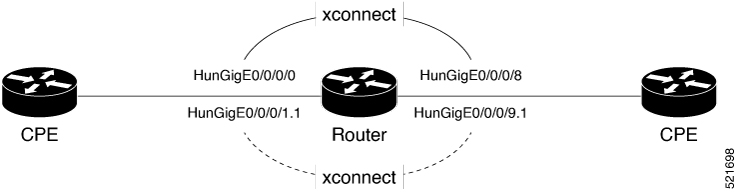
Layer 2 local switching connections have these characteristics:
-
Because there is no bridging in a local connection, there is neither MAC learning nor flooding.
-
Attachment circuits in a local connection are not in the UP state if the interface state is DOWN.
-
Local switching attachment circuits use Layer 2 trunk main interfaces, bundle interfaces, and Ethernet Flow Points.
-
Same-port local switching allows Layer 2 data switching between two circuits on the same interface.