L2VPN Configuration Guide for Cisco 8000 Series Routers, Cisco IOS XR Releases

PDF

Layer 2 bridge services

Want to summarize with AI?

Log in

Introduces Layer 2 bridging concepts, detailing bridge domains, ports, flushing operations, MAC address tables, replication lists, VLAN bridging workflows, and comprehensive configuration and management procedures for Ethernet bridging.


A Layer 2 bridging service is a logical bridge-based Layer 2 service that

  • switches data frames within a Layer 2 broadcast domain by using destination MAC addresses

  • floods multicast, broadcast, and unknown unicast frames within that domain, and

  • learns source MAC addresses on incoming frames.

A logical bridge contains bridge domains, bridge ports, MAC address tables, and replication member lists.
Layer 2 bridge components

Layer 2 bridge services use a small set of logical components that provide connectivity and segmentation in network environments such as data centers, campuses, and global networks. The main components of a logical bridge are:

  • Bridge domain: The fundamental segment that defines the broadcast domain for Layer 2 traffic.

  • Bridge port: The interface or logical port that connects devices or network segments to the bridge domain.

  • MAC address table: Maintains a mapping of device MAC addresses to bridge ports, enabling correct traffic forwarding within the bridge.

  • Replication member list: Identifies all the bridge ports or endpoints where Layer 2 frames should be replicated for broadcast or multicast traffic.

These components work together to deliver efficient Layer 2 bridging services in various network configurations.


Bridge domains

A bridge domain refers to a Layer 2 broadcast domain consisting of a set of physical or virtual ports. Data frames are switched within a bridge domain based on the destination MAC address. Multicast, broadcast, and unknown destination unicast frames are flooded within the bridge domain. In addition, the source MAC address learning is performed on all incoming frames on a bridge domain.

A learned MAC address has an age attribute. The MAC address is remembered for a specified aging time and is removed if it has not been seen in received traffic during the aging period.

Switches assign a locally significant ID to each bridge domain, called the bridge domain ID. Many legacy switches use VLAN as the bridge domain ID, known as the bridging VLAN.

Table 1. Feature History Table

Feature Name

Release Information

Feature Description

Bridge Domain

Release 24.4.1

Introduced in this release on: Fixed Systems (8700) (select variants only*)

*The Bridge Domain functionality is now extended to the Cisco 8712-MOD-M routers.

Bridge Domain

Release 24.3.1

Introduced in this release on: Fixed Systems (8200 [ASIC: Q200, P100], 8700 [ASIC: P100])(select variants only*); Modular Systems (8800 [LC ASIC: Q100, Q200, P100])(select variants only*)

*The Bridge Domain functionality is now extended to these fixed systems and line cards:

  • 8212-48FH-M

  • 8711-32FH-M

  • 88-LC1-52Y8H-EM

  • 88-LC1-12TH24FH-E

Bridge Domain

Release 24.2.11

Introduced in this release on: Modular Systems (8800 [LC ASIC: P100]) (select variants only*)

A bridge domain provides a flexible and efficient Layer 2 broadcast domain by grouping physical or virtual ports to facilitate data frame switching based on MAC addresses. This setup enables effective handling of multicast, broadcast, and unknown unicast frames by flooding them within the bridge domain.

*This functionality is now extended to routers with the 88-LC1-36EH line cards.


Bridge ports

A logical bridge port identifies a unique network segment in a bridge domain. Logical bridge ports enable L2 traffic to traverse a bridge domain and operate independently of traffic encapsulation type, such as VLAN or MPLS.

Key facts about bridge ports:

  • Each logical bridge port is associated with a specific network segment within the bridge domain.

  • Bridge ports facilitate L2 traffic transit in the bridge domain.

  • The function of a bridge port is independent of L2 traffic encapsulation (for example, VLAN, MPLS).

  • Logical bridge ports perform native bridging operations:

    • Forwarding of L2 frames.

    • Destination MAC address lookup.

    • Source MAC address learning.

    • MAC address aging.


Bridge port flush and bridge flush

A bridge port flush and bridge flush feature is a MAC cleanup feature that

  • deletes learned MAC addresses at the bridge port and bridge domain levels after a bridge port goes down

  • prevents traffic from other ports from unicasting to the affected port, and

  • expedites flooding-based MAC relearning.

Table 2. Feature history table

Feature Name

Release Information

Feature Description

Bridge Port Flush and Bridge Flush

Release 24.4.1

Introduced in this release on: Fixed Systems (8700) (select variants only*)

*The Bridge Port Flush functionality is now extended to the Cisco 8712-MOD-M routers.

Bridge Port Flush and Bridge Flush

Release 24.3.1

Introduced in this release on: Fixed Systems (8200 [ASIC: Q200, P100], 8700 [ASIC: P100])(select variants only*); Modular Systems (8800 [LC ASIC: Q100, Q200, P100])(select variants only*)

*The Bridge Port Flush functionality is now extended to:

  • 8212-48FH-M

  • 8711-32FH-M

  • 88-LC1-52Y8H-EM

  • 88-LC1-12TH24FH-E

Bridge Port Flush and Bridge Flush

Release 24.2.11

Introduced in this release on: Modular Systems (8800 [LC ASIC: P100]) (select variants only*)

* The Bridge Port Flush functionality is now extended to routers with the 88-LC1-36EH line cards.

Bridge Port Flush and Bridge Flush

Release 7.3.2

During a port failure, this feature allows the router to delete the learned MAC addresses at the bridge port and bridge domain levels. The deletion of MAC addresses is important because it prevents traffic from other ports to unicast to the affected port, leading to traffic drop. Also, the clean-up ensures flooding of data packets to expedite the process of relearning MAC addresses.

The Bridge Port Flush feature enables the router to delete the MAC addresses automatically, whereas, to delete the learned MAC addresses at the bridge domain level, use the clear l2vpn bridge-domain mac-address-table command.


Bridge port flush behavior

A VPLS bridge sends out a MAC address withdrawal message on every PW when a bridge port (AC or PW) goes down. Upon receiving the MAC address withdrawal message, a VPLS bridge deletes all the MAC addresses learned on a PW. When MAC flush occurs, the MAC addresses are deleted one at a time. The time required to delete all the MAC addresses depends on the number of MAC addresses learned on that bridge port.

You can transition the bridge to a unicast-disable mode for a brief period during the MAC flush at the bridge-domain level.

You can use the following commands to remove MAC addresses from the hardware MAC table:

By removing MAC addresses from the hardware MAC table, you eliminate the need to wait for MAC addresses to age out naturally. This allows you to troubleshoot or recover quickly from MAC learning and forwarding issues. After you clear the MAC addresses, Cisco IOS XR software treats unicast traffic destined for those addresses as unknown unicast, which results in unicast flooding.

Always use the clear l2vpn commands with extreme caution to avoid unintended network issues.


Limitations of bridge port flush and bridge flush

Follow these principles when clearing MAC addresses at the bridge-port or bridge-domain level:

  • Use the clear l2vpn bridge-domain mac-address-table and clear l2vpn forwarding mac-address-table commands only for troubleshooting, as they can disrupt ARP and ND learning on BVI interfaces in both Fixed Systems (8200, 8700, 8010) and Modular Systems (8800).

  • When you use the clear l2vpn forwarding mac-address-table location x/y/z command on Modular Systems (8800), Cisco IOS XR software removes the MAC table only on the specified line card. This can cause the MAC tables on different line cards to become out of sync, leading to inconsistent forwarding behavior across the modular system.

  • Always use the clear l2vpn commands with extreme caution to avoid unintended network issues.


Disable unicast traffic during bridge flush

Disable unicast forwarding during bridge flush to ensure all traffic floods to the bridge, which accelerates convergence as MAC entries are being deleted.

By default, unicast traffic remains enabled during a MAC flush event at the bridge-domain level. However, disabling unicast traffic during bridge flush using the hw-module profile l2fib bridge-flush-convergence command floods all traffic to the bridge, expediting convergence as table lookups are avoided. Unicast traffic is disabled for a duration from 1 to 30 seconds, depending on the number of MAC addresses learned on the bridge domain, and is not user configurable. Once the MAC flush completes, unicast forwarding is automatically reenabled.

Before you begin

  • Ensure you have access to the device's global configuration mode.

  • Confirm you have administrative privileges

  • Review current hardware profile configuration.

Follow these steps to disable unicast traffic during bridge flush and verify the applied profile.

Procedure

1.

Enable bridge-flush convergence in global configuration mode.

Example:

Router# configure
Router(config)# hw-module profile l2fib bridge-flush-convergence
Router(config)# commit
2.

Check the running configuration.

Example:

configure
 hw-module profile l2fib bridge-flush-convergence
!
3.

Use the show hw-module profile l2fib command to verify that the hardware profile shows BD-Flush-Convergence as configured and applied.

Example:

Router# show hw-module profile l2fib
--------------------------------------------------------------
Knob                          Status          Applied   Action         
--------------------------------------------------------------
PW-Stats                      Unconfigured    N/A       None           
BD-Flush-Convergence          Configured      Yes       None
--------------------------------------------------------------

Unicast traffic is disabled during bridge flush, and the hardware profile reflects the applied configuration.


MAC address tables in bridge domains

A MAC address table records forwarding or filtering information for a bridge domain. Each bridge domain contains a unique MAC address table comprised of MAC address entries. When an Ethernet frame is received on a bridge port, the source MAC address and bridge port are recorded in the MAC address table. This information is then used for traffic forwarding in the reverse direction.

Table 3. MAC address table

MAC Address

Ports

1001.1001.2002

Port 2

1001.1001.2003

Port 5

1001.1001.2004

Drop


Replication member lists

A replication member list is a list of virtual bridge ports that allow traffic flooding within a bridge domain. Each bridge domain has one replication member list.

Key facts about replication member lists:

  • Identify the virtual bridge ports that allow traffic flooding.

  • Each bridge domain maintains its own replication member list.

  • The lists enable efficient data distribution across network segments.


Configure a bridge domain

Configure a bridge domain and its operational settings in the network.

Use this task to create a bridge domain, associate interfaces, adjust parameters such as flooding, and disable the domain if needed.

Before you begin

Make sure you have access to the device CLI and the necessary privileges to configure bridge domains.

Follow these steps to configure the bridge domain and its associated settings:

Procedure

1.

Create the bridge domain.

Example:

Router# configure
Router (config)# l2vpn
Router (config-l2vpn)# bridge group bg1
Router (config-l2vpn-bg)# bridge-domain bd1
Router (config-l2vpn-bg-bd)# commit
2.

Associate an interface with the bridge domain.

Example:

Router# configure
Router(config)# l2vpn
Router(config-l2vpn)# bridge group bg1
Router(config-l2vpn-bg)# bridge-domain bd1
Router(config-l2vpn-bg-bd)# interface HundredGigE0/0/0/0
Router(config-l2vpn-bg-bd-ac)# commit
3.

Configure the flooding parameter for the bridge domain.

Flooding is enabled by default.

Example:

Router# configure
Router (config)# l2vpn
Router (config-l2vpn)# bridge group bg1
Router (config-l2vpn-bg)# bridge-domain bd1
Router (config-l2vpn-bg-bd)# flooding disable
Router (config-l2vpn-bg-bd)# commit
4.

Disable the bridge domain when you need to shut it down.

When a bridge domain is disabled, all ACs that are associated with the bridge domain are disabled. You are still able to attach or detach members to the bridge domain.

Example:

Router# configure
Router (config)# l2vpn
Router (config-l2vpn)# bridge group bg1
Router (config-l2vpn-bg)# bridge-domain bd1
Router (config-l2vpn-bg-bd)# shutdown
Router (config-l2vpn-bg-bd)# commit
5.

Review the resulting running configurations.

Example:

configure
 l2vpn
  bridge group bg1
   bridge-domain bd1
    interface HundredGigE0/0/0/0
    flooding disable
    shutdown
   !
  !

The bridge domain and its member interface are configured with the requested operational settings.


VLAN bridge modes

A VLAN bridging mode is a Layer 2 bridging mode that

  • receives Ethernet II and IEEE 802.3 traffic on VLAN-tagged attachment circuits

  • classifies ingress traffic into Layer 2 bridge domains, and

  • can apply VLAN tag rewrite on ingress and egress.

In modern networks, a majority of the Ethernet frames are in Ethernet II frame format. Legacy Layer 2 protocol traffic, such as spanning tree protocol and CDP are in IEEE 802.3 frame format.


How VLAN bridging works

VLAN bridging preserves host mobility by extending the Layer 2 flood domain instead of relying on IP segmentation.

Summary

The key components involved in VLAN bridging are:

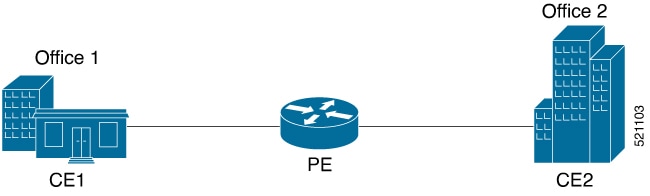
  • Customer edge devices: Send and receive VLAN-tagged Layer 2 traffic.

  • The edge router: Classifies ingress traffic into bridge domains and applies optional VLAN tag rewrite.

  • The remote router: Bridges the traffic to local office buildings after optional VLAN tag rewrite.

VLAN bridging in a campus network extends the Layer 2 flood domain across floors and buildings, enabling MAC hosts to move without dropping TCP or IP sessions.

Workflow

Figure 1. VLAN bridging

VLAN bridging involves these stages:

  1. The customer edge devices send Ethernet II or IEEE 802.3 traffic to the edge router on single-tagged or double-tagged VLAN attachment circuits.
  2. The edge router classifies the ingress traffic into the correct Layer 2 bridge domains and performs optional VLAN tag rewrite.
  3. The edge router forwards the traffic either to a different local customer edge device or to a remote router, and the remote router bridges the traffic to local office buildings after optional VLAN tag rewrite.

Result

Hosts can move across the bridged campus network while remaining in the same Layer 2 flood domain.


Configure VLAN bridging

Set up VLAN bridging by creating attachment circuits, associating them to bridge domains, and confirming successful bridging.

This task explains how to configure VLAN bridging using two bridge domains and four VLAN attachment circuits, mapping each pair of circuits to a bridge domain.

Before you begin

  • Prepare the required VLAN IDs and ensure you have access to the router CLI.

  • The example configuration described here uses four attachment circuits and divides them into two groups, each mapped to a separate bridge domain.

Follow these steps to configure VLAN bridging:

Procedure

1.

Configure the first pair of VLAN attachment circuits.

Example:

Router# configure
Router(config)# interface HundredGigE0/0/0/4.1 l2transport
Router(config-subif)# encapsulation dot1q 1
Router(config-subif)# rewrite ingress tag pop 1 symmetric
Router(config-subif)# exit
Router(config)# interface HundredGigE0/0/0/4.2 l2transport
Router(config-subif)# encapsulation dot1q 2
Router(config-subif)# rewrite ingress tag pop 1 symmetric
Router(config-subif)# exit
2.

Configure the second pair of VLAN attachment circuits.

Example:

Router(config)# interface HundredGigE0/0/0/5.1 l2transport
Router(config-subif)# encapsulation dot1q 3
Router(config-subif)# rewrite ingress tag pop 1 symmetric
Router(config-subif)# exit
Router(config)# interface HundredGigE0/0/0/5.2 l2transport
Router(config-subif)# encapsulation dot1q 4
Router(config-subif)# rewrite ingress tag pop 1 symmetric
Router(config-subif)# exit
3.

Create the first bridge domain and associate the first two attachment circuits.

Example:

Router(config)# l2vpn
Router(config-l2vpn)# bridge group bg1
Router(config-l2vpn-bg)# bridge-domain bd1
Router(config-l2vpn-bg-bd)# interface HundredGigE0/0/0/4.1
Router(config-l2vpn-bg-bd-ac)# exit
Router(config-l2vpn-bg-bd)# interface HundredGigE0/0/0/5.1
Router(config-l2vpn-bg-bd-ac)# exit
Router(config-l2vpn-bg-bd)# exit
Router(config-l2vpn-bg)# exit
4.

Create the second bridge domain and associate the second two attachment circuits.

Example:

Router(config-l2vpn)# bridge group bg2
Router(config-l2vpn-bg)# bridge-domain bd2
Router(config-l2vpn-bg-bd)# interface HundredGigE0/0/0/4.2
Router(config-l2vpn-bg-bd-ac)# exit
Router(config-l2vpn-bg-bd)# interface HundredGigE0/0/0/5.2
Router(config-l2vpn-bg-bd-ac)# commit
5.

Review the running configuration.

Example:

interface HundredGigE0/0/0/4.1 l2transport
encapsulation dot1q 1
rewrite ingress tag pop 1 symmetric
!
interface HundredGigE0/0/0/4.2 l2transport
encapsulation dot1q 2
rewrite ingress tag pop 1 symmetric
!
interface HundredGigE0/0/0/5.1 l2transport
encapsulation dot1q 3
rewrite ingress tag pop 1 symmetric
!
interface HundredGigE0/0/0/5.2 l2transport
encapsulation dot1q 4
rewrite ingress tag pop 1 symmetric
!
bridge group bg1
 bridge-domain bd1
  interface HundredGigE0/0/0/4.1
  !
  interface HundredGigE0/0/0/5.1
  !
 !
bridge group bg2
 bridge-domain bd2
  interface HundredGigE0/0/0/4.2
  !
  interface HundredGigE0/0/0/5.2
  !
 !
6.

Use the show interfaces hundredGigE 0/0/0/4.2 , show l2vpn bridge-domain summary , show l2vpn forwarding bridge-domain location 0/RP0/CPU0 , and show l2vpn forwarding bridge-domain bg1:bd1 location 0/RP0/CPU0 command to verify the VLAN bridging state.

Example:

Router# show interfaces hundredGigE 0/0/0/4.2
Tue Sep 22 11:32:06.993 PDT
HundredGigE0/0/0/4.2 is up, line protocol is up
Interface state transitions: 101
Hardware is VLAN sub-interface(s), address is c4b2.39da.1620
Layer 2 Transport Mode
MTU 1518 bytes, BW 100000000 Kbit (Max: 100000000 Kbit)
reliability Unknown, txload Unknown, rxload Unknown
Encapsulation 802.1Q Virtual LAN, Outer Match: Dot1Q VLAN 2
Ethertype Any, MAC Match src any, dest any
loopback not set,
Last link flapped 2d10h
Last input 00:00:00, output 00:00:00
Last clearing of "show interface" counters 3d18h
21364536641 packets input, 2734660346522 bytes
0 input drops, 0 queue drops, 0 input errors
8420820982 packets output, 1077864630044 bytes
0 output drops, 0 queue drops, 0 output errors
Router# show l2vpn bridge-domain summary
Tue Sep 22 11:31:29.819 PDT
Number of groups: 2, VLAN switches: 0
Number of bridge-domains: 510, Up: 510, Shutdown: 0, Partially- programmed: 0
Default: 510, pbb-edge: 0, pbb-core: 0
Number of ACs: 1530 Up: 1275, Down: 255, Partially-programmed: 0
Number of PWs: 0 Up: 0, Down: 0, Standby: 0, Partially-programmed: 0
Number of P2MP PWs: 0, Up: 0, Down: 0, other-state: 0
Number of VNIs: 0, Up: 0, Down: 0, Unresolved: 0
Router# show l2vpn forwarding bridge-domain location 0/RP0/CPU0
Tue Sep 22 11:36:01.888 PDT
Bridge MAC Bridge-Domain Name ID Ports HW addr SW addr Flooding Learning State
-------------------------------- ------ ----- ------- ------- -------- -------- ---------
bg1:bd1 511 2 405 405 Enabled Enabled UP
bg1:bd2 510 2 405 405 Enabled Enabled UP
-----------------------------------------------------------------------------------------
Router# show l2vpn forwarding bridge-domain bg1:bd1 location 0/RP0/CPU0
Tue Sep 22 11:36:37.141 PDT
Bridge MAC Bridge-Domain Name ID Ports HW addr SW addr Flooding Learning State
-------------------------------- ------ ----- ------- ------- -------- -------- ---------
bg1:bd1 511 2 405 405 Enabled Enabled UP
-----------------------------------------------------------------------------------------

The VLAN attachment circuits and bridge domains are configured, and the verification output shows the bridge domains in the UP state.


Dynamic MAC withdrawals between peer PE routers

A dynamic MAC withdrawal feature is a MAC address withdrawal feature that

  • uses an LDP-based MAC address withdrawal message

  • allows peer PE routers to remove learned dynamic MAC addresses after an attachment-circuit state change, and

  • prevents packet drops and speeds convergence when the attachment circuit comes back up.

Table 4. Feature history table

Feature Name

Release Information

Feature Description

Withdraw Dynamic MAC Addresses Between Peer PE Routers

Release 25.4.1

Introduced in this release on: Fixed Systems (8010 [ASIC: A100])(select variants only*)

*This feature is supported on Cisco 8011-32Y8L2H2FH routers.

Withdraw Dynamic MAC Addresses Between Peer PE Routers

Release 25.1.1

Introduced in this release on: Fixed Systems (8010 [ASIC: A100])(select variants only*)

*This feature is supported on Cisco 8011-4G24Y4H-I routers.

Withdraw Dynamic MAC Addresses Between Peer PE Routers

Release 24.4.1

Introduced in this release on: Fixed Systems (8700) (select variants only*)

*The MAC address withdrawal functionality is now extended to the Cisco 8712-MOD-M routers.

Withdraw Dynamic MAC Addresses Between Peer PE Routers

Release 24.3.1

Introduced in this release on: Fixed Systems (8200 [ASIC: Q200, P100], 8700 [ASIC: P100])(select variants only*); Modular Systems (8800 [LC ASIC: Q100, Q200, P100])(select variants only*

*The MAC address withdrawal functionality is now extended to:

  • 8212-48FH-M

  • 8711-32FH-M

  • 88-LC1-52Y8H-EM

  • 88-LC1-12TH24FH-E

Withdraw Dynamic MAC Addresses Between Peer PE Routers

Release 24.2.11

Introduced in this release on: Modular Systems (8800 [LC ASIC: P100]) (select variants only*)

We now prevent packet drops between peer routers when the attachment circuit (AC) of a PE router goes down, by withdrawing all dynamic MAC addresses from that PE router. When the AC goes down, the PE routers remove or unlearn the MAC addresses learned from the peer routers, that do not need to be relearned. This enables faster convergence when the AC comes up.

*This feature is supported on routers with the 88-LC1-36EH line cards.


Optimized MAC address withdrawal behavior on PE routers

Key behavior

Optimized MAC address withdrawal prevents packet drops between peer routers when the attachment circuit (AC) on a provider edge (PE) router goes down.

This feature uses a Label Distribution Protocol (LDP)-based MAC address withdrawal message. The message includes a MAC address list type-length-value (TLV).

  • The feature optimizes MAC address withdrawal during an AC failure.

  • The PE retains MAC addresses that it learns from customer edge (CE) devices on the access side.

  • The PE clears only the MAC addresses that it learns from peer PEs.

  • Because the PE does not need to relearn the cleared MAC addresses from the access side, the network achieves faster convergence when the AC comes back up.

  • Prevents packet drops between peer routers.

  • Reduces unnecessary MAC relearning.

  • Improves convergence time after AC recovery.

  • MAC address withdrawal is enabled by defaut.

  • To disable MAC address withdrawal, use the mac withdraw disable command.


How MAC address withdrawal works

MAC address withdrawal clears only the peer-learned MAC addresses that must be relearned, improving network convergence and minimizing disruption during attachment circuit state changes.

Summary

The key components involved in MAC address withdrawal are:

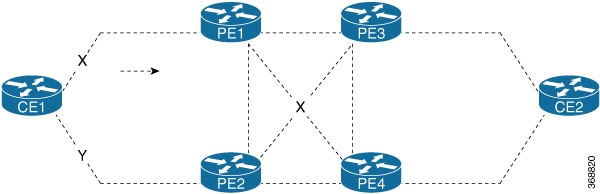
  • Dual-homed customer edge device: Connects to PE1 and PE2 over active and redundant attachment circuits.

  • Peer PE routers: Learn forwarding entries based on the traffic profile.

  • LDP MAC-withdraw messages: Tell the peer PE routers which MAC entries to clear.

MAC address withdrawal prevents packet drops between peer routers when an attachment circuit goes down by withdrawing dynamic MAC addresses. The feature is enabled by default, retaining MAC addresses learned from customer edge devices on the access side.

Workflow

Figure 2. MAC address withdrawal

MAC address withdrawal involves these stages:

  1. The PE routers learn MAC address forwarding entries from the traffic flowing across the active topology, and traffic becomes known unicast.
  2. When link X, which is the attachment circuit of PE1, goes down, PE1 sends an LDP MAC-withdraw TLV message of "FLUSH ALL MAC FROM ME" to the neighbor PEs, and PE2, PE3, and PE4 clear the MAC addresses learned only from PE1.
  3. When link Y, which is the attachment circuit of PE2, comes up, PE2 sends an LDP MAC-withdraw TLV message of "FLUSH ALL MAC BUT ME" to the neighbor PEs, and the peers clear the MAC addresses learned from the other PEs while retaining the entries learned from PE2.

Result

The peer PE routers preserve access-side learning where possible and converge faster when the attachment circuit state changes.


Restrictions on withdrawing dynamic MAC addresses between peer PE routers

You must not use MAC address withdrawal in the following topologies or signaling combinations:

  • Access pseudowires

  • Hierarchical Virtual Private LAN Service (VPLS) networks

  • Networks configured with BGP signaling and discovery

Additionally, do not expect MAC withdraw relaying (the option to forward received MAC withdraw messages), because it is not supported.


Configure MAC address withdrawal for a bridge domain

Enable MAC address withdrawal so that dynamically learned MAC addresses are withdrawn when the attachment circuit is down.

By default, MAC address withdrawal is enabled for each bridge domain. You may disable it with the mac withdraw disable command, if required.

Before you begin

  • Confirm you have access to the router CLI and bridge domain configuration.

  • Ensure the relevant bridge group and bridge-domain already exist.

Follow these steps to configure MAC address withdrawal and verify the bridge-domain status.

Procedure

1.

Configure MAC withdrawal on PE1 for the bridge domain and attachment circuit.

Example:

Router# configure
Router(config)# l2vpn
Router(config-l2vpn)# bridge group bg1
Router(config-l2vpn-bg)# bridge-domain bd1
Router(config-l2vpn-bg-bd)# mac
Router(config-l2vpn-bg-bd-mac)# withdraw state-down
Router(config-l2vpn-bg-bd-mac)# exit
Router(config-l2vpn-bg-bd)# interface HundredGigE0/0/0/0
Router(config-l2vpn-bg-bd-ac)# commit
2.

Review the running configuration for the enabled state-down behavior.

Example:

l2vpn
 bridge group bg1
  bridge-domain bd1
   mac
    withdraw state-down
   !
   interface HundredGigE0/0/0/0
   !
3.

Disable MAC address withdrawal if you do not want the default behavior when the attachment circuit comes up.

Example:

Router# configure
Router(config)# l2vpn
Router(config-l2vpn)# bridge group bg1
Router(config-l2vpn-bg)# bridge-domain bd1
Router(config-l2vpn-bg-bd)# mac
Router(config-l2vpn-bg-bd-mac)# withdraw disable
Router(config-l2vpn-bg-bd-mac)# commit
4.

Use the show l2vpn bridge-domain detail command to verify whether MAC withdrawal is enabled or disabled.

Example:

Router# show l2vpn bridge-domain detail
MAC learning: enabled
  MAC withdraw: enabled
    MAC withdraw sent on: bridge port down

Router# show l2vpn bridge-domain detail
MAC learning: enabled
  MAC withdraw: disabled
    MAC withdraw sent on: bridge port up

MAC address withdrawal is configured or disabled according to the bridge-domain requirements, and the bridge-domain detail output shows the current state.


Disable MAC address source-based learning for a bridge domain

Prevent dynamic MAC address learning in a bridge domain, allowing only static learning behavior.

By default, MAC address source-based learning is enabled. Disabling it ensures statically configured MAC addresses do not age or migrate between attachment circuits, which may be required in certain bridge-domain designs.

Before you begin

  • Ensure you have access to the router CLI.

  • Identify the bridge group and bridge domain you wish to modify.

Follow these steps to disable MAC address source-based learning for a bridge domain:

Procedure

1.

Disable source-based learning under the bridge-domain MAC configuration.

Example:

Router# configure
Router (config)# l2vpn
Router (config-l2vpn)# bridge group bg1
Router (config-l2vpn-bg)# bridge-domain bd1
Router (config-l2vpn-bg-bd)# mac
Router (config-l2vpn-bg-bd-mac)# learning disable
Router (config-l2vpn-bg-bd-mac)# commit
2.

Review the running configuration.

A statically configured MAC address cannot age or move to another attachment circuit through dynamic learning.

Example:

configure
 l2vpn
  bridge group bg1
   bridge-domain bd1
    mac
    learning disable
    !
  !

MAC address source-based learning is disabled for the bridge domain.


Configure the MAC address limit

Configure the MAC address limit parameters for a bridge domain to control address usage and receive notifications.

You can set the MAC address limit for the bridge domain as needed.

Before you begin

Follow these steps to configure the MAC address limit and notification threshold.

Procedure

1.

Configure the MAC address maximum and notification mode.

Example:

Router# configure
Router (config)# l2vpn
Router (config-l2vpn)# bridge group bg1
Router (config-l2vpn-bg)# bridge-domain bd1
Router (config-l2vpn-bg-bd)# mac
Router (config-l2vpn-bg-bd-mac)# limit
Router (config-l2vpn-bg-bd-mac-limit)# maximum 131072
Router (config-l2vpn-bg-bd-mac-limit)# notification both
Router (config-l2vpn-bg-bd-mac-limit)# exit
2.

Configure the limit threshold and commit the change.

Example:

Router (config-l2vpn-bg-bd)# exit
Router (config-l2vpn-bg-bd)# mac limit threshold 80
Router (config-l2vpn-bg-bd-mac-limit)# commit
3.

Review the running configuration.

Example:

configure
 l2vpn
  bridge group bg1
   bridge-domain bd1
    mac
     limit
     maximum 131072
     notification both
    !
    mac limit threshold 80
   !
  !

The bridge domain uses the configured MAC address limit, notification mode, and threshold.


Set the MAC address aging timer

Configure the MAC address aging timer to determine how long MAC addresses remain in the bridge domain’s table before expiring.

MAC address aging time can be configured from 300 seconds to 30,000 seconds. If multiple bridge domains are configured with different aging times, the system uses the highest value across all bridge domains.

Before you begin

Follow these steps to configure MAC address aging in the bridge-domain MAC configuration mode.

Procedure

1.

Configure the MAC address aging timer.

Example:

Router# configure
Router (config)# l2vpn
Router (config-l2vpn)# bridge group bg1
Router (config-l2vpn-bg)# bridge-domain bd1
Router (config-l2vpn-bg-bd)# mac
Router (config-l2vpn-bg-bd-mac)# aging
Router (config-l2vpn-bg-bd-mac-aging)# time 300
Router (config-l2vpn-bg-bd-mac-aging)# commit
2.

Review the running configuration.

Example:

configure
 l2vpn
  bridge group bg1
   bridge-domain bd1
    mac
     aging
      time 300
     !
    !

The bridge domain uses the configured MAC address aging timer, ensuring MAC addresses are removed after the specified period.