Wi-Fi alliance agile multiband
A Wi-Fi alliance agile multiband feature is a Wi-Fi interoperability certification that
-
enables better use of Wi-Fi network resources by leveraging information from both networks and clients,
-
certifies features defined by the IEEE 802.11k, 802.11v, and 802.11u amendments and Wi-Fi Alliance specifications, and
-
improves Wi-Fi client roaming decisions and the overall network user experience.
-
MBO certified clients: Devices that comply with Wi-Fi alliance testing for agile multiband interoperability.
-
IEEE 802.11k, 802.11v, and 802.11u amendments: Standards that provide networks and clients with mechanisms to exchange information about network topology, quality, and roaming policies.
-
RF neighbors: Other radio devices in the vicinity that could affect Wi-Fi performance, as detected and reported by access points (APs) or clients.
Additional reference information
The Wi-Fi alliance agile multiband (MBO) feature enables better use of Wi-Fi network resources. Wi-Fi networks and client devices share information to improve roaming decisions and overall Wi-Fi performance.
 Note |
This feature applies only to MBO certified clients. |
This feature certifies the interoperability of features defined by the IEEE 802.11k, 802.11v, and 802.11u amendments, as well as Wi-Fi Alliance specifications. These technologies are used to exchange access point (AP) information such as band and channel preferences, link quality, and status information between an AP and a client device.
MBO focuses on the following:
-
Interactions between wireless clients and APs,
-
Exchange of information between APs and clients about the wireless medium (such as RF neighbors), and
-
Allowing clients to work with APs to make intelligent connection decisions and improve quality of service.
Example of MBO in Action
For example, when a client device supports MBO, it can receive information from multiple APs about available channels and link quality. This information enables the client to select the best AP for optimal performance and seamless roaming.
Components of a Wi-Fi Agile Multiband topology
This topic describes the system topology and components involved in a Wi-Fi Agile Multiband wireless infrastructure network.
A Wi-Fi Agile Multiband wireless infrastructure network includes these components:
-
Access Point (AP): A Wi-Fi Agile Multiband wireless infrastructure network contains one or more Wi-Fi Agile Multiband APs.
-
WLAN Controller: A Wi-Fi Agile Multiband wireless infrastructure network contains zero or more WLAN controllers that provide centralized management and other features to the interconnected APs.
-
Client Station (STA): A Wi-Fi Agile Multiband wireless infrastructure network contains zero or more Client Stations (STAs). Client Stations support only one WLAN.
-
RADIUS Server: A Wi-Fi Agile Multiband wireless infrastructure network contains zero or more RADIUS Servers that provide Authentication, Authorization, and Accounting (AAA) services.
The topology may vary according to deployment requirements.
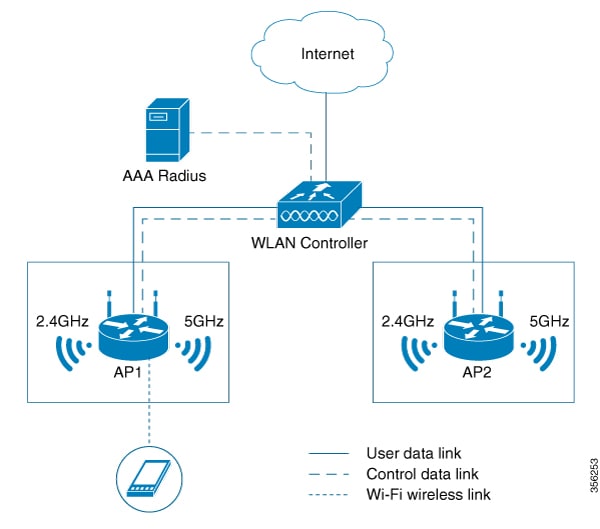
Supported MBO components
MBO AP capability
802.11ax access points add a new information element to the Beacon, Probe Response, Association Response, and Re Association Response frames to indicate MBO support.
Note |
The new information element indicates that Cisco access points are not aware of cellular data status. |
The MBO AP capability is enabled when an SSID is configured on the access point.
802.11k/v/r support
To support MBO, access points must support 802.11k, 802.11v, and 802.11r standard-based technologies. Each technology has specific requirements:
-
802.11k – The access point sends a list of preferred neighboring access points to the client upon request. It also sends a beacon request when a beacon report is required.
-
802.11v – The access point steers the client to a less congested access point using BSS transition. The target access point must not be in the non-preferred or non-operable channel list sent by the MBO client during the association or WNM notification request.
-
802.11r – MBO-related 802.11r capabilities are not supported.
802.11u ANQP or GAS support
For MBO, 802.11ax access points must support 802.11u ANQP or GAS.
These are the prerequisites:
-
The access point responds to the ANQP request for a neighbor report ANQP element.
-
Before authentication, the network must provide Layer 2 transport between the mobile device and the server to support advertisement protocol frames.
MBO beacon request
When an access point sends a beacon request to the client, an MBO-compliant client responds with a beacon report.
MBO associate disallowed IE
When Cisco access points cannot accommodate new clients, they include an Associate Disallowed IE in the Beacon, Probe Response, or (Re) Association Response.
Limitations of MBO
Only 802.11ax access points are supported.
Configure MBO on a WLAN (CLI)
Enable Mobility Optimization (MBO) on a WLAN using command-line interface commands to improve client management and network performance.
Procedure
|
Step 1 |
Enter global configuration mode. Example: |
||
|
Step 2 |
Configure a WLAN and enter the WLAN configuration mode. Example:Example:
|
||
|
Step 3 |
Configure MBO support on WLAN. Example:
|
||
|
Step 4 |
Return to privileged EXEC mode. Example:Alternatively, you can also press Ctrl-Z to exit global configuration mode. |
The WLAN is configured with MBO support. Wireless clients can now benefit from enhanced roaming and optimization features.
Verify MBO configuration
To view the MBO configuration, use this command:
Device# show wlan id 1
WLAN Profile Name     : wlan-demo
================================================
Identifier                                     : 1
Description                                    :
Network Name (SSID)                            : ssid-demo
Status                                         : Disabled
Broadcast SSID                                 : Enabled
802.11ax parameters
    OFDMA Downlink                             : Enabled
    OFDMA Uplink                               : Enabled
    MU-MIMO Downlink                           : Enabled
    MU-MIMO Uplink                             : Enabled
    BSS Color                                  : Enabled
    Partial BSS Color                          : Enabled
    BSS Color Code                             : 0
    BSS Target Wake Up Time                    : Enabled
    BSS Target Wake Up Time Broadcast Support  : Enabled
mDNS Gateway Status                            : Bridge
WIFI Alliance Agile Multiband		    : Enabled
To view the non-operational or non-preferred channels, use this command:
Device# show wireless client mac-address 3413.e8b5.f252 detail
Client MAC Address : 3413.e8b5.f252
Client IPv4 Address : 192.165.1.53
Client IPv6 Addresses : fe80::98bb:ea89:f016:3332
Client Username: N/A
AP MAC Address : 00ee.ab18.d920
AP Name: ssap-pp
AP slot : 1
Client State : Associated
Policy Profile : prof
Flex Profile : N/A
Wireless LAN Id: 1
WLAN Profile Name: mbo_1
Wireless LAN Network Name (SSID): mbo_1
BSSID : 00ee.ab18.d92f
Connected For : 25 seconds
Protocol : 802.11ax - 5 GHz
Channel : 36
Client IIF-ID : 0xa0000001
Association Id : 1
Authentication Algorithm : Open System
Session Timeout : 1800 sec (Remaining time: 1779 sec)
Session Warning Time : Timer not running
Input Policy Name  : None
Input Policy State : None
Input Policy Source : None
Output Policy Name  : None
Output Policy State : None
Output Policy Source : None
WMM Support : Enabled
U-APSD Support : Enabled
  U-APSD value : 0
  APSD ACs    : BK, BE, VI, VO
Fastlane Support : Disabled
Client Active State : Active
Power Save : OFF
Current Rate : 1.5
Supported Rates : 9.0,18.0,36.0,48.0,54.0
Mobility:
  Move Count                  : 0
  Mobility Role               : Local
  Mobility Roam Type          : None
  Mobility Complete Timestamp : 05/15/2019 16:03:34 IST
Client Join Time:
  Join Time Of Client : 05/15/2019 16:03:34 IST
Policy Manager State: Run
Last Policy Manager State : IP Learn Complete
Client Entry Create Time : 26 seconds
Policy Type : N/A
Encryption Cipher : None
User Personal Network    : Disabled
Encrypted Traffic Analytics : No
Protected Management Frame - 802.11w : No
EAP Type : Not Applicable
VLAN : default
Multicast VLAN : 0
WFD capable : No
Managed WFD capable : No
Cross Connection capable : No
Support Concurrent Operation : No
Session Manager:
  Point of Attachment : capwap_90400001
  IIF ID             : 0x90400001
  Authorized         : TRUE
  Session timeout    : 1800
  Common Session ID: 000000000000000BB92939C5
  Acct Session ID  : 0x00000000
  Last Tried Aaa Server Details:
  Server IP :
  Auth Method Status List
  Method : None
  Local Policies:
  Service Template : wlan_svc_prof_local (priority 254)
  VLAN             : 165
  Absolute-Timer   : 1800
  Server Policies:
  Resultant Policies:
  VLAN Name         : VLAN0165
  VLAN             : 165
  Absolute-Timer   : 1800
DNS Snooped IPv4 Addresses : None
DNS Snooped IPv6 Addresses : None
Client Capabilities
  CF Pollable : Not implemented
  CF Poll Request : Not implemented
  Short Preamble : Not implemented
  PBCC : Not implemented
  Channel Agility : Not implemented
  Listen Interval : 0
Fast BSS Transition Details :
  Reassociation Timeout : 0
11v BSS Transition : Implemented
11v DMS Capable : No
QoS Map Capable : Yes
Non-Preferred Channels : 40
Non-Operable Channels : 56
FlexConnect Data Switching : N/A
FlexConnect Dhcp Status : N/A
FlexConnect Authentication : N/A
FlexConnect Central Association : N/A
Client Statistics:
  Number of Bytes Received : 0
  Number of Bytes Sent : 0
  Number of Packets Received : 0
  Number of Packets Sent : 0
  Number of Policy Errors : 0
  Radio Signal Strength Indicator : -34 dBm
  Signal to Noise Ratio : 56 dB
Fabric status : Disabled
Client Scan Reports
Assisted Roaming Neighbor List
Nearby AP Statistics:
EoGRE : No/Simple client
 Feedback