Configuring Switched Port Analyzer

This feature module describes how to configure a switched port analyzer (SPAN) on the Cisco ASR 901 Router.

Finding Feature Information

Your software release may not support all the features documented in this module. For the latest feature information and caveats, see the release notes for your platform and software release. To find information about the features documented in this module, and to see a list of the releases in which each feature is supported, see the feature information table at the end of this module.

Use Cisco Feature Navigator to find information about platform support and Cisco software image support. To access Cisco Feature Navigator, go to http://www.cisco.com/go/cfn . An account on Cisco.com is not required.
SPAN Limitations and Configuration Guidelines

The following limitations and configuration guidelines apply when configuring SPAN on the Cisco ASR 901 Router:

  • Only one SPAN session is supported.
  • Only one local SPAN destination interface is supported.
  • You cannot configure a local SPAN destination interface to receive ingress traffic.
  • Use a network analyzer to monitor interfaces.
  • Outgoing CDP and BPDU packets are not replicated.
  • Ethernet loopback and Traffic generator are not supported when SPAN is enabled. For egress SPAN, the traffic is mirrored before egress xlate translation.
  • Egress SPAN is only supported for port and not supported for VLAN, EFP, or Port-Channel interfaces.
  • When you specify source interfaces and do not specify a traffic type [Transmit (Tx), Receive (Rx), or Both], both type is used by default.
  • Use the no monitor session session_number command with no other parameters to clear the SPAN session number.

Understanding SPAN

The following sections describe SPAN:

Overview

Effective with Cisco IOS Release 15.4(1)S, the Cisco ASR 901 supports Local SPAN. Local SPAN supports a SPAN session entirely within one switch. You can analyze network traffic passing through ports or VLANs by using SPAN to send a copy of the traffic to another port on the switch that has been connected to a network analyzer or other monitoring or security devices. SPAN copies (or mirrors) traffic received or sent (or both) on source ports to a destination port for analysis. SPAN does not affect the switching of network traffic on the source ports, VLANs, or EFPs. You must dedicate the destination port for SPAN use. Except for traffic that is required for the SPAN session, destination ports do not receive or forward traffic.

Only traffic that enters or leaves source ports or traffic that enters or leaves source VLANs or EFPs can be monitored by using SPAN; traffic routed to a source VLAN cannot be monitored. For example, if incoming traffic is being monitored, traffic that gets routed from another VLAN to the source VLAN cannot be monitored; however, traffic that is received on the source VLAN and routed to another VLAN can be monitored. You can use the SPAN destination port to inject traffic from a network security device.

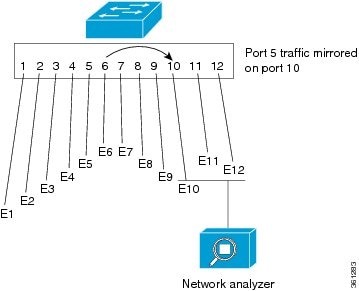
In example, all traffic on Ethernet port 5 (the source port) is mirrored on Ethernet port 10. A network analyzer on Ethernet port 10 receives all the network traffic from Ethernet port 5 without being physically attached to Ethernet port 5.

Figure 1. Example of Local SPAN Configuration

SPAN does not affect the switching of network traffic that is received on source ports; a copy of the packets that are received by the source ports is still sent to the destination port.

SPAN Session

A local SPAN session is an association of a destination interface with a set of source interfaces. You configure SPAN sessions using parameters that specify the type of network traffic to monitor. SPAN sessions allow you to monitor traffic on one or more interfaces and to send either ingress traffic, egress traffic, or both to one destination interface. You can configure a SPAN session with separate sets of SPAN source interfaces or VLANs; overlapping sets are not supported.

SPAN sessions do not interfere with the normal operation of the switch. The show monitor session all command displays the operational status of a SPAN session.

A SPAN session remains inactive after system power-up until the destination interface is operational.

Source Interface

A source interface (also called a monitored interface) is an interface monitored for network traffic analysis.

A source interface has these characteristics:

  • A single VLAN, EFP, or port-channel source per session is supported for ingress.
  • A single physical source port is supported for ingress and egress.
  • A maximum of five physical ports can be used in a single session for ingress SPAN (Rx).
  • When an interface is configured as a destination interface, it cannot be configured as a source interface.

Destination Interface

A destination interface (also called a monitoring interface) is a switched interface to which SPAN sends packets for analysis. You can have only one SPAN destination interface.

A destination interface has these restrictions:

  • It needs to be a single physical port.
  • It cannot be used as an ingress interface.
  • When an interface is configured as a destination interface, it cannot be configured as a source interface.

Traffic Types

Ingress SPAN (Rx) copies network traffic received by the source interfaces for analysis at the destination interface. Egress SPAN (Tx) copies network traffic transmitted from the source interfaces. Specifying the configuration option both copies network traffic received and transmitted by the source interfaces to the destination interface.

SPAN Traffic

Network traffic, including multicast, can be monitored using local SPAN. Multicast packet monitoring is enabled by default. In some local SPAN configurations, multiple copies of the same source packet are sent to the local SPAN destination interface. For example, a bidirectional (both ingress and egress) local SPAN session is configured for sources a1 and a2 to a destination interface d1. If a packet enters the switch through a1 and gets switched to a2, both incoming and outgoing packets are sent to destination interface d1; both packets would be the same (unless a Layer-3 rewrite had occurred, in which case the packets would be different).

Configuring SPAN

The following sections describe how to configure SPAN:

Creating a SPAN Session

To create a SPAN session:

Procedure
  Command or Action Purpose

Step 1

enable

Example:

Router> enable

Enables the privileged EXEC mode.

  • Enter your password if prompted.

Step 2

configure terminal

Example:

Router# configure terminal

Enters the global configuration mode.

Step 3

monitor session {session_number} type local

Example:

Router(config)# monitor session 1 type local

Specifies the SPAN session number.

Step 4

source {interface interface_type slot/port} | {vlan vlan_ID} | {service instance id interface_type slot/port} [, | - | rx | tx | both]

Example:

Router(config-mon-local)# source interface gigabitethernet 0/8

Specifies the source interfaces, VLANs, or service instances, and the traffic direction to be monitored.

Step 5

{destination {interface interface_type slot/port}

Example:

Router(config-mon-local)# destination interface gigabitethernet 0/11

Specifies the destination interface.

Step 6

no shutdown

Example:

Router(config-mon-local)# no shutdown

Enables the SPAN session using the no shutdown command.

What to do next

Removing Sources or Destination from a SPAN Session

To remove sources or destination from a SPAN session, use the following commands beginning in executive mode:

Procedure
  Command or Action Purpose

Step 1

enable

Example:

Router> enable

Enables the privileged EXEC mode.

  • Enter your password if prompted.

Step 2

configure terminal

Example:

Router# configure terminal

Enters the global configuration mode.

Step 3

no monitor session type number

Example:

Router(config)# no monitor session 1

Clears existing SPAN configuration for a session.

Configuration Examples for SPAN

This section shows a sample configuration for local SPAN session on Cisco ASR 901 router:


monitor session 1 type  local
source interface gigabitEthernet 0/8 tx
destination interface gigabitEthernet 0/11
no shut
exit

Verifying Local SPAN

The following is sample output from the show monitor session all command.


Session 1
---------
Type                   : Local Session
Status                 : Admin Enabled
Source Ports           : 
    TX Only            : Gi0/8
Destination Ports      : Gi0/11
    Encapsulation : Native
          Ingress: Disabled

The following is sample output from the show monitor session all detail command.


Session 1
---------
Type                   : Local Session
Status                 : Admin Enabled
Description            : -
Source Ports           : 
    RX Only            : None
    TX Only            : Gi0/8
    Both               : None
Source VLANs           :
    RX Only            : None
    TX Only            : None
    Both               : None
Source EFPs            :
    RX Only            : None
    TX Only            : None
    Both               : None
Source RSPAN VLAN      : None
Destination Ports      : Gi0/11
    Encapsulation : Native
          Ingress: Disabled
Filter VLANs           : None
Dest RSPAN VLAN             : None
Source IP Address      : None
Source IP VRF          : None
Source ERSPAN ID       : None
Destination IP Address : None
Destination IP VRF     : None
MTU                    : None
Destination ERSPAN ID  : None
Origin IP Address      : None
IP QOS PREC            : 0
IP TTL                 : 255

Additional References

The following sections provide references to Switched Port Analyzer feature.

Related Documents

Related Topic

Document Title

Cisco IOS Commands

Cisco IOS Master Commands List, All Releases

Cisco ASR 901 Command Reference

Cisco ASR 901 Series Aggregation Services Router Command Reference

Standards

Standard Title

None

MIBs

MIB

MIBs Link

None

To locate and download MIBs for selected platforms, Cisco IOS releases, and feature sets, use Cisco MIB Locator found at the following URL:

http://www.cisco.com/go/mibs

RFCs

RFC

Title

None

Technical Assistance

Description

Link

The Cisco Technical Support website contains thousands of pages of searchable technical content, including links to products, technologies, solutions, technical tips, and tools. Registered Cisco.com users can log in from this page to access even more content.

http://www.cisco.com/cisco/web/support/index.html

Feature Information for Switched Port Analyzer

Table 1 lists the features in this module and provides links to specific configuration information.

Use Cisco Feature Navigator to find information about platform support and software image support. Cisco Feature Navigator enables you to determine which software images support a specific software release, feature set, or platform. To access Cisco Feature Navigator, go to http://www.cisco.com/go/cfn . An account on Cisco.com is not required.


Note


Table 1 lists only the software release that introduced support for a given feature in a given software release train. Unless noted otherwise, subsequent releases of that software release train also support that feature.
Table 1. Feature Information for Switched Port Analyzer

Feature Name

Releases

Feature Information

Switched Port Analyzer

15.4(1)S

This feature was introduced on the Cisco ASR 901 router.

The following sections provide information about this feature: