ITU-T Y.1731 Performance Monitoring

This chapter provides information on the ITU-T Y.1731 Performance Monitoring for the Cisco ASR 901 Series Aggregation Services Router.

Finding Feature Information

Your software release may not support all the features documented in this module. For the latest feature information and caveats, see the release notes for your platform and software release. To find information about the features documented in this module, and to see a list of the releases in which each feature is supported, see the Feature Information for ITU-T Y.1731 Performance Monitoring.

Use Cisco Feature Navigator to find information about platform support and Cisco software image support. To access Cisco Feature Navigator, go to http://www.cisco.com/go/cfn. An account on Cisco.com is not required.

Prerequisites for ITU-T Y.1731 Performance Monitoring

  • Configure and enable IEEE-compliant connectivity fault management (CFM) for Y.1731 performance monitoring to function.

Restrictions for ITU-T Y.1731 Performance Monitoring

  • One-way delay measurement (1DM) is not supported.
  • Loss Measurement Message (LMM) is not supported.
  • Delay Measurement Message (DMM) is supported only from Cisco IOS Release 15.5(2)S.
  • Synthetic Loss Measurement (SLM) is not supported on the port level cross connect.
  • You can configure only a maximum of 100 DMM responders.

  • Multi-NNI Connectivity Fault Management (CFM) and SLM are not supported over the cross-connect Ethernet flow point (EFP) simultaneously. However, you can enable Multi-NNI CFM or SLM over the cross-connect EFP function in a node.
  • Two-way Ethernet frame Delay Measurement (ETH-DM) on Port maintenance endpoint (MEP) is not supported.

  • For Two-way ETH-DM on DOWN MEP CFM, one index is reserved to be used by bridge-domain. If this index has to be used as a bridge-domain on any port, the DMM session should be un-configured.

  • More than one DMM session on a single EFP with same direction (UP or DOWN), with different level, is not supported.

  • DOWN MEP DMM with untagged encapsulation (encapsulation default without any cfm encapsulation configuration) over Xconnect is not supported. Also, Xconnect DMM with encapsulation dot1ad command and without rewrite ingress tag command is not supported.

    The following encapsulations for xconnect DMM are not supported:

    • dot1ad without rewrite

    • untagged for DOWN MEP

    • default without CFM encapsulation command for DOWN MEP

  • The following delays are observed for 2DM:

    • Queuing delay from where DMM is originated and terminated.

    • Queuing delay of DMR packet at the node where DMM is looped back.

    • Queuing delay when DMR packet is received at the node where DMM was originated.

  • Do not use clock command for DMM or SLM, as it results in junk values in delay, as time stamping is done at the BCM level.

  • When you configure DMM and SLM with different frame sizes, the latency may vary.

  • Offloading is not supported for xconnect.

  • There is no special group for DMM over Xconnect feature in TCAM; FP entries are seen in TCAM, under storm-control slice.

Information About ITU-T Y.1731 Performance Monitoring

When service providers sell connectivity services to a subscriber, a Service Level Agreement (SLA) is reached between the buyer and seller of the service. The SLA defines the attributes offered by a provider and serves as a legal obligation on the service provider. As the level of performance required by subscribers rises, service providers need to monitor the performance parameters being offered. Various standards, such as IEEE 802.1ag and ITU-T Y.1731, define the methods and frame formats used to measure performance parameters.

ITU-T Y.1731 performance monitoring provides standards-based Ethernet performance monitoring as outlined in the ITU-T Y-1731 specification and interpreted by the Metro Ethernet Forum (MEF). It includes the measurement of Ethernet frame delay, frame delay variation, frame loss, and throughput.

To measure SLA parameters such as frame delay or frame delay variation, a small number of synthetic frames are transmitted along with the service to the end point of the maintenance region, where the Maintenance End Point (MEP) responds to the synthetic frame.

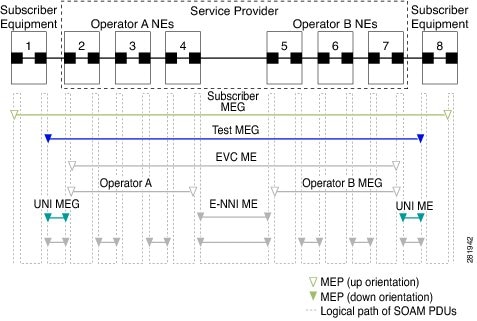
The following figure illustrates Maintenance Entities (ME) and MEP typically involved in a point-to-point metro ethernet deployment for the Y.1731 standard.

Figure 1. A Point-to-Point Metro Ethernet Deployment with Typical Maintenance Entities and Maintenance Points

Frame Delay and Frame-Delay Variation

Ethernet frame Delay Measurement (ETH-DM) is used for on-demand Ethernet Operations, Administration & Maintenance (OAM) to measure frame delay and frame-delay variation.

Ethernet frame delay and frame delay variation are measured by sending periodic frames with ETH-DM information to the peer MEP in the same maintenance entity. Peer MEPs perform frame-delay and frame-delay variation measurements through this periodic exchange during the diagnostic interval.

Ethernet frame delay measurement supports hardware-based timestamping in the ingress direction.

These are the two methods of delay measurement, as defined by the ITU-T Y.1731 standard, One-way ETH-DM (1DM) and Two-way ETH-DM (2DM). However, the Cisco ASR 901 router supports only Two-way ETH-DM.

Two-way Delay Measurement

Two-way frame delay and variation can be measured using DMM and Delay Measurement Reply (DMR) frames.


Note


Starting with Cisco IOS Release 15.4(2)S, the DMM sessions are enhanced from 32 to 100.

In two-way delay measurements, the sender MEP transmits a frame containing ETH-DM request information and TxTimeStampf, where TxTimeStampf is the timestamp of the time at which the DMM is sent.

When the receiver MEP receives the frame, it records RxTimeStampf, where RxTimeStampf is the timestamp of the time at which the frame with ETH-DM request information is received.

The receiver MEP responds with a frame containing ETH-DM reply information and TxTimeStampb, where TxTimeStampb is the timestamp of the time at which the frame with ETH-DM reply information is sent.

When the sender MEP receives this frame, it records RxTimeStampb, where RxTimeStampb is the timestamp of the time at which the frame containing ETH-DM reply information is received.

Two-way frame delay is calculated as:

Frame delay = (RxTimeStampb-TxTimeStampf)-(TxTimeStampb-RxTimeStampf)


Note


Discard the frame delay and frame-delay variation measurements when known network topology changes occur or when continuity and availability faults occur.

For more information on ITU-T Y.1731 performance monitoring, see Configuring IP SLAs Metro-Ethernet 3.0 (ITU-T Y.1731) Operations in the IP SLAs Configuration Guide .
Frame Loss Ratio

Ethernet Frame Loss Ratio (ETH-LM: FLR), also known as frame loss, measures the availability of synthetic frames in the network. Availability is defined in terms of the ratio of frames lost to frames sent, or Frame Loss Ratio (FLR).

Ethernet Synthetic Loss Measurement (ETH-SLM) is used to collect counter values applicable for ingress and egress synthetic frames where the counters maintain a count of transmitted and received synthetic frames between a pair of MEPs.

ETH-SLM transmits synthetic frames with ETH-SLM information to a peer MEP and similarly receives synthetic frames with ETH-SLM information from the peer MEP. Each MEP performs frame loss measurements, which contribute to unavailable time. A near-end frame loss refers to frame loss associated with ingress data frames. A far-end frame loss refers to frame loss associated with egress data frames. Both near-end and far-end frame loss measurements contribute to near-end severely errored seconds and far-end severely errored seconds, which together contribute to unavailable time. ETH-SLM is measured using SLM and SLR frames.

There are the two methods of frame loss measurement, defined by the ITU-T Y.1731 standard ETH-LM and ETH-SLM. However, the Cisco ASR 901 router supports only single-ended ETH-SLM.

Single-ended ETH-SLM

Each MEP transmits frames with the ETH-SLM request information to its peer MEP and receives frames with ETH-SLR reply information from its peer MEP to carry out synthetic loss measurements.

On-Demand and Concurrent Operations

On-demand IP SLAs SLM operations enable users without configuration access to perform real-time troubleshooting of Ethernet services. There are two operational modes for on-demand operations: direct mode that creates and runs an operation immediately and referenced mode that starts and runs a previously configured operation.

  • In the direct mode, a single command can be used to create multiple pseudo operations for a range of class of service (CoS) values to be run, in the background, immediately. A single command in privileged EXEC mode can be used to specify frame size, interval, frequency, and duration for the direct on-demand operation. Direct on-demand operations start and run immediately after the command is issued.
  • In the referenced mode, you can start one or more already-configured operations for different destinations, or for the same destination, with different CoS values. Issuing the privileged EXEC command creates a pseudo version of a proactive operation that starts and runs in the background, even while the proactive operation is running.
  • After an on-demand operation is completed, statistical output is displayed on the console. On-demand operation statistics are not stored and are not supported by the statistic history and aggregation functions.
  • After an on-demand operation is completed, and the statistics handled, the direct and referenced on-demand operation is deleted. The proactive operations are not deleted and continue to be available to be run in referenced mode, again.

A concurrent operation consists of a group of operations, all configured with the same operation ID number, that run concurrently. Concurrent operations are supported for a given EVC, CoS, and remote MEP combination, or for multiple MEPs for a given multipoint EVC, for delay or loss measurements.

The Cisco ASR 901 router also supports burst mode for concurrent operations, one-way dual-ended, single-ended delay and delay variation operations, and single-ended loss operations.

Supported Interfaces

The Cisco ASR 901 router supports ITU-T Y.1731 performance monitoring on the following interfaces:

  • DMM and SLM support on the EVC bridge domain (BD)
  • DMM and SLM support on the Port-Channel EVC BD
  • DMM and SLM support on the EVC cross connect
  • DMM and SLM support on the Port-Channel EVC cross connect
  • DMM and SLM support on the EVC BD for both the up and down MEPs
  • SLM support on the EVC cross connect for both the up and down MEPs

Note


SLM and DMM can be configured for the same EVCs over CFM session. The combined number of CFM, DMM, and SLM sessions must be within the scale limits, otherwise DMM/SLM probes might get dropped resulting in a few incomplete measurements.

Benefits of ITU-T Y.1731 Performance Monitoring

Combined with IEEE-compliant CFM, Y.1731 performance monitoring provides a comprehensive fault management and performance monitoring solution for service providers. This comprehensive solution in turn lessens service providers' operating expenses, improves their SLAs, and simplifies their operations.

How to Configure ITU-T Y.1731 Performance Monitoring

Configuring Two-Way Delay Measurement


Note


To display information about remote (target) MEPs on destination devices, use the show ethernet cfm maintenance-points remote command.

Complete the following steps to configure two-way delay measurement.

Procedure

  Command or Action Purpose

Step 1

enable

Example:


Router> enable

Enables the privileged EXEC mode.

  • Enter your password if prompted.

Step 2

configure terminal

Example:


Router# configure terminal

Enters the global configuration mode.

Step 3

ip sla operation-number

Example:


Router(config)# ip sla 10

Configures an IP SLA operation and enters IP SLA configuration mode.

  • operation-number —Identifies the IP SLAs operation you want to configure.

Step 4

ethernet y1731 delay DMM domain domain-name {evc evc-id | vlan vlan-id } {mpid target-mp-id | mac-address target-address } cos cos {source {mpid source-mp-id | mac-address source-address }}

Example:


Router(config-ip-sla)# ethernet y1731 delay 
DMM domain xxx evc yyy mpid 101 cos 4 
source mpid 100

Configures two-way delay measurement and enters IP SLA Y.1731 delay configuration mode.

  • DMM —Specifies that the frames sent are Delay Measurement Message (DMM) synthetic frames.
  • domain domain-name —Specifies the name of the Ethernet maintenance Operations, Administration & Maintenance (OAM) domain.
  • evc evc-id —Specifies the EVC identification name.
  • vlan vlan-id —Specifies the VLAN identification number. The range is from 1 to 4096.
  • mpid target-mp-id —Specifies the maintenance endpoint identification numbers of the MEP at the destination. The range is from 1 to 8191.
  • mac-address target-address —Specifies the MAC address of the MEP at the destination.
  • cos cos —Specifies, for this MEP, the class of service (CoS) that will be sent in the Ethernet message. The range is from 0 to 7.
  • source —Specifies the source MP ID or MAC address.
  • mpid source-mp-id —Specifies the maintenance endpoint identification numbers of the MEP being configured. The range is from 1 to 8191.
  • mac-address source-address —Specifies the MAC address of the MEP being configured.

Step 5

aggregate interval seconds

Example:


Router(config-sla-y1731-delay)# aggregate interval 900

(Optional) Configures the length of time during which the performance measurements are conducted and the results stored.

  • seconds —Specifies the length of time in seconds. The range is from 1 to 65535. The default is 900.

Step 6

distribution {delay | delay-variation } {one-way | two-way } number-of-bins boundary [,...,boundary ]

Example:


Router(config-sla-y1731-delay)# distribution delay-variation 
two-way 5 5000, 10000,15000,20000,-1

(Optional) Specifies measurement type and configures bins for statistics distributions kept.

  • delay —Specifies that the performance measurement type is delay. This is the default value, along with delay variation.
  • delay-variation —Specifies that the performance measurement type is delay variation. This is the default value, along with delay.
  • one-way —Specifies one-way measurement values. This is the default for a dual-ended operation.
  • two-way —Specifies two-way measurement values. This is the default for a single-ended operation.
  • number-of-bins —Specifies the number of bins kept during an aggregate interval. The range is from 1 to 10. The default is 10.
  • boundary [,...,boundary ]—Lists upper boundaries for bins in microseconds. Minimum number of boundaries required is one. Maximum allowed value for the uppermost boundary is -1 microsecond. Multiple values must be separated by a comma (,). The default value is 5000,10000,15000,20000,25000,30000,35000,40000,45000, -1.

Step 7

frame interval milliseconds

Example:


Router(config-sla-y1731-delay)# frame interval 100

(Optional) Sets the gap between successive frames.

  • milliseconds —Specifies the length of time in milliseconds (ms) between successive synthetic frames. The range is from 100 to 10000. The default is 1000.

Step 8

frame offset offset-value

Example:


Router(config-sla-y1731-delay)# frame offset 1

(Optional) Sets a value for calculating delay variation values.

  • offset-value —The range is from 1 to 10. The default is 1.

Step 9

frame size bytes

Example:


Router(config-sla-y1731-delay)# frame size 32

(Optional) Configures padding size for frames.

  • bytes —Specifies the padding size, in four-octet increments, for the synthetic frames. The range is from 64 to 384. The default is 64.

Step 10

history interval intervals-stored

Example:


Router(config-sla-y1731-delay)# history interval 2

(Optional) Sets the number of statistics distributions kept during the lifetime of an IP SLAs Ethernet operation.

  • intervals-stored —Specifies the number of statistics distributions. The range is from 1 to 10. The default is 2.

Step 11

max-delay milliseconds

Example:


Router(config-sla-y1731-delay)# max-delay 5000

(Optional) Sets the amount of time an MEP waits for a frame.

  • milliseconds —Specifies the maximum delay in milliseconds (ms). The range is from 1 to 65535. The default is 5000.

Step 12

owner owner-id

Example:


Router(config-sla-y1731-delay)# owner admin

(Optional) Configures the owner of an IP SLAs operation.

  • owner-id —Specifies the name of the SNMP owner. The value is from 0 to 255 ASCII characters.

Step 13

end

Example:


Router(config-sla-y1731-delay)# end

Exits IP SLA Y.1731 delay configuration mode and enters privileged EXEC mode.

Configuring Two-Way Delay Measurement on Xconnect (EoMPLS)

Complete the following steps to configure two-way delay measurement on xconnect.

Before you begin

CFM configuration on the interface is mandatory to achieve DMM without CCM exchange.

Port-channel with static mac-address is supported at both the responder and source end.

Procedure

  Command or Action Purpose

Step 1

enable

Example:


Router> enable

Enables the privileged EXEC mode.

  • Enter your password if prompted.

Step 2

configure terminal

Example:


Router# configure terminal

Enters the global configuration mode.

Step 3

ip sla operation-number

Example:


Router(config)# ip sla 11

Configures an IP SLA operation and enters IP SLA configuration mode.

  • operation-number —Identifies the IP SLAs operation you want to configure.

Step 4

ethernet y1731 delay DMM domain domain-name {evc evc-id mac-address target-address cos cos source mac-address source-address }}

Example:


Router(config-ip-sla)# ethernet y1731 delay 
DMM domain cisco evc evc10 mac-address 
7cad.74dc.e3d6 cos 0 source mac-address 18e7.280b.5883

Configures two-way delay measurement and enters IP SLA Y.1731 delay configuration mode.

Step 5

max-delaydelay-period

Example:


Router(config-sla-y1731-delay)# max-delay 500

Configures the maximum length of time a Maintenance Endpoint (MEP) in an IP Service Level Agreements (SLAs) Metro-Ethernet 3.0 (ITU-T Y.1731) operation waits for a synthetic frame.

Step 6

frame interval interval

Example:


Router(config-sla-y1731-delay)# frame interval 100

Configures the rate at which an IP Service Level Agreements (SLAs) Metro-Ethernet 3.0 (ITU-T Y.1731) operation sends synthetic frames.

Step 7

distribution delay-variation two-way number-of-bins boundary [ ,...,boundary ]

Example:


Router(config-sla-y1731-delay)# distribution 
delay-variation two-way 5 5000,10000,15000,20000,-1

Configures the statistics distributions for an IP Service Level Agreements (SLAs) Metro-Ethernet 3.0 (ITU-T Y.1731) operation.

Step 8

ip slaschedule operation-number life forever start-time now

Example:


Router(config-sla-y1731-delay)# ip sla schedule 11 
life forever start-time now

Configures the scheduling parameters for an individual IP SLA's operation.

Step 9

end

Example:


Router(config-sla-y1731-delay)# end

Exits IP SLA Y.1731 delay configuration mode and enters privileged EXEC mode.

Example: Verifying Y.1731 Two Way ETH-DM on Xconnect (EoMPLS)

To verify whether the local mep is up, use the show ethernet cfm maintenance-points local command as given in the following example:

Router# show ethernet cfm maintenance-points local

!The output should show the source mac-address (for example, the mac-address used in the configuration example, which is: 18e7.280b.5883)


To verify whether the remote mep is learnt or not, use the show ethernet cfm maintenance-points remote command as given in the following example:

Router# show ethernet cfm maintenance-points remote

!The output should show the destination mac-address (for example, the mac-address used in the configuration example, which is: 7cad.74dc.e3d6)

To verify whether the dmm is working properly, use the show ip sla summary command as given in the following example:


Router# show ip sla summary | in 11 

*11          y1731-delay Domain:cisco Evc:ev -           OK          56 seconds ag

To verify whether the destination is sending replies or not, use the show ip sla statistics command as given in the following example:

Router# show ip sla statistics 11 details | in Number of measurements

Number of measurements Initiated: 527
Number of measurements completed: 527

To verify whether the xconnect is up, use the show mpls l2transport command as given in the following example:

Router# show mpls l2transport vc 100
 
Local intf     Local circuit              Dest address    VC ID      Status
-------------  -------------------------- --------------- ---------- ----------
Gi0/11         Eth VLAN 100               2.2.2.2         100        UP        
 

Example: Configuring Y.1731 Two Way ETH-DM on Xconnect (EoMPLS)

The topology used in the following configuration example is as follows:

Router1:(gigabitethernet 0/2)----------------------(gigabitethernet 0/8)-xconnect

Router2: gigabitethernet(0/10)------------------(gigabitethernet 0/10)

Router3: (gigabitethernet 0/11)(xconnect) down mep --------------------------(gigabitethernet 0/11)

Router4 (down mep)


Router1 
! configuration to be applied on this router is given below

configure  terminal
interface vlan100
ip address 192.1.1.1 255.255.255.0
no shut
exit
 
ethernet evc evc10
interface gigabitethernet 0/2
service instance 1 ethernet
encapsulation dot1q 100
rewrite ingress tag pop 1 symmetric
bridge-domain 100  
 
 
Router 2
! configuration to be applied on this router is given below

configure terminal  
interface loopback 0
ip address 2.2.2.2 255.255.255.255
 
mpls ip
 
interface vlan 40
ip address 10.8.8.2 255.255.255.0
mpls ip
exit
 
 
interface gigabitethernet 0/10
service instance 1 ethernet
encapsularion dot1q 40
rewrite ingress tag pop1 symmetric
bridge-domain 40
 
 
interface gigabitethernet 0/8
service instance 1 ethernet 
encapsulation dot1q 100
xconnect 3.3.3.3 100 encapsulation mpls
mtu 1500
exit
 
router ospf 1
router-id 2.2.2.2
network 10.8.8.0 0.0.0.2555 area 0
network 2.2.2.2 0.0.0.0 area 0
 

Router 3
! configuration to be applied on this router is given below

configure terminal 
ethernet cfm ieee
ethernet cfm global
ethernet cfm domain cisco level 6
service test evc evc10 direction down
continuity-check
continuity-check interval 1s
 
interface loopback 0
ip address 3.3.3.3 255.255.255.255
 
mpls ip
 
interface vlan 40
ip address 10.8.8.3 255.255.255.0
mpls ip
exit
 
 
interface gigabitethernet 0/10
service instance 1 ethernet
encap dot1q 40
rewrite ingress tag pop1 symmetric
bridge-domain 40
 
 
interface gigabitethernet 0/11
service instance 1 ethernet 
encapsulation dot1q 100
xconnect 2.2.2.2 100 encapsulation mpls
mtu 1500
cfm mep domain cisco mpid 101
dmm responder hardware timestamp
 
exit
 
router ospf 1
router-id 3.3.3.3
network 10.8.8.0 0.0.0.2555 area 0
network 3.3.3.3 0.0.0.0 area 0
 
 
Router 4
! configuration to be applied on this router is given below
 
configure  terminal
 
ethernet cfm ieee
ethernet cfm global
ethernet cfm domain cisco level 6
service test evc evc10 vlan 100 direction down
continuity-check
continuity-check interval 1s
 
interface vlan100
ip address 192.1.1.2 255.255.255.0
no shut
exit
 
ethernet evc evc10
interface gig 0/2
service instance 1 ethernet
encap dot1q 100
rewrite ingress tag pop 1 symmetric
bridge-domain 100  
cfm mep domain cisco mpid 100

Configuring Single-Ended Synthetic Loss Measurement


Note


To display information about remote (target) MEPs on destination devices, use the show ethernet cfm maintenance-points remote command.

Complete the following steps to configure a single-ended SLM.

Before you begin

Class of Service (CoS)-level monitoring must be enabled on MEPs associated to the Ethernet frame loss operation using the monitor loss counter command on the devices at both ends of the operation.


Note


Cisco IOS Y.1731 implementation allows monitoring of frame loss for frames on an EVC regardless of the CoS value (any CoS or Aggregate CoS cases). See the "Configuration Examples for IP SLAs Metro-Ethernet 3.0 (ITU-T Y.1731) Operations" section for configuration information.

Procedure

  Command or Action Purpose

Step 1

enable

Example:


Router> enable

Enables privileged EXEC mode.

  • Enter your password if prompted.

Step 2

configure terminal

Example:


Router# configure terminal

Enters global configuration mode.

Step 3

ip sla operation-number

Example:


Router(config)# ip sla 11

Configures an IP SLA operation and enters IP SLA configuration mode.

  • operation-number —Identifies the IP SLAs operation you want to configure.

Step 4

ethernet y1731 loss SLM domain domain-name {evc evc-id | vlan vlan-id } {mpid target-mp-id | mac-address target-address } cos cos {source {mpid source-mp-id | mac-address source-address }}

Example:


Router(config-ip-sla)# ethernet y1731 loss 
SLM domain xxx evc yyy mpid 101 cos 4 
source mpid 100

Configures a single-ended synthetic loss measurement and enters IP SLA Y.1731 loss configuration mode.

  • SLM —Specifies that the frames sent are Synthetic Loss Measurement (SLM) frames.
  • domain domain-name —Specifies the name of the Ethernet Connectivity Fault Management (CFM) maintenance domain.
  • evc evc-id —Specifies the EVC identification name.
  • vlan vlan-id —Specifies the VLAN identification number. The range is from 1 to 4096.
  • mpid target-mp-id —Specifies the maintenance endpoint identification numbers of the MEP at the destination. The range is from 1 to 8191.
  • mac-address target-address —Specifies the MAC address of the MEP at the destination.
  • cos cos —Specifies, for this MEP, the class of service (CoS) that will be sent in the Ethernet message. The range is from 0 to 7.
  • source —Specifies the source MP ID or MAC address.
  • mpid source-mp-id —Specifies the maintenance endpoint identification numbers of the MEP being configured. The range is from 1 to 8191.
  • mac-address source-address —Specifies the MAC address of the MEP being configured.

Step 5

aggregate interval seconds

Example:


Router(config-sla-y1731-loss)# aggregate interval 900

(Optional) Configures the length of time during which the performance measurements are conducted and the results stored.

  • seconds —Specifies the length of time in seconds. The range is from 1 to 65535. The default is 900.

Step 6

availability algorithm {sliding-window | static-window }

Example:


Router(config-sla-y1731-loss)# availability algorithm 
static-window

(Optional) Specifies availability algorithm used.

  • sliding-window —Specifies a sliding-window control algorithm.
  • static-window —Specifies static-window control algorithm.

Step 7

frame consecutive value

Example:


Router(config-sla-y1731-loss)# frame consecutive 10

(Optional) Specifies number of consecutive measurements to be used to determine availability or unavailability status.

  • value —Specifies the number of consecutive measurements. The range is from 1 to 10. The default is 10.

Step 8

frame interval milliseconds

Example:


Router(config-sla-y1731-loss)# frame interval 100

(Optional) Sets the gap between successive frames.

  • milliseconds —Specifies the length of time in milliseconds (ms) between successive synthetic frames. The range is from 100 to 10000. The default is 1000.

Step 9

frame size bytes

Example:


Router(config-sla-y1731-loss)# frame size 32

(Optional) Configures padding size for frames.

  • bytes —Specifies the padding size, in four-octet increments, for the synthetic frames. The range is from 64 to 384. The default is 64.

Step 10

history interval intervals-stored

Example:


Router(config-sla-y1731-loss)# history interval 2

(Optional) Sets the number of statistics distributions kept during the lifetime of an IP SLAs Ethernet operation.

  • intervals-stored —Specifies the number of statistics distributions. The range is from 1 to 10. The default is 2.

Step 11

owner owner-id

Example:


Router(config-sla-y1731-loss)# owner admin

(Optional) Configures the owner of an IP SLAs operation.

  • owner-id —Specified the name of the SNMP owner. The value is from 0 to 255 ASCII characters.

Step 12

exit

Example:


Router(config-sla-y1731-loss)# exit

Exits IP SLA Y.1731 loss configuration mode and enters IP SLA configuration mode.

Step 13

exit

Example:


Router(config-ip-sla)# exit

Exits IP SLA configuration mode and enters global configuration mode.

Step 14

ip sla reaction-configuration operation-number [react {unavailableDS | unavailableSD | loss-ratioDS | loss-ratioSD }] [threshold-type {average [number-of-measurements ] | consecutive [occurrences ] | immediate }] [threshold-value upper-threshold lower-threshold ]

Example:


Router(config)# ip sla reaction-configuration 11 
react unavailableDS

(Optional) Configures proactive threshold monitoring for frame loss measurements.

  • operation-number —Identifies the IP SLAs operation for which reactions are to be configured.
  • react —(Optional) Specifies the element to be monitored for threshold violations.
  • unavailableDS —Specifies that a reaction should occur if the percentage of destination-to-source Frame Loss Ratio (FLR) violates the upper threshold or lower threshold.
  • unavailableSD —Specifies that a reaction should occur if the percentage of source-to-destination FLR violates the upper threshold or lower threshold.
  • loss-ratioDS —Specifies that a reaction should occur if the one-way destination-to-source loss-ratio violates the upper threshold or lower threshold.
  • loss-ratioSD —Specifies that a reaction should occur if the one way source-to-destination loss-ratio violates the upper threshold or lower threshold.
  • threshold-type average [number-of-measurements ]—(Optional) When the average of a specified number of measurements for the monitored element exceeds the upper threshold or when the average of a specified number of measurements for the monitored element drops below the lower threshold, perform the action defined by the action-type keyword. The default number of 5 averaged measurements can be changed using the number-of-measurements argument. The range is from 1 to 16.
  • threshold-type consecutive [occurrences ]—(Optional) When a threshold violation for the monitored element is met consecutively for a specified number of times, perform the action defined by the action-type keyword. The default number of 5 consecutive occurrences can be changed using the occurrences argument. The range is from 1 to 16.
  • threshold-type immediate —(Optional) When a threshold violation for the monitored element is met, immediately perform the action defined by the action-type keyword.
  • threshold-value upper-threshold lower-threshold —(Optional) Specifies the upper-threshold and lower-threshold values of the applicable monitored elements.

Step 15

ip sla logging traps

Example:


Router(config)# ip sla logging traps

(Optional) Enables IP SLAs syslog messages from CISCO-RTTMON-MIB.

Step 16

exit

Example:


Router(config)# exit

Exits global configuration mode and enters privileged EXEC mode.

Scheduling IP SLAs Operations

Complete the following steps to schedule an IP SLAs operation.

Before you begin

  • All IP SLAs operations to be scheduled must be already configured.
  • The frequency of all operations scheduled in a multi-operation group must be the same.
  • List of one or more operation ID numbers to be added to a multi-operation group is limited to a maximum of 125 characters, including commas (,).

Procedure

  Command or Action Purpose

Step 1

enable

Example:


Router> enable

Enables the privileged EXEC mode.

  • Enter your password if prompted.

Step 2

configure terminal

Example:


Router# configure terminal

Enters the global configuration mode.

Step 3

Do one of the following:

  • ip sla schedule opertion-number start-time now
  • ip sla schedule opertion-number

Example:


Router(config)# ip sla schedule 10 start-time now

Example:


Router(config)# ip sla group schedule 1 3,4,6-9 

Configures the scheduling parameters for an individual IP SLAs operation or Specifies an IP SLAs operation group number and the range of operation numbers to be scheduled for a multi-operation scheduler.

Step 4

exit

Example:


Router(config)# exit

Exits the global configuration mode and enters the privileged EXEC mode.

Verifying the Frame Delay and Synthetic Loss Measurement Configurations

Example: Verifying Sender MEP for a Two-Way Delay Measurement Operation

The following sample output shows the configuration, including default values, of the sender MEP for a two-way delay measurement operation:


Router# show ip sla configuration 10
 
IP SLAs Infrastructure Engine-III
Entry number: 10
Owner: 
Tag: 
Operation timeout (milliseconds): 5000
Ethernet Y1731 Delay Operation
Frame Type: DMM
Domain: xxx
Vlan: yyy
Target Mpid: 101
Source Mpid: 100
CoS: 4
   Max Delay: 5000
   Request size (Padding portion): 64
   Frame Interval: 1000
   Clock: Not In Sync
Threshold (milliseconds): 5000
.
.
.
Statistics Parameters
  Aggregation Period: 900
  Frame offset: 1
  Distribution Delay Two-Way: 
   Number of Bins 10
   Bin Boundaries: 5000,10000,15000,20000,25000,30000,35000,40000,45000,-1
  Distribution Delay-Variation Two-Way: 
   Number of Bins 10
   Bin Boundaries: 5000,10000,15000,20000,25000,30000,35000,40000,45000,-1
History
  Number of intervals: 2

Example: Verifying Receiver MEP for a Two-Way Delay Measurement Operation

The following sample output shows the configuration of the receiver MEP for a two-way delay measurement operation:


Note


The Cisco ASR 901 router supports hardware-based timestamping. Enable the hardware-based timestamping using the dmm responder hardware timestamp command on the receiver MEP.

Router-1# show running interface gigabitethernet0/0
interface GigabitEthernet0/0
 no ip address
 negotiation auto
 service instance 1310 ethernet ssvc1310
  encapsulation dot1q 1310
  rewrite ingress tag pop 1 symmetric
  bridge-domain 1310
  cfm mep domain sdmm mpid 1310
   dmm responder hardware timestamp

Example: Verifying Sender MEP for a Synthetic Loss Measurement Operation

The following sample output shows the configuration, including default values, of the sender MEP for a single-ended SLM operation with a start-time of now:


Router# show ip sla configuration 11
 
IP SLAs Infrastructure Engine-III
Entry number: 11
Owner: 
Tag: 
Operation timeout (milliseconds): 5000
Ethernet Y1731 Loss Operation
Frame Type: SLM
Domain: xxx
Vlan: 12
Target Mpid: 34
Source Mpid: 23
CoS: 4
   Request size (Padding portion): 0
   Frame Interval: 1000
Schedule:
   Operation frequency (seconds): 60  (not considered if randomly scheduled)
   Next Scheduled Start Time: Start Time already passed
   Group Scheduled : FALSE
   Randomly Scheduled : FALSE
   Life (seconds): 3600
   Entry Ageout (seconds): never
   Recurring (Starting Everyday): FALSE
   Status of entry (SNMP RowStatus): ActiveThreshold (milliseconds): 5000
Statistics Parameters
  Aggregation Period: 900
  Frame consecutive: 10
  Availability algorithm: static-window
History
  Number of intervals: 2

Example: Verifying Ethernet CFM Performance Monitoring

To view the Ethernet CFM performance monitoring activities, use the show ethernet cfm pm command.


Router# show ethernet cfm pm session summary
Number of Configured Session : 4
Number of Active Session: 4
Number of Inactive Session: 0
Router# show ethernet cfm pm session detail 1
Session ID: 1
Sla Session ID: 2002
Level: 5
Service Type: BD-V
Service Id: 1000
Direction: Down
Source Mac: 4055.3989.736d
Destination Mac: 4055.3989.6c01
Session Version: 0
Session Operation: On-demand
Session Status: Active
MPID: 1000
Tx active: yes
Rx active: yes
RP monitor Tx active: yes
RP monitor Rx active: yes
Timeout timer: stopped
Last clearing of counters: *13:39:29.070 IST Mon Mar 18 2013
DMMs:
   Transmitted: 0
DMRs:
   Rcvd: 0
1DMs:
   Transmitted: 0
   Rcvd: 0
LMMs:
   Transmitted: 0
LMRs:
   Rcvd: 0
VSMs:
   Transmitted: 0
VSRs:
   Rcvd: 0
SLMs:
   Transmitted: 517100
SLRs:
   Rcvd: 517098

Example: Verifying History for IP SLAs Operations

To view the history collected for IP SLAs operations, use the show ip sla history command.


Note


The show ip sla history full command is not supported for the ITU-T Y.1731 operations.

Router# show ip sla history interval-statistics
Loss Statistics for Y1731 Operation 2001
Type of operation: Y1731 Loss Measurement
Latest operation start time: *13:48:39.055 IST Tue Mar 19 2013
Latest operation return code: OK
Distribution Statistics:
Interval 1
 Start time:  *13:48:39.055 IST Tue Mar 19 2013
 End time:  *13:48:59.055 IST Tue Mar 19 2013
 Number of measurements initiated: 198
 Number of measurements completed: 198
 Flag: OK
Forward
  Number of Observations 19
  Available indicators: 19
  Unavailable indicators: 0
  Tx frame count: 190
  Rx frame count: 190
    Min/Avg/Max - (FLR % ): 0:9/000.00%/0:9
  Cumulative - (FLR % ): 000.0000%
  Timestamps forward:
    Min - *13:48:58.084 IST Tue Mar 19 2013
    Max - *13:48:58.084 IST Tue Mar 19 2013
Backward
  Number of Observations 19
  Available indicators: 19
  Unavailable indicators: 0
  Tx frame count: 190
  Rx frame count: 190
    Min/Avg/Max - (FLR % ): 0:9/000.00%/0:9
  Cumulative - (FLR % ): 000.0000%
  Timestamps backward:
    Min - *13:48:58.084 IST Tue Mar 19 2013
    Max - *13:48:58.084 IST Tue Mar 19 2013

How to Configure IP SLAs Y.1731 On-Demand and Concurrent Operations

Configuring Direct On-Demand Operation on a Sender MEP

Class of Service (CoS)-level monitoring must be enabled on MEPs associated to the Ethernet frame loss operation using the monitor loss counter command on the devices at both ends of the operation.


Note


Cisco IOS Y.1731 implementation allows monitoring of frame loss for frames on an EVC regardless of the CoS value (any CoS or Aggregate CoS cases).

Procedure

  Command or Action Purpose

Step 1

enable

Example:


Router> enable

Enables privileged EXEC mode.

  • Enter your password if prompted.

Step 2

ip sla on-demand ethernet slm domain domain-name {evc evc-id | vlan vlan-id} {mpid target-mp-id | mac-address target-address} cos cos {source {mpid source-mp-id | mac-address source-address}} {continuous [interval milliseconds] | burst [interval milliseconds] [number number-of-frames] [frequency seconds]} [size bytes] aggregation seconds {duration seconds | max number-of-packets}

Example:


Router# ip sla on-demand ethernet SLM domain xxx 
vlan 12 mpid 34 cos 4 source mpid 23 continuous 
aggregation 10 duration 60

Creates and runs an on-demand operation in direct mode.

Repeat this step for each on-demand operation to be run.

Configuring Referenced On-Demand Operation on a Sender MEP

Before you begin

Single-ended and concurrent Ethernet delay, or delay variation, and frame loss operations to be referenced must be configured.

Procedure

  Command or Action Purpose

Step 1

enable

Example:


Router> enable

Enables privileged EXEC mode.

  • Enter your password if prompted.

Step 2

ip sla on-demand ethernet slm operation number {duration seconds | max number-of-packets }

Example:


Router# ip sla on-demand ethernet slm 11

Creates and runs a pseudo operation of the operation being referenced, in the background.

Repeat this step for each on-demand operation to be run.

Configuration Examples for IP SLAs Y.1731 On-Demand Operations

Example: On-Demand Operation in Direct Mode


Router# ip sla on-demand ethernet slm domain md5 evc evc1000 mpid 1000 cos 1 source mpid 1001 continuous aggregation 30 duration 31
Loss Statistics for Y1731 Operation 3313031511
Type of operation: Y1731 Loss Measurement
Latest operation start time: *13:21:23.995 IST Tue Mar 19 2013
Latest operation return code: OK
Distribution Statistics:
Interval
 Start time:  *13:21:23.995 IST Tue Mar 19 2013
 End time:  *13:21:53.988 IST Tue Mar 19 2013
 Number of measurements initiated: 30
 Number of measurements completed: 30
 Flag: OK
Forward
  Number of Observations 3
  Available indicators: 0
  Unavailable indicators: 3
  Tx frame count: 30
  Rx frame count: 30
    Min/Avg/Max - (FLR % ): 0:9/000.00%/0:9
  Cumulative - (FLR % ): 000.0000%
  Timestamps forward:
    Min - *13:21:53.030 IST Tue Mar 19 2013
    Max - *13:21:53.030 IST Tue Mar 19 2013
Backward
  Number of Observations 3
  Available indicators: 0
  Unavailable indicators: 3
  Tx frame count: 30
  Rx frame count: 30
    Min/Avg/Max - (FLR % ): 0:9/000.00%/0:9
  Cumulative - (FLR % ): 000.0000%
  Timestamps backward:
    Min - *13:21:53.030 IST Tue Mar 19 2013
    Max - *13:21:53.030 IST Tue Mar 19 2013

Example: On-Demand Operation in Referenced Mode


Router# configure terminal
Router(config)# ip sla 2002
Router(config-ip-sla)# ethernet y1731 loss SLM domain md5 evc evc1000 mpid 1001 cos 3 source mpid 1000
Router(config-sla-y1731-loss)# aggregate interval 30
Router(config-sla-y1731-loss)# end
Router# ip sla on-demand ethernet slm 2002 duration 31
Loss Statistics for Y1731 Operation 3313031511
Type of operation: Y1731 Loss Measurement
Latest operation start time: *13:21:23.995 IST Tue Mar 19 2013
Latest operation return code: OK
Distribution Statistics:
Interval
 Start time:  *13:21:23.995 IST Tue Mar 19 2013
 End time:  *13:21:53.988 IST Tue Mar 19 2013
 Number of measurements initiated: 30
 Number of measurements completed: 30
 Flag: OK
Forward
  Number of Observations 3
  Available indicators: 0
  Unavailable indicators: 3
  Tx frame count: 30
  Rx frame count: 30
    Min/Avg/Max - (FLR % ): 0:9/000.00%/0:9
  Cumulative - (FLR % ): 000.0000%
  Timestamps forward:
    Min - *13:21:53.030 IST Tue Mar 19 2013
    Max - *13:21:53.030 IST Tue Mar 19 2013
Backward
  Number of Observations 3
  Available indicators: 0
  Unavailable indicators: 3
  Tx frame count: 30
  Rx frame count: 30
    Min/Avg/Max - (FLR % ): 0:9/000.00%/0:9
  Cumulative - (FLR % ): 000.0000%
  Timestamps backward:
    Min - *13:21:53.030 IST Tue Mar 19 2013
    Max - *13:21:53.030 IST Tue Mar 19 2013

Additional References

The following sections provide references to ITU-T Y.1731 Performance Monitoring.

Related Documents

Related Topic

Document Title

Cisco IOS Commands

Cisco IOS Master Commands List, All Releases

Cisco IOS IP SLAs commands

Cisco IOS IP SLAs Command Reference

IEEE CFM

Configuring IEEE Standard-Compliant Ethernet CFM in a Service Provider Network

Using OAM

Using Ethernet Operations, Administration, and Maintenance

IEEE CFM and Y.1731 commands

Cisco IOS Carrier Ethernet Command Reference

Standards

Standard

Title

IEEE 802.1ag

802.1ag - Connectivity Fault Management

ITU-T Y.1731

ITU-T Y.1731 OAM Mechanisms for Ethernet-Based Networks

MEF 17

Service OAM Requirements & Framework - Phase 1

MIBs

MIB

MIBs Link

CISCO-IPSLA-ETHERNET-MIB

CISCO-RTTMON-MIB

To locate and download MIBs for selected platforms, Cisco IOS releases, and feature sets, use Cisco MIB Locator found at the following URL:

http://www.cisco.com/go/mibs

RFCs

RFC

Title

None

Technical Assistance

Description

Link

The Cisco Technical Support website contains thousands of pages of searchable technical content, including links to products, technologies, solutions, technical tips, and tools. Registered Cisco.com users can log in from this page to access even more content.

http://www.cisco.com/cisco/web/support/index.html

Feature Information for ITU-T Y.1731 Performance Monitoring

Table 1 lists the features in this module and provides links to specific configuration information.

Use Cisco Feature Navigator to find information about platform support and software image support. Cisco Feature Navigator enables you to determine which software images support a specific software release, feature set, or platform. To access Cisco Feature Navigator, go to http://www.cisco.com/go/cfn . An account on Cisco.com is not required.


Note


Table 1 lists only the software release that introduced support for a given feature in a given software release train. Unless noted otherwise, subsequent releases of that software release train also support that feature.
Table 1. Feature Information for ITU-T Y.1731 Performance Monitoring

Feature Name

Releases

Feature Information

Y.1731 Performance Monitoring

15.3(2)S

This feature was introduced on the Cisco ASR 901 router.

The following sections provide information about this feature:

Ethernet Synthetic Loss Measurement in Y.1731

15.3(2)S

This feature was introduced on the Cisco ASR 901 router.

The following sections provide information about this feature:

Y.1731 Performance Monitoring

15.3(3)S

The Cisco ASR 901 router supports ITU-T Y.1731 performance monitoring on the following interfaces:

–SLM support on the EVC cross connect

–SLM support on the Port-Channel EVC cross connect

–DMM and SLM support on the EVC BD for both the up and down MEPs

–SLM support on the EVC cross connect for both the up and down MEPs

Y1731 Two Way ETH-DM on Xconnect (EoMPLS)

15.5(2)S

This feature was introduced on the Cisco ASR 901 Series Routers.