Configuring MLPPP

The Multilink Point-to-Point (MLPPP) feature provides load balancing functionality over multiple WAN links, while providing multivendor interoperability, packet fragmentation and proper sequencing, and load calculation on both inbound and outbound traffic.


Note


To get information on the basic configuration of MLPPP, see http://www.cisco.com/en/US/docs/ios/12_2/dial/configuration/guide/dafppp.html.

Finding Feature Information

Your software release may not support all the features documented in this module. For the latest feature information and caveats, see the release notes for your platform and software release. To find information about the features documented in this module, and to see a list of the releases in which each feature is supported, see the Feature Information for MLPPP.

Use Cisco Feature Navigator to find information about platform support and Cisco software image support. To access Cisco Feature Navigator, go to http://www.cisco.com/go/cfn . An account on Cisco.com is not required.

Prerequisites

  • Cisco IOS Release 15.2(2)SNI or a later release that supports the Multiprotocol Label Switching (MPLS) over MLPPP feature must be installed previously on the Cisco ASR 901 Series Aggregation Services Router.
  • Cisco Express Forwarding (CEF) or distributed Cisco Express Forwarding (dCEF) should be enabled.
  • MPLS should enabled on PE and P routers.
  • Before enabling MPLS over MLPPP link, configure the following commands:
    • mpls label protocol ldp
    • mpls ip (configure this command over MLPPP link where IP address has been enabled)

Restrictions

  • TE-FRR/LFA FRR feature is not supported on the MLPPP interface.
  • Virtual Routing and Forwarding (VRF) configuration is not supported on the MLPPP interface.
  • You need to shut down and bring up the MLPP interface for the following conditions:
    • On the fly fragmentation enable or disable
    • On the fly changes to the fragment size
    • Link fragmentation interleave
    • Enabling multiclass
  • If the CPU command is modified when IS-IS is configured, you should remove and re-apply the service-policy in MLPPP.
  • For MLPPP, you can use only up to 1500 maximum transmission unit (MTU) for control plane traffic from the router. Traffic drop is observed while sending ICMP packets over 1500 MTU with Do not Fragment (DF) bits.
  • For data-plane traffic, the MTU configuration has no impact. Though you can configure Multilink Maximum Received Reconstructed Unit (MRRU) to any value, it does not serve any purpose to configure it above 1536, as MTU is hardcoded to 1536.
  • For MPLS backbone, you can use only up to 1492 MTU with DF bit set, which results in 1492 MTU and 2 MPLS headers with DF. ICMP traffic drop is observed for anything beyond this.

MLPPP Optimization Features

The Cisco ASR 901 supports several features that improve the performance of Multilink Point-to-Point Protocol (MLPPP) connections and related applications such as IP over MLPPP. Some important features are given below:

Distributed Multilink Point-to-Point Protocol Offload

Distributed Multilink Point-to-Point Protocol (dMLPPP) allows you to combine T1 or E1 connections into a bundle that has the combined bandwidth of all of the connections in the bundle, providing improved capacity and CPU utilization over MLPPP. The dMLPPP offload feature improves the performance for traffic in dMLPPP applications such as IP over MLPPP by shifting processing of this traffic from the main CPU to the network processor.

The Cisco ASR 901 supports one serial links per T1/E1 connection and up to 16 MLPPP bundles. You can use the fixed T1/E1 ports to create up to 16 MLPPP links.

The Cisco ASR 901 implementation of multilink (dMLPPP) uses interleaving to allow short, delay-sensitive packets to be transmitted within a predictable amount of time. Interleaving allows the Cisco ASR 901 to interrupt the transmission of delay-insensitive packets in order to transmit delay-sensitive packets. You can also adjust the responsiveness of the Cisco ASR 901 to delay-sensitive traffic by adjusting the maximum fragment size; this value determines the maximum delay that a delay-sensitive packet can encounter while the Cisco ASR 901 transmits queued fragments of delay-insensitive traffic.

Multiclass MLPPP

The Cisco ASR 901 implementation of dMLPPP also supports Multiclass MLPPP. Multiclass MLPPP is an extension to MLPPP functionality that allows you to divide traffic passing over a multilink bundle into several independently sequenced streams or classes. Each multiclass MLPPP class has a unique sequence number, and the receiving network peer processes each stream independently. The multiclass MLPPP standard is defined in RFC 2686.

The Cisco ASR 901 supports the following multiclass MLPPP classes:

  • Class 0- Data traffic that is subject to normal MLPPP fragmentation. Appropriate for non-delay-sensitive traffic.
  • Class 1- Data traffic that can be interleaved but not fragmented. Appropriate for delay-sensitive traffic such as voice.

You can use the QoS configuration to classify the LLQ traffic inorder to prioritize the Class 1 traffic and bandwidth queues for Class 0 traffic to guarantee bandwidth when multiclass multilink PPP (MCMP) is enabled.


Note


By default, Multiclass MLPPP is enabled with two classes. Maximum number of classes supported is also two.

Note


The Cisco ASR 901 does not support some PPP and MLPPP options when the bundle is offloaded to the network processor; you can retain these options by disabling MLPPP and IPHC offloading for a given bundle. For more information, see MLPPP Offload.

Note


The output for the show ppp multilink command for an offloaded MLPPP bundle differs from the output for a non-offloaded bundle.

MPLS over MLPPP

The Multiprotocol Label Switching (MPLS) support over Multilink PPP feature allows you to use labeled switch paths (LSPs) over MLPPP links. In a network with Ethernet and MLPPP connections, this feature supports MPLS over MLPPP links in the edge (PE-to-CE) or in the MPLS core (PE-to-PE and PE-to-P) or at the end of MPLS labeled path (CE-to-PE) as PE router.


Note


QoS is not supported for MPLS over MLPPP.

This section contains the following topics:

MPLS Features Supported for MLPPP

The following features are supported.

  • MPLS Label imposition (LER)
  • MPLS Label switching (LSR)
  • MPLS VPN (L3VPN): User-Network Interface (UNI) on which virtual routing and forwarding (VRF) is configured should be switch virtual interface (SVI) on Gigabit interfaces and Network-to-Network Interface(NNI) can be MLPPP link
  • Routing Protocols – ISIS/OSPF/BGP on MLPPP
  • Label Distribution Protocol (LDP) as MPLS label protocol
  • Equal Cost Multipath (ECMP) support on MLPPP links for IP to Tag (LER cases)

MPLS over MLPPP on PE-to-CE Links

The following figure shows a typical MPLS network in which the PE router is responsible for label imposition (at ingress) and disposition (at egress) of the MPLS traffic.

In this topology, MLPPP is deployed on the PE-to-CE links.

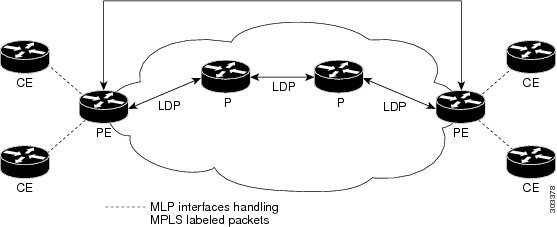
MPLS over MLPPP on Core Links

The following figure shows a sample topology in which MPLS is deployed over MLPPP on PE-to-P and P-to-P links. Enabling MPLS on MLPPP for PE-to-P links is similar to enabling MPLS on MLPPP for P-to-P links.

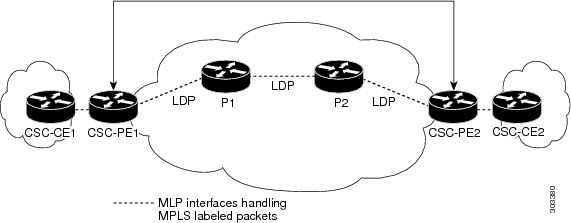
MPLS over MLPPP on CE to PE Links

The following figure shows a sample topology in which MPLS is deployed over MLPPP between CE and PE links with LDP.

Configuring MLPPP Backhaul

To configure an MLPPP backhaul, complete the following tasks:

Configuring a Multilink Backhaul Interface

A multilink interface is a virtual interface that represents a multilink PPP bundle. The multilink interface coordinates the configuration of the bundled link, and presents a single object for the aggregate links. However, the individual PPP links that are aggregated must also be configured. Therefore, to enable multilink PPP on multiple serial interfaces, you first need to set up the multilink interface, and then configure each of the serial interfaces and add them to the same multilink interface.


Note


In the following procedure, press the Return key after each step unless otherwise noted. At any time, you can exit the privileged level and return to the user level by entering disable at the Router# prompt.

The Cisco ASR 901 router can support up to 16 E1/T1 connections through the multilink interface, ranging from 16 bundles of one E1/T1 each to a single bundle containing 12 E1/T1 bundles.

Complete the following tasks to configure a multilink backhaul interface.

Creating a Multilink Bundle

Complete the following steps to create a multilink bundle:

Procedure
  Command or Action Purpose

Step 1

enable

Example:

Router> enable

Enables the privileged EXEC mode.

  • Enter your password if prompted.

Step 2

configure terminal

Example:

Router# configure terminal

Enters the global configuration mode.

Step 3

interface multilink group-number

Example:

Router(config)# interface multilink5

Creates a multilink bundle and enters the interface configuration mode:

  • group-number —Number of the multilink bundle.

The example creates a multilink bundle 5. To remove a multilink bundle, use the no form of this command.

Step 4

ipaddress address subnet mask

Example:

Router(config-if)# ip address 10.10.10.2 255.255.255.0

Assigns an IP address to the multilink interface.

  • address — IP address.
  • subnet mask —Network mask of IP address.

The example configures an IP address and subnet mask.

Step 5

exit

Example:

Router(config-if)# exit

Exits the configuration mode.

Configuring MRRU

You should configure the local maximum received reconstructed unit (MRRU) of the multilink bundle to a value greater than or equal to 1508 bytes(or equal to the maximum packet length expected on the bundle at any point in time). The maximum MTU supported on the Cisco ASR 901 router is 1536, and MTU drops occur when the packet length is more than 1536.

Complete the following steps to configure MRRU:

Procedure
  Command or Action Purpose

Step 1

enable

Example:

Router> enable

Enables privileged EXEC mode.

  • Enter your password if prompted.

Step 2

configure terminal

Example:

Router# configure terminal

Enters global configuration mode.

Step 3

interface multilink multilink-bundle-number

Example:

Router(config)# interface multilink 1 

Creates a multilink bundle and enters the multilink interface configuration mode to configure the multilink bundle.

  • multilink-bundle-number —Number of the multilink bundle. The range is from 1 to 65535.

Step 4

ppp multilink mrru local bytes

Example:

Router(config-if)# ppp multilink mrru local 1536 

Configures the MRRU value negotiated on a Multilink PPP bundle.

  • local —Configures the local MRRU value.
  • bytes —MRRU value, in bytes. Valid value range is 128 to 16384.

Step 5

exit

Example:

Router(config)# exit

Exits configuration mode.

Configuring PFC and ACFC

Protocol-Field-Compression (PFC) and Address-and-Control-Field-Compression (AFC) are PPP compression methods defined in RFCs 1661 and 1662. PFC allows for compression of the PPP Protocol field; ACFC allows for compression of the PPP Data Link Layer Address and Control fields.

Follow these steps to configure PFC and ACFC handling during PPP negotiation to be configured. By default, PFC/ACFC handling is not enabled.


Note


The recommended PFC and ACFC handling in the Cisco ASR 901 router is: acfc local request, acfc remote apply, pfc local request, and pfc remote apply.
Configuring PFC

Complete the following steps to configure PFC handling during PPP negotiation:

Procedure
  Command or Action Purpose

Step 1

enable

Example:

Router> enable

Enables privileged EXEC mode.

  • Enter your password if prompted.

Step 2

configure terminal

Example:

Router# configure terminal

Enters global configuration mode.

Step 3

interface multilink group-number

Example:

Router(config)# interface multilink5

Creates a multilink bundle and enters the interface configuration mode:

  • group-number —Number of the multilink bundle.

The example creates a multilink bundle 5.

To remove a multilink bundle, use the no form of this command.

Step 4

ppp pfc local {request | forbid }

Example:

Router(config-if)# ppp pfc local request

Configures how the router handles PFC in its outbound configuration requests, use the ppp pfc local command. The syntax is as follows:

  • request —The PFC option is included in outbound configuration requests.
  • forbid —The PFC option is not sent in outbound configuration requests, and requests from a remote peer to add the PFC option are not accepted.

The example shows how to create a method for the router to manage PFC.

Step 5

ppp pfc remote {apply | reject | ignore }

Example:

Router(config-if)# ppp pfc remote apply

Specifies how the router manages the PFC option in configuration requests received from a remote peer. The syntax is as follows:

  • apply —Specifies that PFC options are accepted and PFC may be performed on frames sent to the remote peer.
  • reject —Specifies that PFC options are explicitly ignored.
  • ignore —Specifies that PFC options are accepted, but PFC is not performed on frames sent to the remote peer.

The example shows how to allow PFC options to be accepted.

Step 6

exit

Example:

Router(config)# exit

Exits configuration mode.

Configuring ACFC

Complete the following steps to configure ACFC handling during PPP negotiation:

Procedure
  Command or Action Purpose

Step 1

enable

Example:

Router> enable

Enables privileged EXEC mode.

  • Enter your password if prompted.

Step 2

configure terminal

Example:

Router# configure terminal

Enters global configuration mode.

Step 3

interface multilink group-number

Example:

Router(config)# interface multilink 5

Creates a multilink bundle and enter the interface configuration mode:

  • group-number —Number of the multilink bundle.

The example creates a multilink bundle 5.

To remove a multilink bundle, use the no form of this command.

Step 4

ppp acfc local {request | forbid }

Example:

Router(config-if)# ppp acfc local request

Specifies how the router handles ACFC in outbound configuration requests. The syntax is as follows:

  • request—Specifies that the ACFC option is included in outbound configuration requests.
  • forbid—Specifies that the ACFC option is not sent in outbound configuration requests, and requests from a remote peer to add the ACFC option are not accepted.

Step 5

ppp acfc remote {apply | reject | ignore }

Example:

Router(config-if)# ppp acfc remote apply

Specifies how the router handles the ACFC option in configuration requests received from a remote peer. The syntax is as follows:

  • apply—ACFC options are accepted and ACFC may be performed on frames sent to the remote peer.
  • reject—ACFC options are explicitly ignored.
  • ignore—ACFC options are accepted, but ACFC is not performed on frames sent to the remote peer.

The example allows ACFC options to be accepted.

Step 6

exit

Example:

Router(config)# exit

Exit configuration mode.

Enabling Multilink and Identifying the Multilink Interface

Complete the following steps to enable multilink and identify the multilink interface:


Note


If you modify parameters for an MLPPP bundle while it is active, the changes do not take effect until the Cisco ASR 901 renegotiates the bundle connection.
Procedure
  Command or Action Purpose

Step 1

enable

Example:

Router> enable

Enables the privileged EXEC mode.

  • Enter your password if prompted.

Step 2

configure terminal

Example:

Router# configure terminal

Enters the global configuration mode.

Step 3

interface multilink group-number

Example:

Router(config-if)# interface multilink 5

Creates the multilink group interface corresponding to the specified group number. This command enables the following commands under the interface multilink group number:

  1. keepalive
  2. ppp multilink group group-number

where group-number is the Multilink group number.

The example restricts (identifies) the multilink interface that can be negotiated to multilink interface 5.

Step 4

keepalive [period[retries]]

Example:

Router(config-if)# keepalive 1 5

Enables keepalive packets on the interface and specifies the number of times the keepalive packets are sent without a response before the router disables the interface. The syntax is as follows:

  • period —(Optional) Integer value in seconds greater than 0. The default is 10. Using 0 disables the keepalive option.
  • retries —(Optional) Specifies the number of times that the device will continue to send keepalive packets without response before bringing the interface down. Integer value greater than 1 and less than 255. If omitted, the value that was previously set is used; if no value was specified previously, the default of 5 is used.

Step 5

exit

Example:

Router(config)# exit

Exits the configuration mode.

Configuring a Serial Interface as a Member Link of a MLPPP Group

Complete the following steps to configure a serial interface as a member link of a MLPPP group:

Procedure
  Command or Action Purpose

Step 1

enable

Example:

Router> enable

Enables privileged EXEC mode.

  • Enter your password if prompted.

Step 2

configure terminal

Example:

Router# configure terminal

Enters global configuration mode.

Step 3

interface serial slot/port: channel-group-number

Example:

Router(config-if)# interface serial 0/5:5

Identifies and accesses the serial interface on the specified slot and port.

  • channel-group-number —The number to identify the channel group. The valid range is from 0–30 for E1 controllers and 0–23 for T1 controllers.

Step 4

encapsulation ppp

Example:

Router(config-if)# encapsulation ppp

Enables PPP encapsulation on the serial interface.

Step 5

ppp multilink

Example:

Router(config-if)# ppp multilink

Enables multilink PPP on the serial interface.

Step 6

ppp multilink group group-number

Example:

Router(config-if)# ppp multilink group 5

Configures the serial interface as a member link to the multilink interface identified by the group-number.

  • group-number —Multilink group number.

The example identifies the multilink interface to which the serial interface should be bound to as a member-link.

Step 7

exit

Example:

Router(config)# exit

Exits configuration mode.

MLPPP Offload

By default, the Cisco ASR 901 router offloads processing for distributed MLPPP (dMLPPP) to the network processor for improved performance. However, the Cisco ASR 901 does not support some dMLPPP settings on offloaded bundles. The Cisco ASR 901 does not support the following options on offloaded dMLPPP bundles:

  • ppp multilink idle-link
  • ppp multilink queue depth
  • ppp multilink fragment maximum
  • ppp multilink slippage
  • ppp timeout multilink lost-fragment

Note


If you have a bundle that requires the use of these options, contact Cisco support for assistance.

Configuring Additional MLPPP Settings

You can perform a variety of other configurations on an MLPPP bundle, including the following:

  • Modifying the maximum fragment size
  • Modifying fragmentation settings
  • Enabling or disabling fragmentation
  • Enabling or disabling interleaving
  • Configuring multiclass MLPPP

Note


For more information about configuring MLPPP, see the Dial Configuration Guide, Cisco IOS Release 15.0S .

Configuring MPLS over the MLPPP on a Serial Interface

Complete the following steps to configure MPLS over the MLPPP link on a serial interface:

Procedure

  Command or Action Purpose

Step 1

enable

Example:


Router> enable

Enables privileged EXEC mode.

  • Enter your password if prompted.

Step 2

configure terminal

Example:


Router# configure terminal

Enters global configuration mode.

Step 3

interface serial slot/port:time-slot

Example:


Router(config-if)# interface Serial0/0:0

Specifies a serial interface created on a channelized E1 or channelized T1 controller:

  • slot —Slot number where the channelized E1 or T1 controller is located.
  • port —Port number where the channelized E1 or T1 controller is located.
  • time-slot —For ISDN, the D channel time slot, which is the :23 channel for channelized T1 and the :15 channel for channelized E1. PRI time slots are in the range from 0 to 23 for channelized T1 and in the range from 0 to 30 for channelized E1.

Step 4

no ip address

Example:


Router(config-if)# no ip address

Disabled IP address processing.

Step 5

encapsulation encapsulation-type

Example:


Router(config-if)# encapsulation ppp 

Configures the encapsulation method used by the interface.

  • encapsulation-type —Encapsulation type.

Step 6

ppp multilink

Example:


Router(config-if)# ppp multilink

Enables Multilink PPP on an interface .

Step 7

ppp multilink group group-number

Example:


Router(config-if)# ppp multilink group 2

Restricts a physical link to join only one designated multilink group interface.

  • group-number —Multilink-group number (a non-zero number).

Step 8

exit

Example:


Router(config)# exit 

Exits interface configuration mode.

Configuring MPLS over MLPPP for OSPF

Complete the following steps to configure MPLS over the MLPPP link for OSPF:

Procedure

  Command or Action Purpose

Step 1

enable

Example:


Router> enable

Enables privileged EXEC mode.

  • Enter your password if prompted.

Step 2

configure terminal

Example:


Router# configure terminal

Enters global configuration mode.

Step 3

interface multilink group-number

Example:


Router(config)# interface multilink 2

Creates the multilink group interface corresponding to the specified group number, and enters the interface configuration mode.

  • group-number —Multilink group number.

Step 4

ip address ip-address [subnet mask]

Example:


Router(config-if)# ip address 11.11.11.2 255.255.255.0

Assigns an IP address to the multilink interface.

  • ip-address —IP address.
  • subnet mask —Network mask of IP address.

Step 5

ip ospf process-id area area-id

Example:


Router(config-if)# ip ospf 10 area 0

Enables OSPF on an interface.

  • process-id —A decimal value in the range from 1 to 65535.
  • area-id —A decimal value in the range from 0 to 4294967295, or an IP address.

Step 6

ip ospf authentication null

Example:


Router(config-if)# ip ospf authentication null

Specifies the authentication type for an interface.

  • null —No authentication is used. Useful for overriding password or message-digest authentication if configured for an area.

Step 7

mpls ip

Example:


Router(config-if)# mpls ip

Enables MPLS forwarding of IPv4 packets along normally routed paths for a particular interface.

Step 8

no keepalive

Example:


Router(config-if)# no keepalive

Disables keepalive packets.

Step 9

ppp pfc local request

Example:


Router(config-if)# ppp pfc local request

Configures protocol field compression (PFC) in configuration requests.

Step 10

ppp pfc remote apply

Example:


Router(config-if)# ppp pfc remote apply

Configures how the PFC option in configuration requests is received from a remote peer.

Step 11

ppp multilink

Example:


Router(config-if)# ppp multilink

Enables Multilink PPP on an interface.

Step 12

ppp multilink group group-number

Example:


Router(config-if)# ppp multilink group 2

Restricts a physical link to join only one designated multilink group interface.

  • group-number —Multilink-group number (a nonzero number).

Step 13

ppp multilink endpoint string char-string

Example:


Router(config-if)# ppp multilink endpoint string 22

Restricts a physical link to join only one designated multilink group interface.

  • char-string —Character string.

Step 14

exit

Example:


Router(config)# exit 

Exits interface configuration mode.

Step 15

router ospf process-id [vrf vrf-name]

Example:


Router(config)# router ospf 1234

Configures an OSPF routing process and enters the router configuration mode.

  • process-id — Internally used identification parameter for an OSPF routing process. It is locally assigned and can be any positive integer. A unique value is assigned for each OSPF routing process.

Step 16

network ip-address wildcard-mask area area-id

Example:


Router(config-router)# network 6.6.6.6 0.0.0.0 area 2

Configures the interfaces on which OSPF runs and to define the area ID for those interfaces.

  • ip-address —IP address.
  • wildcard-mask —IP-address-type mask that includes optional bits.
  • area-id —Area that is to be associated with the OSPF address range. It can be specified as either a decimal value or as an IP address. If you intend to associate areas with IP subnets, you can specify a subnet address as the value of the area-id argument.

Note

 
Repeat this step to configure different interfaces on which OSPF runs, and to define the area ID for those interfaces.

Step 17

exit

Example:


Router(config-router)# exit

Exits the router configuration mode.

Configuration Examples for MPLS over MLPPP

The following example shows a sample configuration of MPLS over MLPPP for OSPF.


Building configuration...
Current configuration : 234 bytes
!
interface Multilink2
ip address 11.11.11.2 255.255.255.0
ip ospf 1234 area 0
ip ospf authentication null
mpls ip
no keepalive
ppp pfc local request
ppp pfc remote apply
ppp multilink
ppp multilink group 2
ppp multilink endpoint string 22
router ospf 1234
network 6.6.6.6 0.0.0.0 area 2
network 11.11.11.0 0.0.0.255 area 0
network 12.12.12.0 0.0.0.255 area 2

The following example shows a sample configuration of MPLS over MLPPP for a Serial Interface.


Building configuration...
Current configuration : 101 bytes
!
interface Serial0/0:0
no ip address
encapsulation ppp
ppp multilink
ppp multilink group 2

The following example shows a sample configuration of MCMP enabled in MLPPP with classification based on DSCP


Configuring the class-map to match on priority queue (DSCP EF). When Priority percent is configured, it expedites the Class 1 traffic.
class-map match-any DSCP_EF
match ip dscp ef
policy-map BCP_MLPPP
class  DSCP_EF
  priority percent 10
class class-default
  bandwidth percent 5

Verifying MPLS over MLPPP Configuration

To verify the configuration of MPLS over MLPPP, use the following commands as shown in the examples below:


Router# ping mpls ipv4 6.6.6.6/32
Sending 5, 100-byte MPLS Echos to 6.6.6.6/32,
     timeout is 2 seconds, send interval is 0 msec:
Codes: '!' - success, 'Q' - request not sent, '.' - timeout,
  'L' - labeled output interface, 'B' - unlabeled output interface,
  'D' - DS Map mismatch, 'F' - no FEC mapping, 'f' - FEC mismatch,
  'M' - malformed request, 'm' - unsupported tlvs, 'N' - no label entry,
  'P' - no rx intf label prot, 'p' - premature termination of LSP,
  'R' - transit router, 'I' - unknown upstream index,
  'l' - Label switched with FEC change, 'd' - see DDMAP for return code,
  'X' - unknown return code, 'x' - return code 0
Type escape sequence to abort.
!!!!!
Success rate is 100 percent (5/5), round-trip min/avg/max = 4/5/8 ms
Total Time Elapsed 40 ms
Router# show mpls ldp bindings 6.6.6.6 32
lib entry: 6.6.6.6/32, rev 8
        local binding:  label: 17
        remote binding: lsr: 6.6.6.6:0, label: imp-null

Router# traceroute mpls ipv4 6.6.6.6/32
Tracing MPLS Label Switched Path to 6.6.6.6/32, timeout is 2 seconds
Codes: '!' - success, 'Q' - request not sent, '.' - timeout,
  'L' - labeled output interface, 'B' - unlabeled output interface,
  'D' - DS Map mismatch, 'F' - no FEC mapping, 'f' - FEC mismatch,
  'M' - malformed request, 'm' - unsupported tlvs, 'N' - no label entry,
  'P' - no rx intf label prot, 'p' - premature termination of LSP,
  'R' - transit router, 'I' - unknown upstream index,
  'l' - Label switched with FEC change, 'd' - see DDMAP for return code,
  'X' - unknown return code, 'x' - return code 0
Type escape sequence to abort.
  0 11.11.11.1 MRU 1500 [Labels: implicit-null Exp: 0]
! 1 11.11.11.2 4 ms

Additional References

The following sections provide references related to MLPPP feature.

Related Documents

Related Topic

Document Title

Cisco IOS Commands

Cisco IOS Master Commands List, All Releases

Cisco ASR 901 Commands

Cisco ASR 901 Series Aggregation Services Router Command Reference

Cisco IOS Dial Technologies Configuration Guide

http://www.cisco.com/en/US/docs/ios/12_2/dial/configuration/guide/dafppp.html Configuring Media-Independent PPP and Multilink PPP

MPLS over MLPPP

MPLS—Multilink PPP Support

Standards

Standard

Title

None

MIBs

MIB

MIBs Link

None

To locate and download MIBs for selected platforms, Cisco IOS releases, and feature sets, use Cisco MIB Locator found at the following URL:

http://www.cisco.com/go/mibs

RFCs

RFC

Title

None

Technical Assistance

Description

Link

The Cisco Technical Support website contains thousands of pages of searchable technical content, including links to products, technologies, solutions, technical tips, and tools. Registered Cisco.com users can log in from this page to access even more content.

http://www.cisco.com/techsupport

Feature Information for MLPPP

Table 1 lists the features in this module and provides links to specific configuration information.

Use Cisco Feature Navigator to find information about platform support and software image support. Cisco Feature Navigator enables you to determine which software images support a specific software release, feature set, or platform. To access Cisco Feature Navigator, go to http://www.cisco.com/go/cfn . An account on Cisco.com is not required.


Note


Table 1 lists only the software release that introduced support for a given feature in a given software release train. Unless noted otherwise, subsequent releases of that software release train also support that feature.
Table 1. Feature Information for MLPPP

Feature Name

Releases

Feature Information

MPLS over MLPPP

15.2(2)SNI

This feature was introduced on the Cisco ASR 901 routers.

The following sections provide information about this feature: