Layer 2 Control Protocol Peering, Forwarding, and Tunneling

This feature module describes how to configure Layer 2 (L2) Control Protocol Peering, Forwarding, and Tunneling feature on the Cisco ASR 901 Series Aggregation Services Routers.

Finding Feature Information

Your software release may not support all the features documented in this module. For the latest feature information and caveats, see the release notes for your platform and software release. To find information about the features documented in this module, and to see a list of the releases in which each feature is supported, see the Feature Information for Layer 2 Control Protocol Peering, Forwarding, and Tunneling.

Use Cisco Feature Navigator to find information about platform support and Cisco software image support. To access Cisco Feature Navigator, go to http://www.cisco.com/go/cfn. An account on Cisco.com is not required.
Prerequisites for Layer 2 Control Protocol Peering, Forwarding, and Tunneling

Restrictions for Layer 2 Control Protocol Peering, Forwarding, and Tunneling

  • If you want to peer Operation, Administration, and Maintenance (OAM) packets when l2proto-forward tagged command is configured at the interface level, you should also configure the l2protocol peer lacp command.

  • Received L2CP Control Packets (like STP, CDP, and others) are not mirrored to the destination port.

  • Forwarding L2CP tunneled packets over x-connect is not supported.

Layer 2 Control Protocol Forwarding

The ASR 901 forwards Layer 2 Control Protocol (L2CP) packets between customer-edge (CE) devices. Cisco ASR 901 router supports L2CP forwarding on Bridge-domain EVCs and on Cross-connect EVCs.

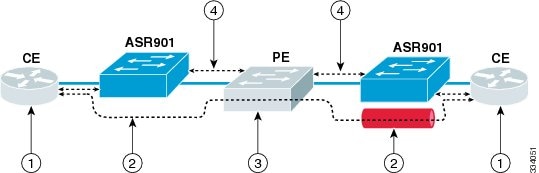
The following figure depicts an end-to-end layer 2 forwarding. The layer 2 traffic is sent through the S-network, and the S-network switches the traffic from end to end. The Cisco ASR 901 router forwards frames from the user network interface (UNI) to the network-to-network Interface (NNI) after appending S-tag. The third party provider edge (PE) router forwards the S-tagged frames. The PE peers the untagged Link Layer Discovery Protocol (LLDP) and Link Aggregation Control Protocol (LACP) frames. On the reverse path (from NNI to UNI), the S-tag is removed.

Figure 1. Layer 2 Forwarding

1

L2CP packets are forwarded between CE devices.

3

Third party PE forwards S-tagged frames and peers untagged frames.

2

Frames are forwarded from UNI to NNI after appending the S-tag. On the reverse path (NNI to UNI), S-tag is removed.

4

Untagged LLDP and LACP is peered.

Layer 2 Control Protocol Tunneling

Layer 2 Control Protocol Tunneling (L2PT) is a Cisco proprietary protocol for tunneling Ethernet protocol frames across layer 2 switching domains. The following tunnel protocols are supported:

  • Cisco Discovery Protocol (CDP)
  • Dynamic Trunking Protocol (DTP)
  • Link Aggregation Control Protocol (LACP)
  • Link Layer Discovery Protocol (LLDP)
  • Spanning Tree Protocol (STP)—including Multiservice Transport Platform (MSTP) and Per VLAN Spanning Tree (PVST)
  • Virtual Trunking Protocol (VTP)

The ASR 901 router allows to tunnel layer 2 packets between CEs. The Cisco proprietary multicast address (01-00-0c-cd-cd-d0) is used while tunneling the packet over the NNI interfaces.

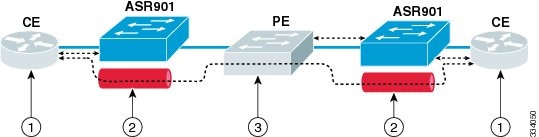
The following figure depicts Layer 2 Protocol Tunneling. The layer 2 traffic is sent through the S-network, and the S-network switches the traffic from end to end. The Cisco multicast address is added to the frames and sent from UNI to NNI. On the reverse path (NNI to UNI), protocol specific multicast address is attached to the frames and sent to the UNI.

Figure 2. Layer 2 Protocol Tunneling

1

CE layer 2 control protocol tunnel (end-to-end).

3

Third party PE forwards S-tagged frames and peers untagged frames.

2

Cisco multicast address is added to the frames and sent from UNI to NNI. On the reverse path (NNI to UNI), a protocol specific multicast address is attached to the frames and sent to UNI.

4

How to Configure Layer 2 Control Protocol Peering, Forwarding, and Tunneling

This section describes how to configure layer 2 control protocol peering, forwarding and tunneling:


Note


The configuration defined for LACP impacts all slow protocols, and is applicable to all the options like peering, forwarding, and tunneling.

Configuring Layer 2 Peering

The ASR 901 router supports layer 2 peering functionality on a per Ethernet Flow Point (EFP) basis. It supports a maximum packet rate of 10 packets ps (per interface) for a protocol, and 100 packets ps for all protocols (on all interfaces).

Table 1 displays the supported defaults and configuration options for the Cisco ASR 901 router.

Table 1. Options Supported on the ASR 901 Router

Protocol

Packet Type

Default Action

Configuration Option

CDP

Untagged

Peer

Peer/Forward/Tunnel

DTP

Untagged

Peer

Peer/Forward/Tunnel

LACP

Untagged

Peer

Peer/Forward/Tunnel

LLDP

Untagged

Peer

Peer/Forward/Tunnel

STP

Untagged

Peer

Peer/Forward/Tunnel

VTP

Untagged

Peer

Peer/Forward/Tunnel

CDP

Tagged

Drop

Forward/Tunnel

DTP

Tagged

Drop

Forward/Tunnel

LACP

Tagged

Drop

Forward/Tunnel

LLDP

Tagged

Drop

Forward/Tunnel

STP

Tagged

Drop

Forward/Tunnel

VTP

Tagged

Drop

Forward/Tunnel

Complete the following steps to configure layer 2 peering:


Note


  • If an EFP is configured with layer 2 peering, then L2CP packets coming on the EFP is sent to the CPU for local protocol processing.
  • Layer2 protocol peering is not supported on port-xconnect.

Procedure

  Command or Action Purpose

Step 1

enable

Example:


Router> enable

Enables privileged EXEC mode.

  • Enter your password if prompted.

Step 2

configure terminal

Example:


Router# configure terminal

Enters global configuration mode.

Step 3

interface type number

Example:


Router(config)# interface gigabitethernet 0/6

Specifies an interface type and number and enters interface configuration mode.

Step 4

service instance id ethernet

Example:


Router(config-if)# service instance 20 ethernet

Configures an Ethernet service instance on an interface.

  • id —Integer that uniquely identifies a service instance on an interface.

Step 5

encapsulation encapsulation-type

Example:


Router(config-if-srv)# encapsulation untagged

Defines the matching criteria to map untagged ingress Ethernet frames on an interface to the appropriate service instance.

Step 6

l2protocol peer [protocol]

Example:


Router(config-if-srv)# l2protocol peer lacp

Configures transparent Layer 2 protocol peering on the interface for a specified layer 2 protocol.

  • protocol —The protocol to be used. The options are: cdp, dtp, lacp, lldp, stp, and vtp .

Note

 
The peer option is not supported for DTP protocol.

Configuring Layer 2 Forwarding

Complete the following steps to configure layer 2 forwarding:


Note


  • The layer 2 forwarding functionality is supported only on an untagged EFP (Only one untagged EFP exists per interface).
  • Forwarding functionality is not supported with dot1q VLAN range encapsulation.
  • If an interface is configured with layer 2 protocol forwarding, then L2CP packets on the interface are flooded on to the bridge domain. The flooding follows the translations specified in interface.
  • Any manipulation of EXP bit is not supported while sending Bridge Protocol Data Units (BPDU) over xconnect.
  • L2CP forwarding is supported only on xconnect interfaces/EFPs created over GigE/TenGig/Port-channel interfaces.

Procedure

  Command or Action Purpose

Step 1

enable

Example:


Router> enable

Enables privileged EXEC mode.

  • Enter your password if prompted.

Step 2

configure terminal

Example:


Router# configure terminal

Enters global configuration mode.

Step 3

interface type number

Example:


Router(config)# interface gigabitethernet 0/1

Specifies an interface type and number and enters interface configuration mode.

Step 4

l2proto-forward tagged protocol

Example:


Router(config-if)# l2proto-forward tagged cdp

Configures a layer 2 control protocol forwarding on an interface.

  • protocol —Specifies the protocol to be forwarded.

Step 5

service instance id ethernet

Example:


Router(config-if)# service instance 20 ethernet

Configures an Ethernet service instance on an interface.

  • id —Integer that uniquely identifies a service instance on an interface.

Step 6

encapsulation untagged

Example:


Router(config-if-srv)# encapsulation untagged

Defines the matching criteria to map untagged ingress Ethernet frames on an interface to the appropriate service instance.

Step 7

l2protocol forward [protocol]

Example:


Router(config-if-srv)# l2protocol forward cdp

Enables forwarding of untagged packets of specified protocol in a service instance.

  • protocol —The protocol to be used. The options are: cdp, dtp, lacp, lldp, stp, and vtp .

Perform Step 8 if you want to bind a service instance to a bridge domain. Go to Step 9 if you want to bind an attachment to a xconnect.

Step 8

bridge-domain bridge-id

Example:


Router(config-if-srv)# bridge-domain 200

Binds a service instance to a bridge domain instance.

  • bridge-id —Identifier for the bridge domain instance.

Step 9

xconnect peer-ip-address vc-id encapsulation mpls

Example:


Router(config-if-srv)# xconnect 1.1.1.1 100 encapsulation mpls 

Binds an attachment circuit to a pseudowire.

  • peer-ip-address —IP address of the remote provider edge (PE) peer. The remote router ID can be any IP address, as long as it is reachable.
  • vc-id —The 32-bit identifier of the virtual circuit (VC) between the PE routers.
  • encapsulation —Specifies the tunneling method to encapsulate the data in the pseudowire.
  • mpls —Specifies MPLS as the tunneling method.

Configuring Layer 2 Tunneling

The ASR 901 router supports layer 2 control protocol tunneling functionality on a per EFP basis. This functionality is supported for tagged and untagged packets based on CDP, DTP, LACP, LLDP, STP, and VTP protocols.

If an EFP is configured for layer 2 control protocol tunneling, then:

  • Any L2CP packet coming on the EFP is forwarded to the bridge domain (BD) with Cisco proprietary multicast address (01-00-0c-cd-cd-d0).
  • Any packet coming on the BD with Cisco proprietary multicast address (01-00-0c-cd-cd-d0) is stamped with well known L2CP MAC address (on EFP which has layer 2 protocol tunneling configured).
  • A packet with Cisco proprietary multicast address is forwarded as is if l2protocol tunnel is not configured.

Complete the following steps to configure layer 2 tunneling:


Note


  • Layer 2 protocol tunneling is not supported on xconnect EFPs.
  • Tunneling functionality is not supported with dot1q VLAN range encapsulation.
  • Layer 2 protocol tunneling supports a maximum packet rate of 10 packets ps (per interface) for a protocol, and 100 packets ps for all protocols (on all interfaces).
  • Layer2 protocol tunneling is not supported on port-xconnect.

Procedure

  Command or Action Purpose

Step 1

enable

Example:


Router> enable

Enables privileged EXEC mode.

  • Enter your password if prompted.

Step 2

configure terminal

Example:


Router# configure terminal

Enters global configuration mode.

Step 3

interface type number

Example:


Router(config)# interface gigabitethernet 0/4

Specifies an interface type and number and enters interface configuration mode.

Step 4

service instance id ethernet

Example:


Router(config-if)# service instance 9 ethernet

Configure an Ethernet service instance on an interface.

  • id —Integer that uniquely identifies a service instance on an interface.

Step 5

encapsulation encapsulation-type

Example:


Router(config-if-srv)# encapsulation untagged

Sets the encapsulation method used by the interface.

  • encapsulation type —Type of encapsulation to be used.

Step 6

l2protocol tunnel [protocol]

Example:


Router(config-if-srv)# l2protocol tunnel cdp

Configures transparent Layer 2 protocol tunneling on the interface for the specified Layer 2 protocol.

  • protocol —(Optional) The protocol to be used. The options are: cdp, dtp, lacp, lldp, stp, and vtp .

Step 7

bridge-domain bridge-id

Example:


Router(config-if-srv)# bridge-domain 9

Binds a service instance to a bridge domain instance.

  • bridge-id —Identifier for the bridge domain instance.

Verifying Layer 2 Peering

To verify the layer 2 protocol peering functionality, use the show ethernet service instance command as shown below.


Router# show ethernet service instance id 99 interface gigabitEthernet0/4 detail
Service Instance ID: 99
Service Instance Type: static
Associated Interface: GigabitEthernet0/4
Associated EVC: 
L2protocol peer cdp
CE-Vlans:                                                                        
Encapsulation: untagged
Interface Dot1q Tunnel Ethertype: 0x8100
State: Up
EFP Statistics:
   Pkts In   Bytes In   Pkts Out  Bytes Out
         0          0          0          0
EFP Microblocks:
****************
Microblock type: Bridge-domain
Bridge-domain: 99

Verifying Layer 2 Forwarding

To verify the layer 2 protocol forwarding functionality, use the show ethernet service instance command as shown below.


Router# show ethernet service instance id 99 interface gigabitEthernet 0/0 detail
Service Instance ID: 99
Service Instance Type: static
Associated Interface: GigabitEthernet0/0
Associated EVC: 
L2protocol forward cdp lldp
CE-Vlans: 
Encapsulation: untagged
Interface Dot1q Tunnel Ethertype: 0x8100
State: Up
EFP Statistics:
Pkts In Bytes In Pkts Out Bytes Out
0 0 0 0
EFP Microblocks:
****************
Microblock type: Bridge-domain
Bridge-domain: 99 

Verifying Layer 2 Tunneling

To verify the layer 2 control protocol tunneling functionality, use the show ethernet service instance command as shown below.


Router# show ethernet service instance id 9 interface GigabitEthernet 0/4 detail
Service Instance ID: 9
Service Instance Type: static
Associated Interface: GigabitEthernet0/4
Associated EVC: 
L2protocol tunnel
CE-Vlans: 
Encapsulation: untagged
Interface Dot1q Tunnel Ethertype: 0x8100
State: Up
EFP Statistics:
Pkts In Bytes In Pkts Out Bytes Out
0 0 0 0
EFP Microblocks:
****************
Microblock type: Bridge-domain
Bridge-domain: 9

Configuration Examples

This section provides sample configuration examples for Layer 2 Control Protocol Peering, Forwarding, and Tunneling feature on the Cisco ASR 901 routers.

Example: Configuring Layer 2 Peering

The following is a sample configuration of layer 2 peering.


!
interface GigabitEthernet0/0
negotiation auto
l2proto-forward tagged -- forwards all tagged frames, and drops untagged frames
cdp enable
service instance 9 ethernet
encapsulation dot1q 9
rewrite ingress tag pop 1 symmetric
bridge-domain 9
!
service instance 99 ethernet
encapsulation untagged
l2protocol peer cdp lldp -- peers lldp and cdp
bridge-domain 99
!
!

Example: Configuring Layer 2 Forwarding

The following is a sample configuration of layer 2 protocol forwarding at untagged EFP.


Building configuration...
Current configuration : 267 bytes
!
interface Port-channel1
 negotiation auto
!
 service instance 9 ethernet
  encapsulation untagged
  l2protocol forward cdp
  bridge-domain 9
 !
end

The following is a sample configuration of layer 2 protocol forwarding of tagged BPDUs at the port-channel interface level.


Current configuration : 270 bytes
!
interface Port-channel1
 no negotiation auto
 l2proto-forward tagged cdp
 service instance 9 ethernet
  encapsulation untagged
  bridge-domain 9
 !
 service instance 99 ethernet
  encapsulation dot1q 99
  rewrite ingress tag pop 1 symmetric
  bridge-domain 99
 !
end

Note


By default, tagged and untagged BPDUs are forwarded on port-xconnect.

The following is a sample configuration for interface level forwarding.


interface GigabitEthernet0/3
 no ip address
 negotiation auto
 l2proto-forward tagged cdp lldp
service instance 100 ethernet 
  encapsulation dot1q 100
  rewrite ingress tag pop 1 symmetric
  xconnect 55.55.55.55 123 encapsulation mpls
service instance 200 ethernet 
  encapsulation dot1q 200
  rewrite ingress tag pop 1 symmetric
  xconnect 66.66.66.66 124 encapsulation mpls
service instance 300 ethernet 
  encapsulation untagged
  l2protocol peer cdp
l2protocol forward lacp
bridge-domain 300

The following is a sample configuration for Default Encapsulation EFP.


interface GigabitEthernet0/3
no ip address
 negotiation auto
service instance 200 ethernet
 encapsulation default
 l2protocol forward cdp stp
 l2protocol peer lldp
 xconnect 33.33.33.33 123 encapsulation mpls

Note


No explicit L2CP related configuration needs to be done for port-xconnect.

The following is a sample configuration for port-xconnect.


interface GigabitEthernet 0/4
 xconnect 44.44.44.44 123 encapsulation mpls

Example: Configuring Layer 2 Tunneling

The following is a sample configuration of Layer 2 control protocol tunneling for untagged packets.


Building configuration...
Current configuration : 151 bytes
!
interface GigabitEthernet0/1
negotiation auto
service instance 10 ethernet
encapsulation untagged
l2protocol tunnel cdp
bridge-domain 10
!
Service instance 100 ethernet
encapsulation dot1q 100
l2protocol tunnel lldp
rewrinte ingress tag pop 1 symmetric
bridge-domain 100
!
interface GigabitEthernet0/7
negotiation auto
service instance 20 ethernet
encapsulation untagged
l2protocol tunnel
bridge-domain 20
!
end

The following is a sample configuration of Layer 2 control protocol tunneling for tagged packets.


Note


The configuration given below applies to only one router. Similar configuration has to be applied on two Cisco ASR 901 routers.

Building configuration...
Current configuration : 153 bytes
!
interface GigabitEthernet0/11
 negotiation auto
 service instance 10 ethernet
  encapsulation dot1q 100
  l2protocol tunnel
  bridge-domain 50
 !
!
interface GigabitEthernet0/1
 negotiation auto
 service instance 10 ethernet
  encapsulation dot1q 100
  bridge-domain 50
 !
end

The following is a sample configuration of layer 2 protocol tunneling for receiving untagged LLDP packets from customer nodes and tunneling them tagged over provider network.

Router 1


Building configuration...
Current configuration : 151 bytes
!
interface GigabitEthernet0/1
 negotiation auto
 service instance 10 ethernet
  encapsulation untagged 
  l2protocol tunnel lldp
  bridge-domain 20
 !
!
interface GigabitEthernet0/7
 negotiation auto
 service instance 10 ethernet
  encapsulation dot1q 100
  rewrite ingress tag pop 1 symmetric
  bridge-domain 20
 !
end

Router 2


Current configuration : 170 bytes
!
interface GigabitEthernet0/7
 negotiation auto
 service instance 20 ethernet
  encapsulation dot1q 100
  rewrite ingress tag pop 1 symmetric
  bridge-domain 30
 !
!
interface GigabitEthernet0/6
 negotiation auto
 service instance 20 ethernet
  encapsulation untagged
  l2protocol tunnel lldp
  bridge-domain 30
 !
end

Additional References

The following sections provide references related to the Layer 2 Control Protocol Peering, Forwarding, and Tunneling feature.

Related Documents

Related Topic

Document Title

Cisco IOS Commands

Cisco IOS Master Commands List, All Releases

Cisco ASR 901 Command Reference

Cisco ASR 901 Series Aggregation Services Router Command Reference

Cisco IOS Interface and Hardware Component Commands

Cisco IOS Interface and Hardware Component Command Reference

Cisco IOS LAN Switching Commands

Cisco IOS LAN Switching Command Reference

Standards

Standard

Title

None

MIBs

MIB

MIBs Link

None

To locate and download MIBs for selected platforms, Cisco IOS releases, and feature sets, use Cisco MIB Locator found at the following URL:

http://www.cisco.com/go/mibs

RFCs

RFC

Title

None

Technical Assistance

Description

Link

The Cisco Technical Support website contains thousands of pages of searchable technical content, including links to products, technologies, solutions, technical tips, and tools. Registered Cisco.com users can log in from this page to access even more content.

http://www.cisco.com/techsupport

Feature Information for Layer 2 Control Protocol Peering, Forwarding, and Tunneling

Table 1 lists the features in this module and provides links to specific configuration information.

Use Cisco Feature Navigator to find information about platform support and software image support. Cisco Feature Navigator enables you to determine which software images support a specific software release, feature set, or platform. To access Cisco Feature Navigator, go to http://www.cisco.com/go/cfn . An account on Cisco.com is not required.


Note


Table 1 lists only the software release that introduced support for a given feature in a given software release train. Unless noted otherwise, subsequent releases of that software release train also support that feature.
Table 2. Feature Information for Layer 2 Control Protocol Peering, Forwarding, and Tunneling

Feature Name

Releases

Feature Information

Layer 2 Control Protocol Peering and Forwarding

15.2(2)SNG

This feature was introduced on the Cisco ASR 901 routers.

The following sections provide information about this feature:

The following command was introduced: l2proto-forward

Layer 2 Control Protocol Tunneling

15.2(2)SNH1

This feature was introduced on the Cisco ASR 901 routers.

The following sections provide information about this feature:

Layer 2 Control Protocol Forwarding over xconnect

15.4(1)S

This feature was introduced on the Cisco ASR 901 routers.