MPLS Traffic Engineering - Fast Reroute Link Protection

This feature module describes the Fast Reroute (FRR) link protection and Bidirectional Forwarding Detection (BFD)-triggered FRR feature of Multiprotocol Label Switching (MPLS) traffic engineering (TE).

Finding Feature Information

Your software release may not support all the features documented in this module. For the latest feature information and caveats, see the release notes for your platform and software release. To find information about the features documented in this module, and to see a list of the releases in which each feature is supported, see the feature information table at the end of this module.

Use Cisco Feature Navigator to find information about platform support and Cisco software image support. To access Cisco Feature Navigator, go to http://www.cisco.com/go/cfn . An account on Cisco.com is not required.

Prerequisites for MPLS Traffic Engineering - Fast Reroute Link Protection

  • Cisco IOS Release 15.2(2)SNG or a later release that supports the MPLS TE-FRR link protection feature must be installed previously on the Cisco ASR 901 Series Aggregation Services Router.

  • You should enable the asr901-platf-frr command at the global configuration before using TE-FRR.

  • Your network must support both the following Cisco IOS features before you can enable Fast Reroute link protection:
    • IP Cisco Express Forwarding (CEF)
    • Multiprotocol Label Switching (MPLS)
  • Your network must also support at least one of the following protocols:
    • Intermediate System-to-Intermediate System (IS-IS)
    • Open Shortest Path First (OSPF)

Restrictions for MPLS Traffic Engineering - Fast Reroute Link Protection

  • MPLS TE works only on the Switch Virtual Interface (SVI).

  • MPLS TE-FRR feature is used only for link protection and not for node protection.

  • MPLS deployments that allows 4-label push is not supported.

  • When the TE-FRR deployments are in ring topology, hair-pinning can occur while trying to reach the destination during cutover.

  • MPLS TE-FRR is not supported on layer 3 over layer 2 deployments.

  • You cannot configure BFD and RSVP on the same interface.

  • You should use the no l3-over-l2 flush buffers command before configuring MPLS TE-FRR feature.

  • Path protection is not supported.

  • Time-division multiplexing (TDM) psuedowire over TE-FRR is not supported.

  • QoS is not supported on the MPLS TE tunnels.

  • You cannot enable FRR hello messages on a router that also has Resource Reservation Protocol (RSVP) Graceful Restart enabled.

  • Psuedowire redundancy over TE-FRR is not supported.

  • CFM over Xconnect over TE-FRR is not supported.

  • The imposition statistics will not work for EOMPLS after the FRR event or layer 3 cutover.

MPLS TE-FRR Link Protection Overview

The MPLS TE is supported on the Cisco ASR 901 router to enable only the FRR. The traffic engineering aspects of MPLS TE is currently not supported. The MPLS TE is the process of establishing and maintaining label-switched paths (LSPs) across the backbone using Resource Reservation Protocol (RSVP). The path used by a given LSP at any point in time is based upon the LSP resource requirements and available network resources.

The MPLS TE-FRR feature is useful for time critical applications like voice calls that require minimal loss of data during link failures. This feature is used to overcome the issue of convergence speed experienced by the Interior Gateway Protocol (IGP) fast timers.

In the MPLS TE-FRR feature, backup tunnels are used to minimize the impact of link breakages. The point of failure can either be a head-end tunnel or a mid-point. In both the cases, the scope of recovery is local. The reroute decision is completely controlled locally by the router interfacing the failed link. The recovery is done by the node that listens to the failure. The node that detects the failure switches the traffic to the backup link with the least amount of delay.

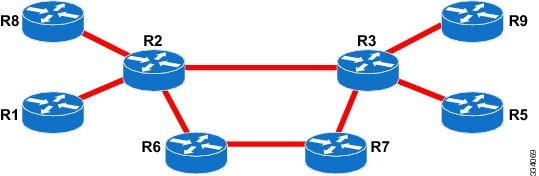
The following figure illustrates the FRR link protection.
Figure 1. FRR Link Protection
R2 Head-end of the tunnel R2-R6-R7-R3 Backup link
R2-R3 Protected link R3 Tail-end of tunnel
R2-R3 Primary link
The MPLS TE-FRR feature supports the following:
  • IP, L3VPN, and EoMPLS.
  • Supports BFD sessions with 50ms interval.
  • Single hop tunnel and multi-hop tunnel deployments.
  • Auto-tunnel feature in primary and backup nodes.
  • Targeted LDP sessions on tunnels.

BFD-triggered Fast Reroute

The MPLS Traffic Engineering: BFD-triggered Fast Reroute feature allows you to obtain link protection by using the BFD protocol.

BFD

BFD is a detection protocol designed to provide fast forwarding link failure detection times for all media types, encapsulations, topologies, and routing protocols. In addition to fast forwarding link failure detection, BFD provides a consistent failure detection method for network administrators. Because the network administrator can use BFD to detect forwarding link failures at a uniform rate, rather than the variable rates for different routing protocol Hello mechanisms, network profiling and planning is easier, and reconvergence time is consistent and predictable.

Fast Reroute

Fast Reroute is a mechanism for protecting MPLS TE LSPs from link failures by locally repairing the LSPs at the point of failure. This allows the data to continue to flow on them while their headend routers attempt to establish new end-to-end LSPs to replace them. FRR locally repairs the protected LSPs by rerouting them over backup tunnels that bypass failed links.

Link Protection

Backup tunnels that bypass only a single link of the LSP’s path provide link protection. They protect LSPs if a link along their path fails by rerouting the LSP’s traffic to the next hop (bypassing the failed link). These are referred to as next-hop (NHOP) backup tunnels because they terminate at the LSP’s next hop beyond the point of failure.

How to Configure Traffic Engineering - Fast Reroute Link Protection

This section describes how to configure MPLS TE-FRR Link Protection feature:

Enabling MPLS TE-FRR on an SVI Interface

To enable MPLS TE-FRR on an SVI interface, perform the steps given below:

Procedure

  Command or Action Purpose

Step 1

enable

Example:


Router> enable

Enables the privileged EXEC mode.

  • Enter your password if prompted.

Step 2

configure terminal

Example:


Router# configure terminal

Enters the global configuration mode.

Step 3

interface type number

Example:


Router(config)# interface vlan 40

Specifies an interface type and number and enters interface configuration mode.

Step 4

mpls traffic-engg tunnels

Example:


Router(config-if)# mpls traffic-engg tunnels

Example:


Enables MPLS TE tunnel signaling on the specified interface.

Enabling MPLS TE-FRR for EoMPLS on a Global Interface

To enable MPLS TE-FRR for EoMPLS on a global interface, perform the steps given below:

Procedure

  Command or Action Purpose

Step 1

enable

Example:


Router> enable

Enables the privileged EXEC mode.

  • Enter your password if prompted.

Step 2

configure terminal

Example:


Router# configure terminal

Enters the global configuration mode.

Step 3

no l3-over-l2 flush buffers

Example:


Router(config)# no l3-over-l2 flush buffers 

Disables layer 3 over layer 2 deployments.

Step 4

asr901-platf-frr enable

Example:


Router(config)# asr901-platf-frr enable

Enables TE-FRR link protection.

Step 5

mpls ldp discovery targeted-hello accept

Example:


Router(config)# mpls ldp discovery targeted-hello accept 

Configures the neighbors from which requests for targeted hello messages may be honored.

Step 6

pseudowire-class pw-class-name

Example:


Router(config)# pseudowire-class T41

Specifies the name of a layer 2 pseudowire class and enters pseudowire class configuration mode.

Step 7

encapsulation encapsulation-type

Example:


Router(config-pw-class)# encapsulation mpls

Specifies the encapsulation method used by the interface.

Step 8

preferred-path {[interface] tunnel tunnel-number| peer host-ip-address} [disable-fallback]

Example:


Router(config-pw-class)# preferred-path interface Tunnel41 disable-fallback

Specifies the MPLS TE tunnel that traffic uses.

  • interface —Specifies the preferred path using an output interface.
  • tunnel —Specifies an MPLS TE tunnel interface that is the core-facing output interface.
  • tunnel-number —Tunnel interface number.
  • peer —Specifies a destination IP address or DNS name configured on the peer provider edge (PE) router, which is reachable through a label switched path (LSP).
  • host-ip-address —Peer host name or IP address.

Step 9

exit

Example:


Router(config-pw-class)# exit

Exits the pseudowire class configuration mode and enters the global configuration mode.

Step 10

mpls label protocol ldp

Example:


Router(config)# mpls label protocol ldp

Specifies the label distribution protocol for an interface. Here LDP protocol is used.

Step 11

mpls ldp igp sync holddown milli-seconds

Example:


Router(config)# mpls ldp igp sync holddown 1000

Specifies how long an Interior Gateway Protocol (IGP) should wait for Label Distribution Protocol (LDP) synchronization to be achieved.

Enabling MPLS TE-FRR for EoMPLS on an Interface

To enable MPLS TE-FRR for EoMPLS on an interface, perform the steps given below:

Procedure

  Command or Action Purpose

Step 1

pw-class

Example:


Router> enable

Enables the privileged EXEC mode.

  • Enter your password if prompted.

Step 2

auto terminal

Example:


Router# configure terminal

Enters the global configuration mode.

Step 3

pseudowire-class pw-class-name

Example:


Router(config)# pseudowire-class T41

Specifies the name of a layer 2 pseudowire class and enters pseudowire class configuration mode.

Step 4

no negotiation auto

Example:


Router(config-if)# no negotiation auto

Disables the automatic negotiation.

Step 5

service instance id ethernet

Example:


Router(config-if)# service instance 100 ethernet

Configures an Ethernet service instance on an interface. The id is an integer that uniquely identifies a service instance on an interface. The value varies by the platform. Range: 1 to 4294967295. The identifier need not map to a VLAN and is local in scope to the interface.

Step 6

encapsulation dot1q vlan-id

Example:


Router(config-if-srv)# encapsulation dot1q 101

Enables IEEE 802.1Q encapsulation of traffic on a specified subinterface in a VLAN. The vlan-id is the Virtual LAN identifier. The allowed range is from 1 to 4094. For the IEEE 802.1Q-in-Q VLAN Tag Termination feature, the first instance of this argument defines the outer VLAN ID, and the second and subsequent instances define the inner VLAN ID.

Step 7

rewrite ingress tag pop 1 symmetric

Example:


Router(config-if-srv)# rewrite ingress tag pop 1 symmetric

Specifies the encapsulation adjustment to be performed on a frame ingressing a service instance.

Step 8

xconnect peer-ip-address vc-id pw-class pw-class-name

Example:


Router(config-if-srv)# xconnect 10.0.0.4 4 pw-class T41 

Binds an attachment circuit to a pseudowire, and to configure an Any Transport over MPLS (AToM) static pseudowire.

  • peer-ip-address —IP address of the remote provider edge (PE) peer. The remote router ID can be any IP address, as long as it is reachable.
  • vc-id —The 32-bit identifier of the virtual circuit (VC) between the PE routers.
  • pw-class —Specifies the pseudowire class for advanced configuration.
  • pw-class-name —Pseudowire class name.

Enabling MPLS TE-FRR for IS-IS

To enable MPLS TE-FRR for IS-IS routing process, perform the steps given below:

Procedure

  Command or Action Purpose

Step 1

mpls-ldp

Example:


Router> enable

Enables the privileged EXEC mode.

  • Enter your password if prompted.

Step 2

configure terminal

Example:


Router# configure terminal

Enters the global configuration mode.

Step 3

router isis

Example:


Router(config)# router isis

Activates the IS-IS routing process for IP and puts the device into router configuration mode.

Step 4

mpls traffic-eng router-id interface-name

Example:


Router(config-router)# mpls traffic-eng router-id Loopback102

Specifies that the traffic engineering router identifier for the node is the IP address associated with a given interface. The interface-name is the interface whose primary IP address is the router's identifier

Step 5

mpls traffic-eng {level-1 | level-2}

Example:


Router(config-router)# mpls traffic-eng level-1

Configures a router running IS-IS so that it floods MPLS TE link information into the indicated IS-IS level.

  • level-1 —Floods MPLS TE link information into IS-IS level 1.
  • level-2 —Floods MPLS TE link information into IS-IS level 2.

Step 6

router isis

Example:


Router(config)# router isis 

Enables the IS-IS routing protocol and enters the router configuration mode.

Step 7

net net-1

Example:


Router(config)# net 49.0001.0000.0000.0001.00 

Configures an Intermediate System-to-Intermediate System (IS-IS) network entity table (NET) for the routing process.

  • net-1 —NET network services access point (NSAP) name or address for the IS-IS routing process on the Mulltilayer Switch Feature Card (MSFC) in the primary slot.

Step 8

is-type level-1

Example:


Router(config-router)# is-type level-1 

Configures the routing level for an instance of the Intermediate System-to-Intermediate System (IS-IS) routing process.

Step 9

fast-reroute per-prefix level-1 all

Example:


Router(config-router)# fast-reroute per-prefix level-1 all

Configures an FRR path that redirects traffic to a remote LFA tunnel for level-1 packets.

  • level-1 —Enables per-prefix FRR of level 1 packets.
  • all —Enables FRR of all primary paths.

Step 10

fast-reroute per-prefix level-2 all

Example:


Router(config-router)# fast-reroute per-prefix level-2 all

Configures an FRR path that redirects traffic to a remote LFA tunnel for level-2 packets.

  • level-2 —Enables per-prefix FRR of level 2 packets.
  • all —Enables FRR of all primary paths.

Step 11

fast-reroute remote-lfa level-1 mpls-ldp

Example:


Router(config-router)# fast-reroute remote-lfa level-1 mpls-ldp

Configures an FRR path that redirects traffic to a remote LFA tunnel.

  • level-1 —Enables LFA-FRR of level-1 packets.
  • mpls-ldp —Specifies that the tunnel type is MPLS or LDP.

Step 12

fast-reroute remote-lfa level-2 mpls-ldp

Example:


Router(config-router)# fast-reroute remote-lfa level-2 mpls-ldp

Configures an FRR path that redirects traffic to a remote LFA tunnel.

  • level-2 —Enables LFA-FRR of level-2 packets.
  • mpls-ldp —Specifies that the tunnel type is MPLS or LDP.

Step 13

bfd all-interfaces

Example:


Router(config-router)# bfd all-interfaces

Enables Bidirectional Forwarding Detection (BFD) for all interfaces participating in the routing process.

Step 14

mpls ldp sync

Example:


Router(config-router)# mpls ldp sync

Enables MPLS LDP synchronization on interfaces for an IS-IS process.

Configuring Primary One-hop Auto-Tunnels

To configure primary one-hop auto-tunnels for MPLS TE-FRR, perform the following steps.

Procedure

  Command or Action Purpose

Step 1

enable

Example:


Router> enable

Enables privileged EXEC mode.

  • Enter your password if prompted.

Step 2

configure terminal

Example:


Router# configure terminal

Enters global configuration mode.

Step 3

mpls traffic-eng auto-tunnel primary onehop

Example:


Router(config)# mpls traffic-eng 
auto-tunnel primary onehop

Creates primary tunnels to all the next hops automatically.

Step 4

mpls traffic-eng auto-tunnel primary tunnel-num [min min-num] [max max-num ]

Example:


Router(config)# mpls traffic-eng auto-tunnel 
primary tunnel-num min 3 max 400

Configures the range of tunnel interface numbers for primary autotunnels.

  • min-num —(Optional) Minimum number of the primary tunnels. The range is 0 to 65535, with a default value of 65436.
  • max-num —(Optional) Maximum number of the primary tunnels. The max number is the minimum number plus 99. The range is from 0 to 65535.

Step 5

mpls traffic-eng auto-tunnel primary config unnumbered interface

Example:


Router(config)# mpls traffic-eng auto-tunnel 
primary config unnumbered-interface Loopback102

Enables IP processing without an explicit address.

  • interface —Interface on which IP processing is enabled without an explicit address.

Step 6

mpls traffic-eng auto-tunnel primary timers removal rerouted sec

Example:


Router(config)# mpls traffic-eng auto-tunnel 
primary timers removal rerouted 604800

Configures the period after a failure to remove primary autotunnels.

  • sec —Number of seconds after a failure that primary autotunnels are removed. The range is from 30 to 604,800, with a default of 0.

Step 7

mpls traffic-eng auto-tunnel primary config mpls ip

Example:


Router(config)# mpls traffic-eng auto-tunnel 
primary config mpls ip

Enables Label Distribution Protocol (LDP) on primary autotunnels.

Configuring Backup Auto-Tunnels

To configure backup auto-tunnels, perform the following steps.

Procedure

  Command or Action Purpose

Step 1

enable

Example:


Router> enable

Enables privileged EXEC mode.

  • Enter your password if prompted.

Step 2

configure terminal

Example:


Router# configure terminal

Enters global configuration mode.

Step 3

mpls traffic-eng auto-tunnel backup

Example:


Router(config)# mpls traffic-eng auto-tunnel 
backup

Builds next-hop (NHOP) and next-next hop (NNHOP) backup tunnels automatically.

Step 4

mpls traffic-eng auto-tunnel backup nhop-only

Example:


Router(config)# mpls traffic-eng auto-tunnel 
backup nhop-only

Builds next-hop (NHOP) backup tunnels automatically.

Step 5

mpls traffic-eng auto-tunnel backup tunnel-num [min min-num] [max max-num]

Example:


Router(config)# mpls traffic-eng auto-tunnel 
backup tunnel-num min 3 max 400

Configures the range of tunnel interface numbers for backup autotunnels.

  • min-num —(Optional) Minimum number of the backup tunnels. The range is 0 to 65535, with a default value of 65436.
  • max-num —(Optional) Maximum number of the backup tunnels. The max number is the minimum number plus 99. The range is from 0 to 65535.

Step 6

mpls traffic-eng auto-tunnel backup timers removal unused sec

Example:


Router(config)# mpls traffic-eng auto-tunnel 
primary timers removal rerouted 604800

Configures how frequently a timer scans the backup autotunnels and remove tunnels that are not being used.

  • sec —Configures (in seconds) the timer scan interval. The range is 0 to 604,800.

Step 7

mpls traffic-eng auto-tunnel backup config unnumbered-interface interface

Example:


Router(config)# mpls traffic-eng auto-tunnel 
backup config unnumbered-interface Loopback0

Configures a specific unnumbered interface for all backup auto-tunnels.

  • interface —Interface for all backup auto-tunnels. Default interface is Loopback0.

Enabling Targeted LDP session over Primary one-hop Auto-Tunnels

An MPLS LDP targeted session is a label distribution session between routers that are not directly connected. When you create an MPLS TE tunnel interface, you need to establish a label distribution session between the tunnel headend and the tailend routers. You establish non-directly connected MPLS LDP sessions by enabling the transmission of targeted Hello messages.

The default behavior of an LSR is to ignore requests from other LSRs that send targeted Hello messages. You can configure an LSR to respond to requests for targeted Hello messages by using the mpls ldp discovery targeted-hello accept command.

The active LSR mandates the protocol that is used for a targeted session. The passive LSR uses the protocol of the received targeted Hello messages.

To enable targeted LDP sessions over primary one-hop auto-tunnels, perform the steps given below:


Note


For targeted mpls session, the head end tunnel should have “mpls ip” configuration.

Procedure

  Command or Action Purpose

Step 1

enable

Example:


Router> enable

Enables the privileged EXEC mode.

  • Enter your password if prompted.

Step 2

configure terminal

Example:


Router# configure terminal

Enters the global configuration mode.

Step 3

mpls ldp discovery targeted-hello accept

Example:


Router(config)# mpls ldp discovery targeted-hello accept 

Configures the router to respond to requests for targeted Hello messages from all neighbors.

Enabling BFD Triggered FRR on an SVI Interface

To enable BFD triggered FRR on an SVI interface, perform the steps given below:

Procedure

  Command or Action Purpose

Step 1

enable

Example:


Router> enable

Enables the privileged EXEC mode.

  • Enter your password if prompted.

Step 2

configure terminal

Example:


Router# configure terminal

Enters the global configuration mode.

Step 3

interface type number

Example:


Router(config)# interface vlan 40

Specifies an interface type and number, and enters interface configuration mode.

Step 4

ip rsvp signalling hello bfd

Example:


Router(config-if)# ip rsvp signalling hello bfd 

Enables BFD protocol on an interface for FRR link protection.

Enabling BFD Triggered FRR on a Router

To enable BFD triggered FRR on a router, perform the steps given below:

Procedure

  Command or Action Purpose

Step 1

enable

Example:


Router> enable

Enables the privileged EXEC mode.

  • Enter your password if prompted.

Step 2

configure terminal

Example:


Router# configure terminal

Enters the global configuration mode.

Step 3

ip rsvp signalling hello bfd

Example:


Router(config-if)# ip rsvp signalling hello bfd 

Enables BFD protocol on an interface for FRR link protection.

What to do next

Verification Examples

Verifying MPLS TE-FRR Configuration

To verify the MPLS TE-FRR configuration, use the show commands given below:

  • show mpls traffic-eng tunnels brief
  • show ip rsvp sender detail
  • show mpls traffic-eng fast-reroute database
  • show mpls traffic-eng tunnels backup
  • show ip rsvp reservation detail

Note


For more information on the above show commands, see: http://www.cisco.com/en/US/docs/ios-xml/ios/mp_te_path_protect/configuration/xe-3s/mp-te-frr-node-prot.html

Use the following command to verify whether the backup tunnels are up.


Router# show mpls traffic-eng tunnels brief 
Signalling Summary:
    LSP Tunnels Process:           running
    RSVP Process:                  running
    Forwarding:                    enabled
    Periodic reoptimization:       every 3600 seconds, next in 1706 seconds
TUNNEL NAME                      DESTINATION      UP IF     DOWN IF   STATE/PROT
Router_t1                        10.112.0.12      -         PO4/0/1   up/up     
Router_t2                        10.112.0.12      -         unknown   up/down   
Router_t3                        10.112.0.12      -         unknown   admin-down
Router_t1000                     10.110.0.10      -         unknown   up/down   
Router_t2000                     10.110.0.10      -         PO4/0/1   up/up     
Displayed 5 (of 5) heads, 0 (of 0) midpoints, 0 (of 0) tails

Use the following command to verify whether the LSPs are protected by the appropriate backup tunnels.


Router# show ip rsvp sender detail 
PATH:
 Tun Dest:   10.10.0.6  Tun ID: 100  Ext Tun ID: 10.10.0.1
 Tun Sender: 10.10.0.1  LSP ID: 31
 Path refreshes:
  arriving: from PHOP 10.10.7.1 on Et0/0 every 30000 msecs
 Session Attr:
  Setup Prio: 7, Holding Prio: 7
  Flags: (0x7) Local Prot desired, Label Recording, SE Style
  session Name: R1_t100
 ERO: (incoming)
  10.10.7.2 (Strict IPv4 Prefix, 8 bytes, /32)
  10.10.0.6 (Strict IPv4 Prefix, 8 bytes, /32)
 RRO:
   10.10.7.1/32, Flags:0x0 (No Local Protection)
   10.10.4.1/32, Flags:0x9 (Local Prot Avail/to NNHOP) !Available to NNHOP
   10.10.1.1/32, Flags:0x0 (No Local Protection)
 Traffic params - Rate: 10K bits/sec, Max. burst: 1K bytes
   Min Policed Unit: 0 bytes, Max Pkt Size 4294967295 bytes
 Fast-Reroute Backup info:
   Inbound  FRR: Not active
   Outbound FRR: No backup tunnel selected
 Path ID handle: 50000416.
 Incoming policy: Accepted. Policy source(s): MPLS/TE
 Status: Proxy-terminated

Use the following command to verify whether the LSPs are protected.


Router# show mpls traffic-eng fast-reroute database
Tunnel head end item frr information:
Protected Tunnel      In-label   intf/label       FRR intf/label     Status
Tunne1l0              Tun        pos5/0:Untagged  Tu0:12304          ready  
Prefix item frr information:
Prefix        Tunnel  In-label   Out intf/label   FRR intf/label     Status
10.0.0.11/32  Tu110   Tun hd     pos5/0:Untagged  Tu0:12304          ready  
LSP midpoint frr information:
LSP identifier        In-label   Out intf/label   FRR intf/label     Status
10.0.0.12 1 [459]     16         pos0/1:17        Tu2000:19          ready

Use the following command to verify the backup tunnel information.


Router# show mpls traffic-eng tunnels backup 
Router_t578
  LSP Head, Tunnel578, Admin: up, Oper: up
  Src 10.55.55.55, Dest 10.88.88.88, Instance 1
  Fast Reroute Backup Provided: 
    Protected i/fs: PO1/0, PO1/1, PO3/3
    Protected lsps: 1
    Backup BW: any pool unlimited; inuse: 100 kbps
Router_t5710
  LSP Head, Tunnel5710, Admin: admin-down, Oper: down
  Src 10.55.55.55, Dest 10.7.7.7, Instance 0
  Fast Reroute Backup Provided: 
    Protected i/fs: PO1/1
    Protected lsps: 0
    Backup BW: any pool unlimited; inuse: 0 kbps
Router_t5711
  LSP Head, Tunnel5711, Admin up, Oper: up 
  Src 10.55.55.55,, Dest 10.7.7.7, Instance 1
  Fast Reroute Backup Provided: 
    Protected i/fs: PO1/0
    Protected lsps: 2
    Backup BW: any pool unlimited; inuse: 6010 kbps

Use the following command to verify the reservation detail.


Router# show ip rsvp reservation detail 
Reservation:
  Tun Dest: 10.1.1.1  Tun ID: 1  Ext Tun ID: 172.16.1.1
  Tun Sender: 172.16.1.1  LSP ID: 104
  Next Hop: 172.17.1.2 on POS1/0
  Label: 18 (outgoing)
  Reservation Style is Shared-Explicit, QoS Service is Controlled-Load
  Average Bitrate is 0 bits/sec, Maximum Burst is 1K bytes
  Min Policed Unit: 0 bytes, Max Pkt Size: 0 bytes
  RRO:
    172.18.1.1/32, Flags:0x1 (Local Prot Avail/to NHOP)
      Label subobject: Flags 0x1, C-Type 1, Label 18
    172.19.1.1/32, Flags:0x0 (Local Prot Avail/In Use/Has BW/to NHOP)
      Label subobject: Flags 0x1, C-Type 1, Label 16
    172.19.1.2/32, Flags:0x0 (No Local Protection)
      Label subobject: Flags 0x1, C-Type 1, Label 0
  Resv ID handle: CD000404.
  Policy: Accepted. Policy source(s): MPLS/TE

Verifying Primary One-hop Auto-Tunnels

To verify the configuration of primary one-hop auto-tunnels, use the show commands as shown in the following examples.


Router# show ip rsvp fast-reroute 
Primary                   Protect BW         Backup 
Tunnel                    I/F     BPS:Type   Tunnel:Label  State  Level   Type 
------                    ------- --------   ------------- ------ -----   ------ 
R3-PRP_t0                 PO3/1   0:G        Tu1000:24     Ready  any-unl Nhop 
Router# show ip interface brief 
Interface            IP-Address    OK?  Method  Status                  Protocol 
POS2/0               10.0.0.14     YES  NVRAM   down                    down 
POS2/1               10.0.0.49     YES  NVRAM   up                      up 
POS2/2               10.0.0.45     YES  NVRAM   up                      up 
POS2/3               10.0.0.57     YES  NVRAM   administratively down   down 
POS3/0               10.0.0.18     YES  NVRAM   down                    down 
POS3/1               10.0.0.33     YES  NVRAM   up                      up 
POS3/2               unassigned    YES  NVRAM   administratively down   down 
POS3/3               unassigned    YES  NVRAM   administratively down   down 
GigabitEthernet4/0   10.0.0.37     YES  NVRAM   up                      up 
GigabitEthernet4/1   unassigned    YES  NVRAM   administratively down   down 
GigabitEthernet4/2   unassigned    YES  NVRAM   administratively down   down 
Loopback0            10.0.3.1      YES  NVRAM   up                      up 
Tunnel0              10.0.3.1      YES  unset   up                      up 
Tunnel65436          10.0.3.1      YES  unset   up                      up 
Ethernet0            10.3.38.3     YES  NVRAM   up                      up 
Ethernet1            unassigned    YES  NVRAM   administratively down   down

Verifying Backup Auto-Tunnels

To verify the configuration of backup auto-tunnels, use the show commands as shown in the following examples.


Router# show ip rsvp fast-reroute
Primary     Protect   BW         Backup 
Tunnel      I/F       BPS:Type   Tunnel:Label  State  Level   Type 
------      -------   -------    ------------  ------ -----   ---- 
R3-PRP_t0   PO3/1     0:G        None          None   None 
Router# show ip interface brief 
Interface              IP-Address      OK? Method Status                  Protocol 
POS2/0                 10.0.0.14       YES NVRAM  down                    down 
POS2/1                 10.0.0.49       YES NVRAM  up                      up 
POS2/2                 10.0.0.45       YES NVRAM  up                      up 
POS2/3                 10.0.0.57       YES NVRAM  administratively down   down 
POS3/0                 10.0.0.18       YES NVRAM  down                    down 
POS3/1                 10.0.0.33       YES NVRAM  up                      up 
POS3/2                 unassigned      YES NVRAM  administratively down   down 
POS3/3                 unassigned      YES NVRAM  administratively down   down 
GigabitEthernet4/0     10.0.0.37       YES NVRAM  up                      up 
GigabitEthernet4/1     unassigned      YES NVRAM  administratively down   down 
GigabitEthernet4/2     unassigned      YES NVRAM  administratively down   down 
Loopback0              10.0.3.1        YES NVRAM  up                      up 
Tunnel0                10.0.3.1        YES unset  up                      up       
Tunnel65436            10.0.3.1        YES unset  up                      up 
Tunnel65437            10.0.3.1        YES unset  up                      up 
Ethernet0              10.3.38.3       YES NVRAM  up                      up 
Ethernet1              unassigned      YES NVRAM  administratively down   down 
Router# show mpls traffic-eng tunnels backup 
Router_t578
  LSP Head, Tunnel578, Admin: up, Oper: up
  Src 10.55.55.55, Dest 10.88.88.88, Instance 1
  Fast Reroute Backup Provided: 
    Protected i/fs: PO1/0, PO1/1, PO3/3
    Protected lsps: 1
    Backup BW: any pool unlimited; inuse: 100 kbps
Router_t5710
  LSP Head, Tunnel5710, Admin: admin-down, Oper: down
  Src 10.55.55.55, Dest 10.7.7.7, Instance 0
  Fast Reroute Backup Provided: 
    Protected i/fs: PO1/1
    Protected lsps: 0
    Backup BW: any pool unlimited; inuse: 0 kbps
Router_t5711
  LSP Head, Tunnel5711, Admin up, Oper: up 
  Src 10.55.55.55,, Dest 10.7.7.7, Instance 1
  Fast Reroute Backup Provided: 
    Protected i/fs: PO1/0
    Protected lsps: 2
    Backup BW: any pool unlimited; inuse: 6010 kbps

Verifying BFD Triggered FRR Configuration

To verify the configuration of BFD triggered FRR, use the show commands as shown in the following examples.

  • show mpls traffic-eng tunnels brief
  • show ip rsvp sender detail
  • show mpls traffic-eng fast-reroute database
  • show mpls traffic-eng tunnels backup
  • show ip rsvp reservation detail
  • show ip rsvp hello
  • show ip rsvp interface detail
  • show ip rsvp hello bfd nbr
  • show ip rsvp hello bfd nbr detail
  • show ip rsvp hello bfd nbr summary

Note


For more information on the above show commands, see: http://www.cisco.com/en/US/docs/ios-xml/ios/mp_te_path_protect/configuration/xe-3s/mp-te-bfd-frr.html

Use the following command to verify whether or not the backup tunnels are up:


Router# show mpls traffic-eng tunnels brief 
Signalling Summary:
    LSP Tunnels Process:           running
    RSVP Process:                  running
    Forwarding:                    enabled
    Periodic reoptimization:       every 3600 seconds, next in 1706 seconds
TUNNEL NAME                      DESTINATION      UP IF     DOWN IF   STATE/PROT
Router_t1                        10.112.0.12      -         Gi4/0/1   up/up     
Router_t2                        10.112.0.12      -         unknown   up/down   
Router_t3                        10.112.0.12      -         unknown   admin-down
Router_t1000                     10.110.0.10      -         unknown   up/down   
Router_t2000                     10.110.0.10      -         Gi4/0/1   up/up     
Displayed 5 (of 5) heads, 0 (of 0) midpoints, 0 (of 0) tails 

Use the following command to verify whether the LSPs are protected by the appropriate backup tunnels.


Router# show ip rsvp sender detail 
PATH:
 Tun Dest:   10.10.0.6  Tun ID: 100  Ext Tun ID: 10.10.0.1
 Tun Sender: 10.10.0.1  LSP ID: 31
 Path refreshes:
  arriving: from PHOP 10.10.7.1 on Et0/0 every 30000 msecs
 Session Attr:
  Setup Prio: 7, Holding Prio: 7
  Flags: (0x7) Local Prot desired, Label Recording, SE Style
  session Name: R1_t100
 ERO: (incoming)
  10.10.7.2 (Strict IPv4 Prefix, 8 bytes, /32)
  10.10.0.6 (Strict IPv4 Prefix, 8 bytes, /32)
 RRO:
   10.10.7.1/32, Flags:0x0 (No Local Protection)
   10.10.4.1/32, Flags:0x9 (Local Prot Avail/to NNHOP) !Available to NNHOP
   10.10.1.1/32, Flags:0x0 (No Local Protection)
 Traffic params - Rate: 10K bits/sec, Max. burst: 1K bytes
   Min Policed Unit: 0 bytes, Max Pkt Size 4294967295 bytes
 Fast-Reroute Backup info:
   Inbound  FRR: Not active
   Outbound FRR: No backup tunnel selected
 Path ID handle: 50000416.
 Incoming policy: Accepted. Policy source(s): MPLS/TE
 Status: Proxy-terminated

Use the following command to verify whether the LSPs are protected:


Router# show mpls traffic-eng fast-reroute database
Tunnel head end item frr information:
Protected tunnel              In-label Out intf/label   FRR intf/label   Status
Tunnel500                     Tun hd   AT4/0.100:Untagg Tu501:20         ready  
Prefix item frr information:
Prefix             Tunnel     In-label Out intf/label    FRR intf/label  Status
10.0.0.8/32        Tu500      18       AT4/0.100:Pop ta  Tu501:20        ready  
10.0.8.8/32        Tu500      19       AT4/0.100:Untagg  Tu501:20        ready  
10.8.9.0/24        Tu500      22       AT4/0.100:Untagg  Tu501:20        ready  
LSP midpoint item frr information:
LSP identifier     In-label Out     intf/label     FRR intf/label     Status

Use the following command to verify the backup tunnel information.


Router# show mpls traffic-eng tunnels backup 
Router_t578
  LSP Head, Tunnel578, Admin: up, Oper: up
  Src 10.55.55.55, Dest 10.88.88.88, Instance 1
  Fast Reroute Backup Provided: 
    Protected i/fs: PO1/0, PO1/1, PO3/3
    Protected lsps: 1
    Backup BW: any pool unlimited; inuse: 100 kbps
Router_t5710
  LSP Head, Tunnel5710, Admin: admin-down, Oper: down
  Src 10.55.55.55, Dest 10.7.7.7, Instance 0
  Fast Reroute Backup Provided: 
    Protected i/fs: PO1/1
    Protected lsps: 0
    Backup BW: any pool unlimited; inuse: 0 kbps
Router_t5711
  LSP Head, Tunnel5711, Admin: up, Oper: up
  Src 10.55.55.55, Dest 10.7.7.7, Instance 1
  Fast Reroute Backup Provided: 
    Protected i/fs: PO1/0
    Protected lsps: 2
    Backup BW: any pool unlimited; inuse: 6010 kbps

Use the following command to verify detailed RSVP-related receiver information currently in the database.


Router# show ip rsvp reservation detail 
Reservation:
  Tun Dest:   10.1.1.1  Tun ID: 1  Ext Tun ID: 10.1.1.1
  Tun Sender: 10.1.1.1  LSP ID: 104
  Next Hop: 10.1.1.2 on Gi1/0
  Label: 18 (outgoing)
  Reservation Style is Shared-Explicit, QoS Service is Controlled-Load
  Average Bitrate is 0 bits/sec, Maximum Burst is 1K bytes
  Min Policed Unit: 0 bytes, Max Pkt Size: 0 bytes
  RRO:
    10.1.1.1/32, Flags:0x1 (Local Prot Avail/to NHOP)
      Label subobject: Flags 0x1, C-Type 1, Label 18
    10.1.1.1/32, Flags:0x0 (Local Prot Avail/In Use/Has BW/to NHOP)
      Label subobject: Flags 0x1, C-Type 1, Label 16
    10.1.1.2/32, Flags:0x0 (No Local Protection)
      Label subobject: Flags 0x1, C-Type 1, Label 0
  Resv ID handle: CD000404.
  Policy: Accepted. Policy source(s): MPLS/TE

Use this command to display hello status and statistics for FRR, reroute (hello state timer), and graceful restart.


Router# show ip rsvp hello 
Hello:
 RSVP Hello for Fast-Reroute/Reroute: Enabled
  Statistics: Disabled
 BFD for Fast-Reroute/Reroute: Enabled
 RSVP Hello for Graceful Restart: Disabled 

Use this command to display the interface configuration for Hello.


Router# show ip rsvp interface detail 
Gi9/47:
 RSVP: Enabled
 Interface State: Up
 Bandwidth:
  Curr allocated: 0 bits/sec
  Max. allowed (total): 0 bits/sec
  Max. allowed (per flow): 0 bits/sec
  Max. allowed for LSP tunnels using sub-pools (pool 1): 0 bits/sec
  Set aside by policy (total): 0 bits/sec
 Signalling:
  DSCP value used in RSVP msgs: 0x3F
  Number of refresh intervals to enforce blockade state: 4
 Authentication: disabled
  Key chain: <none>
  Type:  md5
  Window size: 1
  Challenge:  disabled 
 FRR Extension:
  Backup Path: Configured (or "Not Configured")
 BFD Extension:
  State: Disabled
  Interval: Not Configured
 RSVP Hello Extension:
  State: Disabled
  Refresh Interval: FRR: 200  , Reroute: 2000
  Missed Acks:      FRR: 4    , Reroute: 4
  DSCP in HELLOs:   FRR: 0x30 , Reroute: 0x30

Use this command to display information about all MPLS traffic engineering link and node protected neighbors that use the BFD protocol.


Router# show ip rsvp hello bfd nbr 
Client  Neighbor    I/F     State   LostCnt   LSPs
FRR     10.0.0.6    Gi9/47  Up      0         1

Use this command to display detailed information about all MPLS traffic engineering link and node protected neighbors that use the BFD protocol:


Router# show ip rsvp hello bfd nbr detail
 Hello Client Neighbors
 Remote addr 10.0.0.6, Local addr  10.0.0.7
  Type: Active    
  I/F: Gi9/47
  State: Up (for 00:09:41)
  Clients: FRR
  LSPs protecting: 1 (frr: 1, hst upstream: 0 hst downstream: 0)
  Communication with neighbor lost: 0

Use this command to display summarized information about all MPLS traffic engineering link and node protected neighbors that use the BFD protocol.


Router# show ip rsvp hello bfd nbr summary 
Client  Neighbor    I/F     State  LostCnt  LSPs
FRR     10.0.0.6   Gi9/47  Up     0        1
Configuration Examples

This section provides sample configuration examples for IPv6 over MPLS: 6PE and 6VPE feature on the Cisco ASR 901 router.

Additional References

The following sections provide references related to IPv6 Multicast feature.

Related Documents

Related Topic

Document Title

Cisco IOS Commands

Cisco IOS Master Commands List, All Releases

Cisco ASR 901 Router Commands

Cisco ASR 901 Series Aggregation Services Router Command Reference

Standards and RFCs

Standards/RFCs

Title

RFC 2710

Multicast Listener Discovery (MLD) for IPv6

MIBs

MIB

MIBs Link

None

To locate and download MIBs for selected platforms, Cisco IOS releases, and feature sets, use Cisco MIB Locator found at the following URL:

http://www.cisco.com/go/mibs

Technical Assistance

Description

Link

The Cisco Technical Support website contains thousands of pages of searchable technical content, including links to products, technologies, solutions, technical tips, and tools. Registered Cisco.com users can log in from this page to access even more content.

http://www.cisco.com/techsupport

Feature Information for MPLS Traffic Engineering - Fast Reroute Link Protection

Table 1 lists the features in this module and provides links to specific configuration information.

Use Cisco Feature Navigator to find information about platform support and software image support. Cisco Feature Navigator enables you to determine which software images support a specific software release, feature set, or platform. To access Cisco Feature Navigator, go to http://www.cisco.com/go/cfn . An account on Cisco.com is not required.


Note


Table 1 lists only the software release that introduced support for a given feature in a given software release train. Unless noted otherwise, subsequent releases of that software release train also support that feature.
Table 1. Feature Information for MPLS Traffic Engineering - Fast Reroute Link Protection

Feature Name

Releases

Feature Information

MPLS Traffic Engineering

15.2(2)SNG

This feature was introduced on the Cisco ASR 901 routers.

The following sections provide information about this feature:

BFD-triggered Fast Reroute

15.2(2)SNG

This feature was introduced on the Cisco ASR 901 routers.

The following sections provide information about this feature:

TE-FRR for EoMPLS

15.3(2)S

This feature was introduced on the Cisco ASR 901 routers.

The following sections provide information about this feature: