Remote Loop-Free Alternate - Fast Reroute

This feature module describes the Remote Loop-free Alternate (LFA) - Fast Reroute (FRR) feature that uses a backup route, computed using dynamic routing protocol during a node failure, to avoid traffic loss.

Finding Feature Information

Your software release may not support all the features documented in this module. For the latest feature information and caveats, see the release notes for your platform and software release. To find information about the features documented in this module, and to see a list of the releases in which each feature is supported, see the feature information table at the end of this module.

Use Cisco Feature Navigator to find information about platform support and Cisco software image support. To access Cisco Feature Navigator, go to http://www.cisco.com/go/cfn . An account on Cisco.com is not required.

Prerequisites for Remote Loop-Free Alternate - Fast Reroute

  • Cisco IOS Release 15.2(2)SNI or a later release that supports the Remote LFA-FRR feature must be installed previously on the Cisco ASR 901 Series Aggregation Services Router.

  • You should enable the following commands at the global configuration mode before configuring the Remote LFA-FRR feature.
    • asr901-platf-frr enable
    • mpls label protocol ldp
    • mpls ldp router-id loopback-id force
    • mpls ldp discovery targeted-hello accept
    • no l3-over-l2 flush buffers
  • Your network must support the following Cisco IOS features before you can enable fast reroute link protection:
    • IP Cisco Express Forwarding (CEF)
    • Multiprotocol Label Switching (MPLS)
  • Your network must also support at least one of the following protocols:
    • Intermediate System-to-Intermediate System (IS-IS)
    • Open Shortest Path First (OSPF)
  • You should use throttle interior gateway protocol (IGP) timers for IS-IS and OSPF protocols.

Restrictions for Remote Loop-Free Alternate - Fast Reroute

  • 4-label push is not supported. Due to this limitation, Labeled BGP access (RFC 3107) with Remote LFA-FRR/TE-FRR is not supported, if it exceeds three labels. Four label push is observed on L2VPN and L3VPN scenarios where multihop tunnel terminates before the destination. The four labels are given below:
    • Backup-Repair Label
    • Tunnel Label
    • MPLS LDP Label
    • VC or VRF Label
  • Since FRR is a software based solution on the Cisco ASR 901 router, you should keep the number of prefixes, label-entries, and pseudowires to a minimum to obtain good convergence numbers.

  • Remote LFA-FRR is not supported on layer 3 over layer 2 deployments. Disable this configuration using the no l3-over-l2 flush buffers command before configuring Remote LFA-FRR.

  • Ethernet over Multiprotocol Label Switching (EoMPLS) redundancy is not useful unless you have dual home pseudowire and a protecting backup pseudowire egress link with FRR.

  • Psuedowire redundancy over RLFA is supported effective with Cisco IOS Realease 15.4(1)S.

  • TDM psuedowires over RLFA is supported effective with Cisco IOS Realease 15.3(3)S.

  • CFM over Xconnect over TE-FRR is not supported.

  • The imposition statistics do not work for EoMPLS after the FRR event or layer 3 cutover.

  • The Border Gateway Protocol (BGP) Prefix-Independent Convergence (PIC) edge is not supported. Specifically, the bgp additional-paths install command is not supported.

  • If the network port is an LAG interface (etherchannel), you must use BFD over SVI to achieve FRR convergence numbers.

  • If the LAG interface is used either on access side or towards the core, you should shutdown the interface before removing it.

Feature Overview

The LFA-FRR is a mechanism that provides local protection for unicast traffic in IP, MPLS, EoMPLS, Inverse Multiplexing over ATM (IMA) over MPLS, Circuit Emulation Service over Packet Switched Network (CESoPSN) over MPLS, and Structure-Agnostic Time Division Multiplexing over Packet (SAToP) over MPLS networks. However, some topologies (such as the ring topology) require protection that is not afforded by LFA-FRR alone. The Remote LFA-FRR feature is useful in such situations.

The Remote LFA-FRR extends the basic behavior of LFA-FRR to any topology. It forwards the traffic around a failed node to a remote LFA that is more than one hop away.

In Remote LFA-FRR, a node dynamically computes its LFA node. After determining the alternate node (which is non-directly connected), the node automatically establishes a directed Label Distribution Protocol (LDP) session to the alternate node. The directed LDP session exchanges labels for the particular forward error correction (FEC).

When the link fails, the node uses label stacking to tunnel the traffic to the remote LFA node, to forward the traffic to the destination. All the label exchanges and tunneling to remote LFA node are dynamic in nature and pre-provisioning is not required.

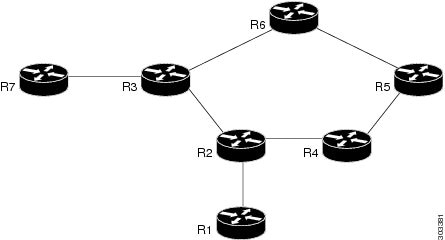
The following figure shows the repair path that is automatically created by the Remote LFA-FRR feature to bypass looping. In this figure, the traffic is flowing between CE nodes (R1 to R7) through the PE nodes (protected link - R2 and R3). When the PE node fails, the repair path (R2 - R4- R5 - R6 - R3) is used to route the traffic between CE nodes.

Figure 1. Remote LFA-FRR Link Protection

R1 and R7

CE nodes

R6 - R5 - R4

P nodes

R2 and R3

PE nodes (protected link)

R2 - R4- R5 - R6 - R3

Fast Reroute Repair Path

Benefits of Remote LFA-FRR

  • Simplifies operation with minimum configuration
  • Eliminates additional traffic engineering (TE) protocols.
  • Computes PQ node dynamically without any manual provisioning (PQ node is a member of both the extended P-space and the Q-space. P-space is the set of routers reachable from a specific router without any path (including equal cost path splits) transiting the protected link. Q-space is the set of routers from which a specific router can be reached without any path, including equal cost path splits, transiting the protected link.)
  • Prevents hair pinning that occurs in TE-FRR
  • Remote LFA-FRR supports the following:
    • Basic LFA-FRR (supported for OSPF and IS-IS protocols)
    • IP, L2VPN, and L3VPN
    • BFD triggered MPLS TE-FRR. Supports BFD sessions with 50ms interval.

Pseudowire Redundancy over FRR

Pseudowire redundancy enables you to configure a pseudowire as a backup for the primary pseudowire. When the primary pseudowire fails, the services are switched to the backup pseudowire. Effective with Cisco IOS Release 15.4(1)S, Pseudowire Redundancy over FRR feature is supported.

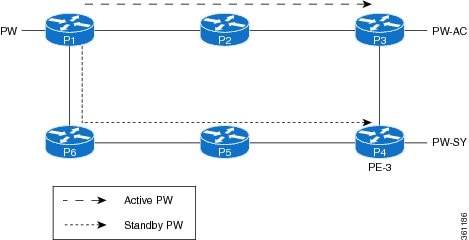
You can enable FRR (TE-FRR and RLFA) in the network for both active and standby pseudowires separately. The primary and backup paths for these virtual circuits (VCs) may or may not overlap. This feature supports link failures through FRR and node failures through PW redundancy. It supports up to 500 primary and backup pseudowires.

The following figure shows the pseudowire redundancy over FRR implementation.

Figure 2. Pseudowire Redundancy Over FRR

Conditions for Switchover

  • If the primary path to the peer node goes down for active VC, the FRR changes to backup and the VC remains active.
  • A VC switchover does not occur unless both primary and backup paths are down for active VC.
  • The standby VC does not go down until both primary and backup paths to the standby peer are down.
  • A VC switchover occurs when the peer node of the active VC reboots or when the access circuit goes down.
  • If the peer node of active VC reboots when the standby VC is in backup state, the VC switchover occurs immediately and the standby VC becomes active.

How to Configure Remote Loop-Free Alternate - Fast Reroute


Note


Effective with Cisco IOS Release 15.3(3)S, the Remote LFA-FRR feature is supported on CESoPSN, SAToP, and ATM/IMA.
  • Effective with Cisco IOS Release 15.4(1)S, the Pseudowire Redundancy over FRR feature is supported.

This section describes how to configure Remote LFA-FRR feature:

Configuring Remote LFA-FRR for IS-IS

To configure Remote LFA-FRR for the IS-IS routing process, complete the following steps:

Procedure

  Command or Action Purpose

Step 1

enable

Example:


Router> enable

Enables privileged EXEC mode.

  • Enter your password if prompted.

Step 2

configure terminal

Example:


Router# configure terminal

Enters global configuration mode.

Step 3

interface type number

Example:


Router(config)# interface vlan 40

Specifies an interface type and number, and enters interface configuration mode.

Step 4

no negotiation auto

Example:


Router(config-if)# no negotiation auto 

Disables automatic negotiation.

Step 5

service instance id ethernet

Example:


Router(config-if)# service instance 7 ethernet 

Configures an Ethernet service instance on an interface.

  • id —Integer that uniquely identifies a service instance on an interface.

Step 6

encapsulation dot1q vlan-id

Example:


Router(config-if)# encapsulation dot1q 7 

Enables IEEE 802.1Q encapsulation of traffic on a specified interface in a VLAN.

  • vlan-id —Virtual LAN identifier.

Step 7

rewrite ingress tag pop 1 symmetric

Example:


Router(config-if)# rewrite ingress tag pop 1 symmetric 

Specifies the encapsulation adjustment to be performed on a frame ingressing a service instance.

  • pop —Removes a tag from a packet.
  • 1 —Specifies the outermost tag for removal from a packet.
  • symmetric —Indicates a reciprocal adjustment to be done in the egress direction. For example, if the ingress pops a tag, the egress pushes a tag and if the ingress pushes a tag, the egress pops a tag.

Step 8

bridge-domain bridge-domain-id

Example:


Router(config-if)# bridge-domain 7 

Enables RFC 1483 ATM bridging or RFC 1490 Frame Relay bridging to map a bridged VLAN to an ATM permanent virtual circuit (PVC) or Frame Relay data-link connection identifier (DLCI).

  • bridge-domain-id —Bridge domain identifier.

Step 9

interface vlan bridge-domain-id

Example:


Router(config-if)# interface vlan 7

Configures an Ethernet interface to create or access a dynamic Switch Virtual Interface (SVI).

Step 10

ip address ip-address

Example:


Router(config-if)# ip address 7.7.7.1 255.255.255.0

Specifies an IP address for the specified interface.

Step 11

ip router isis

Example:


Router(config-if)# ip router isis

Configures an IS-IS routing process for an IP on an interface.

Step 12

mpls ip

Example:


Router(config-if)# mpls ip

Enables MPLS forwarding of IPv4 packets along normally routed paths for a particular interface.

Step 13

isis network point-to-point

Example:


Router(config-if)# isis network point-to-point

Configures a network of two networking devices that use the integrated IS-IS routing protocol to function as a point-to-point link.

Step 14

exit

Example:


Router(config-if)# exit

Exits the interface configuration mode and enters the global configuration mode.

Step 15

router isis

Example:


Router(config)# router isis 

Enables the IS-IS routing protocol and enters the router configuration mode.

Step 16

fast-reroute per-prefix {level-1 | level-2} {all | route-map route-map-name}

Example:


Router(config-router)# fast-reroute per-prefix level-1 all

Configures an FRR path that redirects traffic to a remote LFA tunnel for either level 1 or level 2 packets.

  • level-1 —Enables per-prefix FRR of level 1 packets.
  • level-2 —Enables per-prefix FRR of level 2 packets.
  • all —Enables FRR of all primary paths.
  • route-map —Specifies the route map for selecting primary paths for protection.
  • route-map-name —Route map name.

Step 17

fast-reroute remote-lfa {level-1 | level-2} mpls-ldp [maximum-metric metric-value]

Example:


Router(config-router)# fast-reroute remote-lfa level-1 mpls-ldp

Configures an FRR path that redirects traffic to a remote LFA tunnel.

  • level-1 —Enables LFA-FRR of level 1 packets.
  • level-2 —Enables LFA-FRR of level 2 packets.
  • mpls-ldp —Specifies that the tunnel type is MPLS or LDP.
  • maximum-metric —Specifies the route map for selecting primary paths for protection.
  • metric-value —Metric value.

Step 18

mpls ldp sync

Example:


Router(config-router)# mpls ldp sync

Enables MPLS LDP synchronization on interfaces for an IS-IS process.

Step 19

mpls ldp igp sync holddown milliseconds

Example:


Router(config)# mpls ldp igp sync holddown 1000

Specifies how long an Interior Gateway Protocol (IGP) should wait for Label Distribution Protocol (LDP) synchronization to be achieved.

  • milliseconds —Peer host name or IP address.

Configuring Remote LFA-FRR for OSPF

To configure Remote LFA-FRR for the OSPF routing process, complete the following steps:

Procedure

  Command or Action Purpose

Step 1

enable

Example:


Router> enable

Enables privileged EXEC mode.

  • Enter your password if prompted.

Step 2

configure terminal

Example:


Router# configure terminal

Enters global configuration mode.

Step 3

interface type number

Example:


Router(config)# interface vlan 40

Specifies an interface type and number, and enters interface configuration mode.

Step 4

no negotiation auto

Example:


Router(config-if)# no negotiation auto 

Disables automatic negotiation.

Step 5

service instance id ethernet

Example:


Router(config-if)# service instance 7 ethernet 

Configures an Ethernet service instance on an interface.

  • id —Integer that uniquely identifies a service instance on an interface.

Step 6

encapsulation dot1q vlan-id

Example:


Router(config-if)# encapsulation dot1q 7 

Enables IEEE 802.1Q encapsulation of traffic on a specified interface in a VLAN.

  • vlan-id —Virtual LAN identifier.

Step 7

rewrite ingress tag pop 1 symmetric

Example:


Router(config-if)# rewrite ingress tag pop 1 symmetric 

Specifies the encapsulation adjustment to be performed on a frame ingressing a service instance.

  • pop —Removes a tag from a packet.
  • 1 —Specifies the outermost tag for removal from a packet.
  • symmetric —Indicates a reciprocal adjustment to be done in the egress direction. For example, if the ingress pops a tag, the egress pushes a tag and if the ingress pushes a tag, the egress pops a tag.

Step 8

bridge-domain bridge-domain-id

Example:


Router(config-if)# bridge-domain 7 

Enables RFC 1483 ATM bridging or RFC 1490 Frame Relay bridging to map a bridged VLAN to an ATM permanent virtual circuit (PVC) or Frame Relay data-link connection identifier (DLCI).

  • bridge-domain-id —Bridge domain identifier.

Step 9

interface vlan bridge-domain-id

Example:


Router(config-if)# interface vlan 7

Configures an Ethernet interface to create or access a dynamic SVI.

Step 10

ip address ip-address

Example:


Router(config-if)# ip address 7.7.7.1 255.255.255.0

Specifies an IP address for the specified interface.

Step 11

exit

Example:


Router(config-if)# exit

Exits the interface configuration mode and enters the global configuration mode.

Step 12

router ospf

Example:


Router(config)# router ospf 

Enables the OSPF routing protocol and enters the router configuration mode.

Step 13

fast-reroute per-prefix enable [area area-id]

Example:


Router(config-router)# fast-reroute per-prefix enable area 1

Configures a per-prefix loop-free alternate (LFA) Fast Reroute (FRR) path that redirects traffic to an alternative next hop other than the primary neighbor.

  • area —Specifies the area in which to enable LFA-FRR.
  • area-id —OSPF area ID expressed as a decimal value or in IP address format.

Step 14

fast-reroute per-prefix remote-lfa [area area-id]

Example:


Router(config-router)# fast-reroute per-prefix remote-lfa area 1

Configures a per-prefix LFA FRR path that redirects traffic to a remote LFA area.

Step 15

mpls ldp sync

Example:


Router(config-router)# mpls ldp sync

Enables MPLS LDP synchronization on interfaces for an OSPF process.

Configuring Remote LFA-FRR for Ethernet and TDM Pseudowires


Note


The Remote LFA-FRR feature is supported on the TDM pseudowires from Cisco IOS Realease 15.3(3)S onwards. The configuration and restrictions for EoMPLS are also applicable to the TDM pseudowires.

Note


During packet loss, SAToP requires one second for convergence and two seconds for recovery.

Configuring Remote LFA-FRR on a Global Interface

To configure Remote LFA-FRR on a global interface, complete the following steps:

Procedure
  Command or Action Purpose

Step 1

enable

Example:

Router> enable

Enables privileged EXEC mode.

  • Enter your password if prompted.

Step 2

configure terminal

Example:

Router# configure terminal

Enters global configuration mode.

Step 3

mpls label protocol ldp

Example:

Router(config)# mpls label protocol ldp

Specifies that this LDP is the default distribution protocol.

Step 4

no l3-over-l2 flush buffers

Example:

Router(config)# no l3-over-l2 flush buffers 

Disables Layer 3 over Layer 2 deployments.

Step 5

asr901-platf-frr enable

Example:

Router(config)# asr901-platf-frr enable

Enables TE-FRR link protection.

Step 6

mpls ldp discovery targeted-hello accept

Example:

Router(config)# mpls ldp discovery targeted-hello accept 

Configures the neighbors from which requests for targeted hello messages may be honored.

  • targeted-hello —Configures the intervals and hold times for neighbors that are not directly connected.
  • accept —Configures the router to respond to requests for targeted hello messages from all neighbors.

Configuring Remote LFA-FRR on a GigabitEthernet Interface

To configure Remote LFA-FRR on a GigabitEthernet interface, complete the following steps:

Procedure
  Command or Action Purpose

Step 1

enable

Example:

Router> enable

Enables privileged EXEC mode.

  • Enter your password if prompted.

Step 2

configure terminal

Example:

Router# configure terminal

Enters global configuration mode.

Step 3

interface type number

Example:

Router(config)# interface vlan 40

Specifies an interface type and number, and enters interface configuration mode.

Step 4

no negotiation auto

Example:

Router(config-if)# no negotiation auto 

Disables automatic negotiation.

Step 5

service instance id ethernet

Example:

Router(config-if)# service instance 7 ethernet 

Configures an Ethernet service instance on an interface.

  • id —Integer that uniquely identifies a service instance on an interface.

Step 6

encapsulation dot1q vlan-id

Example:

Router(config-if-srv)# encapsulation dot1q 7 

Enables IEEE 802.1Q encapsulation of traffic on a specified interface in a VLAN.

  • vlan-id —Virtual LAN identifier.

Step 7

rewrite ingress tag pop 1 symmetric

Example:

Router(config-if-srv)# rewrite ingress tag pop 1 symmetric 

Specifies the encapsulation adjustment to be performed on a frame ingressing a service instance.

  • pop —Removes a tag from a packet.
  • 1 —Specifies the outermost tag for removal from a packet.
  • symmetric —Indicates a reciprocal adjustment to be done in the egress direction. For example, if the ingress pops a tag, the egress pushes a tag and if the ingress pushes a tag, the egress pops a tag.

Step 8

bridge-domain bridge-domain-id

Example:

Router(config-if-srv)# bridge-domain 7 

Enables RFC 1483 ATM bridging or RFC 1490 Frame Relay bridging to map a bridged VLAN to an ATM permanent virtual circuit (PVC) or Frame Relay data-link connection identifier (DLCI).

  • bridge-domain-id —Bridge domain identifier.

Configuring Remote LFA-FRR on an SVI Interface

To configure Remote LFA-FRR on an SVI interface, complete the following steps:

Procedure
  Command or Action Purpose

Step 1

enable

Example:

Router> enable

Enables privileged EXEC mode.

  • Enter your password if prompted.

Step 2

configure terminal

Example:

Router# configure terminal

Enters global configuration mode.

Step 3

interface type number

Example:

Router(config)# interface vlan 40

Specifies an interface type and number, and enters interface configuration mode.

Step 4

ip address ip-address

Example:

Router(config-if)# ip address 7.7.7.1 255.255.255.0

Specifies an IP address for the specified interface.

Step 5

ip router isis

Example:

Router(config-if)# ip router isis

Configures an IS-IS routing process for an IP on an interface.

Step 6

mpls ip

Example:

Router(config-if)# mpls ip

Enables MPLS forwarding of IPv4 packets along normally routed paths for a particular interface.

Step 7

isis network point-to-point

Example:

Router(config-if)# isis network point-to-point

Configures a network of two networking devices that use the integrated IS-IS routing protocol to function as a point-to-point link.

Configuring Remote LFA-FRR on IS-IS

To configure Remote LFA-FRR for the IS-IS routing process, complete the following steps:

Procedure
  Command or Action Purpose

Step 1

enable

Example:

Router> enable

Enables privileged EXEC mode.

  • Enter your password if prompted.

Step 2

configure terminal

Example:

Router# configure terminal

Enters global configuration mode.

Step 3

router isis

Example:

Router(config)# router isis 

Enables the IS-IS routing protocol and enters the router configuration mode.

Step 4

net net

Example:

Router(config-router)# net 49.0001.0002.0001.0001.00

Configures an IS-IS network entity table (NET) for the routing process.

Step 5

is-type level-1

Example:

Router(config-router)# is-type level-1 

Configures the routing level for an instance of the IS-IS routing process.

  • level-1 —Router performs only Level 1 (intra-area) routing. This router learns only about destinations inside its area.

Step 6

advertise-passive-only

Example:

Router(config-router)# advertise-passive-only 

Configures IS-IS to advertise only prefixes that belong to passive interfaces.

Step 7

ispf level-1

Example:

Router(config-router)# ispf level-1 

Enables incremental shortest path first (SPF).

  • level-1 —Enables incremental SPF for Level 1 packets only. The level-1 keyword applies only after enabling IS-IS.

Note

 
When IS-IS incremental SPF is configured on a ring topology, high convergence numbers are observed for random global prefixes. See CSCue11410 for details.

Step 8

fast-flood

Example:

Router(config-router)# fast-flood 

Fills IS-IS link-state packets (LSPs).

Step 9

max-lsp-lifetime seconds

Example:

Router(config-router)# max-lsp-lifetime 65535 

Configures the maximum link-state packets (LSPs) lifetime.

  • seconds —Maximum LSP lifetime in seconds. The range is from 1 to 65535.

Step 10

lsp-refresh-interval seconds

Example:

Router(config-router)# lsp-refresh-interval 900 

Sets the link-state packet (LSP) refresh interval.

  • seconds—Interval (in seconds) at which LSPs are refreshed.The range is 1 to 65535 seconds. The default value is 900 seconds (15 minutes).

Step 11

spf-interval [level-1 | level-2] spf-max-wait [spf-initial-wait spf-second-wait]

Example:

Router(config-router)# spf-interval 5 50 200

Customizes IS-IS throttling of shortest path first (SPF) calculations.

  • level-1 —(Optional) Apply intervals to Level-1 areas only.
  • level-2 —(Optional) Apply intervals to Level-2 areas only.
  • spf-max-wait —Indicates the maximum interval (in seconds) between two consecutive SPF calculations. The range is 1 to 120 seconds. The default is 10 seconds.
  • spf-initial-wait —(Optional) Indicates the initial SPF calculation delay (in milliseconds) after a topology change. The range is 1 to 120000 milliseconds. The default is 5500 milliseconds (5.5 seconds).
  • spf-second-wait —(Optional) Indicates the hold time between the first and second SPF calculation (in milliseconds). The range is 1 to 120000 milliseconds. The default is 5500 milliseconds (5.5 seconds).

Step 12

prc-interval prc-max-wait [prc-initial-wait prc-second-wait]

Example:

Router(config-router)# prc-interval 5 50 200

Customizes IS-IS throttling of partial route calculations (PRC).

  • prc-max-wait —Indicates the maximum interval (in seconds) between two consecutive PRC calculations. Value range is 1 to 120 seconds. The default is 5 seconds.
  • prc-initial-wait —(Optional) Indicates the initial PRC calculation delay (in milliseconds) after a topology change. The range is 1 to 120,000 milliseconds. The default is 2000 milliseconds.
  • prc-second-wait —(Optional) Indicates the hold time between the first and second PRC calculation (in milliseconds). The range is 1 to 120,000 milliseconds. The default is 5000 milliseconds (5 seconds).

Step 13

lsp-gen-interval [level-1 | level-2] lsp-max-wait [lsp-initial-wait lsp-second-wait]

Example:

Router(config-router)# lsp-gen-interval 5 50 200

Customizes IS-IS throttling of LSP generation.

  • level-1 —(Optional) Apply intervals to Level-1 areas only.
  • level-2 —(Optional) Apply intervals to Level-2 areas only.
  • lsp-max-wait —Indicates the maximum interval (in seconds) between two consecutive occurrences of an LSP being generated. The range is 1 to 120 seconds. The default is 5 seconds.
  • lsp-initial-wait —(Optional) Indicates the initial LSP generation delay (in milliseconds). The range is 1 to 120,000 milliseconds. The default is 50 milliseconds.
  • lsp-second-wait —(Optional) Indicates the hold time between the first and second LSP generation (in milliseconds). The range is 1 to 120,000 milliseconds. The default is 5000 milliseconds (5 seconds).

Step 14

no hello padding

Example:

Router(config-router)# no hello padding

Reenables IS-IS hello padding at the router level.

Step 15

log-adjacency-changes

Example:

Router(config-router)# log-adjacency-changes

Configures the router to send a syslog message when an OSPF neighbor goes up or down.

Step 16

fast-reroute per-prefix {level-1 | level-2} {all | route-map route-map-name}

Example:

Router(config-router)# fast-reroute per-prefix level-1 all

Configures an FRR path that redirects traffic to a remote LFA tunnel for either level 1 or level 2 packets.

  • level-1 —Enables per-prefix FRR of level 1 packets.
  • level-2 —Enables per-prefix FRR of level 2 packets.
  • all —Enables FRR of all primary paths.
  • route-map —Specifies the route map for selecting primary paths for protection.
  • route-map-name —Route map name.

Step 17

fast-reroute remote-lfa {level-1 | level-2} mpls-ldp [maximum-metric metric-value]

Example:

Router(config-router)# fast-reroute remote-lfa level-1 mpls-ldp

Configures an FRR path that redirects traffic to a remote LFA tunnel.

  • level-1 —Enables LFA-FRR of level 1 packets.
  • level-2 —Enables LFA-FRR of level 2 packets.
  • mpls-ldp —Specifies that the tunnel type is MPLS or LDP.
  • maximum-metric —(Optional)Specifies the maximum metric value required to reach the release node.
  • metric-value —Metric value.

Step 18

passive-interface interface-type interface-number

Example:

Router(config-router)# passive-interface Loopback0

Disables sending routing updates on an interface.

  • interface-type —Interface type.
  • interface-number —Interface number.

Step 19

mpls ldp sync

Example:

Router(config-router)# mpls ldp sync

Enables MPLS LDP synchronization on interfaces for an IS-IS process.

Configuring LFA-FRR for EoMPLS

To configure LFA-FRR for EoMPLS, complete the following steps:


Note


Effective with Cisco IOS release 15.4(1)S, the EoMPLS Pseudowire Redundancy over FRR feature is supported.
Procedure
  Command or Action Purpose

Step 1

enable

Example:

Router> enable

Enables privileged EXEC mode.

  • Enter your password if prompted.

Step 2

configure terminal

Example:

Router# configure terminal

Enters global configuration mode.

Step 3

interface type number

Example:

Router(config)# interface gigabitethernet 0/1 

Specifies an interface type and number and enters interface configuration mode.

Step 4

no ip address

Example:

Router(config-if)# no ip address

Removes an IP address or disables IP processing.

Step 5

negotiation auto

Example:

Router(config-if)# negotiation auto

Enables automatic negotiation.

Step 6

service instance id ethernet

Example:

Router(config-if)# service instance 100 ethernet

Configures an Ethernet service instance on an interface.

  • id —Integer that uniquely identifies a service instance on an interface. The value varies by the platform. Range: 1 to 4294967295. The identifier need not map to a VLAN and is local in scope to the interface.

Step 7

encapsulation dot1q vlan-id

Example:

Router(config-if-srv)# encapsulation dot1q 101

Enables IEEE 802.1Q encapsulation of traffic on a specified subinterface in a VLAN.

  • vlan-id —Virtual LAN identifier. The allowed range is from 1 to 4094. For the IEEE 802.1Q-in-Q VLAN Tag Termination feature, the first instance of this argument defines the outer VLAN ID, and the second and subsequent instances define the inner VLAN ID.

Step 8

rewrite ingress tag pop 1 symmetric

Example:

Router(config-if-srv)# rewrite ingress tag pop 1 symmetric

Specifies the encapsulation adjustment to be performed on a frame ingressing a service instance.

Step 9

xconnect peer-ip-address vc-id encapsulation mpls

Example:

Router(config-if-srv)# xconnect 10.0.0.4 4 encapsulation mpls

Binds an attachment circuit to a pseudowire, and to configure an Any Transport over MPLS (AToM) static pseudowire.

  • peer-ip-address —IP address of the remote provider edge (PE) peer. The remote router ID can be any IP address, as long as it is reachable.
  • vc-id —The 32-bit identifier of the virtual circuit (VC) between the PE routers.
  • encapsulation —Specifies the tunneling method to encapsulate the data in the pseudowire.
  • mpls —Specifies Multiprotocol Label Switching (MPLS) as the tunneling method.

Step 10

backup peer peer-ip-address vc-id

Example:

Router(config-if-ether-vc-xconn)# backup peer 10.0.0.5 4

Specifies a redundant peer for a pseudowire VC.

  • peer-ip-address —IP address of the remote peer.

Configuring LFA-FRR for ATM/IMA

To configure LFA-FRR for ATM/IMA, complete the following steps:


Note


Effective with Cisco IOS release 15.4(1)S, the TDM Pseudowire Redundancy over FRR feature is supported.
Procedure
  Command or Action Purpose

Step 1

enable

Example:

Router> enable

Enables privileged EXEC mode.

  • Enter your password if prompted.

Step 2

configure terminal

Example:

Router# configure terminal

Enters global configuration mode.

Step 3

controller {t1 | e1} slot/port

Example:

Router(config)# controller e1 0/0 

Selects a T1 or E1 controller and enters controller configuration mode.

Step 4

ima-group ima-group-number

Example:

Router(config-controller)# ima-group 2

Assigns the interface to an IMA group.

  • ima-group-number —IMA group number.

Step 5

exit

Example:

Router(config-controller)# exit

Exits controller configuration mode and enters global configuration mode.

Step 6

interface ATM slot /IMA group-number

Example:

Router(config)# interface ATM0/IMA2

Configures inverse multiplexing over ATM (IMA) group.

  • slot —Specifies the slot location of the ATM IMA port adapter.
  • group-number —Specifies the group number of the IMA group.

Step 7

no ip address

Example:

Router(config-if)# no ip address

Disables IP address configuration for the physical layer interface.

Step 8

no atm ilmi-keepalive

Example:

Router(config-if)# no atm ilmi-keepalive

Disables the Interim Local Management Interface (ILMI) keepalive parameters.

Step 9

pvc vpi/vci l2transport

Example:

Router(config-if)# pvc 90/90 l2transport

Create or assigns a name to an ATM permanent virtual circuit (PVC), to specify the encapsulation type on an ATM PVC.

  • vpi —ATM network virtual path identifier (VPI) for this PVC.
  • vci —ATM network virtual channel identifier (VCI) for this PVC.

Step 10

xconnect ip-address encapsulation mpls

Example:

Router(config-if-cem)# xconnect 2.2.2.2 111 encapsulation mpls

Binds an attachment circuit to a pseudowire, to configure an Any Transport over MPLS (AToM) static pseudowire.

  • ip-address —IP address of the remote provider edge (PE) peer. The remote router ID can be any IP address, as long as it is reachable.
  • encapsulation —Specifies the tunneling method to encapsulate the data in the pseudowire.
  • mpls —Specifies Multiprotocol Label Switching (MPLS) as the tunneling method.

Step 11

backup peer peer-ip-address

Example:

Router(config-if-xconn)# backup peer 2.2.2.3 111 

Specifies a redundant peer for a pseudowire VC.

  • peer-ip-address —IP address of the remote peer.

Configuring LFA-FRR for CESoPSN

To configure LFA-FRR for CESoPSN, complete the following steps:


Note


Effective with Cisco IOS release 15.4(1)S, the TDM Pseudowire Redundancy over FRR feature is supported.
Procedure
  Command or Action Purpose

Step 1

enable

Example:

Router> enable

Enables privileged EXEC mode.

  • Enter your password if prompted.

Step 2

configure terminal

Example:

Router# configure terminal

Enters global configuration mode.

Step 3

controller {t1 | e1} slot/port

Example:

Router(config)# controller e1 0/0 

Selects a T1 or E1 controller and enters controller configuration mode.

Step 4

clock source internal

Example:

Router(config-controller)# clock source internal

Sets clocking for individual links.

Step 5

cem-group group-number timeslots timeslot-range

Example:

Router(config-controller)# cem-group 0 timeslots 1-31 

Assigns channels on the T1 or E1 circuit to the circuit emulation (CEM) channel and specific timeslots to the CEM channel.

  • group-number —Channel number to be used for this group of time slots.
  • timeslot —Specifies that a list of time slots is to be used as specified by the timeslot-range argument.
  • timeslot-range —List of the time slots to be included in the CEM channel. The list may include commas and hyphens with no spaces between the numbers.

Step 6

description descriptive-name

Example:

Router(config-controller)# description E1 CESoPSN example 

Specifies a descriptive name for the controller.

Step 7

exit

Example:

Router(config)# exit

Exits global configuration mode.

Step 8

interface cem slot/port

Example:

Router(config)# interface CEM 0/0

Defines a CEM channel.

Step 9

no ip address

Example:

Router(config-cem)# no ip address

Removes an IP address or disables IP processing.

Step 10

cem group-number

Example:

Router(config-cem)# cem 0

Defines a CEM channel.

Step 11

xconnect ip-address encapsulation mpls

Example:

Router(config-cem)# xconnect 2.2.2.2 111 encapsulation mpls

Binds an attachment circuit to a pseudowire, to configure an Any Transport over MPLS (AToM) static pseudowire.

  • ip-address —IP address of the remote provider edge (PE) peer. The remote router ID can be any IP address, as long as it is reachable.
  • encapsulation —Specifies the tunneling method to encapsulate the data in the pseudowire.
  • mpls —Specifies Multiprotocol Label Switching (MPLS) as the tunneling method.

Step 12

backup peer peer-ip-address

Example:

Router(config-if-xconn)# backup peer 2.2.2.3 111 

Specifies a redundant peer for a pseudowire VC.

  • peer-ip-address —IP address of the remote peer.

Configuring LFA-FRR for SAToP

To configure LFA-FRR for SAToP, complete the following steps:


Note


Effective with Cisco IOS release 15.4(1)S, the TDM Pseudowire Redundancy over FRR feature is supported.
Procedure
  Command or Action Purpose

Step 1

enable

Example:

Router> enable

Enables privileged EXEC mode.

  • Enter your password if prompted.

Step 2

configure terminal

Example:

Router# configure terminal

Enters global configuration mode.

Step 3

controller {t1 | e1} slot/port

Example:

Router(config)# controller e1 0/0 

Selects a T1 or E1 controller and enters controller configuration mode.

Step 4

framing unframed

Example:

Router(config-controller)# framing unframed

Specifies the framing format of a circuit emulation (CEM) T1 or E1 port.

Step 5

clock source internal

Example:

Router(config-controller)# clock source internal

Sets clocking for individual T1 or E1 links.

Step 6

cem-group group-number unframed

Example:

Router(config-controller)# cem-group 0 unframed 

Assigns channels on the T1 or E1 circuit to the CEM channel.

  • group-number —Channel number to be used for this group of time slots.
  • unframed —Specifies that a single CEM channel is being created including all time slots and the framing structure of the line.

Step 7

description descriptive-name

Example:

Router(config-controller)# description E1 SAToP example 

Specifies a descriptive name for the controller

Step 8

exit

Example:

Router(config-controller)# exit

Exits controller configuration mode.

Step 9

interface cem slot/port

Example:

Router(config)# interface CEM 0/0

Defines a CEM channel.

Step 10

no ip address

Example:

Router(config-if)# no ip address

Removes an IP address or disables IP processing.

Step 11

cem group-number

Example:

Router(config-if)# cem 0

Defines a CEM channel.

Step 12

xconnect ip-address encapsulation mpls

Example:

Router(config-if-cem)# xconnect 2.2.2.2 111 encapsulation mpls

Binds an attachment circuit to a pseudowire, to configure an Any Transport over MPLS (AToM) static pseudowire.

  • ip-address —IP address of the remote provider edge (PE) peer. The remote router ID can be any IP address, as long as it is reachable.
  • encapsulation —Specifies the tunneling method to encapsulate the data in the pseudowire.
  • mpls —Specifies Multiprotocol Label Switching (MPLS) as the tunneling method.

Step 13

backup peer peer-ip-address

Example:

Router(config-if-cem-xconn)# backup peer 2.2.2.3 111 

Specifies a redundant peer for a pseudowire VC.

  • peer-ip-address —IP address of the remote peer.

Verification Examples for Remote LFA-FRR

Verifying Remote LFA-FRR Configuration

To verify the remote LFA-FRR configuration, use the show commands described in the following examples.

To display information for an OSPF per-prefix LFA-FRR configuration, use the following show command.


Router# show ip ospf fast-reroute remote-lfa tunnels
            OSPF Router with ID (1.1.1.1) (Process ID 1)
                     Area with ID (0)
                    Base Topology (MTID 0)
Interface MPLS-Remote-Lfa5
  Tunnel type: MPLS-LDP
  Tailend router ID: 5.5.5.5
  Termination IP address: 5.5.5.5
  Outgoing interface: Vlan4004
  First hop gateway: 71.14.1.4
  Tunnel metric: 2
  Protects:
    71.17.1.7 Vlan4003, total metric 4
Interface MPLS-Remote-Lfa6
  Tunnel type: MPLS-LDP
  Tailend router ID: 6.6.6.6
  Termination IP address: 6.6.6.6
  Outgoing interface: Vlan4003
  First hop gateway: 71.17.1.7
  Tunnel metric: 2
  Protects:
    71.14.1.4 Vlan4004, total metric 4

To display entries in the Cisco Express Forwarding (CEF) Forwarding Information Base (FIB), use the following show command.


Router# show ip cef 171.1.1.0 internal
171.1.1.0/24, epoch 0, RIB[I], refcount 5, per-destination sharing
  sources: RIB, LTE
  feature space:
   IPRM: 0x00028000
   LFD: 171.1.1.0/24 1 local label
   local label info: global/542
        contains path extension list
        disposition chain 0x12E83850
        label switch chain 0x12E83850
  ifnums:
   Vlan4004(30): 71.14.1.4
   MPLS-Remote-Lfa6(37)
  path 12C70E98, path list 12D52154, share 1/1, type attached nexthop, for IPv4, flags has-repair
    MPLS short path extensions: MOI flags = 0x20 label 31
  nexthop 71.14.1.4 Vlan4004 label [31|537], adjacency IP adj out of Vlan4004, addr 71.14.1.4 12CD6A40
    repair: attached-nexthop 6.6.6.6 MPLS-Remote-Lfa6 (12C70FE8)
  path 12C70FE8, path list 12D52154, share 1/1, type attached nexthop, for IPv4, flags repair, repair-only
  nexthop 6.6.6.6 MPLS-Remote-Lfa6, repair, adjacency IP midchain out of MPLS-Remote-Lfa6 12CD7880
  output chain: label [31|537]
  FRR Primary (0x11139020)
  <primary:  TAG adj out of Vlan4004, addr 71.14.1.4 12D8A780>
  <repair:  TAG midchain out of MPLS-Remote-Lfa6 12CD6580 label 338 TAG adj out of Vlan4003, addr 71.17.1.7 12CD7160>

To display local Routing Information Base (RIB) or locally redistributed routes use the following show command.


Router# show ip ospf rib 171.1.1.0
            OSPF Router with ID (1.1.1.1) (Process ID 1)
                Base Topology (MTID 0)
OSPF local RIB
Codes: * - Best, > - Installed in global RIB
LSA: type/LSID/originator
*>  171.1.1.0/24, Intra, cost 2, area 0
     SPF Instance 130, age 00:03:52
     Flags: RIB, iSPF
      via 71.14.1.4, Vlan4004
       Flags: RIB, iSPF
       LSA: 1/2.0.0.2/2.0.0.2
      repair path via 6.6.6.6, MPLS-Remote-Lfa6, cost 4
       Flags: RIB, Repair, IntfDj, BcastDj, CostWon
       LSA: 1/2.0.0.2/2.0.0.2

To display information for an IS-IS per-prefix LFA-FRR configuration, use the following show command.


Router# show isis fast-reroute remote-lfa tunnels
Tag Null - Fast-Reroute Remote-LFA Tunnels:
  MPLS-Remote-Lfa1: use Vl4003, nexthop 71.17.1.7, end point 6.6.6.6
  MPLS-Remote-Lfa2: use Vl4004, nexthop 71.14.1.4, end point 5.5.5.5

To display entries in the CEF Forwarding Information Base (FIB) use the following show command.


Router# show ip cef 171.1.1.0 internal
171.1.1.0/24, epoch 0, RIB[I], refcount 5, per-destination sharing
  sources: RIB, LTE
  feature space:
   IPRM: 0x00028000
   LFD: 171.1.1.0/24 1 local label
   local label info: global/18
        contains path extension list
        disposition chain 0x12B537C8
  ifnums:
   Vlan4004(30): 71.14.1.4
   MPLS-Remote-Lfa1(32)
  path 12C55CB4, path list 12C856E8, share 1/1, type attached nexthop, for IPv4, flags has-repair
    MPLS short path extensions: MOI flags = 0x20 label none
  nexthop 71.14.1.4 Vlan4004 label [none|23], adjacency IP adj out of Vlan4004, addr 71.14.1.4 1139FAA0
    repair: attached-nexthop 6.6.6.6 MPLS-Remote-Lfa1 (12C55D24)
  path 12C55D24, path list 12C856E8, share 1/1, type attached nexthop, for IPv4, flags repair, repair-only
  nexthop 6.6.6.6 MPLS-Remote-Lfa1, repair, adjacency IP midchain out of MPLS-Remote-Lfa1 12D512C0
  output chain: label [none|23]
  FRR Primary (0xA74F800)
  <primary:  IP adj out of Vlan4004, addr 71.14.1.4 1139FAA0>
  <repair:  TAG midchain out of MPLS-Remote-Lfa1 11180740 label 366 TAG adj out of Vlan4003, addr 71.17.1.7 12D51520>

To display information about IS-IS FRR configurations, use the following show command.


Router# show isis fast-reroute summary
Tag null:
IPv4 Fast-Reroute Protection Summary:
 Prefix Counts:          Total      Protected    Coverage
   High priority:        0          0            0%
   Normal priority:      10         8            80%
   Total:                10         8            80%

To display paths for a specific route or for all routes under a major network that are stored in the IP local Routing Information Base (RIB), use the following show command.


Router# show isis rib 171.1.1.0
IPv4 local RIB for IS-IS process
IPV4 unicast topology base (TID 0, TOPOID 0x0) =================
Repair path attributes:
    DS - Downstream, LC - Linecard-Disjoint, NP - Node-Protecting
    PP - Primary-Path, SR - SRLG-Disjoint
Routes under majornet 171.1.0.0/16:
171.1.1.0/24
  [115/L1/10] via 71.14.1.4(Vlan4004), from 71.14.1.4, tag 0, LSP[2/18]
              (installed)
     repair path: 6.6.6.6(MPLS-Remote-Lfa1) metric:20 (DS,SR) LSP[2]
Verifying Remote LFA-FRR Configuration for EoMPLS on a GigabitEthernet Interface

To verify the remote LFA-FRR configuration for EoMPLS on a GigabitEthernet interface, use the show commands described in the following examples.


Router# show mpls l2transport vc 1 detail
Local interface: Gi0/0 up, line protocol up, Ethernet up
  Destination address: 3.3.3.3, VC ID: 1, VC status: up
    Output interface: Vl4000, imposed label stack {18 16}
    Preferred path: not configured
    Default path: active
    Next hop: 71.12.1.2
  Create time: 00:00:06, last status change time: 00:00:06
    Last label FSM state change time: 00:00:06
  Signaling protocol: LDP, peer 3.3.3.3:0 up
    Targeted Hello: 1.1.1.1(LDP Id) -> 3.3.3.3, LDP is UP
    Graceful restart: not configured and not enabled
    Non stop routing: not configured and not enabled
    Status TLV support (local/remote)   : enabled/supported
      LDP route watch                   : enabled
      Label/status state machine        : established, LruRru
      Last local dataplane   status rcvd: No fault
      Last BFD dataplane     status rcvd: Not sent
      Last BFD peer monitor  status rcvd: No fault
      Last local AC  circuit status rcvd: No fault
      Last local AC  circuit status sent: No fault
      Last local PW i/f circ status rcvd: No fault
      Last local LDP TLV     status sent: No fault
      Last remote LDP TLV    status rcvd: No fault
      Last remote LDP ADJ    status rcvd: No fault
    MPLS VC labels: local 323, remote 16
    Group ID: local 0, remote 0
    MTU: local 1500, remote 1500
    Remote interface description:
  Sequencing: receive disabled, send disabled
  Control Word: On (configured: autosense)
  Dataplane:
    SSM segment/switch IDs: 4801/4799 (used), PWID: 1
  VC statistics:
    transit packet totals: receive 0, send 1009697
    transit byte totals:   receive 0, send 96933706
    transit packet drops:  receive 0, seq error 0, send 0
Local interface: Gi0/0 up, line protocol up, Ethernet up
  Destination address: 4.4.4.4, VC ID: 1, VC status: standby
    Output interface: Vl4000, imposed label stack {21 16}
    Preferred path: not configured
    Default path: active
    Next hop: 71.12.1.2
  Create time: 00:00:06, last status change time: 00:16:44
    Last label FSM state change time: 00:00:06
  Signaling protocol: LDP, peer 4.4.4.4:0 up
    Targeted Hello: 1.1.1.1(LDP Id) -> 4.4.4.4, LDP is UP
    Graceful restart: not configured and not enabled
    Non stop routing: not configured and not enabled
    Status TLV support (local/remote)   : enabled/supported
      LDP route watch                   : enabled
      Label/status state machine        : established, LrdRru
      Last local dataplane   status rcvd: No fault
      Last BFD dataplane     status rcvd: Not sent
      Last BFD peer monitor  status rcvd: No fault
      Last local AC  circuit status rcvd: DOWN(standby)
      Last local AC  circuit status sent: No fault
      Last local PW i/f circ status rcvd: No fault
      Last local LDP TLV     status sent: DOWN(standby)
      Last remote LDP TLV    status rcvd: No fault
      Last remote LDP ADJ    status rcvd: No fault
    MPLS VC labels: local 324, remote 16
    Group ID: local 0, remote 0
    MTU: local 1500, remote 1500
    Remote interface description:
  Sequencing: receive disabled, send disabled
  Control Word: On (configured: autosense)
  Dataplane:
    SSM segment/switch IDs: 8898/8896 (used), PWID: 2
  VC statistics:
    transit packet totals: receive 0, send 0
    transit byte totals:   receive 0, send 0
    transit packet drops:  receive 0, seq error 0, send 0

Verifying Remote LFA-FRR Configuration for EoMPLS on an EVC Interface

To verify the remote LFA-FRR configuration for EoMPLS on an EVC interface, use the show commands described in the following examples.


Router# show mpls l2transport vc 3001 detail 
Local interface: Gi0/0 up, line protocol up, Eth VLAN 200 up
  Interworking type is Ethernet
  Destination address: 3.3.3.3, VC ID: 1, VC status: up
    Output interface: Vl4000, imposed label stack {18 16}
    Preferred path: not configured
    Default path: active
    Next hop: 71.12.1.2
  Create time: 00:13:47, last status change time: 00:04:20
    Last label FSM state change time: 00:11:54
  Signaling protocol: LDP, peer 3.3.3.3:0 up
    Targeted Hello: 1.1.1.1(LDP Id) -> 3.3.3.3, LDP is UP
    Graceful restart: not configured and not enabled
    Non stop routing: not configured and not enabled
    Status TLV support (local/remote)   : enabled/supported
      LDP route watch                   : enabled
      Label/status state machine        : established, LruRru
      Last local dataplane   status rcvd: No fault
      Last BFD dataplane     status rcvd: Not sent
      Last BFD peer monitor  status rcvd: No fault
      Last local AC  circuit status rcvd: No fault
      Last local AC  circuit status sent: No fault
      Last local PW i/f circ status rcvd: No fault
      Last local LDP TLV     status sent: No fault
      Last remote LDP TLV    status rcvd: No fault
      Last remote LDP ADJ    status rcvd: No fault
    MPLS VC labels: local 16, remote 16
    Group ID: local 0, remote 0
    MTU: local 1500, remote 1500
    Remote interface description:
    MAC Withdraw: sent:1, received:0
  Sequencing: receive disabled, send disabled
  Control Word: On (configured: autosense)
  Dataplane:
    SSM segment/switch IDs: 1434251/4096 (used), PWID: 1
  VC statistics:
    transit packet totals: receive 0, send 260970
    transit byte totals:   receive 0, send 24009240
    transit packet drops:  receive 0, seq error 0, send 0
Local interface: Gi0/0 up, line protocol up, Eth VLAN 200 up
  Interworking type is Ethernet
  Destination address: 4.4.4.4, VC ID: 1, VC status: standby
    Output interface: Vl4000, imposed label stack {21 16}
    Preferred path: not configured
    Default path: active
    Next hop: 71.12.1.2
  Create time: 00:13:47, last status change time: 00:14:41
    Last label FSM state change time: 00:12:47
  Signaling protocol: LDP, peer 4.4.4.4:0 up
    Targeted Hello: 1.1.1.1(LDP Id) -> 4.4.4.4, LDP is UP
    Graceful restart: not configured and not enabled
    Non stop routing: not configured and not enabled
    Status TLV support (local/remote)   : enabled/supported
      LDP route watch                   : enabled
      Label/status state machine        : established, LrdRru
      Last local dataplane   status rcvd: No fault
      Last BFD dataplane     status rcvd: Not sent
      Last BFD peer monitor  status rcvd: No fault
      Last local AC  circuit status rcvd: DOWN(standby)
      Last local AC  circuit status sent: No fault
      Last local PW i/f circ status rcvd: No fault
      Last local LDP TLV     status sent: DOWN(standby)
      Last remote LDP TLV    status rcvd: No fault
      Last remote LDP ADJ    status rcvd: No fault
    MPLS VC labels: local 17, remote 16
    Group ID: local 0, remote 0
    MTU: local 1500, remote 1500
    Remote interface description:
    MAC Withdraw: sent:1, received:0
  Sequencing: receive disabled, send disabled
  Control Word: On (configured: autosense)
  Dataplane:
    SSM segment/switch IDs: 885253/8193 (used), PWID: 2
  VC statistics:
    transit packet totals: receive 0, send 0
    transit byte totals:   receive 0, send 0
    transit packet drops:  receive 0, seq error 0, send 0

Verifying Remote LFA-FRR Configuration on IS-IS

To verify the remote LFA-FRR configuration on IS-IS, use the show commands described in the following examples.


Router# show isis fast-reroute remote-lfa tunnels 
Tag aggg - Fast-Reroute Remote-LFA Tunnels:
  No Remote-LFA tunnel
Tag Null - Fast-Reroute Remote-LFA Tunnels:
  No Remote-LFA tunnel
Tag agg - Fast-Reroute Remote-LFA Tunnels:
  MPLS-Remote-Lfa5: use Vl27, nexthop 27.27.27.2, end point 192.168.1.2
  MPLS-Remote-Lfa6: use Vl50, nexthop 50.50.50.2, end point 192.168.1.2

Verifying Remote LFA-FRR Configuration on ATM/IMA

To verify the remote LFA-FRR configuration on ATM/IMA, use the show commands described in the following example.


Router# show mpls l2 vc 90 detail 
Local interface: AT0/IMA2 up, line protocol up, ATM AAL5 90/90 Basic 1 up
  Destination address: 2.2.2.2, VC ID: 111, VC status: up
    Output interface: Vlan300, imposed label stack {29 32}
    Preferred path: not configured  
    Default path: active
    Next hop: point2point
  Create time: 17:54:25, last status change time: 17:54:25
    Last label FSM state change time: 17:54:25
  Signaling protocol: LDP, peer 2.2.2.2:0 up
    Targeted Hello: 170.0.0.201(LDP Id) -> 2.2.2.2, LDP is UP
    Graceful restart: not configured and not enabled
    Non stop routing: not configured and not enabled
    Status TLV support (local/remote)   : enabled/supported
      LDP route watch                   : enabled
      Label/status state machine        : established, LruRru
      Last local dataplane   status rcvd: No fault
      Last BFD dataplane     status rcvd: Not sent
      Last BFD peer monitor  status rcvd: No fault
      Last local AC  circuit status rcvd: No fault
      Last local AC  circuit status sent: No fault
      Last local PW i/f circ status rcvd: No fault
      Last local LDP TLV     status sent: No fault
      Last remote LDP TLV    status rcvd: No fault
      Last remote LDP ADJ    status rcvd: No fault
    MPLS VC labels: local 20, remote 32 
    Group ID: local 0, remote 0
    MTU: local 0, remote 0
    Remote interface description: 
  Sequencing: receive disabled, send disabled
  Control Word: On (configured: autosense)  

Verifying Remote LFA-FRR Configuration on CESoPSN

To verify the remote LFA-FRR configuration on CESoPSN, use the show commands described in the following example.


Router# show mpls l2 vc 111 detail 
Local interface: CE0/0 up, line protocol up, CESoPSN Basic 1 up
  Destination address: 2.2.2.2, VC ID: 111, VC status: up
    Output interface: Vlan300, imposed label stack {29 32}
    Preferred path: not configured  
    Default path: active
    Next hop: point2point
  Create time: 17:54:25, last status change time: 17:54:25
    Last label FSM state change time: 17:54:25
  Signaling protocol: LDP, peer 2.2.2.2:0 up
    Targeted Hello: 170.0.0.201(LDP Id) -> 2.2.2.2, LDP is UP
    Graceful restart: not configured and not enabled
    Non stop routing: not configured and not enabled
    Status TLV support (local/remote)   : enabled/supported
      LDP route watch                   : enabled
      Label/status state machine        : established, LruRru
      Last local dataplane   status rcvd: No fault
      Last BFD dataplane     status rcvd: Not sent
      Last BFD peer monitor  status rcvd: No fault
      Last local AC  circuit status rcvd: No fault
      Last local AC  circuit status sent: No fault
      Last local PW i/f circ status rcvd: No fault
      Last local LDP TLV     status sent: No fault
      Last remote LDP TLV    status rcvd: No fault
      Last remote LDP ADJ    status rcvd: No fault
    MPLS VC labels: local 20, remote 32 
    Group ID: local 0, remote 0
    MTU: local 0, remote 0
    Remote interface description: 
  Sequencing: receive disabled, send disabled
  Control Word: On (configured: autosense)
  Dataplane:
    SSM segment/switch IDs: 4124/8219 (used), PWID: 4
  VC statistics:
    transit packet totals: receive 64465447, send 64465519
    transit byte totals:   receive 15987430856, send 15987448712
    transit packet drops:  receive 0, seq error 0, send 0

Verifying Remote LFA-FRR Configuration on SAToP

To verify the remote LFA-FRR configuration on SAToP, use the show commands described in the following example.

Router# show mpls l2 vc 111 detail


Local interface: CE0/0 up, line protocol up, SATOP Basic 1 up
  Destination address: 2.2.2.2, VC ID: 111, VC status: up
    Output interface: Vlan300, imposed label stack {29 32}
    Preferred path: not configured  
    Default path: active
    Next hop: point2point
  Create time: 17:54:25, last status change time: 17:54:25
    Last label FSM state change time: 17:54:25
  Signaling protocol: LDP, peer 2.2.2.2:0 up
    Targeted Hello: 170.0.0.201(LDP Id) -> 2.2.2.2, LDP is UP
    Graceful restart: not configured and not enabled
    Non stop routing: not configured and not enabled
    Status TLV support (local/remote)   : enabled/supported
      LDP route watch                   : enabled
      Label/status state machine        : established, LruRru
      Last local dataplane   status rcvd: No fault
      Last BFD dataplane     status rcvd: Not sent
      Last BFD peer monitor  status rcvd: No fault
      Last local AC  circuit status rcvd: No fault
      Last local AC  circuit status sent: No fault
      Last local PW i/f circ status rcvd: No fault
      Last local LDP TLV     status sent: No fault
      Last remote LDP TLV    status rcvd: No fault
      Last remote LDP ADJ    status rcvd: No fault
    MPLS VC labels: local 20, remote 32 
    Group ID: local 0, remote 0
    MTU: local 0, remote 0
    Remote interface description: 
  Sequencing: receive disabled, send disabled
  Control Word: On (configured: autosense)

Configuration Examples for Remote LFA-FRR

This section provides sample configuration examples for Remote LFA-FRR feature on the Cisco ASR 901 router.

Example: Configuring Remote LFA-FRR for IS-IS

The following is a sample configuration of Remote LFA-FRR for IS-IS on all nodes.


!
mpls label protocol ldp
mpls ldp router-id lo0 force
mpls ldp discovery targeted-hello accept
no l3-over-l2 flush buffers
asr901-platf-frr enable 
router isis
metric-style wide
fast-flood
max-lsp-lifetime 65535
lsp-refresh-interval 65000
spf-interval 5 50 200
prc-interval 5 50 200
lsp-gen-interval 5 50 200
no hello padding
log-adjacency-changes all
fast-reroute per-prefix level-1 all
fast-reroute remote-lfa level-1 mpls-ldp
mpls ldp sync
!

Example: Configuring Remote LFA-FRR for OSPF

The following is a sample configuration of Remote LFA-FRR for OSPF on all nodes.


!
mpls label protocol ldp
mpls ldp router-id lo0 force
mpls ldp discovery targeted-hello accept
no l3-over-l2 flush buffers
asr901-platf-frr enable 
router ospf 1
router-id 5.5.5.5
fast-reroute per-prefix enable area 0 prefix-priority low  
fast-reroute per-prefix remote-lfa tunnel mpls-ldp  
timers throttle spf 50 200 5000  
timers throttle lsa 50 200 5000  
timers lsa arrival 100 
mpls ldp sync
!

Example: Configuring Remote LFA-FRR Globally

The following is a sample configuration of Remote LFA-FRR at a global level.


!
mpls label protocol ldp
mpls ldp discovery targeted-hello accept
no l3-over-l2 flush buffers
asr901-platf-frr enable
!

Example: Configuring Remote LFA-FRR on a GigabitEthernet Interface

The following is a sample configuration of Remote LFA-FRR on a GigabitEthernet Interface.


!
interface GigabitEthernet0/7
 no ip address
 negotiation auto
 service instance 7 ethernet
  encapsulation dot1q 7
  rewrite ingress tag pop 1 symmetric
  bridge-domain 7
!

Example: Configuring Remote LFA-FRR on an SVI Interface

The following is a sample configuration of Remote LFA-FRR on an SVI Interface.


!
interface Vlan7
 ip address 7.7.7.2 255.255.25
 ip router isis
 mpls ip
 isis network point-to-point
!

Example: Configuring EoMPLS Pseudowire Redundancy over FRR

The following is a sample configuration of EoMPLS pseudowire redundancy over FRR.


!
interface GigabitEthernet0/0
 no ip address
 load-interval 30
 negotiation auto
 service instance 1 ethernet
  encapsulation dot1q 200
  rewrite ingress tag pop 1 symmetric
  xconnect 3.3.3.3 1 encapsulation mpls
   backup peer 4.4.4.4 1
   mtu 1500
!

Example: Configuring LFA-FRR on ATM/IMA

The following is a sample configuration of LFA-FRR on ATM/IMA, which also includes pseudowire redundancy.


!
controller E1 0/0
 ima-group 2
!
interface ATM0/IMA1
 no ip address
 no atm enable-ilmi-trap
 xconnect 2.2.2.2 90 encapsulation mpls
  backup peer 180.0.0.201 90 
!

Example: Configuring LFA-FRR on CESoPSN

The following is a sample configuration of LFA-FRR on CESoPSN, which also includes pseudowire redundancy.


!
controller E1 0/0
 clock source internal
 cem-group 0 timeslots 1-31
 description E1 CESoPSN example
!
!
interface CEM0/2
 no ip address
 cem 1
  xconnect 2.2.2.2 111 encapsulation mpls pw-class test
   backup peer 180.0.0.201 111
 !

Example: Configuring LFA-FRR on SAToP

The following is a sample configuration of LFA-FRR on SAToP, which also includes pseudowire redundancy.


!
controller E1 0/0
 clock source internal
 cem-group 1 unframed
 description E1 SATOP example
!
interface CEM0/0
 no ip address
 cem 0
  xconnect 2.2.2.2 111 encapsulation mpls 
   backup peer 180.0.0.201 111
 !
!

Additional References

The following sections provide references related to Remote Loop-Free Alternate - Fast Reroute feature.

Related Documents

Related Topic

Document Title

Cisco IOS Commands

Cisco IOS Master Commands List, All Releases

Cisco ASR 901 Router Commands

Cisco ASR 901 Series Aggregation Services Router Command Reference

IS-IS Remote LFA FRR

IS-IS Remote Loop-Free Alternate Fast Reroute

OSPFv2 LFA FRR

OSPFv2 Loop-Free Alternate Fast Reroute

Standards

Standard

Title

None

MIBs

MIB

MIBs Link

None

To locate and download MIBs for selected platforms, Cisco IOS releases, and feature sets, use Cisco MIB Locator found at the following URL:

http://www.cisco.com/go/mibs

RFCs

RFC

Title

None

Technical Assistance

Description

Link

The Cisco Technical Support website contains thousands of pages of searchable technical content, including links to products, technologies, solutions, technical tips, and tools. Registered Cisco.com users can log in from this page to access even more content.

http://www.cisco.com/techsupport

Feature Information for Remote Loop-Free Alternate - Fast Reroute

Table 1 lists the features in this module and provides links to specific configuration information.

Use Cisco Feature Navigator to find information about platform support and software image support. Cisco Feature Navigator enables you to determine which software images support a specific software release, feature set, or platform. To access Cisco Feature Navigator, go to http://www.cisco.com/go/cfn . An account on Cisco.com is not required.


Note


Table 1 lists only the software release that introduced support for a given feature in a given software release train. Unless noted otherwise, subsequent releases of that software release train also support that feature.
Table 1. Feature Information for Remote Loop-Free Alternate - Fast Reroute

Feature Name

Releases

Feature Information

Remote Loop-Free Alternate - Fast Reroute

15.2(2)SNI

This feature was introduced on the Cisco ASR 901 routers.

The following sections provide information about this feature:

Remote Loop-Free Alternate - Fast Reroute for EoMPLS

15.3(2)S

This feature was introduced on the Cisco ASR 901 routers.

The following section provides information about this feature:

Remote Loop-Free Alternate - Fast Reroute for TDM Pseudowires.

15.3(3)S

Support for TDM Pseudowires was added.

EoMPLS Pseudowire Redundancy over FRR

15.4(1)S

Support was added for EoMPLS pseudowire redundancy over FRR.

TDM Pseudowire Redundancy over FRR

15.4(1)S

Support was added for TDM pseudowire redundancy over FRR.