- Preface
- Product Overview
- Configuring the Router for the First Time
- Configuring a Supervisor Engine 720
- Configuring a Route Switch Processor 720
- Configuring NSF with SSO Supervisor Engine Redundancy
- ISSU and eFSU on Cisco 7600 Series Routers
- Configuring RPR and RPR+ Supervisor Engine Redundancy
- Configuring Interfaces
- Configuring a Supervisor Engine 32
- Configuring LAN Ports for Layer 2 Switching
- Configuring Flex Links
- Configuring EtherChannels
- Configuring VTP
- Configuring VLANs
- Configuring Private VLANs
- Configuring Cisco IP Phone Support
- Configuring IEEE 802.1Q Tunneling
- Configuring Layer 2 Protocol Tunneling
- Configuring L2TPv3
- Configuring STP and MST
- Configuring Optional STP Features
- Configuring Layer 3 Interfaces
- Configuring GTP-SLB IPV6 Support
- IP Subscriber Awareness over Ethernet
- Configuring UDE and UDLR
- Configuring Multiprotocol Label Switching on the PFC
- Configuring IPv4 Multicast VPN Support
- Configuring Multicast VPN Extranet Support
- Configuring IP Unicast Layer 3 Switching
- Configuring IPv6 Multicast PFC3 and DFC3 Layer 3 Switching
- Configuring IPv4 Multicast Layer 3 Switching
- Configuring MLDv2 Snooping for IPv6 Multicast Traffic
- Configuring IGMP Snooping for IPv4 Multicast Traffic
- Configuring PIM Snooping
- Configuring Network Security
- Understanding Cisco IOS ACL Support
- Configuring VRF aware 6RD Tunnels
- Configuring VLAN ACLs
- Private Hosts (Using PACLs)
- Configuring IPv6 PACL
- IPv6 First-Hop Security Features
- Configuring Online Diagnostics
- Configuring Denial of Service Protection
- Configuring DHCP Snooping
- Configuring Dynamic ARP Inspection
- Configuring Traffic Storm Control
- Unknown Unicast Flood Blocking
- Configuring PFC QoS
- Configuring PFC QoS Statistics Data Export
- Configuring MPLS QoS on the PFC
- Configuring LSM MLDP based MVPN Support
- Configuring IEEE 802.1X Port-Based Authentication
- Configuring IEEE 802.1ad
- Configuring Port Security
- Configuring UDLD
- Configuring NetFlow and NDE
- Configuring Local SPAN, RSPAN, and ERSPAN
- Configuring SNMP IfIndex Persistence
- Power Management and Environmental Monitoring
- Configuring Web Cache Services Using WCCP
- Using the Top N Utility
- Using the Layer 2 Traceroute Utility
- Configuring Bidirectional Forwarding and Detection over Switched Virtual Interface
- Configuring Call Home
- Configuring IPv6 Policy Based Routing
- Using the Mini Protocol Analyzer
- Configuring Resilient Ethernet Protocol
- Configuring Synchronous Ethernet
- Configuring Link State Tracking
- Configuring BGP PIC Edge and Core for IP and MPLS
- Configuring VRF aware IPv6 tunnels over IPv4 transport
- ISIS IPv4 Loop Free Alternate Fast Reroute (LFA FRR)
- Multicast Service Reflection
- Y.1731 Performance Monitoring
- Online Diagnostic Tests
- Acronyms
- Cisco IOS Release 15S Software Images
- Index
- Understanding How MLDv2 Snooping Works
- Default MLDv2 Snooping Configuration
- MLDv2 Snooping Configuration Guidelines and Restrictions
- MLDv2 Snooping Querier Configuration Guidelines and Restrictions
- Enabling the MLDv2 Snooping Querier
- Configuring MLDv2 Snooping
- Enabling MLDv2 Snooping
- Configuring a Static Connection to a Multicast Receiver
- Configuring a Multicast Router Port Statically
- Configuring the MLD Snooping Query Interval
- Enabling Fast-Leave Processing
- Enabling SSM Safe Reporting
- Configuring Explicit Host Tracking
- Configuring Report Suppression
- Displaying MLDv6 Snooping Information
Configuring MLDv2 Snooping for IPv6 Multicast Traffic
This chapter describes how to configure Multicast Listener Discovery version 2 (MLDv2) snooping for IPv6 multicast traffic on the Cisco 7600 series routers. MLDv2 snooping is supported on all versions of the PFC3.

Note ● For complete syntax and usage information for the commands used in this chapter, refer to the Cisco 7600 Series Routers Command References at this URL:
http://www.cisco.com/en/US/products/hw/routers/ps368/prod_command_reference_list.html
- To constrain IPv4 Multicast traffic, see Chapter33, “Configuring IGMP Snooping for IPv4 Multicast Traffic”
Understanding How MLDv2 Snooping Works
These sections describe MLDv2 snooping:
- MLDv2 Snooping Overview
- MLDv2 Messages
- Source-Based Filtering
- Explicit Host Tracking
- MLDv2 Snooping Proxy Reporting
- Joining an IPv6 Multicast Group
- Leaving a Multicast Group
- Understanding the MLDv2 Snooping Querier
MLDv2 Snooping Overview
MLDv2 snooping allows Cisco 7600 series routers to examine MLDv2 packets and make forwarding decisions based on their content.
You can configure the router to use MLDv2 snooping in subnets that receive MLDv2 queries from either MLDv2 or the MLDv2 snooping querier. MLDv2 snooping constrains IPv6 multicast traffic at Layer 2 by configuring Layer 2 LAN ports dynamically to forward IPv6 multicast traffic only to those ports that want to receive it.
MLDv2, which runs at Layer 3 on a multicast router, generates Layer 3 MLDv2 queries in subnets where the multicast traffic needs to be routed.
You can configure the MLDv2 snooping querier on the router to support MLDv2 snooping in subnets that do not have any multicast router interfaces. For more information about the MLDv2 snooping querier, see the “Enabling the MLDv2 Snooping Querier” section.
MLDv2 (on a multicast router) or the MLDv2 snooping querier (on the supervisor engine) sends out periodic general MLDv2 queries that the router forwards through all ports in the VLAN, and to which hosts respond. MLDv2 snooping monitors the Layer 3 MLDv2 traffic.
Note If a multicast group has only sources and no receivers in a VLAN, MLDv2 snooping constrains the multicast traffic to only the multicast router ports.
MLDv2 Messages
– General query—Sent by a multicast router to learn which multicast addresses have listeners.
– Multicast address specific query—Sent by a multicast router to learn if a particular multicast address has any listeners.
– Multicast address and source specific query—Sent by a multicast router to learn if any of the sources from the specified list for the particular multicast address has any listeners.
– Current state record (solicited)—Sent by a host in response to a query to specify the INCLUDE or EXCLUDE mode for every multicast group in which the host is interested.
– Filter mode change record (unsolicited)—Sent by a host to change the INCLUDE or EXCLUDE mode of one or more multicast groups.
– Source list change record (unsolicited)—Sent by a host to change information about multicast sources.
Source-Based Filtering
MLDv2 uses source-based filtering, which enables hosts and routers to specify which multicast sources should be allowed or blocked for a specific multicast group. Source-based filtering either allows or blocks traffic based on the following information in MLDv2 messages:
Because the Layer 2 table is (MAC-group, VLAN) based, with MLDv2 hosts it is preferable to have only a single multicast source per MAC-group.
Note Source-based filtering is not supported in hardware. The states are maintained only in software and used for explicit host tracking and statistics collection.
Explicit Host Tracking
MLDv2 supports explicit tracking of membership information on any port. The explicit-tracking database is used for fast-leave processing, proxy reporting, and statistics collection. When explicit tracking is enabled on a VLAN, the MLDv2 snooping software processes the MLDv2 report it receives from a host and builds an explicit-tracking database that contains the following information:
- The port connected to the host
- The channels reported by the host
- The filter mode for each group reported by the host
- The list of sources for each group reported by the hosts
- The router filter mode of each group
- For each group, the list of hosts requesting the source
Note ● Disabling explicit host tracking disables fast-leave processing and proxy reporting.
- When explicit tracking is enabled and the router is in report-suppression mode, the multicast router might not be able to track all the hosts accessed through a VLAN interface.
MLDv2 Snooping Proxy Reporting
Because MLDv2 does not have report suppression, all the hosts send their complete multicast group membership information to the multicast router in response to queries. The router snoops these responses, updates the database and forwards the reports to the multicast router. To prevent the multicast router from becoming overloaded with reports, MLDv2 snooping does proxy reporting.
Proxy reporting forwards only the first report for a multicast group to the router and suppresses all other reports for the same multicast group.
Proxy reporting processes solicited and unsolicited reports. Proxy reporting is enabled and cannot be disabled.
Note Disabling explicit host tracking disables fast-leave processing and proxy reporting.
Joining an IPv6 Multicast Group
Hosts join IPv6 multicast groups either by sending an unsolicited MLDv2 report or by sending an MLDv2 report in response to a general query from an IPv6 multicast router (the router forwards general queries from IPv6 multicast routers to all ports in a VLAN). The router snoops these reports.
In response to a snooped MLDv2 report, the router creates an entry in its Layer 2 forwarding table for the VLAN on which the report was received. When other hosts that are interested in this multicast traffic send MLDv2 reports, the router snoops their reports and adds them to the existing Layer 2 forwarding table entry. The router creates only one entry per VLAN in the Layer 2 forwarding table for each multicast group for which it snoops an MLDv2 report.
MLDv2 snooping suppresses all but one of the host reports per multicast group and forwards this one report to the IPv6 multicast router.
The router forwards multicast traffic for the multicast group specified in the report to the interfaces where reports were received (see Figure 32-1).
Layer 2 multicast groups learned through MLDv2 snooping are dynamic. However, you can statically configure Layer 2 multicast groups using the mac-address-table static command. When you specify group membership for a multicast group address statically, the static setting supersedes any MLDv2 snooping learning. Multicast group membership lists can consist of both static and MLDv2 snooping-learned settings.
Figure 32-1 Initial MLDv2 Listener Report
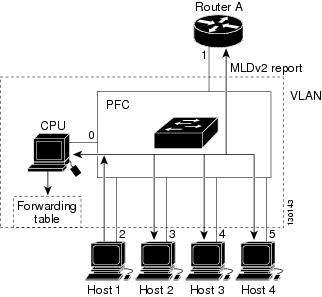
Multicast router A sends an MLDv2 general query to the router, which forwards the query to ports 2 through 5 (all members of the same VLAN). Host 1 wants to join an IPv6 multicast group and multicasts an MLDv2 report to the group with the equivalent MAC destination address of 0x0100.5E01.0203. When the router snoops the MLDv2 report multicast by Host 1, the router uses the information in the MLDv2 report to create a forwarding-table entry, as shown in Table 32-1 , that includes the port numbers of Host 1, the multicast router, and the router.
|
|
|
|
|---|---|---|
The router hardware can distinguish MLDv2 information packets from other packets for the multicast group. The first entry in the table tells the router to send only MLDv2 packets to the CPU. This prevents the router from becoming overloaded with multicast frames. The second entry tells the router to send frames addressed to the 0x0100.5E01.0203 multicast MAC address that are not MLDv2 packets (!MLDv2) to the multicast router and to the host that has joined the group.
If another host (for example, Host 4) sends an unsolicited MLDv2 report for the same group (Figure 32-2), the router snoops that message and adds the port number of Host 4 to the forwarding table as shown in Table 32-2 . Because the forwarding table directs MLDv2 messages only to the router, the message is not flooded to other ports. Any known multicast traffic is forwarded to the group and not to the router.
Figure 32-2 Second Host Joining a Multicast Group
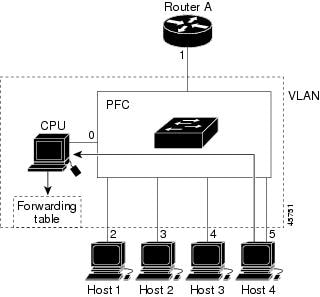
|
|
|
|
|---|---|---|
Leaving a Multicast Group
Normal Leave Processing
Interested hosts must continue to respond to the periodic MLDv2 general queries. As long as at least one host in the VLAN responds to the periodic MLDv2 general queries, the multicast router continues forwarding the multicast traffic to the VLAN. When hosts want to leave a multicast group, they can either ignore the periodic MLDv2 general queries (called a “silent leave”), or they can send an MLDv2 filter mode change record.
When MLDv2 snooping receives a filter mode change record from a host that configures the EXCLUDE mode for a group, MLDv2 snooping sends out a MAC-addressed general query to determine if any other hosts connected to that interface are interested in traffic for the specified multicast group.
If MLDv2 snooping does not receive an MLDv2 report in response to the general query, MLDv2 snooping assumes that no other hosts connected to the interface are interested in receiving traffic for the specified multicast group, and MLDv2 snooping removes the interface from its Layer 2 forwarding table entry for the specified multicast group.
If the filter mode change record was from the only remaining interface with hosts interested in the group, and MLDv2 snooping does not receive an MLDv2 report in response to the general query, MLDv2 snooping removes the group entry and relays the MLDv2 filter mode change record to the multicast router. If the multicast router receives no reports from a VLAN, the multicast router removes the group for the VLAN from its MLDv2 cache.
The interval for which the router waits before updating the table entry is called the “last member query interval.” To configure the interval, enter the ipv6 mld snooping last-member-query-interval interval command.
Fast-Leave Processing
Fast-leave processing is enabled by default. To disable fast-leave processing, turn off explicit-host tracking.
Fast-leave processing is implemented by maintaining source-group based membership information in software while also allocating LTL indexes on a MAC GDA basis.
When fast-leave processing is enabled, hosts send BLOCK_OLD_SOURCES{src-list} messages for a specific group when they no longer want to receive traffic from that source. When the router receives such a message from a host, it parses the list of sources for that host for the given group. If this source list is exactly the same as the source list received in the leave message, the router removes the host from the LTL index and stops forwarding this multicast group traffic to this host.
If the source lists do not match, the router does not remove the host from the LTL index until the host is no longer interested in receiving traffic from any source.
Note Disabling explicit host tracking disables fast-leave processing and proxy reporting.
Understanding the MLDv2 Snooping Querier
Use the MLDv2 snooping querier to support MLDv2 snooping in a VLAN where PIM and MLDv2 are not configured because the multicast traffic does not need to be routed.
In a network where IP multicast routing is configured, the IP multicast router acts as the MLDv2 querier. If the IP-multicast traffic in a VLAN only needs to be Layer 2 switched, an IP-multicast router is not required, but without an IP-multicast router on the VLAN, you must configure another router as the MLDv2 querier so that it can send queries.
When enabled, the MLDv2 snooping querier sends out periodic MLDv2 queries that trigger MLDv2 report messages from the router that wants to receive IP multicast traffic. MLDv2 snooping listens to these MLDv2 reports to establish appropriate forwarding.
You can enable the MLDv2 snooping querier on all the Cisco 7600 series routers in the VLAN, but for each VLAN that is connected to switches that use MLDv2 to report interest in IP multicast traffic, you must configure at least one router as the MLDv2 snooping querier.
You can configure a router to generate MLDv2 queries on a VLAN regardless of whether or not IP multicast routing is enabled.
Default MLDv2 Snooping Configuration
Table 32-3 shows the default MLDv2 snooping configuration.
|
|
|
|---|---|
MLDv2 Snooping Configuration Guidelines and Restrictions
When configuring MLDv2 snooping, follow these guidelines and restrictions:
- MLDv2 is derived from Internet Group Management Protocol version 3 (IGMPv3). MLDv2 protocol operations and state transitions, host and router behavior, query and report message processing, message forwarding rules, and timer operations are exactly same as IGMPv3. See draft-vida-mld-v2.02.txt for detailed information on MLDv2 protocol.
- MLDv2 protocol messages are Internet Control Message Protocol version 6 (ICMPv6) messages.
- MLDv2 message formats are almost identical to IGMPv3 messages.
- IPv6 multicast for Cisco IOS software uses MLD version 2. This version of MLD is fully backward-compatible with MLD version 1 (described in RFC 2710). Hosts that support only MLD version 1 interoperate with a router running MLD version 2. Mixed LANs with both MLD version 1 and MLD version 2 hosts are supported.
- MLDv2 snooping supports private VLANs. Private VLANs do not impose any restrictions on MLDv2 snooping.
- MLDv2 snooping constrains traffic in MAC multicast groups 0100.5e00.0001 to 0100.5eff.ffff.
- MLDv2 snooping does not constrain Layer 2 multicasts generated by routing protocols.
MLDv2 Snooping Querier Configuration Guidelines and Restrictions
When configuring the MLDv2 snooping querier, follow these guidelines and restrictions:
- Configure the VLAN in global configuration mode (see Chapter 14, “Configuring VLANs”).
- Configure an IPv6 address on the VLAN interface (see Chapter 22, “Configuring Layer 3 Interfaces”). When enabled, the MLDv2 snooping querier uses the IPv6 address as the query source address.
- If there is no IPv6 address configured on the VLAN interface, the MLDv2 snooping querier does not start. The MLDv2 snooping querier disables itself if the IPv6 address is cleared. When enabled, the MLDv2 snooping querier restarts if you configure an IPv6 address.
- When enabled, the MLDv2 snooping querier does not start if it detects MLDv2 traffic from an IPv6 multicast router.
- When enabled, the MLDv2 snooping querier starts after 60 seconds with no MLDv2 traffic detected from an IPv6 multicast router.
- When enabled, the MLDv2 snooping querier disables itself if it detects MLDv2 traffic from an IPv6 multicast router.
- QoS does not support MLDv2 packets when MLDv2 snooping is enabled.
- You can enable the MLDv2 snooping querier on all the Cisco 7600 series routers in the VLAN that support it. One router is elected as the querier.
Enabling the MLDv2 Snooping Querier
Use the MLDv2 snooping querier to support MLDv2 snooping in a VLAN where PIM and MLDv2 are not configured because the multicast traffic does not need to be routed.
To enable the MLDv2 snooping querier in a VLAN, perform this task:
|
|
|
|
|---|---|---|
Router# show ipv6 mld interface vlan vlan_ID | include querier |
This example shows how to enable the MLDv2 snooping querier on VLAN 200 and verify the configuration:
Configuring MLDv2 Snooping
Note To use MLDv2 snooping, configure a Layer 3 interface in the subnet for IPv6 multicast routing or enable the MLDv2 snooping querier in the subnet (see the “Enabling the MLDv2 Snooping Querier” section).
These sections describe how to configure MLDv2 snooping:
- Enabling MLDv2 Snooping
- Configuring a Static Connection to a Multicast Receiver
- Enabling Fast-Leave Processing
- Configuring Explicit Host Tracking
- Configuring Report Suppression
- Displaying MLDv6 Snooping Information
Note Except for the global enable command, all MLDv2 snooping commands are supported only on VLAN interfaces.
Enabling MLDv2 Snooping
To enable MLDv2 snooping globally, perform this task:
|
|
|
|
|---|---|---|
Router# show ipv6 mld interface vlan vlan_ID | include globally |
This example shows how to enable MLDv2 snooping globally and verify the configuration:
To enable MLDv2 snooping in a VLAN, perform this task:
|
|
|
|
|---|---|---|
Router# show ipv6 mld interface vlan vlan_ID | include snooping |
This example shows how to enable MLDv2 snooping on VLAN 25 and verify the configuration:
Configuring a Static Connection to a Multicast Receiver
To configure a static connection to a multicast receiver, perform this task:
|
|
|
|
|---|---|---|
Router(config)# mac-address-table static mac_addr vlan vlan_id interface type 1 slot/port [ disable-snooping ] |
||
Router(config)# no mac-address-table static mac_addr vlan vlan_id |
||
|
1.type = ethernet, fastethernet, gigabitethernet, or tengigabitethernet |
When you configure a static connection, enter the disable-snooping keyword to prevent multicast traffic addressed to the statically configured multicast MAC address from also being sent to other ports in the same VLAN.
This example shows how to configure a static connection to a multicast receiver:
Configuring a Multicast Router Port Statically
To configure a static connection to a multicast router, perform this task:
|
|
|
|
|---|---|---|
Router(config-if)# ipv6 mld snooping mrouter interface type 2 slot/port |
||
|
2.type = ethernet, fastethernet, gigabitethernet, or tengigabitethernet |
The interface to the router must be in the VLAN where you are entering the command, the interface must be administratively up, and the line protocol must be up.
This example shows how to configure a static connection to a multicast router:
Configuring the MLD Snooping Query Interval
You can configure the interval for which the router waits after sending a group-specific query to determine if hosts are still interested in a specific multicast group.
Note When both MLD snooping fast-leave processing and the MLD snooping query interval are configured, fast-leave processing takes precedence.
To configure the interval for the MLD snooping queries sent by the router, perform this task:
This example shows how to configure the MLD snooping query interval:
Enabling Fast-Leave Processing
To enable fast-leave processing in a VLAN, perform this task:
|
|
|
|
|---|---|---|
Router# show ipv6 mld interface vlan vlan_ID | include fast-leave |
This example shows how to enable fast-leave processing on the VLAN 200 interface and verify the configuration:
Enabling SSM Safe Reporting
To enable source-specific multicast (SSM) safe reporting, perform this task:
|
|
|
|
|---|---|---|
This example shows how to SSM safe reporting:
Configuring Explicit Host Tracking
Note Disabling explicit host tracking disables fast-leave processing and proxy reporting.
To enable explicit host tracking on a VLAN, perform this task:
|
|
|
|
|---|---|---|
Router# show ipv6 mld snooping explicit-tracking vlan vlan_ID |
This example shows how to enable explicit host tracking:
Configuring Report Suppression
To enable report suppression on a VLAN, perform this task:
|
|
|
|
|---|---|---|
Router# show ipv6 mld interface vlan_ID | include report-suppression |
This example shows how to enable explicit host tracking:
Displaying MLDv6 Snooping Information
These sections describe displaying MLDv6 snooping information:
Displaying Multicast Router Interfaces
When you enable IGMP snooping, the router automatically learns to which interface the multicast routers are connected.
To display multicast router interfaces, perform this task:
|
|
|
|---|---|
This example shows how to display the multicast router interfaces in VLAN 1:
Displaying MAC Address Multicast Entries
To display MAC address multicast entries for a VLAN, perform this task:
|
|
|
|---|---|
This example shows how to display MAC address multicast entries for VLAN 1:
This example shows how to display a total count of MAC address entries for a VLAN:
Displaying MLDv2 Snooping Information for a VLAN Interface
To display MLDv2 snooping information for a VLAN interface, perform this task:
|
|
|
|---|---|
Router# show ipv6 mld snooping {{ explicit-tracking vlan_ID }| { mrouter [ vlan vlan_ID ]} | { report-suppression vlan vlan_ID } | { statistics vlan vlan_ID } |
This example shows how to display explicit tracking information on VLAN 25:
This example shows how to display the multicast router interfaces in VLAN 1:
This example shows IGMP snooping statistics information for VLAN 25:
 Feedback