- Preface
- Product Overview
- Configuring the Router for the First Time
- Configuring a Supervisor Engine 720
- Configuring a Route Switch Processor 720
- Configuring NSF with SSO Supervisor Engine Redundancy
- ISSU and eFSU on Cisco 7600 Series Routers
- Configuring RPR and RPR+ Supervisor Engine Redundancy
- Configuring Interfaces
- Configuring a Supervisor Engine 32
- Configuring LAN Ports for Layer 2 Switching
- Configuring Flex Links
- Configuring EtherChannels
- Configuring VTP
- Configuring VLANs
- Configuring Private VLANs
- Configuring Cisco IP Phone Support
- Configuring IEEE 802.1Q Tunneling
- Configuring Layer 2 Protocol Tunneling
- Configuring L2TPv3
- Configuring STP and MST
- Configuring Optional STP Features
- Configuring Layer 3 Interfaces
- Configuring GTP-SLB IPV6 Support
- IP Subscriber Awareness over Ethernet
- Configuring UDE and UDLR
- Configuring Multiprotocol Label Switching on the PFC
- Configuring IPv4 Multicast VPN Support
- Configuring Multicast VPN Extranet Support
- Configuring IP Unicast Layer 3 Switching
- Configuring IPv6 Multicast PFC3 and DFC3 Layer 3 Switching
- Configuring IPv4 Multicast Layer 3 Switching
- Configuring MLDv2 Snooping for IPv6 Multicast Traffic
- Configuring IGMP Snooping for IPv4 Multicast Traffic
- Configuring PIM Snooping
- Configuring Network Security
- Understanding Cisco IOS ACL Support
- Configuring VRF aware 6RD Tunnels
- Configuring VLAN ACLs
- Private Hosts (Using PACLs)
- Configuring IPv6 PACL
- IPv6 First-Hop Security Features
- Configuring Online Diagnostics
- Configuring Denial of Service Protection
- Configuring DHCP Snooping
- Configuring Dynamic ARP Inspection
- Configuring Traffic Storm Control
- Unknown Unicast Flood Blocking
- Configuring PFC QoS
- Configuring PFC QoS Statistics Data Export
- Configuring MPLS QoS on the PFC
- Configuring LSM MLDP based MVPN Support
- Configuring IEEE 802.1X Port-Based Authentication
- Configuring IEEE 802.1ad
- Configuring Port Security
- Configuring UDLD
- Configuring NetFlow and NDE
- Configuring Local SPAN, RSPAN, and ERSPAN
- Configuring SNMP IfIndex Persistence
- Power Management and Environmental Monitoring
- Configuring Web Cache Services Using WCCP
- Using the Top N Utility
- Using the Layer 2 Traceroute Utility
- Configuring Bidirectional Forwarding and Detection over Switched Virtual Interface
- Configuring Call Home
- Configuring IPv6 Policy Based Routing
- Using the Mini Protocol Analyzer
- Configuring Resilient Ethernet Protocol
- Configuring Synchronous Ethernet
- Configuring Link State Tracking
- Configuring BGP PIC Edge and Core for IP and MPLS
- Configuring VRF aware IPv6 tunnels over IPv4 transport
- ISIS IPv4 Loop Free Alternate Fast Reroute (LFA FRR)
- Multicast Service Reflection
- Y.1731 Performance Monitoring
- Online Diagnostic Tests
- Acronyms
- Cisco IOS Release 15S Software Images
- Index
Configuring L2TPv3
This chapter describes how to configure the L2TPv3 in Cisco IOS Software Release 15.1(3)S.

Note For complete syntax and usage information for the commands used in this chapter, see the Cisco 7600 Series Router Cisco IOS Command Reference at this URL: http://www.cisco.com/en/US/products/ps6922/prod_command_reference_list.html
Understanding L2TPv3
The Layer 2 Tunneling Protocol version 3 (L2TPv3) feature employs L2TPv3 and pseudowire (PW) technology to provide tunneling service to Ethernet traffic. The feature is developed for SUP720-3B/3BXL and RSP720 routers, which function as Provider Edge (PE) routers in the network topologies recommended by RFC3985 Pseudowire Emulation Edge-to-Edge (PWE3) architecture. L2TPv3 also supports inter-operability between the Cisco 7600 router and any standard compliant Cisco or non-Cisco device.
A L2TPv3 tunnel is a control connection between two PE routers. One L2TPv3 tunnel can have multiple data connections, and each data connection is termed as an L2TPv3 session. The control connection is used to establish, maintain, and release sessions. Each session is identified by a session ID which is unique across the entire router.
Figure 19-1 Network Topology for L2TPv3
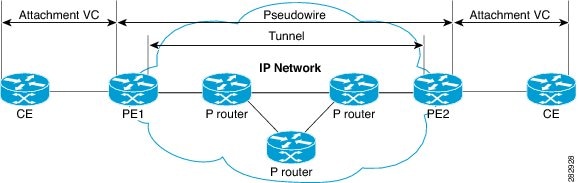
In Figure 19-1, the attachment Virtual Circuit (VC) represents a physical or a logical port that connects a Customer Edge (CE) device to a Provider Edge (PE) device. A pseudowire is defined as a VC connecting two attachment VCs, and it consists of two L2TPv3 tunnel paths, one in each direction.
Restrictions for L2TPv3
Following restrictions apply to L2TPv3:
- Layer 2 facing line card must be an L2TPv3 supporting line card.
- There must be at least one distinct L2TPv3 tunnel per Layer 2 facing linecard.
- The L2TPv3 feature on a Cisco 7600 router is supported on ES+ and SIP 400 line cards.
- The Cisco 7600 router supports only IPv4 tunnelling for the Layer 2 frames.
- The L2TPv3 feature does not support configurations such as EoL2TPv3oMPLS on the encapsulating PE.
- The L2TPv3 feature supports a maximum of 16,000 pseudowires.
- L2TPv3 is not supported in conjunction with EVC features. L2TPv3 coexists with EVC on the same port. That is, while one sub-interface is used to tunnel dot1q tagged traffic over L2TP, another sub-interface is used to perform EVC features.
- Effective with Cisco IOS release 15.1(3)S, 4000 IP tunnels are supported on ES+ line cards.
- The L2TPv3 feature does not support SSO. You must enable cookies for L2TPv3 session on HA setups.
Configuring L2TPv3
For information on configuring the L2TPv3, please see: http://www.cisco.com/en/US/docs/routers/7600/install_config/ES40_config_guide/es40_chap4.html
 Feedback