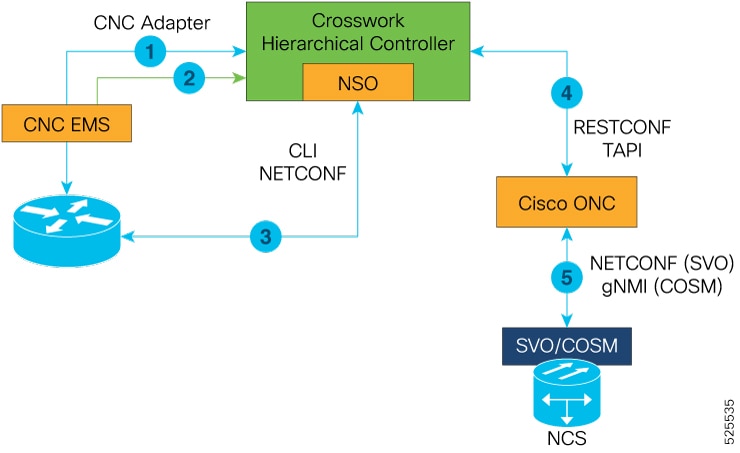
This section compares the automation starter solution with the full Routed Optical Networking automation solution. It explains supported functions, adapter requirements, and when each deployment model is appropriate.
Automation starter solution
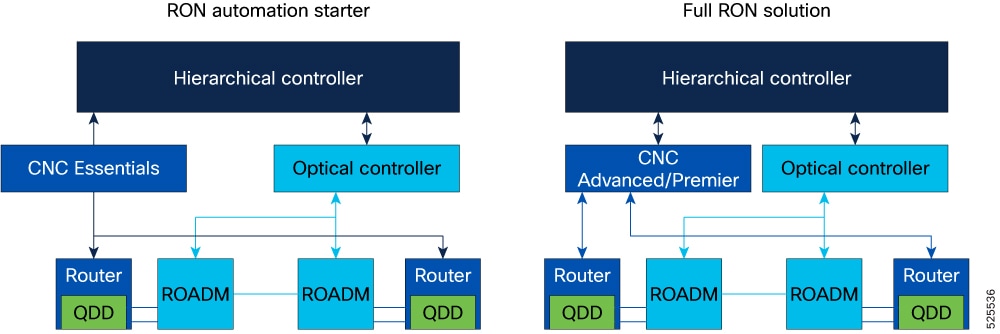
The automation starter solution is a simplified automation stack to manage ZR and ZR+ optics in Cisco routers. This solution accelerates the adoption of Routed Optical Networking by simplifying the installation and deployment processes.
The primary difference between the starter and full solutions is that the starter solution lacks CNC. In the starter solution, the Crosswork Hierarchical Controller communicates with Cisco routers using the IOS XR (only in R3.0) and NSO adapters, and communicates with optical networks using the appropriate optical controller adapter.
Both the starter and full solutions use the same NSO RON-ML function pack. The function pack version is 3.0
From Release 4.0, IOS XR adapter is not supported in the starter solution. Crosswork Network Controller EMS provides minimal installation to support full IP network inventory, basic topology, and PM data delivered through its integrated Crosswork Data Gateway.
From Release 4.0, IOS XR adapter is not supported in the full solution. Crosswork Network Controller provides the necessary inventory and state information to Crosswork Hierarchical Controller through NB API.
Automation starter solution versus full solution
This diagram displays the components that are involved in the automation starter solution and full solution.
Features and adapters in automation starter solution and full solution
This table lists the features supported in both the automation starter solution and the full solution.
|
Feature |
Automation starter solution |
Full solution |
|---|---|---|
|
Wavelength provisioning |
Yes |
Yes |
|
Optical circuit assurance and troubleshooting |
Yes |
Yes |
|
Multilayer visualization and History view |
Yes |
Yes |
|
Management and verification of optical to IP connections |
Yes |
Yes |
|
SR and SRv6 control plane SDN automation |
No |
Yes |
|
IP element management and IP SDN path optimization |
No |
Yes |
|
IP service assurance and service orchestration |
No |
Yes |
|
PLE automation including SR-CS bandwidth reservation, provisioning, and assurance |
No |
Yes |
This table lists the adapters required for both the automation starter solution and the full solution.
|
Type of solution |
Required adapters |
Use |
|---|---|---|
|
Full solution |
|
|
|
Starter solution |
|
|