Segment Routing v6 Configuration Guide for Cisco 8000 Series Routers, Cisco IOS XR Releases

PDF

Segment Routing v6 Configuration Guide for Cisco 8000 Series Routers, Cisco IOS XR Releases

Liveness monitoring

Want to summarize with AI?

Log in

Explains how endpoint and SR policy probes detect path availability and control candidate-path activation, supporting resilient forwarding, maintenance, load balancing, and service assurance.


Liveness is the ability of the network to confirm that a specific path, segment, or node is operational and capable of forwarding packets. It is essential for maintaining network availability and reliability. You can determine liveness for SR Policy and IP Endpoint.

Benefits of liveness monitoring

  • Fault detection: You can quickly identify if a device is down, which allows for immediate response and troubleshooting.

  • Load balancing: You can identify which network devices are live, so work can be distributed more evenly across the network. This prevents overloading of specific components and improves overall performance.

  • System health: You can provide an ongoing snapshot of a system's health, helping to identify potential issues before they become significant problems.

  • Maintenance planning: Liveness information also helps with maintenance planning, as system administrators can understand which components are operational or offline. They can then plan maintenance and downtime to minimize service disruption.

  • Security: Regular liveness checks help maintain network security. Administrators can take proactive steps to mitigate damage and prevent future incidents by identifying unusual activity that might indicate a security breach or attack.


IP endpoint liveness monitoring

IP endpoint liveness is a network monitoring method that

  • dynamically measures and verifies the availability of a device identified by an IP address

  • sends probes or requests to the endpoint's IP address and awaits responses, and

  • determines the endpoint's status based on receiving a response within a specified timeframe.

Table 1. Feature History Table

Feature Name

Release Information

Feature Description

Liveness Monitoring for IP Endpoint over SRv6 Network

Release 25.4.1

Introduced in this release on: Fixed Systems (8010 [ASIC: A100])(select variants only*)

*This feature is now supported on:

  • 8011-32Y8L2H2FH

  • 8011-12G12X4Y-A/D

Liveness Monitoring for IP Endpoint over SRv6 Network

Release 25.1.1

Introduced in this release on: Fixed Systems (8010 [ASIC: A100])

This feature is now supported on:

  • 8011-4G24Y4H-I

Liveness Monitoring for IP Endpoint over SRv6 Network

Release 24.4.1

Introduced in this release on: Fixed Systems (8200 [ASIC: P100], 8700 [ASIC: P100])(select variants only*); Modular Systems (8800 [LC ASIC: P100])(select variants only*)

In Segment Routing over an IPv6 network (SRv6), you can keep track of the operational status of both the forward and reverse paths of a particular node or IP endpoint.

*This feature is supported on:

  • 8212-48FH-M

  • 8711-32FH-M

  • 88-LC1-36EH

  • 88-LC1-12TH24FH-E

  • 88-LC1-52Y8H-EM

Liveness Monitoring for IP Endpoint over SRv6 Network

Release 24.2.11

In Segment Routing over an IPv6 network (SRv6), you can keep track of the operational status of both the forward and reverse paths of a particular node or IP endpoint. You can use this information for troubleshooting, network maintenance, and optimizing network performance.

Additionally, you can use flow labels to verify the liveness of each subsequent hop path toward the IP endpoint of that path. So that, when network traffic is distributed across multiple available paths towards an IP endpoint, liveness detection tracks the operational status of each of these paths towards the IP endpoint.

The feature introduces these changes:

CLI:

YANG Data Model:

  • Cisco-IOS-XR-um-performance-measurement-cfg

  • Cisco-IOS-XR-perf-meas-oper.yang

(see GitHub, YANG Data Models Navigator)

Key concepts of IP endpoint liveness

  • IP endpoint: An IP endpoint is any device in the network identified by an IPv4 or IPv6 address. The endpoint of a probe is defined by this IP address. This IP address can be any address that the sender can reach, such as a local interface or a remote node or host, either within an operator's network or accessible via a VRF. The endpoint's IP address can be located in the global routing table or under a user-specified VRF routing table. You can use the performance-measurement endpoint command to configure a probe endpoint source and destination addresses on a sender node. When the endpoint is reachable using SRv6, the forwarding stage imposes the SRv6 encapsulation.

  • Probe: The probe is the request sent to verify liveness and the probe can be of various packet types, such as Ithat the endpoint responds to. The probe could be an ICMP echo request (Ping), a TCP packet, a UDP packet, or any other type of packet that the endpoint would respond to. \

    • If a response is received, the endpoint is considered live.

    • If no response is received within a certain time frame, the endpoint is considered down or unreachable.

  • VRF: You can define the endpoint point IP address belonging to a specific VRF.

    Use the performance-measurement endpoint {ipv4 | ipv6} ip_addr [vrf WORD] command to configure an endpoint to define the VRF. IP Endpoint segment list configuration is not supported under nondefault VRF.

    • VRF-awareness allows operators to deploy probes in these scenarios:

      • Managed Customer Equipment (CE) scenarios:

        • PE to CE probes

        • CE to CE probes

      • Unmanaged Customer Equipment (CE) scenarios:

        • PE to PE probes

        • PE to PE (source from PE-CE interface) probes

  • Source address: You can define the source of the endpoint using the endpoint specific source address and the global source address.

    Global source address configuration is applied to all the endpoints when the endpoint specific source address configuration isn’t specified. endpoint specific configuration overrides all the global source address configuration for those specific endpoints for which source addresses are configured.

    For Micro-SID configuration for IPv4 endpoint sessions, if IPv6 global source address is configured, then it applies the configured global IPv6 source address for the IPv6 header in the SRv6 packet. If IPv6 global address is not configured, then It does not form a valid SRv6 packet.

    You can use the source-address keyword under the performance-measurement command to define the global source address or use the keyword under performance-measurement endpoint to define endpoint specific source address.

  • Reverse path: To detect the liveness of the reverse of the segment, starting from Release 24.2.11 you can configure the reverse path using the reverse-path command.

    The default reverse path configured under the endpoint submode is only used for sessions with segment list. The endpoint session without a segment list does not support reverse path configuration and will not use this reverse path.

    The reverse-path under the performance-measurement endpoint is used as the default reverse path if there are no reverse paths configured under the segment list.

    Use the reverse-path under the performance-measurement endpoint segment-routing traffic-eng explicit segment-list name to configure the reverse path under segment list.

    The reverse type must be the same as the forward path. Using different types for forward and reverse paths is not supported. For example, uSID forward path and uSID reverse path; MPLS forward path and MPLS reverse path.

    User-configured segment-list can also represent the reverse path (reflector to sender) when probe is configured in liveness detection mode. Up to 128 segment-lists can be configured under a probe. An additional PM session is created for each segment-list. Segment-lists are configured under segment-routing traffic-eng segment-list submode.

  • Flow label: The flow label field in the IPv6 header is used to carry information that helps distribute traffic across multiple network paths. The flow label is a 20-bit field in the IPv6 header designed to carry information about the flow of packets, which routers can use to identify and differentiate between different traffic flows. Flow label sweeping uses a flow label to distribute the traffic load across multiple paths to the endpoint. Starting from Release 24.2.11, you can use the flow-label keyword to configure flow label.


Usage guidelines for IP endpoint liveness monitoring

  • Liveness session without segment list for an endpoint in a non-default VRF is not supported.

  • IP Endpoint segment list configuration is not supported under nondefault VRF.

  • SR PM endpoint session over BVI interface is not supported.

  • SRv6 locator prefix and VRF SRv6 locator/function (uDT4/uDT6) as IPv6 endpoint of a probe is not supported.

  • IPv6 Endpoint liveness in default VRF is not supported over SRv6.

Supported and unsupported features for liveness monitoring for IP Endpoint over SRv6 Network

Table 2. Supported and unsupported features for liveness monitoring for IP Endpoint over SRv6 Network

Supported Features

Unsupported Features

SRv6 Endpoint liveness in default VRF

Example:

endpoint ipv6 fccc:2:: liveness-detection

In this example, the endpoint with the IPv6 address fccc:2:: is the SRv6 uSID format.

IPv6 Endpoint liveness in default VRF (over SRv6)

Example:

endpoint ipv6 10::2 liveness-detection

In this example, the endpoint with the IPv6 address 2::2 is part of an underlay network using SRv6.

IPv6 Endpoint liveness in VRF (static uDT6)

Example:

endpoint ipv6 fccc:2:fe02:: liveness-detection

In this example, the endpoint with the IPv6 address fccc:2:fe02:: is the static uDT6 uSID carrier

IPv6 Endpoint liveness in VRF (dynamic DT6 encap)

Example:

endpoint ipv6 10::1 vrf purple source-address ipv6 10::2 liveness-detection

IPv4 Endpoint Liveness in VRF or GRT (static uDT4)

Example:

endpoint ipv4 10.5.56.1 source-address ipv4 10.1.17.1 segment-routing traffic-eng explicit segment-list name vrf-2-3-5-udt4 liveness-detection

The segment-list vrf-2-3-5-udt4 here has static uDT4 SID.

IPv4 Endpoint Liveness in VRF or GRT (dynamic uDT4 encap

Example:

endpoint ipv4 10.0.0.1 vrf purple source-address ipv4 10.0.0.2 liveness-detection

IPv6 address over SRV6 underlay

Example:

endpoint ipv6 10::1 source-address ipv6 10::2 liveness-detection

How IP endpoint liveness detection works

IP endpoint liveness detection leverages the loopback measurement mode to determine if an IP endpoint is active within an SRv6 network.

Summary

The key components involved in this process are the querier, the responder, and the SRv6 transport network. The process describes how the querier initiates and monitors PM TWAMP probe packets to determine the session's status.

Workflow

Figure 1. IP Endpoint Liveness In an SRv6 Network

These stages describe the sequence of events:

  1. Probe creation and transmission: The querier creates and transmits the PM TWAMP probe packets based on the endpoint configuration.

  2. Packet formation: The system forms the packet to reach the responder and return to the querier node over the SRv6 transport network.

  3. Session up declaration: The querier node declares the session active once it receives the probe packet back

  4. Session down declaration: If the sender node does not receive the specified number of consecutive probe packets, based on the configured multiplier, it declares the PM session inactive.


Configure IP Endpoint liveness

Procedure

  1. Configure basic IP endpoint liveness with a source address, endpoint, and a multiplier for liveness detection.

    Example:

    
    Router(config)#performance-measurement
    Router(config-perf-meas)#source-address ipv6 2020:1::1
    Router(config-perf-meas)#endpoint ipv6 FCBB:0::5::
    Router(config-pm-ep)#exit             
    Router(config-perf-meas)#liveness-profile endpoint default
    Router(config-pm-ld-ep)#probe
    Router(config-pm-ld-ep-probe)#exit
    Router(config-pm-ld-ep)#liveness-detection  
    Router(config-pm-ld-ep-ld)#multiplier 3
    Router(config-pm-ld-ep-ld)#
    

    This example shows how to configure liveness with segment list and reverse path.

    Router(config-sr)#traffic-eng
    Router(config-sr-te)#segment-lists
    Router(config-sr-te-segment-lists)#srv6
    Router(config-sr-te-sl-global-srv6)#sid-format usid-f3216
    Router(config-sr-te-sl-global-srv6)#exit
    Router(config-sr-te-sl-global)#segment-list test
    Router(config-sr-te-sl)#srv6
    Router(config-sr-te-sl-srv6)#index 10 sid ff::2
    Router(config-sr-te-sl-srv6)#index 20 sid ff::3
    

    This example shows how to configure liveness reverse path under segment list and under endpoint:

    Router(config)#performance-measurement
    Router(config-perf-meas)#endpoint ipv6 ff::2
    
    /* Configure reverse path under segment list name *\
    Router(config-pm-ep)#segment-routing traffic-eng explicit segment-list name fwd-path
    Router(config-pm-ep-sl)#reverse-path segment-list name rev-path
    Router(config-pm-ep-sl)#exit
    
    /* Configure reverse path under performance measurement endpoint *\
    Router(config-pm-ep)# segment-routing traffic-eng explicit reverse-path segment-list name rev-path-name
    

    This example shows how to configure liveness with flow label:

    Router(config-perf-meas)#liveness-profile endpoint default
    Router(config-pm-ld-ep)#probe 
    Router(config-pm-ld-ep-probe)#flow-label from 1000 to 20000 increment 16
    Router(config-pm-ld-ep-probe)#liveness-detection 
    Router(config-pm-ld-ep-ld)#multiplier 3
    

    This example shows how to configure liveness with flow label sweeping:

    Router#configure 
    Router(config)#performance-measurement 
    Router(config-perf-meas)#liveness-profile name profile-sweeping
    Router(config-pm-ld-profile)# flow-label from 1000 to 20000 increment 16
    Routerconfig-pm-ld-profile)#commit
    
  2. Use the show performance-measurement endpoint detail to verify the IP endpoint liveness configuration.

    Example:

    Router# show performance-measurement endpoint detail
    Endpoint name: IPv6-FCBB:0::5:::-vrf-default
      Source address              : 2020:1::1
      VRF name                    : default
      Liveness Detection          : Enabled
      Profile Keys:
        Profile name              : default
        Profile type              : Endpoint Liveness Detection
      Segment-list                : None
      Liveness Detection session:
        Session ID                : 4109
        Flow-label                : 1000
        Session State: Up
        Last State Change Timestamp: Jan 23 2024 16:06:01.214
        Missed count: 0
    
      Liveness Detection session:
        Session ID                : 4110
        Flow-label                : 2000
        Session State: Up
        Last State Change Timestamp: Jan 23 2024 16:06:01.214
        Missed count: 0
    
      Segment-list                : test-dm-two-carrier-sl2
        FCBB:0::5:2:e004::/64
          Format: f3216
        FCBB:0::5:3:e000::/64
          Format: f3216
        FCBB:0::5:2:e004::/64
          Format: f3216
        FCBB:0::5:2:e000::/64
          Format: f3216
        FCBB:0::5:1:e000::/64
          Format: f3216
        FCBB:0::5:1:e004::/64
          Format: f3216
        FCBB:0::5:4:e000::/64
          Format: f3216
        FCBB:0::5:4::/48
          Format: f3216
      Liveness Detection session:
        Session ID                : 4111
        Flow-label                : 1000
        Session State: Up
        Last State Change Timestamp: Jan 23 2024 16:06:01.217
        Missed count: 0
    
      Liveness Detection session:
        Session ID                : 4112
        Flow-label                : 2000
        Session State: Up
        Last State Change Timestamp: Jan 23 2024 16:06:01.217
        Missed count: 0 

SR policy liveness monitoring

SR policy liveness monitoring is a mechanism that

  • verifies end-to-end traffic forwarding over an SRv6 policy candidate path

  • periodically sends probe messages from the head-end router to the SRv6 Policy's endpoint router, and

  • receives these probe messages back from the endpoint router without control-plane dependency.

Table 3. Feature History Table

Feature Name

Release Information

Feature Description

SR Policy Liveness Monitoring on Segment Routing over IPv6 (SRv6)

Release 25.4.1

Introduced in this release on: Fixed Systems (8010 [ASIC: A100])(select variants only*)

*This feature is supported on:

  • 8011-32Y8L2H2FH

  • 8011-12G12X4Y-A/D

SR Policy Liveness Monitoring on Segment Routing over IPv6 (SRv6)

Release 25.1.1

Introduced in this release on: Fixed Systems (8700 [ASIC: K100], 8010 [ASIC: A100])(select variants only*)

*This feature is now supported on:

  • 8712-MOD-M

  • 8011-4G24Y4H-I

SR Policy Liveness Monitoring on Segment Routing over IPv6 (SRv6)

Release 24.4.1

Introduced in this release on: Fixed Systems (8200 [ASIC: P100], 8700 [ASIC: P100])(select variants only*); Modular Systems (8800 [LC ASIC: P100])(select variants only*)

*This feature is supported on:

  • 8212-48FH-M

  • 8711-32FH-M

  • 88-LC1-36EH

  • 88-LC1-12TH24FH-E

  • 88-LC1-52Y8H-EM

SR Policy Liveness Monitoring on Segment Routing over IPv6 (SRv6)

Release 7.11.1

In segment routing over IPv6 (SRv6), you can now verify end-to-end traffic forwarding over an SR policy candidate path by periodically sending probe messages. Performance monitoring on an SRv6 network enables you to track and monitor traffic flows at a granular level.

Earlier releases supported SR policy liveness monitoring over an SR policy candidate path on MPLS.


Restrictions for SR policy liveness monitoring

  • Liveness-detection and delay-measurement aren't supported together.

  • When liveness-profile isn't configured, SR Policies use the default values for the liveness-detection profile parameters.


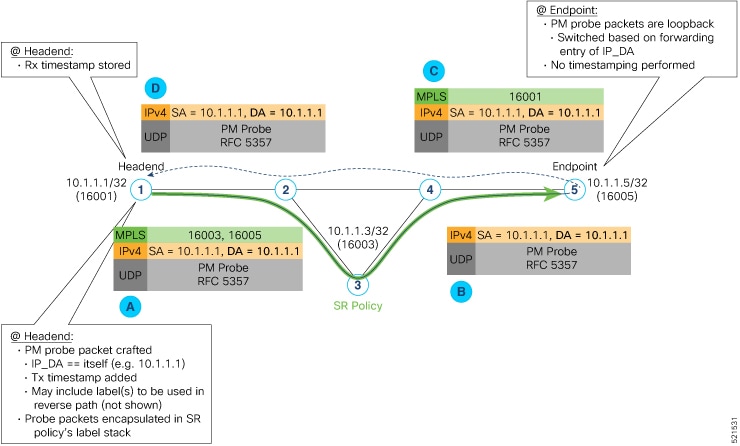
How SRv6 policy liveness detection works

This process describes the workflow for liveness detection over an SRv6 Policy. Consider an SRv6 policy programmed at a head-end node router (for example, Router 1) towards an endpoint node (example, Router 5). This SRv6 policy is enabled for liveness detection using the loopback measurement-mode.

Summary

SRv6 policy liveness detection involves a head-end node sending PM probe packets through the network to an endpoint node. The endpoint node processes these packets and sends them back to the head-end. The head-end node then uses the received packets to determine the operational status of the SRv6 policy's candidate path.

Workflow

These stages describe how SRv6 policy liveness detection works:

  1. The head-end node creates and transmits the PM probe packets.

    • The IP destination address (DA) on the probe packets is set to the loopback value of the head-end node itself.

    • A transmit (Tx) timestamp is added to the payload.

    • Optionally, the head-end node may also insert extra encapsulation (labels) to enforce the reverse path at the endpoint node.

    • Finally, the packet is injected into the dataplane using the same encapsulation (label stack) of that of the SR policy being monitored.

  2. The network delivers the PM probe packets as it would user packet for the SR policy.

  3. The end-point node receives the PM probe packets.

    • Packets are switched back based on the forwarding entry associated with the IP DA of the packet. This would typically translate to the endpoint node pushing the prefix SID label associated with the head-end node.

    • If the head-end node inserted label(s) for the reverse path, then the packets are switched back at the endpoint node based on the forwarding entry associated with the top-most reverse path label.

  4. Head-end node receives the PM probe packets.

    • A received (Rx) timestamp is stored.

    • If the head-end node receives the PM probe packets, the head-end node assume that the SR policy active candidate path is up and working.

    • If the head-end node doesn't receive the specified number of consecutive probe packets (based on configured multiplier), the head-end node assumes the candidate path is down and a configured action is triggered.


Configure SR Policy Liveness Monitoring

Configuring SR Policy liveness monitoring involves configuring a performance measurement liveness profile to customize generic probe parameters and enabling liveness monitoring under SR Policy by associating a liveness profile, and customizing SR policy-specific probe parameters.

Procedure

Configure a performance measurement liveness profile to customize generic probe parameters and enable liveness monitoring under SR policy by associating a liveness profile, and customize SR policy-specific probe parameters.
  • Configure a default SR-policy PM liveness-profile

    Router(config)# performance-measurement
    Router(config-perf-meas)# liveness-profile sr-policy default
    Router(config-pm-ld-srpolicy)# probe
    Router(config-pm-ld-srpolicy-probe)# tx-interval 150000
    Router(config-pm-ld-srpolicy-probe)# tos dscp 52
    Router(config-pm-ld-srpolicy-probe)# exit
    Router(config-pm-ld-srpolicy)# liveness-detection
    Router(config-pm-ld-srpolicy-ld)# multiplier 5
    
    
  • Configure a named (Non-Default) SR-policy PM liveness-profile

    Router(config)# performance-measurement 
    Router(config-perf-meas)# liveness-profile name sample-profile
    Router(config-pm-ld-profile)# probe
    Router(config-pm-ld-probe)# tx-interval 150000
    Router(config-pm-ld-probe)# tos dscp 52
    Router(config-pm-ld-probe)# exit
    Router(config-pm-ld-profile)# liveness-detection 
    Router(config-pm-ld-profile-ld)# multiplier 5
    Router(config-pm-ld-profile-ld)#commit
    
    
  • Configure a SR-policy PM liveness-Profile with sweep parameters

    Router(config)# performance-measurement 
    Router(config-perf-meas)# liveness-profile name sample-profile
    Router(config-pm-ld-profile)# probe
    Router(config-pm-ld-probe)# tx-interval 150000
    Router(config-pm-ld-probe)# tos dscp 52
    Router(config-pm-ld-probe)# sweep 
    Router(config-pm-ld-probe-sweep)# destination ipv4 127.0.0.1 range 25
    Router(config-pm-ld-probe-sweep)# exit
    Router(config-pm-ld-probe)# exit
    
    Router(config-pm-ld-profile)# liveness-detection
    Router(config-pm-ld-profile-ld)# multiplier 5
    Router(config-pm-ld-profile-ld)#commit
    
  • Enable liveness monitoring under SR policy

    The following example shows how to enable liveness monitoring under SR Policy, associate a liveness-profile, and configure the invalidation action:

    Router(config)# segment-routing traffic-eng
    Router(config-sr-te)# policy FOO
    Router(config-sr-te-policy)# performance-measurement
    Router(config-sr-te-policy-perf-meas)# liveness-detection
    Router(config-sr-te-policy-live-detect)# liveness-profile name sample-profile
    Router(config-sr-te-policy-live-detect)# invalidation-action none
    
  • Enable liveness monitoring under SR policy with optional parameters

    The following example shows how to enable liveness monitoring under SR Policy, associate a liveness-profile, and configure reverse path label and session logging:

    Router(config)# segment-routing traffic-eng
    Router(config-sr-te)# policy BAA
    Router(config-sr-te-policy)# performance-measurement
    Router(config-sr-te-policy-perf-meas)# liveness-detection
    Router(config-sr-te-policy-live-detect)# liveness-profile name sample-profile
    Router(config-sr-te-policy-live-detect)# invalidation-action down
    Router(config-sr-te-policy-live-detect)# logging session-state-change
    Router(config-sr-te-policy-live-detect)# exit
    Router(config-sr-te-policy-perf-meas)# reverse-path label 16001
    

Segment lists to activate candidate paths for PM Liveness

A minimum active segment lists is an SRv6 PM liveness feature that

  • allows configuring the number of active segment lists required for a candidate path to be considered operational

  • enables the head-end router to determine a candidate path's up status based on this configured minimum, and

  • identifies a candidate path as up only when all segment lists are active if the configured minimum exceeds the total available segment lists in that path.

Table 4. Feature History Table

Feature Name

Release Information

Feature Description

Configure Segment Lists to Activate Candidate Paths in SRv6 for PM Liveness

Release 25.4.1

Introduced in this release on: Fixed Systems (8010 [ASIC: A100])(select variants only*)

*This feature is supported on:

  • 8011-32Y8L2H2FH

  • 8011-12G12X4Y-A/D

Configure Segment Lists to Activate Candidate Paths in SRv6 for PM Liveness

Release 25.1.1

Introduced in this release on: Fixed Systems (8010 [ASIC: A100], 8700 [ASIC: K100])(select variants only*)

*This feature is supported on:

  • 8011-4G24Y4H-I

  • 8712-MOD-M

Configure Segment Lists to Activate Candidate Paths in SRv6 for PM Liveness

Release 24.1.1

Introduced in this release on: Fixed Systems (8200 [ASIC: P100], 8700 [ASIC: P100])(select variants only*); Modular Systems (8800 [LC ASIC: P100])(select variants only*)

*This feature is supported on:

  • 8212-48FH-M

  • 8711-32FH-M

  • 88-LC1-36EH

  • 88-LC1-12TH24FH-E

  • 88-LC1-52Y8H-EM

Configure Segment Lists to Activate Candidate Paths in SRv6 for PM Liveness

Release 7.11.1

You can now enable a candidate path to be up by configuring the minimum number of active segment lists associated with the candidate path. The head-end router determines that a candidate path is up based on the minimum number of active segment lists configured.

In earlier releases, the head-end router identified a candidate path as up only when all the segment lists associated with the path were active.

The feature introduces these changes:

CLI:

YANG Data Models:

  • Cisco-IOS-XR-infra-xtc-agent-cfg.yang

See (GitHub, Yang Data Models Navigator)


Configure the minimum number of segment lists in SRv6

Use this task to configure the minimum number of active segment lists required for a candidate path to be considered up within an SRv6 policy.

By default, the head-end router identifies a candidate path as operational only when all associated segment lists are active. This feature allows you to define a specific, lower threshold for the number of active segment lists.

Note

If the configured minimum number of active segment lists is greater than the number of available segment lists in a candidate path, the head-end router determines the candidate path as up only when all the segment lists are active.

Procedure

  1. Activate three segment lists to have the PM liveness session up.

    Example:

    Router(config)#segment-routing 
    Router(config-sr)#traffic-eng 
    Router(config-sr-te)#policy po-103
    Router(config-sr-te-policy)#performance-measurement 
    Router(config-sr-te-policy-perf-meas)#liveness-detection
    Router(config-sr-te-policy-live-detect)#validation-cp minimum-active segment-lists 3
    
  2. Verify the running configuration after applying the minimum active segment list settings.

    Example:

    segment-routing
     traffic-eng
      policy po-103
       performance-measurement
        liveness-detection
         validation-cp minimum-active segment-lists 3
        !
       !
      !
     !
    !
    
  3. Verify the configuration by displaying the detailed liveness information for the SR policy.

    Example:

    Router#show performance-measurement sr-policy liveness color 103 detail verbose private 
    Mon Oct 30 15:10:51.863 EDT
     
    ----------------------------------------------------------------------------------------------------------------------------------------------------------------
    0/1/CPU0
    ----------------------------------------------------------------------------------------------------------------------------------------------------------------
    
    SR Policy name: srte_c_103_ep_3::1
      Color                       : 103
      SRv6 Encap Source Address   : 1::1
      Endpoint                    : 3::1
      Handle                      : 0x00000000
      Policy to be deleted        : False
      Number of candidate-paths   : 1
    
      Candidate-Path:
        Instance                  : 5
        Preference                : 300
        Protocol-origin           : Configured
        Discriminator             : 300
        Profile Keys:
          Profile name            : default
          Profile type            : SR Policy Liveness Detection
        Candidate path to be deleted: False
        Source address            : 1::1
        Local label               : Not set
        Fast notification for session down: Disabled
          No fast notifications have been sent
        Number of segment-lists   : 3
        Liveness Detection: Enabled
          Minimum SL Up Required: 1
          Session State: Up
          Last State Change Timestamp: Oct 30 2023 15:10:16.322
          Missed count: 0
    
        Segment-List              : sl-1041
          fccc:cc00:1:fe10:: (Local Adjacency SID)
          fccc:cc00:2:fe41::/64
            Format: f3216
          Segment List ID: 0
          Reverse path segment-List: Not configured
          Segment-list to be deleted: False
          Number of atomic paths  : 1
          Liveness Detection: Enabled
            Session State: Up
            Last State Change Timestamp: Oct 30 2023 15:10:16.322
            Missed count: 0
    
          Atomic path:
            Flow Label            : 0
            Session ID            : 4198
            Trace ID              : 738913600
            Atomic path to be deleted: False
            NPU Offloaded session : False
            Timestamping Enabled  : True
            Liveness Detection: Enabled
              Session State: Up
              Last State Change Timestamp: Oct 30 2023 15:10:16.322
              Missed count: 0
            Responder IP          : 1::1
            Number of Hops        : 3
    
        Segment-List              : sl-1042
          fccc:cc00:1:fe10:: (Local Adjacency SID)
          fccc:cc00:2:fe42::/64
            Format: f3216
          Segment List ID: 0
          Reverse path segment-List: Not configured
          Segment-list to be deleted: False
          Number of atomic paths  : 1
          Liveness Detection: Enabled
            Session State: Up
            Last State Change Timestamp: Oct 30 2023 15:10:16.322
            Missed count: 0
    
          Atomic path:
            Flow Label            : 0
            Session ID            : 4199
            Trace ID              : 954039677
            Atomic path to be deleted: False
            NPU Offloaded session : False
            Timestamping Enabled  : True
            Liveness Detection: Enabled
              Session State: Up
              Last State Change Timestamp: Oct 30 2023 15:10:16.322
              Missed count: 0
            Responder IP          : 1::1
            Number of Hops        : 3
    
        Segment-List              : sl-1043
          fccc:cc00:1:fe10:: (Local Adjacency SID)
          fccc:cc00:2:fe43::/64
            Format: f3216
          Segment List ID: 0
          Reverse path segment-List: Not configured
          Segment-list to be deleted: False
          Number of atomic paths  : 1
          Liveness Detection: Enabled
            Session State: Up
            Last State Change Timestamp: Oct 30 2023 15:10:16.322
            Missed count: 0
    
          Atomic path:
            Flow Label            : 0
            Session ID            : 4200
            Trace ID              : 1119107116
            Atomic path to be deleted: False
            NPU Offloaded session : False
            Timestamping Enabled  : True
            Liveness Detection: Enabled
              Session State: Up
              Last State Change Timestamp: Oct 30 2023 15:10:16.322
              Missed count: 0
            Responder IP          : 1::1
            Number of Hops        : 3
    
    ----------------------------------------------------------------------------------------------------------------------------------------------------------------
    0/RSP0/CPU0
    ---------------------------------------------------------------------------------------------------------------------------------------------------------------- 

Flow labels in SRv6 Header for PM liveness

Flow labels in SRv6 header for PM liveness is a SRv6 mechanism that utilizes 20-bit fields within the SRv6 header that

  • monitors the activeness of multiple paths for a given segment list

  • identifies different Equal-Cost Multi-Path (ECMP) paths, and

  • is used exclusively with IPv6 probe packets.

Table 5. Feature History Table

Feature Name

Release Information

Feature Description

Configure Flow Labels in SRv6 Header for PM Liveness

Release 25.4.1

Introduced in this release on: Fixed Systems (8010 [ASIC: A100])(select variants only*)

*This feature is supported on:

  • 8011-32Y8L2H2FH

  • 8011-12G12X4Y-A/D

Configure Flow Labels in SRv6 Header for PM Liveness

Release 25.1.1

Introduced in this release on: Fixed Systems (8010 [ASIC: A100], 8700 [ASIC: K100])(select variants only*)

*This feature is supported on:

  • 8011-4G24Y4H-I

  • 8712-MOD-M

Configure Flow Labels in SRv6 Header for PM Liveness

Release 24.4.1

Introduced in this release on: Fixed Systems (8200 [ASIC: P100], 8700 [ASIC: P100])(select variants only*); Modular Systems (8800 [LC ASIC: P100])(select variants only*)

*This feature is supported on:

  • 8212-48FH-M

  • 8711-32FH-M

  • 88-LC1-36EH

  • 88-LC1-12TH24FH-E

  • 88-LC1-52Y8H-EM

Configure Flow Labels in SRv6 Header for PM Liveness

Release 7.11.1

You can now monitor the activeness of multiple paths for a given segment list using flow labels in the SRv6 header.

In earlier releases, the SRv6 header didn't include flow labels.

The feature introduces these changes:

CLI:

YANG Data Models:

  • Cisco-IOS-XR-um-performance-measurement-cfg.yang

  • Cisco-IOS-XR-perf-meas-oper.yang

See (GitHub, Yang Data Models Navigator)


Configure flow labels in the SRv6 header

Use this task to configure flow labels in the SRv6 header. This enables you to monitor the activeness of multiple paths for a given segment list.

Procedure

  1. Configure flow labels in the SRv6 header in the global configuration mode.

    Example:

    Router#configure 
    Router(config)#performance-measurement 
    Router(config-perf-meas)#liveness-profile name name1
    Router(config-pm-ld-profile)#probe flow-label from 0 to 1000000 increment 10
    
  2. Use the show running configuration to verify the flow label configuration.

    Example:

    performance-measurement
     liveness-profile name name1
      probe
       flow-label from 0 to 1000000 increment 10
      !
     !
    !
    
  3. Verify the SRv6 header flow label configuration by displaying the detailed liveness information for an SR policy.

    Example:

    Router#show performance-measurement sr-policy liveness color 1001 detail verbose private 
     
    Mon Oct 30 15:25:55.241 EDT
    
    ----------------------------------------------------------------------------------------------------------------------------------------------------------------
    0/1/CPU0
    ----------------------------------------------------------------------------------------------------------------------------------------------------------------
    
    SR Policy name: srte_c_1001_ep_3::1
      Color                       : 1001
      SRv6 Encap Source Address   : 1::1
      Endpoint                    : 3::1
      Handle                      : 0x00000000
      Policy to be deleted        : False
      Number of candidate-paths   : 1
    
      Candidate-Path:
        Instance                  : 3
        Preference                : 300
        Protocol-origin           : Configured
        Discriminator             : 300
        Profile Keys:
          Profile name            : profile-scale
          Profile type            : Generic Liveness Detection
        Candidate path to be deleted: False
        Source address            : 1::1
        Local label               : Not set
        Fast notification for session down: Disabled
          No fast notifications have been sent
        Number of segment-lists   : 2
        Liveness Detection: Enabled
          Minumum SL Up Required: 2
          Session State: Up
          Last State Change Timestamp: Oct 26 2023 15:31:43.478
          Missed count: 0
    
        Segment-List              : sl-1041
          fccc:cc00:1:fe10:: (Local Adjacency SID)
          fccc:cc00:2:fe41::/64
            Format: f3216
          Segment List ID: 0
          Reverse path segment-List: Not configured
          Segment-list to be deleted: False
          Number of atomic paths  : 2
          Liveness Detection: Enabled
            Session State: Up
            Last State Change Timestamp: Oct 26 2023 15:31:43.478
            Missed count: 0
    
          Atomic path:
            Flow Label            : 0
            Session ID            : 4178
            Trace ID              : 280178832
            Atomic path to be deleted: False
            NPU Offloaded session : False
            Timestamping Enabled  : True
            Liveness Detection: Enabled
              Session State: Up
              Last State Change Timestamp: Oct 26 2023 15:31:43.478
              Missed count: 0
            Responder IP          : 1::1
            Number of Hops        : 3
    
          Atomic path:
            Flow Label            : 10
            Session ID            : 4179
            Trace ID              : 1866227171
            Atomic path to be deleted: False
            NPU Offloaded session : False
            Timestamping Enabled  : True
            Liveness Detection: Enabled
              Session State: Up
              Last State Change Timestamp: Oct 26 2023 15:31:43.478
              Missed count: 0
            Responder IP          : 1::1
            Number of Hops        : 3
    
        Segment-List              : sl-scale
          fccc:cc00:1:fe10:: (Local Adjacency SID)
          fccc:cc00:2:fed1::/64
            Format: f3216
          Segment List ID: 0
          Reverse path segment-List: Not configured
          Segment-list to be deleted: False
          Number of atomic paths  : 2
          Liveness Detection: Enabled
            Session State: Up
            Last State Change Timestamp: Oct 26 2023 15:31:43.478
            Missed count: 0
    
          Atomic path:
           Flow Label            : 0
            Session ID            : 4180
            Trace ID              : 2609815826
            Atomic path to be deleted: False
            NPU Offloaded session : False
            Timestamping Enabled  : True
            Liveness Detection: Enabled
              Session State: Up
              Last State Change Timestamp: Oct 26 2023 15:31:43.478
              Missed count: 0
            Responder IP          : 1::1
            Number of Hops        : 3
    
          Atomic path:
            Flow Label            : 10
            Session ID            : 4181
            Trace ID              : 170501506
            Atomic path to be deleted: False
            NPU Offloaded session : False
            Timestamping Enabled  : True
            Liveness Detection: Enabled
              Session State: Up
              Last State Change Timestamp: Oct 26 2023 15:31:43.478
              Missed count: 0
            Responder IP          : 1::1
            Number of Hops        : 3
    
    ----------------------------------------------------------------------------------------------------------------------------------------------------------------
    0/RSP0/CPU0
    ----------------------------------------------------------------------------------------------------------------------------------------------------------------