Segment Routing v6 Configuration Guide for Cisco 8000 Series Routers, Cisco IOS XR Releases

PDF

Segment Routing v6 Configuration Guide for Cisco 8000 Series Routers, Cisco IOS XR Releases

SRv6 MPLS Dual-Connected PEs

Want to summarize with AI?

Log in

Explains how dual-connected PEs provide IPv4 and IPv6 L3VPN services over both MPLS and SRv6 through coordinated label allocation, SID allocation, and route advertisement.


An SRv6 MPLS dual-connected PE (SRv6 Micro SID) is a network feature that allows a PE router to support IPv4 or IPv6 L3VPN services for a given VRF with both MPLS and SRv6, and establishes an MPLS and SRv6 L3VPN coexistence scenario.

Table 1. Feature History Table

Feature Name

Release

Description

SRv6/MPLS Dual-Connected PE (SRv6 Micro SID)

Release 25.4.1

Introduced in this release on: Fixed Systems (8010 [ASIC: A100])(select variants only*)

*This feature is supported on:

  • 8011-32Y8L2H2FH

  • 8011-12G12X4Y-A/D

SRv6/MPLS Dual-Connected PE (SRv6 Micro SID)

Release 25.1.1

Introduced in this release on: Fixed Systems (8700 [ASIC: K100], 8010 [ASIC: A100])(select variants only*)

*This feature is now supported on:

  • 8712-MOD-M

  • 8011-4G24Y4H-I

SRv6/MPLS Dual-Connected PE (SRv6 Micro SID)

Release 24.4.1

Introduced in this release on: Fixed Systems (8200 [ASIC: P100], 8700 [ASIC: P100])(select variants only*); Modular Systems (8800 [LC ASIC: P100])(select variants only*)

*This feature is supported on:

  • 8212-48FH-M

  • 8711-32FH-M

  • 88-LC1-36EH

  • 88-LC1-12TH24FH-E

  • 88-LC1-52Y8H-EM

SRv6/MPLS Dual-Connected PE (SRv6 Micro SID)

Release 7.8.1

This feature allows a PE router to support IPv4 L3VPN services for a given VRF with both MPLS and SRv6. This is MPLS and SRv6 L3VPNv4 co-existence scenario and is sometimes referred to as dual-connected PE.


How an SRv6 MPLS dual-connected PE operates

An SRv6 MPLS dual-connected PE (Provider Edge) is a router that supports IPv4 or IPv6 L3VPN services for a given VRF with both MPLS and SRv6. This setup creates an MPLS and SRv6 L3VPN coexistence scenario, sometimes referred to as a dual-connected PE.

Summary

The process involves a PE router configured to support L3VPN services for a VRF using both MPLS and SRv6. This enables the PE to provide connectivity for different sites, such as MPLS/IPv4 L3VPN between one set of sites and SRv6/IPv4 L3VPN between another set of sites, by managing the allocation and advertisement of appropriate labels and SIDs.

Workflow

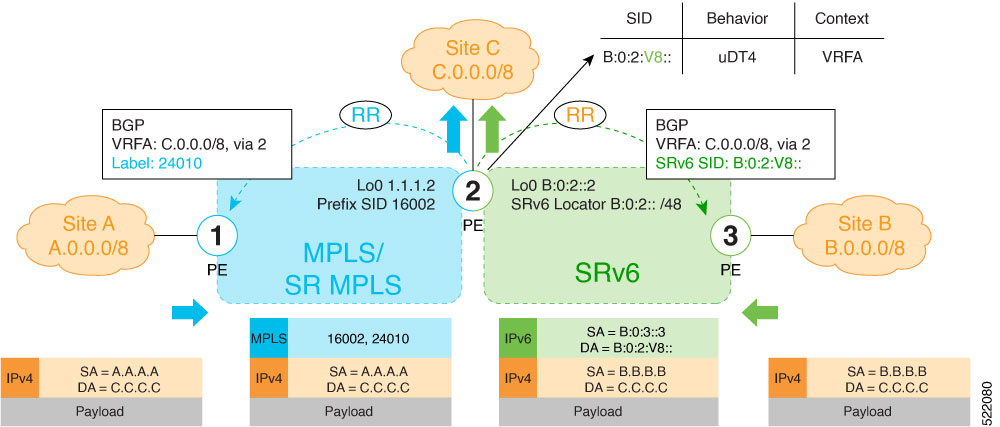
Figure 1. Deployment scenario for SRv6 MPLS dual-connected PE

These stages describe how an SRv6 MPLS dual-connected PE operates:

  1. The PE router is configured for dual-mode L3VPN services.

    • The PE router is set up to support a specific VRF for L3VPN services, enabling both MPLS and SRv6 capabilities.

    • BGP is configured to enable MPLS label allocation and SRv6 SID allocation within the VRF's address family.

  2. The PE router allocates identifiers for L3VPN prefixes. For each L3VPN prefix within the configured VRF, the PE router allocates both an MPLS label and an SRv6 SID.

  3. The PE router advertises VRF prefixes.

    By default, if a VRF prefix has both an MPLS label and an SRv6 SID, the PE sends the MPLS label when advertising the prefix to the PE.

  4. The PE router provides L3VPN connectivity.

    • The dual-connected PE provides MPLS/IPv4 L3VPN services between designated sites (for example, Site A and Site C).

    • The dual-connected PE also provides SRv6/IPv4 L3VPN services between other designated sites (for example, Site B and Site C).


Configure an SRv6 MPLS dual-connected PE

Use this procedure to configure a PE router to support IPv4 or IPv6 L3VPN services for a given VRF with both MPLS and SRv6, enabling an MPLS and SRv6 L3VPN coexistence scenario.

Procedure

  1. Enable MPLS label allocation.

    Example:

    Router(config)# router bgp 100
    Router(config-bgp)# vrf blue
    Router(config-bgp-vrf)# rd 1:10
    Router(config-bgp-vrf)# address-family ipv4 unicast
    Router(config-bgp-vrf-af)# mpls alloc enable
    Router(config-bgp-vrf-af)# label mode per-ce
    Router(config-bgp-vrf-af)# segment-routing srv6
    Router(config-bgp-vrf-af-srv6)# alloc mode per-ce
    Router(config-bgp-vrf-af-srv6)# exit
    Router(config-bgp-vrf-af)# exit
    Router(config-bgp-vrf)# exit
    Router(config-bgp)#
    
  2. Configure Encaps on neighbor to send the SRv6 SID toward the SRv6 dataplane

    By default, if a VRF prefix has both an MPLS label and an SRv6 SID, the MPLS label is sent when advertising the prefix to the PE. To advertise a VRF prefix with an SRv6 SID to an SRv6 session, use the encapsulation-type srv6 command under the neighbor VPN address-family.

    Example:

    Router(config-bgp)# neighbor 192::6
    Router(config-bgp-nbr)# remote-as 1
    Router(config-bgp-nbr)# address-family ipv4 unicast
    Router(config-bgp-nbr-af)# encapsulation-type srv6
    Router(config-bgp-nbr-af)# exit
    
  3. Run the show running-config command to verify the configuration.

    Example:

    
    router bgp 100
     neighbor 192::6
      remote-as 1
      address-family ipv4 unicast
       encapsulation-type srv6
      !
     !
     vrf blue
      rd 1:10
      address-family ipv4 unicast
       mpls alloc enable
       label mode per-ce
       segment-routing srv6
        alloc mode per-ce
       !
      !
     !
    !