This section explains the DHCP relay configuration for an OLT node. Use it to understand the feature behavior, requirements, and setup context before you configure or verify remote node management.
The OLT node must be configured with the DHCP management connection to manage the ILA node remotely over OSC interface.
Details
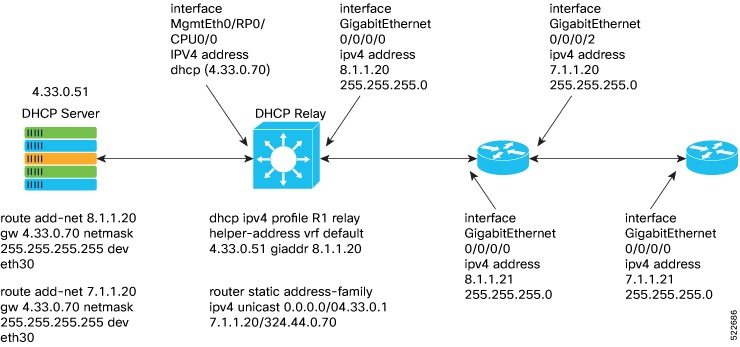
Following is the sample DHCP relay configuration for the OLT gateway node:
RP/0/RP0/CPU0:P2B_DT_02#sh running-config int mgmtEth 0/RP0/CPU0/2
Thu Jun  9 06:37:59.071 UTC
interface MgmtEth0/RP0/CPU0/2
 ipv4 address 192.168.1.1 255.255.255.252
!

RP/0/RP0/CPU0:P2B_DT_02#

RP/0/RP0/CPU0:P2C_DT_02#

RP/0/RP0/CPU0:P2B_DT_02#sh running-config dhcp ipv4
Thu Jun  9 06:28:51.879 UTC
dhcp ipv4
 profile R1 relay
  helper-address vrf default 10.4.33.51 giaddr 10.8.1.20
 !
 interface GigabitEthernet0/0/0/0 relay profile R1
!
In the above sample CLI,
-
10.4.33.51 is the DHCP server IP address
-
10.8.1.20 is the OSC interface IP address that going to ILA node from OLT node
-
0/0/0/0 is the interface number
-
R1 is the profile
Sample command for DHCP server:
3)	Config on dhcp server:
route add -net <OLT-OSCip> gw <OLT-MGMTip> netmask 255.255.255.255 dev eth3

route add -net 10.8.1.20 gw 10.4.33.70 netmask 255.255.255.255 dev eth3
route add -net 10.7.1.20 gw 10.4.33.70 netmask 255.255.255.255 dev eth3
Config on OLT:
dhcp ipv4 profile R1 relay helper-address vrf default 10.4.33.51 giaddr 10.8.1.20
router static
address-family ipv4 unicast
  0.0.0.0/0 10.4.33.1
  10.7.1.20/32 10.4.44.70
interface MgmtEth0/RP0/CPU0/0
ipv4 address dhcp
interface GigabitEthernet0/0/0/0
ipv4 address 10.8.1.20 255.255.255.0