System Setup and Software Installation Guide for Cisco NCS 1010, IOS XR Releases

PDF

Cisco NCS 1010 post-setup tasks

Want to summarize with AI?

Log in

Provides Cisco NCS 1010 post-setup task information, including AAA context and links to user profile and user group configuration tasks.


You must create user profiles and user groups to manage your system, install software packages, and configure your network.

AAA services

Every user is authenticated using a username and a password.

The authentication, authorization, and accounting (AAA) commands help with these services:

  • Create users, groups, command rules, or data rules

  • Change the disaster-recovery password

User access behavior

IOS-XR and Linux have separate AAA services. IOS XR AAA is the primary AAA system.

  • A user created through IOS-XR can log in directly to the EXEC prompt on the NCS 1010.

  • A user created through Linux can connect to the NCS 1010 and log in to the bash prompt. The user must log in to IOS XR explicitly to access the IOS-XR EXEC prompt.

AAA authorization

Configure IOS-XR AAA authorization to restrict uncontrolled user access.

If AAA is not configured, the command rules and data rules that are associated with the assigned groups are ignored.

A user can then have full read and write access to IOS XR configuration through NETCONF, gRPC, or other YANG-based agents.

Enable AAA before you set up any configuration. For more information about AAA services, see AAA services.

Post-setup workflow

The image shows the tasks that are involved in the Cisco NCS 1010 Series NCS 1010 post-setup procedure.
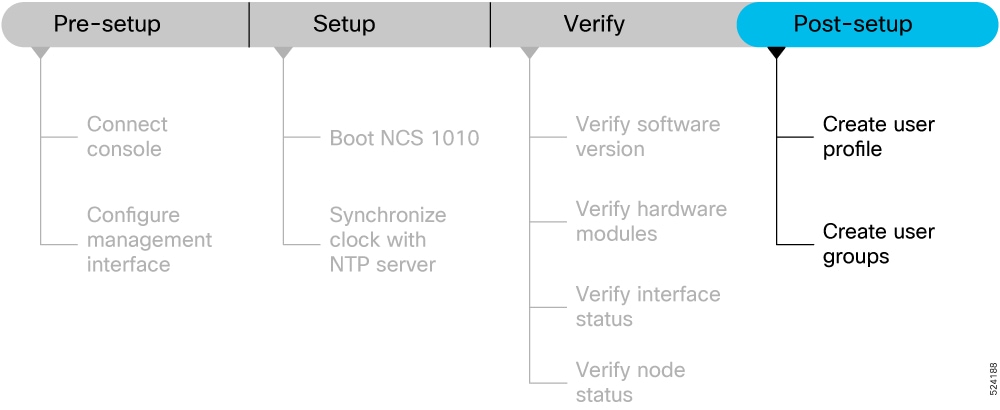
Figure 1. Post-setup Workflow for the Cisco NCS 1010

Before you begin

Before you perform the post-setup tasks, complete these prerequisite tasks:

Post-setup task functions

  • Create a user profile: Create users and include the users in user groups with certain privileges.

  • Create user groups: Associate command rules and data rules with a user group and enforce those rules on users in the group.


Create a user profile

Use this procedure to create a user profile.

You can create new users and include the user in a user group with certain privileges. The NCS 1010 supports a maximum of 1024 user profiles.

Create a user profile with these steps:

Procedure

1.

Create a user, provide a password, and assign the user to a group.

config

username <user-name>

password password

group root-lr

Example:

RP/0/RP0/CPU0:ios#config

/* Create a new user */
ios(config)#username user1

/* Set a password for the new user */
ios(config-un)#password pw123

/* Assign the user to group root-lr */
RP/0/RP0/CPU0:ios(config-un)#group root-lr

All users have read privileges. The root-lr users inherit write privileges where users can create configurations, create new users, and so on.

Enable display of login banner: The US Department of Defense (DOD)-approved login banner provides information such as number of successful and unsuccessful login attempts, time stamp, login method, and so on.

The banner is displayed before granting access to devices and helps maintain privacy and security that is consistent with applicable federal laws.

The system tracks logins from system boot or from the time the user profile is created.

You can enable or disable the login banner by using the login-history enable and login-history disable commands.

Note

Login notifications get reset during a NCS 1010 reload.

2.

Verify the state of login banner.

show running-config username NAME1

Example:

RP/0/RP0/CPU0:ios(config-un)#show running-config username NAME1
 Fri Jan 29 13:55:28.261 UTC
 username NAME1 
 group UG1
 secret * ********** 
 password * ******
 login-history enable
3.

Commit the configuration.

commit

Example:

RP/0/RP0/CPU0:ios(config-un)#commit

The user profile is created and allowed access to the NCS 1010 based on the configured privileges.

The create a user profile task is complete.


Create user groups

Use this procedure to create user groups.

You can create a new user group to associate command rules and data rules with it. The command rules and data rules are enforced on all users that are part of the user group. The NCS 1010 supports a maximum of 32 user groups.

Before you begin

Ensure that you have created a user profile. See Create a user profile.

Procedure

1.

Create a new user group.

config

group group1

username user1

Example:

RP/0/RP0/CPU0:ios#config

/* Create a new user group, group1 */
ios#(config)#group group1

/* Specify the name of the user, user1 to assign to this user group */
ios#(config-GRP)#username user1
2.

Commit the configuration.

commit

Example:

RP/0/RP0/CPU0:ios(config-GRP)#commit

The create user groups task is complete.

What to do next

This completes the NCS 1010 setup and verification process. You can now proceed with upgrading the software, installing RPMs, SMUs and bug fixes based on your requirement.