System Setup and Software Installation Guide for Cisco NCS 1010, IOS XR Releases

PDF

Cisco NCS 1010 software and hardware verification

Want to summarize with AI?

Log in

Provides the Cisco NCS 1010 software and hardware verification task sequence used to check the default setup after console login.


After logging into the console, perform preliminary checks to verify the default setup.
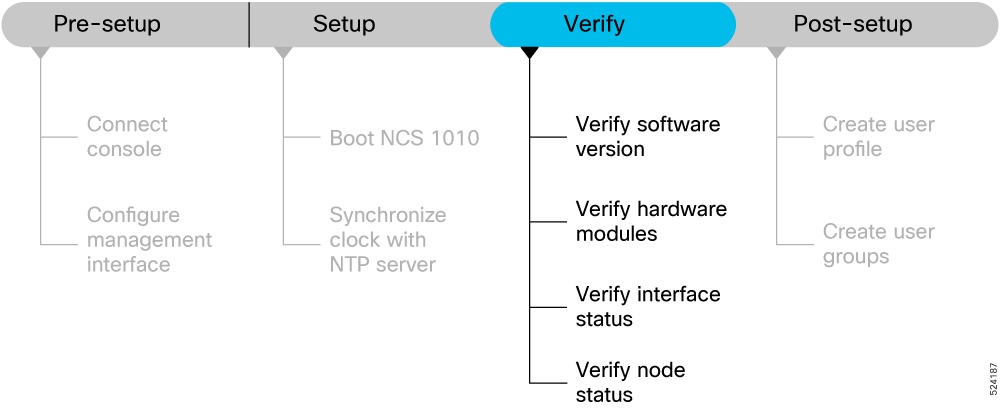
Figure 1. Verification Workflow for the Cisco NCS 1010 Setup

Complete the procedures in Cisco NCS 1010 setup workflow before you proceed with the verification tasks.

Note

The output of the examples in the procedures is not from the latest software release. The output will change for any explicit references to the current release.


Verify the software version

Use this procedure to verify the software version.

View the software version installed on the NCS 1010.

Procedure

Verify the latest version of the Cisco IOS XR software installed on the NCS 1010.

show version

Example:

RP/0/RP0/CPU0:ios#show version
Sat Mar 25 11:38:23.614 IST
Cisco IOS XR Software, Version 24.3.1
Copyright (c) 2013-2023 by Cisco Systems, Inc.
Build Information:
Built By : ingunawa
Built On : Tue Mar 07 02:22:55 UTC 2023
Build Host : iox-ucs-063
Workspace : /auto/iox-ucs-063-san2/prod/203.0.113.1I.SIT_IMAGE/ncs1010/ws
Version : 24.3.1
Label : 24.3.1
cisco NCS1010 (C3758 @ 2.20GHz)
cisco NCS1010-SA (C3758 @ 2.20GHz) processor with 32GB of memory
OLT-C-R-SITE-1 uptime is 2 weeks, 12 hours, 59 minutes
NCS 1010 - Chassis
Note

You must upgrade the system if a new version of the system is available to avail the latest features on the NCS 1010.

For more information about upgrading the software version, see Software upgrade plan.

The show version only displays the IOS XR version in the label field if modific ations are made to the running software on the booted ISO image during installation of a newer version.

The verify the software version task is complete.


Verify hardware modules

Use this procedure to verify hardware modules.

Cisco NCS 1010 have various hardware modules such as processors, line cards, fan trays, and power modules installed on the NCS 1010. Ensure that the firmware on various hardware components of the NCS 1010 is compatible with the installed Cisco IOS XR image. You also must verify that all the installed hardware and firmware modules are operational.

Procedure

1.

Verify the status of the hardware modules.

show platform

Example:

RP/0/RP0/CPU0:ios#show platform
Wed Apr 27 08:43:40.130 UTC
Node              Type                     State                    Config state
--------------------------------------------------------------------------------
0/RP0/CPU0        NCS1010-CNTLR-K9(Active) IOS XR RUN               NSHUT,NMON
0/PM0             NCS1010-AC-PSU           OFFLINE                  NSHUT,NMON
0/PM1             NCS1010-AC-PSU           OPERATIONAL              NSHUT,NMON
0/FT0             NCS1010-FAN              OPERATIONAL              NSHUT,NMON
0/FT1             NCS1010-FAN              OPERATIONAL              NSHUT,NMON
0/0/NXR0          NCS1K-OLT-C              OPERATIONAL              NSHUT,NMON
0/1               NCS1K-BRK-SA             OPERATIONAL              NSHUT,NMON
0/1/0             NCS1K-BRK-8              OPERATIONAL              NSHUT,NMON
0/1/1             NCS1K-BRK-8              OPERATIONAL              NSHUT,NMON
0/1/2             NCS1K-BRK-24             OPERATIONAL              NSHUT,NMON
0/1/3             NCS1K-BRK-24             OPERATIONAL              NSHUT,NMON
0/2               NCS1K-MD-32E-C           OPERATIONAL              NSHUT,NMON
0/3               NCS1K-MD-32O-C           OPERATIONAL              NSHUT,NMON
2.

View the list of hardware and firmware modules that are detected on the NCS 1010.

Note

From R26.2.1, the SSD FPD name displayed in the output of show hw-module fpd command is changed from a vendor or model-specific name to a generic format: 'CPU-SSD' for RP locations and 'CHASSIS-SSD' for rack locations.

show hw-module fpd command output until R26.2.1

Example:

RP/0/RP0/CPU0:ios# show hw-module fpd                                                                                                                     
Mon Dec 22 10:01:56.338 UTC
Auto-upgrade:Enabled,PM excluded
Attribute codes: B golden, P protect, S secure, A Anti Theft aware
                                                                         FPD Versions
                                                                        ==============
Location   Card type             HWver FPD device       ATR Status    Running  Programd   Reload Loc
-------------------------------------------------------------------------------------------------
0/RP0/CPU0 NCS1010-CNT-B-K9      0.1   ADMCONFIG            CURRENT      1.00     1.00        NOT REQ
0/RP0/CPU0 NCS1010-CNT-B-K9      0.1   BIOS             S   CURRENT      6.10     6.10          0/RP0
0/RP0/CPU0 NCS1010-CNT-B-K9      0.1   BIOS-Golden      BS  CURRENT               1.30          0/RP0
0/RP0/CPU0 NCS1010-CNT-B-K9      0.1   CpuFpga          S   CURRENT      1.12     1.12          0/RP0
0/RP0/CPU0 NCS1010-CNT-B-K9      0.1   CpuFpgaGolden    BS  CURRENT               0.07          0/RP0
0/RP0/CPU0 NCS1010-CNT-B-K9      0.1   SsdMicron5300    S   CURRENT      0.01     0.01          0/RP0
0/RP0/CPU0 NCS1010-CNT-B-K9      0.1   TamFw            S   CURRENT      9.07     9.07          0/RP0
0/RP0/CPU0 NCS1010-CNT-B-K9      0.1   TamFwGolden      BS  CURRENT               9.05          0/RP0
0/PM0      NCS1K4-AC-PSU-2       1.0   PO-PriMCU            NOT READY                             N/A
0/PM0      NCS1K4-AC-PSU-2       1.0   PO-SecMCU            CURRENT      1.05     1.05        NOT REQ
0/PM1      NCS1K4-AC-PSU-2       1.0   PO-PriMCU            CURRENT      1.03     1.03        NOT REQ
0/PM1      NCS1K4-AC-PSU-2       1.0   PO-SecMCU            CURRENT      1.05     1.05        NOT REQ
0/0/NXR0   NCS1K-E-ILA-RE-C      0.1   ILA              S   CURRENT      3.44     3.44        NOT REQ
0/0/NXR0   NCS1K-E-ILA-RE-C      0.1   Raman-E-1        S   CURRENT      4.04     4.04        NOT REQ
0/1/NXR0   NCS1K-E2-OLT-RE-C     0.1   E2_OLT           S   CURRENT      4.01     4.01        NOT REQ
0/1/NXR0   NCS1K-E2-OLT-RE-C     0.1   Raman-E-1        S   CURRENT      4.04     4.04        NOT REQ
0/Rack     NCS1020-SA            0.1   ADMCONFIG            CURRENT      1.00     1.00        NOT REQ
0/Rack     NCS1020-SA            0.1   IoFpgaLow        S   CURRENT      1.12     1.12        NOT REQ
0/Rack     NCS1020-SA            0.1   IoFpgaLowGolden  BS  CURRENT               0.07        NOT REQ
0/Rack     NCS1020-SA            0.1   IoFpgaUp         S   CURRENT      1.10     1.10        NOT REQ
0/Rack     NCS1020-SA            0.1   IoFpgaUpGolden   BS  CURRENT               0.06        NOT REQ
0/Rack     NCS1020-SA            0.1   SsdIntelSC2KB    S   CURRENT      1.30     1.30         0/Rack
 

show hw-module fpd command output from R26.2.1

Example:

RP/0/RP0/CPU0:ios# show hw-module fpd                                                                                                                     
Mon Dec 22 09:27:51.696 UTC
Auto-upgrade:Enabled,PM excluded
Attribute codes: B golden, P protect, S secure, A Anti Theft aware
                                                                         FPD Versions
                                                                        ==============
Location   Card type             HWver FPD device       ATR Status    Running  Programd   Reload Loc
-------------------------------------------------------------------------------------------------
0/RP0/CPU0 NCS1010-CNT-B-K9      0.1   ADMCONFIG            CURRENT      1.00     1.00        NOT REQ
0/RP0/CPU0 NCS1010-CNT-B-K9      0.1   BIOS             S   CURRENT      6.10     6.10          0/RP0
0/RP0/CPU0 NCS1010-CNT-B-K9      0.1   BIOS-Golden      BS  CURRENT               1.30          0/RP0
0/RP0/CPU0 NCS1010-CNT-B-K9      0.1   CPU-SSD          S   CURRENT      0.01     0.01          0/RP0
0/RP0/CPU0 NCS1010-CNT-B-K9      0.1   CpuFpga          S   CURRENT      1.12     1.12          0/RP0
0/RP0/CPU0 NCS1010-CNT-B-K9      0.1   CpuFpgaGolden    BS  CURRENT               0.07          0/RP0
0/RP0/CPU0 NCS1010-CNT-B-K9      0.1   TamFw            S   CURRENT      9.07     9.07          0/RP0
0/RP0/CPU0 NCS1010-CNT-B-K9      0.1   TamFwGolden      BS  CURRENT               9.05          0/RP0
0/PM0      NCS1K4-AC-PSU-2       1.0   PO-PriMCU            NOT READY                             N/A
0/PM0      NCS1K4-AC-PSU-2       1.0   PO-SecMCU            CURRENT      1.05     1.05        NOT REQ
0/PM1      NCS1K4-AC-PSU-2       1.0   PO-PriMCU            CURRENT      1.03     1.03        NOT REQ
0/PM1      NCS1K4-AC-PSU-2       1.0   PO-SecMCU            CURRENT      1.05     1.05        NOT REQ
0/0/NXR0   NCS1K-E-ILA-RE-C      0.1   ILA              S   CURRENT      3.44     3.44        NOT REQ
0/0/NXR0   NCS1K-E-ILA-RE-C      0.1   Raman-E-1        S   CURRENT      4.04     4.04        NOT REQ
0/1/NXR0   NCS1K-E2-OLT-RE-C     0.1   E2_OLT           S   CURRENT      4.01     4.01        NOT REQ
0/1/NXR0   NCS1K-E2-OLT-RE-C     0.1   Raman-E-1        S   CURRENT      4.04     4.04        NOT REQ
0/Rack     NCS1020-SA            0.1   ADMCONFIG            CURRENT      1.00     1.00        NOT REQ
0/Rack     NCS1020-SA            0.1   CHASSIS-SSD      S   CURRENT      1.30     1.30         0/Rack
0/Rack     NCS1020-SA            0.1   IoFpgaLow        S   CURRENT      1.12     1.12        NOT REQ
0/Rack     NCS1020-SA            0.1   IoFpgaLowGolden  BS  CURRENT               0.07        NOT REQ
0/Rack     NCS1020-SA            0.1   IoFpgaUp         S   CURRENT      1.10     1.10        NOT REQ
0/Rack     NCS1020-SA            0.1   IoFpgaUpGolden   BS  CURRENT               0.06        NOT REQ
 

show hw-module fpd command output from R26.2.1 with another PSU vendor.

Example:

RP/0/RP0/CPU0:ios# show hw-module fpd                                                                                                                     
Wed Jun  3 20:23:01.254 IST
 
Auto-upgrade:Enabled,PM excluded
Attribute codes: B golden, P protect, S secure, A Anti Theft aware
                                                                         FPD Versions
                                                                        ==============
Location   Card type             HWver FPD device       ATR Status    Running  Programd   Reload Loc
-------------------------------------------------------------------------------------------------
0/RP0/CPU0 NCS1010-CNTLR-K9      1.0   ADMConfig            CURRENT      3.40     3.40        NOT REQ
0/RP0/CPU0 NCS1010-CNTLR-K9      1.0   BIOS             S   CURRENT      6.10     6.10          0/RP0
0/RP0/CPU0 NCS1010-CNTLR-K9      1.0   BIOS-Golden      BS  CURRENT               4.40          0/RP0
0/RP0/CPU0 NCS1010-CNTLR-K9      1.0   CPU-SSD          S   CURRENT     11.51    11.51          0/RP0
0/RP0/CPU0 NCS1010-CNTLR-K9      1.0   CpuFpga          S   CURRENT      1.16     1.16          0/RP0
0/RP0/CPU0 NCS1010-CNTLR-K9      1.0   CpuFpgaGolden    BS  CURRENT               1.01          0/RP0
0/RP0/CPU0 NCS1010-CNTLR-K9      1.0   TamFw            S   CURRENT      6.13     6.13          0/RP0
0/RP0/CPU0 NCS1010-CNTLR-K9      1.0   TamFwGolden      BS  CURRENT               6.11          0/RP0
0/PM0      NCS1010-AC-PSU        1.0   LI-PriMCU            CURRENT      2.03     2.03        NOT REQ
0/PM0      NCS1010-AC-PSU        1.0   LI-SecMCU            CURRENT      2.03     2.03        NOT REQ
0/PM1      NCS1010-AC-PSU        1.0   LI-PriMCU            CURRENT      2.03     2.03        NOT REQ
0/PM1      NCS1010-AC-PSU        1.0   LI-SecMCU            CURRENT      2.03     2.03        NOT REQ
0/0/NXR0   NCS1K-ILA-C           0.1   ILA              S   CURRENT      3.48     3.48        NOT REQ
0/Rack     NCS1010-SA            1.0   CHASSIS-SSD      S   CURRENT     11.51    11.51         0/Rack
0/Rack     NCS1010-SA            1.0   EITU-ADMConfig       CURRENT      2.10     2.10        NOT REQ
0/Rack     NCS1010-SA            1.0   IoFpga           S   CURRENT      1.30     1.30        NOT REQ
0/Rack     NCS1010-SA            1.0   IoFpgaGolden     BS  CURRENT               1.01        NOT REQ
 

From the show hw-module fpd output, verify that all hardware modules that are installed on the chassis are listed. An unlisted module indicates that the module is either malfunctioning, or has not been installed properly. You must remove and reinstall the hardware module.

The fields in the show hw-module fpd output are:

  • FPD Device: Name of the hardware component, such as IO FPGA, or BIOS. The Golden FPDs are not field upgradable.

  • Running: Current version of the firmware running on the FPD.

  • Programd: Version of the FPD programmed on the module

  • Status: Upgrade status of the firmware. The different states are:

Table 1. Status and Description of the Firmware Upgrade
Status Description
CURRENT The firmware version is the latest version.
READY The firmware of the FPD is ready for an upgrade.
NOT READY The firmware of the FPD is not ready for an upgrade.
NEED UPGD A new firmware version is available in the installed image. Cisco recommends that you perform an upgrade of the firmware version.
RLOAD REQ The upgrade is complete, and the ISO image requires a reload.
UPGD DONE The firmware upgrade is successful.
UPGD FAIL The firmware upgrade has failed.
BACK IMG The firmware is corrupt. Reinstall the firmware.
UPGD SKIP The upgrade is skipped because the installed firmware version is higher than the one available in the image.
3.

Upgrade the required firmware as required,.

upgrade hw-module location all fpd all

Example:

RP/0/RP0/CPU0:ios#upgrade hw-module location all fpd all
Alarms are created showing all modules that needs to be upgraded.

Active Alarms
-----------------------------------------------------------------------------------------------------------------
Location     Severity  Group      Set Time                  Description
-----------------------------------------------------------------------------------------------------------------
0/6/CPU0     Major     FPD_Infra  09/16/2019 12:34:59 UTC   One Or More FPDs Need Upgrade Or Not In Current State
0/10/CPU0    Major     FPD_Infra  09/16/2019 12:34:59 UTC   One Or More FPDs Need Upgrade Or Not In Current State
0/RP0/CPU0   Major     FPD_Infra  09/16/2019 12:34:59 UTC   One Or More FPDs Need Upgrade Or Not In Current State
0/RP1/CPU0   Major     FPD_Infra  09/16/2019 12:34:59 UTC   One Or More FPDs Need Upgrade Or Not In Current State
0/FC0        Major     FPD_Infra  09/16/2019 12:34:59 UTC   One Or More FPDs Need Upgrade Or Not In Current State
0/FC1        Major     FPD_Infra  09/16/2019 12:34:59 UTC   One Or More FPDs Need Upgrade Or Not In Current State
Note

The BIOS and IOFPGA upgrades require a restart of the NCS 1010 for the new version to take effect.

4.

Verify status of the modules after upgrade.

show hw-module fpd REQ

Example:

RP/0/RP0/CPU0:ios#show hw-module fpd                                                                                                                     REQ
Wed Jun 29 08:50:21.057 UTC

Auto-upgrade:Disabled
                                                                         FPD Versions
                                                                        ==============
Location   Card type             HWver FPD device       ATR Status    Running   Programd  Reload Loc  
------------------------------------------------------------------------------------------------------
0/RP0/CPU0 NCS1010-CNTLR-K9      1.0   ADMConfig            CURRENT    3.40    3.40       NOT REQ
0/RP0/CPU0 NCS1010-CNTLR-K9      1.0   BIOS              S  CURRENT    4.10    4.10         0/RP0
0/RP0/CPU0 NCS1010-CNTLR-K9      1.0   BIOS-Golden      BS  CURRENT            4.10         0/RP0
0/RP0/CPU0 NCS1010-CNTLR-K9      1.0   CpuFpga           S  CURRENT    1.02    1.02         0/RP0
0/RP0/CPU0 NCS1010-CNTLR-K9      1.0   CpuFpgaGolden    BS  CURRENT            1.01         0/RP0
0/RP0/CPU0 NCS1010-CNTLR-K9      1.0   SsdIntelS4510     S  CURRENT   11.32   11.32         0/RP0
0/RP0/CPU0 NCS1010-CNTLR-K9      1.0   TamFw             S  CURRENT    6.13    6.13         0/RP0
0/RP0/CPU0 NCS1010-CNTLR-K9      1.0   TamFwGolden      BS  CURRENT            6.11         0/RP0
0/PM0      NCS1010-AC-PSU        0.0   AP-PriMCU            CURRENT    1.03    1.03       NOT REQ
0/PM0      NCS1010-AC-PSU        0.0   AP-SecMCU            CURRENT    2.01    2.01       NOT REQ
0/PM1      NCS1010-AC-PSU        0.0   AP-PriMCU            CURRENT    1.03    1.03       NOT REQ
0/PM1      NCS1010-AC-PSU        0.0   AP-SecMCU            CURRENT    2.01    2.01       NOT REQ
0/0/NXR0   NCS1K-ILA-C           1.0   ILA               S  CURRENT    1.00    1.00       NOT REQ
0/Rack     NCS1010-SA            1.0   EITU-ADMConfig       CURRENT    2.10    2.10       NOT REQ
0/Rack     NCS1010-SA            1.0   IoFpga            S  CURRENT    1.04    1.04       NOT REQ
0/Rack     NCS1010-SA            1.0   IoFpgaGolden     BS  CURRENT            1.01       NOT REQ
0/Rack     NCS1010-SA            1.0   SsdIntelS4510     S  CURRENT   11.32   11.32        0/Rack
 

The status of the upgraded nodes shows that a reload is required.

5.

Reload the individual nodes that require an upgrade.

reload location node-location

Example:

RP/0/RP0/CPU0:ios#reload location node-location
6.

Verify that all nodes that had required an upgrade now shows an updated status of CURRENT with an updated FPD version.

Example:


Thu Mar  2 12:35:06.602 IST

Auto-upgrade:Enabled
Attribute codes: B golden, P protect, S secure, A Anti Theft aware
                                                                         FPD Versions
                                                                        ==============
Location   Card type             HWver FPD device       ATR Status   Running Programd  Reload Loc
-------------------------------------------------------------------------------------------------
0/RP0/CPU0 NCS1010-CNTLR-K9      1.11  ADMConfig            CURRENT    3.40    3.40       NOT REQ
0/RP0/CPU0 NCS1010-CNTLR-K9      1.11  BIOS             S   CURRENT    4.20    4.20         0/RP0
0/RP0/CPU0 NCS1010-CNTLR-K9      1.11  BIOS-Golden      BS  CURRENT            4.10         0/RP0
0/RP0/CPU0 NCS1010-CNTLR-K9      1.11  CpuFpga          S   CURRENT    1.11    1.11         0/RP0
0/RP0/CPU0 NCS1010-CNTLR-K9      1.11  CpuFpgaGolden    BS  CURRENT            1.01         0/RP0
0/RP0/CPU0 NCS1010-CNTLR-K9      1.11  SsdIntelS4510    S   CURRENT   11.32   11.32         0/RP0
0/RP0/CPU0 NCS1010-CNTLR-K9      1.11  TamFw            S   CURRENT    6.13    6.13         0/RP0
0/RP0/CPU0 NCS1010-CNTLR-K9      1.11  TamFwGolden      BS  CURRENT            6.11         0/RP0
0/PM0      NCS1010-AC-PSU        0.0   AP-PriMCU            CURRENT    1.03    1.03       NOT REQ
0/PM0      NCS1010-AC-PSU        0.0   AP-SecMCU            CURRENT    2.01    2.01       NOT REQ
0/PM1      NCS1010-AC-PSU        0.0   AP-PriMCU            CURRENT    1.03    1.03       NOT REQ
0/PM1      NCS1010-AC-PSU        0.0   AP-SecMCU            CURRENT    2.01    2.01       NOT REQ
0/0/NXR0   NCS1K-OLT-L           1.0   OLT              S   CURRENT    1.02    1.02       NOT REQ
0/Rack     NCS1010-SA            2.1   EITU-ADMConfig       CURRENT    2.10    2.10       NOT REQ
0/Rack     NCS1010-SA            2.1   IoFpga           S   CURRENT    1.12    1.12       NOT REQ
0/Rack     NCS1010-SA            2.1   IoFpgaGolden     BS  CURRENT            1.01       NOT REQ
0/Rack     NCS1010-SA            2.1   SsdIntelS4510    S   CURRENT   11.32   11.32        0/Rack

The verify hardware modules task is complete.


Verify interface status

Use this procedure to verify interface status.

All available interfaces must be discovered by the system after booting the Cisco NCS 1010. Interfaces not discovered might indicate a malfunction in the unit.

Procedure

View the interfaces discovered by the system.

show ipv4 interfaces brief

Example:

RP/0/RP0/CPU0:ios#show ipv4 interfaces brief
Wed May 25 11:50:28.438 UTC

               Intf     Intf        LineP              Encap         MTU        BW
               Name    State       State               Type        (byte)    (Kbps)
--------------------------------------------------------------------------------------------------------
                Lo0       up          up              Loopback       1500          0
                Lo3       up          up              Loopback       1500          0
                Nu0       up          up               Null           1500          0
          Gi0/0/0/0       up          up               ARPA           1514    1000000
         Mg0/RP0/CPU0/0    up          up               ARPA          1514    1000000
        Mg0/RP0/CPU0/1    admin-down  admin-down        ARPA  1514    1000000
        Mg0/RP0/CPU0/2    admin-down  admin-down        ARPA  1514    1000000
        PT0/RP0/CPU0/0    admin-down  admin-down        ARPA  1514    1000000
        PT0/RP0/CPU0/1    admin-down  admin-down        ARPA  1514    1000000

Example:

RP/0/RP0/CPU0:ios#show ipv4 interfaces brief
Tue Jul 12 07:32:42.390 UTC

Interface                      IP-Address      Status          Protocol Vrf-Name
Loopback0                      198.51.100.1       Up            Up       default 
Loopback3                      203.0.113.1        Up            Up       default 
GigabitEthernet0/0/0/0         192.0.2.1          Up            Up       default 
MgmtEth0/RP0/CPU0/0            192.0.2.255        Up            Up       default 
PTP0/RP0/CPU0/0                unassigned      Shutdown        Down     default 
MgmtEth0/RP0/CPU0/1            unassigned      Down            Down     default 
PTP0/RP0/CPU0/1                unassigned      Shutdown        Down     default 
MgmtEth0/RP0/CPU0/2            unassigned      Down            Down     default

When a NCS 1010 is turned ON for the first time, all interfaces are in the unassigned state.

Ensure that the total number of interfaces that are displayed in the result matches with the actual number of interfaces present on the NCS 1010, and that the interfaces are created according to the type of line cards displayed in show platform command.

The verify interface status task is complete.


Verify node status

Use this procedure to verify node status.

A node can be a specified location, or the complete hardware module in the system. You must verify that the software state of all route processors, line cards, and the hardware state of fabric cards, fan trays, and power modules are listed, and their state is OPERATIONAL. This indicates that the IOS XR console is operational on the cards.

Procedure

Verify the operational status of the node.

show platform

Example:

RP/0/RP0/CPU0:ios#show platform
Wed Apr 27 08:43:40.130 UTC
Node              Type                     State                    Config state
--------------------------------------------------------------------------------
0/RP0/CPU0        NCS1010-CNTLR-K9(Active) IOS XR RUN               NSHUT,NMON
0/PM0             NCS1010-AC-PSU           OFFLINE                  NSHUT,NMON
0/PM1             NCS1010-AC-PSU           OPERATIONAL              NSHUT,NMON
0/FT0             NCS1010-FAN              OPERATIONAL              NSHUT,NMON
0/FT1             NCS1010-FAN              OPERATIONAL              NSHUT,NMON
0/0/NXR0          NCS1K-OLT-C              OPERATIONAL              NSHUT,NMON
0/1               NCS1K-BRK-SA             OPERATIONAL              NSHUT,NMON
0/1/0             NCS1K-BRK-8              OPERATIONAL              NSHUT,NMON
0/1/1             NCS1K-BRK-8              OPERATIONAL              NSHUT,NMON
0/1/2             NCS1K-BRK-24             OPERATIONAL              NSHUT,NMON
0/1/3             NCS1K-BRK-24             OPERATIONAL              NSHUT,NMON
0/2               NCS1K-MD-32E-C           OPERATIONAL              NSHUT,NMON
0/3               NCS1K-MD-32O-C           OPERATIONAL              NSHUT,NMON

Example:

RP/0/RP0/CPU0:ios#show platform
Thu Mar  2 12:35:01.883 IST
Node              Type                     State                    Config state
--------------------------------------------------------------------------------
0/RP0/CPU0        NCS1010-CNTLR-K9(Active) IOS XR RUN               NSHUT,NMON
0/PM0             NCS1010-AC-PSU           OPERATIONAL              NSHUT,NMON
0/PM1             NCS1010-AC-PSU           OFFLINE                  NSHUT,NMON
0/FT0             NCS1010-FAN              OPERATIONAL              NSHUT,NMON
0/FT1             NCS1010-FAN              OPERATIONAL              NSHUT,NMON
0/0/NXR0          NCS1K-OLT-L              OPERATIONAL              NSHUT,NMON
0/3               NCS1K-BRK-24             OPERATIONAL              NSHUT,NMON

The verify node status task is complete.

What to do next

This completes verification of the basic NCS 1010 setup. You can now complete the post-setup tasks where you manage user profiles and groups.


Verify hardware inventory

Use this procedure to verify hardware inventory.

The show inventory command displays details of the hardware inventory of NCS 1010.

To verify the inventory information for all the physical entities, perform this procedure.

Procedure

Verify hardware inventory.

show inventory

Displays the details of the physical entities of NCS 1010 along with the details of SFPs.

Example:

RP/0/RP0/CPU0:ios#show inventory    
Wed Apr 27 08:43:44.222 UTC

NAME: "Rack 0", DESCR: "NCS1010 - Shelf Assembly"
PID: NCS1010-SA        , VID: V00, SN: FCB2504B0X4

NAME: "0/RP0/CPU0", DESCR: "Network Convergence System 1010 Controller"
PID: NCS1010-CNTLR-K9  , VID: V00, SN: FCB2506B0NX

NAME: "0/1", DESCR: "NCS 1000 shelf for 4 passive modules"
PID: NCS1K-BRK-SA      , VID: V00 , SN: FCB2534B0GR

NAME: "0/1/0", DESCR: "NCS 1000 MTP/MPO to 8 port passive breakout module"
PID: NCS1K-BRK-8       , VID: V00 , SN: MPM25401005

NAME: "0/1/1", DESCR: "NCS 1000 MTP/MPO to 8 port passive breakout module"
PID: NCS1K-BRK-8       , VID: V00 , SN: MPM25401003

NAME: "0/1/2", DESCR: "NCS 1000 MTP/MPO to 24 colorless chs passive breakout module"
PID: NCS1K-BRK-24      , VID: V00 , SN: MPM25141004

NAME: "0/1/3", DESCR: "NCS 1000 MTP/MPO to 24 colorless chs passive breakout module"
PID: NCS1K-BRK-24      , VID: V00 , SN: MPM25371005

NAME: "0/2", DESCR: "NCS 1000 32 chs Even Mux/Demux Patch Panel - 150GHz - C-band"
PID: NCS1K-MD-32E-C    , VID: V00 , SN: ACW2529YE13

NAME: "0/3", DESCR: "NCS 1000 32 chs Odd  Mux/Demux Patch Panel - 150GHz - C-band"
PID: NCS1K-MD-32O-C    , VID: V00 , SN: ACW2529YA13

NAME: "0/FT0", DESCR: "NCS1010 - Shelf Fan"
PID: NCS1010-FAN       , VID: V00, SN: FCB2504B0W3

NAME: "0/FT1", DESCR: "NCS1010 - Shelf Fan"
PID: NCS1010-FAN       , VID: V00, SN: FCB2504B0U8

NAME: "0/PM0", DESCR: "NCS 1010 - AC Power Supply Unit" 
PID: NCS1010-AC-PSU    , VID: V00, SN: APS244700D0

NAME: "0/PM1", DESCR: "NCS 1010 - AC Power Supply Unit"
PID: NCS1010-AC-PSU    , VID: V00, SN: APS244700BY

Example:

RP/0/RP0/CPU0:ios#show inventory    
Wed Jun  3 20:23:34.452 IST
 
NAME: "Rack 0", DESCR: "NCS 1010 Shelf Assembly"
PID: NCS1010-SA        , VID: V00, SN: FCB2546B08R
 
NAME: "0/RP0/CPU0", DESCR: "NCS1010 - Controller"
PID: NCS1010-CNTLR-K9  , VID: V00, SN: FCB2535B0AB
 
NAME: "0/FT0", DESCR: "NCS1010 - Shelf Fan"
PID: NCS1010-FAN       , VID: V00, SN: FCB2528B1M3
 
NAME: "0/FT1", DESCR: "NCS1010 - Shelf Fan"
PID: NCS1010-FAN       , VID: V00, SN: FCB2528B1LZ
 
NAME: "0/PM0", DESCR: "NCS 1010 - AC Power Supply Unit"
PID: NCS1010-AC-PSU    , VID: V00, SN: LIT2944334E
 
NAME: "0/PM1", DESCR: "NCS 1010 - AC Power Supply Unit"
PID: NCS1010-AC-PSU    , VID: V00, SN: LIT2944336S
 
NAME: "0/0/NXR0", DESCR: "NCS 1010 - In-Line Amplifier - C-band"
PID: NCS1K-ILA-C       , VID: V00, SN: FCB2533B0NB
 
NAME: "0/RP0-PTP0", DESCR: "Cisco Pluggable Optics Module"
PID: GLC-SX-MMD        , VID: V01, SN: OPM22160121
 
NAME: "0/RP0-PTP1", DESCR: "Cisco Pluggable Optics Module"
PID: GLC-SX-MMD        , VID: V01, SN: OPM221600ZM
 
NAME: "0/RP0-UDC0", DESCR: "Cisco Pluggable Optics Module"
PID: SFP-GE-S          , VID: V01, SN: FNS12281ZGA
 
NAME: "0/RP0-UDC1", DESCR: "Cisco Pluggable Optics Module"
PID: SFP-GE-S          , VID: V01, SN: FNS12510W8C

The verify hardware inventory task is complete.


Verify management interface status

Use this procedure to verify management interface status.

To verify the management interface status, perform this procedure.

Procedure

1.

Verify the management interface configuration.

show interfaces MgmtEth 0/RP0/CPU0/0

Displays the management interface configuration.

Example:

RP/0/RP0/CPU0:ios#show interfaces MgmtEth 0/RP0/CPU0/0
Wed May 25 11:49:18.118 UTC
MgmtEth0/RP0/CPU0/0 is up, line protocol is up 
  Interface state transitions: 1
  Hardware is Management Ethernet, address is 38fd.f866.0964 (bia 38fd.f866.0964)
  Internet address is 192.0.2.254/16
  MTU 1514 bytes, BW 1000000 Kbit (Max: 1000000 Kbit)
     reliability 255/255, txload 0/255, rxload 0/255
  Encapsulation ARPA,
  Full-duplex, 1000Mb/s, CX, link type is autonegotiation
  loopback not set,
  Last link flapped 15:05:21
  ARP type ARPA, ARP timeout 04:00:00
  Last input never, output 00:00:00
  Last clearing of "show interface" counters never
  5 minute input rate 0 bits/sec, 0 packets/sec
  5 minute output rate 0 bits/sec, 0 packets/sec
     53138 packets input, 6636701 bytes, 0 total input drops
     0 drops for unrecognized upper-level protocol
     Received 12145 broadcast packets, 40082 multicast packets
              0 runts, 0 giants, 0 throttles, 0 parity
     0 input errors, 0 CRC, 0 frame, 0 overrun, 0 ignored, 0 abort
     217288 packets output, 60964220 bytes, 0 total output drops
     Output 1 broadcast packets, 15 multicast packets
     0 output errors, 0 underruns, 0 applique, 0 resets
     0 output buffer failures, 0 output buffers swapped out
     1 carrier transitions
2.

Verify the management interface status.

show interfaces summary

show interfaces brief

show ipv4 interfaces brief

Verifies the management interface status.

Example:

RP/0/RP0/CPU0:ios#show interfaces summary
Mon Nov  4 18:10:14.996 IST
Interface Type          Total    UP       Down     Admin Down
--------------          -----    --       ----     ----------
ALL TYPES               9        7        0        2       
--------------         
IFT_GETHERNET           1        1        0        0       
IFT_LOOPBACK            1        1        0        0       
IFT_ETHERNET            4        4        0        0       
IFT_NULL                1        1        0        0       
IFT_PTP_ETHERNET        2        0        0        2       

Example:

RP/0/RP0/CPU0:ios#show interfaces brief
Mon Nov  4 18:11:37.222 IST

               Intf       Intf        LineP              Encap  MTU        BW
               Name       State       State               Type (byte)    (Kbps)
--------------------------------------------------------------------------------
                Lo0          up          up           Loopback  1500          0
                Nu0          up          up               Null  1500          0
          Gi0/0/0/0          up          up               ARPA  1514     100000
     Mg0/RP0/CPU0/0          up          up               ARPA  1514    1000000
     Mg0/RP0/CPU0/1          up          up               ARPA  1514    1000000
     Mg0/RP0/CPU0/2          up          up               ARPA  1514    1000000
     PT0/RP0/CPU0/0  admin-down  admin-down               ARPA  1514    1000000
     PT0/RP0/CPU0/1  admin-down  admin-down               ARPA  1514    1000000
    Mg0/RP0/RCOM0/0          up          up               ARPA  1514    1000000

Example:

RP/0/RP0/CPU0:ios#show ipv4 interfaces brief
Mon Nov  4 18:12:32.082 IST

Interface                      IP-Address      Status          Protocol Vrf-Name
Loopback0                      192.0.2.1        Up              Up       default 
GigabitEthernet0/0/0/0         192.0.2.1        Up              Up       default 
MgmtEth0/RP0/CPU0/0            192.0.2.254      Up              Up       default 
PTP0/RP0/CPU0/0                unassigned      Shutdown        Down      default 
MgmtEth0/RP0/CPU0/1            203.0.113.1      Up              Up       default 
PTP0/RP0/CPU0/1                unassigned      Shutdown        Down      default 
MgmtEth0/RP0/CPU0/2            192.0.2.255      Up              Up       default 
MgmtEth0/RP0/RCOM0/0           unassigned       Up              Up       default 

The verify management interface status task is complete.


Verify alarms

Use this procedure to verify alarms.

You can view the alarm information using the show alarms command.

Procedure

Verify active alarms.

show alarms brief system active

Displays alarms in brief or detail.

Example:

RP/0/RP0/CPU0:ios#show alarms brief system active
 
Thu Apr 28 06:16:50.524 UTC

------------------------------------------------------------------------------------
Active Alarms 
------------------------------------------------------------------------------------
Location        Severity     Group            Set Time                   Description
------------------------------------------------------------------------------------
0/RP0/CPU0      Major        Ethernet         04/28/2022 06:03:39 UTC    RP-SW: SPI flash config is incorrect
0/PM0           Major        Environ          04/28/2022 06:03:50 UTC    Power Module Error (PM_VIN_VOLT_OOR)
0/PM0           Major        Environ          04/28/2022 06:03:50 UTC    Power Module Output Disabled (PM_OUTPUT_DISABLED)
0               Major        Environ          04/28/2022 06:03:50 UTC    Power Group redundancy lost
0/PM0           Major        FPD_Infra        04/28/2022 06:04:08 UTC    One Or More FPDs Need Upgrade Or Not In Current State
0/PM1           Major        FPD_Infra        04/28/2022 06:04:09 UTC    One Or More FPDs Need Upgrade Or Not In Current State
0/0             Major        Controller       04/28/2022 06:05:12 UTC    Osc0/0/0/0 - Provisioning Failed
0/0             Major        Controller       04/28/2022 06:05:12 UTC    Osc0/0/0/2 - Provisioning Failed
0/0             Major        Controller       04/28/2022 06:05:12 UTC    Ots0/0/0/0 - Provisioning Failed
0/0             Major        Controller       04/28/2022 06:05:12 UTC    Ots0/0/0/2 - Provisioning Failed
Note
In the maintenance mode, all the alarms are moved from active to suppressed and the show alarms command does not display the alarms details.

The verify alarms task is complete.


Verify environmental parameters

Use this procedure to verify environmental parameters.

The show environment command displays the environmental parameters of NCS 1010.

To verify that the environmental parameters are as expected, perform this procedure.

Procedure

1.

Verify fan environmental parameters.

show environment fan

Example:

This example shows a sample output of the show environment command with the fan keyword.

RP/0/RP0/CPU0:ios#show environment fan
Thu May 26 04:15:37.765 UTC
===========================================================================
                                              Fan speed (rpm)
Location      FRU Type                        FAN_0    FAN_1   FAN_2   
---------------------------------------------------------------------------

0/PM0        NCS1010-AC-PSU                     5368   
0/PM1        NCS1010-AC-PSU                     5336   
0/FT0        NCS1010-FAN                       10020   10020   10020   
0/FT1        NCS1010-FAN                       10020   10020    9960   

==============================================================================
Displays the environmental parameters for the selected command output.
2.

Verify route processor temperature parameters.

show environment temperature location 0/RP0

Example:

This example shows a sample output of the show environment command with the temperatures keyword for 0/RP0 location.

RP/0/RP0/CPU0:ios#show environment temperature location 0/RP0
 
Thu May 26 04:16:39.832 UTC
=============================================================================================================
Location  TEMPERATURE                          Value     Crit    Major    Minor    Minor    Major    Crit
          Sensor                             (deg C)     (Lo)     (Lo)     (Lo)     (Hi)     (Hi)    (Hi)
-------------------------------------------------------------------------------------------------------------
0/RP0/CPU0 
          RP_TEMP_PCB                            30      -10       -5        0       70       75       80
          RP_TEMP_HOT_SPOT                       33      -10       -5        0       70       75       80
          RP_TEMP_LTM4638                        49      -10       -5        0       80       85       90
          RP_TEMP_LTM4644_0                      36      -10       -5        0       80       85       90
          RP_TEMP_LTM4644_1                      39      -10       -5        0       80       85       90
          RP_JMAC_1V0_VCCP_TMON                  33      -10       -5        0       80       85       90
          RP_JMAC_1V0_VNN_TMON                   33      -10       -5        0       80       85       90
          RP_JMAC_1V0_VCC_RAM_TMON               32      -10       -5        0       80       85       90
          RP_JMAC_1V2_DDR_VDDQ_TMON              33      -10       -5        0       80       85       90
==============================================================================================================
3.

Verify NXR temperature parameters.

show environment temperature location 0/0/NXR0

Example:

This example shows a sample output of the show environment command with the temperatures keyword for 0/0/NXR0 location.

RP/0/RP0/CPU0:ios#show environment temperature location 0/0/NXR0 

Thu May 26 04:16:39.832 UTC
=============================================================================================================
Location  TEMPERATURE                          Value     Crit    Major    Minor    Minor    Major    Crit
          Sensor                             (deg C)     (Lo)     (Lo)     (Lo)     (Hi)     (Hi)    (Hi)
-------------------------------------------------------------------------------------------------------------
0/0/NXR0   
          OLTC_LT_P0_iEDFA0                      24       18       19       20       30       31       32
          OLTC_LT_P0_iEDFA1                      25       18       19       20       30       31       32
          OLTC_LT_P0_iEDFA2                      24       18       19       20       30       31       32
          OLTC_LT_P2_iEDFA0                      25       18       19       20       30       31       32
          OLTC_LT_P3_iEDFA0                      25       18       19       20       30       31       32
          OLTC_LT_P0_eEDFA0                      24       18       19       20       30       31       32
          OLTC_CT_1                              32      -10       -7       -5       75       77       80
          OLTC_LT_P0_eEDFA1                      24       18       19       20       30       31       32
          OLTC_CT_2                              27      -10       -7       -5       70       73       75
          OLTC_CT_3                              30      -10       -7       -5       70       73       75
          OLTC_CT_4                              30      -10       -7       -5       70       73       75
          OLTC_FT_P0_iEDFA0                      60       55       57       58       62       64       65
          OLTC_FT_P2_iEDFA0                      60       55       57       58       62       64       65
          OLTC_FT_P3_iEDFA0                      60       55       57       58       62       64       65
          OLTC_FT_P0_eEDFA0                      60       55       57       58       62       64       65
=============================================================================================================
4.

Verify power environmental parameters.

show environment power

Example:

This example shows a sample output of the show environment command with the power keyword.

RP/0/RP0/CPU0:ios#show environment power
Thu May 26 04:17:55.592 UTC
================================================================================
CHASSIS LEVEL POWER INFO: 0
================================================================================
   Total output power capacity (Group 0 + Group 1) :    1050W +     1050W
   Total output power required                     :     700W
   Total power input                               :     228W
   Total power output                              :     140W

Power Group 0:
================================================================================
   Power       Supply         ------Input----   ------Output---     Status
   Module      Type            Volts     Amps    Volts     Amps    
================================================================================
   0/PM0       NCS1010-AC-PSU  228.5     0.5     12.1      5.6      OK

Total of Group 0:              114W/0.5A         67W/5.6A

Power Group 1:
================================================================================
   Power       Supply         ------Input----   ------Output---     Status
   Module      Type            Volts     Amps    Volts     Amps    
================================================================================
   0/PM1       NCS1010-AC-PSU  228.5     0.5     12.1      6.1      OK
          
Total of Group 1:              114W/0.5A         73W/6.1A
          
================================================================================
   Location     Card Type               Power       Power        Status
                                        Allocated   Used
                                        Watts       Watts
================================================================================
   0/RP0/CPU0   NCS1010-CNTLR-K9        90          14           ON
   0/FT0        NCS1010-FAN             110         17           ON
   0/FT1        NCS1010-FAN             110         15           ON
   0/0/NXR0     NCS1K-OLT-C             350         61           ON
   0/Rack       NCS1010-SA              40          19           ON


=================================================================================

Example:


RP/0/RP0/CPU0:ios#show environment power
Wed Jun  3 20:27:37.231 IST
================================================================================
CHASSIS LEVEL POWER INFO: 0
================================================================================
   Total output power capacity (Group 0 + Group 1) :    1050W +     1050W
   Total output power required                     :     511W
   Total power input                               :     136W
   Total power output                              :     118W
 
Power Group 0:
================================================================================
   Power       Supply            ------Input----   ------Output---     Status
   Module      Type               Volts     Amps    Volts     Amps   
================================================================================
   0/PM0       NCS1010-AC-PSU     228.0     0.3     12.1      5.2      OK
 
Total of Group 0:               68W/0.3A         62W/5.2A
 
Power Group 1:
================================================================================
   Power       Supply            ------Input----   ------Output---     Status
   Module      Type               Volts     Amps    Volts     Amps   
================================================================================
   0/PM1       NCS1010-AC-PSU     227.5     0.3     12.1      4.7      OK
 
Total of Group 1:               68W/0.3A         56W/4.7A
 
================================================================================
   Location     Card Type               Power       Power        Status
                                        Allocated   Used
                                        Watts       Watts
================================================================================
   0/RP0/CPU0   NCS1010-CNTLR-K9        111         10           ON
   0/FT0        NCS1010-FAN             110         12           ON
   0/FT1        NCS1010-FAN             110         13           ON
   0/0/NXR0     NCS1K-ILA-C             140         37           ON
   0/Rack       NCS1010-SA              40          12           ON
5.

Verify voltage environmental parameters.

show environment voltage location 0/RP0

Example:

This example shows a sample output of the show environment command with the voltages keyword.

RP/0/RP0/CPU0:ios#show environment voltage location 0/RP0 
Thu May 26 04:19:16.636 UTC
========================================================================================
Location  VOLTAGE                             Value      Crit    Minor    Minor     Crit
          Sensor                              (mV)       (Lo)    (Lo)     (Hi)      (Hi)
----------------------------------------------------------------------------------------
0/RP0/CPU0 
          RP_ADM1266_12V0                     12094    10800    11280    12720    13200
          RP_ADM1266_1V8_CPU                   1806     1670     1750     1850     1930
          RP_ADM1266_1V24_VCCREF               1238     1150     1200     1280     1330
          RP_ADM1266_1V05_CPU                  1047      980     1020     1080     1120
          RP_ADM1266_1V2_DDR_VDDQ              1204     1120     1160     1240     1280
          RP_ADM1266_1V0_VCC_RAM                988      650      700     1250     1300
          RP_ADM1266_1V0_VNN                    869      550      600     1250     1300
          RP_ADM1266_1V0_VCCP                  1018      450      500     1250     1300
          RP_ADM1266_0V6_DDR_VTT                599      560      580      620      640
          RP_ADM1266_3V3_STAND_BY              3301     3070     3200     3400     3530
          RP_ADM1266_5V0                       5004     4650     4850     5150     5350
          RP_ADM1266_3V3                       3325     3070     3200     3400     3530
          RP_ADM1266_2V5_PLL                   2489     2330     2430     2580     2680
          RP_ADM1266_2V5_FPGA                  2502     2330     2430     2580     2680
          RP_ADM1266_1V2_FPGA                  1202     1120     1160     1240     1280
          RP_ADM1266_3V3_CPU                   3332     3070     3200     3400     3530
          RP_ADM1266_2V5_CPU                   2498     2330     2430     2580     2680

=========================================================================================
6.

Verify current environmental parameters.

show environment current

Example:

This example shows a sample output of the show environment command with the current keyword.

RP/0/RP0/CPU0:P2C_DT_02#show environment current 
Tue Jul  5 08:36:22.132 UTC
==========================================================================================
Location  CURRENT                              Value    
          Sensor                               (mA)    
------------------------------------------------------------------------------------------
0/RP0/CPU0 
          RP_CURRMON_LTM4638                    395
          RP_CURRMON_LTM4644_0                  179
          RP_CURRMON_LTM4644_1                  307
          RP_JMAC_1V0_VCCP_IMON                 187
          RP_JMAC_1V0_VNN_IMON                   62
          RP_JMAC_1V0_VCC_RAM_IMON                0
          RP_JMAC_1V2_DDR_VDDQ_IMON             187
0/Rack     
          SA_ADM1275_12V_MOD0_IMON             4154
          SA_ADM1275_12V_MOD1_IMON               43
          SA_ADM1275_12V_MOD2_IMON               18
          SA_ADM1275_12V_FAN0_IMON             1356
          SA_ADM1275_12V_FAN1_IMON             1517
          SA_INA230_5V0_IMON                    129
          SA_INA230_3V3_IMON                   2998
          SA_INA230_1V0_XGE_CORE_IMON          2464
          SA_INA230_1V0_FPGA_CORE_IMON          787
          SA_ADM1275_12V_SA_IMON               1668
          SA_ADM1275_12V_CPU_IMON              1147
7.

Verify altitude environmental parameters.

show environment altitude

Example:

This example shows a sample output of the show environment command with the altitude keyword.

RP/0/RP0/CPU0:P2C_DT_02#show environment altitude 
Tue Jul  5 08:36:51.710 UTC
================================================================================
Location     Altitude Value (Meters)    Source         
--------------------------------------------------------------------------------
0            760                    sensor
8.

Verify all environmental parameters.

show environment all

Example:

This example shows a sample output of the show environment command with the all keyword.

RP/0/RP0/CPU0:P2C_DT_02#show environment all

Tue Jul  5 08:37:28.412 UTC
=============================================================================================================
Location  TEMPERATURE                          Value     Crit    Major    Minor    Minor    Major    Crit
          Sensor                             (deg C)     (Lo)     (Lo)     (Lo)     (Hi)     (Hi)    (Hi)
-------------------------------------------------------------------------------------------------------------
0/RP0/CPU0 
          RP_TEMP_PCB                            29      -10       -5        0       70       75       80
          RP_TEMP_HOT_SPOT                       32      -10       -5        0       70       75       80
          RP_TEMP_LTM4638                        45      -10       -5        0       80       85       90
          RP_TEMP_LTM4644_0                      35      -10       -5        0       80       85       90
          RP_TEMP_LTM4644_1                      38      -10       -5        0       80       85       90
          RP_JMAC_1V0_VCCP_TMON                  30      -10       -5        0       80       85       90
          RP_JMAC_1V0_VNN_TMON                   29      -10       -5        0       80       85       90
          RP_JMAC_1V0_VCC_RAM_TMON               30      -10       -5        0       80       85       90
          RP_JMAC_1V2_DDR_VDDQ_TMON              31      -10       -5        0       80       85       90
0/PM0      
          Ambient Temp                           29      -10       -5        0       55       60       65
          Secondary HotSpot Temp                 50      -10       -5        0       85       90       95
          Primary HotSpot Temp                   41      -10       -5        0       65       70       75
0/0/NXR0   
          ILAC_LT_P0_eEDFA0                      25       18       19       20       30       31       32
          ILAC_LT_P0_eEDFA1                      25       18       19       20       30       31       32
          ILAC_LT_P0_eEDFA2                      25       18       19       20       30       31       32
          ILAC_LT_P2_eEDFA0                      25       18       19       20       30       31       32
          ILAC_LT_P2_eEDFA1                      25       18       19       20       30       31       32
          ILAC_LT_P2_eEDFA2                      25       18       19       20       30       31       32
          ILAC_CT_1                              29      -10       -7       -5       75       77       80
          ILAC_CT_2                              26      -10       -7       -5       70       73       75
          ILAC_CT_3                              28      -10       -7       -5       70       73       75
          ILAC_CT_4                              28      -10       -7       -5       70       73       75
          ILAC_FT_P0_eEDFA0                      59       55       57       58       62       64       65
          ILAC_FT_P0_eEDFA1                      59       55       57       58       62       64       65
0/Rack     
          SA_TEMP_AIR_INLET0                     25      -10       -5        0       45       55       60
          SA_TEMP_AIR_INLET1                     25      -10       -5        0       45       55       60
          SA_TEMP_AIR_EXAUST0                    27      -10       -5        0       75       85       90
          SA_TEMP_AIR_EXAUST1                    26      -10       -5        0       75       85       90
          SA_TEMP_PCB_HOT_SPOT0                  28      -10       -5        0       80       85       90
          SA_TEMP_PCB_HOT_SPOT1                  32      -10       -5        0       80       85       90
          SA_TEMP_PCB_HOT_SPOT2                  28      -10       -5        0       80       85       90
          SA_TEMP_PCB_HOT_SPOT3                  30      -10       -5        0       80       85       90

=============================================================================================================
Location  VOLTAGE                             Value      Crit    Minor    Minor     Crit
          Sensor                              (mV)       (Lo)    (Lo)     (Hi)      (Hi)
-------------------------------------------------------------------------------------------------------------
0/RP0/CPU0 
          RP_ADM1266_12V0                     12094    10800    11280    12720    13200
          RP_ADM1266_1V8_CPU                   1801     1670     1750     1850     1930
          RP_ADM1266_1V24_VCCREF               1238     1150     1200     1280     1330
          RP_ADM1266_1V05_CPU                  1054      980     1020     1080     1120
          RP_ADM1266_1V2_DDR_VDDQ              1207     1120     1160     1240     1280
          RP_ADM1266_1V0_VCC_RAM                988      650      700     1250     1300
          RP_ADM1266_1V0_VNN                    858      550      600     1250     1300
          RP_ADM1266_1V0_VCCP                  1008      450      500     1250     1300
          RP_ADM1266_0V6_DDR_VTT                603      560      580      620      640
          RP_ADM1266_3V3_STAND_BY              3310     3070     3200     3400     3530
          RP_ADM1266_5V0                       4996     4650     4850     5150     5350
          RP_ADM1266_3V3                       3328     3070     3200     3400     3530
          RP_ADM1266_2V5_PLL                   2489     2330     2430     2580     2680
          RP_ADM1266_2V5_FPGA                  2500     2330     2430     2580     2680
          RP_ADM1266_1V2_FPGA                  1197     1120     1160     1240     1280
          RP_ADM1266_3V3_CPU                   3332     3070     3200     3400     3530
          RP_ADM1266_2V5_CPU                   2502     2330     2430     2580     2680
0/Rack     
          SA_ADM1266_12V_BUS_EITU             12057    10800    11280    12720    13200
          SA_ADM1266_5V0                       5022     4650     4800     5200     5350
          SA_ADM1266_1V8_ZARLINK_DPLL          1806     1670     1730     1870     1930
          SA_ADM1266_1V0_PHY                   1009      930      960     1040     1070
          SA_ADM1266_1V0_ALDRIN_CORE            982      910      930     1070     1090
          SA_ADM1266_1V0_ALDRIN_SERDES         1007      930      960     1040     1070
          SA_ADM1266_1V0_FPGA                  1008      930      960     1040     1070
          SA_ADM1266_1V2_FPGA                  1205     1120     1150     1250     1280
          SA_ADM1266_1V8                       1804     1670     1730     1870     1930
          SA_ADM1266_2V5                       2505     2330     2400     2600     2680
          SA_ADM1266_3V3                       3323     3070     3170     3430     3530
          SA_ADM1275_12V_SA_BP                12058    10800    11280    12720    13200
          SA_ADM1275_12V_CPU_BP               12032    10800    11280    12720    13200
          SA_ADM1275_12V_MOD0_BP              12063    10800    11280    12720    13200
          SA_ADM1275_12V_MOD1_BP              12048    10800    11280    12720    13200
          SA_ADM1275_12V_MOD2_BP              12027    10800    11280    12720    13200
          SA_ADM1275_12V_FAN0_BP              12032    10800    11280    12720    13200
          SA_ADM1275_12V_FAN1_BP              12042    10800    11280    12720    13200
=============================================================================================================
Location  CURRENT                              Value    
          Sensor                               (mA)    
-------------------------------------------------------------------------------------------------------------
0/RP0/CPU0 
          RP_CURRMON_LTM4638                    395
          RP_CURRMON_LTM4644_0                  179
          RP_CURRMON_LTM4644_1                  307
          RP_JMAC_1V0_VCCP_IMON                 125
          RP_JMAC_1V0_VNN_IMON                   62
          RP_JMAC_1V0_VCC_RAM_IMON                0
          RP_JMAC_1V2_DDR_VDDQ_IMON             156
0/Rack     
          SA_ADM1275_12V_MOD0_IMON             3412
          SA_ADM1275_12V_MOD1_IMON               30
          SA_ADM1275_12V_MOD2_IMON               43
          SA_ADM1275_12V_FAN0_IMON             1418
          SA_ADM1275_12V_FAN1_IMON             1394
          SA_INA230_5V0_IMON                    129
          SA_INA230_3V3_IMON                   3020
          SA_INA230_1V0_XGE_CORE_IMON          2464
          SA_INA230_1V0_FPGA_CORE_IMON          787
          SA_ADM1275_12V_SA_IMON               1640
          SA_ADM1275_12V_CPU_IMON              1157
===========================================================================
                                              Fan speed (rpm)
Location      FRU Type                        FAN_0    FAN_1   FAN_2   
---------------------------------------------------------------------------

0/PM0        NCS1010-AC-PSU                     5424   
0/FT0        NCS1010-FAN                        9960    9960    9960   
0/FT1        NCS1010-FAN                       10020   10020   10020   
================================================================================
Location     Altitude Value (Meters)    Source         
--------------------------------------------------------------------------------
0            760                    sensor

================================================================================
CHASSIS LEVEL POWER INFO: 0
================================================================================
   Total output power capacity (Group 0 + Group 1) :    1050W +        0W
   Total output power required                     :     700W
   Total power input                               :     159W
   Total power output                              :     129W

Power Group 0:
================================================================================
   Power       Supply         ------Input----   ------Output---     Status
   Module      Type            Volts     Amps    Volts     Amps    
================================================================================
   0/PM1       NCS1010-AC-PSU  0.0       0.0     0.0       0.0      OFFLINE

Total of Group 0:                0W/0.0A         0W/0.0A

Power Group 1:
================================================================================
   Power       Supply         ------Input----   ------Output---     Status
   Module      Type            Volts     Amps    Volts     Amps    
================================================================================
   0/PM0       NCS1010-AC-PSU  228.5     0.7     12.1      10.7     OK

Total of Group 1:              159W/0.7A         129W/10.7A

================================================================================
   Location     Card Type               Power       Power        Status
                                        Allocated   Used
                                        Watts       Watts
================================================================================
   0/RP0/CPU0   NCS1010-CNTLR-K9        90          14           ON
   0/FT0        NCS1010-FAN             110         17           ON
   0/FT1        NCS1010-FAN             110         16           ON
   0/0/NXR0     NCS1K-ILA-C             350         54           ON
   0/Rack       NCS1010-SA              40          19           ON

The command output shows the fan, temperature, power, voltage, current, altitude, and overall environmental status.


Verify core dump context

Use this procedure to verify core dump context.

The show context command displays core dump context information of NCS 1010. Core dump is a result of abnormal exit of any process running in the system.

Procedure

Verify the context.

show context

Displays the core dump context information of NCS 1010.

Example:

RP/0/RP0/CPU0:ios# show context
Mon Sep 27 17:21:59.219 UTC

node: node0_RP0_CPU0
----------------------------------------------------------------
No context

The command output is empty during system upgrade.

The verify core dump context task is complete.


Verify core files

Use this procedure to verify core files.

Use the run command to go to the hard disk location and check for the core dumps of NCS 1010.

Procedure

Run the shell.

run

Example:

RP/0/RP0/CPU0:ios# run
Mon Sep 27 17:29:11.163 UTC
[xr-vm_node0_RP0_CPU0:~]$cd /misc/disk1/
[xr-vm_node0_RP0_CPU0:/misc/disk1]$ls -lrt *.tgz

The verify core files task is complete.


Verify memory information

Use this procedure to verify memory information.

You can view the memory information using the show watchdog memory-state command.

Procedure

Verify memory information.

show watchdog memory-state location all

Displays memory snapshot in brief.

Example:

RP/0/RP0/CPU0:ios#show watchdog memory-state location all
Thu Jun 16 08:36:44.436 UTC
---- node0_RP0_CPU0 ----
Memory information:
    Physical Memory     : 31935.167 MB
    Free Memory         : 29236.0   MB
    Memory State        :   Normal

The verify memory information task is complete.