This section explains DHCP configuration for Cisco NCS 1010. Use it to understand the DHCP setup context required for manual configuration and classic ZTP deployment.
DHCP configuration is required for both manual configuration and ZTP configuration. Follow the below sections to set up DHCP for booting NCS 1010 using ZTP and iPXE.
DHCP relay
A DHCP relay agent is a host that forwards DHCP packets between clients and servers that do not reside on a shared physical subnet. Relay agent forwarding is distinct from the normal forwarding of an IP router where IP datagrams are switched between networks transparently.
Details
DHCP clients use User Datagram Protocol (UDP) broadcasts to send DHCPDISCOVER messages when they lack information about the network to which they belong.
If a client is on a network segment that does not include a server, a relay agent is needed on that network segment to ensure that DHCP packets reach the servers on another network segment. UDP broadcast packets are not forwarded, because most routers are not configured to forward broadcast traffic. You can configure a DHCP relay agent to forward DHCP packets to a remote server by configuring a DHCP relay profile and configure one or more helper addresses in it. You can assign the profile to an interface or a VRF.
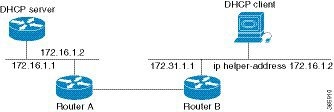
The figure below demonstrates the process. The DHCP client broadcasts a request for an IP address and additional configuration parameters on its local LAN. Acting as a DHCP relay agent, Router B picks up the broadcast, changes the destination address to the DHCP server's address and sends the message out on another interface. The relay agent inserts the IP address of the interface, on which the DHCP client’s packets are received into the gateway address (giaddr) field of the DHCP packet, which enables the DHCP server to determine which subnet should receive the offer and identify the appropriate IP address range. The relay agent unicasts the messages to the server address, in this case 172.16.1.2 (which is specified by the helper address in the relay profile).
Figure 1. Forwarding UDP Broadcasts to a DHCP Server Using a Helper Address
Prerequisites for configuring DHCP relay agent
Use this reference to review prerequisites for configuring DHCP relay agent.
The following are the prerequisites to configure a DHCP relay agent:
You must be in a user group associated with a task group that includes the proper task IDs. The command reference guides include the task IDs required for each command. If you suspect user group assignment is preventing you from using a command, contact your AAA administrator for assistance.
A configured and running DHCP client and DHCP server.
Connectivity between the relay agent and DHCP server
Limitations for DHCP relay feature
Use this reference to review limitations for DHCP relay feature.
These are the limitations for implementing DHCP relay feature:
The multicast addresses are not supported. The helper-address command in DHCP relay profile submode supports valid unicast IP address as the helper address.
Note
Configuring the helper-address command directly (not using profile) under a interface (such as BVI interface) is not supported.
Only interface-id and remote-id DHCP option code are added by a relay agent while forwarding the packet to a DHCP server.
Note
Configuring DHCP option code is not supported in DHCP relay profile submode.
DHCP relay agent configuration
Use this reference to review configuring and enabling the DHCP relay agent.
RP/0/RP0/CPU0:ios# show running-config dhcp ipv4
Tue Aug 29 07:30:50.677 UTC
dhcp ipv4
 profile r1 relay
  helper-address vrf default 198.51.100.1 giaddr 198.51.100.3
 !
 interface GigabitEthernet0/0/0/2 relay profile r1
!
DHCP client
The Dynamic Host Configuration Protocol (DHCP) client functionality enables the router interfaces to dynamically acquire the IPv4 or DHCPv4 or DHCPv6 server, and forwards the responses back to the correct Layer 2 address so that the correct device gets the correct configuration information.
Details
DHCP has the ability to allocate IP addresses only for a configurable period of time, called the lease period. If the client is required to retain this IP address for a longer period beyond the lease period, the lease period must be renewed before the IP address expires. The client renews the lease based on configuration that was sent from the server. The client unicasts a REQUEST message using the IP address of the server. When a server receives the REQUEST message and responds with an ACK message. The lease period of the client is extended by the lease time configured in the ACK message.
Enabling DHCP Client on an Interface
You can enable both the DHCPv4 and DHCPv6 clients at an interface level. The DHCP component receives a notification when DHCPv4 or DHCPv6 is enabled or disabled on an interface.
RP/0/RP0/CPU0:ios# configure
Tue Aug 29 09:26:12.468 UTC
RP/0/RP0/CPU0:ios(config)# int mgmtEth 0/RP0/CPU0/0
RP/0/RP0/CPU0:ios(config-if)# ipv4 address dhcp
RP/0/RP0/CPU0:ios(config-if)# commit
Tue Aug 29 09:26:21.715 UTC
RP/0/RP0/CPU0:ios(config-if)# exit
RP/0/RP0/CPU0:ios(config)# int mgmtEth 0/RP0/CPU0/0
RP/0/RP0/CPU0:ios(config-if)# ipv6 address dhcp
dhcp  dhcp-client-options
RP/0/RP0/CPU0:ios(config-if)# ipv6 address dhcp
RP/0/RP0/CPU0:ios(config-if)# commit
Tue Aug 29 09:26:50.159 UTC