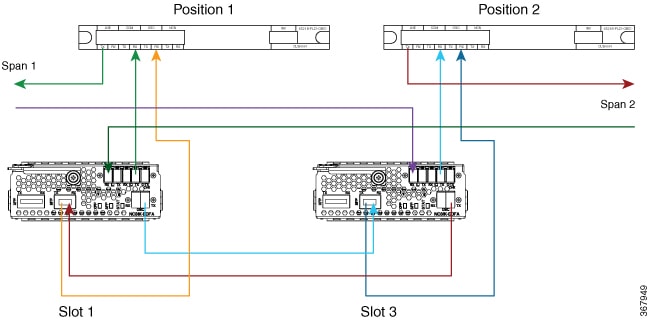
Use this procedure to connect ILA cabling through the 15216-FLD-OSC module when the deployment still uses that module in the OSC path.
Connect the span, EDFA, OSC pluggable, and 15216-FLD-OSC ports sequentially.
The NCS1K-OTDR module replaces the need for the 15216-FLD-OSC module in the recommended ILA configuration.
Procedure
|
1. |
Connect the EDFA slot 1 line and COM paths.
-
Connect an LC/LC fiber from RX-span 2 to the LINE RX port of EDFA slot 1.
-
Connect an LC/LC fiber from the COM TX port of EDFA slot 1 to the COM RX port of 15216-FLD-OSC position 1.
-
Connect an LC/LC fiber from TX-span 1 to the LINE TX port of 15216-FLD-OSC position 1.
|
|
2. |
Connect the EDFA slot 1 OSC path.
-
Connect an LC/LC fiber from the OSC pluggable TX port inserted into EDFA slot 1 to the OSC RX port of 15216-FLD-OSC position 1.
-
Connect an LC/LC fiber from the OSC TX port of EDFA slot 1 to the OSC pluggable RX port inserted into EDFA slot 3.
|
|
3. |
Connect the EDFA slot 3 OSC path.
-
Connect an LC/LC fiber from the OSC TX port of EDFA slot 3 to the OSC pluggable RX port inserted into EDFA slot 1.
-
Connect an LC/LC fiber from the OSC pluggable TX port inserted into EDFA slot 3 to the OSC RX port of 15216-FLD-OSC position 2.
|
|
4. |
Connect the EDFA slot 3 line and COM paths.
-
Connect an LC/LC fiber from RX-span 1 to the LINE RX port of EDFA slot 3.
-
Connect an LC/LC fiber from the COM TX port of EDFA slot 3 to the COM RX port of 15216-FLD-OSC position 2.
-
Connect an LC/LC fiber from TX-span 2 to the LINE TX port of 15216-FLD-OSC position 2.
Figure 1. Cabling for ILA configuration with 15216-FLD-OSC
|
The ILA node cabling through the 15216-FLD-OSC module is complete.