IKE ネゴシエーションは 2 つのフェーズで構成されています。フェーズ 1 では、2 つの IKE ピア間のセキュリティ アソシエーションをネゴシエートします。これにより、ピアはフェーズ 2 で安全に通信できるようになります。フェーズ 2 のネゴシエーションでは、IKE
によって IPsec などの他のアプリケーション用の SA が確立されます。両方のフェーズで接続のネゴシエーション時にプロポーザルが使用されます。
IKE ポリシーは、2 つのピア間の IKE ネゴシエーションを保護するためにこれらのピアで使用されるアルゴリズムのセットです。IKE ネゴシエーションは、共通(共有)IKE ポリシーに合意している各ピアによって開始されます。このポリシーは、どのセキュリティ
パラメータが後続の IKE ネゴシエーションを保護するかを規定します。 IKE バージョン 1(IKEv1)では、IKE ポリシーに、単一のアルゴリズムのセットと係数グループが含まれています。IKEv1 とは異なり、IKEv2 ポリシーでは、フェーズ 1 ネゴシエーション中にピアがその中から選択できるように、複数のアルゴリズムとモジュラス
グループを選択できます。単一の IKE ポリシーを作成できますが、最も必要なオプションにより高い優先順位をつけるために異なるポリシーが必要となる場合もあります。サイト間 VPN の場合は、単一の IKE ポリシーを作成できます。IKEv1 と IKEv2 はどちらも、最大 20 個の IKE ポリシーをサポートしますが、値のセットはそれぞれ異なります。作成するポリシーのそれぞれに、固有のプライオリティを割り当てます。プライオリティ番号が小さいほど、プライオリティが高くなります。
You can configure supporting device models to use IPsec flow offload. After the initial setup of an IPsec site-to-site VPN
or remote access VPN security association (SA), IPsec connections are offloaded to the field-programmable gate array (FPGA)
in the device, which should improve device performance. On the Secure Firewall 1200 series, IPsec connections are offloaded to the Marvell Cryptographic Accelerator (CPT) to improve
device performance.
Offloaded operations specifically relate to the pre-decryption and decryption
processing on ingress, and the pre-encryption and encryption processing on
egress. The system software handles the inner flow to apply your security
policies.
IPsec flow offload is enabled by default, and applies to the following device
types:
Secure Firewall 1200
Secure Firewall 3100
Secure Firewall 4200
IPsec flow offload is also used when the
device's VTI loopback interface is enabled.
Limitations for IPsec Flow Offload
The following IPsec flows are not offloaded:
IKEv1 tunnels. Only IKEv2 tunnels will be offloaded. IKEv2 supports
stronger ciphers.
Flows that have volume-based rekeying configured.
Flows that have compression configured.
Transport mode flows. Only tunnel mode flows will be offloaded.
AH format. Only ESP/NAT-T format will be supported.
Flows that have post-fragmentation configured.
Flows that have anti-replay window size other than 64bit and anti-replay
is not disabled.
Flows that have firewall filter enabled.
Mult-instance mode.
Configure IPsec Flow Offload
IPsec flow offload is enabled by default on hardware platforms that support the
feature. To change the configuration, use FlexConfig to implement the
flow-offload-ipsec command. See the ASA command
reference for detailed information about the command.
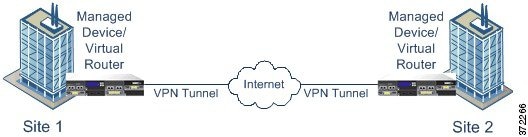
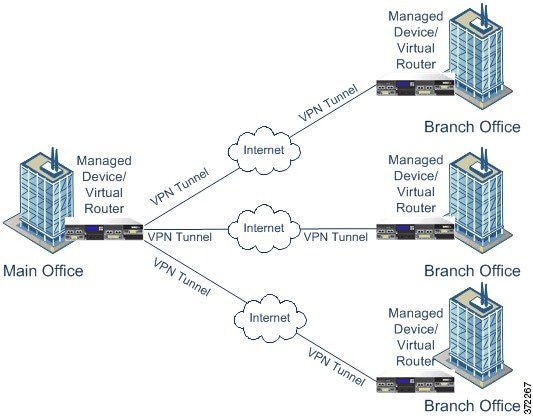
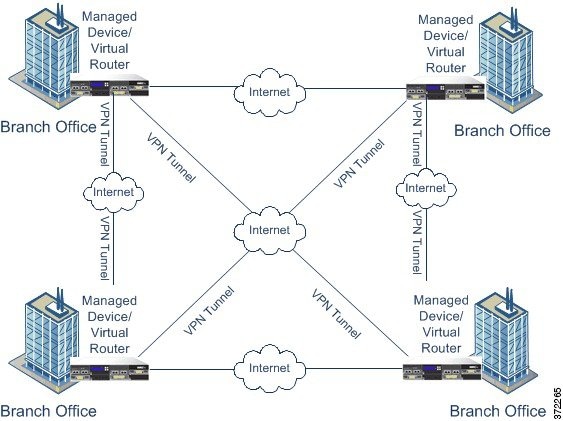
Because a VPN tunnel typically
traverses a public network, most likely the Internet, you need to encrypt the
connection to protect the traffic. You define the encryption and other security
techniques to apply using IKE polices and IPsec proposals.
If your device license allows you to apply strong encryption, there is a
wide range of encryption and hash algorithms, and Diffie-Hellman groups, from
which to choose. However, as a general rule, the stronger the encryption that
you apply to the tunnel, the worse the system performance. Find a balance
between security and performance that provides sufficient protection without
compromising efficiency.
We cannot provide specific guidance on which options to choose. If you
operate within a larger corporation or other organization, there might already
be defined standards that you need to meet. If not, take the time to research
the options.
The following topics explain the available options.
When deciding which
encryption algorithms to use for the IKE policy or IPsec proposal, your choice
is limited to algorithms supported by the devices in the VPN.
For IKEv2, you can
configure multiple encryption algorithms. The system orders the settings from
the most secure to the least secure and negotiates with the peer using that
order. For IKEv1, you can select a single option only.
For IPsec proposals,
the algorithm is used by the Encapsulating Security Protocol (ESP), which
provides authentication, encryption, and anti-replay services. ESP is IP
protocol type 50. In IKEv1 IPsec proposals, the algorithm name is prefixed with
ESP-.
If your device license
qualifies for strong encryption, you can choose from the following encryption
algorithms. If you are not qualified for strong encryption, you can select DES
only.
(注)
If you are qualified for strong encryption, before upgrading from the evaluation
license to a smart license, check and update your encryption algorithms for stronger
encryption so that the VPN configuration works properly. Choose AES-based
algorithms. DES is not supported if you are registered using an account that
supports strong encryption. After registration, you cannot deploy changes until you
remove all uses of DES.
AES-GCM—(IKEv2 only.) Advanced Encryption Standard in Galois/Counter Mode is a block cipher mode of operation providing confidentiality
and data-origin authentication, and provides greater security than AES. AES-GCM offers three different key strengths: 128-,
192-, and 256-bit keys. A longer key provides higher security but a reduction in performance. GCM is a mode of AES that is
required to support NSA Suite B. NSA Suite B is a set of cryptographic algorithms that devices must support to meet federal
standards for cryptographic strength. .
AES—Advanced Encryption Standard is a symmetric cipher algorithm that provides greater security than DES and is computationally
more efficient than 3DES. AES offers three different key strengths: 128-, 192-, and 256-bit keys. A longer key provides higher
security but a reduction in performance.
DES—Data Encryption Standard, which encrypts using 56-bit keys, is a symmetric secret-key block algorithm. If your license
account does not meet the requirements for export controls, this is your only option.
Null, ESP-Null—A null encryption algorithm provides authentication without encryption. This method is not secure; use at your
own discretion.
Deciding Which Hash
Algorithms to Use
In IKE policies, the hash algorithm creates a message digest, which is used to ensure message integrity. In IKEv2, the hash
algorithm is separated into two options, one for the integrity algorithm, and one for the pseudo-random function (PRF).
In IPsec proposals, the hash algorithm is used by the Encapsulating Security Protocol (ESP) for authentication. In IKEv2 IPsec
Proposals, this is called the integrity hash. In IKEv1 IPsec proposals, the algorithm name is prefixed with ESP-, and there
is also an -HMAC suffix (which stands for “hash method authentication code”).
For IKEv2, you can configure multiple hash algorithms. The system orders the settings from the most secure to the least secure
and negotiates with the peer using that order. For IKEv1, you can select a single option only.
You can choose from the following hash algorithms.
SHA (Secure Hash Algorithm)—Standard SHA (SHA1) produces a 160-bit digest.
The following SHA-2 options, which are even more secure, are available for IKEv2 configurations. Choose one of these if you
want to implement the NSA Suite B cryptography specification.
SHA256—Specifies the Secure Hash Algorithm SHA 2 with the 256-bit digest.
SHA384—Specifies the Secure Hash Algorithm SHA 2 with the 384-bit digest.
SHA512—Specifies the Secure Hash Algorithm SHA 2 with the 512-bit digest.
Null or None (NULL, ESP-NONE)—(IPsec Proposals only.) A null Hash Algorithm; this is typically used for testing purposes only.
However, you should choose the null integrity algorithm if you select one of the AES-GCM options as the encryption algorithm.
Even if you choose a non-null option, the integrity hash is ignored for these encryption standards.
Deciding Which
Diffie-Hellman Modulus Group to Use
You can use the
following Diffie-Hellman key derivation algorithms to generate IPsec security
association (SA) keys. Each group has a different size modulus. A larger
modulus provides higher security, but requires more processing time. You must
have a matching modulus group on both peers.
If you select AES encryption, to support the large key sizes required by AES, you should use Diffie-Hellman (DH) Group 5 or
higher. IKEv1 policies do not support all of the groups listed below.
To implement the NSA
Suite B cryptography specification, use IKEv2 and select one of the elliptic
curve Diffie-Hellman (ECDH) options: 19, 20, or 21. Elliptic curve options and
groups that use 2048-bit modulus are less exposed to attacks such as Logjam.
For IKEv2, you can
configure multiple groups. The system orders the settings from the most secure
to the least secure and negotiates with the peer using that order. For IKEv1,
you can select a single option only.
14—Diffie-Hellman Group 14: 2048-bit modular exponential (MODP) group. Considered good protection for 192-bit keys.
15—Diffie-Hellman Group 15: 3072-bit MODP group.
16—Diffie-Hellman Group 16: 4096-bit MODP group.
19—Diffie-Hellman Group 19: National Institute of Standards and Technology (NIST) 256-bit elliptic curve modulo a prime (ECP)
group.
20—Diffie-Hellman Group 20: NIST 384-bit ECP group.
21—Diffie-Hellman Group 21: NIST 521-bit ECP group.
31—Diffie-Hellman Group 31: Curve25519 256-bit EC Group.
事前共有キーを使用すると、秘密鍵を 2 つのピア間で共有したり、認証フェーズ中に IKE で使用したりできます。各ピアに同じ共有キーを設定する必要があります。同じキーが設定されていない場合は、IKE SA を確立できません。
デジタル証明書は IKE キー管理メッセージの署名や暗号化に RSA キー ペアを使用します。証明書によって、2 つのピア間の通信の否認防止を実施します。つまり、実際に通信が行われたことを証明できます。この認証方式を使用する場合、ピアが証明機関(CA)からデジタル証明書を取得できるように
Public Key Infrastructure(PKI)を定義する必要があります。CA は参加するネットワークデバイスの証明書要求を管理し、証明書を発行することで、すべての参加デバイスの Centralized Key Management
を行います。
事前共有キーの拡張性は高くありませんが、CA を使用することによって IPsec ネットワークの管理性や拡張性が高まります。CA を使用する場合は、すべての暗号化デバイス間でキーを設定する必要がありません。代わりに、参加する各デバイスは CA
に登録され、CA に対して証明書を要求します。自身の証明書と CA の公開キーを持つ各デバイスは、その CA のドメイン内にある他のすべてのデバイスを認証できます。
事前共有キー
事前共有キーを使用すると、2 つのピア間で秘密キーを共有できます。IKE は、このキーを認証フェーズで使用します。各ピアに同じ共有キーを設定する必要があります。同じキーが設定されていない場合は、IKE SA を確立できません。
CA サーバは公開 CA 証明書要求を管理し、参加ネットワーク デバイスに公開キー インフラストラクチャ(PKI)の一部として証明書を発行します。このアクティビティは、証明書の登録と呼ばれます。これらのデジタル証明書は、アイデンティティ証明書とも呼ばれています。デジタル証明書の内容は以下のとおりです。
PKI を使用すると、すべての暗号化デバイス間で事前に共有するキーを設定する必要がなくなるため、VPN をもっと容易に管理できるようになり、スケーラビリティが高まります。代わりに、参加する各デバイスを CA サーバーに個別に登録します。CA
サーバーは、アイデンティティを検証し、デバイスのアイデンティティ証明書を作成することを明示的に信任されています。登録が完了すると、参加する各ピアは、もう一方の参加するピアにアイデンティティ証明書を送信し、証明書に含まれる公開キーでそのアイデンティティを検証して、暗号化セッションを確立できるようにします。Firewall Threat Defense デバイスの登録の詳細については、証明書の登録オブジェクトを参照してください。
認証局証明書
ピアの証明書を検証するには、参加デバイスのそれぞれが CA の証明書をサーバから取得する必要があります。CA 証明書は、他の証明書に署名するために使用されます。これは自己署名され、ルート証明書と呼ばれます。この証明書に含まれる CA の公開キーを使用して、CA
のデジタル署名および受信したピアの証明書の内容を復号して検証します。CA 証明書は次の方法で取得可能です。
Simple Certificate Enrollment Protocol(SCEP)または Enrollment over Secure Transport(EST)を使用して、CA サーバーから CA の証明書を取得します。
さらに CA は、ネットワークに参加しなくなったピアの証明書を無効にすることもできます。失効した証明書は、オンライン証明書ステータス プロトコル(OCSP)サーバによって管理されるか、LDAP サーバに格納されている証明書失効リスト(CRL)に含まれます。ピアは、別のピアからの証明書を受け入れる前に、これらを検査できます。

 フィードバック