Describes the process of monitoring and analyzing network traffic flows to track data movement, measure performance, and identify patterns across network infrastructure.
The following sections describe traffic flow monitoring.
Cisco Catalyst SD-WAN Policies Configuration Guide, Releases 26.x and Later
Describes the process of monitoring and analyzing network traffic flows to track data movement, measure performance, and identify patterns across network infrastructure.
The following sections describe traffic flow monitoring.
Cflowd is a flow analysis tool that
analyzes Flexible NetFlow (FNF) traffic data
monitors traffic flowing through Cisco vEdge deviceCisco IOS XE Catalyst SD-WAN devices in the overlay network, and
exports flow information to a collector where it can be processed by an IP Flow Information Export (IPFIX) analyzer.
For a traffic flow, Cflowd periodically sends template reports to flow collector. These reports contain information about the flows and the data is extracted from the payload of these reports.
You can create a Cflowd template that defines the location of Cflowd collectors, how often sets of sampled flows are sent to the collectors, and how often the template is sent to the collectors (on Cisco SD-WAN Controllers and on Cisco SD-WAN Manager). You can configure a maximum of four Cflowd collectors per Cisco vEdge deviceCisco IOS XE Catalyst SD-WAN device. To have a Cflowd template take effect, apply it with the appropriate data policy.
You must configure at least one Cflowd template, but it need not contain any parameters. With no parameters, the data flow cache on the nodes is managed using default settings, and no flow export occurs.
Cflowd traffic flow monitoring is equivalent to FNF.
The Cflowd software implements Cflowd version 10, as specified in RFC 7011 and RFC 7012. Cflowd version 10 is also called the IP Flow Information Export (IPFIX) protocol.
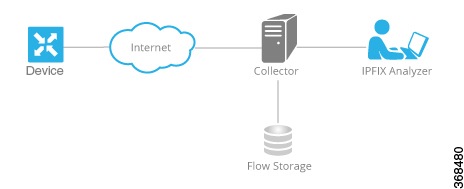
Cflowd performs 1:1 sampling. Information about all flows is aggregated in the Cflowd records; flows are not sampled. Cisco vEdge deviceCisco IOS XE Catalyst SD-WAN devices do not cache any of the records that are exported to a collector.
From Cisco IOS XE Catalyst SD-WAN Release 17.9.1a, netFlow on Secure Internet Gateway (SIG) tunnels is supported on Cisco vEdge deviceCisco IOS XE Catalyst SD-WAN devices. However, netflow is not supported on regular IPSec tunnel.
Cflowd and SNMP traffic monitoring comparison:
|
Cflowd |
SNMP |
|---|---|
|
Monitors service side traffic (LAN to WAN, WAN to LAN, LAN to LAN and DIA) |
Monitors all traffic including non-service side traffic |
|
Byte counting starts from L3 header |
Byte counting starts from L2 header |
|
Does not monitor BFD traffic |
Monitors BFD traffic |
The Cisco Catalyst SD-WAN Cflowd software exports the following IP Flow Information Export (IPFIX) information elements to the Cflowd collector. Fields vary depending on the release that you are on. Common fields are exported to Cisco SD-WAN Manager and external exporters. Feature fields are exported only to Cisco SD-WAN Manager.
Before Cisco IOS XE Catalyst SD-WAN Release 17.2.1r, Flexible NetFlow exports all fields to external collectors and Cisco SD-WAN Manager. Starting from Cisco IOS XE Catalyst SD-WAN Release 17.2.1r, FNF exports the elements (that are marked yes) in the following table to both external collectors and Cisco SD-WAN Manager. Other fields like drop cause ID are for specific features and these fields are exported only to Cisco SD-WAN Manager, but not to an external collector.
|
Information Element |
Element ID |
Exported to External Collector |
Description |
Data Type |
Data Type Semantics |
Units or Range |
|---|---|---|---|---|---|---|
|
sourceIPv4Address |
8 |
Yes |
IPv4 source address in the IP packet header. |
ipv4Address (4 bytes) |
default |
— |
|
sourceIPv6Address |
27 |
Yes |
IPv6 source address in the IP packet header. |
ipv6Address (16 bytes) |
default |
— |
|
destinationIPv4Address |
12 |
Yes |
IPv4 destination address in the IP packet header. |
IPv4Address (4 bytes) |
default |
— |
|
destinationIPv6Address |
28 |
Yes |
IPv6 destination address in the IP packet header. |
ipv6Address (16 bytes) |
default |
— |
|
ingressInterface |
10 |
Yes |
Index of the IP interface where packets of this flow are being received. |
unsigned32 (4 bytes) |
identifier |
— |
|
ipDiffServCodePoint |
195 |
Yes |
Value of a Differentiated Services Code Point (DSCP) encoded in the Differentiated Services field. This field spans the most significant 6 bits of the IPv4 TOS field. |
unsigned8 (1 byte) |
identifier |
0 through 63 |
|
application business-relevance |
12244 |
Yes |
Application business-relevance |
varibale length |
identifier |
— |
Flexible NetFlow for VPN0 interface is a network monitoring capability that
enables bidirectional traffic visibility on a VPN0 interface of a Cisco IOS XE Catalyst SD-WAN device from Cisco IOS XE Catalyst SD-WAN Release 17.7.1a
provides statistics on packets flowing through the device and helps to identify the tunnel or service VPNs, and
provides visibility for all traffic (both ingress and egress) hitting VPN0 on Cisco IOS XE SD-WAN devices.
A profile is a predefined set of traffic that you can enable or disable for a context. You can create an Easy Performance Monitor (ezPM) profile that provides an express method of provisioning monitors. This new mechanism adds functionality and does not affect the existing methods for provisioning monitors. As part of this feature, you can create sdwan-FNF profile to monitor traffic passing through netflow VPN0 configuration.
A context represents a performance monitor policy map that is attached to an interface in ingress and egress directions. A context contains the information about the traffic-monitor that has to be enabled. When a context is attached to an interface, two policy-maps are created, one each in ingress and egress directions. Depending on the direction specified in the traffic monitor, the policy-maps are attached in that direction and the traffic is monitored. You can modify the context to override pre-defined directions.
You can create multiple contexts based on a single profile with different traffic monitors, different exporters, and different parameters for every selected traffic monitor. An ezPM context can be attached to multiple interfaces. Only one context can be attached to an interface.
|
Cisco Catalyst SD-WAN Flexible Netflow |
Cisco SD-WAN Flexible Netflow VPN0 from Cisco vManage Release 20.7.1 |
|
|---|---|---|
|
Configuration |
Localized Policy: APP-visibility or flow-visibility Centralized policy: cflowd policy Supported on both Cisco SD-WAN Manager feature template and CLI template/ |
Define Flexible Netflow VPN0 monitor using command performance monitor context xxx profile sdwan-FNF and attach on VPN0 interface. Supported on CLI template and add-on CLI feature template in Cisco SD-WAN Manager. |
|
Interface |
Cisco Catalyst SD-WAN tunnel interface and service VPN interface |
VPN0 interface except Cisco Catalyst SD-WAN tunnel and VPN interface |
|
Flow Records |
Fixed records by default. Supports dynamic monitoring for records such as, FEC, packet duplication, SSL proxy and so on. Also supports collecting type of service (ToS), sampler ID and remarked DSCP values for centralized policies. |
Fixed records. You cannot modify or add new fields. |
|
Flow Direction |
Supports only ingress flows |
Supports both ingress and egress by default. |
|
NBAR for APP |
Network-based Application recognition (NBAR) is enabled only when APP-visibility is defined. |
NBAR is enabled by default. |
|
Exporter |
JSON file to Cisco SD-WAN Manager and IPFIX to external collector |
Can't export to Cisco SD-WAN Manager IPFIX to external collectors |
Flexible Netflow on VPN0 has specific limitations that affect interface support, record configuration, flow reporting, and protocol handling.
Flexible Netflow on VPN0 is not supported on Cisco Catalyst SD-WAN tunnel and Cisco Catalyst SD-WAN VPN interfaces.
The FNF record for VPN0 traffic is a fixed record and cannot be modified.
Cisco Catalyst SD-WAN VPN0 flow entries are reported to external collectors defined in CLI configuration and not to Cisco SD-WAN Manager.
Cisco Catalyst SD-WAN BFD and Cisco Catalyst SD-WAN control connections such as OMP, Netconf, and SSH are encapsulated by Datagram Transport Layer Security (DTLS) or Transport Layer Security (TLS) tunnels. FNF reports on only the DTLS traffic and not the encapsulated protocol packets.
When FNF is configured for a VPN0 WAN interface, for ingress flows (WAN > Cisco Catalyst SD-WAN-tunnel > LAN) the output interface is reported as NULL, and for egress flows (LAN > Cisco Catalyst SD-WAN-tunnel > WAN) input interface is reported as WAN interface (Cisco Catalyst SD-WAN underlay tunnels).
VPN0 monitor supports only IPv4 and IPv6 protocols.
For routing protocols, such as OSPF, BGP, only egress traffic is supported. Ingress OSPF and BGP traffic is treated as high priority packets.
FNF records only the original DSCP values when the packets are sent to the external collector. FNF supports only ingress flows.
Flexible NetFlow export spreading is a feature that
spreads out the export of records in the monitor cache over a time interval to improve collector performance
prevents collector performance issues when multiple network devices export records simultaneously from synchronized caches, and
distributes export bursts evenly across the cache timeout period instead of sending all records at once.
Minimum releases: Cisco IOS XE Catalyst SD-WAN Release 17.9.1a and Cisco vManage Release 20.9.1
Enable Flexible NetFlow export spreading on Cisco IOS XE Catalyst SD-WAN devices. In the case of a synchronized cache, all network devices export records in the monitor cache at the same time. If multiple network devices are configured with the same monitor interval and synchronized cache, the collector may receive all records from all devices at the same time, which can impact the collector performance. Set the time interval for export spreading to spread out the export over a time interval.
To ensure that the collector performance is not affected, export records at a specified time interval, spreading the exporting of records evenly over the cache timeout.
Configure FNF exports using option and data templates. Use the options templates to configure system level attributes. Use the data templates to configure flow records and corresponding data.
When you enable export-spread, configure these three spread intervals:
app-tables: application-table, application-attributes option template
tloc-tables: tunnel-tloc-table option template
other-tables: other option templates
The bfd-metric-table introduced in Cisco IOS XE Catalyst SD-WAN Release 17.10.1a and Cisco vManage Release 20.10.1 belongs to the tloc-table category.
Flexible NetFlow option template packets are sent as a burst regularly as set by the timeout option. With export spread interval, instead of sending the option template packets as bursts, the packets are spread across the timeout and export-spread interval.
In Cisco vManage Release 20.8.1 and earlier releases, after every 60 secs option template packets are sent as a burst. For example, if there are 1000 packets, it enqueues all the 1000 packets at the end of 60 secs which causes packet drops.
When you configure export spreading, if there are 1000 packets to be sent at the end of 60 secs, then 100 packets are sent in 10 secs at the rate of 100 packets and avoids the export bursts. If no export spread is specified, the default behavior is immediate export.
When you upgrade from a previous version which doesn't support export spreading, the default value for spreading in a Cflowd template is disabled.
This example shows how a spreading interval works:
When an app-table is configured with ten application-attributes or application-table, the option template packets are sent in ten seconds for all the attributes evenly.
The default interval is one second. So, with export-spreading, one large traffic burst of ten seconds is spread into ten smaller bursts of one second each.
Flexible NetFlow export of BFD metrics is a network monitoring feature that
exports BFD telemetry data to external FNF collectors for analyzing average jitter, average latency, and loss per tunnel
measures jitter and latency in microseconds and loss in units of 0.01%, and
provides enhanced monitoring and faster collection of network state data.
Minimum releases: Cisco IOS XE Catalyst SD-WAN Release 17.10.1a and Cisco Catalyst SD-WAN Control Components Release 20.10.1
A new option template, BFD-metric-table, is added for export of BFD metrics.
Configure export of BFD metrics on Cisco IOS XE Catalyst SD-WAN devices using a Cisco SD-WAN Manager feature template or using the CLI from a Cisco SD-WAN Controller.
Minimum releases: Cisco IOS XE Catalyst SD-WAN Release 17.10.1a and Cisco Catalyst SD-WAN Control Components Release 20.10.1
The key components involved in the export of BFD metrics are:
Cisco IOS XE Catalyst SD-WAN device: Responsible for sending IP Flow Information Export (IPFIX) packets to an external collector.
Forwarding TABLE Manager (FTM): Generates the source metrics for BFD export.
Cisco SD-WAN Controllers or Cisco SD-WAN Manager: Configuration points for BFD export interval settings.
These stages describe how BFD metrics are exported:
After you configure the BFD export interval on the Cisco SD-WAN Controllers or on Cisco SD-WAN Manager, the Forwarding TABLE Manager (FTM) generates the source metrics.
If you reboot a Cisco IOS XE Catalyst SD-WAN device, the device exports the BFD metrics according to the BFD export interval that you configured. At this point, the FTM does not have any data for exporting. As a consequence, all of the fields, except for the TLOC TABLE OVERLAY SESSION ID field, contain the following invalid value: 0xFFFFFFFF
The FTM interval for sending data is greater than the BFD export interval. In this situation, data may end up getting exported twice, while the FTM sends data only once. Consequently, there is no new data received from the FTM. The BFD metrics and timestamps are the same as for the last packet.
For an example of BFD telemetry data that is sent to an external collector, see Configuration Examples for Flexible Netflow Export of BFD Metrics.
FNF statistics management on Cisco IOS XE Catalyst SD-WAN devices is a network monitoring capability that
uses Data Tracking Agent (DTA) to export BFD metrics from FNF starting from Cisco IOS XE Catalyst SD-WAN Release 17.18.1a
stabilizes the network by efficiently managing high IPFIX traffic, and
ensures network performance remains unaffected.
See Monitor BFD Metrics for information on monitoring.
Cflowd traffic flow monitoring with SAIE flows is a network monitoring feature that
provides real-time device options for monitoring both Cflowd flows and SAIE flows
allows filtering for displaying specific applications or application families running within a VPN, and
enables traffic analysis on selected Cisco IOS XE Catalyst SD-WAN device devices.
Minimum releases: Cisco IOS XE Catalyst SD-WAN Release 17.10.1a and Cisco vManage Release 20.10.1
This feature enables you to choose two Cisco SD-WAN Manager real-time device options for monitoring both Cflowd flows and SAIE flows.
You can apply filters for displaying specific applications or application families running within a VPN on the selected Cisco IOS XE Catalyst SD-WAN device.
For more information on SAIE flows, see the SD-WAN Application Intelligence Engine Flow chapter.
For more information on the device-filtering options for Cflowd and SAIE flows, see the Devices and Controllers chapter in the Cisco Catalyst SD-WAN Monitor and Maintain Configuration Guide.
Cflowd traffic flow monitoring with SAIE flows provides several key benefits for network operations and performance management.
Provides increased visibility of the network traffic, enabling network operators to analyze network usage and improve network performance
Provides real-time monitoring of Cisco IOS XE Catalyst SD-WAN devices
Provides parity with Cisco SD-WAN Manager real-time device options on Cisco IOS XE Catalyst SD-WAN devices
You must meet the minimum releases: Cisco IOS XE Catalyst SD-WAN Release 17.10.1a and Cisco vManage Release 20.10.1.
Configure application and flow visibility prior to viewing the Cflowd with SAIE flow device options.
For more information on configuring application flow visibility, refer to Configure global application visibility.
For more information on configuring global flow visibility, refer to Configure global flow visibility.
Minimum releases: Cisco IOS XE Catalyst SD-WAN Release 17.10.1a and Cisco vManage Release 20.10.1
Cisco SD-WAN Manager can only display 4001 Cflowd records at a time.
If two different users attempt to access the same query from the same device at the same time, the Cisco IOS XE Catalyst SD-WAN device processes only the first request. The second user must resend their request because the first request gets timed out.
Search filters for Cflowd with SAIE are matched against the fetched 4001 Cflowd flow records.
Enter the full name of the application or the application family for the search filter to return a valid result.
For example, if you want to search for the netbios-dgm application, and you enter netbios for Application or Application Family, you won't receive the correct result.
A maximum FNF record rate is a network configuration parameter that
limits the rate (records per minute) of aggregated traffic data FNF records that a device can send
reduces performance demands (CPU and memory) on the device, and
helps manage network traffic when there is a large number of applications producing network traffic.
Minimum supported releases: Cisco IOS XE Catalyst SD-WAN Release 17.14.1a, Cisco Catalyst SD-WAN Control Components Release 20.14.1
When traffic flow visibility is enabled (see Configure Global Flow Visibility), devices in the network send raw and aggregated traffic flow data to Cisco SD-WAN Manager.
To aggregate flow data, routers use 4-tuples of flow data (containing VPN ID, application name, ingress interface of the flow, and egress interface of the flow) as a key for consolidating the raw data of multiple flows. The router consolidates each flow for which the 4-tuple is identical into a single aggregated FNF record.
Cisco SD-WAN Manager uses the aggregated data to provide a high-level view of network traffic flow information. The aggregated data shows the network applications that are producing traffic, but is less granular than the full traffic flow data. It does not provide source and destination addresses, or source and destination ports for traffic flows.
For a detailed view of traffic flows, use functions such as On Demand Troubleshooting. For information about On Demand Troubleshooting, see On-Demand Troubleshooting.
You can configure a maximum rate (records per minute) of aggregated traffic data FNF records that a device can send to reduce the performance demands (CPU and memory) on the device. This may be helpful when there is a large number of applications producing network traffic. For information about configuring this, see Configure the maximum FNF record rate for aggregated data using the CLI.