Describes how devices download and install the Cisco Cyber Vision application through integration with Cisco Cyber Vision Center as a remote image-hosting server.
For the integration with Cisco Cyber Vision, Cisco SD-WAN Manager designates the Cisco Cyber Vision Center as a remote image-hosting server for the Cisco Cyber Vision application.
Summary
The key components involved in this process are:
-
Cisco Cyber Vision Center: Serves as the remote image-hosting server and generates deployment tokens for device authentication
-
Cisco SD-WAN Manager: Manages the configuration and designates Cisco Cyber Vision Center as the application host
-
Network devices: Download, install, and activate the Cisco Cyber Vision application to operate as sensors
-
Deployment token: Provides authentication information for devices to access Cisco Cyber Vision Center
Workflow
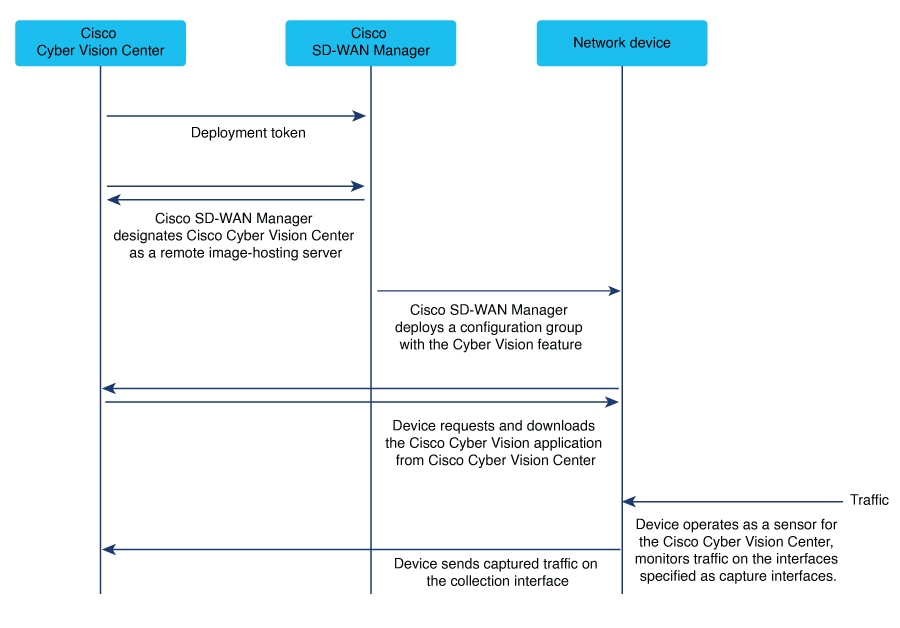
These stages describe how devices download and install the Cisco Cyber Vision application:
-
The administrator logs in to Cisco Cyber Vision Center and generates a deployment token as part of the configuration prerequisites.
As described in the Configure a Cyber Vision Center connection procedure prerequisites, you log in to Cisco Cyber Vision Center and generate a type of token called a deployment token.
-
Cisco SD-WAN Manager uses the deployment token information to designate Cisco Cyber Vision Center as the application host.
When you complete the Configure a Cyber Vision Center connection procedure, Cisco SD-WAN Manager uses the information in the deployment token to designate the Cisco Cyber Vision Center as the host for the Cisco Cyber Vision application.
To designate Cisco Cyber Vision Center as the host from which to download the application, Cisco SD-WAN Manager adds Cisco Cyber Vision Center as a remote server. As such, it appears on the page, in the Remote server tab. As described in Caution: do not remove remote servers, do not edit or remove the server.
-
The devices connect to Cisco Cyber Vision Center to download the Cisco Cyber Vision application when a configuration is pushed to them.
When you push a Cisco Cyber Vision configuration to devices in the network, the devices connect to Cisco Cyber Vision Center to download the Cisco Cyber Vision application.
-
The devices install and activate the application, enabling them to operate as sensors for the Cisco Cyber Vision Center.
The devices install and activate the application. This enables the devices to operate as sensors for the Cisco Cyber Vision Center.