System Setup and Software Installation Guide for Cisco NCS 1014, IOS XR Releases 26.x.x

PDF

System Setup and Software Installation Guide for Cisco NCS 1014, IOS XR Releases 26.x.x

Zero Touch Provisioning

Want to summarize with AI?

Log in

Describes how Zero Touch Provisioning (ZTP) provisions Cisco NCS 1014 with day 0 configurations on management ports and data ports, the methods used to start ZTP, and the benefits of automated provisioning.


Zero Touch Provisioning (ZTP) is an automated provisioning capability on Cisco NCS 1014 that

  • provisions the network device with day 0 configurations,

  • supports both management ports and data ports, and

  • downloads and applies a configuration file or runs a user script that the DHCP server points to.

What you can do with ZTP

ZTP provides multiple options:

  • Automatically apply specific configuration in a large-scale environment.

  • Download and install specific IOS XR image.

  • Install specific application package or third-party applications automatically.

  • Deploy containers without manual intervention.

  • Upgrade or downgrade software versions effortlessly on thousands of network devices at a time.

Benefits of using ZTP

ZTP helps you manage large-scale service provider infrastructures effortlessly. Following are the added benefits of using ZTP:

  • ZTP helps you to remotely provision a router anywhere in the network. This eliminates the need for an expert to deploy network devices and reduces IT cost.

  • Automated provisioning using ZTP removes delay, increases accuracy, provides better customer experience and is cost-effective. By automating repeated tasks, ZTP allows network administrators to concentrate on more important stuff.

  • ZTP process helps you to quickly restore service. Rather than troubleshooting an issue on hand, you can reset a system to a well-known working status.

Prerequisites for ZTP

ZTP does not execute, if a username is already configured in the system.

Methods to start ZTP

ZTP is initiated through one of the following methods:

  • Automated fresh boot: On booting a device without any prior configuration, ZTP starts automatically. The router receives configuration file details from the DHCP server. This method is used for devices without pre-loaded configuration. Refer to Fresh boot using DHCP.

  • Configuration file: The first line of the configuration file must be "!! IOS XR configuration" for ZTP to process it. If bringing up multiple new nodes, each requires a separate configuration file. Refer to ZTP configuration files.

  • ZTP bootscript: Define a script to execute on every boot for customized automated actions. Refer to ZTP bootscript.

  • Manual invocation using CLI: Use this method to forcefully start ZTP on a fully configured device by running a CLI command. Refer to Invoke ZTP manually through CLI.

  • Invocation using reload command: Use the reload command to start ZTP on a fully configured device. Refer to Invoke ZTP through reload.
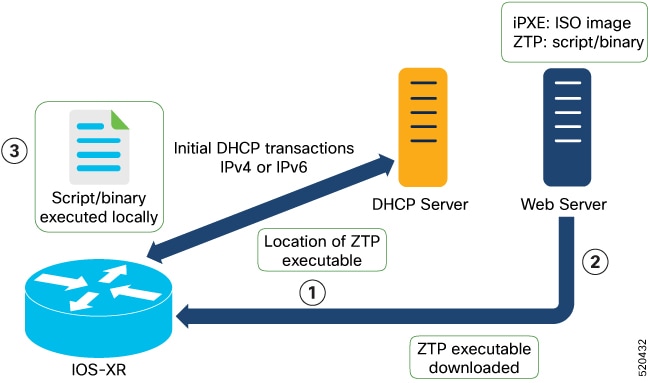

How fresh boot using DHCP works

The fresh boot using DHCP starts the ZTP process on a Cisco NCS 1014 device that has no existing configuration. This process automates day 0 provisioning by coordinating DHCP-based discovery, automated file downloads, and applying the necessary configuration or scripts, enabling rapid deployment without manual intervention.

Summary

The key components involved in this process are:

  • Cisco NCS 1014 device: Sends DHCP requests on management and data ports, downloads the configuration or script file, and applies the file or runs the script.

  • DHCP server: Identifies the device through the DHCP options that ZTP sends and responds with the location of the configuration file or script.

  • Web (HTTP) server: Hosts the configuration file or script file that the device downloads using the URL location provided in the DHCP response.

The figure depicts the high-level workflow of the ZTP process.

Workflow

Figure 1. ZTP fresh boot workflow

These stages describe the fresh boot using DHCP:

  1. Z Initiating DHCP requests: ZTP begins by sending DHCP requests to obtain the configuration file or user script. To help the bootstrap server uniquely identify the device, these DHCP options are sent:
    • DHCP(v4/v6) client-id set to the device serial number
    • DHCPv4 option 124 providing the vendor, platform, and serial number
    • DHCPv6 option 16 providing the vendor, platform, and serial number
    DHCP requests are performed in this order:
    • ZTP sends an IPv4 DHCP request to all management ports. If this fails, it follows with an IPv6 request on the same ports.
    • Next, ZTP sends an IPv4 DHCP request on all data ports. If this fails, it follows with an IPv6 request on these ports.
  2. DHCP server response: The DHCP server recognizes the device from the received options and replies with the location of the configuration or script file using one of these DHCP options:
    • DHCPv4 using BOOTP filename.
    • DHCPv4 using Option 67 (bootfile-name).
    • DHCPv6 using Option 59 (OPT_BOOTFILE_URL).
  3. Downloading the file: The device uses the URL from the DHCP response to download the required file (configuration or script) from the web (HTTP) server.
  4. Identifying the downloaded file: The device assesses the file type based on its content:
    • If the downloaded file content starts with !! IOS XR , it is considered as a configuration file.
    • If the downloaded file content starts with #! /bin/bash , #! /bin/sh , or #!/usr/bin/python , it is considered as a script file.
  5. Applying the configuration or running the script: The device either applies the configuration file or runs the script or binary in the default bash shell.
  6. Device is operational: The device is now up and running, fully provisioned with the day 0 configuration or script as directed by the DHCP server.

Result

The Cisco NCS 1014 device completes its initial provisioning and is ready for use, having automatically applied the appropriate configuration or script obtained through the ZTP and DHCP process.


ZTP configuration files

A ZTP configuration file is an IOS XR configuration file that

  • starts with !! IOS XR on the first line so that ZTP processes it as a configuration,

  • contains the day 0 configuration that you want to automate on Cisco NCS 1014, and

  • is downloaded from the DHCP server when ZTP is executed.

You can use either a configuration file or a script file to initiate the ZTP process, based on your business needs. The configuration file must start with !! IOS XR to be recognized by ZTP.

For more information on how to create ZTP configuration files, see ZTP Configuration Files Creation.

Sample ZTP configuration file

The following sample configuration file illustrates how you can automate all IOS XR configurations required during Zero Touch Provisioning:

!! Building configuration
!! IOS XR Configuration 7.11.1.35I
!! Last configuration change at Fri Sep 15 17:18:53 2023 by cisco
!
hostname IOS_P2B_FLT
logging console debugging
username cisco
 group root-lr
 group cisco-support
 secret 10 $6$4gjnzvvwDCz1z...$bovO.6uRYD9qsujiw6DNjTx6bngeDIVMvXxVbReal6bpd0SRo5qyfHk5S4D23r9hjntYtXnyQWNcrgbK0USB20
!
grpc
 port 57400
!
line template vty
 timestamp disable
 exec-timeout 0 0
!
line template test
 exec-timeout 0 0
!
line console
 timeout login response 30
 timestamp
 exec-timeout 0 0
 width 0
 length 0
!
line default
 timestamp disable
 exec-timeout 0 0
 length 0
 absolute-timeout 0
 session-timeout 0
!
vty-pool default 0 10 line-template default
fpd auto-upgrade enable
ntp
 max-associations 99
!
call-home
 service active
 contact smart-licensing
 profile CiscoTAC-1
  active
  destination transport-method email disable
  destination transport-method http
 !
!
netconf-yang agent
 ssh
!
hw-module location 0/1/NXR0
 mxponder-slice 0
  trunk-rate 600G
  client-rate 100GE
 !
!
hw-module location 0/2/NXR0
 mxponder-slice 0
  trunk-rate 800G
  client-port-rate 1 client-type 400GE
 !
!
interface MgmtEth0/RP0/CPU0/0
 description mgmt0
 ipv4 address 10.105.57.64 255.255.255.0
!
interface MgmtEth0/RP0/CPU0/1
 ipv4 address 10.127.60.44 255.255.255.0
 ipv6 enable
!
controller Optics0/0/0/0
 description optics0/0/0/0
 pm 30-sec optics threshold opt min 2
 fastpoll enable
 perf-mon enable
!
controller Optics0/0/0/1
 description optics0/0/0/1
 fastpoll enable
!
controller Optics0/0/0/2
 description optics0/0/0/2
 perf-mon enable
!
controller Optics0/0/0/3
 description optics0/0/0/3
!
controller Optics0/0/0/4
 description optics0/0/0/4
!
controller Optics0/0/0/5
 description optics0/0/0/5
!
controller Optics0/0/0/6
 description optics0/0/0/6
!
controller Optics0/0/0/7
 description optics0/0/0/7
!
controller Optics0/0/0/8
 description optics0/0/0/8
!
controller Optics0/0/0/9
 description optics0/0/0/9
 pm 15-min optics report opt max-tca enable
 pm 15-min optics threshold opt-dbm max -200
 pm 30-sec optics report opr min-tca enable
 pm 30-sec optics report opt max-tca enable
 pm 30-sec optics threshold opr-dbm min 500
 pm 30-sec optics threshold opt-dbm max -210
!
controller Optics0/0/0/10
 description optics0/0/0/10
!
controller Optics0/0/0/11
 description optics0/0/0/11
!
controller Optics0/0/0/12
 description optics0/0/0/12
!
controller Optics0/0/0/13
 description optics0/0/0/13
!
controller Optics0/1/0/0
 description optics0/1/0/0
 pm 15-min optics report opr min-tca enable
 pm 15-min optics threshold opr-dbm min 200
 pm 30-sec optics report opr min-tca enable
 pm 30-sec optics threshold opr-dbm min 200
 fastpoll enable
!
controller Optics0/1/0/1
 description optics0/1/0/1
!
controller Optics0/1/0/2
 description optics0/1/0/2
!
controller Optics0/1/0/3
 description optics0/1/0/3
!
controller Optics0/1/0/4
 description optics0/1/0/4
!
controller Optics0/1/0/5
 description optics0/1/0/5
!
controller Optics0/1/0/6
 description optics0/1/0/6
!
controller Optics0/1/0/7
 description optics0/1/0/7
!
controller Optics0/1/0/8
 description optics0/1/0/8
!
controller Optics0/1/0/9
 description optics0/1/0/9
!
controller Optics0/1/0/10
 description optics0/1/0/10
!
controller Optics0/1/0/11
 description optics0/1/0/11
!
controller Optics0/1/0/12
 description optics0/1/0/12
!
controller Optics0/1/0/13
 description optics0/1/0/13
!
controller Optics0/2/0/0
 description optics0/2/0/0
 transmit-power -25
 dwdm-carrier 100MHz-grid frequency 1923500
 rx-low-threshold -120
 rx-high-threshold 40
 tx-low-threshold -101
 tx-high-threshold 40
!
controller Optics0/2/0/1
 description optics0/2/0/1
!
controller Optics0/2/0/2
 description optics0/2/0/2
!
controller Optics0/2/0/3
 description optics0/2/0/3
!
controller Optics0/2/0/4
 description optics0/2/0/4
!
controller Optics0/2/0/5
 description optics0/2/0/5
!
controller Optics0/2/0/6
 description optics0/2/0/6
!
controller Optics0/2/0/7
 description optics0/2/0/7
!
controller Optics0/3/0/0
 description optics0/3/0/0
!
controller Optics0/3/0/1
 description optics0/3/0/1
!
controller Optics0/3/0/2
 description optics0/3/0/2
 pm 30-sec optics report opr min-tca enable
 pm 30-sec optics threshold opr-dbm min 200
!
controller Optics0/3/0/3
 description optics0/3/0/3
!
controller Optics0/3/0/4
 description optics0/3/0/4
!
controller Optics0/3/0/5
 description optics0/3/0/5
!
controller Optics0/3/0/6
 description optics0/3/0/6
!
controller Optics0/3/0/7
 description optics0/3/0/7
!
controller Optics0/3/0/8
 description optics0/3/0/8
!
controller Optics0/3/0/9
 description optics0/3/0/9
!
controller Optics0/3/0/10
 description optics0/3/0/10
!
controller Optics0/3/0/11
 description optics0/3/0/11
!
controller Optics0/3/0/12
 description optics0/3/0/12
!
controller Optics0/3/0/13
 description optics0/3/0/13
!
interface PTP0/RP0/CPU0/0
 shutdown
!
interface PTP0/RP0/CPU0/1
 shutdown
!
router static
 address-family ipv4 unicast
  0.0.0.0/0 10.105.57.1
  0.0.0.0/0 10.127.60.1
 !
!
snmp-server traps sensor
snmp-server traps fru-ctrl
netconf agent tty
!
lldp
!
ains-soak hours 47 minutes 59
ssh timeout 120
ssh server rate-limit 600
ssh server session-limit 100
ssh server v2
ssh server vrf default
ssh server netconf vrf default
end

ZTP bootscripts

A ZTP bootscript is a downloadable script file that

  • starts with #! /bin/bash or #! /bin/sh on the first line so that ZTP processes it as a script,

  • provides a programmatic way to complete a task such as a patch upgrade using IOS XR commands, and

  • runs every time the device boots when you register it through the ztp bootscript command.

You can either use the ZTP bash script or the ZTP configuration file. ZTP downloads and executes the script files. These script files include a programmatic approach to complete a task. For example, scripts created using IOS XR commands to perform patch upgrades.

Register the bootscript

To manually execute a script during every boot, use this configuration:

RP/0/RP0/CPU0:ios#configure
RP/0/RP0/CPU0:ios(config)#ztp bootscript /disk0:/myscript
RP/0/RP0/CPU0:ios(config)#commit

This configuration waits for the first data plane interface to be configured and waits an extra minute for the management interface to receive an IP address, ensuring connectivity in the third-party namespace. If you do not want this delay, use:

RP/0/RP0/CPU0:ios#configure
RP/0/RP0/CPU0:ios(config)#ztp bootscript preip /disk0:/myscript
RP/0/RP0/CPU0:ios(config)#commit
Note

When the above command is first configured, you are prompted whether you wish to invoke it now. The prompt helps with testing.

Sample content of /disk0:/myscript

host ncs1010_P1B_DT_08_ETH0 {
#hardware ethernet 68:9e:0b:b8:6f:5c ;
option dhcp-client-identifier "FCB2437B05N" ;
if exists user-class and option user-class = "iPXE" {
filename "http://192.0.2.51/P1B_DT_08/ncs1010-x64.iso";
} else {
filename "http://192.0.2.51/P1B_DT_08/startup.cfg";
}
fixed-address 192.0.2.19;
}

Sample ZTP bash script

#! /bin/bash
#
# NCS1014 Demo Sample
# ZTP installation of config and day-0 SMU's
#
source ztp_helper

wget http://downloads.sourceforge.net/project/yourcode/application.tgz
#install the downloaded application.tgz

#Run XR CLI's from the script
`xrcmd "show version"`

Sample ZTP configuration file

Tue May 4 18:08:59.544 UTC
Building configuration...
IOS XR Configuration 7.11.1.35I
!! Last configuration change at Fri Sep 15 17:18:53 2023 by cisco
!
line console
exec-timeout 0 0
!
line default
exec-timeout 0 0
session-timeout 0
!
vty-pool default 0 20
alias alarms show alarms brief system active
interface MgmtEth0/RP0/CPU0/0
ipv4 address dhcp
no shut
!
interface MgmtEth0/RP0/CPU0/1
description noshut-interface-ztp
ipv4 address 10.127.60.160 255.255.255.0
no shut
!
interface PTP0/RP0/CPU0/0
description noshut-interface-ztp
no shut
!
interface PTP0/RP0/CPU0/1
description noshut-interface-ztp
no shut
end

Manually initiate ZTP through CLI on Cisco NCS 1014

Configure ZTP by manually initiating, terminating, or cleaning ZTP sessions using CLI commands on a Cisco NCS 1014 device so you can provision the router in stages or test ZTP without a system reboot.

Use this task to provision the router in stages or test your ZTP configuration without needing to restart the device. You do not need to pre-configure or bring up interfaces beforehand; ZTP commands work on any data or management interface regardless of state and automatically bring up interfaces as needed.

Procedure

1.

(Optional) Remove all the ZTP logs and saved settings using the command Initiate a new ZTP session.

Example:

RP/0/RP0/CPU0:ios#ztp clean
Fri Sep 15 17:12:33.477 IST
This would remove all ZTP temporary files.
Would you like to proceed? [no]: yes
All ZTP operation files have been removed.
ZTP logs are present in /var/log/ztp*.log for logrotate.
Please remove manually if needed.
If you now wish ZTP to run again from boot, do 'conf t/commit replace' followed by reload.
RP/0/RP0/CPU0:ios#
2.

Reboot the Cisco NCS 1014 system to start a new ZTP session using the command ztp initiate .

Example:

RP/0/RP0/CPU0:ios#ztp initiate
Fri Sep 15 17:13:28.580 IST
Inititaing ZTP may change your configuration.
Interfaces might be brought up if they are in shutdown state
Would you like to proceed? [no]: yes
ZTP will now run in the background.
Please use "show logging" or look at /var/log/ztp.log to check progress.
RP/0/RP0/CPU0:ios#
3.

(Optional) Terminate the active ZTP session using the command ztp terminate .

Example:

RP/0/RP0/CPU0:ios#ztp terminate
Fri Sep 15 17:15:04.592 IST
This would terminate active ZTP session if any (this may leave your system in a partially configured state)
Would you like to proceed? [no]: yes
Terminating ZTP
RP/0/RP0/CPU0:ios#

ZTP runs on the specified interfaces of Cisco NCS 1014, and the device is provisioned with the day 0 configuration or script that the DHCP server pointed to.


Force ZTP through reload

Restore the device to its ZTP-initiated state by wiping the running configuration, cleaning ZTP logs and saved settings, and rebooting the system.

Use this task to automatically invoke the ZTP process on a Cisco NCS 1014 device by performing a reload. This operation is valuable when you need to re-provision a device or return it to its default, fully provisioned state.

Procedure

1.

Enter the configuration mode.

configure

Example:

RP/0/RP0/CPU0:P2B_DT_02#configure
2.

Remove the entire running configuration.

commit replace

Example:

RP/0/RP0/CPU0:ios(config)#commit replace
Fri Sep 15 11:47:31.746 UTC

This commit will replace or remove the entire running configuration. This
operation can be service affecting.
Do you wish to proceed? [no]: yes
RP/0/RP0/CPU0:ios(config)#
3.

Remove all the ZTP logs and saved settings.

ztp clean

Example:

RP/0/RP0/CPU0:ios#ztp clean
Fri Sep 15 11:48:13.669 UTC
This would remove all ZTP temporary files.
Would you like to proceed? [no]: yes
All ZTP operation files have been removed.
ZTP logs are present in /var/log/ztp*.log for logrotate.
Please remove manually if needed.
If you now wish ZTP to run again from boot, do 'conf t/commit replace' followed by reload.
RP/0/RP0/CPU0:ios#
4.

Reboot the Cisco NCS 1014 system.

reload

After the node comes up, you can see that the ZTP is initiated and the configuration is restored successfully.

Example:

RP/0/RP0/CPU0:ios#reload
Fri Apr 29 06:50:12.312 UTC
Proceed with reload? [confirm]

RP/0/RP0/CPU0:ios#
Preparing system for backup. This may take a few minutes especially for large configurations.
	Status report: node0_RP0_CPU0: BACKUP INPROGRESS
	Status report: node0_RP0_CPU0: BACKUP HAS COMPLETED SUCCESSFULLY
[Done]

RP/0/RP0/CPU0:Sep 25 17:29:19.875 UTC: pyztp2[325]: %INFRA-ZTP-4-START : ZTP has started. Interfaces might be brought up if they are shutdown
RP/0/RP0/CPU0:Sep 25 17:30:33.286 UTC: pyztp2[325]: %INFRA-ZTP-6-DISCOVERY_COMPLETED : Discovery successful on MgmtDhcp4Fetcher. Will proceed with fetching.
RP/0/RP0/CPU0:Sep 25 17:30:47.362 UTC: pyztp2[325]: %INFRA-ZTP-6-FETCHING_COMPLETED : Provisioning file fetched successfully
RP/0/RP0/CPU0:Sep 25 17:31:30.889 UTC: pyztp2[325]: %INFRA-ZTP-4-CONFIG_INITIATED : ZTP has initiated config load and commit operations
RP/0/RP0/CPU0:Sep 25 17:32:36.100 UTC: pyztp2[325]: %INFRA-ZTP-4-CONFIG_FINISHED : ZTP has finished config load and commit operations
RP/0/RP0/CPU0:Sep 25 17:32:41.059 UTC: pyztp2[325]: %INFRA-ZTP-6-CFG_TAMP_SAVE_HASH : Config hash saved after ztp Config is: (643013d9a43a3d2576012a24eb9745a8f960480d0053d06ed81146cb3c3d54c5).
RP/0/RP0/CPU0:Sep 25 17:32:44.089 UTC: pyztp2[325]: %INFRA-ZTP-4-PROVISIONING_COMPLETED : ZTP has successfully completed the provisioning
RP/0/RP0/CPU0:Sep 25 17:32:52.909 UTC: pyztp2[325]: %INFRA-ZTP-4-EXITED : ZTP exited
User Access Verification

Username: cisco
Password:
ios con0/RP0/CPU0 is now available

The ZTP process is initiated on Cisco NCS 1014, the configuration is restored, and the device returns to a fully provisioned state.


Log files for ZTP operations on Cisco NCS 1014

ZTP records all provisioning activities on the flash file system in the /disk0:/ztp/ directory. The log captures every transaction with the DHCP server and tracks all state transitions throughout the provisioning process.

This is a sample excerpt from a ZTP log obtained during the execution of a simple configuration script that was downloaded from a data interface. The script unshuts all system interfaces and sets a load interval of 30 seconds on each interface.

2023-09-25 17:37:31,693  28136 [Engine       ] DEB: ZAdmin, current state:active. Processing work: Sending standby sync message. done = False
2023-09-25 17:37:31,716  28136 [Engine       ] DEB: ZAdmin, current state:active. Processing work: [privileged] getting engine status. done = False
2023-09-25 17:37:31,717  28136 [Engine       ] DEB: ZAdmin, current state:active. Processing work: Fetching provisioning data. done = False
2023-09-25 17:37:31,718  28136 [Engine       ] INF: ZAdmin, current state:active: state tag changed to fetch
2023-09-25 17:37:31,721  28136 [Xr           ] INF: Downloading the file to /tmp/ztp.script
2023-09-25 17:37:31,948  28136 [ReportBootz  ] INF: User script downloaded successfully. Provisioning in progress.
2023-09-25 17:37:31,950  28136 [Engine       ] DEB: ZAdmin, current state:active. Processing work: Config device work for ZAdmin. done = False
2023-09-25 17:37:31,951  28136 [ZtpHelpers   ] DEB: Executing: source /pkg/bin/ztp_helper.sh && echo -ne  | xrcmd "show version"
2023-09-25 17:37:32,956  28136 [ZAdmin       ] DEB: Proceeding to provision the router
2023-09-25 17:37:32,958  28136 [Engine       ] DEB: ZAdmin, current state:active. Processing work: ZAdmin: Apply configuration. done = False
2023-09-25 17:37:32,959  28136 [Engine       ] INF: ZAdmin, current state:active: state tag changed to provision
2023-09-25 17:37:32,975  28136 [Env          ] DEB: No MTU configs detected
2023-09-25 17:37:32,977  28136 [Engine       ] DEB: ZAdmin, current state:active. Processing work: ZAdmin: Apply configuration. done = False
2023-09-25 17:37:33,021  28136 [Xr           ] DEB: Will apply the following config: /disk0:/ztp/customer/config.candidate
2023-09-25 17:37:33,022  28136 [Xr           ] INF: Applying user configurations
2023-09-25 17:37:33,023  28136 [Configuration] INF: Provisioning via config replace
2023-09-25 17:38:14,445  28136 [Configuration] INF: Configuration has been applied
2023-09-25 17:38:14,447  28136 [Env          ] DEB: cfg::createRefOnConfigCommit: called
2023-09-25 17:38:15,778  28136 [Env          ] DEB: cfg:: Generating hash for File name: /disk0:/ztp/customer/config.inithash_tmp
2023-09-25 17:38:15,780  28136 [Env          ] DEB: cfg::_generateCfgAndSaveHash:: HASH : 643013d9a43a3d2576012a24eb9745a8f960480d0053d06ed81146cb3c3d54c5, type : 1
2023-09-25 17:38:17,743  28136 [Env          ] DEB: cfg::getRefOnConfigCommit: called
2023-09-25 17:38:17,818  28136 [Env          ] DEB: cfg::getRefOnConfigCommit :: ret : data : 643013d9a43a3d2576012a24eb9745a8f960480d0053d06ed81146cb3c3d54c5, len: 64
2023-09-25 17:38:17,819  28136 [Env          ] INF: Env::getConfigRefHashOnCommit: get data from tam : success:b'643013d9a43a3d2576012a24eb9745a8f960480d0053d06ed81146cb3c3d54c5'
2023-09-25 17:38:17,821  28136 [Engine       ] DEB: ZAdmin, current state:active. Processing work: Sending standby sync message. done = False
2023-09-25 17:38:17,836  28136 [Engine       ] DEB: ZAdmin, current state:active. Processing work: [privileged] getting engine status. done = False
2023-09-25 17:38:17,837  28136 [Engine       ] DEB: ZAdmin, current state:active. Processing work: ZAdmin: Execute post-configuration script. done = False
2023-09-25 17:38:17,873  28136 [Env          ] INF: Env::cleanup, success:True, exiting:False
2023-09-25 17:38:17,876  28136 [ZtpHelpers   ] DEB: Executing: source /pkg/bin/ztp_helper.sh && echo -ne  | xrcmd "show running-config"
2023-09-25 17:38:19,582  28136 [Env          ] INF: Executing command ip netns exec vrf-default /sbin/dhclient -4 -cf /etc/dhcp/dhclient.conf.ztp -lf /var/lib/dhcp/dhclient.leases.ztp -sf /etc/dhcp/dhclient-script.ztp2 -r Mg0_RP0_CPU0_0 to release IP
2023-09-25 17:38:20,695  28136 [Xr           ] INF: Removing linux route with ip 10.105.57.107
2023-09-25 17:38:20,731  28136 [Xr           ] INF: Failed to remove default route to to_xr via 10.105.57.107 with error: Error: RTNETLINK answers: No such process encountered while executing command: ip netns exec vrf-default ip route del default dev to_xr src 10.105.57.107 metric 512
2023-09-25 17:38:20,736  28136 [Engine       ] INF: ZAdmin, current state:active, exit code:success
2023-09-25 17:38:20,737  28136 [Engine       ] INF: ZAdmin, current state:final, exit code:success: state changed to final
2023-09-25 17:38:22,846  28136 [Engine       ] DEB: ZAdmin, current state:final, exit code:success. Processing work: Sending standby sync message. done = False
2023-09-25 17:38:22,847  28136 [Engine       ] WAR: ZAdmin, current state:final, exit code:success: work is ignored: work=<desc='Sending standby sync message' done=False priv=False>
2023-09-25 17:38:22,848  28136 [Engine       ] DEB: ZAdmin, current state:final, exit code:success. Processing work: [privileged] getting engine status. done = False
2023-09-25 17:38:27,853  28136 [__main__     ] DEB: Moved to final state
2023-09-25 17:38:27,854  28136 [__main__     ] DEB: ZTP completed successfully
2023-09-25 17:38:27,855  28136 [__main__     ] INF: Exiting SUCCESSFULLY

Tech support information for ZTP on Cisco NCS 1014

Tech support information for Zero Touch Provisioning on Cisco NCS 1014

Command to gather ZTP debugging information

Run the show tech-support ztp command to collect all debugging information of the ZTP process.

RP/0/RP0/CPU0:ios#show tech-support ztp
Thu Jul 28 08:33:27.531 UTC
++ Show tech start time: 2022-Jul-28.083327.UTC ++
Thu Jul 28 08:33:28 UTC 2022 Waiting for gathering to complete
..
Thu Jul 28 08:33:34 UTC 2022 Compressing show tech output
Show tech output available at 0/RP0/CPU0 : /harddisk:/showtech/showtech-R1-ZTP-2022-Jul-28.083327.UTC.tgz
++ Show tech end time: 2022-Jul-28.083334.UTC ++
RP/0/RP0/CPU0:ios#

In this example, the tech support information is saved as a .tgz file in the specified location. You can share this information with the Cisco technical support representative for troubleshooting the ZTP process.