The documentation set for this product strives to use bias-free language. For the purposes of this documentation set, bias-free is defined as language that does not imply discrimination based on age, disability, gender, racial identity, ethnic identity, sexual orientation, socioeconomic status, and intersectionality. Exceptions may be present in the documentation due to language that is hardcoded in the user interfaces of the product software, language used based on RFP documentation, or language that is used by a referenced third-party product. Learn more about how Cisco is using Inclusive Language.
This chapter explains the general (such as VM requirements, port requirements, application requirements, etc.) and platform-specific
prerequisites to install each Crosswork component.
The data center resources needed to operate other integrated components or applications (such as WAE, DHCP, and TFTP servers)
are not addressed in this document. Refer to the respective installation documentation of those components for more details.
Supported Network Topology Models
This section introduces the different topology models that are supported when deploying Cisco Crosswork and the other solution
components on a data center using VMware.
Routed and Device Networks
The following table describes the types of traffic that comes from the Crosswork Network Controller. This traffic can use
dual NICs.
Table 1. Types of Crosswork Network Traffic
Traffic
Description
Management
For accessing the UI and Crosswork Network Controller command line, and passing information between servers (for example,
Cisco Crosswork to Crosswork Data Gateway or NSO).
Data
Data and configuration transfer between Cisco Crosswork and Crosswork Data Gateway and other data destinations (external Kafka/gRPC).
Device Access
The device access that the servers (Crosswork, NSO, Crosswork Data Gateway, or others) use to communicate with the managed
devices in the network.
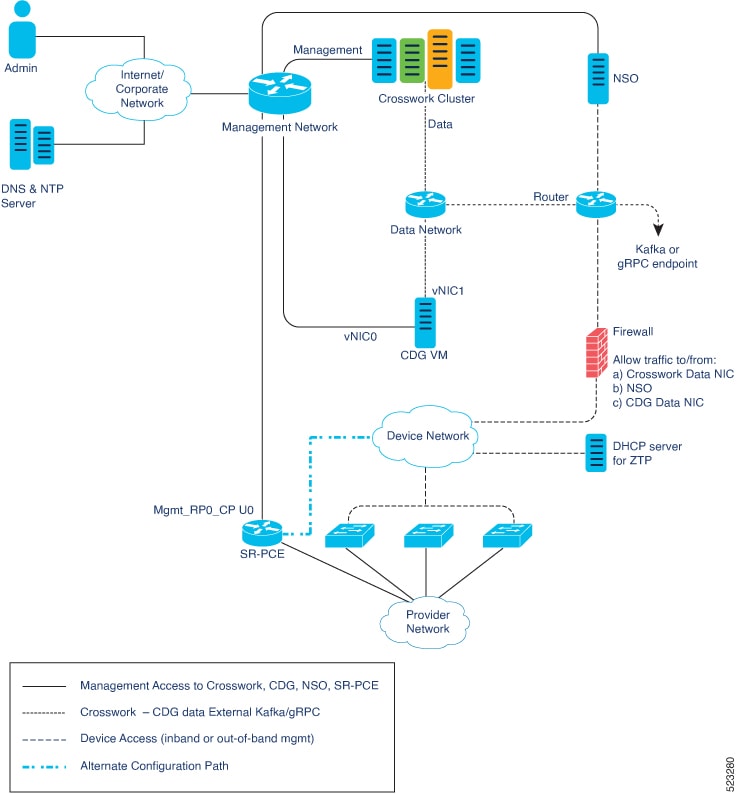
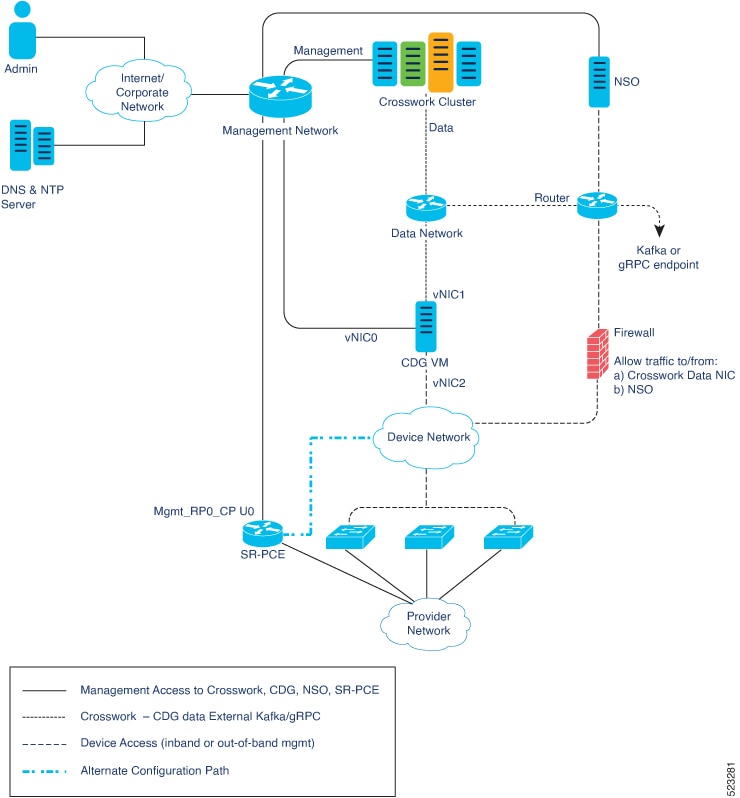
Connectivity between the various components should be accomplished via an external routing entity.
The Network Topology figures in this section show various line styles suggesting possible routing domains within the routed
network.
Solid - Management routing domain.
Dotted - Data/Control routing domain (information transferred between Cisco Crosswork and Crosswork Data Gateway, and other
data destinations (external Kafka or gRPC)).
Dashes - Device access routing domain (from Crosswork Data Gateway and NSO).
Blue dotted/dashed line - Alternate SR-PCE configuration path
The IP/subnet addressing scheme on each of these domains depends on the type of deployment.
Routing between domains is needed for Crosswork and NSO to reach the devices. However, proper firewall rules need to be in
place to allow only select sources (for example, Crosswork and NSO) to reach the devices.
Important
It is vital to have secure firewalls between Crosswork Network Controller and the network devices. However, the firewalls
are not provided by Crosswork Network Controller and must be set up separately by the user. This topic highlights what application
flows need to be allowed through the user-provided firewall system.
On the device network, devices can be reached in-band or using out-of-band management interfaces, depending on the local security
policies of each deployment.
Crosswork Cluster Configurations
The supported configurations are:
2 NIC Network Topology: The Crosswork cluster, Crosswork Data Gateway, NSO, and SR-PCE use one network interface to communicate between their management
interfaces, a second interface to pass the data between Crosswork Network Controller and Crosswork Data Gateway, and a routed
interface to communicate with the network devices.
3 NIC Network Topology: The Crosswork Data Gateway, NSO, and SR-PCE use one network interface to communicate between their management interfaces,
a second interface to pass the data between Crosswork Network Controller and Crosswork Data Gateway, and a third interface
for Crosswork Data Gateway to communicate with the network devices.
Note
For simplicity, all these diagrams depict NSO using a management interface and a device-facing interface. Other configurations
are also possible.
Figure 1. Cisco Crosswork - 2 NIC Network Topology
Figure 2. Cisco Crosswork - 3 NIC Network Topology
Cisco Crosswork Virtual Machine (VM)
The Cisco Crosswork VM has the following vNIC deployment options:
Table 2. Cisco Crosswork vNIC deployment modes
No. of vNICs
vNIC
Description
2
Management
Management
Data
Data and Device access
Crosswork Data Gateway VM
Overview of vNIC configuration
When configuring your Crosswork Data Gateway, the number of vNICs you use depends on your specific network requirements. If
your Crosswork Cluster is set up with two interfaces, you can configure the Data Gateway to use either two or three vNICs,
based on the needs of your deployment.
The number of vNICs may vary from one deployment to another. Factors such as security requirements and traffic isolation typically
influence this decision.
vNIC mapping
The vNICs in Crosswork Data Gateway are identified by both their system interface names and their corresponding labels:
vNIC0 corresponds to the eth0 interface
vNIC1 corresponds to the eth1 interface
vNIC2 corresponds to the eth2 interface
These system interface names (eth0, eth1, eth2) are used to refer to the respective vNICs in the operating system.
Available vNIC deployment options
The Crosswork Data Gateway VM has the following vNIC deployment options:
Table 3. Crosswork Data Gateway default vNIC deployment modes
No. of vNICs
vNIC
Roles
2
vNIC0
Default Gateway, Administration, External Logging, and Management traffic.
vNIC1
Control, Northbound External Data, and Southbound Data traffic.
3
vNIC0
Default Gateway, Administration, External Logging, and Management traffic.
vNIC1
Control and Northbound External Data traffic.
vNIC2
Southbound Data traffic
KVM host bare metal requirements
The following requirements are mandatory if you are planning to install Crosswork Network Controller on RHEL KVM.
Table 4. Host bare metal requirements
Component
Minimum requirement per host
Processor
Intel(R) Xeon(R) CPU E5-2699 v4 @ 2.20GHz or latest
Resource allocation: Refer to the resource requirements outlined in Host resource requirements, for each host.
Note
Crosswork Network Controller cluster nodes place high demands on the VMs. Ensure that CPU and memory resources on the machines
hosting the nodes are not oversubscribed.
Node distribution: Ensure all Crosswork Hybrid nodes are spread across multiple RHEL bare metals. While it is possible to deploy all cluster
nodes on a single RHEL bare metal (provided it meets the requirements), it is recommended to distribute the nodes across multiple
RHEL bare metals. This approach prevents the host from being a single point of failure and enhances solution resilience.
Network configuration: Ensure the networks required for the Crosswork Management and Data networks are built and configured in the data centers.
These networks must allow low-latency L2 communication with a round-trip time (RTT) of 10 ms or less.
Note
The same network names must be used and configured on all RHEL bare metal host machines that are hosting the Crosswork VMs.
Important
Crosswork Network Controller cluster VMs (Hybrid and Worker nodes) must run on hardware with Hyper Threading disabled to ensure
consistent, real-time performance for CPU-intensive workloads, as Hyper Threading may cause resource contention and unpredictable
performance
Host VM Requirements
This section explains the resource requirements per VM to deploy the Crosswork Cluster and Crosswork Data Gateway.
The Crosswork cluster consists of three VMs or nodes operating in a hybrid configuration. This is the minimum configuration
necessary to support the applications in a standard network. Additional VMs or nodes in a worker configuration can be added
during the installation or later to scale your deployment. For more information on VM count for each Crosswork Network Controller
package, see Table 1. Please consult with the Cisco Customer Experience team for guidance on your deployment to best meet your needs.
The table below explains the network requirements per VM host:
Table 5. Network Requirements (per VM)
Requirement
Description
Network Connections
For production deployments, we recommend that you use dual interfaces, one for the Management network and one for the Data
network.
For optimal performance, the Management and Data networks should use links configured at a minimum of 10 Gbps with a latency
of less than 10 milliseconds.
IP Addresses
The number of IP addresses required may vary based on the selection of the IP stack (IPv4, IPv6, or dual stack).
When using dual NICs (one for the Management network and one for the Data network): A management and data IP address (IPv4 or IPv6) for each node being deployed (Hybrid or Worker) and two additional IP addresses to be used as the Virtual IP (VIP) address (one for the Management network and one for the
Data network).
For example, in the case of a single stack deployment of a cluster with 3 Hybrid VMs and 1 Worker VM using dual NICs, you
need 10 IP addresses (5 for the Management network and 5 for the Data network). This number would double in the case of a
dual stack deployment.
Note
The IP addresses must be able to reach the gateway address for the network where Crosswork Data Gateway will be installed,
or the installation will fail.
When deploying a IPv6 cluster, the installer needs to run on an IPv6 enabled container/VM.
At this time, your IP allocation is permanent and cannot be changed without re-deployment. For more information, contact the
Cisco Customer Experience team.
NTP Server
The IPv4 or IPv6 addresses (based on the selection of the IP stack) or host names of the NTP server you plan to use. If you
want to enter multiple NTP servers, separate them with spaces. These should be the same NTP servers you use to synchronize the Crosswork application VM clock, devices, clients, and servers
across your network.
Ensure that the NTP servers are reachable on the network before attempting installation. The installation will fail if the
servers cannot be reached.
DNS Servers
The IPv4 or IPv6 addresses ((based on the selection of the IP stack) of the DNS servers you plan to use. These should be the
same DNS servers you use to resolve host names across your network.
Ensure that the DNS servers are reachable on the network before attempting installation. The installation will fail if the servers cannot be reached.
DNS Search Domain
The search domain you want to use with the DNS servers, for example, cisco.com. You can have only one search domain.
Backup Server
Cisco Crosswork will back up the configuration of the system to an external server using SCP. The SCP server storage requirements
will vary slightly but you must have at least 25 GB of storage.
FQDN (Optional)
The installation process supports using either a VIP (Virtual IP address) or a FQDN (Fully Qualified Domain Name) to access
the cluster.
If you choose to use the FQDN, you will need one for the Management and one for the Data network.
Note
Secure ZTP and Secure Syslog require the Crosswork cluster to be deployed with FQDN.
Cisco Crosswork Infrastructure and applications are built to run as a distributed collection of containers managed by Kubernetes.
SSH password guidelines
When updating the SSH password for the cluster, change the password on all cluster nodes simultaneously, ensuring each node
uses the same password.
In a geo setup, after updating the SSH password on the cluster nodes, promptly update the password in the geo inventory.
Crosswork Data Gateway VM requirements
This section provides information about the general guidelines and minimum requirements for installing Crosswork Data Gateway.
There are licensing implications for different packages, please consult your Cisco Account team to understand which packages
and licenses are required for your use cases.
The VM resource requirements for Crosswork Data Gateway are different for each type and cannot be modified. Therefore, if
your requirements change, you must redeploy the Crosswork Data Gateway to move from one type to another. For more information,
see the Redeploy a Crosswork Data Gateway VM section in the Crosswork Network Controller 7.1 Administration Guide.
Crosswork Data Gateway VM Requirements
The VM requirements for Crosswork Data Gateway are listed in the following table.
Table 7. Crosswork Data Gateway Requirements for on-premise applications
Requirement
Description
Interfaces
Minimum: 2
Maximum: 3
Crosswork Data Gateway can be deployed with 2 or 3 interfaces as per the combinations after this:
Note
If you use two interfaces on your Crosswork Cluster, then you can use two or three interfaces on the Data Gateway as per your
network requirements.
No. of NICs
vNIC0
vNIC1
vNIC2
2
Management Traffic
Control/Data Traffic
Device Access Traffic
—
3
Management Traffic
Control/Data Traffic
Device Access Traffic
Management traffic: for accessing the Interactive Console and passing the Control/Data information between servers (for example,
a Crosswork application to Crosswork Data Gateway).
Control/Data traffic: for data and configuration transfer between Crosswork Data Gateway and Crosswork applications and other external data destinations.
Device access traffic: for device access and data collection.
Note
Due to security policies, traffic from subnets of a vNIC received on other vNICs is dropped. For example, in a 3 vNIC model
setup, all device traffic (incoming and outgoing) must be routed through default vNIC2. Crosswork Data Gateway drops device
traffic received over vNIC0 and vNIC1.
IP Addresses
1 or 2 IPv4 or IPv6 addresses based on the number of interfaces that you choose to use.
An additional IP address to be used as the Virtual IP (VIP) address. For each active Data Gateway, a unique VIP is required.
For more information, refer to the Interfaces section in the Table 1.
Note
In a 3-NIC deployment, you must provide an IP address for Management interface (vNIC0) and Control/Data interface (vNIC1)
during installation. A virtual IP address for Device Access Traffic (vNIC2) is assigned when you create a Data Gateway to
a pool as explained in the Create a Crosswork Data Gateway Pool section in the Cisco Crosswork Network Controller 7.1 Administration Guide.
NTP Servers
The IPv4 or IPv6 addresses or hostnames of the NTP servers you plan to use. If you want to enter multiple NTP servers, separate
them with spaces. These should be the same NTP servers you use to synchronize devices, clients, and servers across your network.
Verify that the NTP IP address or host name is reachable on the network else the installation fails.
Also, the ESXi hosts that run the Crosswork application and Crosswork Data Gateway VM must have NTP configured, or the initial handshake may fail with "certificate not valid" errors.
DNS Servers
The IPv4 or IPv6 addresses of the DNS servers you plan to use. These should be the same DNS servers you use to resolve hostnames
across your network. Confirm that the DNS servers are reachable on the network before attempting installation. The installation
fails if the servers cannot be reached.
DNS Search Domain
The search domain you want to use with the DNS servers, for example cisco.com. You can have only one search domain.
FQDN
The FQDN addresses are configured for Amazon EC2 deployments.
Internet Control Message Protocol (ICMP)
The Crosswork uses ICMP in the communications with Crosswork Data Gateway. Ensure that the firewall between Crosswork and
Crosswork Data Gateway passes this traffic.
Crosswork TCP/UDP port requirements
Attention
The list of ports in this section applies only to on-premises deployments where all the intra-site components are able to
communicate without any firewall restrictions. Firewalls between the individual VMs hosting Crosswork components is not supported.
For any inter-site communication between the Crosswork geo redundancy components (if configured) or with any other external
tools in the integration, firewall may be present.
As a general policy, ports that are not needed should be disabled. To view a list of all the open listening ports once all
the applications are installed and active, log in as a Linux CLI admin user on any Crosswork cluster VM, and run the netstat -aln command.
Important
All IP addresses (including Virtual IP addresses) between Crosswork cluster, Crosswork applications, and Crosswork Data Gateway
need to be reachable (to be pinged to/from) between each other.
Crosswork cluster port requirements
These TCP/UDP port numbers need to be allowed through any external firewall or access-list rules deployed by the data center
administrator. Depending on the NIC deployment, these ports may be applicable to only one or both NICs.
Note
Crosswork cluster ports allow bidirectional flow of information.
Table 8. External ports used by Crosswork cluster
Port
Protocol
Used for
Location (in 2 NIC deployment)
22
TCP
Remote SSH traffic
Management Network / vNIC0
179
TCP
Calico BGP (Kubernetes)
Management Network / vNIC0
500, 4500
UDP
IPSec
Management Network / vNIC0
2379/2380
TCP
Kubernetes etcd
Management Network / vNIC0
6443
TCP
kube-apiserver (Kubernetes)
Management Network / vNIC0
9100
TCP
Kubernetes metamonitoring
Management Network / vNIC0
10250
TCP
kubelet (Kubernetes)
Management Network / vNIC0
24007
TCP
GlusterFS
Management Network / vNIC0
30603
TCP
User interface (NGINX server listens for secure connections on port 443)
Management Network / vNIC0
30606
TCP
Docker Registry
Management Network / vNIC0
30621
TCP
For FTP (available on data interface only). The additional ports used for file transfer are 31121 (TCP), 31122 (TCP), and
31123 (TCP).
This port is available only when the supported application is installed on Cisco Crosswork and the FTP settings are enabled.
Data Network / vNIC1
30622
TCP
For SFTP (available on data interface only)
This port is available only when the supported application is installed on Cisco Crosswork and the SFTP settings are enabled.
Data Network / vNIC1
49152:49370
TCP
GlusterFS
Management Network / vNIC0
Table 9. Ports used by other Crosswork components
Port
Protocol
Used for
Location (in 2 NIC deployment)
30180, 30190
TCP
Used in geo HA deployments for database replication (PQ binary protocol), and are secured by SSL.
Management Network / eth0
30602
TCP
To monitor the installation (Crosswork Network Controller)
Management Network / vNIC0
30604
TCP
Used for Classic Zero Touch Provisioning (Classic ZTP) on the NGINX server
Management Network / vNIC0
30607
TCP
Crosswork Data Gateway vitals collection
Data Network / vNIC1
30608
TCP
Crosswork Data Gateway gRPC channel with Data Gateway VMs
Data Network / vNIC1
30609
TCP
Used by the Expression Orchestrator (Crosswork Service Health)
Management Network / vNIC0
30610
TCP
Used by the Metric Scheduler (Crosswork Service Health)
Management Network / vNIC0
30611
TCP
Used by the Expression Tracker component (Crosswork Service Health)
Management Network / vNIC0
30617
TCP
Used for Secure Zero Touch Provisioning (Secure ZTP) on the ZTP server
Management Network / vNIC0
30620
TCP
Used to receive plug-and-play HTTP traffic on the ZTP server
Management Network / vNIC0
30649
TCP
To set up and monitor Data Gateway collection status
Data Network / vNIC1
30650
TCP
The astack gRPC channel with astack-client running on the Data Gateway VMs
Data Network / vNIC1
30993, 30994, 30995
TCP
Crosswork Data Gateway sending the collected data to Crosswork Kafka destination
Data Network / vNIC1
Table 10. Destination ports used by Crosswork cluster
Port
Protocol
Used for
Location (in 2 NIC deployment)
7
TCP/UDP
Discover endpoints using ICMP
Management Network / vNIC0
22
TCP
Initiate SSH connections with managed devices
Management Network / vNIC0
53
TCP/UDP
Connect to DNS
Management Network / vNIC0
123
UDP
Network Time Protocol (NTP)
Management Network / vNIC0
830
TCP
Initiate NETCONF
Management Network / vNIC0
2022
TCP
Used for communication between Crosswork and Cisco NSO (for NETCONF)
Management Network / vNIC0
8080
TCP
REST API to SR-PCE
Management Network / vNIC0
8888
TCP
Used for communication between Crosswork and Cisco NSO (for HTTPS)
Management Network / vNIC0
20243
TCP
Used by the DLM Function Pack for communication between DLM and Cisco NSO
Management Network / vNIC0
20244
TCP
Used to internally manage the DLM Function Pack listener during a Reload Packages scenario on Cisco NSO
Management Network / vNIC0
Crosswork Data Gateway port requirements
The following tables show the minimum set of ports required for Crosswork Data Gateway to operate correctly.
Inbound: Crosswork Data Gateway listens on the specified ports.
Outbound: Crosswork Data Gateway connects to external destination IP on the specified ports.
Table 11. Ports to be opened for Management traffic
Port
Protocol
Used for
Direction
22
TCP
SSH server
Inbound
22
TCP
SCP client
Outbound
123
UDP
NTP Client
Outbound
53
UDP
DNS Client
Outbound
30607
TCP
Crosswork Controller
Outbound
Note
SCP port can be tuned.
Table 12. Ports to be opened for Device Access traffic
3 For default port information of a device, see the platform-specific documentation. Ensure that port number on the device is
the same as that configured onDevice Management > Network Devices > Edit Device
Table 13. Ports to be opened for Control/Data traffic
4 You cannot modify the port numbers of system-created destinations as they are created with predefined ports. To modify the
user-defined destination ports, edit the port number from Administration > Data Collector(s) Global Settings > Data destinations > Edit destination.
IP Address Restrictions
Crosswork cluster uses specific IP ranges for internal communications by default, which cannot be used for other devices or
purposes within your network. It is recommended to isolate your Crosswork cluster to ensure all communications remain internal
and that there are no address space overlaps with external integration points (e.g., connections to devices, external servers,
or the NSO server).
If these default IP ranges conflict with your network, collaborate with the Cisco Customer Experience team for assistance
in modifying the settings before deployment.
Note
This is applicable for cluster installation and for adding a static route.
Note
The default values for the K8sServiceNetwork (10.96.0.0) and K8sPodNetwork (10.244.0.0) parameters can be changed.
Table 14. Protected IP Subnets
IP Type
Subnet
Remarks
IPv4
172.17.0.0/16
Docker Subnet (Infrastructure)
169.254.0.0/16
Link local address block
127.0.0.0/8
Loopback address
192.88.99.0/24
Reserved, used for relay servers to do IPv6 over IPv4
240.0.0.0/4
Reserved for future use (previously class E block)
224.0.0.0/4
MCAST-TEST-NET
0.0.0.0/8
Current network, valid as source address only
IPv6
2001:db8:1::/64
Docker Subnet (Infrastructure)
fdfb:85ef:26ff::/48
Pod Subnet (Infrastructure)
fd08:2eef:c2ee::/110
Service Subnet (Infrastructure)
::1/128
Loopback address
fe80::/10
Link local
ff00::/8
IPv6 Multicast
2002::/16
Reserved, used for relay servers to do IPv6 over IPv4
2001:0000::/32
Terredo tunnel and relay
2001:20::/28
Used by ORCHID and not IPv6 routable
100::/64
Discard prefix, used in specific use-cases not applicable to Crosswork Zero Touch Provisioning

 Feedback