Connecting a connector to Cisco Catalyst 9300 and 9400 Series Switches
For certain use cases such as energy utilization or occupancy, the following steps are sufficient (and there is no further need to configure the IOX app). However, ensure that location services are enabled.
Before you begin
-
Deploy a connector OVA and activate it using a token from Cisco Spaces.
-
The IP address of a Cisco Catalyst 9300 and 9400 Series Switches that is reachable from the Cisco Spaces: Connector.
-
Test the Netconf commands on the Cisco Catalyst 9300 and 9400 Series Switches
SUMMARY STEPS
- Login to Cisco Spaces.
- In the Cisco Spaces dashboard, choose Setup > Wired Networks.
- From the Step 3: Add Switches area, click Add Switch.
- From the Add Switches page, select the connector, enter a name to identify the switch, the switch IP address. Netconf username, Netconf password, and click the checkbox to acknowledge that you have tested these commands on the switch.
- Click Test to see if the connection to the switch.
- Do one of the following:
- Click Save & Add Next Switch
- Click Save & Close
DETAILED STEPS
|
Step 1 |
Login to Cisco Spaces. |
||
|
Step 2 |
In the Cisco Spaces dashboard, choose Setup > Wired Networks. |
||
|
Step 3 |
From the Step 3: Add Switches area, click Add Switch. 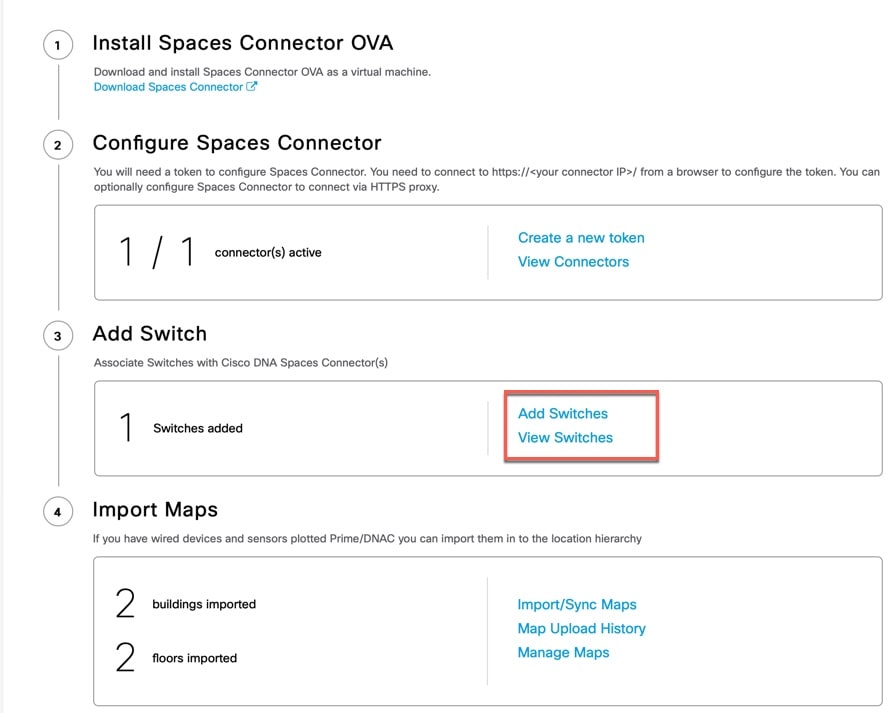 |
||
|
Step 4 |
From the Add Switches page, select the connector, enter a name to identify the switch, the switch IP address. Netconf username, Netconf password, and click the checkbox to acknowledge that you have tested these commands on the switch.
|
||
|
Step 5 |
Click Test to see if the connection to the switch. |
||
|
Step 6 |
Do one of the following:
|
 Feedback