- Preface
- Software Licensing
- The Cisco IOS command-line interface (CLI)
- Configuring Interfaces
- Switch Alarms
- Initial Switch Configuration (IP address assignments and DHCP autoconfiguration)
- How to Setup and Use the Cisco Configuration Engine
- How to Create and Manage Switch Clusters
- Performing Switch Administration
- Configuring Precision Time Protocol (PTP)
- Configuring PROFINET
- Common Industrial Protocol (CIP)
- Configuring SDM Templates
- Configuring Switch-Based Authentication
- Configuring IEEE 802.1x Port-Based Authentication
- MACsec
- Web-Based Authentication
- Configuring Smartports Macros
- Configuring SGACL Monitor Mode and SGACL Logging
- Configuring SGT Exchange Protocol over TCP (SXP) and Layer 3 Transport
- Configuring VLANs
- VLAN Trunking Protocol (VTP)
- Configuring Voice VLAN
- How to Configure Spanning Tree Protocol (STP)
- Configuring MSTP
- Configuring Optional Spanning-Tree Features
- Configuring Resilient Ethernet Protocol
- Configuring the FlexLinks and the MAC Address-Table Move Update
- Configuring DHCP
- Dynamic Address Resolution Protocol (ARP)
- Configuring IP Source Guard
- How to Configure Internet Group Management Protocol (IGMP) and Multicast VLAN Registration (MVR)
- Configuring Port-Based Traffic Control
- Configuring LLDP, LLDP-MED, and Wired Location Service
- Configuring SPAN and RSPAN
- One-to-one (1:1) Layer 2 Network Address Translation (NAT)
- How to Configure CDP
- Configuring UniDirectional Link Detection (UDLD)
- Configuring RMON
- Configuring System Message Logging
- Configuring Simple Network Management Protocol (SNMP)
- Network Security with ACLs
- Configuring Quality of Service (QoS)
- Configuring Static IP Unicast Routing
- Configuring IPv6 Host Functions
- Configuring Link State Tracking
- Configuring IP multicast routing
- Configuring Multicast Source Discovery Protocol (MSDP)
- Configuring Multicast Listener Discovery (MLD) snooping
- Configuring HSRP and VRRP
- Configuring IPv6 access control lists (ACLs)
- Configuring Embedded Event Manager (EEM)
- IP Unicast Routing
- IPv6 Unicast Routing
- Unicast Routing Overview
- Configuring Cisco IOS IP SLAs Operations
- Configuring Dying-Gasp
- How to Configure Enhanced Object Tracking
- Configuring MODBUS TCP
- Configuring Ethernet CFM
- Working with the Flash File System
- How to Configure EtherChannels
- Troubleshooting
- How to use a Secure Digital (SD) flash memory module (SD card)
Configuring Voice VLAN
Information About Configuring Voice VLAN
Voice VLAN
The voice VLAN feature enables access ports to carry IP voice traffic from an IP phone. When the switch is connected to a Cisco 7960 IP Phone, the phone sends voice traffic with Layer 3 IP precedence and Layer 2 class of service (CoS) values, which are both set to 5 by default. Because the sound quality of a Cisco IP phone call can deteriorate if the data is unevenly sent, the switch supports quality of service (QoS) based on IEEE 802.1p CoS. QoS uses classification and scheduling to send network traffic from the switch in a predictable manner. Voice VLAN is referred to as an auxiliary VLAN in some switch documentation.
The Cisco 7960 IP Phone is a configurable device, and you can configure it to forward traffic with an IEEE 802.1p priority. You can configure the switch to trust or override the traffic priority assigned by a Cisco IP phone.
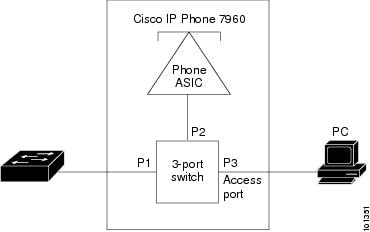
The Cisco IP phone contains an integrated three-port 10/100 switch as shown in Figure 35. The ports provide dedicated connections to these devices:
■ Port 1 connects to the switch or other voice-over-IP (VoIP) device.
■Port 2 is an internal 10/100 interface that carries the IP phone traffic.
■Port 3 (access port) connects to a PC or other device.
Figure 35 Cisco 7960 IP Phone Connected to a Switch
Cisco IP Phone Voice Traffic
You can configure an access port with an attached Cisco IP phone to use one VLAN for voice traffic and another VLAN for data traffic from a device attached to the phone. You can configure access ports on the switch to send Cisco Discovery Protocol (CDP) packets that instruct an attached phone to send voice traffic to the switch in any of these ways:
■In the voice VLAN tagged with a Layer 2 CoS priority value
■In the access VLAN tagged with a Layer 2 CoS priority value
■In the access VLAN, untagged (no Layer 2 CoS priority value)
Note: In all configurations, the voice traffic carries a Layer 3 IP precedence value (the default is 5 for voice traffic and 3 for voice control traffic).
You can configure a port connected to the Cisco IP phone to send CDP packets to the phone to configure the way in which the phone sends voice traffic. The phone can carry voice traffic in IEEE 802.1Q frames for a specified voice VLAN with a Layer 2 CoS value. It can use IEEE 802.1p priority tagging to give voice traffic a higher priority and forward all voice traffic through the native (access) VLAN. The Cisco IP phone can also send untagged voice traffic or use its own configuration to send voice traffic in the access VLAN. In all configurations, the voice traffic carries a Layer 3 IP precedence value (the default is 5).
Cisco IP Phone Data Traffic
The switch can also process tagged data traffic (traffic in IEEE 802.1Q or IEEE 802.1p frame types) from the device attached to the access port on the Cisco IP phone (see Figure 35). You can configure Layer 2 access ports on the switch to send CDP packets that instruct the attached phone to configure the phone access port in one of these modes:
■In trusted mode, all traffic received through the access port on the Cisco IP phone passes through the phone unchanged.
■In untrusted mode, all traffic in IEEE 802.1Q or IEEE 802.1p frames received through the access port on the Cisco IP phone receive a configured Layer 2 CoS value. The default Layer 2 CoS value is 0. Untrusted mode is the default.
Note: Untagged traffic from the device attached to the Cisco IP phone passes through the phone unchanged, regardless of the trust state of the access port on the phone.
Default Voice VLAN Configuration
The voice VLAN feature is disabled by default.
When the voice VLAN feature is enabled, all untagged traffic is sent according to the default CoS priority of the port.
The CoS value is not trusted for IEEE 802.1p or IEEE 802.1Q tagged traffic.
Voice VLAN Configuration Guidelines
■Voice VLAN configuration is only supported on switch access ports; voice VLAN configuration is not supported on trunk ports.
Note: Trunk ports can carry any number of voice VLANs, similar to regular VLANs. The configuration of voice VLANs is not required on trunk ports.
■The voice VLAN should be present and active on the switch for the IP phone to correctly communicate on the voice VLAN. Use the show vlan privileged EXEC command to see if the VLAN is present (listed in the display).
■Before you enable voice VLAN, we recommend that you enable QoS on the switch. If you use the auto-QoS feature, these settings are automatically configured. For more information, see Configuring QoS
■You must enable CDP on the switch port connected to the Cisco IP phone to send the configuration to the phone. (CDP is globally enabled by default on all switch interfaces.)
■The Port Fast feature is automatically enabled when voice VLAN is configured. When you disable voice VLAN, the Port Fast feature is not automatically disabled.
■If the Cisco IP phone and a device attached to the phone are in the same VLAN, they must be in the same IP subnet. These conditions indicate that they are in the same VLAN:
–They both use IEEE 802.1p or untagged frames.
–The Cisco IP phone uses IEEE 802.1p frames, and the device uses untagged frames.
–The Cisco IP phone uses untagged frames, and the device uses IEEE 802.1p frames.
–The Cisco IP phone uses IEEE 802.1Q frames, and the voice VLAN is the same as the access VLAN.
■The Cisco IP phone and a device attached to the phone cannot communicate if they are in the same VLAN and subnet but use different frame types because traffic in the same subnet is not routed (routing would eliminate the frame type difference).
■You cannot configure static secure MAC addresses in the voice VLAN.
■Voice VLAN ports can also be these port types:
–IEEE 802.1x authenticated port. See Configuring IEEE 802.1x Port-Based Authentication for more information.
If you enable IEEE 802.1x on an access port on which a voice VLAN is configured and to which a Cisco IP phone is connected, the phone loses connectivity to the switch for up to 30 seconds.
–A source or destination port for a SPAN or RSPAN session.
When you enable port security on an interface that is also configured with a voice VLAN, you must set the maximum allowed secure addresses on the port to two plus the maximum number of secure addresses allowed on the access VLAN. When the port is connected to a Cisco IP phone, the phone requires up to two MAC addresses. The phone address is learned on the voice VLAN and might also be learned on the access VLAN. Connecting a PC to the phone requires additional MAC addresses.
Port Connection to a Cisco 7960 IP Phone
Because a Cisco 7960 IP Phone also supports a connection to a PC or other device, a port connecting the switch to a Cisco IP phone can carry mixed traffic. You can configure a port to decide how the Cisco IP phone carries voice traffic and data traffic.
Priority of Incoming Data Frames
You can connect a PC or other data device to a Cisco IP phone port. To process tagged data traffic (in IEEE 802.1Q or IEEE 802.1p frames), you can configure the switch to send CDP packets to instruct the phone how to send data packets from the device attached to the access port on the Cisco IP phone. The PC can generate packets with an assigned CoS value. You can configure the phone to not change (trust) or to override (not trust) the priority of frames arriving on the phone port from connected devices.
How to Configure Voice VLAN
Configuring the Priority of Incoming Data Frames
Monitoring and Maintaining Voice VLAN
|
|
|
|---|---|
Configuration Examples for Configuring Voice VLAN
Configuring the Cisco IP Phone Priority of Incoming Data Frames: Example
This example shows how to configure a port connected to a Cisco IP phone to not change the priority of frames received from the PC or the attached device:
Additional References for Configuring Voice VLAN
The following sections provide references related to switch administration:
Related Documents
|
|
|
|---|---|
Standards
|
|
|
|---|---|
No new or modified standards are supported by this feature, and support for existing standards has not been modified by this feature. |
MIBs
|
|
|
|---|---|
To locate and download MIBs using Cisco IOS XR software, use the Cisco MIB Locator found at the following URL and choose a platform under the Cisco Access Products menu: http://cisco.com/public/sw-center/netmgmt/cmtk/mibs.shtml |
RFCs
|
|
|
|---|---|
No new or modified RFCs are supported by this feature, and support for existing RFCs has not been modified by this feature. |
 Feedback