Cisco 8500 Series Secure Routers Hardware Installation Guide

PDF

Cisco 8500 Series Secure Routers Hardware Installation Guide

Remove and replace the battery

Want to summarize with AI?

Log in

Explains how to safely remove and replace router batteries, providing clear steps for both removal and installation to support continued reliable device operation.


These instructions are provided in order to comply with the EU Battery Replaceability Requirement.

  • This product was not specifically designed for battery replacement in the field.

  • It is recommended that, whenever possible, follow the standard repair or return process for battery issues.

Caution

Always wear an ESD-preventive wrist strap and ensure that it makes good contact with your skin when you remove or install the internal modules. Connect the equipment end of the wrist strap to the metal part of the chassis.
Remove the battery

Perform this procedure when the battery requires replacement or maintenance on supported hardware.

Note

Follow proper electrostatic discharge (ESD) precautions before handling the battery or device.

Wear an ESD-preventive wrist strap, ensuring that it makes good skin contact. Connect the clip to an unpainted surface of the chassis frame to channel unwanted ESD voltages safely to ground. To guard against ESD damage and shocks, the wrist strap and cord must operate effectively.

Warning

Statement 1015—Battery Handling

To reduce risk of fire, explosion or leakage of flammable liquid or gas:

  • Replace the battery only with the same or equivalent type recommended by the manufacturer.

  • Do not dismantle, crush, puncture, use sharp tool to remove, short external contacts, or dispose of in fire.

  • Do not use if battery is warped or swollen.

Procedure

1.

Before you perform any module replacement, read the Safety Warnings section and disconnect the power supplies.

2.

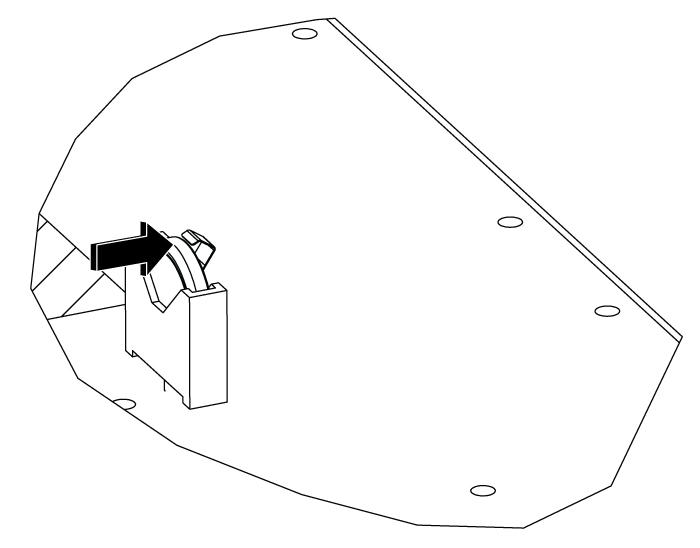
Pull the retention arm back from the battery.

Figure 1. Pull back the latch arm
3.

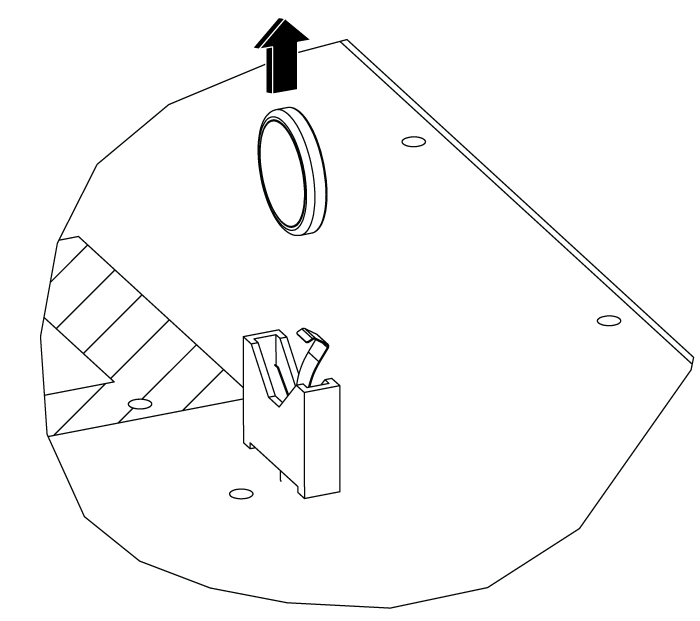
Lift the battery out of the holder.

Figure 2. Remove the battery

Replace the battery

Replace the battery in the chassis following the safety procedures to ensure proper device functionality.
Note

Follow proper electrostatic discharge (ESD) precautions before handling the battery or device.

Before you begin

The battery is a CR2032 type. Batteries should only be replaced with the same or an equivalent type recommended by the manufacturer.

  • RENATA 100272

  • VARTA MICROBATTERY INC 06032 101 501

  • Panasonic CR-2032L/BN

Procedure

1.

Read the Safety Warnings instructions and disconnect the power supplies before you perform any module replacement.

2.

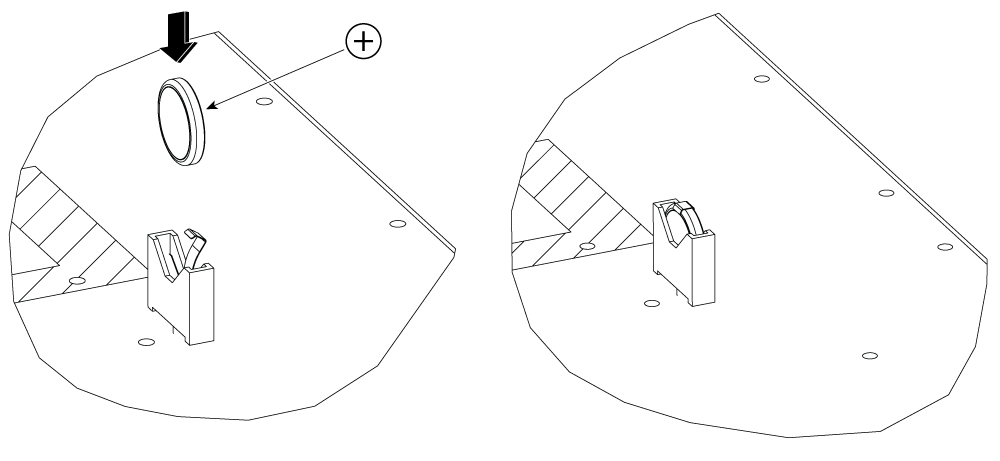
Orient the battery with positive polarity as shown.

3.

Push the battery down into the holder. Once installed the latch will snap back over the battery to keep it retained.

Figure 3. Install the battery