Explains how to assign custom IP prefixes to cloud-hosted control component interfaces and the implications for management access and service configuration.
A custom IP prefix is a network allocation that
-
enables tailored management and control access for cloud-hosted control component interfaces,
-
allows secure configuration of AAA (Authentication, Authorization, and Accounting) and TACACS authentication, and
-
must be specified to avoid conflicts with existing fabric subnets.
Custom IP prefix configuration requirements
Custom IP prefixes apply only to Cisco-managed, cloud-based, dedicated single tenant control components. They are not used for shared tenant fabrics.
Assign custom network prefix-based IPs to the cloud control component interfaces for management access and control if necessary. For example:
-
accessing the management VPN 512 of Cisco SD-WAN Manager and Cisco SD-WAN Validator or Cisco SD-WAN Controller devices over a Cisco Catalyst SD-WAN tunnel with Authentication, Authorization, and Accounting (AAA) or Terminal Access Controller Access-Control System (TACACS) based authentication, or
-
sending syslog data from Cisco SD-WAN Manager on VPN 512 to a syslog server over a Cisco Catalyst SD-WAN tunnel.
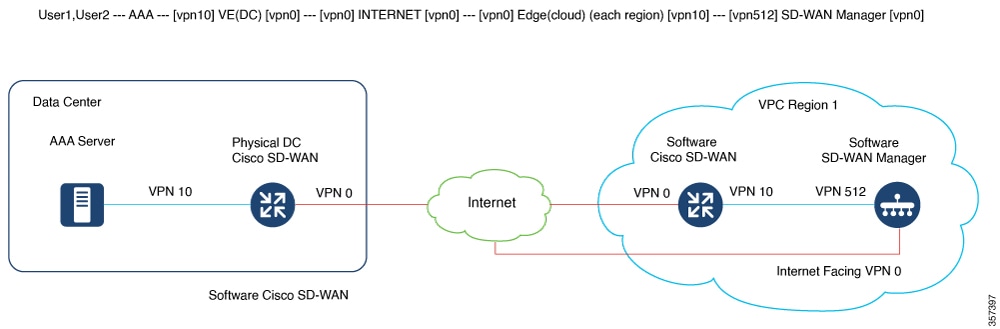
By default, Cisco-managed cloud-hosted control components use 10.0.0.0/16-based subnets, including for VPN 512.
If you add the cloud Cisco Catalyst SD-WAN and make the VPN 512 subnet reachable within your fabric, you might encounter a conflict with an existing subnet.
If this occurs, you must share a /24 prefix for each of the two control component deployment regions. Use these IP prefixes to create control components. You can then use the subnets within the Cisco Catalyst SD-WAN fabric.
Request cloud gateways after fabric provisioning:
-
For a fabric that we host on Azure, open a TAC case and provide this information::
-
The specific enterprise subnet prefixes from which the connectivity to the VPN 512 of the control components is required.
-
To enable AAA or TACACS, provide IP prefixes that are unused within your existing fabric. These prefixes are used to create the control components. The original control components are shut down, then snapshotted, and finally cloned back.
-
Each region with control components uses one /24 unique custom subnet across the Cisco Catalyst SD-WAN fabric. Since each fabric includes two regions, you need two subnets.
-
Admin credentials to the Cisco SD-WAN Validator, Cisco SD-WAN Controller and Cisco SD-WAN Manager devices are required. You can provide credentials at the start of the change window.
-
-
Schedule an eight-hour maintenance window after the pre-approval and pre-checks are completed by the CloudOps engineer.
-
Before starting the process, enable DNS for Cisco SD-WAN Validator and configure all control components.
-
Ensure that GR is set to a default of twelve hours or higher on Cisco Catalyst SD-WAN or Cisco SD-WAN Controller devices.
-
Reserve two available Cloud Cisco Catalyst SD-WAN UUIDs through Plug and Play (PNP) and attach them to Cisco SD-WAN Manager.
-
We recommend attaching Cisco SD-WAN Manager templates to Cisco SD-WAN Validator, Cisco SD-WAN Controller, and any existing cloud Cisco Catalyst SD-WAN devices from Cisco.
You can use this feature only with single-tenant single-node Cisco SD-WAN Manager fabrics, single-tenant cluster-node Cisco SD-WAN Manager fabrics for provisioned control components, and all new control component sets to be provisioned. You cannot use this feature with multitenant Cisco SD-WAN Manager cluster fabrics.
Configure cloud gateways after provisioning:
Once CloudOps has completed the provisioning of the cloud gateways next to the cloud-hosted control components, they provide the public and private IP assignments for each cloud gateway. These are in the format (VPN 512, VPN 0, and VPN X).
CloudOps also provides the credentials for the newly provisioned cloud gateways. The cloud gateways have VPN 512 and VPN X interfaces in the same subnet as the VPN 512 of the control components in that region. CloudOps sets up the cloud gateways for AAA TACACS in this network layout.
| Interface |
Description |
Configuration |
|---|---|---|
| GigabitEthernet1 |
VPN 512 (Management) |
DCHP-assigned |
| GigabitEthernet2 |
VPN 0 (Transport) |
DHCP-assigned |
| GigabitEthernet3 |
VPN X (Service) |
Static IP |
If you encounter reachability issues with the cloud gateway, they usually result from problems with the interface IP address or route configurations.
Public and private IPs are assigned one-to-one to the cloud gateway interfaces using NAT. Although the gateway interface uses DHCP, it receives the same IP address from the cloud each time.
For VPN X interfaces, configure the static IP identical to the one shared by CloudOps. Do not use random IP addresses within the subnet.
The cloud gateways are subject to the same Inbound access list as the control components, since they are provisioned in the same unique environment per fabric.
Perform these steps to complete the configuration:
-
Log in via SSH to the gateway public IPs using the provided credentials.
-
Configure the new cloud gateways with the necessary configurations. For example, site-id, system IP, organization name, Cisco SD-WAN Validator DNS or IP, and so on.
-
If you are using Enterprise root-ca, also upload and install the same on the cloud gateways.
-
You may configure AAA or TACACS on the Cisco SD-WAN Manager with authentication fallback to local mode. The local mode must have the viptelatac, ciscotacro, or ciscotacrw users enabled. This configuration allows support teams to log in and resolve issues when necessary.
-
Acquire one unused cloud gateway UUID from the device list of the Cisco SD-WAN Manager per cloud gateway provisioned.
If you do not have any cloud gateway UUID available in the WAN Edge Device list on your Cisco SD-WAN Manager, log in to the Cisco PNP portal on the fabric's associated Smart Account and Virtual Account. Perform Add Software Devices (C8000V), then Sync Smart Account on the Cisco SD-WAN Manager.
-
Activate the UUID on the cloud gateways so they can be authenticated by the Cisco SD-WAN Manager and join the Cisco Catalyst SD-WAN fabric.
-
The Azure subnet default gateway is your default gateway, even if you configure the gateway service VPN IP to be the gateway for your enterprise subnets. Therefore, in addition to your configuration on VPN 512 on the control components, there is additional configuration needed on the Azure side.
We will help apply an Azure Route Table (RT) entry for each of the necessary Enterprise subnets and also enable IP forwarding on the cloud gateway interfaces.
Additional actions are needed to configure enterprise prefixes.