This section explains t the laser squelch feature on Ethernet controllers in the NCS 1004 platform.
A laser squelch feature is an Ethernet controller capability that
automatically shuts down the laser when a trunk fault or certain client alarms occur,
raises a SQUELCHED alarm on the mapped client port to indicate the action, and
supports fast protection switching by using interrupt-based triggers instead of poll-based mechanisms.
Feature history
Table 1. Feature history
Feature name
Release information
Feature description
Laser squelching
Cisco IOS XR Release 7.8.1
Laser Squelching is now triggered using a new interrupt mechanism to detect faults in the client or trunk connections. Compared to the earlier poll-based triggers, the new interrupt-based mechanism makes the protection switching considerably faster.
This feature is supported on the following line cards with 100GE client rate with the ONS-QSFP28-LR4 pluggable:
NCS1K4-1.2T-K9
NCS1K4-1.2TL-K9
NCS1K4-OTN-XP
NCS1K4-2-QDD-C-K9
You can enable laser squelching on Ethernet controllers. When laser squelching is enabled, the laser is shut down in the event of trunk faults (LOS, LOF), and a SQUELCHED alarm is raised on the mapped client port.
In previous releases, implementation was based on a poll mechanism and client squelch was supported only in case of trunk fault scenarios. From Release 7.8.1 squelching uses an interrupt based method. Hence squelching happens faster when compared to previous releases. Squelch happens for client alarms also like Ingress LF, LOA, and CSF (not for egress client alarms) in addition to trunk fault cases. Fast squelching helps to achieve faster protection switching. See . This feature is supported on the following line cards with 100GE client rate with the ONS-QSFP28-LR4 pluggable:
NCS1K4-1.2T-K9
NCS1K4-1.2TL-K9
NCS1K4-OTN-XP
NCS1K4-2-QDD-C-K9
Protection switching use cases
A protection switching use case is a network deployment scenario that
utilizes the Protection Switching Module (PSM) to enable swift reaction to trunk and client path faults,
leverages fast-squelching to improve switching speed and minimize data loss, and
supports both line card and client protection by differentiating working and protection paths.
Fast-Squelching provides increased protection switching speed when there’s a trunk fault or a client fault.
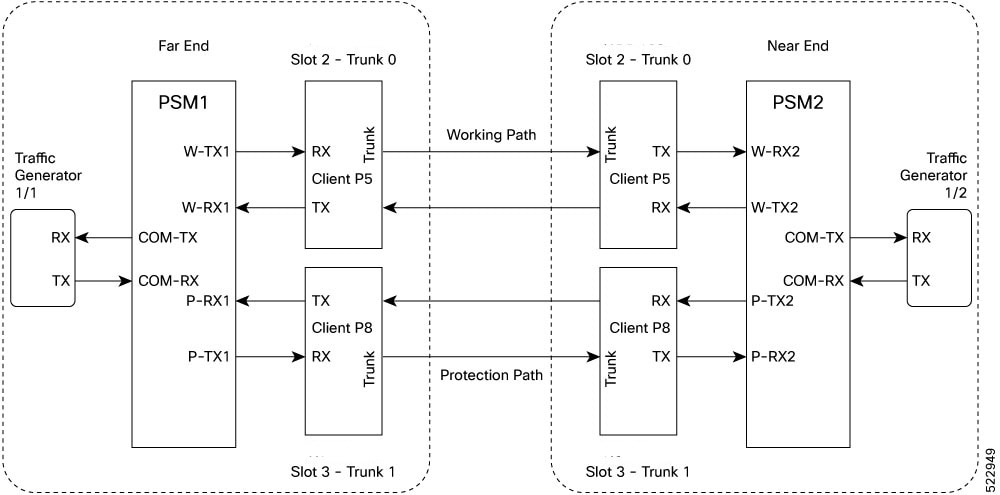
This sample topology includes a Far End (FE) station and a Near End (NE) station. Each station includes an NCS 1004 node having two line cards. The nodes are connected to the respective Traffic generators through a Protection Switching Module (PSM).
Figure 1. Reference topology for protection switching
Trunk fault protection switching
If there is a fiber cut in the trunk working path from the Far End (FE) station to the Near End (NE) station, an LOS alarm is raised on the NE working trunk. This results in squelching of all client ports mapped to the working NE trunk port. As the laser of the client port is squelched, LOS is reported on the W-RX2 port of PSM2. As the received optical power on the W-RX2 port of PSM is below the threshold, PSM2 switches to receive the optical signal on the P-RX2 port, implementing bidirectional switching from working to protection path.
In the case of a unidirectional trunk fault, switching happens in one direction as described above. In the other direction, when LOS is received at the W-RX2 port of PSM2, W-TX2 sends LOS for 25 milliseconds. When LOS is reported on the NE client port, the fault propagates over the trunk, resulting in squelching of FE station client ports, and the PSM switches in that direction as well.
Client fault protection switching
When a client failure occurs on the FE station, a Client Signal Failure (CSF) alarm is raised on the NE station trunk. The CSF results in squelching of the corresponding client port and PSM switching. In summary:
A fault on the NE station client RX port results in CSF on the FE station trunk, and switching occurs.
A fault on the NE station client TX port results in LOS on the PSM ports, and switching occurs.
Note
PSM must be in the standalone mode.
PSM alarm threshold must be set to +/ –3 dBm from the actual power received in the PSM RX port.
If line card protection is required, the working and protect path must be configured in two different line cards.
If only client protection is required, the working and protection path can be configured in the same line card.
If the LC trunk configuration is x50 rate, then we can’t use a single-line card for work and protection due to x50 coupled mode limitations (coupled trunk).
Manual switch, Force switch, and lock-out protection on PSM, result in bidirectional switching.
The PSM supports both C2B (4x100G-MXP-400G-TXP) and C3B (40x10G-4x100G-MXP) cards. The C2B card allows client data rates of 100G and 400G, while the C3B card supports client data rates of 10G and 100G. The PSM supports upto 400G with the GL-2 pluggable module.
The PAM4 and QDD pluggable modules take more than 50ms to recover traffic when switching between working and protection modes.
The GL-2 DP04CFP2-M25-K9 pluggable module supports both Flexcoh streaming and ODUCn termination modes. Compared to Flexcoh streaming mode, the ODUCn termination mode with chromatic dispersion configuration of +/- 10000 has a shorter switching time.
This table lists 400G client pluggables that do not support switching from the active path to the protection path within 50 milliseconds:
Operating Mode
Pluggables not supporting switching within 50 ms
400GE to 2×400G
QDD-400G-DR4-S
QDD-400G-FR4-S
Note
According to the QDD pluggable standard, if an electrical (TP1) or optical (TP3) signal is interrupted or disturbed at a client pluggable, and the Clock and Data Recovery (CDR) inside the QDD loses the lock, the QDD pluggable requires some time to recover the signal. Hence, when a fault is identified on the trunk port, the client port Rx loses the lock. The recovery takes between 1.5 to 2 seconds depending on the pluggable standard.
Configure laser squelching on Ethernet controller
Enable the laser squelching feature on Ethernet controllers to immediately disable the laser output when a trunk fault is detected, improving operational safety and hardware protection.
Follow these steps to configure laser squelching on an Ethernet controller:
Procedure
Run the configurecontroller HundredGigECtrlr Rack/Slot/Instance/Portlaser-squelch to configure laser squelching on the Ethernet controllers.
Example:
This is a sample where laser squelching is enabled on the Ethernet controller.
This is a sample to view the laser squelch status on the controller.
RP/0/RP0/CPU0:ios#show controller HundredGigECtrlr 0/1/0/10
Fri Feb 22 15:18:47.011 UTC
Operational data for interface HundredGigECtrlr0/1/0/10:

State:
    Administrative state: enabled
    Operational state: Up
    LED state: Green On
    Maintenance: Disabled
    AINS Soak: None
      Total Duration: 0 hour(s) 0 minute(s)
      Remaining Duration: 0 hour(s) 0 minute(s) 0 second(s)
    Laser Squelch: Enabled

Phy:
    Media type: Not known
    Statistics:
        FEC:
            Corrected Codeword Count: 0
            Uncorrected Codeword Count: 0

Autonegotiation disabled.

Operational values:
    Speed: 100Gbps
    Duplex: Full Duplex
    Flowcontrol: None
    Loopback: None (or external)
    BER monitoring:
        Not supported
    Forward error correction: Standard (Reed-Solomon)
    Holdoff Time: 0ms
Configure laser squelching on OTN-XP card
Enable laser squelching on compatible controller types to improve link protection and switching performance.
Laser squelching is supported on these controllers for the OTN-XP card:
10GE controllers (from Release 7.2.1)
100GE and 400GE controllers (from Release 7.3.1)
16G FC and 32G FC controllers (from Release 7.5.2)
Follow these steps to configure and verify laser squelching on an OTN-XP card controller:
Procedure
1.
Run the configurecontroller GigECtrlrRack/Slot/Instance/Port/Lanenumberlaser-squelch to configure laser squelching on the controllers for the OTN-XP card.
2.
Configure laser squelching on the required controller type.
Example:
For 10GE controllers:
The range of Lanenumber is from 1 to 4.
This is a sample where laser squelching is enabled on the 10GE controller for the OTN-XP card.
This is a sample to view the laser squelch status on the 10GE controller.
P/0/RP0/CPU0:ios#show controllers tenGigECtrlr 0/0/0/4/1
Wed May 6 06:28:29.603 UTC
Operational data for interface TenGigECtrlr0/0/0/4/1:

State:
Administrative state: enabled
Operational state: Up
LED state: Green On
Maintenance: Disabled
AINS Soak: None
Total Duration: 0 hour(s) 0 minute(s)
Remaining Duration: 0 hour(s) 0 minute(s) 0 second(s)
Laser Squelch: Enabled

Phy:
Media type: Not known

Autonegotiation disabled.

Operational values:
Speed: 10Gbps
Duplex: Full Duplex
Flowcontrol: None
Loopback: None (or external)
Inter-packet gap: standard (12)
BER monitoring:
Not supported
Holdoff Time: 0ms
Example:
For 100GE controllers:
This is a sample where laser squelching is enabled on the 100GE controller for the OTN-XP card.
This is a sample to view the laser squelch status on the 400GE controller.
RP/0/RP0/CPU0:ios#show controller fourhundredGigECtrlr 0/0/0/8
Fri Jul 23 16:07:11.541 UTC
Operational data for interface fourHundredGigECtrlr0/0/0/8:

State:
    Administrative state: enabled
    Operational state: Up
    LED state: Green On
    Maintenance: Disabled
    AINS Soak: None
      Total Duration: 0 hour(s) 0 minute(s)
      Remaining Duration: 0 hour(s) 0 minute(s) 0 second(s)
    Laser Squelch: Enabled

Phy:
    Media type: Not known

Statistics:
FEC:
Corrected Codeword Count: 134967789
Uncorrected Codeword Count: 0
Autonegotiation disabled.

Operational values:
    Speed: 400Gbps
    Duplex: Full Duplex
    Flowcontrol: None
    Loopback: None (or external)
    BER monitoring:
        Not supported
    Forward error correction: Standard (Reed-Solomon)
    Holdoff Time: 0ms
Example:
For 6G FC and 32G FC Controllers controllers:
This is a sample where laser squelching is enabled on the 16G FC controller for the OTN-XP card.
RP/0/RP0/CPU0:ios#configure
RP/0/RP0/CPU0:ios(config)#controller SixteenGigFibreChanCtrlr 0/1/0/0/2 laser-squelch
RP/0/RP0/CPU0:ios(config)#commit
Sat Apr  9 13:03:26.746 UTC
RP/0/RP0/CPU0:ios(config)#end
This is a sample verifies the laser squelching enabled on the 16G FC controller for the OTN-XP card.
RP/0/RP0/CPU0:ios#show controllers SixteenGigFibreChanCtrlr 0/1/0/0/2

+++ 13:03:44 fe(default) exec +++
show controllers SixteenGigFibreChanCtrlr 0/1/0/0/2

Sat Apr  9 13:03:43.743 UTC

Operational data for Fibre Channel controller SixteenGigFibreChanCtrlr0/1/0/0/2

State:
	Admin State           : Up
	Operational state     : Up
	LED state             : Green On
	Secondary admin state : Normal
	AINS Soak             : None
	    Total Duration    : 0 hour(s) 0 minute(s)
	    Remaining Duration: 0 hour(s) 0 minute(s) 0 second(s)
	Laser Squelch         : Enabled

Performance Monitoring is enabled

Operational values:
	Speed                    : 16 Gbps
	Loopback                 : None
	BER monitoring:
	    Not supported
	Hold-off Time            : 0 ms
	Forward Error Correction : Not Configured
RP/0/RP0/CPU0:ios#
This is a sample where laser squelching is enabled on the 32G FC controller for the OTN-XP card.
RP/0/RP0/CPU0:ios#configure
RP/0/RP0/CPU0:ios(config)#controller ThirtyTwoGigFibreChanCtrlr 0/1/0/6/4 laser-squelch
RP/0/RP0/CPU0:ios(config)#commit
Sat Apr  9 13:05:26.746 UTC
RP/0/RP0/CPU0:ios(config)#end
This sample verifies the laser squelching enabled on the 32G FC controller for the OTN-XP card.
RP/0/RP0/CPU0:ios#show controllers ThirtyTwoGigFibreChanCtrlr 0/1/0/6/4

+++ 13:03:44 fe(default) exec +++
show controllers ThirtyTwoGigFibreChanCtrlr 0/1/0/6/4

Sat Apr  9 13:03:43.923 UTC

Operational data for Fibre Channel controller ThirtyTwoGigFibreChanCtrlr0/1/0/6/4

State:
	Admin State           : Up
	Operational state     : Up
	LED state             : Green On
	Secondary admin state : Normal
	AINS Soak             : None
	    Total Duration    : 0 hour(s) 0 minute(s)
	    Remaining Duration: 0 hour(s) 0 minute(s) 0 second(s)
	Laser Squelch         : Enabled

Performance Monitoring is enabled

Operational values:
	Speed                    : 32 Gbps
	Loopback                 : None
	BER monitoring:
	    Not supported
	Hold-off Time            : 0 ms
	Forward Error Correction : Standard(Reed Solomon)
Laser squelching is enabled on the selected controller.