Configuration Guide for Cisco NCS 1004, IOS XR Release 25.x.x

PDF

Configuration Guide for Cisco NCS 1004, IOS XR Release 25.x.x

Daisy chain support on management ports

Want to summarize with AI?

Log in

This section explains the daisy chain features available on management ports of the NCS 1004, including ring-like topologies that support up to five devices, main and backup paths, and specific port limitations.


A daisy chain topology is a connection method that

  • enables multiple NCS 1004 devices to be linked in a ring-like sequence,

  • requires only the first and last node to connect to a top-of-rack (TOR) switch, and

  • provides a primary and backup path for management connectivity.

Feature history

Table 1. Feature history

Feature name

Release information

Description

Daisy chain support on management ports

Cisco IOS XR Release 7.7.1

In a daisy chain arrangement, multiple NCS 1004 devices are connected to form a ring-like topology, and only the first and last nodes are connected to a Top-of-Rack (TOR) switch.

The first connection serves as the main path for data transmission and carries the traffic, while the last connection acts as a backup or secondary path. If the primary path fails, the secondary path takes over and allows traffic to continue transmitting in the network. You can daisy chain up to five NCS 1004 nodes in the network.

Daisy chain topology

Daisy chain is supported only on management ports 0 and 1 on the NCS 1004 chassis.

This diagram shows the Daisy Chain topology. In this topology, three NCS 1004 nodes are connected to each other over the management ports.
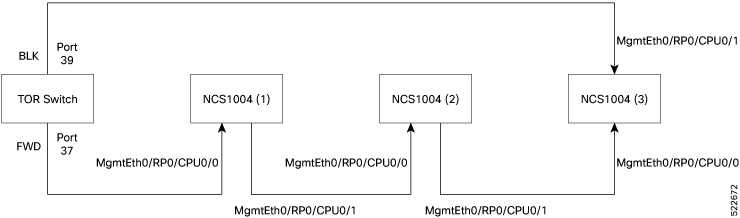
Figure 1. Daisy chain topology
Daisy chain topology

Configure daisy chain on management ports

Establish a daisy chain configuration on management port 1, allowing it to act as a bridge port for management port 0 in a ring topology.
Follow these steps to configure the daisy chain on management port 1:

Before you begin

  • Enable storm control on the TOR switch. See Enable storm control on TOR switch.

  • Disable DAD on management port 0. See Disable DAD on management port.

  • STP must be running on the TOR switch.

  • Management port 0 must not be in shut down state and must be configured with an IPv4 or IPv6 address.

  • Management port 1 must not be configured with an IPv4 or IPv6 address.

  • LLDP is not supported on management port 1 if daisy chain is configured.

Procedure

1.

Run the configure interface mgmtEth 0/RP0/CPU0/1 no ipv4 address no ipv6 address bridge-port routed-interface mgmtEth 0/RP0/CPU0/0 command to configure daisy chain on management port 1 by setting it as a bridge port for management port 0.

2.

Run the show running-config interface MgmtEth command to verify the daisy chain configuration.

Example:


RP/0/RP0/CPU0:ios#show running-config interface MgmtEth0/RP0/CPU0/1
...
interface MgmtEth0/RP0/CPU0/0
 ipv4 address 10.127.60.220 255.255.255.0
!
interface MgmtEth0/RP0/CPU0/1
 bridge-port routed-interface MgmtEth0/RP0/CPU0/0
!
interface MgmtEth0/RP0/CPU0/2
 shutdown
!

Daisy chain is configured on management port 1. Management port 1 acts as a bridge port for management port 0 in the daisy chain ring topology.


Enable storm control on TOR switch

Ensure that packet duplication loops do not occur during daisy chain configuration or node reboot.

In Daisy Chain configuration, one of the Top of the Rack (TOR) switch ports is in blocked state, provided NCS 1004 forwards STP BPDU in periodic intervals. Three consecutive hello misses move the port state from blocked to forwarding state.

When the NCS 1004 node reboots, the other port state of the TOR switch changes from blocking to forwarding state. Hence, a loop is created momentarily when both the TOR switch ports are in forwarding state. This loop results in duplication of packets on the network. Hence, storm control must be enabled on the TOR switch.

Follow these steps to enable storm control on the Top-of-Rack (TOR) switch:

Procedure

Run these commands from the TOR switch to enable storm control.


switch(config)#errdisable recovery interval 60
switch(config)#errdisable recovery cause storm-control

Storm control is enabled on the TOR switch. The TOR switch recovers automatically from storm-control error disabled state within 60 seconds.


Disable DAD on management port

Prevent the management port from going down due to momentary network looping when configuring daisy chaining.

By default, IPv6 Duplicate Address Detection (DAD) is enabled on the management ports. Similar to storm control scenario, when IPv6 is configured for a management port, DAD happens due to looping in the network. Since DAD was enabled, management port will be down. In order to avoid management port being down due to momentary looping, DAD must be disabled on the management port 0.

Follow these steps to disable IPv6 DAD on the management port:

Procedure

Run the configure interface mgmtEth0/RP0/CPU0/0 ipv6 nd dad attempts 0 command to disable DAD on the management port 0.


RP/0/RP0/CPU0:ios(config)#interface mgmtEth0/RP0/CPU0/0
RP/0/RP0/CPU0:ios(config-if)#ipv6 nd dad attempts 0
RP/0/RP0/CPU0:ios(config-if)#commit

DAD is disabled on management port 0. The management port remains up, even during momentary network looping in a daisy chain.