Configuration Guide for Cisco NCS 1004, IOS XR Release 25.x.x

PDF

Configuration Guide for Cisco NCS 1004, IOS XR Release 25.x.x

Postquantum preshared keys

Want to summarize with AI?

Log in

Explains how postquantum preshared keys (PPKs) enhance the security of Internet Key Exchange Protocol Version 2 (IKEv2) communications to protect against future quantum computer attacks.


A postquantum preshared key is a security enhancement that

  • strengthens IKEv2 encryption by adding additional preshared keys to the key derivation process,

  • makes VPN communications resilient against attacks by future quantum computers by incorporating quantum-safe techniques, and

  • extends the standard cryptographic protocol to comply with RFC 8784, supporting both manual and dynamic PPK generation.

Table 1. Feature history

Feature name

Release information

Description

SKIP Protocol Support for Quantum Safe IKEv2 Encryption

Release 24.1.1

Traditionally, the IKEv2 encryption was vulnerable to quantum attacks. Now, IKEv2 encryption complies with RFC 8784, which specifies using postquantum preshared keys (PPK) to make it resilient to quantum attacks. You can generate both manual and dynamic PPKs. The dynamic PPKs are generated using the Cisco Secure Key Integration Protocol (SKIP). The IKEv2 encryption is configured through CLI or by the Cisco-IOS-XR-um-ikev2-cfg Yang model.

CLI:

  • The ppk manual/dynamic keyword is introduced in the keyring command.

  • The keyring ppk keyword is introduced in the ikev2 profile command.

  • The sks profile command is introduced.

Quantum computers have raised significant concerns about the security of traditional cryptographic algorithms. For example, the IKEv2 protocol, which is used to establish VPNs, could become vulnerable to decryption by powerful quantum computers. Postquantum preshared keys address this risk. They extend IKEv2 by using additional keys in the derivation process. This approach ensures that encrypted communications remain secure, even as cryptographic threats increase.

If the preshared keys contain sufficient entropy, session keys derived from them are resistant to quantum attacks. As a result, the system is secure against both modern classical attackers and future quantum attackers.

RFC 8784 (Mixing Preshared Keys in IKEv2 for Postquantum Security) specifies how IKEv2 can use PPKs for quantum resistance, enabling PPK negotiation, PPK ID transmission, integration into session key derivation, and fallback to sessions not using PPKs.
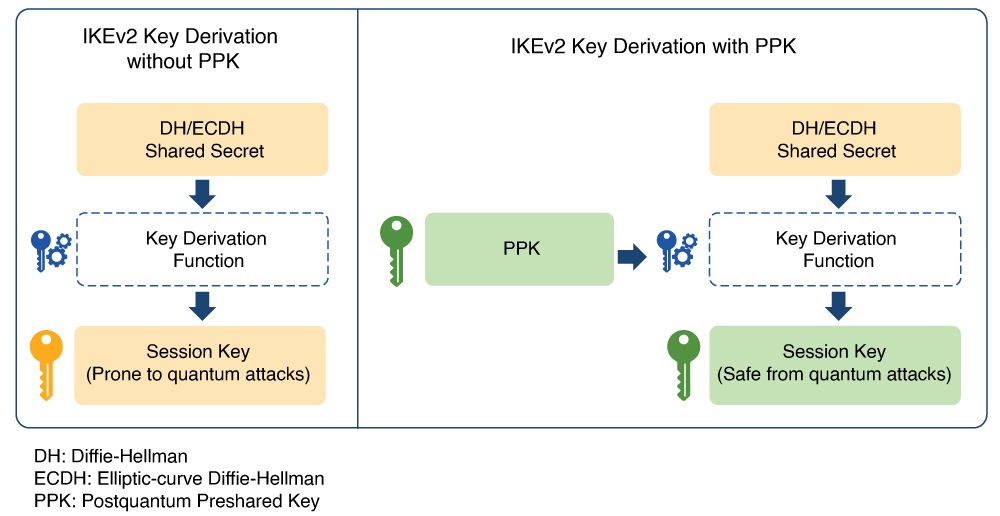
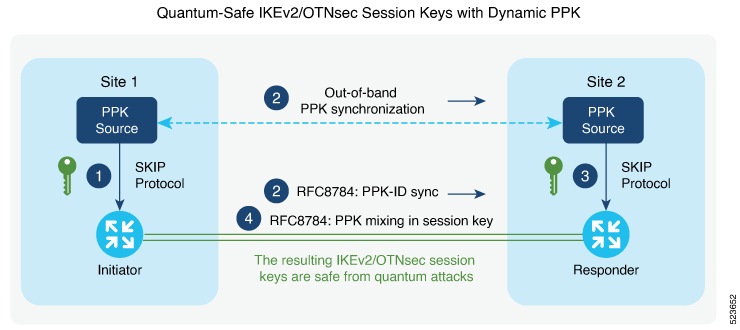
Figure 1. IKEv2 Key Derivation - With and Without PPK

Dynamic postquantum preshared keys

A dynamic postquantum preshared key is a cryptographic key that

  • is imported by encryption devices from external key sources using the Cisco Secure Key Integration Protocol (SKIP),

  • enables automated provisioning and periodic updates of preshared keys, and

  • provides improved entropy for greater quantum safety compared to static preshared keys.

Dynamic postquantum preshared keys are typically provisioned from sources such as Quantum Key Distribution (QKD) devices, specialized software, or cloud-based key services. These keys support quantum-safe session key generation when used with protocols like IKEv2 and OTNsec.

Cisco Secure Key Integration Protocol

A Cisco Secure Key Integration Protocol is a security protocol that

  • uses HTTPS as a transport to securely import preshared keys (PPKs) into Cisco encryption devices,

  • acts as a client on encryption devices and a server on external key sources to enable automated and coordinated key provisioning, and

  • provides reliable out-of-band synchronization, ensuring both initiator and responder devices receive identical key material.

Externally imported PPKs via SKIP are called dynamic PPKs. For successful integration, encryption devices must implement the SKIP client, and external sources (such as Quantum Key Distribution [QKD] devices or Cisco Session Key Service [SKS] servers) must implement the SKIP server.

SKIP compliance requirements

To be SKIP-compliant, an external key source must:

  • implement the SKIP protocol or API as specified in the Cisco SKIP specification,

  • provide the same preshared key (PPK) to both the initiator and responder devices using a reliable out-of-band synchronization mechanism,

  • contact Cisco for technical guidance during implementation, especially for vendors supplying Quantum Key Distribution (QKD) or third-party solutions.


Workflow for dynamic postquantum preshared keys

Dynamic postquantum preshared keys rely on secure orchestration among encryption devices and their key sources, leveraging SKIP for automated provisioning, synchronization, and quantum-safe session key generation.

Summary

The key components involved in the process are:

  • IKEv2 initiator: Requests and uses PPKs, communicating with the peer during session establishment.

  • IKEv2 responder: Uses synchronized PPKs to ensure secure and matching session derivation.

  • External key sources (SKIP server): Provide PPKs to devices and synchronize key material out-of-band.

  • SKIP client: Runs on encryption devices to interact securely with the key source.

Workflow

Figure 2. Quantum-safe IKEv2 and OTNsec session keys with dynamic PPK

Thiw figure shows quantum-safe IKEv2 and OTNsec session keys using dynamic PPK.

The process involves the following stages:

  1. The IKEv2 initiator requests a preshared key (PPK) from its configured external key source using SKIP. The key source replies with a PPK and associated PPK ID.
  2. The initiator’s key source synchronizes the PPK to the responder’s key source out-of-band, based on the type of key source. Simultaneously, the initiator communicates the PPK ID to the responder via IKEv2 using RFC 8784 extensions.
  3. The responder requests the correct PPK from its own key source using the received PPK ID and obtains the matching PPK.
  4. Both initiator and responder mix the PPK into the key derivation process as specified in RFC 8784, generating quantum-safe IKEv2 and OTNsec session keys.

Result

The process ensures that both participating devices use a synchronized cryptographic key with enhanced entropy, enabling secure, quantum-resistant session establishment.


Configuring Dynamic PPK using SKS SKIP

Use the following commands to configure the dynamic PPK for one or more peers or groups of peers, in the IKEv2 keyring.

configure terminal

keyring dynamic

peer name

ppk dynamic sks-profile-name [required]

pre-shared-key key-string

address {ipv4-address mask}

ikev2 profile name

match identity remote address {ipv4-address mask}

keyring ppk keyring-name

keyring keyring-name

sks profile profile-name type remote

kme server ipv4 ip-address port port-number

exit

exit

Example :

RP/0/RP0/CPU0:ios#configure terminal
RP/0/RP0/CPU0:ios(config)#keyring dynamic
RP/0/RP0/CPU0:ios(config-ikev2-keyring)#peer peer1
RP/0/RP0/CPU0:ios(config-ikev2-keyring-peer)#ppk dynamic qkd required
RP/0/RP0/CPU0:ios(config-ikev2-keyring-peer)#pre-shared-key cisco123!cisco123
RP/0/RP0/CPU0:ios(config-ikev2-keyring-peer)#address 10.0.0.1 255.0.0.0
RP/0/1/CPU0:ios(config)#ikev2 profile test
RP/0/1/CPU0:ios(config-ikev2-profile-test)#keyring dynamic
RP/0/1/CPU0:ios(config-ikev2-profile-test)#keyring ppk dynamic
RP/0/1/CPU0:ios(config-ikev2-profile-name)#match address 10.0.0.1 255.255.255.0

RP/0/1/CPU0:ios(config)#sks profile qkd type remote 
RP/0/1/CPU0:ios(config-sks-profile)#kme server ipv4 192.0.2.34 port 10001
RP/0/RP0/CPU0:ios(config-ikev2-keyring-peer)#exit
RP/0/RP0/CPU0:ios(config)#exit

Manual postquantum preshared keys

A manual postquantum preshared key is a type of PPK that

  • is manually configured with identical values on both the IKEv2 and OTNsec initiator and responder,

  • provides an easier alternative to dynamic PPKs, and

  • requires administrator intervention for setup, maintenance, and rotation.

Manual PPK requirements

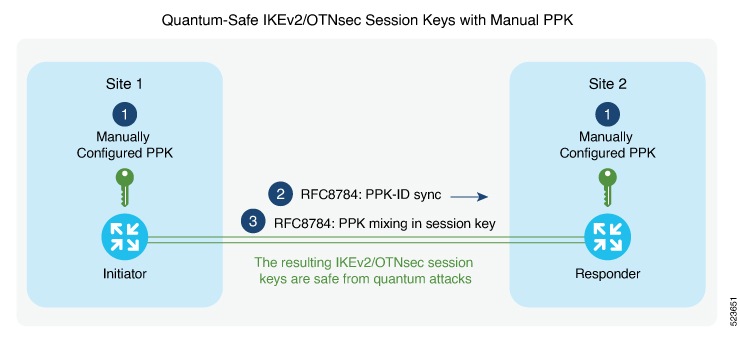
When using manual PPKs, you can provision the same PPKs on both the IKEv2 and OTNsec initiator and responder by manually configuring the PPKs on both sides. Ensure that a manual PPK is of sufficient size and entropy, and that it is frequently rotated by the administrator to maintain security.

This figure illustrates that the session keys of quantum-safe IKEv2 and OTNsec are obtained through a manual PPK:

Figure 3. Quantum-safe IKEv2 and OTNsec session keys with manual PPK

Configure a manual PPK in an IKEv2 keyring

Define a manual PPK for one or more IKEv2 peers or peer groups to enhance VPN authentication security.

Manually configuring PPKs in IKEv2 keyrings allows for more flexible peer authentication in secure VPN deployments. From Release 24.3.1, Type 6 passwords are supported for preshared keys, providing enhanced protection. See Enable Type 6 password.

Follow these steps to configure a manual PPK in an IKEv2 keyring:

Procedure

1.

Access global configuration mode and create or enter an IKEv2 keyring using the keyring keyring-name command.

Example:

RP/0/RP0/CPU0:ios#configure terminal
RP/0/RP0/CPU0:ios(config)#keyring manual
2.

Define the peer and configure the manual PPK and preshared key using the keywords peer name key [ clear | password | password6 ] password [required].

Example:


RP/0/RP0/CPU0:ios(config-ikev2-keyring)#peer peer1
RP/0/RP0/CPU0:ios(config-ikev2-keyring-peer)#ppk manual id cisco123 key password 060506324F41584B56 required
3.

Define the pre-shred-key and peer adress using the keywords pre-shared-key key-string address {ipv4-address mask }

Example:


RP/0/RP0/CPU0:ios(config-ikev2-keyring-peer)#pre-shared-key cisco123cisco123
RP/0/RP0/CPU0:ios(config-ikev2-keyring-peer)#address 10.0.0.1 255.0.0.0
4.

Exit to global configuration mode.

Example:

RP/0/RP0/CPU0:ios(config-ikev2-keyring-peer)#exit
RP/0/RP0/CPU0:ios(config)#exit
5.

Create or modify the IKEv2 profile, associating the keyring and matching remote peer identity using the keywords ikev2 profile namematch identity remote address {ipv4-address mask}keyring ppk keyring-name keyring keyring-name

6.

Exit to global configuration mode.

Example:

RP/0/RP0/CPU0:ios(config-ikev2-keyring-peer)#exit
RP/0/RP0/CPU0:ios(config)#exit

These are the examples where the PPK and the preshared key are configured with the clear keyword, after enabling the Type 6 method:

RP/0/RP0/CPU0:ios#configure terminal
RP/0/RP0/CPU0:ios(config)#keyring type6_psk
RP/0/RP0/CPU0:ios(config-ikev2-keyring)#peer peer1
RP/0/RP0/CPU0:ios(config-ikev2-keyring)#pre-shared-key clear cisco123
RP/0/RP0/CPU0:ios(config-ikev2-keyring-peer)#address 10.0.0.1 255.0.0.0
RP/0/RP0/CPU0:ios#configure terminal
RP/0/RP0/CPU0:ios(config)#keyring type6_ppk
RP/0/RP0/CPU0:ios(config-ikev2-keyring)#peer peer1
RP/0/RP0/CPU0:ios(config-ikev2-keyring-peer)#ppk manual id 123 key clear cisco123 required
RP/0/RP0/CPU0:ios(config-ikev2-keyring)#pre-shared-key 

These are the examples where the PPK and preshared key are configured with the password6 keyword, after enabling the Type 6 method:

RP/0/RP0/CPU0:ios#configure terminal
RP/0/RP0/CPU0:ios(config)#keyring type6_psk
RP/0/RP0/CPU0:ios(config-ikev2-keyring)#peer peer1
RP/0/RP0/CPU0:ios(config-ikev2-keyring)#pre-shared-key 
password6 525548665b4e534660504c54645d63526668604945635a6452604a5f644d605a5c4461644d4e444e6566414142
RP/0/RP0/CPU0:ios(config-ikev2-keyring-peer)#address 10.0.0.1 255.0.0.0
RP/0/RP0/CPU0:ios#configure terminal
RP/0/RP0/CPU0:ios(config)#keyring type6_ppk
RP/0/RP0/CPU0:ios(config-ikev2-keyring)#peer peer1
RP/0/RP0/CPU0:ios(config-ikev2-keyring-peer)#ppk manual id 123 key password6
 426447414e60494d48655d434f4749525d69484f434d445850675258544d56444a5d4d5b664b4c55624e414142 required
RP/0/RP0/CPU0:ios(config-ikev2-keyring)#pre-shared-key 
Note

When using the password6 keyword for PPK and preshared key, you must use an encrypted key. You can use the encrypted form of the clear PPK and preshared key that you previously configured (retrieve the encrypted form using the show running-config keyring command), as long as the primary key used to enable the type 6 password remains the same.


Type 6 password support for preshared keys in IKEv2 authentication

A Type 6 password support is an encryption method that

  • uses AES256-GCM (Advanced Encryption Standard 256-bit Galois/Counter Mode) encryption,

  • applies a user-configured primary key to encrypt preshared keys and postquantum preshared keys (PPK) in IKEv2 keyring configuration, and

  • stores the primary key in the Trusted-Anchor-Module (TAM) so that it is never displayed in the device configuration.

Feature history

Table 2. Feature history

Feature name

Release information

Description

Type 6 Password Support for Keyring Configuration used in IKEv2

Release 24.3.1

The keyring configuration for IKEv2 encryption now supports the Type 6 password encryption method. This method uses AES256-GCM encryption and a user-configured primary key to encrypt the preshared key and postquantum preshared keys (PPK).

This Type 6 encryption enhances security by storing sensitive information, such as the preshared key, in an encoded format on the device and makes it difficult to decipher.

You can enable this feature using the following commands:

  • key config-key password-encryption

  • password6 aes encryption

You can verify the status of the encryption using the following command:

  • show type6 server

Type 6 password security benefits

The Type 6 password support feature enhances security by encoding sensitive information, such as the preshared key and PPK, in configurations for IKEv2 encryption. The primary key is securely stored in the Trusted-Anchor-Module and remains inaccessible through configuration display, ensuring the encrypted data is highly protected against unauthorized access.

From Release 24.3.1, Type 6 password support is available for both preshared keys and PPKs in IKEv2 keyring configurations. The use of AES256-GCM encryption, in combination with a user-configured primary key, prevents exposure of sensitive key material by encoding it in the device and never displaying the key in clear text.


Enable Type 6 password

Enable Type 6 password encryption, which uses AES to secure device credentials.

Context:

Type 6 password encryption provides strong protection for preshared keys and pre-shared PPKs (Pairwise Primary Keys) on your device, using the Advanced Encryption Standard (AES). This ensures credentials are not stored as plain text and are not directly visible in the configuration.

Follow these steps to enable Type 6 password.

Procedure

1.

Use the password6 encryption aes command to enable the AES encryption and save the changes.

Example:

RP/0/RP0/CPU0:ios(config)#password6 encryption aes
RP/0/RP0/CPU0:ios(config)#commit
RP/0/RP0/CPU0:ios(config)#end
2.

Use the key config-key password-encryption command to create the primary key.

Example:

P/0/0/CPU0:ios#key config-key password-encryption
Thu Jul 11 09:40:47.396 UTC
New password Requirements: Min-length 6, Max-length 64
Enter new key :
Enter confirm key :
Master key operation is started in background
3.

Use the same command key config-key password-encryption again, if you want to update the primary key. When it prompts for an old key, input the old key and then enter the new key that you want to configure.

RP/0/RP0/CPU0:ios#key config-key password-encryption 
Thu Jul 11 09:40:47.396 UTC
New password Requirements: Min-length 6, Max-length 64 
Enter old key : 
Enter new key : 
Enter confirm key : 
Master key operation is started in background

If you forget the old key while updating the primary key, use the command key config-key password-encryption delete to delete the old key and create a new one. Make sure that you disable password6 encryption aes before deleting the primary key.

Example:

RP/0/RP0/CPU0:ios#key config-key password-encryption delete
Thu Jul 11 09:42:39.612 UTC
Disable 'password6 encryption aes' before deleting master key, Masterkey delete Failed
RP/0/RP0/CPU0:ios#con
Thu Jul 11 10:01:47.056 UTC
RP/0/RP0/CPU0:ios(config)#no password6 encryption aes 
RP/0/RP0/CPU0:ios(config)#commit
Thu Jul 11 10:01:57.755 UTC
RP/0/RP0/CPU0:ios(config)#end
RP/0/RP0/CPU0:ios#key config-key password-encryption delete
Thu Jul 11 10:02:02.238 UTC
WARNING: All type 6 encrypted keys will become unusable
Continue with master key deletion ? [yes/no]:yes
Master key operation is started in background

Enable the AES encryption and configure the primary key again.

4.

Use the show type6 server command to verify the status of the Type 6 password encryption information.

Example:

RP/0/RP0/CPU0:ios#show type6 server
Thu Jul 11 09:43:36.103 UTC
Server detail information:
=============================================
AES config State       :             Enabled
Masterkey config State :             Enabled
Type6 feature State    :             Enabled
Master key Inprogress  :             No
Masterkey Last updated/deleted :     Thu Jul 11 09:40:57 2024

When the key is created, it is stored internally; not as part of the NCS 1004 device configuration. The device does not display the primary key as part of the running configuration. So, you cannot see or access the primary key when you connect to the device.

5.

(Optional) Use the nonvolatile generation (NVGEN) command, nvgen-default-sanitize passwords, if you want to mask completely the preshared key in the show command output.

Example:

RP/0/0/CPU0:ios(config)#nvgen-default-sanitize passwords
RP/0/0/CPU0:ios(config)#commit
6.

(Optional) Use the command show running-config keyring to view encrypted keys.

The configured primary key and AES encryption encrypt the preshared key and PPK.

Example:

RP/0/RP0/CPU0:ios#show running-config keyring
Thu Jul 11 09:42:43.085 UTC
keyring keyring type6_psk
 peer link-1
  pre-shared-key password6 62415744534e564365625c544e5b68594d4158515d4f6768436845556747414142
  address 1.1.1.2 255.255.255.0
RP/0/RP0/CPU0:ios#show running-config keyring
Thu Jul 11 09:42:43.085 UTC
keyring type6_ppk
peer 1
ppk manual id 123 key password6 4d49525f5848444b535b625243584764636952644e64414952415641554655635e5f4c56424d46455c65414142 required
!
RP/0/0/CPU0:ios(config)#show running-config keyring
Thu Jul 11 09:45:37.193 UTC
keyring keyring_all_in_one
 peer link-1
  pre-shared-key password6 <removed>
  address 1.1.1.2 255.255.255.0
  !
!