This topic describes how Y.1731 Ethernet SLA collects and optionally aggregates performance metrics over time, and how the minimum-delay bin feature lets you configure a distinct width for the first bin to prevent wastage of bins that might otherwise be empty due to inherent speed of light delays.
The Y.1731 Ethernet SLA is a performance monitoring feature that
-
collects and aggregates performance metrics over time
-
organizes data into buckets, and
-
utilizes bins to reduce memory consumption.
The system manages performance data through these mechanisms:
-
The system organizes data collected during specific timeframes into buckets.
-
The system utilizes bins to store aggregated data, which reduces overall memory consumption.
-
The minimum-delay bin feature allows the administrator to configure a distinct width for the first bin to prevent the wastage of empty bins.
-
The remaining bins capture variations in observed delays.
|
Feature Name |
Release Information |
Feature Description |
|---|---|---|
|
Minimum-delay bin |
Release 26.1.1 |
Introduced in this release on: Centralized Systems (8400 [ASIC: K100]) (select variants only*) *This feature is supported on Cisco 8404-SYS-D router. |
|
Minimum-delay bin |
Release 25.1.1 |
Introduced in this release on: Fixed Systems (8200 [ASIC: Q200, P100], 8700 [ASIC: P100, K100]); Centralized Systems (8600 [ASIC:Q200]); Modular Systems (8800 [LC ASIC: Q100, Q200, P100]). For statistics aggregation, you can now configure a distinct width for the first bin to adjust for large propagation delay. By using this feature, you can avoid wasting several bins that would be empty in some unavoidable situations such as delay due to speed of light limitations. The feature introduces these changes: CLI:
YANG Data Models: New XPaths for
(see GitHub, YANG Data Models Navigator) |
Information about minimum-delay bin
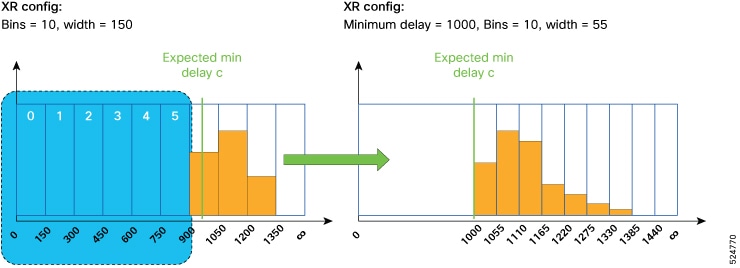
In situations where a delay is expected in first few iterations, you can specify the width of the first bin independently using the minimum-delay keyword in statistics aggregation configuration. See below examples to configure aggregation with and without minimum-delay support.
The below figure shows the comparision between statistics aggregation before and after minimum-delay configuration.
Example 1: Configuring aggregation without minimum-delay
statistics measure round-trip-delay aggregate bins 10 width 150This configuration has 10 bins and the results being aggregated into the ranges 0-150, 150-300, 300-450 and so on, until 1350+, where the last bin has infinite width to hold all values greater than 1350.
Example 2: Configuring aggregation with minimum-delay
statistics measure round-trip-delay aggregate bins 10 width 55 minimum-delay 1000Here, the width of the first bin is 1000ms and not 150ms. The width of the other nine bins are aggregated into 1000-1055, 1055-1110, 1110-1165, and so on. This leads to increased resolution with the same number of bins, as all the bins are utilized.
To specify the values of width and minimum-delay in microseconds instead of milliseconds, you must use the usec keyword. For more information, see aggregate and cfm-delay-measurement probe commands.