Interfaces and Hardware Component Configuration Guide for Cisco 8000 Series Routers, Cisco IOS XR Releases

PDF

Interfaces and Hardware Component Configuration Guide for Cisco 8000 Series Routers, Cisco IOS XR Releases

Interfaces and subinterfaces on the router

Want to summarize with AI?

Log in

In Cisco IOS XR, interfaces are, by default, main interfaces (also known as trunk interfaces) on Cisco 8000 Series Routers, under which the system creates logical subinterfaces for efficient network segmentation and management.


In Cisco IOS XR, interfaces are, by default, main interfaces. A main interface is also known as a trunk interface, which you must not confuse with the word trunk in the context of VLAN trunking. A subinterface is a logical interface that the system creates under a trunk interface.

Feature history table

Table 1. Feature history table

Feature Name

Release Information

Feature Description

Interfaces and subinterfaces

Release 26.1.1

Introduced in this release on: Centralized Systems (8400 [ASIC: K100]) (select variants only*)

*This feature is now supported on Cisco 8404-SYS-D routers.

Interfaces and subinterfaces

Release 25.4.1

Introduced in this release on: Fixed Systems (8010 [ASIC: A100])(select variants only*)

*This feature is now supported on:

  • 8011-32Y8L2H2FH

  • 8011-12G12X4Y-A/D

Interfaces and subinterfaces

Release 25.1.1

Introduced in this release on: Fixed Systems (8010 [ASIC: A100])(select variants only*)

*This feature is supported on Cisco 8011-4G24Y4H-I routers.

Interfaces and subinterfaces

Release 24.4.1

Introduced in this release on: Fixed Systems (8700 [ASIC: K100])(select variants only*)

This feature that allows for the configuration of main trunk interfaces that are either physical or bundle interfaces, automatic creation of physical interfaces, and creation of logical subinterfaces with unique IDs for efficient network segmentation and management is now supported on the following hardware.

*This feature is now supported on the Cisco 8712-MOD-M routers.

Interfaces and subinterfaces

Release 24.3.1

Introduced in this release on: Fixed Systems (8200 [ASIC: Q200, P100], 8700 [ASIC: P100])(select variants only*); Modular Systems (8800 [LC ASIC: Q100, Q200, P100])(select variants only*)

*The support for Interfaces and subinterfaces is now extended to:

  • 8212-48FH-M

  • 8711-32FH-M

  • 88-LC1-52Y8H-EM

  • 88-LC1-36EH

  • 88-LC1-12TH24FH-E

Interfaces and subinterfaces

Release 24.2.11

Introduced in this release on: Modular Systems (8800 [LC ASIC: P100]) (select variants only*)

The interfaces are initially configured as main trunk interfaces, which can be either physical or bundle types, with physical interfaces being automatically created by the system. The benefit of this setup is the flexibility it provides, allowing users to create logical subinterfaces under trunk interfaces with unique identifiers, enabling efficient network segmentation and management.

*This feature is now supported on routers with the Cisco 88-LC1-36EH line cards.


Trunk interfaces

There are two types of trunk interfaces:

  • Physical

  • Bundle

On the router, the system automatically creates the physical interfaces when the router recognizes a card and its physical interfaces. However, the system does not automatically create bundle interfaces; you must create them at the time of configuration.

Trunk interface configuration samples

The following configuration samples are examples of the trunk interfaces that you can create:

  • interface HundredGigE 0/5/0/0

  • interface bundle-ether 1


Create a subinterface

A subinterface is a logical interface that the system create under a trunk interface.

Procedure

1.

To create a subinterface, you must first identify a trunk interface under which to place it.

In case of bundle interfaces, if a trunk interface does not exist, you must create a bundle interface before creating any subinterfaces under it.

2.

Assign a subinterface number to the subinterface that you want to create.

  • The subinterface number must be a positive integer from zero to some high value. For a given trunk interface, each subinterface under it must have a unique value.

  • Subinterface numbers do not need to be contiguous or in numeric order. For example, the following subinterfaces numbers are valid under one trunk interface:

    1001, 0, 97, 96, 100000

  • Subinterfaces can never have the same subinterface number under one trunk.

Example:

In this example, the card in slot 5 has trunk interface, HundredGigE 0/5/0/0. A subinterface, HundredGigE 0/5/0/0.0, is created under it.

RP/0/RSP0/CPU0:router#  conf
Mon Sep 21 11:12:11.722 EDT
RP/0/RSP0/CPU0:router(config)#  interface HundredGigE0/5/0/0.0
RP/0/RSP0/CPU0:router(config-subif)# encapsulation dot1q 100
RP/0/RSP0/CPU0:router(config-subif)# commit

RP/0/RSP0/CPU0:Sep 21 11:12:34.819 : config[65794]: %MGBL-CONFIG-6-DB_COMMIT : Configuration committed by user 'root'. Use 'show configuration commit changes 1000000152' to view the changes.

RP/0/RSP0/CPU0:router(config-subif)# end

RP/0/RSP0/CPU0:Sep 21 11:12:35.633 : config[65794]: %MGBL-SYS-5-CONFIG_I : Configured from console by root
RP/0/RSP0/CPU0:router#

Example:

This example shows two interfaces being created at the same time: first, the bundle trunk interface, then a subinterface attached to the trunk:

RP/0/RSP0/CPU0:router# conf
Mon Sep 21 10:57:31.736 EDT
RP/0/RSP0/CPU0:router(config)# interface Bundle-Ether1
RP/0/RSP0/CPU0:router(config-if)# no shut
RP/0/RSP0/CPU0:router(config-if)# interface bundle-Ether1.0
RP/0/RSP0/CPU0:router(config-subif)# encapsulation dot1q 100
RP/0/RSP0/CPU0:router(config-subif)# commit
RP/0/RSP0/CPU0:Sep 21 10:58:15.305 : config[65794]: %MGBL-CONFIG-6-DB_COMMIT : Configuration committed by user 'root'. Use 'show configuration commit changes 1000000149' to view the changes.
RP/0/RSP0/CPU0:router# show run | begin Bundle-Ether1
Mon Sep 21 10:59:31.317 EDT
Building configuration..
interface Bundle-Ether1
!
interface Bundle-Ether1.0
 encapsulation dot1q 100
!

Display subinterfaces

Procedure

1.

Use the show run command to display the trunk interface first, then the subinterfaces in ascending numerical order.

Example:


Router# show run | begin HundredGigE 0/5/0/0
Mon Sep 21 11:15:42.654 EDT
Building configuration...
interface HundredGigE 0/5/0/0
 shutdown
!
interface HundredGigE 0/5/0/0.0
 encapsulation dot1q 100
!
interface HundredGigE 0/5/0/1
 shutdown
!
2.

When a subinterface is first created, the router recognizes it as an interface that, with few exceptions, is interchangeable with a trunk interface. After the new subinterface is configured further, the show interface command can display it along with its unique counters:

This example shows the display output for the trunk interface, HundredGigE 0/5/0/0, followed by the display output for the subinterface HundredGigE 0/5/0/0.0.

Example:


Router# show interface HundredGigE 0/5/0/0
Mon Sep 21 11:12:51.068 EDT
HundredGigE0/5/0/0 is administratively down, line protocol is administratively down.
  Interface state transitions: 0
  Hardware is HundredGigE, address is 0024.f71b.0ca8 (bia 0024.f71b.0ca8)
  Internet address is Unknown
  MTU 1514 bytes, BW 1000000 Kbit
     reliability 255/255, txload 0/255, rxload 0/255
  Encapsulation 802.1Q Virtual LAN,
  Full-duplex, 1000Mb/s, SXFD, link type is force-up
  output flow control is off, input flow control is off
  loopback not set,
  ARP type ARPA, ARP timeout 04:00:00
  Last input never, output never
  Last clearing of "show interface" counters never
  5 minute input rate 0 bits/sec, 0 packets/sec
  5 minute output rate 0 bits/sec, 0 packets/sec
     0 packets input, 0 bytes, 0 total input drops
     0 drops for unrecognized upper-level protocol
     Received 0 broadcast packets, 0 multicast packets
              0 runts, 0 giants, 0 throttles, 0 parity
     0 input errors, 0 CRC, 0 frame, 0 overrun, 0 ignored, 0 abort
     0 packets output, 0 bytes, 0 total output drops
     Output 0 broadcast packets, 0 multicast packets
     0 output errors, 0 underruns, 0 applique, 0 resets
     0 output buffer failures, 0 output buffers swapped out
     0 carrier transitions


Router# show interface HundredGigE0/5/0/0.0
Mon Sep 21 11:12:55.657 EDT
HundredGigE0/5/0/0.0 is administratively down, line protocol is administratively down.
  Interface state transitions: 0
  Hardware is VLAN sub-interface(s), address is 0024.f71b.0ca8
  Internet address is Unknown
  MTU 1518 bytes, BW 1000000 Kbit
     reliability 255/255, txload 0/255, rxload 0/255
  Encapsulation 802.1Q Virtual LAN, VLAN Id 100,  loopback not set,
  ARP type ARPA, ARP timeout 04:00:00
  Last input never, output never
  Last clearing of "show interface" counters never
  5 minute input rate 0 bits/sec, 0 packets/sec
  5 minute output rate 0 bits/sec, 0 packets/sec
     0 packets input, 0 bytes, 0 total input drops
     0 drops for unrecognized upper-level protocol
     Received 0 broadcast packets, 0 multicast packets
     0 packets output, 0 bytes, 0 total output drops
     Output 0 broadcast packets, 0 multicast packets

Delete subinterfaces

Procedure

Use the no interface command to delete a subinterface.

Example:


Router#
Router# show run | begin HundredGigE 0/5/0/0
Mon Sep 21 11:42:27.100 EDT
Building configuration...
interface HundredGigE 0/5/0/0
 negotiation auto
!
interface HundredGigE 0/5/0/0.0
 encapsulation dot1q 100
!
interface HundredGigE 0/5/0/1
 shutdown
!
RP/0/RSP0/CPU0:router# conf
Mon Sep 21 11:42:32.374 EDT
Router(config)# no interface HundredGigE 0/5/0/0.0
Router(config)# commit
RP/0/RSP0/CPU0:Sep 21 11:42:47.237 : config[65794]: %MGBL-CONFIG-6-DB_COMMIT : Configuration committed by user 'root'. Use 'show configuration commit changes 1000000159' to view the changes.
Router(config)# end
RP/0/RSP0/CPU0:Sep 21 11:42:50.278 : config[65794]: %MGBL-SYS-5-CONFIG_I : Configured from console by root
Router# show run | begin HundredGigE 0/5/0/0
Mon Sep 21 11:42:57.262 EDT
Building configuration...
interface HundredGigE 0/5/0/0
 negotiation auto
!
interface HundredGigE 0/5/0/1
 shutdown
!

Layer 2, Layer 3, and EFPs

On the router, a trunk interface can be either a Layer 2 or Layer 3 interface. A Layer 2 interface is configured using the interface command with the l2transport keyword. When the l2transport keyword is not used, the interface is a Layer 3 interface. Subinterfaces are configured as Layer 2 or Layer 3 subinterfaces in the same way.

Layer 3 trunk interfaces and subinterfaces

A Layer 3 trunk interface or subinterface is a routed interface and can be assigned an IP address. Traffic sent on that interface is routed.

Subinterfaces can only be created under a Layer 3 trunk interface. Subinterfaces cannot be created under a Layer 2 trunk interface.

A Layer 3 trunk interface can have any combination of Layer 2 and Layer 3 subinterfaces.

Layer 2 trunk interfaces and subinterfaces

A Layer 2 trunk interface or subinterface is a switched interface and cannot be assigned an IP address. A Layer 2 interface must be connected to an L2VPN component. Once it is connected, it is called an access connection.

All subinterfaces must have unique encapsulation statements, so that the router can send incoming packets and frames to the correct subinterface. If a subinterface does not have an encapsulation statement, the router does not send any traffic to it.

Ethernet Flow Points (EFPs)

In Cisco IOS XR, an Ethernet Flow Point (EFP) is implemented as a Layer 2 subinterface, and consequently, a Layer 2 subinterface is often called an EFP.

A Layer 2 trunk interface can be used as an access connection. However, a Layer 2 trunk interface is not an EFP because an EFP, by definition, is a substream of an overall stream of traffic.

Cisco IOS XR also has other restrictions on what can be configured as a Layer 2 or Layer 3 interface. Certain configuration blocks only accept Layer 3 and not Layer 2. For example, OSPF only accepts Layer 3 trunks and subinterfaces. Refer to the appropriate Cisco IOS XR configuration guide for other restrictions.

Example: Layer 2 and Layer 3 interface configuration

The following example shows an attempt to configure a subinterface under a Layer 2 trunk and the commit errors that occur. It also shows an attempt to change the Layer 2 trunk interface to a Layer 3 interface and the errors that occur because the interface already had an IP address assigned to it.


Router# config
Mon Sep 21 12:05:33.142 EDT
Router(config)# interface HundredGigE0/5/0/0
Router(config-if)# ipv4 address 10.0.0.1/24
Router(config-if)# commit
Router: config[65794]: %MGBL-CONFIG-6-DB_COMMIT : Configuration committed by user 'root'. Use 'show configuration commit changes 1000000160' to view the changes.
Router(config-if)# end
Router : config[65794]: %MGBL-SYS-5-CONFIG_I : Configured from console by root
Router# show run | begin HundredGigE0/5/0/0
Mon Sep 21 12:06:19.535 EDT
Building configuration...
interface HundredGigE0/5/0/0
 ipv4 address 10.0.0.1 255.255.255.0
 negotiation auto
!
interface HundredGigE0/5/0/1
 shutdown
!
Router#
Router# conf
Mon Sep 21 12:08:07.426 EDT
Router(config)# interface HundredGigE0/5/0/0 l2transport
Router(config-if-l2)# commit

% Failed to commit one or more configuration items during a pseudo-atomic operation. All changes made have been reverted. Please issue 'show configuration failed' from this session to view the errors
Router(config-if-l2)# no ipv4 address
Router(config-if)# commit
RP/0/RP0/CPU0:Sep 21 12:08:33.686 : config[65794]: %MGBL-CONFIG-6-DB_COMMIT : Configuration committed by user 'root'. Use 'show configuration commit changes 1000000161' to view the changes.
Router(config-if)# end
Router# show run interface HundredGigE0/5/0/0
Mon Sep 21 12:09:02.471 EDT
interface HundredGigE0/5/0/0
 negotiation auto
 l2transport
 !
!
Router# conf
Router(config)# interface HundredGigE0/5/0/0.0
Router(config-subif)# commit

% Failed to commit one or more configuration items during a pseudo-atomic operation. All changes made have been reverted. Please issue 'show configuration failed' from this session to view the errors
Router(config-subif)# interface HundredGigE0/5/0/0
Router(config-if)# no l2transport
Router(config-if)# interface HundredGigE0/5/0/0.0
Router(config-subif)# encapsulation dot1q 99
Router(config-subif)# ipv4 address 11.0.0.1/24
Router(config-subif)# interface HundredGigE0/5/0/0.1 l2transport
Router(config-subif)# encapsulation dot1q 700
Router(config-subif)# commit
Router(config-subif)# end
Router# show run | b HundredGigE0/5/0/0
Mon Sep 21 12:12:00.248 EDT
Building configuration...
interface HundredGigE0/5/0/0
 negotiation auto
!
interface HundredGigE0/5/0/0.0
 ipv4 address 11.0.0.1 255.255.255.0
 encapsulation dot1q 99
!
interface HundredGigE0/5/0/0.1 l2transport
 encapsulation dot1q 700
!
interface HundredGigE0/5/0/1
 shutdown
!
            

Untagged L2 subinterface

The untagged L2 subinterface is a subinterface on a network device that

  • operates without a VLAN tag, which divides network traffic into smaller, distinct networks

  • improves security and manageability in network setups, and

  • handles untagged traffic.

Feature history table

Table 2. Feature history table

Feature Name

Release Information

Feature Description

Untagged L2 subinterface

Release 26.1.1

Introduced in this release on: Centralized Systems (8400 [ASIC: K100])(select variants only*)

*This feature is now supported on Cisco 8404-SYS-D routers.

Untagged L2 subinterface

Release 25.4.1

Introduced in this release on: Fixed Systems (8010 [ASIC: A100])(select variants only*)

*This feature is supported on:

  • 8011-32Y8L2H2FH

  • 8011-12G12X4Y-A/D

Untagged L2 subinterface

Release 25.1.1

Introduced in this release on: Fixed Systems (8010 [ASIC: A100])

This feature support is now extended to the 8011-4G24Y4H-I routers.

Untagged L2 subinterface

Release 24.4.1

Introduced in this release on: Fixed Systems (8700)

This feature support is now extended to the Cisco 8712-MOD-M routers.

Untagged L2 subinterface

Release 24.3.1

Introduced in this release on: Fixed Systems (8200, 8700)(select variants only*); Modular Systems (8800 [LC ASIC: P100])(select variants only*)

*This feature support is now extended to:

  • 8212-48FH-M

  • 8711-32FH-M

  • 88-LC1-52Y8H-EM

  • 88-LC1-12TH24FH-E

Untagged L2 subinterface

Release 24.2.11

Introduced in this release on: Modular Systems (8800 [LC ASIC: P100])(select variants only*)

You can now use untagged L2 subinterfaces to effectively manage and process traffic from customer edge (CE) devices that do not employ VLAN tagging. This capability allows you to apply services to untagged packets, which would not have been possible if the packets were to be logically received on the main interface. As a result, you can now push a dot1q or other supported Layer 2 encapsulation on the received frame.

*This feature is now supported on:

  • 88-LC1-36EH

This feature introduces the encapsulation untagged command.

Challenges in processing traffic without untagged L2 subinterfaces

You cannot perform the following actions on an untagged frame received on the main interface:

  • Apply commands available only to l2transport subinterfaces, such as popping or pushing a dot1q or dot1ad header.

  • Attach a service policy, because you cannot simultaneously attach a service policy to the main interface and subinterfaces of that interface.

Untagged L2 subinterface offerings

The untagged subinterface takes a higher priority than the main interface on service mapping. When both interfaces are created, the untagged traffic is mapped to the untagged subinterface.


Untagged traffic mapped to an untagged subinterface

Traffic using an unsupported VLAN tag format is considered untagged traffic and mapped to an untagged subinterface.

These VLAN tag formats are supported:

  • Single tag format - dot1q

  • Double tag format - outer dot1ad paired with inner dot1q tag, or outer dot1q tag paired with inner dot1q tag

  • Three or more tags - outermost dot1ad tag followed by dot1q tag, or outermost dot1q tag followed by dot1q tag


Benefits of untagged L2 subinterfaces

Untagged L2 subinterfaces provide the following benefits.

  • Manages untagged and tagged traffic on the same port to different services.

  • Allows rewriting of different VLANs on untagged subinterfaces for both tagged and untagged traffic.


How the untagged L2 subinterface works

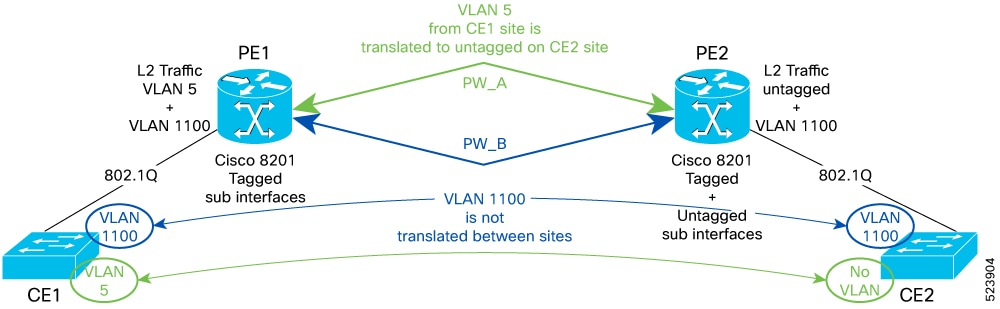
Consider a sample topology in which the P2P L2VPN service is deployed between two CE devices.

Summary

In this topology:

  • VLAN 1100 is a common VLAN that is shared between CE1 and CE2.

    PE nodes do not require VLAN translation. However, if a VLAN ID is not common on CE1 and CE2, PE must perform VLAN translation.

  • For instance, VLAN 5 is known only to CE1, and for the same service, CE1 uses VLAN 5, while CE2 uses no VLAN. In this situation, PE1 performs VLAN translation.

Workflow

Figure 1. Untagged L2 subinterface in a P2P L2VPN topology
  1. When traffic is sent from CE1 to CE2, PE1 removes the VLAN 5 tag on the traffic from CE1 and then sends untagged traffic to PE2 through the pseudowire (PW). PE2 disposes the PW header and forwards untagged traffic to CE2.
  2. When traffic is sent from CE2 to CE1, PE2 maps untagged traffic from CE2 to an L2 subinterface and sends the traffic to PE1 through the PW. PE1 disposes of the PW header and adds the VLAN 5 tag before switching the traffic to CE1.

Configure an untagged L2 subinterface

To manage traffic efficiently, configure an untagged L2 subinterface.

Procedure

1.

Create an untagged L2 subinterface with the encapsulation untagged keyword under an L2 transport main interface.

This feature is only applicable to L2 transport main and subinterfaces and does not support any other encapsulation types on the same L2 subinterface.

Example:


Router# configure
Router(config)# interface HundredGigE0/0/16.1500 l2transport
Router(config-subif)# encapsulation untagged
Router(config-subif)# commit
                    
2.

Verify that the untagged encapsulation is configured on the L2 subinterface.

Example:


Router# show interfaces HundredGigE0/0/16.1500
HundredGigE0/0/16.1500 is up, line protocol is up
Interface state transitions: 1
Hardware is VLAN sub-interface(s), address is 0029.c201.3f0c
Internet address is 40.40.50.1/24
MTU 1522 bytes, BW 100000000 Kbit (Max: 100000000 Kbit)
reliability 255/255, txload 0/255, rxload 0/255
Encapsulation Untagged Virtual LAN,
Last link flapped 00:01:25
ARP type ARPA, ARP timeout 04:00:00
Last input never, output never
Last clearing of "show interface" counters never
5 minute input rate 0 bits/sec, 0 packets/sec
5 minute output rate 0 bits/sec, 0 packets/sec
0 packets input, 0 bytes, 0 total input drops
0 drops for unrecognized upper-level protocol
Received 0 broadcast packets, 0 multicast packets
0 packets output, 0 bytes, 0 total output drops
Output 0 broadcast packets, 0 multicast packets
                    

Enhanced performance monitoring for Layer 2 subinterfaces (EFPs)

Beginning in Cisco IOS XR Release 7.2.12, the router adds support for basic counters for performance monitoring on Layer 2 subinterfaces. This topic provides a summary of the support for Layer 2 interface counters.

Commands that support the interface basic-counters keyword

The interface basic-counters keyword has been added to support a new entity for performance statistics collection and display on Layer 2 interfaces in the following commands:

  • performance-mgmt statistics interface basic-counters

  • performance-mgmt threshold interface basic-counters

  • performance-mgmt apply statistics interface basic-counters

  • performance-mgmt apply threshold interface basic-counters

  • performance-mgmt apply monitor interface basic-counters

  • show performance-mgmt monitor interface basic-counters

  • show performance-mgmt statistics interface basic-counters

Layer 2 basic-counter attributes

The performance-mgmt threshold interface basic-counters command supports the following attribute values for Layer 2 statistics, which also appear in the show performance-mgmt statistics interface basic-counters and show performance-mgmt monitor interface basic-counters command output.

Table 3. Layer 2 basic-counter attributes

Attribute

Description

InOctets

Bytes received (64-bit)

InPackets

Packets received (64-bit)

InputQueueDrops

Input queue drops (64-bit)

InputTotalDrops

Inbound correct packets discarded (64-bit)

InputTotalErrors

Inbound incorrect packets discarded (64-bit)

OutOctets

Bytes sent (64-bit)

OutPackets

Packets sent (64-bit)

OutputQueueDrops

Output queue drops (64-bit)

OutputTotalDrops

Outband correct packets discarded (64-bit)

OutputTotalErrors

Outband incorrect packets discarded (64-bit)