Cisco APIC Getting Started Guide, Release 6.2(x)

PDF

Fabric initialization

Updated: January 12, 2026

Overview

This topic explains how to initialize the fabric by adding switches to be managed by the APIC and validating the steps using the GUI, CLI, or API, after creating an APIC cluster over the out-of-band network.

When you initialize the fabric, you add switches to be managed by the APIC and you validate the steps using the GUI, CLI, or API. Before you start this process, you must create an APIC cluster over the out-of-band network.

Fabric Topology

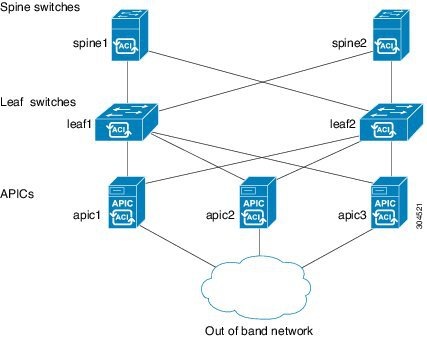
An example of a fabric topology includes:

  • Two spine switches (spine1, spine2)

  • Two leaf switches (leaf1, leaf2)

  • Three instances of APIC (apic1, apic2, apic3)

The figure shows an example of a fabric topology.

Figure 1. Fabric Topology Example


Connections: fabric topology

An example of a fabric topology is as follows:

  • Two spine switches (spine1, spine2)

  • Two leaf switches (leaf1, leaf2)

  • Three instances of APIC (apic1, apic2, apic3)

The following figure shows an example of a fabric topology.

Figure 1. Fabric Topology Example