Use this procedure to preview the modernized interface and explore its enhanced layout. While in this view-only mode, you can navigate available pages but must revert to the existing interface to perform configuration updates or manage fabric settings.
The APIC GUI has been enhanced for a better look-and-feel, and customer experience. However, not all screen have moved to the new GUI. You can take a preliminary look at the new APIC GUI which is presently being developed. However, this is view-only; if you need to make any configuration changes, you will need to revert to the existing GUI and then update the required configurations.
Procedure
| 1. | Click the profile icon in the upper right of any page and choose Switch to new UI. 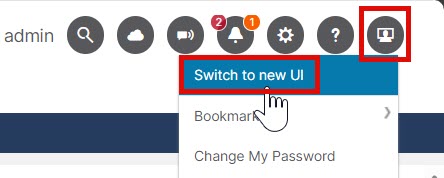
You cannot view anything in the new GUI that is grayed out. These pages will be added in a future release. |
|
| 2. | To change back to the original GUI so that you can make configuration changes, click the profile icon in the upper right of any page and choose Switch to existing UI. |