Overview
Steps to attach the optical network cable.
Before you begin
Before you remove the dust plugs and make any optical connections, use these guidelines:
-
Keep the protective dust plugs installed in the unplugged fiber-optic cable connectors and in the transceiver optical bores until you are ready to make a connection.
-
Inspect and clean the optical connector end faces just before you make any connections.
-
Grasp the optical connector only by the housing to plug or unplug a fiber-optic cable.
The transceiver modules and fiber connectors are keyed to prevent incorrect insertion.
The multiple-fiber push-on (MPO) connectors on the optical transceivers support network interface cables with either physical contact (PC) or ultra-physical contact (UPC) flat polished face types. The MPO connectors on the optical transceivers do not support network interface cables with an angle-polished contact (APC) face type.
Inspect the MPO connector for the correct cable type, cleanliness, and any damage. For complete information on inspecting and cleaning fiber-optic connections, see the Inspection and Cleaning Procedures for Fiber-Optic Connections document.
Procedure
| 1. | Remove the dust plugs from the optical network interface cable MPO connectors and from the transceiver module optical bores. Save the dust plugs for future use. |
|
| 2. | Attach the network interface cable MPO connectors immediately to the transceiver module. 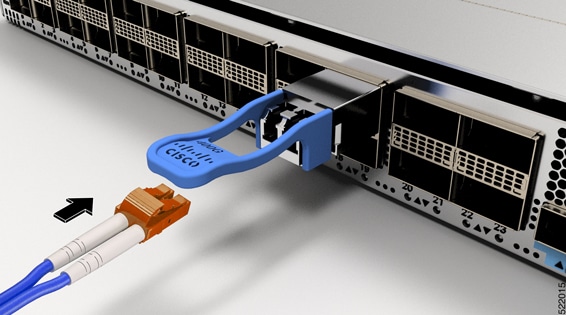
|