Outlines the process for removing the SFP-10G-ONT20-I XGSPON optical module, detailing safe extraction steps to facilitate maintenance and replacement of optical components.
Before you begin
The instructions apply to these models:
-
C8130-VAI-G2
-
C8130-VAP-G2
-
C8151-CVAI-G2
-
C8151-CVAP-G2
Follow these steps to remove the SFP-10G-ONT20-I XGSPON optical module from the supported routers:
Procedure
-
Support the module from the bottom. Release the bail downward using your thumb and index finger.
Figure 1. Hand Position for SFP-10G-ONT20-I Optical Removal 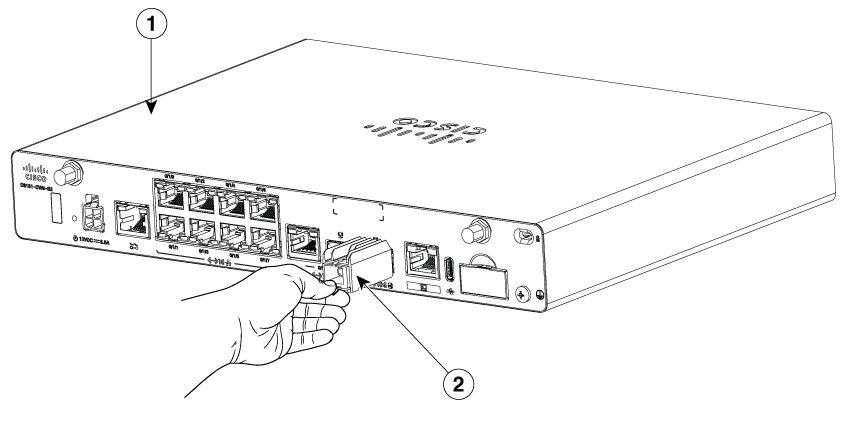
1
Router
2
Optical Module
-
When the module is released from the cage, slide it straight out of the router.
Figure 2. Removal Position of SFP-10G-ONT20-I 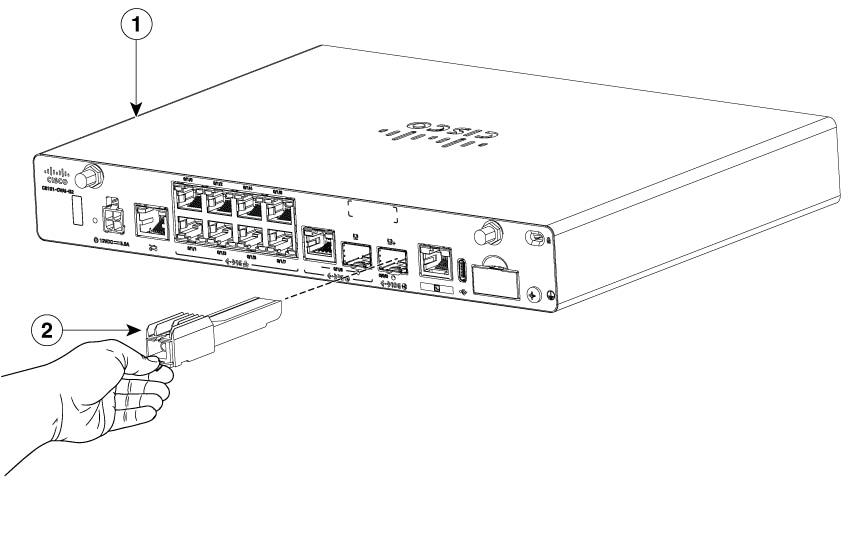
1
Router
2
Optical Module
The optical module is removed from the router.