TLOC Extension

Feature history for TLOC extension

This table describes the developments of this feature, by release.

Table 1. Feature History

Feature Name

Release Information

Description

TLOC Extension Over IPv6

Cisco IOS XE Catalyst SD-WAN Release 17.11.1a

Cisco vManage Release 20.11.1

This feature enables the support of TLOC extension for IPv6. In the previous releases, TLOC extension was supported only for IPv4.

TLOC extension

A TLOC Extension is a Cisco Catalyst SD-WAN feature that

  • enables a device to access the opposite WAN transport connected to a neighboring device using a TLOC extension interface, and

  • addresses scenarios where devices cannot connect directly to a single transport and only one device can connect to each transport.

Benefits of TLOC extension

There are scenarios when Cisco IOS XE Catalyst SD-WAN devices cannot connect to a single transport directly and only one device can connect to a single transport. A switch is connected to each transport and the devices connect to each transport through the switches. TLOC extension provides the following benefits:

  • Eliminates the need for additional switches at branch locations.

  • Reduces overall solution costs and simplifies network management.

TLOC extension over IPv6

From Cisco IOS XE Catalyst SD-WAN Release 17.11.1a TLOC extension over IPv6 works only if the underlay supports IPv6 addressing on both the Cisco IOS XE Catalyst SD-WAN devices connecting each other.

In the earlier releases, TLOC extension was supported only over IPv4 interfaces.

Supported configurations

This feature supports the following requirements:

  • Implicit IPv6 ACL on TLOC tunnel interface.

  • Private and public color TLOC interfaces.

  • Dual stack support. When both IPv4 and IPv6 are configured, the tunnel is built on top of either IPv4 or IPv6, based on the configuration.

  • NAT66 support. The limitations of NAT66 also applies to the TLOC extended interface.

  • Only the Layer 2 setup supports IPv6 TLOC extension. The following interface types supports IPv6 TLOC extension:

    • Physical interface

    • Physical sub-interface

    • Loopback interface

  • Loopback TLOC interface that is bound to either:

    • The WAN transport circuit.

    • An extended WAN interface between two Cisco IOS XE Catalyst SD-WAN devices.

Limitations for TLOC extension over IPv6

SIG

Secure Internet Gateway (SIG) is not supported on TLOC extension over IPv6.

NAT64

NAT64 is not supported for TLOC extension over IPv6.

Layer 3 Connectivity

TLOC extension over IPv6 is not supported for Layer 3 connections.

Control connection persistence

When a TLOC configuration is extended to a peer interface and then to the internet service provider, the extended control connections remain active on the peer interface even after the TLOC extension configuration is removed.

Extender interface configuration

In TLOC extension, the extender interface is part of the Cisco Catalyst SD-WAN. However, configuring a tunnel-interface under the extender interface is optional.

How TLOC extension over IPv6 works

Summary

The key components involved in TLOC extension over IPv6 are:

  • Establish TLOC extension interfaces: Each Cisco IOS XE Catalyst SD-WAN device configures a TLOC-extension interface to enable access to the transport network of its neighboring SD-WAN device.

  • Access opposite transport via neighbor.

Workflow

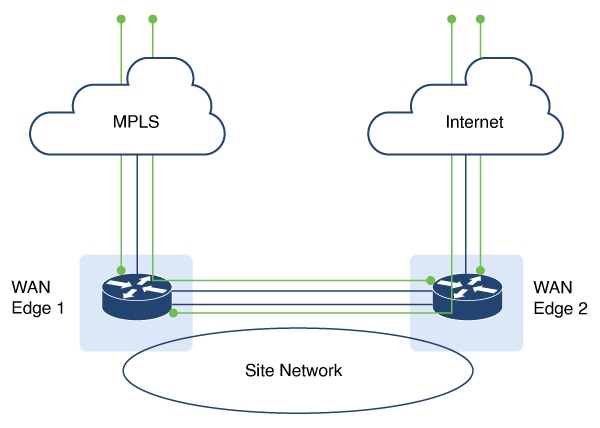
Figure 1. TLOC extension

This process outlines how TLOC extension interfaces facilitate transport access and redundancy between two Cisco IOS XE Catalyst SD-WAN devices.

  1. SD-WAN device 1 accesses the internet transport through the TLOC-extension interface on SD-WAN device 2, in addition to its direct MPLS connection.
  2. SD-WAN device 2 accesses the MPLS transport through the TLOC-extension interface on SD-WAN device 1, in addition to its direct internet connection.

Result

TLOC extension over IPv6 achieves redundancy in a dual-device deployment scenario with only one circuit connection on each device.

Configure TLOC extension using CLI commands

Follow these steps to configure TLOC extension using CLI commands:

Procedure


Step 1

Enter global configuration mode, and configure an interface.

Example:

Device# config-transaction 

Step 2

Enter SD-WAN configuration mode.

Example:

Device(config)# sdwan

Step 3

in the SD-WAN configuration mode, configure an interface type such as, Gigabit Ethernet.

Example:

Device(config-sdwan)# interface GigabitEthernet3 

Step 4

Configure tunnel interface.

Example:

Device(config-interface-GigabitEthernet3)# tunnel-interface

Step 5

Configure encapsulation, color, allowed services for TLOC.

Example:


Device(config-interface-GigabitEthernet3)# tunnel-interface
Device(config-interface-GigabitEthernet3)# encapsulation ipsec
Device(config-interface-GigabitEthernet3)# color color
Device(config-interface-GigabitEthernet3)# exit

Step 6

In the global configuration mode, configure an interface.

Example:


Device# config-transaction 
Device(config)# ip route 0.0.0.0 0.0.0.0 ip-address

Step 7

On device 2, the LTE WAN connection is on GigabitEthernet1 and this transport is extended to device 1 GigabitEthernet3 TLOC interface.

Example:


Device(config-sdwan)# tloc-extension GigabitEthernet1

Step 8

Configure NAT routes on GigabitEthernet1 for data traffic to reach back to device 1 through device 2 for GigabitEthernet3 subnet.


The following example describes how TLOC extension is configured on a network interface.


On Device1,
Configure TLOC interface on VPN 0
sdwan
interface GigabitEthernet3
  tunnel-interface
   encapsulation ipsec
   color custom1
   no allow-service bgp
   allow-service dhcp
   allow-service dns
   allow-service icmp
   no allow-service sshd
   no allow-service netconf
   no allow-service ntp
   no allow-service ospf
   no allow-service stun
   allow-service https
   no allow-service snmp
   no allow-service bfd
  exit

  Configure default route via this TLOC interface with nexthop 
  to L2 connected interface of the peer (ED2 Gig3).

  ip route 0.0.0.0 0.0.0.0 10.1.19.16

 On Device2,
LTE WAN connection is on Gig1 and this transport is extended to ED1 Gig3 TLOC interface(custom1).
 sdwan
 int GigabitEthernet3
 tloc-extension GigabitEthernet1
Configure NAT routes on Gig1 or appropriate routes for data traffic to reach back to ED1 via ED2 for Gig3 subnet.

Verify TLOC extension

The following is a sample output of the commands to verify if TLOC extension is configured on a network interface.


Device# show sdwan control connections
PEER                                          PEER                                          CONTROLLER
PEER    PEER PEER            SITE       DOMAIN PEER                                    PRIV  PEER                                    
PUB                                           GROUP
TYPE    PROT SYSTEM IP       ID         ID     PRIVATE IP                              PORT  PUBLIC IP                               
PORT  ORGANIZATION            LOCAL COLOR     PROXY STATE UPTIME      ID
--------------------------------------------------------------------------------------------------------
vsmart  dtls 172.16.255.19   100        1      2001:a0:5::13                           
12455 2001:a0:5::13                           12455 vIPtela Inc Regression  custom1             No    up
0:01:23:06 0
vsmart  dtls 172.16.255.20   200        1      2001:a0:c::14                           12456
2001:a0:c::14                           12456 vIPtela Inc Regression  custom1             No    up
0:01:23:06 0

Device# show sdwan bfd sessions
                                        SOURCE TLOC      REMOTE TLOC
DST PUBLIC                      DST PUBLIC         DETECT      TX
  SYSTEM IP        SITE ID     STATE       COLOR            COLOR            SOURCE IP
IP                                              PORT        ENCAP  MULTIPLIER  INTERVAL(msec  UPTIME
TRANSITIONS
---------------------------------------------------------------------------------------------------------
172.16.255.14    400         up          custom1             lte              2001:a0:15::10
2001:a1:e::e                               12346       ipsec  7           1000
0:00:05:50  3