Hot Standby Router Protocol

Feature history table for hot standby router protocol

Table 1. Feature History

Feature Name

Release Information

Description

Support for HSRP and HSRP Authentication on Cisco IOS XE Catalyst SD-WAN Devices

Cisco IOS XE Catalyst SD-WAN Release 17.7.1a

Cisco vManage Release 20.7.1

This feature allows you to configure HSRPv2 and HSRP authentication on Cisco IOS XE Catalyst SD-WAN platforms via CLI template. HSRP is a long-standing Cisco proprietary First Hop Redundancy Protocol (FHRP) to support version 2 of the protocol and authentication.

Hot standby router protocol

default

Hot Standby Router Protocol (HSRP) is a First Hop Redundancy Protocol (FHRP) that allows transparent failover of the first-hop IP device and provides high network availability. HSRP offers first-hop routing redundancy for IP hosts on networks configured with a default-gateway IP address. It identifies active and standby devices, supports multiple groups for load sharing, and uses virtual addresses for gateway redundancy. HSRP includes version 2 enhancements for stability and management, provides MD5 authentication for security, and enables dynamic-priority changes through object tracking.

HSRP version 2 support

Following are the HSRP version 2 (HSRPv2) features:

  • HSRPv2 advertises and learns millisecond timer values. This change ensures stability of the HSRP groups in all cases.

  • HSRPv2 expands the group number range from 0 to 4095.

  • HSRPv2 provides improved management and troubleshooting. The HSRPv2 packet format includes a 6-byte identifier. This field is typically populated with the interface MAC address.

  • HSRPv2 uses the IP multicast address 224.0.0.102 to send hello packets. This multicast address allows Cisco Group Management Protocol (CGMP) leave processing to be enabled concurrently with HSRP.

  • HSRPv2 has a different packet format that uses a type–length–value (TLV) format.

HSRP MD5 authentication

HSRP supports two authentication schemes for protocol packets: simple plain-text strings and Message Digest 5 (MD5). HSRP MD5 authentication is an advanced authentication method that generates a Message Digest 5 (MD5) digest for the HSRP portion of the multicast HSRP protocol packet. This functionality provides added security and protects against the threat from HSRP-spoofing software.

MD5 authentication provides greater security than plain text authentication. MD5 authentication allows each HSRP group member to use a secret key to generate a keyed MD5 hash, which is part of the outgoing packet. A keyed hash of an incoming packet is generated; if the hash in the incoming packet does not match the generated hash, the packet is ignored.

You can provide the MD5 hash key directly in the configuration using a key string or supply it indirectly through a key chain.

HSRP packets will be rejected if one or more of the following conditions occur:

  • Authentication schemes differ on the device and in the incoming packets.

  • MD5 digests differ on the device and in the incoming packets.

  • Text authentication strings differ on the device and in the incoming packets.

HSRP object tracking

Object tracking separates the tracking mechanism from HSRP and creates a stand-alone tracking process. Other processes and HSRP can use this tracking process. The priority of a device can change dynamically when it has been configured for object tracking, and the object that is being tracked goes down. Examples of objects that can be tracked are the line protocol state of an interface or the reachability of an IP route. If the specified object goes down, the HSRP priority is reduced.

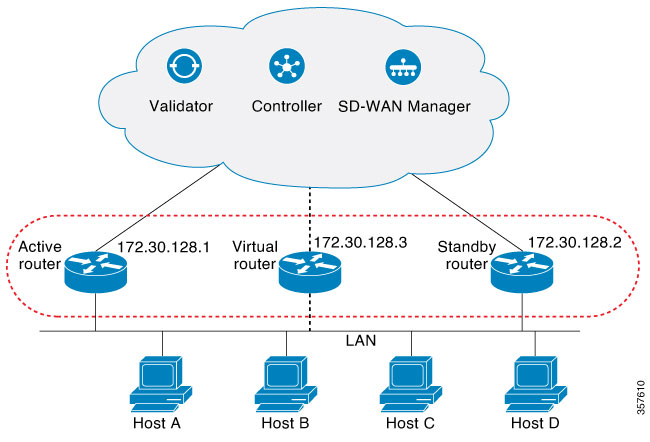
How HSRP topologies work

Summary

HSRP enables redundancy and reliability by allowing multiple routers to present as a single virtual gateway.

The key components involved in the process are:

  • HSRP routers: Physical routers configured in a standby group.

  • Virtual IP address: Shared address used by hosts as their default gateway.

  • Virtual MAC address: Shared hardware address enabling failover.

  • Hosts: End devices on the LAN that use the virtual gateway.

Workflow

Figure 1. HSRP Topology

The process involves the following stages:

  1. The routers are configured into an HSRP standby group, sharing a virtual IP and MAC address.

  2. One router assumes the active role, responding to traffic for the virtual IP.

  3. Another router is in the standby role, monitoring the active router.

  4. Hosts are configured with the virtual IP as their default gateway.

  5. If the active router fails or does not send hello messages within a preset interval, the standby router becomes active and takes over packet forwarding.

Result

Hosts experience uninterrupted gateway service; redundancy is achieved, ensuring network reliability.

HSRP benefits

  • Redundancy: HSRP employs a proven redundancy scheme and is widely deployed in large networks.

  • Fast Failover: HSRP provides transparent, fast failover for the first-hop device.

  • Preemption: Preemption allows a standby device to delay activation for a configurable time.

  • Authentication: The HSRP Message Digest 5 (MD5) authentication algorithm safeguards against HSRP spoofing software and uses the MD5 standard to improve reliability and security.

Supported devices

  • Cisco Catalyst 8500 Series Edge Platforms

  • Cisco Catalyst 8300 Series Edge Platforms

  • Cisco Catalyst 8200 Series Edge Platforms

  • Cisco Catalyst 8200 uCPE Series Edge Platforms

  • Cisco ASR 1000 Series Aggregation Services Routers

  • Cisco ISR 1000 and ISR 4000 Series Integrated Services Routers (ISRs)

  • Cisco ISR 1100 and ISR 1100X Series Integrated Services Routers (ISRs)

  • Cisco IR1101 Integrated Services Router Rugged

  • Cisco Catalyst 8000v Series Cloud Services Router

For details on supported models for each of these device families, refer to Cisco Catalyst SD-WAN Device Compatibility page.

Configure HSRP using the CLI

Before you begin

You can configure HSRP using the Cisco SD-WAN Manager CLI Add-on feature templates and CLI device templates. For more information on configuring using CLI templates, see CLI Templates. The following commands can be used in any order.

Procedure


Step 1

Enable HSRP on the interface.

Create (or enable) the HSRP group in IPv4 using its number and virtual IP address:

Device(config)# interface interface-type
Device(config-if)# standby group-number ip [ip-address [secondary]]

Activate HSRP in IPv6:

Device(config)# interface interface-type
Device(config-if)# standby group-number ipv6 {link-local-address | autoconfig }

Step 2

Set the HSRP version.

Note that the nostandby or nostandby version 2 commands are rejected when the interface has IPv6 groups.

Device(config)# interface interface-type
Device(config-if)# standby version {1|2}

Step 3

Configure group priority and preemption.

Set the priority value used in choosing the active router, and configure HSRP preemption and preemption delay:

Device(config)# interface interface-type
Device(config-if)# standby group-number ip [ip-address [secondary]]
Device(config-if)# standby group-number priority [priority]
Device(config-if)# standby group-number preempt [ delay{ [ minimum seconds] [ reload seconds] [ sync seconds]}]

Step 4

Enable HSRP authentication (MD5 or text authentication).

  • Configure HSRP MD5 authentication using a key chain.

    Key chains allow a different key string to be used at different times according to the key chain configuration. HSRP queries the appropriate key chain to obtain the current live key and key ID for the specified key chain.

    Device(config)# interface interface-type
    Device(config-if)# ip address ip-address mask [secondary ]
    Device(config-if)# standby group-number priority [priority]
    Device(config-if)# standby group-number preempt [ delay{ [ minimum seconds] [ reload seconds] [ sync seconds]}]
    Device(config-if)# standby group-number authentication md5 key-chain key-chain-name
    Device(config-if)# standby group-number ip [ip-address [secondary]]
  • Configure HSRP text authentication.

    The authentication string can be up to eight characters in length; the default string is Cisco.

    Device(config)# interface interface-type
    Device(config-if)# ip address ip-address mask [secondary ]
    Device(config-if)# standby group-number priority [priority]
    Device(config-if)# standby group-number preempt [ delay{ [ minimum seconds] [ reload seconds] [ sync seconds]}]
    Device(config-if)# standby group-number authentication text string
    Device(config-if)# standby group-number ip [ip-address [secondary]]

Step 5

Adjust HSRP timers.

Configure the time between the hello packets and the time before other routers declare the active router to be inactive:

Device(config)# interface interface-type
Device(config-if)# standby group-number ip [ip-address [secondary]]
Device(config-if)# standby group-number timers hellotime holdtime

Step 6

Adjust HSRP object tracking.

Configure HSRP to track an object and change the HSRP priority based on the state of the object:

Device(config)# interface interface-type
Device(config-if)# standby group-number track object-number [decrement priority-decrement] [shutdown]

Step 7

Optimize CPU and network performance with HSRP multiple group optimization.

  • Configure an HSRP group as a client group:

    Device(config)# interface interface-type
    Device(config-if)# standby group-number follow group-name
  • Configure the HSRP client group refresh interval:

    Device(config)# interface interface-type
    Device(config-if)# standby group-number mac-refresh seconds

Step 8

Configure a specific virtual MAC address.

Specify a virtual MAC address for HSRP:

Device(config)# interface interface-type
Device(config-if)# standby group-number mac-address mac-address

Step 9

Link IP redundancy clients to HSRP groups.

Configure the name of a standby group:

Device(config)# interface interface-type
Device(config-if)# standby group-number name [redundancy-name]

The configured interface participates as a member of the specified HSRP group and provides high-availability failover with other routers in the group.


Example

The following is a complete HSRP configuration example on Cisco IOS XE Catalyst SD-WAN devices through CLI:

config-transaction
!
    interface GigabitEthernet0/0/1.94
    encapsulation dot1Q 94
    vrf forwarding 509
    ip address 10.96.194.2 255.255.255.0
    ip directed-broadcast
    ip mtu 1500
    ip nbar protocol-discovery
    standby version 2
    standby 1 preempt
    standby 94 ip 10.96.194.1
    standby 94 timers 1 4
    standby 94 priority 110
    standby 94 preempt delay minimum 180
    standby 94 authentication md5 key-string 7 094F471A1A0A
    standby 94 track 8 shutdown
    standby 194 ipv6 2001:10:96:194::1/64
    standby 194 timers 1 4
    standby 194 priority 110
    standby 194 preempt delay minimum 180
    standby 194 authentication md5 key-string 7 094F471A1A0A
    standby 194 track 80 shutdown
    ip policy route-map clear-df
    ipv6 address 2001:10:96:194::2/64
    ipv6 mtu 1500
    arp timeout 1200
    end

What to do next

  • Verify HSRP operation and monitor for proper failover behavior.

  • Adjust settings based on observed performance as needed.

Verify hot standby router protocol

The following is a sample output from the show standby command displaying the standby router information:

Device# show standby
GigabitEthernet0/0/1.94 - Group 94 (version 2)
  State is Standby
    1 state change, last state change 01:06:09
    Track object 8 state Up
  Virtual IP address is 10.96.194.1
  Active virtual MAC address is 0000.0c9f.f05e (MAC Not In Use)
    Local virtual MAC address is 0000.0c9f.f05e (v2 default)
  Hello time 1 sec, hold time 4 sec
    Next hello sent in 0.688 secs
  Authentication MD5, key-string
  Preemption enabled, delay min 180 secs
  Active router is 10.96.194.2, priority 110 (expires in 4.272 sec)
    MAC address is cc16.7e8c.6dd1
  Standby router is local
  Priority 105 (configured 105)
  Group name is "hsrp-Gi0/0/1.94-94" (default)
  FLAGS: 0/1
GigabitEthernet0/0/1.94 - Group 194 (version 2)
  State is Standby
    1 state change, last state change 01:06:07
    Track object 80 state Up
  Link-Local Virtual IPv6 address is FE80::5:73FF:FEA0:C2 (impl auto EUI64)
    Virtual IPv6 address 2001:10:96:194::1/64
  Active virtual MAC address is 0005.73a0.00c2 (MAC Not In Use)
    Local virtual MAC address is 0005.73a0.00c2 (v2 IPv6 default)
  Hello time 1 sec, hold time 4 sec
    Next hello sent in 0.480 secs
  Authentication MD5, key-string
  Preemption enabled, delay min 180 secs
  Active router is FE80::CE16:7EFF:FE8C:6DD1, priority 110 (expires in 4.032 sec)
    MAC address is cc16.7e8c.6dd1
  Standby router is local
  Priority 105 (configured 105)
  Group name is "hsrp-Gi0/0/1.94-194" (default)
  FLAGS: 0/1

The following is a sample output from the show standby command displaying HSRP Version 2 information if HSRP Version 2 is configured:

Device# show standby
Ethernet0/1 - Group 1 (version 2)
  State is Speak
  Virtual IP address is 10.21.0.10
  Active virtual MAC address is unknown
   Local virtual MAC address is 0000.0c9f.f001 (v2 default)
  Hello time 3 sec, hold time 10 sec
   Next hello sent in 1.804 secs
  Preemption enabled
  Active router is unknown
  Standby router is unknown
  Priority 20 (configured 20)
  Group name is "hsrp-Et0/1-1" (default)
Ethernet0/2 - Group 1
  State is Speak
  Virtual IP address is 10.22.0.10
  Active virtual MAC address is unknown
    Local virtual MAC address is 0000.0c07.ac01 (v1 default)
  Hello time 3 sec, hold time 10 sec
    Next hello sent in 1.804 secs
  Preemption disabled
  Active router is unknown
  Standby router is unknown
  Priority 90 (default 100)
    Track interface Serial2/0 state Down decrement 10
  Group name is "hsrp-Et0/2-1" (default)
The following is a sample output from the show standby command displaying HSRP authentication information if HSRP MD5 authentication is configured:
Device# show standby
Ethernet0/1 - Group 1
  State is Active
    5 state changes, last state change 00:17:27
  Virtual IP address is 10.21.0.10
  Active virtual MAC address is 0000.0c07.ac01
    Local virtual MAC address is 0000.0c07.ac01 (default)
  Hello time 3 sec, hold time 10 sec
    Next hello sent in 2.276 secs
  Authentication MD5, key-string, timeout 30 secs
  Preemption enabled
  Active router is local
  Standby router is unknown
  Priority 110 (configured 110)
  Group name is "hsrp-Et0/1-1" (default)

The following is a sample output from the show standby brief command displaying HSRP information for a specific interface:

Device# show standby brief
Interface   Grp  Pri P State   Active                    Standby   Virtual IP
Gi0/0/1.94  94   105 P Standby 10.96.194.2                 local    10.96.194.1
Gi0/0/1.94  194  105 P Standby FE80::CE16:7EFF:FE8C:6DD1   local    FE80::5:73FF:FEA0:C2 

The following is a sample output from the show standby neighbors command displaying the HSRP neighbors on Ethernet interface 0/0. Neighbor 10.0.0.250 is active for group 2 and standby for groups 1 and 8, and is registered with BFD:

Device# show standby neighbors Ethernet0/0
HSRP neighbors on Ethernet0/0
  10.0.0.250
    Active groups: 2
    Standby groups: 1, 8
    BFD enabled
  10.0.0.251
    Active groups: 5, 8
    Standby groups: 2
    BFD enabled
  10.0.0.253
    No Active groups
    No Standby groups
    BFD enabled

The following is a sample output from the show standby neighbors command displaying information for all HSRP neighbors:

Device# show standby neighbors
HSRP neighbors on FastEthernet2/0
  10.0.0.2
    No active groups
    Standby groups: 1
    BFD enabled
HSRP neighbors on FastEthernet2/0
  10.0.0.1
    Active groups: 1
    No standby groups
    BFD enabled