RADIUS and TACACS

Feature history for RADIUS and TACACS

Table 1. Feature history table
Feature name Release information Description
RADIUS and TACACS Support for Multitenancy

Cisco IOS XE Catalyst SD-WAN Release 17.12.1a

Cisco Catalyst SD-WAN Manager Release 20.12.1

This feature enables support for Remote Authentication Dial-In User Service (RADIUS) and Terminal Access Controller Access Control System (TACACS) authentication in a multitenant deployment on WAN edge devices.
Configure RADIUS and TACACS Servers to Receive Authentication Requests Over Management VPN 512

Cisco IOS XE Catalyst SD-WAN Release 17.16.1a

Cisco Catalyst SD-WAN Manager Release 20.16.1

This feature provides increased security by allowing you to configure tenants to send and receive AAA traffic over WAN transport VPN 0 or management VPN 512.

RADIUS

A RADIUS is a distributed client and server system that

  • secures networks with authorized access,

  • runs on supported Cisco devices, and

  • sends authentication requests to a central RADIUS server.

The RADIUS server stores user authentication and network service access information.

TACACS

A TACACS is a security application that

  • provides centralized validation of users accessing an access point,

  • delivers separate and modular authentication, authorization, and accounting, and

  • integrates each service with separate databases.

TACACS within AAA

TACACS administered through AAA security services provides these functions:

  • Authentication: Complete control through login/password dialog, challenge-response, and messaging support.

  • Authorization: Fine-grained privilege control, including access, session limits, protocol support, and command restrictions.

  • Accounting: Collects and reports administrator activity (identities, times, executed commands, packets, bytes) for billing, auditing, and reporting.

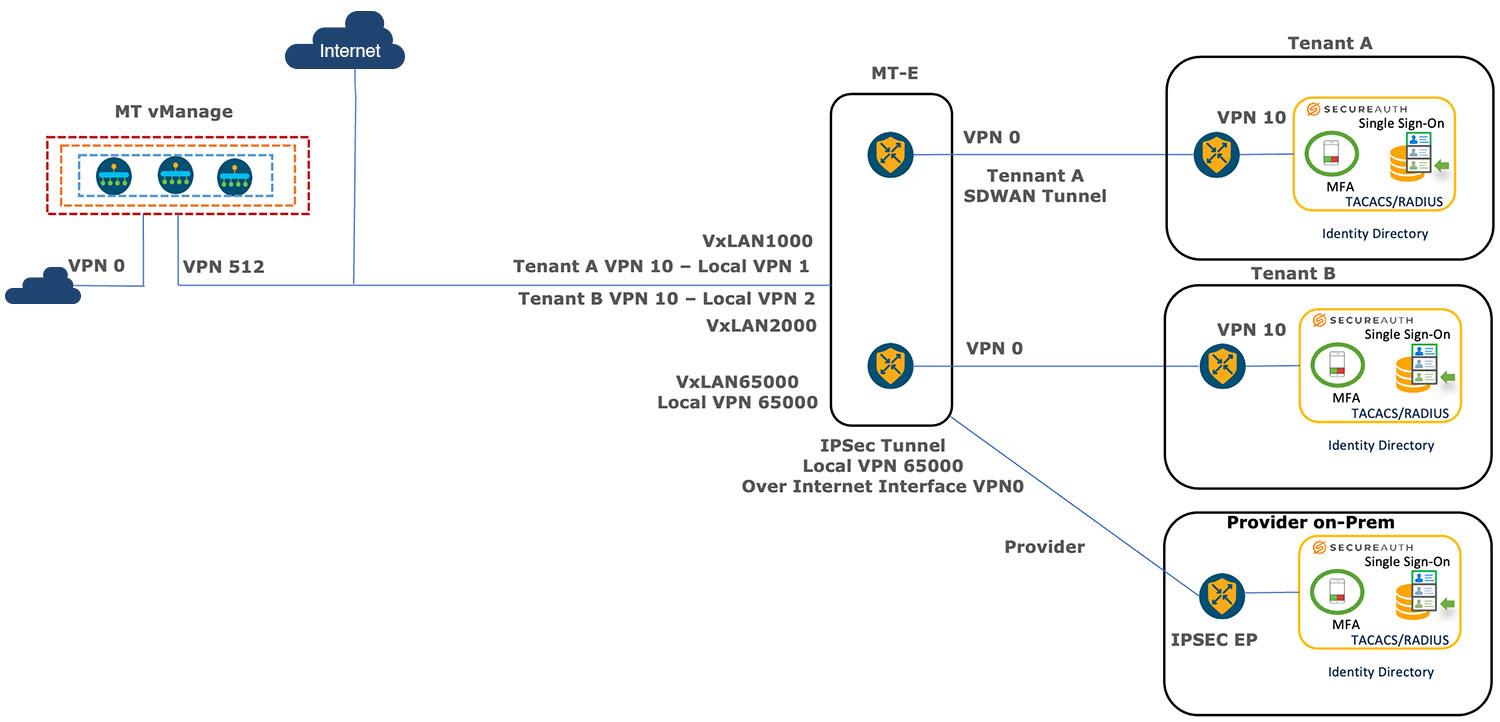
Cloud multitenancy with on-prem tenant and provider AAA

This illustration shows the architecture of the cloud multitenancy with on-prem per tenant and provider AAA.

Restrictions for cloud multitenant with on-prem per-tenant AAA and provider AAA

Lists restrictions for multitenant deployment in Cisco SD-WAN Manager

  • A provider's RADIUS and TACACS server cannot be shared with the tenant.

  • VxLAN tunnels must use the VPN 512 interface as the underlay.

  • A provider can have tenant configurations only through a device or feature template.

Prerequisites for cloud multitenant with on-prem per-tenant AAA and provider AAA

  • Ensure that a multitenant edge connector is onboarded in Cisco SD-WAN Manager, and it is located on the same premises as the controllers.

  • Ensure that the edge connector is on the same premises as the controllers.

  • Ensure that Cisco SD-WAN Manager is configured with VPN 512 interface.

  • Ensure that in a Cisco SD-WAN Manager cluster, there is a VxLAN tunnel created between each Cisco SD-WAN Manager node and the edge connector.

  • Ensure that RADIUS and TACACS server authentication is within the tenant network.

  • Ensure that multiple RADIUS and TACACS servers are used for the same tenant.

  • Ensure that a tenant's RADIUS and TACACS server is on-prem or cloud-hosted.

  • Ensure that you configure an external AAA server and provide mapping between the user and the Viptela groups to authentication. For example, Viptela-Group-Name as basic, tenantadmin, or operator.

Configure Remote AAA

Use these steps to configure remote AAA:

Enable multitenancy

Cisco SD-WAN Manager reboots in multitenant mode, and when a provider user logs in to Cisco SD-WAN Manager, the provider dashboard appears.

For information about configuring AAA using feature templates for a single tenant, see Configuring AAA using Cisco SD-WAN Manager Template.

Use these steps to enable multitenancy.

Procedure


Step 1

From Cisco SD-WAN Manager menu, choose Administration > Settings.

Step 2

Click Edit adjacent to the Tenancy Mode.

If you are using Cisco Catalyst SD-WAN Manager Release 20.12.x or earlier, click Edit.

Step 3

Click Multitenant.

Step 4

In the Domain field, enter the domain name of the service provider (for example, managed-sp.com).

Step 5

Enter a Cluster Id (for example, cluster-1 or 123456).

Step 6

Click Save.

If you are using Cisco Catalyst SD-WAN Manager Release 20.12.x or earlier, click Proceed to confirm that you want to change the tenancy mode.


Configure tenant

To onboard the edge connector in a Cisco SD-WAN Manager provider, perform these steps:

Procedure


Step 1

From the Cisco SD-WAN Manager, choose Administration > Tenant Management.

Step 2

Click Edit adjacent to the tenant.

The Edit Tenant window is displayed

Step 3

Enter the description in the Description field.

Step 4

Enter the edge number in the Forecasted Edge field.

Step 5

Enter the sub-domain URL in the URL Subdomain field.

Step 6

Enable the Edge Connector option.

Step 7

Choose the Edge Connector IP from the drop-down list.

Step 8

Choose the VXLAN tunnel endpoint from the Edge Connector VTEP Interface Name drop-down list.

For a cloud deployment, it is essential to provision the Cloud-hosted SD-WAN Control Components and gateway with the third interface GigabitEthernet3 for AAA.

When selecting the VXLAN tunnel endpoint from the Edge Connector VTEP Interface Name drop-down list, choose GigabitEthernet3. Selecting any other interface, such as VPN 0 or VPN 512, might result in misconfiguration.

Step 9

Click Save.


Configure remote AAA

Cisco SD-WAN Manager reboots in multitenant mode, and when a provider user logs in to Cisco SD-WAN Manager, the provider dashboard appears.

Use these steps to configure Remote AAA:

Procedure


Step 1

From the Cisco SD-WAN Manager menu, choose Administration > Manage Users.

Step 2

Click Remote AAA.

Expand the Remote AAA tab to configure remote AAA.

Step 3

Enter the order in which to attempt different authentication methods in the Authentication Order field.

Step 4

Choose the option in Authentication Fallback to fallback if higher-priority authentication fails.

Step 5

Choose the Admin Authentication Order to authenticate a tenantadmin user according to the authentication order.

Step 6

Enable or disable audit logs in the Disable Audit Logs field.

Step 7

Enable or disable user accounting in the Enable/disable user accounting field.

Step 8

Click Save.


Configure RADIUS

Use these steps to configure RADIUS servers in Cisco SD-WAN Manager for centralized authentication, authorization, and accounting:

Procedure


Step 1

From the Cisco SD-WAN Manager menu, choose Administration > Manage.

Step 2

Click Remote AAA.

Step 3

Expand the RADIUS tab to configure a RADIUS server.

Step 4

Enter the duration to wait for replies from the RADIUS server in the Timeout field.

Step 5

Enter the number of times you want to contact a RADIUS server in the Retransmit Count field.

Step 6

Click New RADIUS Server to add a new RADIUS server.

Table 2. Radius server details

Field

Description

RADIUS Server Details

Address

IP address of the RADIUS server.

Authentication Port

Port to connect to the RADIUS server.

Accounting Port

Port used to connect to the server.

Key

Password to access the RADIUS server.

Secret Key

AES encrypted key to access the RADIUS server.

Priority

Enter the server priority.

VPN ID

Enter the VPN in which the RADIUS server.

Note


This option is available in Cisco Catalyst SD-WAN Manager Release 20.15.x and earlier.

VPN IP Subnet

Enter the VPN IP subnet (VXLAN tunnel VPN IP subnet) in which the RADIUS server is located.

Note


This option is available in Cisco Catalyst SD-WAN Manager Release 20.15.x and earlier.

Network Connectivity

Note


This Network Connectivity option is available from Cisco Catalyst SD-WAN Manager Release 20.16.1.

Source VPN

Choose from these VPN options, the location of the RADIUS server:

  • 0: Transport VPN.

  • 512: Management VPN.

    Configure these fields only if you have specified the tenant to manage the AAA server. These fields do not appear if the multitenant setup is configured to be managed by the provider.

    • (Optional) Source Subnet: Enter the VPN IP subnet that is unique within the tenant network.

    • (Optional) Destination VPN: Enter the VPN in which the RADIUS server is located.

Step 7

Click Save and Add.


Configure TACACS

Use these steps to configure TACACS:

Procedure


Step 1

From the Cisco SD-WAN Manager menu, choose Administration > Manage Users.

Step 2

Click Remote AAA.

Step 3

Expand the TACACS tab to configure TACACS.

Step 4

Enter the duration to wait for replies from the TACACS server in the Timeout field.

Step 5

Choose the TACACS authentication type from the Authentication drop-down list.

  • ASCII

  • PAP

Step 6

Click New TACACS Server to add a new TACACS server.

Field

Description

TACACS Server Details

Address

Enter the IP address of the TACACS server.

Authentication Port

Enter the port to connect to a TACACS server.

Key

Enter the password to access the TACACS server.

Secret Key

Enter the AES encrypted key to access the TACACS server.

Priority

Enter the TACACS server priority.

VPN ID

Enter the VPN in which the TACACS server.

Note


This option is available in Cisco Catalyst SD-WAN Manager Release 20.15.1 and earlier.

VPN IP Subnet

Enter the VPN IP subnet in which the TACACS server is located.

Note


This option is available in Cisco Catalyst SD-WAN Manager Release 20.15.1 and earlier.

Network Connectivity

Note


The Network Connectivity option is available from Cisco Catalyst SD-WAN Manager Release 20.16.1.

Source VPN

Choose from these VPN options, the location of the TACACS server:

  • 0: Transport VPN.

  • 512: Management VPN.

    Configure these fields only if you have specified the tenant to manage the AAA server. These fields do not appear if the multitenant setup is configured to be managed by the provider.

    • (Optional) Source Subnet: Enter the VPN IP subnet that is unique within the tenant network.

    • (Optional) Destination VPN: Enter the VPN in which the TACACS server is located.

Step 7

Click Add.


Configure RADIUS and TACACS for multitenancy using CLI

The following is a sample of RADIUS and TACACS configuration on Cisco IOS XE Catalyst SD-WAN devices using the CLI.

device# interface GigabitEthernet4

 description VTEP Interface

 no shutdown

 arp timeout 1200

 ip address 172.1.1.101 255.255.255.0

 no ip redirects

 ip mtu 1500

 load-interval 30

 mtu  1500

 negotiation auto

exit

Verify RADIUS and TACACS

Use the show ip interface brief command to verify the AAA configuration:

device# show ip interface brief | i VPN IP SUBNET of VxTunnel

Here, VPN IP SUBNET of VxTunnel is the subnet configured under Tenant > Administration > Remote AAA.