Configure Devices

Feature history for configure devices

Table 1. Feature history
Feature name Release information Description
Support for Draft Mode in Device Template

Cisco IOS XE Catalyst SD-WAN Release 17.5.1a

Cisco vManage Release 20.5.1
This feature allows you to save the device template configuration changes in Cisco SD-WAN Manager, and then apply these configuration changes to multiple Cisco IOS XE Catalyst SD-WAN devices later. The ability to save configuration changes simplifies generating larger device template configurations and applying them to devices.
Retrieve Last Edited Configuration

Cisco IOS XE Catalyst SD-WAN Release 17.5.1a

Cisco vManage Release 20.5.1
This feature allows you to review the last edited configuration when a configuration push to the device fails. A copy of the last edited configuration is saved and can be retrieved to allow edits to the configuration before the next push.
Default Device Templates Cisco IOS XE Catalyst SD-WAN Release 17.2.1r

A default device template provides basic information that you can use to bring up devices in a deployment quickly.

This feature is supported on the Cisco Cloud Services Router 1000V Series, Cisco C1111-8PLTELA Integrated Services Routers, and Cisco 4331 Integrated Services Routers.

Remove Certificate SUDI requirement

Cisco IOS XE Catalyst SD-WAN Release 17.3.1a

Cisco vManage Release 20.3.1

This feature allows you to use a subject SUDI serial number instead of a certificate serial number to add a device to a Cisco Catalyst SD-WAN overlay network.
Create a UCS-E Template Cisco IOS XE Catalyst SD-WAN Release 16.12.1b This feature allows you to connect a UCS-E interface with a UCS-E server through the interface feature template.

Configure devices in Cisco SD-WAN

You can use Cisco SD-WAN Manager to create and store configurations for all devices; the Cisco SD-WAN Manager systems themselves, Cisco SD-WAN Controllers, Cisco SD-WAN Validator, and routers. When the devices start up, they contact SD-WAN Manager, which then downloads the device configuration to them. (A device starting up first contacts the SD-WAN Validator, which validates the device and sends it the IP address of SD-WAN Manager.)

The general procedure for creating configurations for all devices is the same. This section provides a high-level description of the configuration procedure and describes the prerequisite steps you must complete before creating configurations and configuring devices in the overlay network.

Types of templates

There are two types of templates:
  • Feature templates

  • Device templates

Feature templates

Feature templates are the building blocks of complete configuration for a device. For each feature that you can enable on a device, Cisco SD-WAN Manager provides a template form that you fill out. The form allows you to set the values for all configurable parameters for that feature.

Because device configurations vary for different device types and the different types of routers, feature templates are specific to the type of device.

Some features are mandatory for device operation, so creating templates for these features is required. Also for the same feature, you can create multiple templates for the same device type.

Special Characters in Feature Template

In releases prior to Cisco IOS XE Catalyst SD-WAN Release 17.7.1a, if you enter < or > special characters in a SD-WAN Manager feature template definition or description, SD-WAN Manager generates a 500 exception error while attempting to preview a SD-WAN Manager feature template.

Starting from Cisco IOS XE Catalyst SD-WAN Release 17.7.1a, if you enter < or > special characters in a SD-WAN Manager feature template definition or description, the special characters are converted to their HTML equivalents, &lt; and &gt;.

This applies to all feature templates. You no longer receive a 500 exception error when previewing a SD-WAN Manager feature template.

Device templates

Device templates contain the complete operational configuration for a device and are created by consolidating feature templates.

  • Each device template is specific to a device type.

  • If multiple devices of the same type share the same configuration, you can use the same template for all of them. Differences between devices are handled using configuration variables.

  • If devices of the same type have different configurations, you create separate templates.

CLI-based device templates

You can create a device template by entering a CLI-style configuration directly in SD-WAN Manager by

  • Uploading a text file with the configuration

  • Copying and pasting configuration text

  • Typing the configuration directly into SD-WAN Manager

From Cisco IOS XE Catalyst SD-WAN Release 17.5.1a and Cisco vManage Release 20.5.1, you can review your last edited configuration when your latest configuration is not being pushed to the device. For more information, see Edit a device template when a push fails.

From Cisco vManage Release 20.5.1, device variable page shows text area instead of text input field to configure CLI device template for the ease of configuration.

Template variables

Within a feature template, some configuration commands and options are identical across all device types, while others are variable, changing from device to device. Examples of variable parameters include:

  • Device system IP address

  • Geographic latitude and longitude

  • Timezone

  • Overlay network site identifier

When you attach a device template to a device, you are prompted to enter the actual values for these variables. You can provide these values in two ways:

  1. Manually: Type the values for each variable for each device.

  2. Bulk upload: Upload an excel file in CSV format containing the values for all devices.

Use variable values in configuration templates

In an overlay network, multiple devices of the same type might have similar configurations. This often happens with routers in different stores or branch locations that provide identical services but have unique hostnames, IP addresses, GPS locations, and site-specific properties such as BGP neighbors. It also applies to redundant controllers like Cisco SD-WAN Controllers and Cisco SD-WAN Manager systems, where each controller has its own hostname and IP address.

To simplify configuration, create a single configuration template with both static and variable values. Static values remain common across all devices, while variable values apply to individual devices. You provide the variable values when attaching a device to the configuration template.

You can configure variable values in a feature template in two ways:

  • Set the parameter scope to Device Specific:

    For a parameter, select Device Specific to mark it as a variable. Each variable has a unique key. When you select Device Specific, the Enter Key box appears with a default key. You can use the default key, or you can change it by typing a new string and then moving the cursor out of the Enter Key box.

  • Mark a group of parameters as optional:

    For some features in some feature configuration templates, you can mark the entire feature as optional. To mark the feature in this way, click Mark as Optional Row in a section of a feature configuration template. The variable parameters are then dimmed, and you cannot configure values for them in the feature configuration template.

Enter device-specific values for the variables when attaching the device to the configuration using one of these methods:

  • From a file: When you are attaching a template to a device, you load a file to SD-WAN Manager. This is an Excel file in CSV format that lists all the variables and defines the variable's value for each device.

  • Manually: When you attach a device template to a device, the SD-WAN Manager prompts you for the values for each of device-specific parameters, and you type in the value for each parameter.

Cisco Catalyst SD-WAN supports up to 500 variables in a single template push operation.

Use a file for variable parameters

To load device-specific variable values, create a template variables file in Excel CSV format. This file lists all the variables in your device configurations and defines their values. Create the file offline, and then import it into the SD-WAN Manager server when you attach a device configuration to one or more devices in the overlay network.

We recommend creating a template variables CSV file if your overlay network includes more than a few Cisco IOS XE Catalyst SD-WAN devices.

CSV file format

File description

The CSV file is an Excel spreadsheet with one column for each variable required to configure a device. The header row lists the variable names (one variable per column), and each subsequent row represents a device and defines its variable values.

Spreadsheet options

You can create one spreadsheet for all devices in the overlay network: Cisco IOS XE Catalyst SD-WAN devices, SD-WAN Manager systems, SD-WAN Controller, and SD-WAN Validators, or create a separate spreadsheet for each device type. The system identifies the device type by its serial number.

In the spreadsheet, specify values only for the required variables for each device type and device. If a variable does not need a value, leave the corresponding cell blank.

Make the first three columns in the spreadsheet these items, and arrange them in the order shown:

Column Column heading Description
1 csv-deviceId Serial number of the device (used to uniquely identify the device). For Cisco IOS XE Catalyst SD-WAN devices, you receive the serial numbers in the authorized serial number file sent to you from Cisco. For other devices, the serial number is included in the signed certificate you receive from Symantec or from your root CA.
2 csv-deviceIP System IP address of the device (used to populate the system ip address command).
3 csv-host-name Hostname of the device (used to populate the system hostname command).

Use unique variable keys from the Enter Key box of a feature configuration template as the headings for the remaining columns. You can arrange these columns in any order.

Generate a skeleton CSV file

To have SD-WAN Manager generate a skeleton CSV file:

You create a template variables CSV file manually using the format described in the previous section, or let SD-WAN Manager generate a skeleton CSV file containing all required columns and headings. The generated CSV file includes one row for each Cisco device type and column headings for all variables required by the feature templates in the device configuration. The column headings use the key strings that identify device-specific parameters. Then fill each row with values for the corresponding variables.

Procedure


Step 1

From the SD-WAN Manager menu, choose Configuration > Templates.

Step 2

Click Feature Templates, and click Add Template.

In Cisco vManage Release 20.7.x and earlier releases, Feature Templates is titled Feature.

Step 3

Create the required feature templates for one Cisco IOS XE Catalyst SD-WAN device router, one Cisco Catalyst SD-WAN Controller, one Cisco SD-WAN Manager system, and one Cisco Catalyst SD-WAN Validator.inf

In each feature template:

  • For fields that have default values, verify that you want to use that value for all devices. If you do not want to use the default, change the scope to Global or Device-specific.

  • For fields that apply to all devices, select the Global icon next to the field and set the desired global values.

  • For fields that are device specific, select the Device-specific icon next to the field and leave the field blank.

Step 4

For each Cisco device type, create a device template.

Step 5

From the SD-WAN Manager menu, choose Configuration > Templates.

Step 6

Click Device Templates, and select the desired device template from the template list table.

In Cisco vManage Release 20.7.x and earlier releases, Device Templates is titled Device.

Step 7

Click , and click Export CSV.

Step 8

Repeat Steps 7 and 8 for each device template.

Edit the exported CSV file to include at least the device serial number, system IP address, and hostname for each device in the overlay network. Then enter values for the desired device-specific variables. Ensure that variable names do not include forward slashes (/), backslashes (), or parentheses (( )).

If needed, combine multiple CSV files into a single file.


Import a CSV file

To import the CSV file containing device-specific variable values when you attach a device template to the Viptela device.

Procedure


Step 1

From the Cisco SD-WAN Manager menu, choose Configuration > Templates.

Step 2

Click Device Templates.

In Cisco vManage Release 20.7.x and earlier releases, Device Templates is titled Device.

Step 3

For the desired template, click ..., and select Attach Devices.

Step 4

In the Attach Devices dialog box, select the desired devices in Available Devices and click the arrow to move them to Selected Devices.

Step 5

Click Attach.

Step 6

Click the Up arrow. The Upload CSV File box displays.

Step 7

Choose the CSV file to upload, and click Upload.

During the attachment process, click Import file to load the Excel file. If SD-WAN Manager detects duplicate system IP addresses for devices in the overlay network, it shows a warning message or pop-up. Correct the system IP addresses to remove any duplicates before continuing to attach device templates to Viptela devices.


Manually enter values for device-specific variables and for optional rows

To manually enter values for device-specific variables or for variables in optional rows when you attach the template to a device:

When you attach a device template that includes device-specific parameters, SD-WAN Manager prompts you to enter the parameter values. When you attach a device template that includes device-specific parameters, SD-WAN Manager prompts you to enter the parameter values. However, this method does not scale well for larger networks.

When many devices share the same configuration except for a few parameters, you can specify those parameters as optional rows in the feature configuration template. When you select Optional Row, the feature template automatically marks those parameters as device-specific and dims them so you cannot modify them in the template. You do not have to individually mark the parameters as device specific. When you attach the device template to a device, SD-WAN Manager prompts you to enter the values for those parameters.

Using optional rows to enter device-specific values is useful when a group of many Cisco IOS XE Catalyst SD-WAN devices provide identical services at their branch or site, but individual routers have their own hostname, IP address, GPS location, and other site or store properties, such as BGP neighbors.

Optional rows are available for some parameters in some feature configuration templates. To treat a parameter or set of parameters as an optional row, click the Mark as Optional Row box. For these types of parameters, the feature configuration template has a table listing all the configured parameters. The Optional column indicates which are optional rows

Procedure


Step 1

From the Cisco SD-WAN Manager menu, choose Configuration > Templates.

Step 2

Click Device Templates, and select the desired device template.

Step 3

Click , and click Attach Devices.

The Attach Devices dialog box opens.

Step 4

Choose one or more devices from Available Devices and move them to Selected Devices.

Step 5

Click Attach.

Step 6

In the Chassis Number list, select the desired device.

Step 7

Click , and click Edit Device Template. The Update Device Template dialog box opens.

Step 8

Enter values for the optional parameters. When you are using optional rows, if you do not want to include the parameter for the specific device, do not specify a value.

Step 9

Click Update.

Step 10

Click Next.

If any devices have the same system IP address, a dialog box appears or an error message is displayed when you click Next. Modify the system IP addresses so that there are no duplicates, and click Save. Then click Next again.

You need to shut down the OMP on the device, before changing the system-ip on the device.

Step 11

In the left pane, select the device. The right pane displays the device configuration and the Config Preview tab in the upper right corner is selected.

Step 12

Click Config Diff to preview the differences between this configuration and the configuration currently running on the device, if applicable. To edit the variable values entered in the previous screen, click Back.

Step 13

Click Configure Devices to push the configuration to the devices.

The Status column displays whether the configuration was successfully pushed. Click the right angle bracket to the left of the row to display details of the push operation.


Configure and manage device templates

Create a device template

A device template defines a device’s complete operational configuration.

It consists of multiple feature templates, each defining the configuration for a specific Cisco Catalyst SD-WAN software feature.

  • Some feature templates are mandatory (marked with an asterisk *), while others are optional.

  • Each mandatory feature template and some optional ones include a factory-default template.

You can either use the factory-default template Factory_Default_feature-name_Template or create a custom feature template.

Create a device template from feature templates

Use these steps to create a device template from feature templates.
Procedure

Step 1

From the Cisco SD-WAN Manager menu, choose Configuration > Templates.

Step 2

Click Device Templates.

Step 3

Click the Create Template drop-down and select From Feature Template.

Step 4

From the Device Model drop-down, select the device type for which you wish to create the template.

  1. All feature templates for that device type appear.

  2. Required templates are marked with *, and optional ones are not.

  3. Factory-default templates are preselected.

Step 5

In the Template Name field, enter a name using letters, digits (0–9), hyphens (-), or underscores (_).

No spaces or special characters allowed.

Step 6

In the Description field, enter a description.

Spaces and any characters allowed

Step 7

To view a factory-default configuration, select a feature template and click View Template.

Click Cancel to return to the previous screen.

Step 8

To create a custom template for a feature:

  1. Select the desired factory-default feature template and click Create Template.

  2. In the Template Name and Description fields, provide details (same naming rules apply).

  3. Configure each parameter as needed.

  4. Click tabs or (+) to expand additional fields.

Step 9

When you first open a feature template, parameters with default values show a check mark under the Default scope. You can change the scope for each parameter:

Parameter scope Scope description
Device Specific (indicated by a host icon)

Use a device-specific value for the parameter. For device-specific parameters, you cannot enter a value in the feature template. You enter the value when you attach a device to a device template.

When you click Device Specific, the Enter Key box opens. This box displays a key, which is a unique string that identifies the parameter in a CSV file that you create. This file is an Excel spreadsheet that contains one column for each key. The header row contains the key names (one key per column), and each row after that corresponds to a device and defines the values of the keys for that device. You upload the CSV file when you attach a device to a device template. For more information, see Use Variable Values in Configuration Templates.

To change the default key, type a new string and move the cursor out of the Enter Key box.

Examples of device-specific parameters are system IP address, hostname, GPS location, and site ID.

Global (indicated by a globe icon)

Enter a value for the parameter, and apply that value to all devices.

Examples of parameters that you might apply globally to a group of devices are DNS server, syslog server, and interface MTUs.

To make an entire parameter group device-specific, select Mark as Optional Row. These parameters are grayed out in the feature template and filled later when attaching the device.

Step 10

Click Save after configuring each feature template.

Step 11

Repeat steps 6 through 9 for each additional software feature you want to include.

Step 12

Click Create.


  • The new device template appears in the Device Template table.

  • The Feature Templates column shows how many feature templates it includes.

  • The Type column displays Feature, indicating it was created from feature templates.

Create a device template after building custom feature templates

To create device templates after building custom feature templates.

Procedure

Step 1

Click Feature > Add Template.

Step 2

From Select Devices, choose the device type.

You can create a single feature template for features that are available on multiple device types. You must, however, create separate feature templates for software features that are available only on the device type you are configuring.

Step 3

Select the feature template.

The template form is displayed.

This form contains fields for naming the template and fields for defining the required parameters. If the feature has optional parameters, then the template form shows a plus sign (+) after the required parameters.

Step 4

In the Template Name field, enter a name for the device template.

This field is mandatory and can contain only uppercase and lowercase letters, the digits 0 through 9, hyphens (-), and underscores (_). It cannot contain spaces or any other characters.

Step 5

In the Description field, enter a description for the device template.

This field is mandatory, and it can contain any characters and spaces.

Step 6

For each required parameter, choose the desired value, and if applicable, select the scope of the parameter. Select the scope from the drop-down list of each parameter's value box.

Click the plus sign (+) from the required parameters to set the values of optional parameters.

Step 7

Click Save .

Step 8

Repeat Steps 2 to 7 for each additional feature template you wish to create.

Step 9

Click Device.

Step 10

Click the Create Template drop-down list and select From Feature Template.

Step 11

From the Device Model drop-down list, select the type of device for which you wish to create the device template.

SD-WAN Manager displays the feature templates for the device type you selected. The required feature templates are indicated with an asterisk (*). The remaining templates are optional.

Step 12

Repeat step 4 and 5.

Step 13

To view the factory-default configuration for a feature template, select the desired feature template and click View Template.

Step 14

Factory default configuration.

  1. Click Cancel to return to the Configuration Template screen.

    The new device template is displayed in the Device Template table. The Feature Templates column shows the number of feature templates that are included in the device template, and the Type column shows "Feature" to indicate that the device template was created from a collection of feature templates.

  2. To modify a factory-default configuration, choose a different feature template you created from the drop-down.

    Repeat this step for each factory-default feature template you wish to modify.

Step 15

Click Create


The new configuration template is displayed in the Device Template table.

The Feature Templates column shows the number of feature templates that are included in the device template, and the Type column shows "Feature" to indicate that the device template was created from a collection of feature templates.

Create a device CLI template

To create a device template by entering a CLI text-style configuration directly on the SD-WAN Manager.

Procedure


Step 1

From the Cisco SD-WAN Manager menu, choose Configuration > Templates .

Step 2

Click Device Templates.

Step 3

Click the Create Template drop-down list and select CLI Template.

Step 4

From the Device Type drop-down list, select the type of device for which you wish to create the template.

Step 5

In the Template Name field, enter a name for the device template.

This field is mandatory and can contain only uppercase and lowercase letters, the digits 0 through 9, hyphens (–), and underscores (_). It cannot contain spaces or any other characters.

Step 6

In the Description field, enter a description for the device template.

This field is mandatory, and it can contain any characters and spaces.

Step 7

In the CLI Configuration box, enter the configuration either by typing it, cutting and pasting it, or uploading a file.

Step 8

To convert an actual configuration value to a variable, select the value and click Create Variable. Enter the variable name, and click Create Variable. You can also type the variable name directly, in the format {{variable-name}}; for example, {{hostname}}.

Step 9

Click Add. The new device template is displayed in the Device Template table.


The Feature Templates column shows the number of feature templates that are included in the device template, and the Type column shows "CLI" to indicate that the device template was created from CLI text.

Default device templates

A default device template includes the basic information needed to bring up devices in a deployment. It allows you to quickly provision devices with the minimum details required for them to operate in your network.

You cannot directly edit or update a default device template, but you can copy it and then edit the copied version.

Procedure


Step 1

From the Cisco SD-WAN Manager menu, choose Configuration > Templates.

Step 2

Click Device Templates.

Step 3

From the Template Type drop-down list, select Default.

A list of default device templates displays.

Step 4

Perform any of these actions:

  • To attach a default device template to devices, click ..., and select Attach Devices.

    In the Attach Devices dialog box, select the devices that you want attach, and then click Attach.

  • To view the configuration settings for a default device template, click ..., and choose View.

  • To copy a default device template, click ..., and choose View.

    In the Template Copy dialog box, enter a unique name and a description for the copy that you are creating, and then click Copy.

    The copied version becomes a feature template that you can edit.

  • To create an Excel file in CSV format that contains device-specific settings from a device template, click ..., and choose Export CSV. Use the dialog box that displays to open or save the CSV file.

    You can use this CSV file as a reference for device-specific settings when you create other device templates.


Change variable values for a device

When you create a configuration from device configuration templates that contain variables, SD-WAN Manager automatically populates those variables with actual values when you attach the templates to devices. To enable this, create an Excel file listing the variable values for each device and save it in CSV format. You can also manually enter the variable values.

After you push the configuration to a device, you can change the value assigned to any variable.

Procedure


Step 1

From the Cisco SD-WAN Manager menu, choose Configuration > Templates.

Step 2

Click Device Templates, and choose the desired device template.

Step 3

Click ..., and click Change Device Values.

The screen displays a table of all the devices that are attached to that device template.

Step 4

For the desired device, click ..., and click Edit Device Template.

Step 5

In the Update Device Template dialog box, enter values for the items in the variable list.

Step 6

Click Update.

Step 7

Click Next.

Step 8

Click Configure Devices to push the configuration to the device.


The Status column displays if the configuration was successfully pushed or not. Click the right angle bracket to display the details of the push operation.

Change the device rollback timer

By default, when you attach a configuration template to a Cisco IOS XE Catalyst SD-WAN device, the router rolls back to the previous configuration if it fails to start successfully within 5 minutes. For configurations created from the CLI, you can change the device's rollback timer.

Procedure


Step 1

From the Cisco SD-WAN Manager menu, choose Configuration > Templates.

Step 2

Click Device Templates, and choose a device template.

Step 3

Click , and click Change Device Values.

The right pane displays the device's configuration, and the Config Preview tab is selected.

Step 4

In the left pane, click the name of a device.

Step 5

Click Configure Device Rollback Timer. The Configure Device Rollback Time pop up page is displayed.

Step 6

From the Devices drop-down list, select a device.

Step 7

Enable or disable the rollback timer.

  • To enable the rollback timer, in the Set Rollback slider drag the slider to the left to enable the rollback timer. When you do this, the slider changes in color from gray to green.

  • To disable the rollback timer, click Enable Rollback slider. When you disable the timer, the Password field dialog box appears.

    Enter the password that you used to log in to SD-WAN Manager.

  • In the Device Rollback Time slider, drag the slider to the desired value. The default time is 5 minutes. You can configure a time from 6 to 15 minutes.

  • To exclude a device from the rollback timer setting, click Add Exception and select the devices to exclude.

Step 8

The table of the Configure Device Rollback Time dialog box lists all the devices to which you are attaching the template and their rollback time. To delete a configured rollback time, click the Trash icon of the device name.

Step 9

Click Save.

Step 10

Click Configure Devices to push the configuration to the devices.


The Status column displays whether the configuration was successfully pushed. Click (+) to display details of the push operation.

Edit a device template when a push fails

If the configuration push to a device fails, you can review the last edited configuration to identify any issues that caused the failure.

See Retrieve last edited configuration.

Retrieve last edited configuration

Before you begin

To review your last edited configuration, a device template must be attached to a device.

Procedure


Step 1

From the Cisco SD-WAN Manager menu, choose ConfigurationTemplates.

Step 2

Click Device Templates and choose a device template.

Step 3

Click ..., and choose Edit.

The CLI Configuration box displays the current running configuration on the device.

Step 4

Click Load Last Attempted Config to view the last edited configuration.

Step 5

Click Config Diff to view the differences in the current configuration versus the last edited configuration. The Config Diff option is available when you modify the configuration or when you click Load Last Attempted Config.

Step 6

Click Config Preview.

Load Last Attempted Config and the Config Diff option is available only when the configuration is not being pushed to the device.

Step 7

Click Update.

Step 8

Click Configure Devices to push the configuration to the devices.


The Status column displays whether the configuration was successfully pushed. Click > to view the details of the push operation.

Determine why a device rejects a template

To determine why the device rejected the template.

When you attach a template to a device using the screen, the device might reject the template. One reason that this may occur is because the device template contains incorrect variable values. When a device rejects a template, it reverts to the previous configuration.

Procedure


Step 1

From the Cisco SD-WAN Manager menu, choose ConfigurationTemplates.

Step 2

Click Device Templates and select the desired template.

Step 3

Locate the device. The Template Status column indicates why the device rejected the template.


Preview device configuration and view configuration differences

Use these steps for a configuration that you have created using the CLI.

Procedure


Step 1

From the Cisco SD-WAN Manager menu, choose Configuration > Templates.

Step 2

Click Device Templates, and choose the desired device template.

Step 3

Click ..., and click Change Device Values.

The right pane displays the device's configuration, and Config Preview is selected.

Step 4

Click the name of a device.

Step 5

Click Config Diff to view the differences between the current configuration and the one running on the device.

Step 6

Click Back to edit the variable values you entered on the previous screen.

Step 7

Click Configure Devices to push the configuration to the devices.


The Status column displays whether the configuration was successfully pushed.

Click the right angle bracket to display details of the push operation.

Export a variables-spreadsheet in CSV format for a template

Procedure


Step 1

From the Cisco SD-WAN Manager menu, choose ConfigurationTemplates.

Step 2

Click Device Templates and select the desired template.

Step 3

Click , and click Export CSV.


Edit a device template

Procedure


Step 1

From the Cisco SD-WAN Manager menu, choose Configuration > Templates .

Step 2

Click Device Templates or Feature Templates and select a template..

In Cisco vManage Release 20.7.x and earlier releases, Device Templates is titled Device, and Feature Templates is titled Feature.

Step 3

Click , and click Edit.

You cannot change the name of a device or feature template when that is attached to a device.

You can edit templates simultaneously from one or more Cisco SD-WAN Manager servers. For simultaneous template edit operations, the following rules apply:

  • You cannot edit the same device or feature template simultaneously.

  • When you are editing a device template, all other feature templates attached to that device template are locked and you cannot perform any edit operations on them.

  • When you are editing a feature template that is attached to a device template, that device template as well as all other feature templates attached to it are locked and you cannot perform any edit operations on them.


Delete a template

Deleting a template does not remove the associated configuration from devices.

Procedure


Step 1

From the Cisco SD-WAN Manager menu, choose Configuration > Templates .

Step 2

Click Device Templates or Feature Templates and select a template..

In Cisco vManage Release 20.7.x and earlier releases, Device Templates is titled Device, and Feature Templates is titled Feature.

Step 3

Click , and click Delete.

Step 4

To confirm the deletion of the template, click OK.


Copy a template

Procedure


Step 1

From the Cisco SD-WAN Manager menu, choose Configuration > Templates .

Step 2

Click Device Templates or Feature Templates and select a template..

In Cisco vManage Release 20.7.x and earlier releases, Device Templates is titled Device, and Feature Templates is titled Feature.

Step 3

Click , and click Copy.

Step 4

Enter a new template name and description.

Step 5

Click Copy.


Edit a CLI device template

Procedure


Step 1

From the Cisco SD-WAN Manager menu, choose Configuration > Templates .

Step 2

Click Device Templates and select a template..

In Cisco vManage Release 20.7.x and earlier releases, Device Templates is titled Device, and Feature Templates is titled Feature.

Step 3

Click , and click Edit.

Step 4

Under Device CLI Template, edit the template.

Step 5

Click Update.


View a template

Use these steps to view a template.

Procedure


Step 1

From the Cisco SD-WAN Manager menu, choose Configuration > Templates.

Step 2

Click Device Templates or Feature Templates, and select a template you wish to view.

In Cisco vManage Release 20.7.x and earlier releases, Device Templates is titled Device, and Feature Templates is titled Feature.

Step 3

Click , and then click View.


View device templates attached to a feature template

Use these steps to view a template device templates attached to a feature template.

Procedure


Step 1

From the Cisco SD-WAN Manager menu, choose Configuration > Templates.

Step 2

Click Feature Templates, and select a template you wish to view.

In Cisco vManage Release 20.7.x and earlier releases, Feature Templates is titled Feature.

Step 3

Click , and click Show Attached Device Templates.

Step 4

Device Templates dailog box opens, displaying the names of the device templates to which the feature template is attached.


View devices attached to a device template

Procedure


Step 1

For a device template that you created from feature templates:

  1. From the Cisco SD-WAN Manager menu, choose Configuration > Templates.

  2. Click Device Templates, and select a template you wish to view.

    In Cisco vManage Release 20.7.x and earlier releases, Device Templates is titled Device.

  3. Click Device Templates, and select a template you wish to view.

    In Cisco vManage Release 20.7.x and earlier releases, Device Templates is titled Device.

  4. Click , and click Attach Devices.

  5. From Attach Devices, click Attached Devices.

Step 2

For a device template that you created from a CLI template:

  1. From the Cisco SD-WAN Manager, choose Configuration > Templates.

  2. Click Device Templates, and select a template you wish to view.

  3. Click , and then click Show Attached Devices.


Attach templates to devices

Attach and detach a device template

To configure a device on the network, attach a device template to it. You can attach only one device template to each device, and the template, whether created by consolidating individual feature templates or by entering a CLI text-style configuration, must include the complete configuration for that device. You cannot mix and match feature templates with CLI-style configurations.

You need to recreate the feature templates, as the templates created prior to Cisco vManage Release 20.5.1 fail when attached to the device.

Parallel operations

On Cisco IOS XE Catalyst SD-WAN devices in the overlay network, you can perform the same operations in parallel from one or more SD-WAN Manager servers.

You can perform the following template operations in parallel:

  • Attach device templates to devices

  • Detach device templates from devices

  • Change variable values for device templates that have devices attached to them

Configuration deployment behavior

If the device being configured is present and operational on the network, the configuration is sent to the device immediately and takes effect immediately.

If the device has not yet joined the network, the pushing of the configuration to the device is scheduled. When the device joins the network, SD-WAN Manager pushes the configuration immediately after it learns that the device is present in the network.

Rules for template operations

The rules below apply for template operations:

  • When a device template is already attached to a device, you can modify one of its feature templates.

  • When you click Update > Configure Devices, all other template operations, including attach devices, detach devices, and edit device values, are locked on all SD-WAN Manager servers until the update operation completes.

  • This means that a user on another SD-WAN Manager server cannot perform any template operations until the update completes.

  • You can perform the attach and detach device template operations on different devices, from one or more SD-WAN Manager servers, at the same time.

  • However, if any one of these operations is in progress on one SD-WAN Manager server, you cannot edit any feature templates on any of the servers until the attach or detach operation completes.

Attach a device template to devices

Use these steps to attach a device template to one or more devices.

You can attach the same templates to multiple devices, and you can do so simultaneously, in a single operation.

Procedure

Step 1

From the Cisco SD-WAN Manager menu, choose Configuration > Templates.

Step 2

Click Device Templates and select the desired template.

Step 3

Click , and click Attach Devices.

The Attach Devices dialog box opens with the Select Devices tab.

Step 4

Select devices.

  1. In the Available Devices column on the left, select a group and search for one or more devices, select a device from the list, or click Select All.

  2. Click the arrow pointing right to move the device to the Selected Devices column on the right.

  3. Click Attach.

Step 5

Enter variable values.

If the template contains variables, enter the missing values for each device:

  • Manually: Enter values in the table or click and Edit Device Template.

    When using optional rows, leave a parameter blank if not required.

  • Import File: Click Import File to upload a CSV file listing all variables and their values.

  • Click Update, then Next.

    If any devices have the same system IP address, a dialog box appears or an error message is displayed when you click Next. Modify the system IP addresses so that there are no duplicates, and click Save. Then click Next again.

Step 6

Preview configuration.

  1. In the left pane, select a device to preview its configuration.

    The right pane displays the Config Preview tab.

  2. To view differences with the running configuration, click the Config Diff tab.

  3. Click Back to edit variables if needed.

Step 7

Click Configure Device Rollback Timer.

The Configure Device Rollback Time dialog box appears.

  1. Select a device from the Devices drop-down list.

  2. Enable timer: Drag the Set Rollback slider left (gray → green).

  3. Disable timer: Click the slider; enter your Cisco SD-WAN Manager password when prompted.

  4. Set interval: Drag the Device Rollback Time slider to choose a time (default 5 minutes; range 6–15 minutes).

  5. Add Exception: Click Add Exception to exclude devices.

  6. The bottom table lists devices and their rollback times. Click the Trash icon to delete an entry.

  7. Click Save.

Step 8

Click Configure Devices to push the configuration to all selected devices.


The Status column shows whether the configuration was successfully pushed. Click the right angle bracket ( > ) to view detailed push operation results.

Configuration prerequisites

Security prerequisistes
  • Before configuring any device in the network, ensure that the device is validated and authenticated so that SD-WAN Manager, Cisco SD-WAN Controllers, and SD-WAN Validators recognize it as authorized in the overlay network.

  • A signed certificate must be installed on SD-WAN Manager, Cisco SD-WAN Controllers, and SD-WAN Validators to validate and authenticate them in the overlay network.

  • Obtain an authorized serial number file from Cisco, which lists the serial and chassis numbers for all routers permitted in your network. Upload this serial number file to SD-WAN Manager to validate and authenticate the routers.

Variables spreadsheet

Feature templates often include variables. To ensure SD-WAN Manager populates these variables with actual values when attaching a device template to a device, create an Excel spreadsheet containing the variable values for each device, and save it in CSV format.

In the spreadsheet, the header row contains the variable name and each row after that corresponds to a device, defining the values of the variables. The first three columns in the spreadsheet must be the following, in this order:

  • csv-deviceId—Serial number of the device (used to uniquely identify the device). For routers, you receive the serial numbers in the authorized serial number file sent to you from Cisco. For other devices, the serial number is included in the signed certificate you receive from Symantec or from your root CA.

  • csv-deviceIP—System IP address of the device (used to populate the system ip address command).

  • csv-host-name—Hostname of the device (used to populate the system hostname command).

You can create a single spreadsheet for all devices in the overlay network—Cisco Catalyst SD-WAN Controllers, SD-WAN Validators, and routers. You do not need to specify values for all variables for all devices.SD-WAN Validator

Device configuration workflow

Devices in the overlay network that are managed by SD-WAN Manager must be configured from SD-WAN Manager.

Procedure


Step 1

Create feature templates.

  1. From the SD-WAN Manager menu, choose Configuration > Templates.

  2. Click Feature Templates, and click Add Templates.

    In Cisco vManage Release 20.7.x and earlier releases, Feature Templates is titled Feature.

Step 2

Create device templates.

  1. From the SD-WAN Manager menu, choose Configuration > Templates.

  2. Click Device Templates, and click Create Templates.

    In Cisco vManage Release 20.7.x and earlier releases, Device Templates is titled Device.

Step 3

Attach device templates to individual devices.

  1. From the SD-WAN Manager menu, choose Configuration > Templates.

  2. Click Device Templates, and choose a template.

  3. Click , and select Attach Devices.


Configure and manage devices using SD-WAN Manager

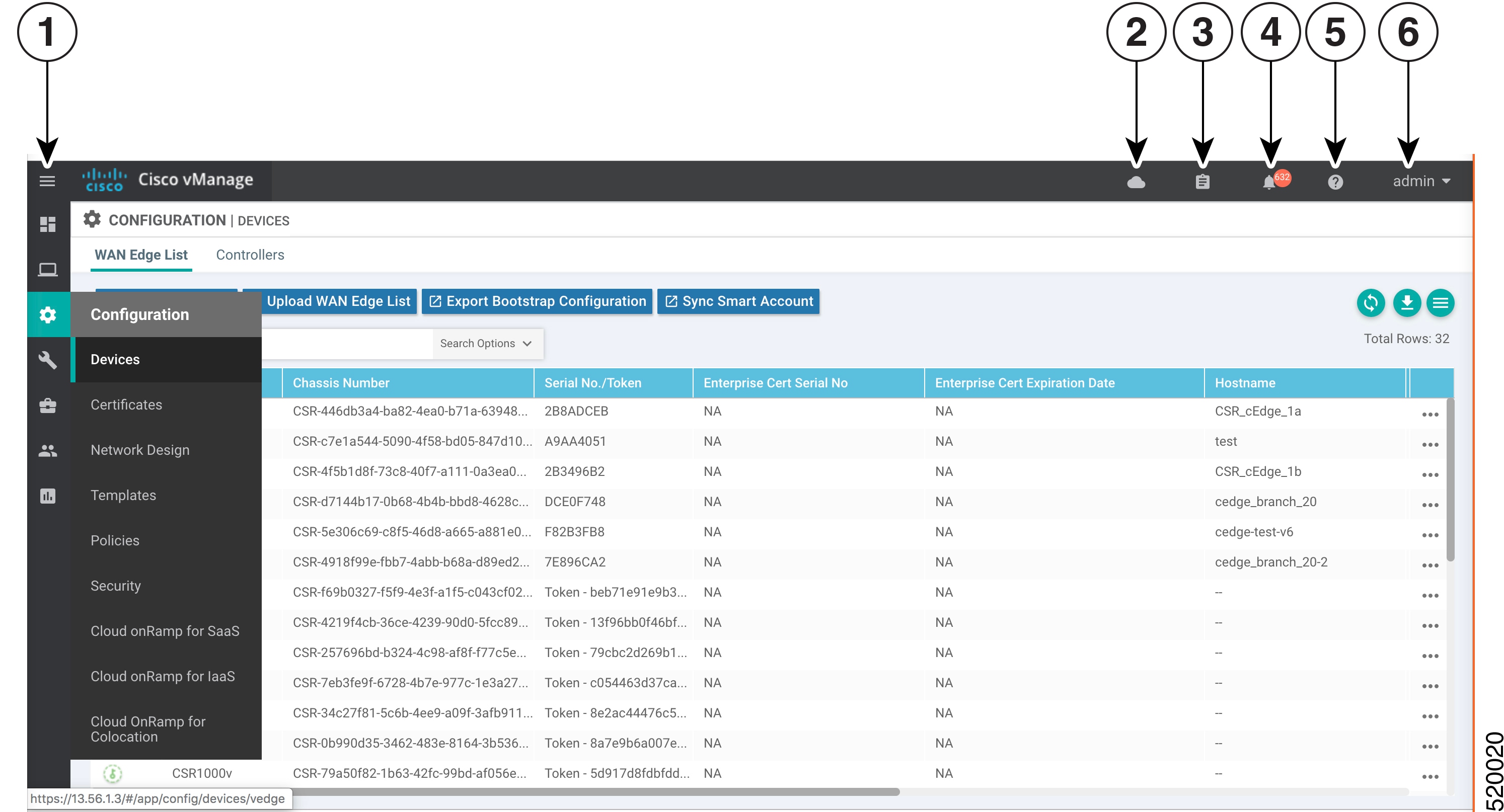
Use the Devices screen to add and delete devices, toggle the mode of a device between CLI and SD-WAN Manager, upload the WAN edge serial number file, export bootstrap configuration and, and perform other device-related tasks.

1 Menu
2 CloudExpress
3 Tasks
4 Alarms
5 Help
6 User Profile

Change configuration modes

A device can be in either of these configuration modes:

  • Cisco SD-WAN Manager mode–A template is attached to the device and you cannot change the configuration on the device by using the CLI.

  • CLI mode – No template is attached to the device and the device can be configured locally by using the CLI.

When you attach a template to a device from Cisco SD-WAN Manager, it puts the device in Cisco SD-WAN Manager mode. You can change the device back to CLI mode if needed to make local changes to its configuration.

Procedure


Step 1

Follow these steps to toggle a router from Cisco SD-WAN Manager mode to CLI mode.

  1. From the Cisco SD-WAN Manager menu, choose Configuration > Devices.

  2. Click WAN Edge List, and select a device.

  3. Click the Change Mode drop-down list and select CLI mode.

    • The Config Lock (Provision Device) option appears only if a template is attached to the device or if a configuration group is deployed to the device.

    • Starting from Cisco IOS XE SD-WAN Release 17.11.1a, click the ... icon adjacent to the device that you want to change fromCisco SD-WAN Manager mode to the CLI mode and click Config Lock (Provision Device).

Step 2

Follow these steps to toggle a controller device from Cisco SD-WAN Manager mode to CLI mode:

  1. From the Cisco SD-WAN Manager menu, choose Configuration > Devices.

  2. Click Controllers, and select a device.

    Starting from Cisco IOS XE Catalyst SD-WAN Release 17.13.1a, the Controllers tab is renamed as the Control Components tab to stay consistent with Cisco Catalyst SD-WAN rebranding.

  3. Click the Change Mode drop-down list.

  4. Select CLI mode and then select the device type. The Change Mode - CLI window opens.

  5. From the Manager mode pane, select the device and click the right arrow to move the device to the CLI mode pane.

  6. Click Update to CLI Mode.


An SSH window opens. To log in to the device, enter a username and password. You can then issue CLI commands to configure or monitor the device.

Upload WAN edge router authorized serial number file

To upload the WAN edge router authorized serial number file to SD-WAN Manager and then download it to controllers in the network

  • The WAN eEdge router authorized serial number file contains, as applicable, the subject SUDI serial number, the chassis number, and the certificate serial numbers of all valid Cisco IOS XE Catalyst SD-WAN devices in the overlay network.

  • You retrieve a serial number file from the Cisco Plug-and-Play (PnP) portal and upload it to SD-WAN Manager. (For more information about Cisco PnP, see Cisco Plug and Play Support Guide for Cisco Catalyst SD-WAN Products.)

  • From SD-WAN Manager, you send the file to the controllers in the network. This file is required to allow the Cisco Catalyst SD-WAN overlay network components to validate and authenticate each other and to allow the overlay network to become operational.

Procedure


Step 1

From the Cisco SD-WAN Manager menu, choose Configuration > Devices.

Step 2

Click WAN Edge List, and click Upload WAN Edge List.

The Quick Connect workflow opens, enabling you to upload the serial number file. See Quick Connect Workflow for details.

Step 3

(This step applies only for releases earlier than Cisco Catalyst SD-WAN Manager Release 20.14.1) Under the Upload WAN Edge List screen:

  1. Click Choose File and select the WAN edge router authorized serial number file you received from Cisco PnP.

  2. To automatically validate the routers and send their chassis and serial numbers to the controllers, ensure that the Validate the uploaded vEdge List and send to controllers check box is selected. If you do not select this option, you must individually validate each router in Configuration > Certificates > WAN Edge List.

  1. Click Upload.


A list of routers in the network is displayed in the router table, with details about each router.

What to do next

Starting from Cisco vManage Release 20.9.2, you can monitor the newly added WAN Edge devices in the Monitor > Devices page.

Upload WAN edge router serial numbers from Cisco Smart Account

To upload the WAN edge router authorized serial numbers from a Cisco Smart account to SD-WAN Manager and then download it to all the controllers in the overlay network:

  • To allow Cisco Catalyst SD-WAN overlay network components to validate and authenticate each other and to allow the overlay network to become operational, Cisco Catalyst SD-WAN requires chassis numbers of all valid Cisco IOS XE Catalyst SD-WAN devices in the overlay network.

    In addition, certificate serial numbers, subject SUDI serial numbers, or both numbers are required for all devices.

Procedure


Step 1

From the SD-WAN Manager menu, choose Configuration > Devices.

Step 2

Click WAN Edge List, and click Sync Smart Account.

Step 3

In the Sync Smart Account window:s

  1. Enter the Username and Password for your Smart account.

  2. To automatically validate the routers and send their chassis and serial numbers to the controllers, check the Validate the Uploaded WAN Edge List and Send to Controllers check box. If you do not select this option, you must individually validate each router in Configuration > Certificates > WAN Edge List .

  3. Click Sync


A list of routers in the network is displayed in the router table, with details about each router.

Starting from Cisco vManage Release 20.9.2, you can monitor the newly added WAN Edge devices in the Monitor > Devices page.

Export device data in CSV format

In an overlay network, you might deploy multiple devices of the same type that share identical or nearly identical configurations.

  • Example 1: In a network with redundant SD-WAN Controllers, you must configure each controller with identical policies.

  • Example 2: In a network with Cisco IOS XE Catalyst SD-WAN devices at multiple sites, each device provides identical services at each site.

Using templates for identical configurations

As these devices have essentially identical configurations:

  • You can create one set of feature templates.

  • You can consolidate them into one device template.

  • You can use this single device template to configure all devices.

To assign unique values per device, you can:

  • Create an Excel file in CSV format.

  • List all the variables.

  • Define each device-specific variable value for every device.

  • Load this file when you attach the device template to the devices.

How to export data in CSV format

The Export icon lets you create and download device data in a CSV file. This icon, which is a downward-pointing arrow, is located to the right of the filter criteria both in the WAN Edge List and in the Controllers tab.

SD-WAN Manager downloads all data from the device table to an Excel file in CSV format.

View a device's running configuration

Running configuration is configuration information that SD-WAN Manager obtains from the memory of a device. This information can be useful for troubleshooting.

Use these steps to view a device's running configuration:

Procedure


Step 1

From the Cisco SD-WAN Manager menu, choose Configuration > Devices.

Step 2

Click WAN Edge List or Controllers, and select the device.

Step 3

Click , and click Running Configuration.


View a device's local configuration

Local configuration refers to the configuration that the SD-WAN Manager stores for a device.This information helps troubleshoot issues or determine how to access a device when it is not reachable from SD-WAN Manager.

To view a device's local configuration created using Configuration ► Templates:

Procedure


Step 1

From the Cisco SD-WAN Manager menu, choose Configuration > Devices.

Step 2

Click WAN Edge List or Controllers, and select the device.

Step 3

Click ..., and click Local Configuration.


Copy router configuration

Copy the configuration from the old router to the new router.

When you are replacing one router at a site with another router, you copy the old router's configuration to the new router. Then you remove the old router from the network and add the new one.

Procedure


Step 1

From the Cisco SD-WAN Manager menu, choose Configuration > Certificates.

Step 2

Mark the new Cisco IOS XE Catalyst SD-WAN device as invalid.

Step 3

From the Cisco SD-WAN Manager, choose Configuration > Devices.

Step 4

Under WAN Edge List, select the old router.

Step 5

Click , and click Copy Configuration.

Step 6

In the Copy Configuration window, select the new router.

Step 7

To confirm the copy of the configuration, click Update.

After you have copied the configuration to the new router, you can add the new router to the network. First, delete the old router from the network, as described below. Then add the new router to the network:

Step 8

From the Cisco SD-WAN Manager, choose Configuration > Certificates.

Mark the new router as valid.

Step 9

Click Send to Controller.


Delete a WAN edge router

Delete a router to remove it from your deployment. This action also removes the following items associated with the router from the WAN Edge router serial number list:

  • Chassis number

  • Certificate serial number

  • Subject SUDI serial number

Deleting a router also permanently removes the router configuration from SD-WAN Manager.

Procedure


Step 1

From the Cisco SD-WAN Manager menu, Configuration > Certificates.

Step 2

Mark the WAN Edge router as invalid.

Step 3

From the SD-WAN Manager menu, choose Configuration > Devices.

Step 4

Click WAN Edge List, and select the router.

Step 5

Click ..., and click Delete WAN Edge.

Step 6

To confirm deletion of the device, click OK.

Step 7

From the Cisco SD-WAN Manager menu, choose Configuration > Certificates.

Step 8

Click Send to Controller.


Decommission a cloud router

Decommissioning a cloud router (such as a C8000v) removes the device's serial number from SD-WAN Manager and generates a new token for the device.

  • The Decommission WAN Edge feature applies only to cloud WAN edge devices and retains the cloud WAN Edge's UUID generated on the PnP Portal.

  • Physical devices do not support the Decommission WAN Edge functionality.

Procedure


Step 1

From the Cisco SD-WAN Manager menu, choose Configuration > Devices.

Step 2

Click WAN Edge List, and select a cloud router.

Step 3

Click , and click Decommission WAN Edge.

Step 4

To confirm the decommissioning of the router, click OK.

Note


From Cisco Catalyst SD-WAN Manager Release 20.15.1, the process to decommision a WAN edge router has been modified. The scenarios below highlight the updates.

Table 2. Updates to deleting a WAN edge router
Scenario Action
Decommision a compromised device Click Delete WAN Edge
Device is reachable Perform a mandatory configuration unlock before proceeding with the decommissioning process.
Device is unreachable

The device will be unlocked after certain time when the device is unreachable.

If you no longer have the device onboarded, with no Cisco SD-WAN Manager visibility, you can hold the power button for 5–10 seconds for a config reset, or 10-20 seconds for a software reset.

If you have console/terminal access, you can run the request config reset command.

Reuse of UUID is only possible after decommissioning a device. In this case, the Decommission option is not available since the device is offline.


View log of template activities

The template activity log records details about creating, editing, and deleting configuration templates, as well as the status of attaching templates to devices. This information helps in troubleshooting.

Procedure


Step 1

From the Cisco SD-WAN Manager menu, choose Configuration > Devices.

Step 2

Click WAN Edge List or Controllers, and select the device.

Step 3

Click , and click Template Log.


View status of device bring up

You can view the status of operations that bring a router or controller online in the overlay network. This helps you monitor and track their progress effectively.

Procedure


Step 1

From the Cisco SD-WAN Manager menu, choose Configuration > Devices.

Step 2

Click WAN Edge List or Controllers, and select the device.

Step 3

Click , and click Device Bring Up.


Add a Cisco SD-WAN Validator

A Cisco SD-WAN Validator automatically orchestrates connectivity between Cisco IOS XE Catalyst SD-WAN devices and Cisco SD-WAN Manager. If any Cisco IOS XE Catalyst SD-WAN device or SD-WAN Controller is behind a NAT, the SD-WAN Validator also serves as an initial NAT-traversal orchestrator.

Procedure


Step 1

From the Cisco SD-WAN Manager menu, choose Configuration > Devices.

Step 2

Click Controllers.

Step 3

Click Add Validator.

Step 4

In the Add Validator window:

  1. Enter Validator Management IP Address of the SD-WAN Validator.

  2. Enter the Username and Password to access the SD-WAN Validator.

  3. To allow the certificate-generation process to occur automatically, check the Generate CSR check box.

  4. Click Add.

Step 5

Repeat Steps 2, 3 and 4 to add additional SD-WAN Validators.


The new SD-WAN Validator is added to the list of controllers in the Controllers screen.

Configure Cisco SD-WAN Controllers

Add a SD-WAN Controller

After the SD-WAN Validator authenticates Cisco IOS XE Catalyst SD-WAN devices, the SD-WAN Validator provides Cisco IOS XE Catalyst SD-WAN device information that they need to connect to the SD-WAN Controller. A SD-WAN Controller controls the flow of data traffic throughout the network via data and app-route policies.

Procedure

Step 1

From the Cisco SD-WAN Manager menu, choose Configuration > Devices.

Step 2

Click Controllers.

Step 3

Click Add Controller.

Step 4

In the Add Controller window:

  1. Enter the system IP address of the Cisco Catalyst SD-WAN Controller.

  2. Enter the username and password to access the SD-WAN Controller.

  3. Select the protocol to use for control-plane connections. The default is DTLS. The DTLS (Datagram Transport Layer Security) protocol is designed to provide security for UDP communications.

  4. If you select TLS, enter the port number to use for TLS connections. The default is 23456.

  5. The TLS (Transport Socket Layer) protocol that provides communications security over a network.

  6. Check the Generate CSR check box to allow the certificate-generation process to occur automatically.

  7. Click Add.

Step 5

Repeat Steps 2, 3 and 4 to add additional SD-WAN Controllers. Cisco SD-WAN Manager can support up to 20 SD-WAN Controllers in the network.


The new SD-WAN Controller is added to the list of controllers in the Controllers screen.

Edit controller details

You can edit controller details to update the controller’s IP address and login credentials.

Procedure

Step 1

From the Cisco SD-WAN Manager menu, choose Configuration > Devices.

Step 2

Click Controllers, and select the controller.

Step 3

Click , and click Edit.

Step 4

In the Edit window, edit the IP address and the login credentials.

Step 5

Click Save.


Delete a controller

Deleting a controller removes it from the overlay. Delete the controller when you replace it or no longer need it in your network.

Procedure

Step 1

From the Cisco SD-WAN Manager menu, choose Configuration > Devices.

Step 2

Click Controllers, and select the controller.

Step 3

Click , and click Invalidate.

Step 4

To confirm the removal of the device and all its control connections, click OK.


Configure reverse proxy on SD-WAN Controllers

To configure reverse proxy on an individual SD-WAN Manager and SD-WAN Controller:

Procedure

Step 1

From the Cisco SD-WAN Manager menu, choose Configuration > Devices.

Step 2

Click Controllers, and select the controller.

Step 3

Click , and click Add Reverse Proxy.

The Add Reverse Proxy dialog box is displayed.

Step 4

Configure the private IP address and port number for the device.

The private IP address is the IP address of the transport interface in VPN 0. The default port number is 12346. This is the port used to establish the connections that handle control and traffic in the overlay network.

Step 5

Configure the proxy IP address and port number for the device, to create the mapping between the private and public IP addresses and port numbers.

Step 6

If the SD-WAN Manager NMS or SD-WAN Controller has multiple cores, repeat Steps 5 and 6 for each core.

Step 7

Click Add.

To enable reverse proxy in the overlay network, from the Cisco SD-WAN Manager menu, choose Administration > Settings > Proxy > Reverse Proxy. Now enable Reverse Proxy and click Save.


Configure UCSE using a configuration group

Use these steps to configure UCSE using a configuration group.

Before you begin

On the Configuration > Configuration Groups page, choose SD-WAN as the solution type.

Procedure


Step 1

From the Cisco SD-WAN Manager menu, choose Configuration > Configuration Groups.

Step 2

Create and configure a UCSE feature in Other profile.

  1. Configure parameter scope.

    Table 3. Parameter

    Parameter Scope

    Scope Description

    Global (Indicated by a globe icon)

    Enter a value for the parameter and apply that value to all devices.

    Examples of parameters that you might apply globally to a group of devices are DNS server, syslog server, and interface MTUs.

    Device Specific (Indicated by a host icon)

    Use a device-specific value for the parameter.

    Choose Device Specific to provide a value for the key in the Enter Key field. The key is a unique string that helps identify the parameter. To change the default key, type a new string in the Enter Key field.

    Examples of device-specific parameters are system IP address, host name, GPS location, and site ID.

    Default (indicated by a check mark)

    The default value is shown for parameters that have a default setting.

  2. Configure options for the UCSE feature.

    Table 4. Settings

    Field

    Description

    Type

    Choose a feature from the drop-down list.

    Feature Name*

    Enter a name for the feature. The name can be up to 128 characters and can contain only alphanumeric characters.

    Description

    Enter a description of the feature. The description can be up to 2048 characters and can contain only alphanumeric characters.

  3. Configure basic settings.

    Table 5. Basic Configuration

    Field

    Description

    Bay*

    Specify the number for the SAS drive bays. The input value must be an integer.

    Slot*

    Specify the slot numbers for the mezzanine adapters. The input value must be an integer.
  4. Configure IMC.

    Table 6. IMC

    Field

    Description

    Access Port

    Configure the interface as an access port. You can configure only one VLAN on an access port, and the port can carry traffic for only one VLAN.

    Not all hardware models have a dedicated access port. See the release notes for your Cisco Catalyst SD-WAN release for the supported hardware.

    Available options:

    • Dedicated

    • Shared

      Configure the appropriate port (GE or TE) based on the hardware module.

    IPv4 Address*

    Provide the UCS-E management port address.

    Default Gateway*

    Gateway tracking determine, for static routes, whether the next hop is reachable before adding that route to the device’s route table.

    Default: Enabled.

    VLAN ID

    Provide the VLAN number, which can be a value from 1 through 4094.

    Assign Priority

    Assign the priority.
  5. Configure advanced settings.

    Table 7. Advanced Configuration

    Field

    Description

    Interface Name*

    Specify the name of the interface.

    Layer

    Specify the layer details necessary for traffic exchange between different VLANs.

    UCSE Interface VPN

    Specify the details of the UCS-E interface VPN.

    IPv4 Address

    Provide the UCS-E management port address.


What to do next

See Deploy a configuration group.

Create a UCS-E Template

For more information about the Cisco Unified Computing System (UCS) E-Series Servers, see the Cisco UCS E-Series Servers and the Cisco UCS E-Series Network Compute Engine Hardware Installation Guide.

Procedure


Step 1

From the Cisco SD-WAN Manager menu, choose Configuration > Templates .

Step 2

Click Feature Templates.

In Cisco vManage Release 20.7.x and earlier releases, Feature Templates is titled Feature.

Step 3

Click Add Template.

Step 4

Select a Cisco IOS XE Catalyst SD-WAN device from the list.

Step 5

From the Other Templates section, click UCSE.

The UCSE Feature template opens. The top of the form contains fields for naming the template, and the bottom contains fields for configuring the Integrated Management Controller (IMC).

Step 6

In the Template Name field, enter a name for the template.

The name can be up to 128 characters and can contain only alphanumeric characters.

Step 7

In the Description field, enter a description of the template.

The description can be up to 2048 characters and can contain only alphanumeric characters.

Step 8

Configure bay and slot for template

Click the Basic Configuration tab to configure the bay and the slot for the template.

Parameter name Description
Bay Specify the number for the SAS drive bays.
Slot Specify the slot numbers for the mezzanine adapters

Step 9

Configure IMC.

Click the IMC tab to configure the IMC parameters for the template.

Parameter name Description
Access port

Configure the interface as an access port. You can configure only one VLAN on an access port, and the port can carry traffic for only one VLAN.

Not all hardware models have a dedicated access port. See the Release Notes for your Cisco Catalyst SD-WAN release for the supported hardware.

Available options:

  • Dedicated

  • Shared

    The type of port, GE or TE, depends on the hardware model.

    For example:

    Router(config-ucse)# imc access-port shared-lom ?
    GE1 GE1
    TE2 TE2
    TE3 TE3
    console Console
    failover Failover

    Some hardware models have GE ports whereas some have TE ports.

    Depending on the hardware module, the appropriate port (GE or TE) needs to be configured. Otherwise you will get an error.

  • You can obtain the UCS-E module hardware model type by using the following commands:

    show inventory

    show platform

  • Failover - sub-option under Shared.

    For example:

    Router(config)#ucse subslot 1/0
    Router(config-ucse)#imc access-port ?
    MGMT MGMT Interface
    shared-lom Shared LOMRouter(config-ucse)#imc access-port shared-lom ?
    GE1 GE1
    TE2 TE2
    TE3 TE3
    console Console
    failover Failover 
IPv4 address Provide the UCS-E management port address.
Default gateway

Gateway tracking determine, for static routes, whether the next hop is reachable before adding that route to the device’s route table.

Default: Enabled.

VLAN ID Provide the VLAN number, which can be a value from 1 through 4094.
Assign priority Assign the priority.
Parameter scope Scope description
Global (indicated by a globe icon) Enter a value for the parameter and apply that value to all devices.
Device specific (indicated by a host icon)

Use a device-specific value for the parameter.

For device-specific parameters, you cannot enter a value in the feature template. You enter the value when you attach a Cisco Catalyst SD-WAN device to a device template.

When you click Device Specific, the Enter Key box opens. This box displays a key, which is a unique string that identifies the parameter in a CSV file that you create. This file is an Excel spreadsheet that contains one column for each key. The header row contains the key names (one key per column), and each row after that corresponds to a device and defines the values of the keys for that device. You upload the CSV file when you attach a Cisco Catalyst SD-WAN device to a device template.

To change the default key, type a new string and move the cursor out of the Enter Key box.

Default When Default is selected, this field is not enabled.