Cisco APIC Security Configuration Guide, Release 6.2(x)

PDF

Cisco APIC Security Configuration Guide, Release 6.2(x)

Contracts in the ACI fabric security policy model

Want to summarize with AI?

Log in

Contracts define the traffic that can pass between endpoint groups (EPGs) in the Cisco Application Centric Infrastructure (ACI) fabric.


A contract is a policy construct that defines and enforces security requirements for communication between EPGs.

  • Contracts specify the types of traffic that can pass between EPGs.

  • By default, communication between different EPGs is denied unless a contract or another policy construct permits the traffic.

  • Contracts provide a flexible and manageable alternative to traditional access control lists (ACLs).

Contract policy enforcement

The ACI fabric converts the contract policy model into a concrete policy model on each applicable switch.

  • The ingress leaf switch identifies the source EPG and marks the packet with the required policy information as the packet enters the fabric.

  • The fabric uses the source and destination EPG information to determine the applicable contract rules.

  • The applicable leaf switch enforces the resulting policy and permits or denies the traffic.
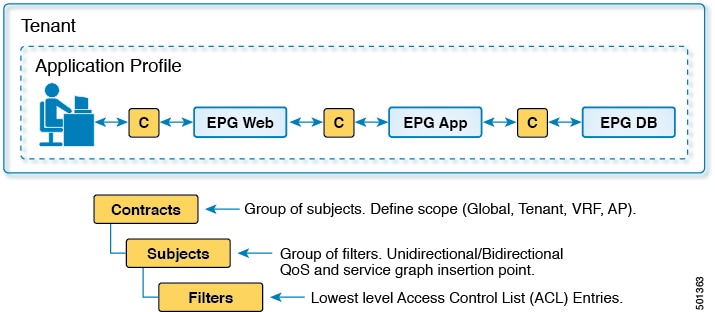
Figure 1. Contract components

Access control list limitations

An ACL is a collection of rules that permits or denies traffic based on attributes such as source, destination, and protocol.

  • ACLs are typically customized for individual router or switch interfaces.

  • Rule sets become more complex as the number of sources, destinations, and protocols increases.

  • Administrators might retain obsolete or uncertain rules to avoid disrupting traffic, causing ACLs to grow over time.

Operational limitations

Because traditional ACLs are customized for specific interfaces and traffic paths, they can be difficult to reuse across interfaces or devices.

  • Topology changes can require ACL updates on multiple interfaces and devices.

  • Large and complex rule sets increase the effort required to review, troubleshoot, and maintain ACLs.

  • The administrative complexity can limit ACL deployment to network demarcation points, reducing policy coverage within an enterprise or data center.

  • Administrators must periodically review ACLs to remove unnecessary rules and control rule-set growth.

Comparison with the ACI fabric security model

The Cisco Application Centric Infrastructure (ACI) fabric uses reusable policy constructs, such as contracts, to define permitted traffic independently of individual interfaces.

Table 1. Traditional ACLs and the ACI fabric security model

Attribute

Traditional ACLs

ACI fabric security model

Topology dependence

Topology-dependent

Policy-based

Rule reusability

Limited

High

Scalability

Limited by rule growth

Improved through reusable policies

Maintainability

Requires interface-specific updates

Uses centrally managed policies

ACL entry growth

If N sources communicate with M destinations by using K protocols, a traditional ACL might require N * M * K entries. For example, 5 sources, 4 destinations, and 3 protocols can require 60 ACL entries.


Security policy specifications in contracts

A contract is a policy construct that controls communication between endpoint groups (EPGs) by specifying allowed protocols, traffic direction, and service-level actions.

  • Uses a hierarchical structure of subjects, filters, and filter entries.

  • Defines directional relationships in which EPGs provide or consume services.

  • Is enforced on leaf switches to support high availability and performance.

Contract components and communication

A contract can contain the following components:

  • A name uniquely identifies each contract that a tenant consumes.

  • Subjects group filters for a specific application or service.

  • Filters classify traffic according to Layer 2 through Layer 4 attributes.

  • Filter entries define the traffic-matching criteria within a filter.

  • Actions specify how to handle filtered traffic. Available actions include permit, mark, redirect, copy, block, and log.

  • Aliases provide optional names that you can change for contract objects.

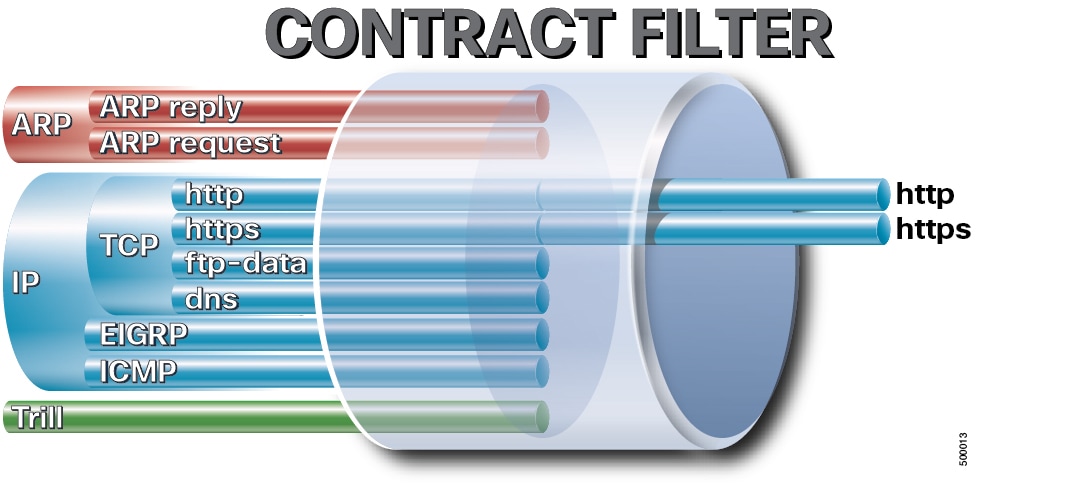
Figure 2. Contract filters


Figure 3. Contracts determine EPG-to-EPG communication


Web service contract

For example, you can define an HTTP filter for TCP ports 80 and 8080 and an HTTPS filter for TCP port 443.

You can then create a webCtrct contract with two sets of subjects. The openProv and openCons subjects contain the HTTP filter. The secureProv and secureCons subjects contain the HTTPS filter.

The webCtrct contract allows secure and nonsecure web traffic between EPGs that provide the web service and EPGs that contain endpoints that consume the service.


Filter entry options

A filter entry specifies the Layer 2 through Layer 4 attributes that identify a type of traffic. A filter can contain multiple entries and can be associated with one or more contract subjects.

Traffic-matching options

The following options provide additional traffic-matching criteria for a filter entry:

Option

Description

Match Only Fragments

Matches fragmented packets.

Match DSCP

Matches packets that contain the specified differentiated services code point (DSCP) value.

TCP Flags

Matches packets that contain the specified Transmission Control Protocol (TCP) flags.

Stateful

Enables stateful processing for the filter entry.

Port Zero Entry

Matches traffic that uses port 0.

GUI location

To configure a filter, navigate to Tenants > tenant_name > Contracts > Filters > filter_name .

To configure an entry in the filter, navigate to Tenants > tenant_name > Contracts > Filters > filter_name > filter_entry_name .


Match Only Fragments option

When Match Only Fragments is enabled, the filter entry matches every fragment except the first fragment.

  • The first fragment has a fragment offset of zero.

  • Each subsequent fragment has a fragment offset greater than zero.

  • The option is disabled by default.

Fragment processing

When Match Only Fragments is disabled, the filter evaluates packets according to all configured matching criteria. The resulting contract action can permit, drop, copy, or redirect matching traffic.

Transmission Control Protocol (TCP) and User Datagram Protocol (UDP) port information is available only in the first fragment. Noninitial fragments do not contain the transport-layer header that provides the port information.

Fragment-matching scenarios

  • If a permit contract uses an IP filter with Match Only Fragments disabled, the contract permits all IP packets that match the filter, including all fragments.

  • If a permit contract uses an IP filter with Match Only Fragments enabled, the contract permits only IP fragments whose fragment offset is greater than zero. The implicit deny rule drops the first fragment unless another contract permits it.

  • If a permit contract uses a specific TCP port filter, such as destination TCP port 80, with Match Only Fragments disabled, the first fragment can match the TCP port. The implicit deny rule drops subsequent fragments unless another contract permits them because those fragments do not contain TCP port information.

  • Do not enable Match Only Fragments on a filter entry that matches a specific TCP or UDP port. The option selects noninitial fragments, but TCP and UDP port information is available only in the first fragment.


Match DSCP option

The Match DSCP option adds the packet's DSCP value to the matching criteria of a filter entry.

  • You can configure a specific DSCP value for the filter entry to match.

  • Contracts can apply different actions to packets that have the same source, destination, and protocol information but different DSCP values.

  • The default value is Unspecified , which is equivalent to Any in Cisco IOS and NX-OS access control lists.


TCP flag matching

The TCP flag option matches traffic by its TCP control flags in addition to criteria such as EtherType, Internet Protocol (IP) protocol, source port, and destination port.

TCP flag match options

Option

Matching behavior

Synchronize (SYN)

Matches packets with the SYN flag set. The SYN flag is used during connection establishment.

Established (ACK or RST)

Matches packets with the ACK or RST flag set.

Acknowledgement (ACK)

Matches packets with the ACK flag set. The ACK flag acknowledges received data.

Reset (RST)

Matches packets with the RST flag set. The RST flag resets a connection.

Finish (FIN)

Matches packets with the FIN flag set. The FIN flag indicates that the sender has no more data to transmit.


Stateful filter option

The Stateful option adds an ACK-flag match to the provider-to-consumer direction of a Transmission Control Protocol (TCP) contract rule.

  • The option applies only to TCP traffic.

  • The option is disabled by default.

  • Enabling the option can improve security by preventing provider-to-consumer packets without the ACK flag from matching the contract rule.

Operational considerations

  • The option checks only whether the ACK flag is set. It does not track TCP connection state in the same manner as a stateful firewall.

  • Because a SYN-ACK packet contains the ACK flag, the option does not prevent a provider endpoint from sending a SYN-ACK attack.

  • Policy compression, also called bidirectional rule compression, cannot be enabled when the Stateful option is enabled.

TCP port configuration

To allow a consumer to connect to a specific TCP port on a provider, configure a sufficiently wide consumer-side port range to include the non-well-known source ports that consumer endpoints use.

The resulting contract typically contains one rule that permits traffic from any applicable consumer source port to the provider service port and another rule for traffic in the opposite direction. In the provider-to-consumer direction, the Stateful option adds the ACK match.

Provider-to-consumer packet handling

When the Stateful option is enabled, the leaf switch handles common provider-to-consumer packets as follows:

  • Data packets sent after the TCP three-way handshake normally contain the ACK flag and are permitted.

  • Reset (RST) packets that contain the ACK flag are permitted.

  • Finish (FIN) packets that contain the ACK flag are permitted. FIN packets without the ACK flag are dropped.

Operating systems handle FIN packets without the ACK flag differently. Dropping these packets can reduce the effectiveness of FIN scans that attempt to identify an endpoint's operating system.

Verification

Use the following switch CLI commands to verify the zoning rules and filter entries:

leaf# show zoning-rule
                leaf# show zoning-filter filter filter_id

In this example, filter 69 applies in the consumer-to-provider direction, and filter 71 applies in the provider-to-consumer direction:

Direction

Filter ID

Port match

TCP rule

Consumer to provider

69

Destination port 22

None

Provider to consumer

71

Source port 22

ack


Port Zero Entry option

A Port Zero Entry is a filter entry that matches traffic with source port 0, destination port 0, or both ports set to 0.

  • Port 0 is reserved by the Internet Assigned Numbers Authority (IANA) and is not intended for normal application traffic.

  • A Port Zero Entry is primarily used with a deny rule to block traffic that uses port 0.

  • In a general filter entry, a port value of 0 or Unspecified represents the complete port range of 0-65535. It does not match only port 0.

Direction options

The direction setting determines whether the Port Zero Entry matches port 0 as the source port, destination port, or both.

Direction

Source port

Destination port

Both (default)

0

0

Destination

0

Any (0-65535)

Source

Any (0-65535)

0

A filter entry that combines port 0 with a specific nonzero port is not supported. For example, you cannot configure source port 0 and destination port 80 in either a general filter entry or a Port Zero Entry.