Cisco APIC Security Configuration Guide, Release 6.2(x)

PDF

Cisco APIC Security Configuration Guide, Release 6.2(x)

APIC local users

Want to summarize with AI?

Log in

Explains user accounts configured directly on the Cisco Application Policy Infrastructure Controller instead of external AAA servers.


APIC-local users are user accounts that

  • are configured directly on the Cisco Application Policy Infrastructure Controller (APIC) itself

  • provide an alternative to using external AAA servers for user authentication, and

  • can coexist with users from externally managed authentication systems.

Password requirements and security

At the time a user sets their password, the Cisco APIC validates it against these criteria:

  • Minimum password length is 8 characters.

  • Maximum password length is 64 characters.

  • Has fewer than three consecutive repeated characters.

  • Must have characters from at least three of the following characters types: lowercase, uppercase, digit, symbol.

  • Does not use easily guessed passwords.

  • Cannot be the username or the reverse of the username.

  • Cannot be any variation of cisco, isco or any permutation of these characters or variants obtained by changing the capitalization of letters therein.

  • Only a maximum number of 100 admin users are supported in Cisco Application Centric Infrastructure (ACI).

Note

Beginning with the 6.0(2) release, the Cisco APIC base OS was updated, including the dictionary of the easily guessed passwords. As a result, some passwords that were considered strong in earlier releases are no longer considered so now.

Cisco ACI uses a crypt library with a SHA256 one-way hash for storing passwords. At rest hashed passwords are stored in an encrypted filesystem. The key for the encrypted filesystem is protected using the Trusted Platform Module (TPM).

The Cisco APIC also enables administrators to grant access to users configured on externally managed authentication Lightweight Directory Access Protocol (LDAP), RADIUS, TACACS+, or SAML servers. Users can belong to different authentication systems and can log in simultaneously to the Cisco APIC.

Local user configuration process

This figure shows how the process works for configuring an admin user in the local Cisco APIC authentication database who has full access to the entire Cisco ACI fabric.
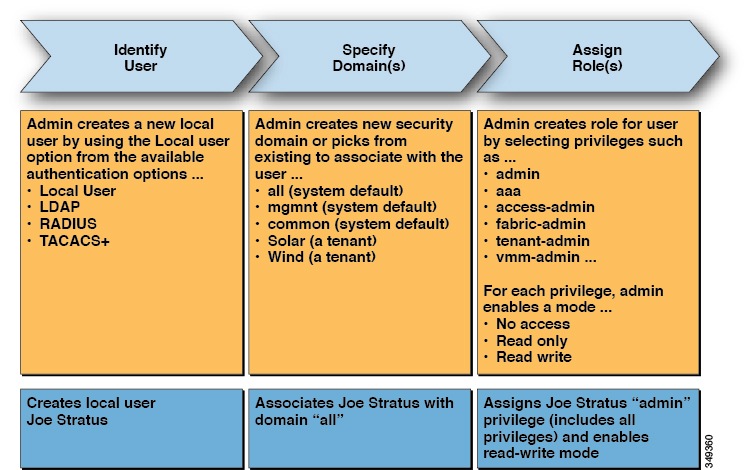
Figure 1. APIC Local User Configuration Process


Note

The security domain "all" represents the entire Managed Information Tree (MIT). This domain includes all policies in the system and all nodes managed by the Cisco APIC. Tenant domains contain all the users and managed objects of a tenant. Tenant administrators should not be granted access to the "all" domain.

This figure shows the access that the admin user Joe Stratus has to the system.
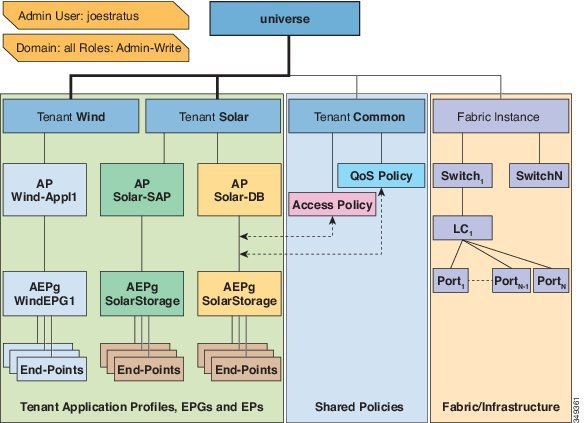
Figure 2. Result of configuring admin user for "all" domain


The user Joe Stratus with read-write "admin" privileges is assigned to the domain "all" which gives him full access to the entire system.
OTP-based two-factor authentication for local users

OTP-based two-factor authentication for local users is a security feature that

  • generates one-time passwords that change every 30 seconds for enhanced security

  • uses a random human-readable 16 binary octet base32 OTP key generated by Cisco Application Policy Infrastructure Controller (APIC), and

  • provides two-factor authentication for local users after fabric admin enablement.

Supported security platforms

Cisco APIC supports these security platforms for use with two-factor authentication:

  • Duo Security, with the Duo Mobile app

  • Google, with the Google Authenticator app (only with Android and Apple iOS smartphones)

Note

You must download the indicated app from the appropriate app store.

These security platforms do not act as a repository for user identities. The platforms offer two-factor authentication on top of an organization's existing authentication, which could be on-premises or cloud-based. Two-factor authentication occurs once the user has finished the authentication with the organization's primary authentication source.

The platforms support three types of two-factor authentication methods after you complete authentication with the primary authentication source:

  • Notification push on mobile using the appropriate mobile app on smartphones.

  • Phone call on your registered phone or mobile numbers.

  • Passcode that is generated on the appropriate mobile app.


Externally managed authentication server users

An externally managed authentication server user is a tenant administrator that

  • is configured on an external RADIUS authentication server with Cisco AV Pairs specifying RBAC roles and privileges

  • has full access to all objects contained in their assigned tenant as well as read-only access to the tenant Common

  • can modify configuration parameters of the ACI fabric they own and control, and

  • can read statistics and monitor faults and events for entities such as endpoints, endpoint groups (EPGs) and application profiles that apply to them.

Configuration process and access levels

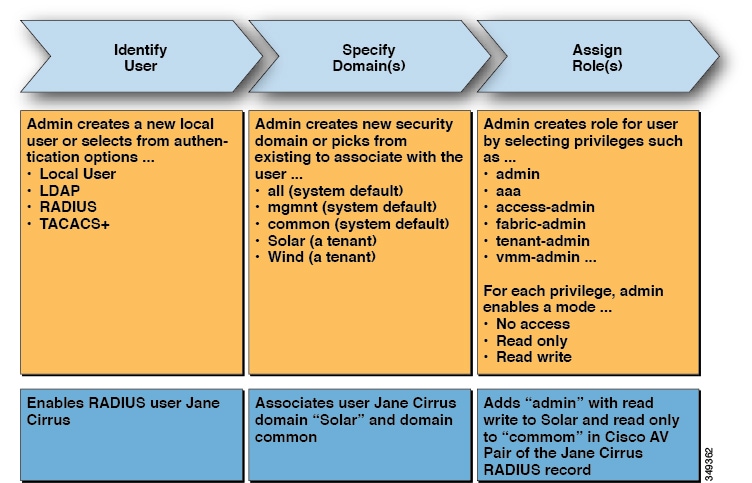
This figure shows how the process works for configuring an admin user in an external RADIUS server who has full access to the tenant Solar.

Figure 3. Process for configuring users on external authentication servers

The process for configuring an admin user on an external RADIUS server, illustrating the access granted to the user Jane Cirrus for the tenant Solar.

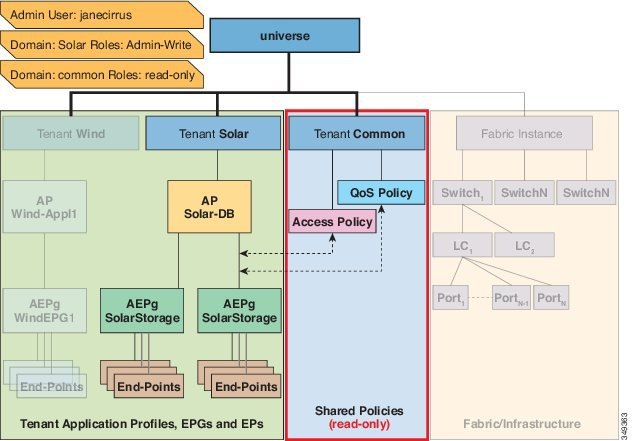
This figure shows the access the admin user Jane Cirrus has to the system.

Figure 4. Result of configuring admin user for tenant solar

The figure illustrates the configuration outcome for the admin user Jane Cirrus on the external RADIUS server, highlighting her full access to the Solar tenant and read-only access to the Common tenant.

In this example, the Solar tenant administrator has full access to all the objects contained in the Solar tenant as well as read-only access to the tenant Common. Tenant admin Jane Cirrus has full access to the tenant Solar, including the ability to create new users in tenant Solar. Tenant users are able to modify configuration parameters of the ACI fabric that they own and control. They also are able to read statistics and monitor faults and events for the entities (managed objects) that apply to them such as endpoints, endpoint groups (EPGs) and application profiles.

To configure an AV Pair on an external authentication server, add a Cisco AV Pair to the existing user record. The Cisco AV Pair specifies the Role-Based Access Control (RBAC) roles and privileges for the user on the APIC. The RADIUS server then propagates the user privileges to the APIC controller.

RADIUS server configuration

In the example above, the configuration for an open RADIUS server (/etc/raddb/users) is as follows:

janecirrus Cleartext-Password := "<password>"
Cisco-avpair = "shell:domains = solar/admin/,common//read-all(16001)"

This example includes these elements:

  • janecirrus is the tenant administrator

  • solar is the tenant

  • admin is the role with write privileges

  • common is the tenant-common subtree that all users should have read-only access to

  • read-all is the role with read privileges


Cisco AV pair format

The Cisco APIC requires that an administrator configure a Cisco AV Pair on an external authentication server and only looks for one AV pair string. To do so, an administrator adds a Cisco AV pair to the existing user record. The Cisco AV pair specifies the APIC required RBAC roles and privileges for the user.

AV pair format requirements

In order for the AV pair string to work, it must be formatted as follows:

shell:domains = 
ACI_Security_Domain_1/ACI_Write_Role_1|ACI_Write_Role_2|ACI_Write_Role_3/ACI_Read_Role_1|ACI_Read_Role_2,
ACI_Security_Domain_2/ACI_Write_Role_1|ACI_Write_Role_2|ACI_Write_Role_3/ACI_Read_Role_1|ACI_Read_Role_2,
ACI_Security_Domain_3/ACI_Write_Role_1|ACI_Write_Role_2|ACI_Write_Role_3/ACI_Read_Role_1|ACI_Read_Role_2
  • shell:domains= - Required so that ACI reads the string correctly. This must always prepend the shell string.

  • ACI_Security_Domain_1//admin - Grants admin read only access to the tenants in this security domain.

  • ACI_Security_Domain_2/admin - Grants admin write access to the tenants in this security domain.

  • ACI_Security_Domain_3/read-all - Grants read-all write access to the tenants in this security domain.

Note

/'s separate the security domain, write, read sections of the string. |'s separate multiple write or read roles within the same security domain.

Note

Starting with Cisco APIC release 2.1, if no UNIX ID is provided in AV Pair, the APIC allocates the unique UNIX user ID internally.

Supported regular expressions

The APIC supports these regexes:

shell:domains\\s*[=:]\\s*((\\S+?/\\S*?/\\S*?)(,\\S+?/\\S*?/\\S*?){0,31})(\\(\\d+\\))$
shell:domains\\s*[=:]\\s*((\\S+?/\\S*?/\\S*?)(,\\S+?/\\S*?/\\S*?){0,31})$

Configuration examples

Examples:

  • Example 1: A Cisco AV Pair that contains a single Login domain with only writeRoles:
    
    shell:domains=ACI_Security_Domain_1/Write_Role_1|Write_Role_2/
    
  • Example 2: A Cisco AV Pair that contains a single Login domain with only readRoles:
    
    shell:domains=Security_Domain_1//Read_Role_1|Read_Role_2
    
Note

The "/" character is a separator between writeRoles and readRoles per Login domain and is required even if only one type of role is to be used.

The Cisco AVpair string is case sensitive. Although a fault may not be seen, using mismatching cases for the domain name or roles could lead to unexpected privileges being given.

AV pair GUI configuration

The security domain is defined in the ACI GUI under Admin > AAA > Security Management > Security Domains and assigned to a tenant under Tenants > Tenant_Name > Policy.

A security domain must have either a read or write role. These roles are defined in APIC > Admin > Security Management > Roles. If a role is input into the write section it automatically grants read privileges of the same level so there is no need to have ACI_Security_Domain_1/admin/admin.