Configure OTP-based two-factor authentication for a local user using the Cisco APIC GUI to enhance security by requiring both password and time-based token authentication.
This task enables OTP-based two-factor authentication for local users to enhance security by requiring both password and time-based token authentication for user access.
The following procedure configures OTP-based two-factor authentication for a local user using the Cisco APIC GUI. The procedure assumes that you are a fabric administrator.
Before you begin
You must have already created a local user for which you want to enable OTP-based two-factor authentication.
Follow these steps to configure OTP-based two-factor authentication for a local user:
Procedure
-
In the Work pane, click the user for which you want to enable OTP-based two-factor authentication.
A window is displayed on the right which has more details about the user. Click the Details (
 ) icon, and in the new screen that is displayed (with user details), click the Edit icon.
 -
Click Save.
To get the OTP details, on the Users > Local tab, click the User_name > Details icon, to get the user details screen. Click the displayed OTP Key to see the QR code. The user details screen is as shown below.
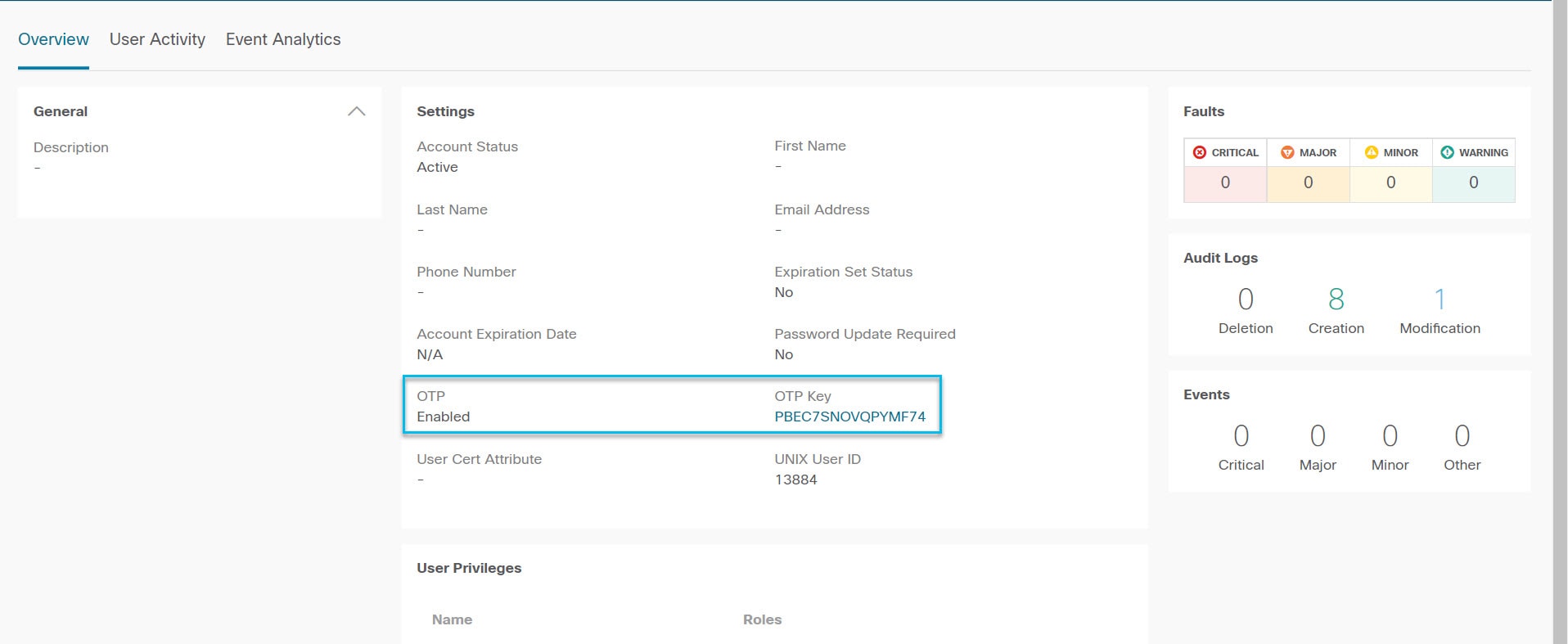
OTP-based two-factor authentication is now enabled for the selected local user. The user can now view the OTP key and QR code to complete their authentication setup.
What to do next
The user for which you enabled OTP must complete the configuration of OTP authentication. See Complete the configuration of OTP-based two-factor authentication by a user using the GUI .