Deploy and Configure cnAAA through Ops Center

Introduction

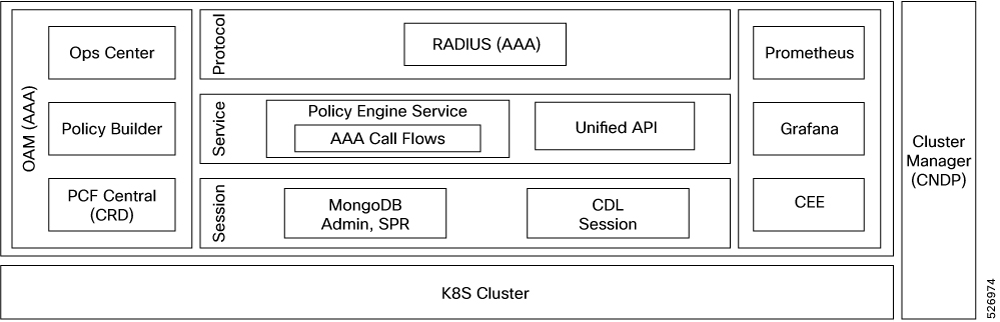
Cisco cnAAA has a three-tier architecture which consists of Protocol, Service, and Session tiers. Each tier includes a set of microservices (pods) for a specific functionality. Within these tiers, there exists a Kubernetes Cluster comprising of Kubernetes (K8s) master, and worker nodes (including Operation and Management nodes).

For high availability and fault tolerance, a minimum of two K8s worker nodes are required for each tier. Multiple replicas can be assigned to each worker node. Kubernetes uses the StatefulSets controller to manage pods. The pods require a minimum of two replicas for fault tolerance.

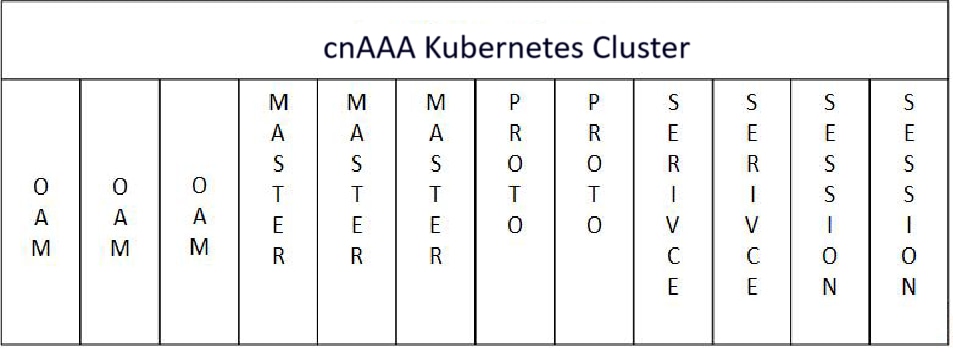
The following figure depicts a cnAAA K8s Cluster – Master nodes, Operations, and Management (OAM) worker nodes, Protocol worker nodes, Service worker nodes, Session (data store) worker nodes.

Figure 1. cnAAA Kubernetes Cluster

Note


  • OAM worker nodes - These nodes host the Ops Center pods for configuration management and metrics pods for statistics and Key Performance Indicators (KPIs).

  • Protocol worker nodes - These nodes host the cnAAA protocol-related pods for RADIUS Endpoint.

  • Service worker nodes - These nodes host the cnAAA application-related pods that perform session management processing.

  • Session worker nodes - These nodes host the database-related pods that store subscriber session data.


Base cnAAA Configuration

The cnAAA base configuration provides a comprehensive overview of the required configurations to make Policy Builder and cnAAA functional. This involves setting up the infrastructure needed for deploying cnAAA through the Subscriber Microservices Infrastructure (SMI) and configuring the Ops-Center to utilize cnAAA capabilities effectively over time.

The base configuration consists of the following steps

  1. Deployment through SMI—All the network functions are deployed through the SMI platform. The platform simplifies the cloud-native NF deployments and monitors the NF performance while providing an integrated experience.

  2. Configuring Ops Center—The cnAAA Ops Center provides an intuitive console for interacting with cnAAA in terms of configuring and gaining visibility into resources and features that you have subscribed to.

    The Ops Center lets you review the current and historical configurations corresponding to your environment. See Accessing the cnAAA Ops Center

Deploy and Validate cnAAA Software

This section describe different stages in deploying the cnAAA Software.

  • Run the SMI Cluster Manager

  • Deploy the cnAAA Software

  • Validate the Deployment

Run the SMI Cluster Manager

The cnAAA software deploy or in-service procedure utilizes the K8s rolling strategy to update the pod images. In K8s rolling update strategy, the pods of a StatefulSet updates sequentially to ensure that the ongoing process remains unaffected. Initially, a rolling update on a StatefulSet causes a single pod instance to terminate. This process continues until all the replicas of the StatefulSet are updated. The terminating pods exit gracefully after completing all the ongoing processes.


Note


Run the SMI sync operation for the cnAAA Ops Center and Cloud Native Common Execution Environment (CN-CEE).

For more information, see the SMI Cluster Manager - Deployment guide.


Deployment Architecture

The Cisco CPC is part of the 5G core network functions portfolio with a common mobile core platform architecture.

CPC Architecture

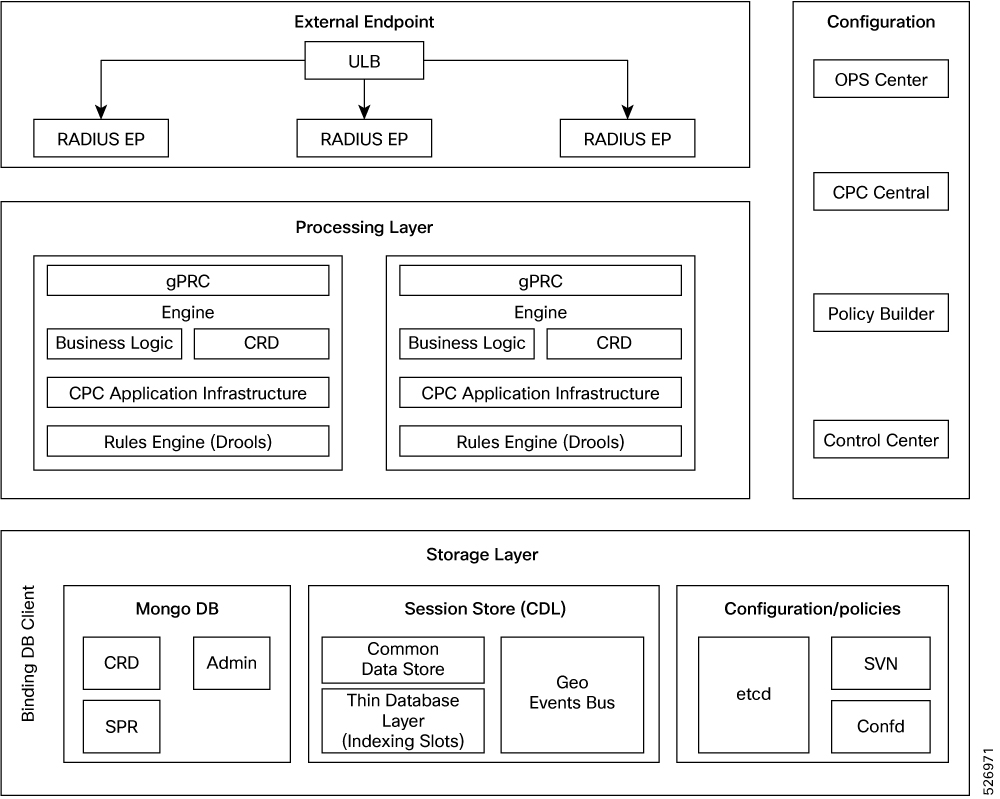
The CPC architecture is built on a multi-layer platform, which enables efficient policy control and management in the 5G Core network.

Figure 2. CPC cnAAA Architecture

The cnAAA comprises of the following components:

  1. External Endpoint

    • RADIUS-EP—It is a interface which provides a channel for inbound and outbound RADIUS Endpoint messages.

    • Unified Load Balancer (ULB) — The ULB is a Cisco proprietary node or network function (NF) that manages traffic distribution of incoming network traffic equally across all worker nodes and ensures high availability and reliability across network infrastructures.

      The ULB distributes incoming network traffic across multiple endpoints.

  2. Processing Layer

    • grPC—Provides a framework that enables the internal processes to communicate with each other and synchronize their events.

    • Engine—Hosts the business logic of CPC and responsible for driving the rules engine for making crucial policy decisions.

  3. Configurations

    • Policy Builder—Allows configuration of the RADIUS Endpoint and Engine pods and configuration of services and advanced policy rules.

    • CPC Central—Provides a unified GUI that allows you to configure Policy Builder, manage custom reference table data, and initiate the Web-based applications and utilities.

    • Ops Center—Allows you to configure and manage the applications and pods configuration.

    • Etcd—Contains the RADIUS Endpoint configurations.

  4. Storage Layer

    • MongoDB—Preserves the subscriber-specific, balance data, and admin configuration data.

    • Session store—Contains the data which CDL accesses for processing a session persistence activity. Stores the CPC sessions.
      Figure 3. CPC cnAAA deployment architecture
  • The CPC cnAAA deployment architecture includes

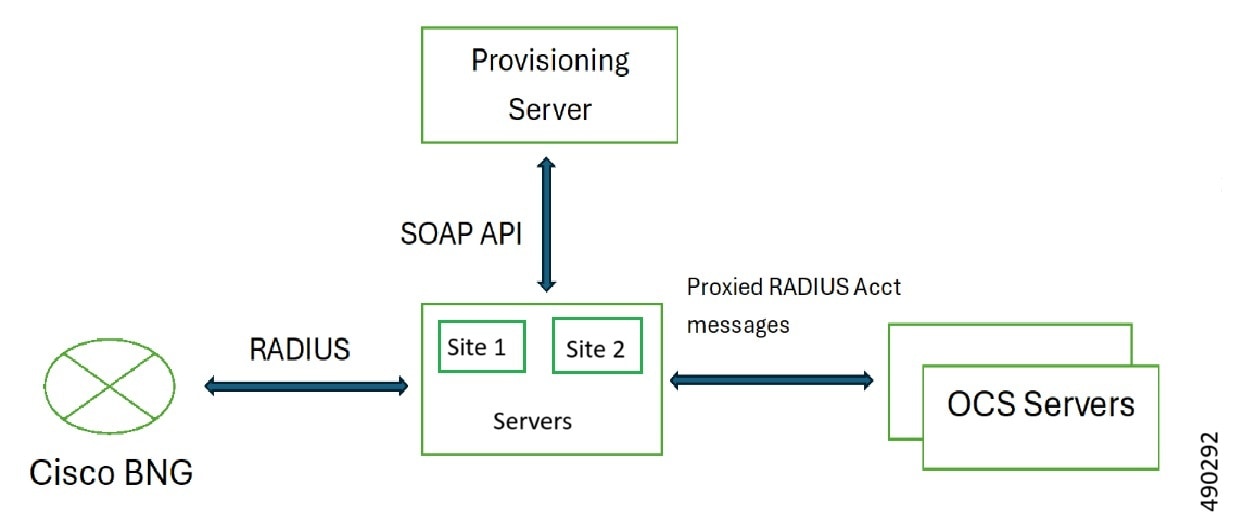
    • One Region = Two sites. Each site has one cluster (total two clusters in a region).

    • Mongo DB is a dedicated database to store Subscriber Profile Information.

    • Cisco CDL is the dedicated session database for CPC.

Components

This section provides an overview of the functional components that comprise the cnAAA architecture. It defines the roles of elements in the external endpoint, processing, configuration, and storage layers. This overview illustrates how the system manages network traffic, applies policy logic, and ensures data persistence.

Figure 4. CPC architecture components

The cnAAA comprises of these components:

  1. External endpoint

    • Unified Load Balancer (ULB) is a Network Function (NF) that manages the distribution of incoming RADIUS traffic to RADIUS endpoints deployed on worker nodes. The ULB ensures high availability and reliability across the network infrastructure.

    • RADIUS-EP: A microservice that provides a channel for inbound and outbound RADIUS messages.

  2. Processing layer

    • Engine: This component hosts the business logic and drives the rules engine to make policy decisions.

    • gRPC: This framework enables internal processes to communicate and synchronize events.

  3. Configurations

    • Policy Builder: Allows the configuration of Engine pods, services, and advanced policy rules.

    • CPC Central: A unified GUI that you use to configure the Policy Builder, manage custom reference table data, and access web-based applications such as Grafana and the Control Center.

    • Ops-Center: Allows to configure and manage the applications and pods configuration.

    • etcd: Stores the RADIUS-EP configurations.

  4. Storage layer

    • MongoDB: Stores subscriber-specific data and CRD configuration data.

    • Cisco Data Layer (CDL): A dedicated in-memory database used for session persistence.

Deploy the cnAAA

This section describes the procedures involved in deploy cnAAA.

Stage the cnAAA Image

This section describes the procedure involved in staging the cnAAA image before initiating the deployment.

To stage the cnAAA image:

  1. Download and verify the cnAAA image.

  2. Log in to the SMI Cluster Manager node as an ubuntu user.

  3. Copy the images to the Uploads directory.

    sudo mv <cpc_new_image.tar> /data/software/uploads 

    Note


    The SMI uses the new image present in the Uploads directory to upgrade.


  4. Verify whether the image is retrieved up by the SMI for processing from the Uploads directory.

    sleep 30; ls /data/software/uploads 

    Example:

    ubuntu@pocnAAA-cm01:~/temp_08072019_T1651$ sleep 30; ls /data/software/uploads
    ubuntu@pocpc-cm01:~/temp_08072019_T1651$
    
  5. Verify whether the images were successfully picked up and processed.

    Example:

    auser@unknown:$ sudo du -sh /data/software/packages/*
    1.6G	/data/software/packages/cee.2019.07
    5.3G	/data/software/packages/cpc.2019.08-04
    16K	/data/software/packages/sample
    

    The SMI unpacks the images into the packages directory successfully to complete the staging.

    For more information, refer the SMI Cluster Manager - Deployment


Note


Similar steps can be followed to deploy ULB. For more information, refer the ULB Configuration and Administration Guide.

Trigger cnAAA

The cnAAA is triggered using the SMI cluster manager. To trigger cnAAA using SMI Cluster Manager, follow these configurations:

  1. Log in to the SMI Cluster Manager console.

  2. Run the following command to log in to the SMI Ops Center.

    ssh -p <port_number> admin@$(kubectl get svc -n smi | grep
    '.*netconf.*<port_number>' | awk '{ print $4 }') 

    Example:

    ubuntu@pocnAAA-cm01:~$ ssh -p <port_number> admin@$(kubectl get svc -n smi | grep '.*netconf.*<port_number>' | awk '{ print $4 }')
    admin@<admin_ip_address> password: SMI-CONSOLE-PASSWORD
    Welcome to the CLI
    admin connected from <admin_ip_address> using ssh on ops-center-smi-cluster-manager-85869cf9b6-7j64k
    
  3. Download the latest .tar from the URL.

    software-packages download URL 

    Example:

    SMI Cluster Manager# software-packages download <URL> 
    

    NOTES:

    • software-packages download url —Specify the software packages to be downloaded through HTTP/HTTPS.

  4. Verify whether the TAR balls are loaded.

    software-packages list 

    Example:

    SMI Cluster Manager# software-packages list 
    [ cnAAA-2019-08-21 ] 
    [ sample ] 
    

    NOTES:

    • software-packages list —Specify the list of available software packages.

  5. Update the product repository URL with the latest version of the product chart.

    config
      cluster cluster_name
       ops-centers app_name cnAAA_instance_name
            repository url
             exit
           exit 

    Example:

    SMI Cluster Manager# config 
    SMI Cluster Manager(config)# clusters test2 
    SMI Cluster Manager(config-clusters-test2)# ops-centers cnAAA data 
    SMI Cluster Manager(config-ops-centers-cnAAA/data)# repository <url> 
    SMI Cluster Manager(config-ops-centers-cnAAA/data)# exit 
    SMI Cluster Manager(config-clusters-test2)# exit 
    

    NOTES:

    • cluster —Specify the K8s cluster.

    • cluster_name —Specify the name of the cluster.

    • ops-centers app_name instance_name —Specify the product Ops Center and instance. app_name is the application name. instance_name is the name of the instance.

    • repository url —Specify the local registry URL for downloading the charts.

  6. Run the cluster sync command to update to the latest version of the product chart. For more information on cluster sync command, see the Important section.

    clusters cluster_name actions sync run 

    Example:

    SMI Cluster Manager# clusters test2 actions sync run

    Important


    The cluster synchronization configure the cnAAA Ops Center, which in turn deploy the application pods (through helm sync command) one at a time automatically.


    NOTES:

    • cluster —Specify the K8s cluster.

    • cluster_name —Specify the name of the cluster.

    • actions —Specify the actions performed on the cluster.

    • sync run —Triggers the cluster synchronization.

Configure Cluster Manager for Dual Stack Environment

Follow these steps to configure the Cluster Manager for a Dual Stack Environment.

Configure Unified API IPv6 support

Follow these steps to configure Unified API IPv6 support. It supports IPv6 for all management functionalities, including Ingress, Grafana, PolicyBuilder, Netconf, and SSH. Dual-stack is supported, ensuring public and virtual IP addresses (VIPs) are accessible over both protocols.

Procedure

Step 1

Configure the cluster to operate in dual-stack mode and define IPv6 subnets for pods and services.

clusters cncps
  environment cncps-dev
    configuration ipv6-mode dual-stack
    configuration pod-subnet-ipv6 2001:DB8:1:1::/108
    configuration service-subnet-ipv6 2001:DB8:2:2::/108
  exit
  Configure node-specific IPv6 addresses for Secure Shell (SSH) and Kubernetes (k8s) within the cluster definition.
  nodes cm
    k8s ssh-ipv6 2001:DB8:1::83
    k8s node-ipv6 2001:DB8:2::11
    os additional-ssh-ips [ 192.0.2.1 2001:DB8:1::83 ]
    initial-boot netplan vlans vlan2400
      addresses [ 192.0.2.11/24 2001:DB8:1:1::11/64 ]
    exit
    initial-boot netplan vlans vlan3594
      addresses [ 192.0.2.83/26 2001:DB8:1::83/64 ]
    exit
  exit

Step 2

Specify IPv6 addresses for Netconf, SSH, and Ingress hostnames for both the cluster manager and Ops-Center instances.

cluster-manager netconf-ipv6 2001:DB8:1::83
cluster-manager ssh-port 3022
cluster-manager ingress-hostname 2001-db8-1--83.sslip.io
cluster-manager iso-download-ipv6 2001:DB8:1::83

ops-centers cee cee-cm
  netconf-ipv6 2001:DB8:1::83
  ssh-ipv6 2001:DB8:1::83
  ingress-hostname 2001-db8-1--83.sslip.io
exit

Step 3

Configure OAM, virtual IP with IPv6 addresses.

virtual-ips oam
  vrrp-interface vlan3594
  vrrp-router-id 22
  ipv6-addresses 2001:DB8:1::88
    mask 64
    device vlan3594
  exit
  ipv6-addresses 2001:DB8:1::89
    mask 64
    device vlan3594
  exit
exit

Step 4

Bind the Ingress addon to both IPv4 and IPv6 addresses.

addons ingress bind-ip-address 192.0.2.83
addons ingress bind-ipv6-address 2001:DB8:1::83
addons ingress bind-ip-address-internal 192.0.2.11
addons ingress bind-ipv6-address-internal 2001:DB8:2::11
addons ingress enabled
exit

Step 5

Enable IPv6 features within the engine configuration.

api unified engine-group production-rjio
  api unified externalIPs [ 192.0.2.87 2001:DB8:1::87 ]
  engine production-rjio
    properties com.broadhop.domain.ipv6.enable.feature
      value true
    exit
    properties com.broadhop.pep.ipv6.enable.feature
      value true
    exit
  policy-builder properties com.broadhop.pep.ipv6.enable.feature
    value true
  exit
exit

Step 6

Bind the Ingress addon to both IPv4 and IPv6 addresses.

addons ingress bind-ip-address 192.0.2.83
addons ingress bind-ipv6-address 2001:DB8:1::83
addons ingress bind-ip-address-internal 192.0.2.11
addons ingress bind-ipv6-address-internal 2001:DB8:2::11
addons ingress enabled
exit

Step 7

Enable IPv6 features within the engine configuration.

api unified engine-group production-rjio
api unified externalIPs [ 192.0.2.87 2001:DB8:1::87 ]
engine production-rjio
properties com.broadhop.domain.ipv6.enable.feature
value true
exit
properties com.broadhop.pep.ipv6.enable.feature
value true
exit
policy-builder properties com.broadhop.pep.ipv6.enable.feature
value true
exit
exit

Dedicated ingress for unified API traffic

Feature History

Feature Name

Release Information

Description

Dedicated ingress for unified API traffic

2025.04.1

This enhancement provides a dedicated ingress for Unified API traffic, separating it from OAM traffic. This separation enhances performance, security, and operational simplicity.

This enhancement provides a dedicated ingress for Unified API traffic within cnAAA. The separation of Unified API traffic from OAM traffic enhances performance, security, and troubleshooting by addressing issues such as resource contention (large log queries, heavy dashboard loading, and SNMP polling), stringent network policy requirements (Network Segmentation, Security, and Auditing and Compliance), and operational complexity. The system achieves this by supporting the configuration of one or more dedicated external IP addresses (IPv4 and IPv6) or Virtual IPs (VIPs) for the Unified API service, while OAM traffic continues to use the existing common management VIP.

Key capabilities

This enhancement offers these capabilities:

  • The CNDP CLI binds specific external IP addresses to the cluster's ingress infrastructure.

  • The cnAAA Ops-Center CLI assigns dedicated external IP addresses to the Unified API service to ensure traffic isolation.

  • The system routes OAM traffic through the original common management Virtual IP (VIP) to maintain existing access.

  • The configuration persists through application restarts, pod rescheduling, and cluster upgrades.

  • The system allows administrators to remove the dedicated IP configuration and revert the Unified API to the common management VIP.

Configure dedicated external IPs for Unified API traffic

Use this procedure to segregate Unified API traffic from OAM traffic. This two-step process involves provisioning IP addresses at the cluster level and assigning them to the Unified API service.

Procedure

Step 1

Provision external IP addresses in the CNDP cluster manager.

  1. Log in to the CNDP cluster manager CLI.

  2. Execute the clusters <cluster-name> addons ingress bind-ip-address-list command to add the desired external IP addresses to the cluster's ingress configuration.

    • To configure a dedicated IPv4 address:

      clusters <cluster-name> addons ingress bind-ip-address-list
          203.0.113.10
    • To configure a dedicated IPv6 address:

      clusters <cluster-name> addons ingress bind-ip-address-list
              2001:db8:a0b:12f0::1
    • To configure multiple addresses (IPv4 and IPv6):

      clusters <cluster-name> addons ingress bind-ip-address-list 203.0.113.10
                2001:db8:a0b:12f0::1
  3. Verify that the IP address is binding to the Nginx ingress controller.

    kubectl get svc -n nginx-ingress | grep nginx-controller

Note


The configured IP addresses must match across both configuration steps.

Step 2

Assign the external IP addresses in cnAAA Ops-Center.

  1. Log in to the cnAAA Ops-Center CLI and enter the config command.

  2. Execute the api unified externalIPs command to assign the dedicated IP(s) to the Unified API.

    • To configure a dedicated IPv4 address: api unified externalIPs [ 203.0.113.10 ]

    • To configure a dedicated IPv6 address: api unified externalIPs [ 2001:db8:a0b:12f0::1 ]

    • To configure multiple addresses (IPv4 and IPv6):
      api unified externalIPs [ 203.0.113.10 2001:db8:a0b:12f0::1
          ]
  3. (Optional) Disable plain HTTP access for the Unified API. api unified disable-http true

    Warning


    Enabling this option blocks all non-HTTPS traffic. Ensure that clients support HTTPS.

    Note


    By default, this setting is false, which allows both HTTP and HTTPS access. Setting it to true will disable HTTP access and enforce HTTPS.

  4. commit the changes.

  5. Verify the traffic segregation.

    kubectl get ingress -n <CPC_NAMESPACE>

Note


Ensure that the configured IP addresses match the addresses provisioned in the CNDP cluster manager.


SOAP call validation

SOAP Call Validation with IP whitelisting enhances security for the Unified API by allowing only trusted IP addresses or ranges to access SOAP services. This security measure is enforced at the nginx-ingress controller, which acts as the entry point for the API traffic.

Key attributes:

  • By default, the Unified API URL is accessible from any IP address.

  • The feature restricts access to a predefined list of IP addresses or ranges.

  • Only IP addresses or ranges specified in the whitelist can access the Unified API URL.

  • Requests from any IP address not in the whitelist are automatically denied.

  • Manage the whitelist dynamically, using simple commands, without requiring system reconfiguration or service restarts.

  • If there is no whitelist configured, the system allows access from all IP ranges, reverting to default behavior.

Configure IP whitelisting for unified API access
Procedure

Follow these steps to configure IP whitelisting for the Unified API using the CPC Ops-Center:


Follow these steps to configure IP whitelisting for the Unified API using the CPC Ops-Center:

Step 1

Log in to the CPC Ops-Center and enter config mode by entering the config command.

Step 2

Specify the IP addresses or ranges to whitelist:

api unified whitelistIPs [ 10.110.128.2 20.50.23.0/29 
10.50.53.100/30 192.168.1.1
commit

Note


Enter individual IPv4 address and CIDR ranges. Include necessary IP address, such as your system or server IP address, that require access to the Unified API.

Step 3

commit the changes, and verify the configured whitelist IP addresses:

show running-config api unified whitelistIPs

Step 4

Verify the whitelist in Nginx-Ingress by entering this command on Kubernetes cluster:

kubectl get ingress pcf-unified-api-ingress -n pcf -o yaml | grep whitelist

Step 5

To allow access from all IP ranges, remove the whitelist by using one of these options:

  • Provide an empty list.

    api unified whitelistIPs [ ]
    commit
  • Use the no command

    no api unified whitelistIPs
    commit

Configure rate limit threshold functionality

Follow these steps to configure the rate limiting for the SOAP API URL. This prevents the system from becoming overloaded during high volumes of SOAP API requests.

Procedure

Step 1

Login to CPC Ops-Centre, enter the config command:

[unknown] pcf(config)# api unified limit-max-requests-per-sec 2 
[unknown] pcf(config)# api unified limit-burst-multiplier 1
[unknown] pcf(config)# commit 

Step 2

To check if the given values are reflecting in the setup, enter this command:

[unknown] pcf(config)# do show running-config api unified limit-max-requests-persec 
[unknown] pcf(config)# do show running-config api unified limit-burst-multiplier 

Step 3

To remove the configuration, enter this command:

[unknown] pcf(config)# no api unified limit-max-requests-per-sec 
[unknown] pcf(config)# no api unified limit-burst-multiplier 
[unknown] pcf(config)# commit 

Note


Always set the limit-burst-multiplier value to 1.


Monitor the Deployment of cnAAA

You can monitor the status of the deployment through SMI Cluster Manager Ops Center configurations:

config 
  clusters cluster_name actions sync run upgrade-strategy concurrent debug true 
  clusters cluster_name actions sync logs 
  monitor sync-logs cluster_name 
  clusters cluster_name actions sync status 
  end 
Example:
SMI Cluster Manager# clusters test1 actions sync run
SMI Cluster Manager# clusters test1 actions sync run upgrade-strategy concurrent debug true
SMI Cluster Manager# clusters test1 actions sync logs
SMI Cluster Manager# monitor sync-logs test1
SMI Cluster Manager# clusters test1 actions sync status

NOTES:

  • clusters cluster_name —Specify the information about the nodes to be deployed. cluster_name is the name of the cluster.

  • actions —Configures the actions performed on the cluster.

  • sync run —Triggers the cluster synchronization.

  • sync logs —Displays the current cluster synchronization logs.

  • sync status —Displays the current status of the cluster synchronization.

  • debug true —Enters the debug mode.

  • monitor sync logs – Monitors the cluster synchronization process.


Important


You can view the pod details after the upgrade through CEE Ops Center. For more information on pod details, see Viewing the Pod Details section.


Pod affinity relaxation for maximum resource utilization

Feature history

Feature Name

Release Information

Description

Strict anti-affinity is disabled, allowing multiple replicas per node for maximum resource utilization

2025.03.0

This feature provides configurable control over anti-affinity rules for engine pods in Kubernetes clusters. Disabling anti-affinity allows the scheduler to place multiple engine pod replicas on the same node, ensuring all replicas are deployed even in environments with limited node availability.

This feature enables configuration of engine pod scheduling behavior in Kubernetes clusters. When strict anti-affinity rules are enforced, only one engine pod replica is scheduled per node. In resource-constrained environments, it prevents deployment of all requested replicas. Setting the scheduling-affinity parameter to false strict anti-affinity is disabled, allowing multiple replicas per node and allowing multiple engine pod replicas on the same node. This ensures balanced pod deployment and flexibility across available nodes.

Scheduling affinity parameter

The scheduling-affinity parameter controls how engine pods are scheduled in the cluster.

  • When set to true (default), strict anti-affinity is enforced. Only one engine pod replica is scheduled per node. If the number of requested replicas exceeds the number of available nodes, additional replicas remain in a pending state.

  • When set to false , strict anti-affinity is disabled, allowing multiple replicas per node. The scheduler can place multiple engine pod replicas on the same node if sufficient resources are available. Pod placement is balanced automatically to prevent resource bottlenecks and maximize utilization.

  • When the scheduling-affinity parameter is set to false , the maxSkew parameter is automatically set to 1. This configuration ensures that the difference in the number of engine pods assigned to any two nodes does not exceed 1. This balanced distribution applies only when each node has enough memory to host additional pods.

Configure the scheduling-affinity parameter for an engine pod
Procedure

Step 1

Enter the Ops-Center configuration mode:

config

Step 2

Navigate to the Engine Pod Configuration:

engine <engine_name>

Step 3

Set the scheduling-affinity Parameter.

  • By default, scheduling-affinity is set to true (strict anti-affinity)

  • To allow multiple replicas per node, set:

    scheduling-affinity false

Step 4

Specify the Number of Replicas.

replicas <number_of_replicas>

Note


Perform Step 3 and Step 4 only when the system is in a shut down state.

Step 5

Enter commit to save the changes and exit the configuration mode.


Example

Sample configuration:

engine cpc-green
 scheduling-affinity false
 replicas 8
exit

Note


Ensure that the cluster has sufficient CPU and memory resources to support the specified number of replicas.


Disable the optional PODs through Ops Center configuration

Feature History

Feature Name

Release Information

Description

Disable the optional Pods through Ops-Center configuration

2025.03.0

This feature allows deactivation of certain optional pods in the cnAAA. This is done through Ops Center configuration. Disabling optional pods reduces resource consumption and simplifies deployments.

This feature allows disabling optional pods such as traceid, network-query, redis, and consolidated-aaa-logging. These pods deployed by default and consume system resources even when standard operations do not require them. Disabling a pod optimizes resource usage, simplifies management, and offers deployment flexibility, especially in resource-constrained environments.

Deactivate optional Pods through Ops-Center

Follow these steps to configure optional pods using the Ops CLI:

Procedure

Step 1

Enter Ops-Center configuration mode.

config

Step 2

To view currently disabled optional pods, enter the show running-config pods-management disable-pods command.

show running-config pods-management disable-pods

Sample output:

[m13-cnaaa/m13] cpc# show running-config pods-management disable-pods
Thu Oct  30 04:29:38.896 UTC+00:00
% No entries found.
[m13-cnaaa/m13] cpc#

Note


If no pods are disabled, the output indicates "No entries found."

Step 3

Specify the pods which needs to be disable using the pods-management disable-pods command.

pods-management disable-pods <pod_name1> <pod_name2> ...

Sample configuration to disable pods:

cpc(config)# pods-management disable-pods 
[ consolidated-aaa-logging  network-query  redis  traceid ]
Tue Jul  22 12:41:17.163 UTC+00:00
[m13-cnaaa/m13] cpc(config)# commit

Note


To re-enable a pod, remove it from the disabled list. Use the no form of the command followed by the pod name(s).

no pods-management disable-pods <pod_name1> <pod_name2>

Sample configuration to re-enable multiple pods:

cpc(config)# no pods-management disable-pods [ consolidated-aaa-logging network-query traceid ]
Tue Jul  22 11:47:10.101 UTC+00:00
[m13-cnaaa/m13] cpc(config)# commit
Tue Jul  22 11:47:12.266 UTC+00:00
Commit complete.
[m13-cnaaa/m13] cpc(config)#

Step 4

Commit the configuration changes.

commit

After committing the changes and re-deploying or updating the system with the new configuration, the specified pods are either excluded (if disabled) or included (if enabled) in the Kubernetes.

Sample configuration file

The following is only a sample configuration file provided solely for your reference. Create and modify the configuration file according to the specific needs of the deployment.


Important


The mandatory parameters are required to ensure that the critical pods such as CRD and Policy Engine are in the running state.


software cnf cee-2025.01.1.i14
 url                            http://<Repo_Server_IP>/releases/cee/cee-2025.01.1.i14.tar
 user                           labuser
 password                       labuser
 accept-self-signed-certificate true
 sha256                         a5d00f217d011a9c941592433f1254888fe50b0d55d0e73011913575f477ed02
exit
software cnf cpc.2026.01.0.x
 url                            http://<Repo_Server_IP>/releases/cpc/cpc.2026.01.0.x.tar
 user                           labuser
 password                       labuser
 accept-self-signed-certificate true
 sha256                         aa871140c8ac914d7e74e0e3b109fe1d43fb9a44bc9c1c07d5fa6bae34150764
exit
software cnf ulb.2025.01.0.i6
 url      http://<Repo_Server_IP>/releases/ulb/ulb.2025.01.0.i6.tar
 user     labuser
 password labuser
 sha256   0efcdab729f9408053d5d3c7deb64e619d3919b045e78d3e3fb76c82ca18d373
exit
environments alpha-env
 ucs-server
exit
feature-gates alpha true
feature-gates test true
clusters alpha
 environment alpha-env
 configuration master-virtual-ip        <Ingress_Bind_IP>
 configuration master-virtual-ip-cidr   24
 configuration master-virtual-ip-interface vlan2400
 configuration additional-master-virtual-ip <Additional_VIP>
 configuration additional-master-virtual-ip-cidr 26
 configuration cni type cilium
 configuration additional-master-virtual-ip-interface vlan3594
 configuration virtual-ip-vrrp-router-id 21
 configuration enable-pod-security-policy false
 configuration ipv6-mode                dual-stack
 configuration pod-subnet               192.101.0.0/16
 configuration pod-subnet-ipv6          2002:192:101::/108
 configuration service-subnet           10.101.0.0/16
 configuration service-subnet-ipv6      2002:10:101::/108
 configuration size                     production
 configuration allow-insecure-registry  true
 configuration restrict-logging         false
 configuration cilium lb-algorithm random
 configuration cilium enable-legacy-host-routing true
 configuration cilium enable-bgp true
 configuration cilium enable-egress-gateway true
 node-defaults ssh-username cloud-user
 node-defaults ssh-connection-private-key "REe0lk3jB+ck8NCRd1jt40XkE0G69lOOm3V9o0539m+IRWJuczXf5rid"
 node-defaults initial-boot default-user cloud-user
 node-defaults initial-boot default-user-ssh-public-key "ssh-ed25519 AAAAC3NzaC1lZDI1NTE5AAAAILqi81JXjSCWg18QMphgIBl2QiIUkur1uJS/kK1otSDq smi@cisco.com"
 node-defaults initial-boot default-user-password Csco@123
 node-defaults initial-boot default-user-password-expiration-days 999
 node-defaults initial-boot netplan ethernets eno5
  dhcp4 false
  dhcp6 false
 exit
 node-defaults initial-boot netplan ethernets eno6
  dhcp4 false
  dhcp6 false
 exit
 node-defaults initial-boot netplan ethernets ens1f0
  dhcp4 false
  dhcp6 false
 exit
 node-defaults initial-boot netplan ethernets ens1f1
  dhcp4 false
  dhcp6 false
 exit
 node-defaults initial-boot netplan ethernets ens9f0
  dhcp4 false
  dhcp6 false
 exit
 node-defaults initial-boot netplan ethernets ens9f1
  dhcp4 false
  dhcp6 false
 exit
 node-defaults initial-boot netplan bonds bd0
  dhcp4      false
  dhcp6      false
  optional   true
  interfaces [ eno5 eno6 ]
  parameters mode      active-backup
  parameters mii-monitor-interval 100
  parameters fail-over-mac-policy active
 exit
 node-defaults initial-boot netplan bonds bd1
  dhcp4      false
  dhcp6      false
  optional   true
  interfaces [ ens1f0 ens9f1 ]
  parameters mode      active-backup
  parameters mii-monitor-interval 100
  parameters fail-over-mac-policy active
 exit
 node-defaults initial-boot netplan bonds bd2
  dhcp4      false
  dhcp6      false
  optional   true
  interfaces [ ens1f1 ens9f0 ]
  parameters mode      active-backup
  parameters mii-monitor-interval 100
  parameters fail-over-mac-policy active
 exit
 node-defaults initial-boot netplan vlans vlan2400
  dhcp4 false
  dhcp6 false
  id    2400
  link  bd1
 exit
 node-defaults initial-boot netplan vlans vlan3594
  gateway4 10.84.117.65
  nameservers search [ mitg-bxb300.cisco.com ]
  nameservers addresses [ 10.84.96.130 ]
  id       3594
  link     bd0
 exit
 node-defaults k8s ssh-username cloud-user
 node-defaults k8s ssh-connection-private-key "$8$5tiwVUlT9T"
 node-defaults k8s max-pods 256
 node-defaults ucs-server cimc bios configured-boot-mode Uefi
 node-defaults ucs-server cimc bios uefi-secure-boot yes
 node-defaults ucs-server cimc certificate rehydrate true
 node-defaults os tuned enabled
 node-defaults os tuned base-profile latency-performance
 node-defaults os ntp enabled
 node-defaults os ntp servers 10.192.1.11
 exit
 nodes master-1
  maintenance false
  k8s node-type       master
  k8s ssh-ip          10.192.1.22
  k8s ssh-ipv6        2002:10:192:1::22
  k8s sshd-bind-to-ssh-ip true
  k8s node-ip         10.192.1.22
  k8s node-ipv6       2002:10:192:1::22
  k8s node-labels smi.cisco.com/node-type oam
  exit
  k8s node-labels smi.cisco.com/node-type-2 protocol
  exit
  k8s node-labels smi.cisco.com/node-type-3 service
  exit
  k8s node-labels smi.cisco.com/node-type-4 session
  exit
  ucs-server cimc user admin
  ucs-server cimc password Csco@123
  ucs-server cimc storage-adaptor create-virtual-drive true
  ucs-server cimc remote-management sol enabled
  ucs-server cimc remote-management sol baud-rate 115200
  ucs-server cimc remote-management sol comport com0
  ucs-server cimc remote-management sol ssh-port 2400
  ucs-server cimc ip-address 10.84.117.76
  ucs-server cimc networking ntp enabled
  ucs-server cimc networking ntp servers 10.84.117.83
  exit
  initial-boot default-user cloud-user
  initial-boot default-user-password Csco@123
  initial-boot netplan vlans vlan2005
   dhcp4     false
   dhcp6     false
   addresses [ 20.50.55.22/24 2002:20:50:55::22/64 ]
   id        2005
   link      bd2
  exit
  initial-boot netplan vlans vlan2008
   dhcp4     false
   dhcp6     false
   addresses [ 20.50.58.22/24 2002:20:50:58::22/64 ]
   id        2008
   link      bd2
  exit
  initial-boot netplan vlans vlan2010
   dhcp4     false
   dhcp6     false
   addresses [ 20.50.60.22/24 2002:20:50:60::22/64 ]
   id        2010
   link      bd2
  exit
  initial-boot netplan vlans vlan2400
   addresses [ 10.192.1.22/24 2002:10:192:1::22/64 ]
  exit
  initial-boot netplan vlans vlan3594
   addresses [ 10.84.117.84/26 ]
  exit
  os additional-ssh-ips [ 10.84.117.84 ]
 exit
 nodes master-2
  maintenance false
  k8s node-type       master
  k8s ssh-ip          10.192.1.23
  k8s ssh-ipv6        2002:10:192:1::23
  k8s sshd-bind-to-ssh-ip true
  k8s node-ip         10.192.1.23
  k8s node-ipv6       2002:10:192:1::23
  k8s node-labels smi.cisco.com/node-type oam
  exit
  k8s node-labels smi.cisco.com/node-type-2 protocol
  exit
  k8s node-labels smi.cisco.com/node-type-3 service
  exit
  k8s node-labels smi.cisco.com/node-type-4 session
  exit
  ucs-server cimc user admin
  ucs-server cimc password Csco@123
  ucs-server cimc storage-adaptor create-virtual-drive true
  ucs-server cimc remote-management sol enabled
  ucs-server cimc remote-management sol baud-rate 115200
  ucs-server cimc remote-management sol comport com0
  ucs-server cimc remote-management sol ssh-port 2400
  ucs-server cimc ip-address 10.84.117.77
  ucs-server cimc networking ntp enabled
  ucs-server cimc networking ntp servers 10.84.117.83
  exit
  initial-boot default-user cloud-user
  initial-boot default-user-password Csco@123
  initial-boot netplan vlans vlan2005
   dhcp4     false
   dhcp6     false
   addresses [ 20.50.55.23/24 2002:20:50:55::23/64 ]
   id        2005
   link      bd2
  exit
  initial-boot netplan vlans vlan2008
   dhcp4     false
   dhcp6     false
   addresses [ 20.50.58.23/24 2002:20:50:58::23/64 ]
   id        2008
   link      bd2
  exit
  initial-boot netplan vlans vlan2010
   dhcp4     false
   dhcp6     false
   addresses [ 20.50.60.23/24 2002:20:50:60::23/64 ]
   id        2010
   link      bd2
  exit
  initial-boot netplan vlans vlan2400
   addresses [ 10.192.1.23/24 2002:10:192:1::23/64 ]
  exit
  initial-boot netplan vlans vlan3594
   addresses [ 10.84.117.85/26 ]
  exit
  os additional-ssh-ips [ 10.84.117.85 ]
 exit
 nodes master-3
  maintenance false
  k8s node-type       master
  k8s ssh-ip          10.192.1.24
  k8s ssh-ipv6        2002:10:192:1::24
  k8s sshd-bind-to-ssh-ip true
  k8s node-ip         10.192.1.24
  k8s node-ipv6       2002:10:192:1::24
  k8s node-labels smi.cisco.com/node-type oam
  exit
  k8s node-labels smi.cisco.com/node-type-2 protocol
  exit
  k8s node-labels smi.cisco.com/node-type-3 service
  exit
  k8s node-labels smi.cisco.com/node-type-4 session
  exit
  ucs-server cimc user admin
  ucs-server cimc password Csco@123
  ucs-server cimc storage-adaptor create-virtual-drive true
  ucs-server cimc remote-management sol enabled
  ucs-server cimc remote-management sol baud-rate 115200
  ucs-server cimc remote-management sol comport com0
  ucs-server cimc remote-management sol ssh-port 2400
  ucs-server cimc ip-address 10.84.117.78
  ucs-server cimc networking ntp enabled
  ucs-server cimc networking ntp servers 10.84.117.83
  exit
  initial-boot default-user cloud-user
  initial-boot default-user-password Csco@123
  initial-boot netplan vlans vlan2005
   dhcp4     false
   dhcp6     false
   addresses [ 20.50.55.24/24 2002:20:50:55::24/64 ]
   id        2005
   link      bd2
  exit
  initial-boot netplan vlans vlan2008
   dhcp4     false
   dhcp6     false
   addresses [ 20.50.58.24/24 2002:20:50:58::24/64 ]
   id        2008
   link      bd2
  exit
  initial-boot netplan vlans vlan2010
   dhcp4     false
   dhcp6     false
   addresses [ 20.50.60.24/24 2002:20:50:60::24/64 ]
   id        2010
   link      bd2
  exit
  initial-boot netplan vlans vlan2400
   addresses [ 10.192.1.24/24 2002:10:192:1::24/64 ]
  exit
  initial-boot netplan vlans vlan3594
   addresses [ 10.84.117.86/26 ]
  exit
  os additional-ssh-ips [ 10.84.117.86 ]
 exit
 nodes worker-1
  maintenance false
  k8s node-type worker
  k8s ssh-ip 10.192.1.25
  k8s ssh-ipv6 2002:10:192:1::25
  k8s node-ip 10.192.1.25
  k8s node-ipv6 2002:10:192:1::25
  k8s node-labels smi.cisco.com/node-type-2 protocol
  exit
  k8s node-labels smi.cisco.com/node-type-3 service
  exit
  k8s node-labels smi.cisco.com/node-type-4 session
  exit
  ucs-server cimc user admin
  ucs-server cimc password Csco@123
  ucs-server cimc storage-adaptor create-virtual-drive true
  ucs-server cimc remote-management sol enabled
  ucs-server cimc remote-management sol baud-rate 115200
  ucs-server cimc remote-management sol comport com0
  ucs-server cimc remote-management sol ssh-port 2400
  ucs-server cimc ip-address 10.84.117.79
  ucs-server cimc networking ntp enabled
  ucs-server cimc networking ntp servers 10.84.117.83
  exit
  initial-boot default-user cloud-user
  initial-boot default-user-password Csco@123
  initial-boot netplan vlans vlan2005
   dhcp4     false
   dhcp6     false
   addresses [ 20.50.55.25/24 2002:20:50:55::25/64 ]
   id        2005
   link      bd2
  exit
  initial-boot netplan vlans vlan2008
   dhcp4     false
   dhcp6     false
   addresses [ 20.50.58.25/24 2002:20:50:58::25/64 ]
   id        2008
   link      bd2
  exit
  initial-boot netplan vlans vlan2010
   dhcp4     false
   dhcp6     false
   addresses [ 20.50.60.25/24 2002:20:50:60::25/64 ]
   id        2010
   link      bd2
  exit
  initial-boot netplan vlans vlan2400
   addresses [ 10.192.1.25/24 2002:10:192:1::25/64 ]
  exit
  initial-boot netplan vlans vlan3594
   addresses [ 10.84.117.81/26 ]
  exit
  os additional-ssh-ips [ 10.84.117.81 ]
 exit
 nodes worker-2
  maintenance false
  k8s node-type worker
  k8s ssh-ip 10.192.1.26
  k8s ssh-ipv6 2002:10:192:1::26
  k8s node-ip 10.192.1.26
  k8s node-ipv6 2002:10:192:1::26
  k8s node-labels smi.cisco.com/node-type-2 protocol
  exit
  k8s node-labels smi.cisco.com/node-type-3 service
  exit
  k8s node-labels smi.cisco.com/node-type-4 session
  exit
  ucs-server cimc user admin
  ucs-server cimc password Csco@123
  ucs-server cimc storage-adaptor create-virtual-drive true
  ucs-server cimc remote-management sol enabled
  ucs-server cimc remote-management sol baud-rate 115200
  ucs-server cimc remote-management sol comport com0
  ucs-server cimc remote-management sol ssh-port 2400
  ucs-server cimc ip-address 10.84.117.80
  ucs-server cimc networking ntp enabled
  ucs-server cimc networking ntp servers 10.84.117.83
  exit
  initial-boot default-user cloud-user
  initial-boot default-user-password Csco@123
  initial-boot netplan vlans vlan2005
   dhcp4     false
   dhcp6     false
   addresses [ 20.50.55.26/24 2002:20:50:55::26/64 ]
   id        2005
   link      bd2
  exit
  initial-boot netplan vlans vlan2008
   dhcp4     false
   dhcp6     false
   addresses [ 20.50.58.26/24 2002:20:50:58::26/64 ]
   id        2008
   link      bd2
  exit
  initial-boot netplan vlans vlan2010
   dhcp4     false
   dhcp6     false
   addresses [ 20.50.60.26/24 2002:20:50:60::26/64 ]
   id        2010
   link      bd2
  exit
  initial-boot netplan vlans vlan2400
   addresses [ 10.192.1.26/24 2002:10:192:1::26/64 ]
  exit
  initial-boot netplan vlans vlan3594
   addresses [ 10.84.117.115/26 ]
  exit
  os additional-ssh-ips [ 10.84.117.115 ]
 exit
 virtual-ips oam
  vrrp-interface vlan3594
  vrrp-router-id 22
  check-interface vlan2400
  exit
  check-interface vlan3594
  exit
  ipv4-addresses 10.84.117.88
   mask      26
   broadcast 10.84.117.127
   device    vlan3594
  exit
  ipv4-addresses <Ops_Center_VIP>
   mask      26
   broadcast 10.84.117.127
   device    vlan3594
  exit
  ipv4-addresses 10.192.1.27
   mask      24
   broadcast 10.192.1.255
   device    vlan2400
  exit
  hosts master-1
   priority      100
   preempt-delay 0
  exit
  hosts master-2
   priority      100
   preempt-delay 0
  exit
  hosts master-3
   priority      100
   preempt-delay 0
  exit
 exit
 virtual-ips v4bng
  vrrp-interface vlan2010
  vrrp-router-id 41
  check-interface vlan2400
  exit
  ipv4-addresses 20.50.60.200
   mask      24
   broadcast 20.50.60.255
   device    vlan2010
  exit
  hosts master-1
   priority 100
  exit
  hosts master-2
   priority 100
  exit
  hosts master-3
   priority 100
  exit
  hosts worker-1
   priority 100
  exit
  hosts worker-2
   priority 100
  exit
 exit
 virtual-ips v4ocs
  vrrp-interface vlan2005
  vrrp-router-id 42
  check-interface vlan2400
  exit
  ipv4-addresses 20.50.55.200
   mask      24
   broadcast 20.50.55.255
   device    vlan2005
  exit
  hosts master-1
   priority 100
  exit
  hosts master-2
   priority 100
  exit
  hosts master-3
   priority 100
  exit
  hosts worker-1
   priority 100
  exit
  hosts worker-2
   priority 100
  exit
 exit
 virtual-ips v6bng
  vrrp-interface vlan2010
  vrrp-router-id 61
  check-interface vlan2400
  exit
  ipv6-addresses 2002:20:50:60::200
   mask   64
   device vlan2010
  exit
  hosts master-1
   priority 100
  exit
  hosts master-2
   priority 100
  exit
  hosts master-3
   priority 100
  exit
  hosts worker-1
   priority 100
  exit
  hosts worker-2
   priority 100
  exit
 exit
 virtual-ips v6ocs
  vrrp-interface vlan2005
  vrrp-router-id 62
  check-interface vlan2400
  exit
  ipv6-addresses 2002:20:50:55::200
   mask   64
   device vlan2005
  exit
  hosts master-1
   priority 100
  exit
  hosts master-2
   priority 100
  exit
  hosts master-3
   priority 100
  exit
  hosts worker-1
   priority 100
  exit
  hosts worker-2
   priority 100
  exit
 exit
 ops-centers cee alpha
  repository-local        cee-2025.01.1.i14
  sync-default-repository true
  netconf-ip              <Ops_Center_VIP>
  netconf-port            2024
  ssh-ip                  <Ops_Center_VIP>
  ssh-port                22
  ingress-hostname        <Additional_VIP>.nip.io
  initial-boot-parameters use-volume-claims true
  initial-boot-parameters first-boot-password Csco@123
  initial-boot-parameters auto-deploy true
  initial-boot-parameters single-node false
 exit
 ops-centers lbs alpha
  repository-local        ulb.2025.01.0.i6
  sync-default-repository true
  netconf-ip              10.84.117.88
  netconf-port            4024
  ssh-ip                  10.84.117.88
  ssh-port                22
  ingress-hostname        <Additional_VIP>.nip.io
  initial-boot-parameters use-volume-claims false
  initial-boot-parameters first-boot-password Csco@123
  initial-boot-parameters auto-deploy true
  initial-boot-parameters single-node false
 exit
 ops-centers cpc alpha
  repository-local        cpc.2026.01.0.x <Repo_Server_IP>
  sync-default-repository true
  netconf-ip              10.84.117.88
  netconf-port            3024
  ssh-ip                  10.84.117.88
  ssh-port                22
  ingress-hostname        <Additional_VIP>.nip.io
  initial-boot-parameters use-volume-claims true
  initial-boot-parameters first-boot-password Csco@123
  initial-boot-parameters auto-deploy false
  initial-boot-parameters single-node false
 exit
 addons istio enabled
 addons cpu-partitioner enabled
 addons cpu-partitioner tier small
 addons ingress bind-ip-address <Additional_VIP>
 addons ingress bind-ip-address-internal <Master_VIP>
 addons ingress enabled
exit

Access the cnAAA Ops-Center

This section describes how to access the cnAAA Ops-Center.

Access the cnAAA Ops-Center from the CLI console in the console application. You can access the following from the master node:

  1. CLI:

    ssh username@ops_center_pod_ip -p 2024 

cnAAA Health Check

You need to perform a health check to ensure that all the services are running and nodes are in ready state. To perform a health check:

  1. Log in to master node and use the following configuration:

    kubectl get pods -n smi 
    kubectl get nodes 
    kubectl get nodes --show-labels 
    kubectl get pod --all-namespaces -o wide 
    kubectl get pods -n cpc-wsp -o wide 
    kubectl get pods -n cee-wsp -o wide 
    kubectl get pods -n smi-vips -o wide 
    helm list 
    kubectl get pods -A | wc -l 
    

Important


Ensure that all the nodes are in the ready state before you proceed further. Use the kubectl get nodes command to display the node states.


Verify the Deployment

This section describes the procedures involved in verifying the deployment process.

View the Pod Details

View RADIUS pod details through the CEE Ops-Center.

To view RADIUS pod details, use this command in the CEE Ops-Center CLI:

cluster pods instance_name pod_name detail 

Note


  • cluster pods —Specify the current pods in the cluster.

  • instance_name —Specify the name of the instance.

  • pod_name —Specify the name of the pod.

  • detail—Displays the details of the specified pod.


The following example displays the details of the pod named alertmanager-0 in the cnAAA-data instance.

Example:
cee# cluster pods cnAAA-data alertmanager-0 detail
details apiVersion: "v1"
kind: "Pod"
metadata:
  annotations:
    alermanager.io/scrape: "true"
    cni.projectcalico.org/podIP: "<ipv4address/subnet>"
    config-hash: "5532425ef5fd02add051cb759730047390b1bce51da862d13597dbb38dfbde86"
  creationTimestamp: "2020-02-26T06:09:13Z"
  generateName: "alertmanager-"
  labels:
    component: "alertmanager"
    controller-revision-hash: "alertmanager-67cdb95f8b"
    statefulset.kubernetes.io/pod-name: "alertmanager-0"
  name: "alertmanager-0"
  namespace: "cnAAA"
  ownerReferences:
  - apiVersion: "apps/v1"
    kind: "StatefulSet"
    blockOwnerDeletion: true
    controller: true
    name: "alertmanager"
    uid: "82a11da4-585e-11ea-bc06-0050569ca70e"
  resourceVersion: "1654031"
  selfLink: "/api/v1/namespaces/cnAAA/pods/alertmanager-0"
  uid: "82aee5d0-585e-11ea-bc06-0050569ca70e"
spec:
  containers:
  - args:
    - "/alertmanager/alertmanager"
    - "--config.file=/etc/alertmanager/alertmanager.yml"
    - "--storage.path=/alertmanager/data"
    - "--cluster.advertise-address=$(POD_IP):6783"
    env:
    - name: "POD_IP"
      valueFrom:
        fieldRef:
          apiVersion: "v1"
          fieldPath: "status.podIP"
    image: "<path_to_docker_image>"
    imagePullPolicy: "IfNotPresent"
    name: "alertmanager"
    ports:
    - containerPort: 9093
      name: "web"
      protocol: "TCP"
    resources: {}
    terminationMessagePath: "/dev/termination-log"
    terminationMessagePolicy: "File"
    volumeMounts:
    - mountPath: "/etc/alertmanager/"
      name: "alertmanager-config"
    - mountPath: "/alertmanager/data/"
      name: "alertmanager-store"
    - mountPath: "/var/run/secrets/kubernetes.io/serviceaccount"
      name: "default-token-kbjnx"
      readOnly: true
  dnsPolicy: "ClusterFirst"
  enableServiceLinks: true
  hostname: "alertmanager-0"
  nodeName: "for-smi-cdl-1b-worker94d84de255"
  priority: 0
  restartPolicy: "Always"
  schedulerName: "default-scheduler"
  securityContext:
    fsGroup: 0
    runAsUser: 0
  serviceAccount: "default"
  serviceAccountName: "default"
  subdomain: "alertmanager-service"
  terminationGracePeriodSeconds: 30
  tolerations:
  - effect: "NoExecute"
    key: "node-role.kubernetes.io/oam"
    operator: "Equal"
    value: "true"
  - effect: "NoExecute"
    key: "node.kubernetes.io/not-ready"
    operator: "Exists"
    tolerationSeconds: 300
  - effect: "NoExecute"
    key: "node.kubernetes.io/unreachable"
    operator: "Exists"
    tolerationSeconds: 300
  volumes:
  - configMap:
      defaultMode: 420
      name: "alertmanager"
    name: "alertmanager-config"
  - emptyDir: {}
    name: "alertmanager-store"
  - name: "default-token-kbjnx"
    secret:
      defaultMode: 420
      secretName: "default-token-kbjnx"
status:
  conditions:
  - lastTransitionTime: "2020-02-26T06:09:02Z"
    status: "True"
    type: "Initialized"
  - lastTransitionTime: "2020-02-26T06:09:06Z"
    status: "True"
    type: "Ready"
  - lastTransitionTime: "2020-02-26T06:09:06Z"
    status: "True"
    type: "ContainersReady"
  - lastTransitionTime: "2020-02-26T06:09:13Z"
    status: "True"
    type: "PodScheduled"
  containerStatuses:
  - containerID: "docker://821ed1a272d37e3b4c4c9c1ec69b671a3c3fe6eb4b42108edf44709b9c698ccd"
    image: "<path_to_docker_image>"
    imageID: "docker-pullable:<path_to_docker_image>@sha256:c4bf05aa677a050fba9d86586b04383ca089bd784d2cb9e544b0d6b7ea899d9b"
    lastState: {}
    name: "alertmanager"
    ready: true
    restartCount: 0
    state:
      running:
        startedAt: "2020-02-26T06:09:05Z"
  hostIP: "<host_ipv4address>"
  phase: "Running"
  podIP: "<pod_ipv4address>"
  qosClass: "BestEffort"
  startTime: "2020-02-26T06:09:02Z"
cee#

Verify the Helm Status

This section describes the procedure involved in verifying the helm status. You need to determine whether the deployed helm chart is listed in the helm list successfully.

To determine the helm status:

  1. Run the following on the master node to view the list of deployed helm charts.

    helm list 
  2. If the helm chart is not found, run the following in the operational mode to view the charts irrespective of their deployment status.

    show helm charts 

    Sample output:

    [m13-cnaaa/m13] cpc# show helm charts version
    Wed Oct  29 06:36:48.650 UTC+00:00
    CHART                    INSTANCE                                VERSION
    --------------------------------------------------------------------------------------
    cpc-ops-center           cpc-m13-ops-center                      BUILD_2025.03.1.i54
    cnat-cps-infrastructure  cpc-m13-cnat-cps-infrastructure         BUILD_2025.03.1.i54
    cps-radius-ep            cpc-m13-cps-radius-ep                   BUILD_2025.03.1.i54
    etcd-cluster             cpc-m13-etcd-cluster                    BUILD_2025.03.1.i54
    network-query            cpc-m13-network-query                   BUILD_2025.03.1.i54
    ngn-datastore            cpc-m13-ngn-datastore                   BUILD_2025.03.1.i54
    cpc-config               cpc-m13-cpc-config                      BUILD_2025.03.1.i54
    cpc-dashboard            cpc-m13-cpc-dashboard                   BUILD_2025.03.1.i54
    cpc-engine-app           cpc-m13-cpc-engine-app-production-rjio  BUILD_2025.03.1.i54
    cpc-oam-app              cpc-m13-cpc-oam-app                     BUILD_2025.03.1.i54
    cpc-services             cpc-m13-cpc-services                    BUILD_2025.03.1.i54
    
    [m13-cnaaa/m13] cpc# show helm charts status
    Wed Oct  29 06:36:54.252 UTC+00:00
    CHART                    INSTANCE                                STATUS
    ---------------------------------------------------------------------------
    cpc-ops-center           cpc-m13-ops-center                      deployed
    cnat-cps-infrastructure  cpc-m13-cnat-cps-infrastructure         deployed
    cps-radius-ep            cpc-m13-cps-radius-ep                   deployed
    etcd-cluster             cpc-m13-etcd-cluster                    deployed
    network-query            cpc-m13-network-query                   deployed
    ngn-datastore            cpc-m13-ngn-datastore                   deployed
    cpc-config               cpc-m13-cpc-config                      deployed
    cpc-dashboard            cpc-m13-cpc-dashboard                   deployed
    cpc-engine-app           cpc-m13-cpc-engine-app-production-rjio  deployed
    cpc-oam-app              cpc-m13-cpc-oam-app                     deployed
    cpc-services             cpc-m13-cpc-services                    deployed
    
    [m13-cnaaa/m13] cpc#

Verify the Pods

This section describes the procedure involved in determining the pod and container status after upgrading cnAAA. You need to ensure that the pods and containers are up and running.

Use the following commands to view the cnAAA pod logs.

kubectl describe pod pod_name -n namespace 

Note


If the Status column displays the state as Running, and the Ready column has the same number of containers on both sides of the forward-slash (/), then the pod is healthy and operational.


Centralized system information command for cnAAA

Feature history
Table 1. Feature history

Feature Name

Release Information

Description

Centralized system information command for cnAAA

2026.01.0

This feature introduces the pcf-system about-system-info CLI command to provide a comprehensive overview of the system's state such as component versions and externally accessible endpoint URLs. As a result, users no longer need to execute multiple commands to obtain system information.

This feature introduces the pcf-system about-system-info CLI command. This command provides a consolidated overview of the system state, including component versions and externally accessible endpoint URLs. It replaces the multiple kubectl and helm commands previously required to gather system information. When executed from the OpsCenter, the command displays the following details:

  • Component versions:

    • CPC version: The overall version of the Cisco Policy Controller.

    • CPC core component versions: Detailed build information for individual CPC modules (for example, pcf-cnat-cps-infrastructure, pcf-cps-diameter-ep-grouprx, pcf-ops-center).

    • Database version: The version of MongoDB in use (for example, MONGO VERSION v7.0.28).

    • CDL version: The version of the Cisco Data Layer component.

    • CNDP version: The version of the SMI platform CNDP.

    • ULB version: The Unified Load Balancer version (potential addition).

    • OS Version: The underlying Operating System version.

Endpoint URLs: A list of externally accessible URLs for key interfaces, including Policy Builder, Control Center, Smart License, Unified API, and other CRD APIs, as well as infrastructure endpoints.

pcf-system about-system-info
CPC VERSION
------------------------

CPC VERSION                    BUILD_2026.01.0.i51

CPC CORE COMPONENT VERSION
------------------------

pcf-beta-cncps-cnat-cps-infrastructure        BUILD_2026.01.0.i51
pcf-beta-cncps-cps-radius-ep                  BUILD_2026.01.0.i51
pcf-beta-cncps-etcd-cluster                   BUILD_2026.01.0.i51
pcf-beta-cncps-network-query                  BUILD_2026.01.0.i51
pcf-beta-cncps-ngn-datastore                  BUILD_2026.01.0.i51
pcf-beta-cncps-ops-center                     BUILD_2026.01.0.i51
pcf-beta-cncps-pcf-config                     BUILD_2026.01.0.i51
pcf-beta-cncps-pcf-dashboard                  BUILD_2026.01.0.i51
pcf-beta-cncps-pcf-engine-app-production-rjio BUILD_2026.01.0.i51
pcf-beta-cncps-pcf-oam-app                    BUILD_2026.01.0.i51
pcf-beta-cncps-pcf-services                   BUILD_2026.01.0.i51
pcf-beta-cncps-unified-api-proxy-ep           BUILD_2026.01.0.i51


CNDP VERSION
------------------------

cee-beta-cncps-cee-ops-center  2026.01.1.i06


ULB VERSION
------------------------

lbs-beta-ops-center            BUILD_2025.04.0.i18


DATABASE VERSION
------------------------

CDL VERSION                    1.12.3

MONGO VERSION                  v7.0.28


OS VERSION
------------------------

OS VERSION                     Ubuntu 22.04.5 LTS


CPC ENDPOINT URLs
------------------------

cee-beta-cncps-cee-product-documentation-ingress                     https://docs.cee-beta-cncps-cee-product-documentation.10.84.117.93.nip.io

grafana-ingress                                                      https://grafana.10.84.117.93.nip.io

prometheus-hi-res                                                    https://prometheus-hi-res.10.84.117.93.nip.io

restconf-ingress-cee-beta-cncps-cee-ops-center                       https://restconf.cee-beta-cncps-cee-ops-center.10.84.117.93.nip.io

show-tac-manager-ingress                                             https://show-tac-manager.10.84.117.93.nip.io

restconf-ingress-lbs-beta-ops-center                                 https://restconf.lbs-beta-ops-center.10.84.117.93.nip.io

crd-api-ingress-pcf-beta-cncps-pcf-engine-app-production-rjio        https://crd-api.pcf-beta-cncps-pcf-engine-app-production-rjio.10.84.117.93.nip.io

patch-server-ingress-pcf-beta-cncps-cnat-cps-infrastructure          https://patch.pcf-beta-cncps-cnat-cps-infrastructure.10.84.117.93.nip.io

pcf-controlcenter-ingress                                            https://pcf.controlcenter.10.84.117.93.nip.io

pcf-smartlicense-ingress                                             https://pcf.smartlicense.10.84.117.93.nip.io

pcf-unified-api-ingress                                              https://pcf.unified-api.10.84.117.90.nip.io

policy-builder-ingress-pcf-beta-cncps-pcf-engine-app-production-rjio https://pb.pcf-beta-cncps-pcf-engine-app-production-rjio.10.84.117.93.nip.io

restconf-ingress-pcf-beta-cncps-ops-center                           https://restconf.pcf-beta-cncps-ops-center.10.84.117.93.nip.io

unified-api-ingress-pcf-beta-cncps-unified-api-proxy-ep              https://producer.10.84.117.93.nip.io

Each Ops-Center has a dedicated restconf ingress that can be use to manage system configurations.

Sample configuration:


cloud-user@beta-master-2:~$ curl -X GET -H "Accept: application/yang-data+json" -H "Content-Length: 0" -k https://restconf.pcf-beta-cncps-ops-center.10.84.117.93.nip.io/restconf/data/radius/device-group=ASR9K/ -u "admin:Csco@123"
{
  "cisco-mobile-policy-radius:device-group": [
    {
      "name": "ASR9K",
      "default-shared-secret": "$8$NN1TZKxYV0VhU/AwnyhDxXrbjefL6cYYq4rHW6Ah2Ks=",
      "default-coa-shared-secret": "$8$2RGVxv+EeM3dVkgfe+pKux7TWNSM6mdQlzG/LuDx7kU=",
      "coa-port": 3799,
      "coa-timeout-seconds": 3,
      "device": [
        {
          "name": "dev1",
          "ip": "30.50.60.104",
          "shared-secret": "$8$V7uy9wa05SgL9wfSZYg7qDvFvtDc2ERam5DkrPvJTCc=",
          "coa-shared-secret": "$8$OSBemFPAAkJaYYWlZEhQmlK4C6qgaszYjYaorvflo1w=",
          "loopback-addresses": ["12.3.1.2"]
        },
        {
          "name": "dev2",
          "ip": "30.50.59.100",
          "shared-secret": "$8$jVN6+79cfNg3Ucgbzfb0lY8zQlw1a3q/hIdbVrTravQ=",
          "coa-shared-secret": "$8$VejMqJxpPXZ1NOrtMYEcPYIT8C7VaApG45Myb6QrX3E=",
          "loopback-addresses": ["12.3.1.2"]
        },
        {
          "name": "dev3",
          "ip": "30.50.53.100",
          "shared-secret": "$8$T6ImW7n7ivtyqbGT6AHB+sAjLm3pOyThgh51fsmEFO4=",
          "coa-shared-secret": "$8$tIhkvyd0hWV3Uctedg2ObOP89Hbg/1B1F6bOFm5b7gk=",
          "loopback-addresses": ["12.3.1.2"]
        },
        {
          "name": "dev4",
          "ip": "30.50.54.100",
          "shared-secret": "$8$7d9Rvt2ErFWw1pEsRQL4NVXDD2Qr3cjS0jDvwi6z+t4=",
          "coa-shared-secret": "$8$G85seWs9cQqzDd16skDn8PMsZZIKprH2epNdWKAPHlI=",
          "loopback-addresses": ["12.3.1.2"]
        },
        {
          "name": "dev5",
          "ip": "30.50.55.100",
          "shared-secret": "$8$3COUO14/oBtsfPtre7sT7A08ozc93m6KXfoD7kWwIjY=",
          "coa-shared-secret": "$8$8cwGZwRMB7N6pmvTfn/oh3PjnwR8No16j0SGd2Aw+Pc=",
          "loopback-addresses": ["12.3.1.2"]
        },
        {
          "name": "dev6",
          "ip": "30.50.56.100",
          "shared-secret": "$8$C4ikcwpW9i359dr9KzdNcIzqYncuus8q7eLPEs3imYM=",
          "coa-shared-secret": "$8$zNRZ/G11/3OOKsphCOdfskP3Vg1NnH75u9omJtdbh2k=",
          "loopback-addresses": ["12.3.1.2"]
        },
        {
          "name": "dev7",
          "ip": "30.50.57.100",
          "shared-secret": "$8$YGQInkFa9oi44QEmIl2sGc8PlZDtUeRJa2s4I0X5Djk=",
          "coa-shared-secret": "$8$k08oIbyuwvVrZURFzh4yWn712qFntEAK9c9MaPilVyI=",
          "loopback-addresses": ["12.3.1.2"]
        },
        {
          "name": "dev8",
          "ip": "30.50.58.100",
          "shared-secret": "$8$CJG3CUKZdBI0iebZO3gSoKkeDCfSfj48GJyxcrbSwVs=",
          "coa-shared-secret": "$8$r558D+wqGHOg0HbyVyhX8JeLRAFY7G6gyl1JQS86Ypg=",
          "loopback-addresses": ["12.3.1.2"]
        },
        {
          "name": "dev9",
          "ip": "30.50.60.100",
          "shared-secret": "$8$Up58AHsx6jnphvv10UrK1pU8gl6wlguCl9KsNm1odH4=",
          "coa-shared-secret": "$8$/EAmCsH7gHp6LaCmmvHMSr3+Pbg8j8iMTEgl0XPg26w=",
          "loopback-addresses": ["12.3.1.2"]
        }
      ]
    }
  ]
}

View the unified-api ingress details at the following location:

https://cisco.app.box.com/s/a3s9cw9qe9or81abd05i81j9m56j8txy/file/2035899361626

Use the crd-api ingress to retrieve the CRD table data.

curl --insecure https://crd-api.pcf-engine.192.0.2.1.example.com/custrefdata/Loopback/_query

Sample configuration:


curl --insecure https://crd-api.pcf-beta-cncps-pcf-engine-app-production-rjio.10.84.117.93.nip.io/custrefdata/Loopback/_query
<rows>
    <row>
        <field code="Loopback" value=" Loopback1010111015"/>
        <field code="OLT_Name" value="match=INRJALWRSHTRTW6001ENBOLT001.*"/>
    </row>
    <row>
        <field code="Loopback" value="LOOPBK40TPS_31388"/>
        <field code="OLT_Name" value="match=INRJBHLRCDRSTW6001ENBOLT001.*"/>
    </row>
    <row>
        <field code="Loopback" value="LOOPBK40TPS_31389"/>
        <field code="OLT_Name" value="match=INRJGGGRJWHRNB0002ENBOLT001.*"/>
    </row>
    <row>
        <field code="Loopback" value="LOOPBK40TPS_31390"/>
        <field code="OLT_Name" value="match=INUWETWHSVEHNB0001NA2OLT001.*"/>
    </row>
</rows>
Known limitations
  • Software version: Run the latest build version of the cnAAA system to access this feature. Older builds require an upgrade.

  • Execution environment: Execute the command within the OpsCenter operational mode.

  • Accuracy of version information: The accuracy of the displayed version information depends on correctly applied Docker image tags that follow a consistent pattern.

  • Endpoint discovery: The script discovers only endpoints exposed through Kubernetes Ingress or Service resources. The script does not detect manually configured services or services exposed outside of Kubernetes.

  • Performance dependency: The command's performance depends on the health and responsiveness of the Kubernetes API server. In a healthy cluster, execution time is minimal (a few seconds).
Check the PB, CRD, Ops-Center Configuration

Use Policy Builder, CRD, Grafana, Unified API, Contol Center URLS to verify configuration files.

cloud-user@alpha-master-1:~$ kubectl get ing -n cpc-alpha
NAME CLASS HOSTS ADDRESS PORTS AGE
crd-api-ingress-cpc-alpha-cpc-engine-app-production-rjio nginx crd-api.cpc-alpha-cpc-engine-app-production-rjio.198.51.100.0/24.nip.io 192.0.2.0/24, 443 10h
patch-server-ingress-cpc-alpha-cnat-cps-infrastructure nginx patch.cpc-alpha-cnat-cps-infrastructure.203.0.113.0/24.nip.io 198.51.100.1, 443 10h
cpc-controlcenter-ingress nginx cpc.controlcenter.192.0.2.254.nip.io 10.101.204.15 80, 443 10h
cpc-unified-api-ingress nginx cpc.unified-api.<Additional_VIP>.nip.io 192.0.2.254, 443 10h
policy-builder-ingress-cpc-alpha-cpc-engine-app-production-rjio nginx pb.cpc-alpha-cpc-engine-app-production-rjio.<Additional_VIP>.nip.io 203.0.113.0/24, 80, 443 10h
restconf-ingress-cpc-alpha-ops-center nginx restconf.cpc-alpha-ops-center.192.0.2.0/24.nip.io 192.0.2.0/24.80, 443 13h
cloud-user@alpha-master-1:~$ kubectl get ing -n cee-alpha|grep grafana
grafana-ingress                           nginx   grafana.192.0.2.0/24.nip.io                                203.0.113.0/24, 443   13h
cloud-user@alpha-master-1:~$

This section describes the procedure involved in verifying all the Policy Builder and CRD configuration files from the backup.

Verify and enable Policy Builder configuration

  1. Log in to the master node as an ubuntu user.

  2. Retrieve the CPC URL.

    Example:

    ubuntu@pocnAAA-mas01:~/backups_09182019_T2141$ kubectl get ing -n $( kubectl get namespaces | grep -oP 'cnAAA-(\d+|\w+)' | cut -d\  -f1) | grep policy-builder | awk '{ print $2 }'
    pb.cnAAA-02-cnAAA-engine-app-blv02.<ipv4address>.nip.io
    
  3. Navigate to the CPC URL and log in with your user credentials.

  4. Click Import/Export and click Import.

  5. Click File to Import.

  6. Choose the exported policy backed up in the Back Up SVN, Policy, and CRD Data section.

  7. In Import URLtab, specify the following URL:

    http://svn/repos/configuration 
  8. Enter a brief description in Commit Message check box and click Import

Retrieve and use Cisco Policy Builder URL

  1. Log in to the master node as an ubuntu user.

  2. Run the following command to retrieve the Cisco Policy Builder URL.

    Example:

    kubectl get ing -n $(kubectl get namespaces | grep -oP 'cnAAA-(\d+|\w+)' | cut -d\  -f1) | grep policy-builder | awk '{ print "https://"$2"/pb" }'
    https://pb.cnAAA-02-cnAAA-engine-app-blv02.<ipv4address>.nip.io/pb
    ubuntu@pocnAAA-mas01:~/backups_09182019_T2141$
    
  3. Navigate to the Cisco Policy Builder URL and click the Build Policies using version controlled data

  4. Choose Repository from the drop-down list. and click OK.

  5. Log in with your user credentials.

  6. Navigate to Fileand click Publish to Runtime Environment

  7. Enter a brief description in Commit Message and click OK.

Verify and enable CRD data

  1. In CPS Central home page, click Custom Reference Data.

  2. Check the Export CRD to Golden Repository check box. Specify the SVN host name in Please enter valid server Hostname or IP field.

    For cnAAA the SVN host name value is svn.

  3. Click + to add the specified host name .

  4. Click Export.


    Note


    You receive a success message when the data is exported successfully.


Verify and enable Ops-Center configuration

This section describes the procedure involved in enabling the cnAAA Ops-Center configuration after restoring it.

  1. Log in to the master node as an ubuntu user.

  2. Run the following command to log in to the cnAAA Ops-Center CLI.

    Example:
    ubuntu@pocnAAA-mas01:~$ ssh -p <port_number> admin@$(kubectl get svc -n $(kubectl get namespaces | grep -oP 'cnAAA-(\d+|\w+)') | grep <port_number> | awk '{ print $3 }')
    admin@<admin_ip_address> password: cnAAA-OPS-PASSWORD
    Welcome to the cnAAA CLI on pocnAAA01
    admin connected from <admin_ip_address> using ssh on ops-center-cnAAA-01-ops-center-68dd9f588-htjdf
    
  3. Paste the contents of the exported cnAAA configuration file (the cpcops.txt file) mentioned in the cnAAA Ops-Center.

    Example:
    product cnAAA# config
    Entering configuration mode terminal
    product cnAAA(config)# <PASTE CONTENTS OF cpcops.txt AND RETURN TO ‘config’ mode. Don’t Paste Default Configuration>
    product cnAAA(config)#
    

    Note


    Before adding or restoring a cnAAA backup configuration in cnAAA Ops-Center, all passwords must be in plain text format.


    Important


    Fix any sections in the configuration file that did not import properly.


  4. Ensure that the helm URLs are inline with the updated cnAAA image.

    Example:

    product cnAAA(config)# helm repository base-repos
    product cnAAA(config-repository-base-repos)# url <url>
    product cnAAA(config-repository-base-repos)# exit
    product cnAAA(config)# k8s registry <registry_url>
    product cnAAA(config)# commit
    Commit complete.
    product cnAAA(config)#
    

    Note


    Before updating the Helm repository, check the status through this command. If the URL is correct with base-repos, then re-configuration in Ops-Center is not required.

    
    [m13-cnaaa/m13] cpc# show running-config helm
    Thu Oct  30 04:55:14.891 UTC+00:00
    helm default-repository base-repos
    helm repository base-repos
     url https://charts.2002-10-192-1--21.sslip.io/cpc.2025.03.1.i54
    exit
    [m13-cnaaa/m13] cpc#

Post deployment verification steps

Procedure


Step 1

Verify that the cnAAA software is running with the latest release.

cloud-user@m13-cnaaa-master-1:~$ helm ls -A| grep cpc
cpc-m13-cnat-cps-infrastructure         cpc-m13         2               2025-04-11 11:53:48.578067272 +0000 UTC deployed        cnat-cps-infrastructure-0.6.10-dev-cpc-2025-02-0050-250408121948-f40a27d    BUILD_2025.02.0.i64
cpc-m13-cps-radius-ep                   cpc-m13         2               2025-04-11 16:20:11.651559054 +0000 UTC deployed        cps-radius-ep-0.6.43-dev-cpc-2025-02-0200-250408121849-8607cb3              BUILD_2025.02.0.i64
cpc-m13-network-query                   cpc-m13         1               2025-04-11 11:52:11.315757946 +0000 UTC deployed        network-query-0.5.4-dev-cpc-2025-02-0087-250408121740-e3b7c7c               BUILD_2025.02.0.i64
cpc-m13-ops-center                      cpc-m13         14              2025-04-11 07:35:17.683951128 +0000 UTC deployed        cpc-ops-center-0.6.32-dev-cpc-2025-02-0028-250408121815-e6c0a94                  BUILD_2025.02.0.i64
cpc-m13-cpc-dashboard                   cpc-m13         1               2025-04-11 11:52:11.317568845 +0000 UTC deployed        cpc-dashboard-0.2.17-dev-cpc-2025-02-0180-250408121812-9158e52              BUILD_2025.02.0.i64
cpc-m13-cpc-engine-app-production-rjio  cpc-m13         3               2025-04-11 16:21:16.676033778 +0000 UTC deployed        cpc-engine-app-0.9.1-dev-cpc-2025-02-0757-250410073515-0989b9a              BUILD_2025.02.0.i64
cpc-m13-cpc-oam-app                     cpc-m13         1               2025-04-11 11:52:11.341161764 +0000 UTC deployed        cpc-oam-app-0.6.2-dev-cpc-2025-02-0021-250408121806-044882f                 BUILD_2025.02.0.i64
cpc-m13-cpc-services                    cpc-m13         1               2025-04-11 11:52:11.315586937 +0000 UTC deployed        cpc-services-0.6.17-dev-cpc-2025-02-0081-250408121813-5ce3a4e               BUILD_2025.02.0.i64
cloud-user@m13-cnaaa-master-1:~$ 

Step 2

SSH to the ops-center, enter "system mode running" in the configuration prompt, and then commit.

Step 3

Use the same commands as in step 1, and verify that all the pods and nodes are operational.

Step 4

Check the PB and CRD data is configured.

Step 5

Use the same commands as in step 1, and verify that all the pods and nodes are operational.