Plugin

Overview

In CPC, reference data is considered information that is needed to operate the policy engine, but not used for evaluating policies. For example, in the Reference Data tab in CPC, are the forms used to define systems, clusters, and instances, and to set times and dates used for tariff switching. The policy engine needs to refer to this data only to process policies correctly. However, the data does not define the policy itself.

CPC provides core plug-ins for customizing and optimizing your installation.

  • Configurations set at the system level are system-wide except as noted in the bullet items below.

  • Configurations set at the cluster level apply to that cluster and the instances in it. A value set here overrides the same value set at the system level.

  • Configurations set at the instance level apply to the instance only and override the same value set at the cluster or system level.

Select the Create Child action in a Plug-in Configuration node in the Systems tree to define them. You can change any of the variables from the default, or choose not to use a plug-in, as necessary.

When you create a system from the example, the following configuration stubs appear at the cluster and instance level:
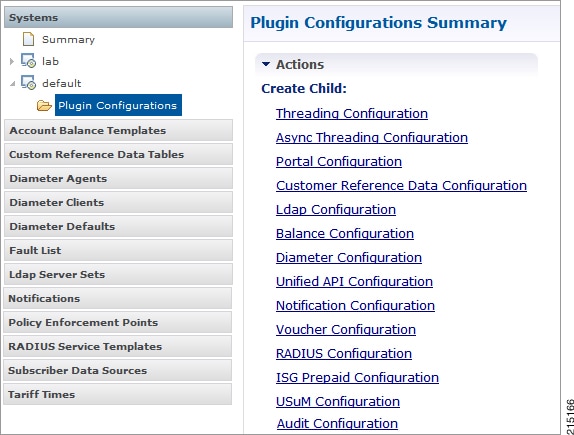
Figure 1. Create Child Action


You are notified when a new policy is applied that overrides the existing configuration.

The notification is displayed as a warning icon above the configuration heading. When you hover over the warning icon, it displays the notification message as a tooltip. When there is an error and warning in the plugin configuration, then the error is overridden by a warning message.

A warning message is displayed under the following conditions:

  • At the System level, if the selected plugin configuration is overridden by cluster or Instance plugin configuration.

  • At the Cluster level, if the selected plugin configuration overrides the same plugin configuration at the system level or is overridden by the same plugin configuration at an Instance level.

  • At the Instance level, if the selected plugin configuration overrides the same plugin configuration at system or cluster level.
Threading Configuration

A threading configuration utility is provided for advanced users.

Click Threading Configuration in the right pane to add the threading configuration to the system. This is a performance tuning parameter and can be changed in case of a performance issue according to the call model and hardware. For further information, contact your Cisco Account representative.

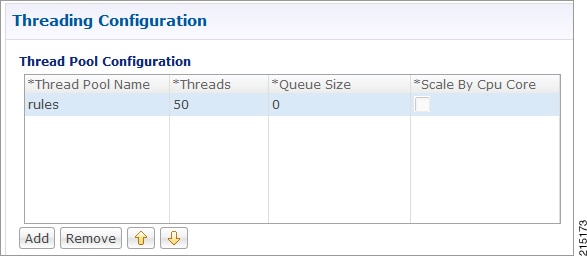
The Threading Plug-in is for Mobility. The only value to set is rules. It controls the total number of threads in the Policy Engine (QNS) that are executing at any given time. The default value is 50.

It is recommended not to configure the value below 50. It can be set higher to help increase performance in certain situations where the queue full issue or performance issue is being observed. The value also depends on call model, hardware type.

A configuration example is shown below:

Figure 2. Thread Pool Configuration


The following parameters can be configured under Threading Configuration:

Table 1. Threading Configuration Parameters

Parameter

Description

Thread Pool Name

Name of the Cisco thread pool i.e., rules.

Threads

Specify the threads to set in the thread pool. You can set rules thread ranging from 50 to 100 depending on the call flow (based on number of lookup operations).

  • rules = 50; Queue Size = 0; Scale By Cpu Core = unchecked

  • rules = 100; Queue Size = 0 (If TPS is > 2000 per Policy Server (QNS) depending on call model used; Scale By Cpu core = unchecked

The threads are driven based upon average response time of the message. The response time is call model dependent.

Queue Size

Specify the size of the queue before the threads are rejected.

If value is greater than 50, performance may degrade because it holds the number of tasks in queue waiting for threads to be executed when TPS is high.

If the value is lower than 50, the requests start dropping when all worker threads are busy in executing actions.

The queue belongs to each Policy Server (QNS) process, and it holds incoming messages from Policy Directors (LB), but also internal events/messages (for example, an internal time change that triggers a policy evaluation).

This is a performance tuning parameter and can be changed in case of a performance issue according to the call model and hardware.

Default value is 0.

Note


In most of the setups, keep the queue size value default.

Scale By Cpu Core

Select this check box to enable the processor cores to scale the maximum number of threads.

By default, this check box is unchecked.

RADIUS Configuration

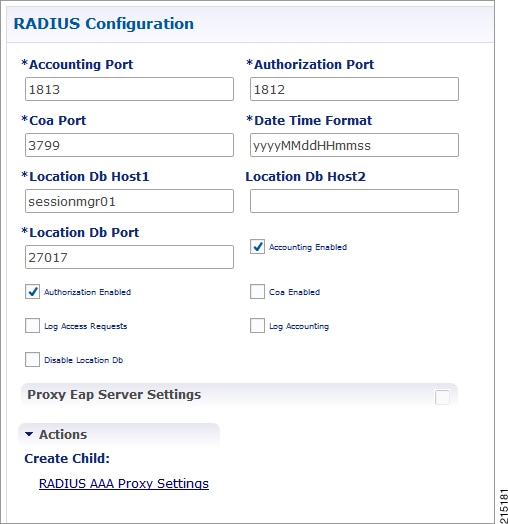
Click RADIUS Configuration in the right pane to add the configuration in the system.

Figure 3. RADIUS Configuration


The following parameters can be configured under RADIUS Configuration:

Table 2. RADIUS Configuration Parameters

Parameter

Description

Accounting Port

Port used for incoming radius accounting.

Authorization Port

Port used for incoming radius authorization.

Coa Port

Port used for Change of Authority between CPC and Radius Device.

Date Time Format

Time stamping format for radius transactions.

Location Db Host1

Mongo location for Primary Radius database.

Location Db Host2

Mongo location for Secondary Radius database.

Location Db Port

Port number for the Radius database.

Accounting Enabled

Enables CPC to receive incoming Radius Accounting.

Default value is True (checked).

Authorization Enabled

Enables CPC to receive incoming Radius Authorization.

Default value is True (checked).

Coa Enabled

Enables CPC to send and receive CoAs.

Log Access Requests

Log the radius accounting which is configured in /etc/broadhop/logback.xml. The typical default logging location is /var/broadhop/radius/accounting/accounting.current.

Log Accounting

Logs radius authorization requests, also configured in /etc/broadhop/logback.xml. The typical default logging location is /var/broadhop/radius/access/rejects.current.

Disable Location Db

Will not record WLC locations in the Radius mongo DB.

Default value is False (unchecked).

For information on proxy settings, refer to RADIUS AAA Proxy Settings.

RADIUS AAA Proxy Settings

Click RADIUS AAA Proxy Settings to add the configuration in the system. These proxy settings are used for domain-based subscriber authorization.

Table 3. RADIUS AAA Proxy Settings

Parameter

Description

RADIUS Server

Server Identification which will be mapped between Proxy Settings and Domain/Service.

Accounting Port

AAA Server Accounting Port which will receive and process accounting requests.

Authorization Port

AAA Server Authorization Port which will receive and process authentication requests.

Primary IP Address

Primary AAA Server IP address.

Secondary IP Address

Secondary AAA Server IP address.

RADIUS NAS IP Address

NAS IP address which will be sent in the proxied requests.

RADIUS Auth Protocol

RADIUS authentication protocol used. Default: PAP

RADIUS Password

RADIUS authentication password.

Retries

Number of times the requests will be retried in a failure scenario.

Shared Secret

Shared Secret of the AAA Server.

Test User Id

RADIUS username used for testing between CPC and AAA Server.

Test Password

RADIUS password used for testing between CPC and AAA Server.

Thread Pool Size

Number of threads to handle proxying of requests.

Max Proxy Queue Size

Maximum number of requests that can be queued before being proxied.

Send Test Message

Select this option to send a test message to the AAA server when CPC comes up.

ASR9K Configuration

Click ASR9K Service to add the configuration in the system.

Table 4. RADIUS AAA Proxy Settings

Parameter

Description

Display Name Priority

Order of preference for display configurations.

Accept Access Template

Structure for accepted access requests.

Proxy Access Accept Values

Criteria for accepting access requests.

Avp Subscription (List)

List of subscribed attribute-value pairs.

Additional Avps (List)

Extra attribute-value pairs for requests.

Multi Co A Template

Supports multiple Change of Authorization requests.