Pods and Services

Feature Summary and Revision History

Summary Data

Table 1. Summary Data
Applicable Product(s) or Functional Area cnAAA
Applicable Platform(s) SMI
Feature Default Setting Enabled – Always-on
Related Documentation Not Applicable

Feature History

Table 2. Feature History
Feature Details Release
First introduced. 2025.01.0

Feature Description

The cnAAA is built on the Kubernetes cluster strategy, which implies that it has adopted the native concepts of containerization, high availability, scalability, modularity, and ease of deployment. To achieve the benefits offered by Kubernetes, cnAAA uses the construct that includes the components such as pods and services.

Depending on your deployment environment, cnAAA deploys the pods on the virtual machines that you have configured. Pods operate through the services that are responsible for the intrapod communications. If the machine hosting the pods fail or experiences network disruption, the pods are terminated or deleted. However, this situation is transient and cnAAA spins new pods to replace the invalid pods.

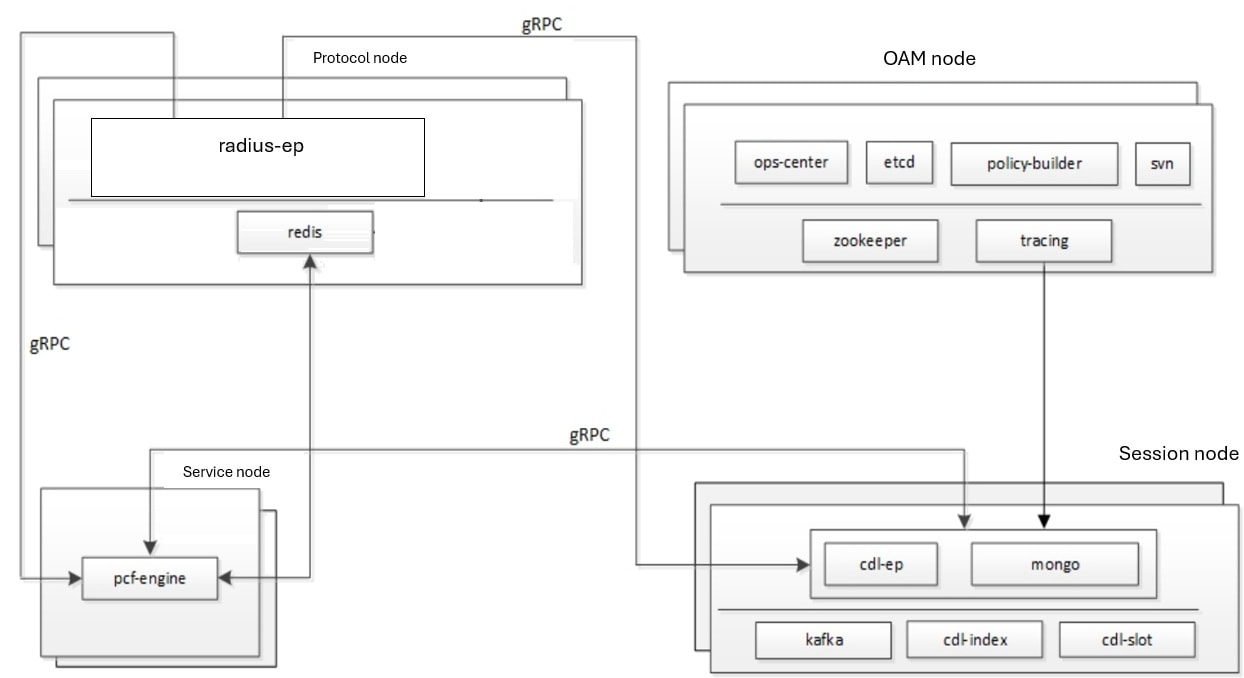
The following workflow provides a high-level visibility into the host machines, and the associated pods and services. It also represents how the pods interact with each other. The representation might defer based on your deployment infrastructure.

Figure 1. Communication Workflow of Pods

The Protocol Node hosts the radius-ep, which manages ingress (incoming) and egress (outgoing) traffic on the interfaces. Pods for operations and management processes are located in the OAM Node, while the Service Node hosts the cnAAA-engine. Session Nodes contain pods that serve as databases, storing data accessed by other pods. The illustration also shows the services that pods use to facilitate interactions. All pod communications occur over the gRPC interface.


Note


To ensure resiliency, multiple instances of the Protocol and OAM Nodes are created

Kubernetes deployment includes the kubectl command-line tool to manage the resources in the cluster. You can manage the pods, nodes, and services using the CLI.

For performing the maintenance activities, you can use the kubectl drain command to withdraw a node voluntarily. This command prepares the node by evicting or assigning the associated pods to another node with sufficient resources. You can run the kubectl drain on individual or multiple nodes concurrently.

For generic information on the Kubernetes concepts, see the Kubernetes documentation.

For more information on the Kubernetes components in cnAAA, see the following.

Pods

Pod is a process that runs on your Kubernetes cluster. Pod encapsulates a granular unit known as a container. A pod can contain one or multiple containers.

Kubernetes deploys one or multiple pods on a single node which can be a physical or virtual machine. Each pod has a discrete identity with an internal IP address and port space. However, the containers within a pod can share the storage and network resources.

The following table lists the pod names and the hosts on which they are deployed depending on the labels that you assign. For information on how to assign the labels, see Associating Pods to the Nodes.

Table 3. cnAAA Pods

Pod Name

Description

Label

admin-db

Acts as the MongoDB router pod for the Admin database.

Session

cdl-ep-session-c1

Provides an interface to the CDL.

Note


Configuration changes to the CDL endpoint cause the endpoint to restart automatically. Cisco recommends making such changes only within the maintenance window.

Session

cdl-index-session

Preserves mapping information of the keys to the session pods.

Session

cdl-slot-session-c1

Operates as the CDL Session pod to store the session data.

Session

db-admin

Acts as the replica set pod for the Admin database.

Session

db-admin-config

Acts as the replica set pod that stores the Admin database configuration.

Session

db-spr-config

Operates as the replica set pod that stores the SPR database configuration.

Session

db-spr1

Functions as the replica set pod that preserves the SPR database.

Session

rs-controller-admin

Responsible for the replication controller for Admin database.

Session

rs-controller-admin-config

Operates as a replication controller for the Admin database configuration.

Session

rs-controller-spr-config

Operates as a replication controller for SPR database configuration.

Session

rs-controller-spr1

Operates as a replication controller for the SPR database.

Session

cpc-engine-cpc-cpc-engine-

app-cpc

Operates as the cpc Engine.

Note


Configuration changes to the cpc Engine endpoint cause the endpoint to restart automatically. Cisco recommends making such changes only within the maintenance window.

Service

smart-agent-cpc-ops-center

Operates as the utility pod for the cpc Ops Center.

OAM

svn

Stores all the cpc XMI configuration files.

OAM

swift-cpc-ops-center

Operates as the utility pod for the cpc Ops Center.

OAM

traceid-cpc-cpc-engine

Stores the subscriber tracing details.

OAM

zookeeper

Assigned for the Zookeeper.

OAM

api-cpc-ops-center

Functions as the confD API pod for the cnAAA Ops-Center.

OAM

consolidated-aaa-logging-0

Preserves the logs generated by other pods like engine pod.

OAM

cps-license-manager

Acts as the cnAAA License Manager.

OAM

documentation

Contains the documentation.

OAM

etcd-cpc-etcd-cluster

Hosts the etc-d for the cnAAA application.

OAM

grafana-dashboard-cdl

Contains the Grafana metrics for CDL.

OAM

grafana-dashboard-cpc

Contains the Grafana metrics for cnAAA.

OAM

network-query

Operates as the utility pod to determine the route IP for the RADIUS outbound messages.

OAM

ops-center-cnaaa-ops-center

Acts as the cnAAA Ops Center.

OAM

patch-server-cpc-cnat-cps-

infrastructure

Operates as the utility pod for patching the cpc JAR files.

OAM

cpc-day0-config-cpc-cpc

-engine-<n>-rchg2

Dedicated for performing the Day-0 configuration for cpc.

OAM

policy-builder-cpc-cpc-engine-app

Operates as the Policy Builder for cpc.

OAM

api-proxy-logging-0

This post contains all the log related to unified proxy ep for debugging and troubleshooting.

OAM

kafka

Hosts the Kafka details for the CDL replication.

Protocol

crd-api-cpc-cpc-engine-

app-cpc-<n >-mjgxp

Hosts the CRD APIs.

Protocol

radius-ep-<N>

Contains the RADIUS stack details and acts as the endpoint. Note:Configuration changes done in the radius opscenter properties causes the radius ep pod to restart automatically.cisco recommends making such changes only within the maintainance window.

Protocol

redis-keystore

Operates as the REDIS Index.

Protocol

redis-queue

Operates as the REDIS IPC.

Protocol

unified-api-proxy-ep

Unified API request handler during migration stage.

Protocol

Table 4. ULB Pods

Pod Name

Description

Label

lbs-agent

A DaemonSet pod managing NAT and RAW table entries on each Kubernetes node for enforcing Egress Management Policies at the node level.

OAM

lbs-operator

A controller pod responsible for automating deployment, scaling, and operational tasks of Kubernetes and Cilium resources associated with Load Balancer and Egress Management Policy CRs.

OAM

ops-center-lbs-m13-ops-center

A central pod for managing configuration, upgrades, and lifecycle of ULB components within the Kubernetes cluster.

OAM

Services

The cnAAA configuration is composed of several microservices that run on a set of discrete pods. Microservices are deployed during the cnAAA deployment. cnAAA uses these services to enable communication between the pods. When interacting with another pod, the service identifies the pod's IP address to start the transaction and acts as an endpoint for the pod.

This table describes the cnAAA services and the pod on which they run.

Table 5. cnAAA Services and Pods

Service Name

Pod Name

Description

admin-db

admin-db-0

Serves to process the MongoDB-specific router messages.

crd-api-pcf-pcf-engine-app-pcf

crd-api

Processes the CRD API calls.

datastore-notification-ep

pcf-engine

Responsible for sending the notifications from the CDL to the engine.

documentation

documentation

Processes the documentation API calls.

etcd

pcf-etcd-cluster

Processes the etc-d API.

etcd-pcf-etcd-cluster-<n>

pcf -etcd-cluster

Processes the etc-d stateful sets.

grafana-dashboard-cdl

grafana-dashboard-cdl

Responsible for managing the Grafana dashboard for inputs from the CDL.

grafana-dashboard-pcf

grafana-dashboard-pcf

Manages the Grafana dashboard for cnAAA.

helm-api-pcf-ops-center

helm-api

Manages the Ops Center API.

kafka

kafka

Processes the Kafka messages.

mongo-admin-<n>

db-admin-0

Responsible for the Admin database stateful sets.

mongo-admin-config-<n>

db-admin-config-0

Responsible for the Admin database configuration stateful sets.

mongo-spr-config-<n>

db-spr-config-0

Responsible for the SPR database configuration stateful sets.

mongo-spr1-<n>

db-spr1-0

Responsible for the SPR database stateful sets

ops-center-pcf-ops-center

ops-center

Manages the cnAAA Ops Center.

patch-server-cnAAA-cnat-

cps-infrastructure

patch-server

Maintains the patch repository.

pcf-day0-config-pcf-pcf-

engine-app-pcf

pcf-day0-config

Manages the Day-0 configuration.

pcf-engine

pcf-engine

Processes the API calls to cnAAA-engine.

pcf-rest-ep

pcf-rest-ep

Acts as the http2 request/response to the REST endpoint.

You can set an external IP address for the service.

policy-builder-pcf-pcf-

engine-app-pcf

policy-builder

Manages the Policy Builder's request/response messages.

cps-radius-ep service details.

cps-radius-ep-<N>

Acts as a RADIUS endpoint

redis-keystore-<n>

redis-keystore-0

Manages the REDIS keystore stateful set.

redis-queue-<n>

redis-queue-0

Processes the REDIS queue stateful set.

rs-admin

replica-set admin

Manages the replica set for Admin database.

rs-admin-config

replica-set admin-config

Manages the replica set for the Admin database configuration.

rs-spr-config

replica-set spr-conifg

Manages the replica set for the SPR configuration.

rs-spr1

replica-set sp1

Manages the replica set for the SPR database.

smart-agent-pcf-ops-center

smart-agent-pcf-ops-center

Responsible for the Ops Center API.

svn

cps-subversion

Responsible for the SVN API calls.

swift-pcf-ops-center

swift-pcf-ops-center

Responsible for the Ops Center API.

Limitations

This feature has the following limitations in this release:

When removing a node using the kubectl drain command, the pods managing the inbound traffic such as cnAAA-radius-ep, and cnAAA-server-ep protocol cannot be assigned to another node. The workload of these pods' cannot be scheduled to another node since the traffic is routed through persistent connections that do not support load balance. As a result, the Grafana dashboard does not display the Transaction Per Second (TPS) for these pods.

Configuration Support for Pods and Services

This section describes how to associate pods to node and view the pod-related information using the following steps:

  1. Associating Pods to the Nodes

  2. Viewing the Pod Details and Status

Associate Pods to the Nodes

This section describes how to associate a pod to the node based on their labels.

After you have configured a cluster, you can associate pods to the nodes through labels. This association enables the pods to get deployed on the appropriate node based on the key-value pair.

Labels are required for the pods to identify the nodes where they must get deployed and to run the services. For example, when you configure the protocol-layer label with the required key-value pair, the pods get deployed on the nodes that match the key-value pair.

To associate pods to the nodes through the labels, use the following configuration:

config 
  label 
    cdl-layer   
      key key_value 
      value value 
    oam-layer   
      key key_value 
      value value 
    protocol-layer   
      key key_value 
      value value 
    service-layer   
      key key_value 
      value value 
      end 

Sample Configuration

pcf# show running-config label
label protocol-layer key smi.cisco.com/node-type-1
label protocol-layer value protocol
label service-layer key smi.cisco.com/node-type-2
label service-layer value service
label cdl-layer key smi.cisco.com/node-type-3
label cdl-layer value session
label oam-layer key smi.cisco.com/node-type
label oam-layer value oam
pcf#

NOTES:

  • If you opt not to configure the labels, then cnAAA assumes the labels with the default key-value pair.

  • cdl-layer —Configures the key-value pair parameters for the CDL.

  • oam-layer —Configures the key-value pair parameters for the OAM layer.

  • protocol-layer —Configures the key-value pair parameters for the protocol layer.

  • service-layer —Configures the key-value pair parameters for the service layer.

View the Pod details and status

This section describes how to view the pod details.

If the service requires additional pods, cnAAA creates and deploys the pods. You can view the list of pods that are participating in your deployment through the cnAAA Ops-Center.

You can run the kubectl command from the master node to manage the Kubernetes resources.

  • To view the summary of pod details, use this configuration:

    kubectl get pods -A | grep <cpc namespace> 
    kubectl get pods -A -owide | grep <cpc namespace> 
    
    kubectl get pods -A| grep -iv running
  • To view the summary of the pod details, use the following configuration:

    kubectl get pods -A -owide | grep <cpc namespace>

States

Understanding the pod's state lets you determine the current health and prevent the potential risks.

The following table describes the pod's states.

Table 6. Pod States

State

Description

Running

The pod is healthy and deployed on a node.

It contains one or more containers.

Pending

The application is in the process of creating the container images for the pod.

Succeeded

Indicates that all the containers in the pod are successfully terminated. These pods cannot be restarted.

Failed

One ore more containers in the pod have failed the termination process. The failure occurred as the container either exited with non zero status or the system terminated the container.

Unknown

The state of the pod could not be determined. Typically, this could be observed because the node where the pod resides was not reachable.