RADIUS Endpoint

Feature Summary and Revision History

Feature Description

Remote Authentication Dial-In User Service (RADIUS) attributes are used to define specific authentication, authorization, and accounting (AAA) elements in a user profile, which are stored on the RADIUS program.

Enable the RADIUS endpoint to dynamically create pods on a designated node or host. This feature is necessary to ensure nodes meet specific security and regulatory parameters are geographically closer to the datacenter. Node affinity determines the node where cnAAA creates the RADIUS endpoint pods, based on affinity towards a node or group of nodes. Node affinity is a set of rules that defines custom labels on nodes and specifies label selectors within the pods. Based on these rules, the scheduler determines the pod's placement location.


Note


If you do not specify a node, then the Kubernetes scheduler determines the node where the RADIUS endpoint creates a pod.


cnAAA supports both IPv4 and IPv6 connectivity on its external interfaces/endpoints (inbound and outbound).

Overview

The CPC supports RADIUS for managing Authentication, Authorization, and Accounting (AAA) for users connecting to a network service. It ensures secure network access and precise session tracking for accurate billing and resource management. The feature also supports interim updates and Change of Authorization (CoA) requests, allowing real-time adjustments to user services. The Broadband Network Gateway (BNG) acts as the RADIUS client, sending requests to CPC based on user information.

The following are the core functionalities of the CPC in handling RADIUS requests:

  • Access-Request

  • Accounting-Request

Configure the node for the RADIUS Endpoint Pod

This section describes how to specify the node or host where the RADIUS endpoint must spawn the pod.


Note


Configuration changes to the RADIUS endpoint cause the endpoint to restart automatically. Cisco recommends making such changes only within the maintenance window.


Mandatory RADIUS configuration

To configure the RADIUS server with essential parameters for optimal network performance and security, use the following configuration:

radius bind-ip <bind IP address>
radius replicas 2
radius settings request-timeout-ms 5000
radius settings max-tries  1
radius async-threading-configuration default-processing-threads 100
radius async-threading-configuration default-action-priority 5
radius async-threading-configuration default-action-threads 100
radius async-threading-configuration default-action-queue-size 400000
radius async-threading-configuration default-action-drop-oldest-when-full true
radius device-group ASR9K
 	default-shared-secret     <secret value>
 	default-coa-shared-secret <secret value>
 	coa-port                  3799
 coa-timeout-seconds       3
 	device <BNG Device Name>
 	 ip                 <BNG IP Address>
  	shared-secret      <secret value>
  	coa-shared-secret  <secret value>
  	loopback-addresses [ <loopback addresses> ]
 exit
radius server-group <Server Group Name>
 servers <server name>
  	primary              <primary OCS IP Address>
 	 secondary            <secondary OCS IP Address>
 	 nas-ip               <nas p address>
 	 accounting-port      1803
  	authorization-port   1802
 	 auth-protocol        PAP
 	 radius-password      <radius password>
  	shared-secret        <secret value>
 	 timeout-seconds      3
  	test-message         false
  	test-userid          test
 	 test-password        test123
 	 thread-pool-size     330
 	 max-proxy-queue-size 50000
       server-type   online (or) offline
 	 retries              0
 exit
radius properties grpc.executors
 	value 5
exit
radius properties grpc.timeoutMs.processing
 value 5000
exit
radius properties io.netty.eventLoopThreads
 	value 16
exit
radius properties parallelChannelCount
 	value 5
exit
radius properties prometheusPort
 	value 9099
exit
radius properties radiusCorePoolSize
 	value 20
exit
radius properties radiusMaxQueue
 	value 4000
exit
radius properties traps.tps
 	value 4000
exit
radius properties udpMaxQueue
 	value 4000
exit
radius properties udpPoolSize
 value 20
exit
RADIUS Endpoint

RADIUS call flow support in CPC

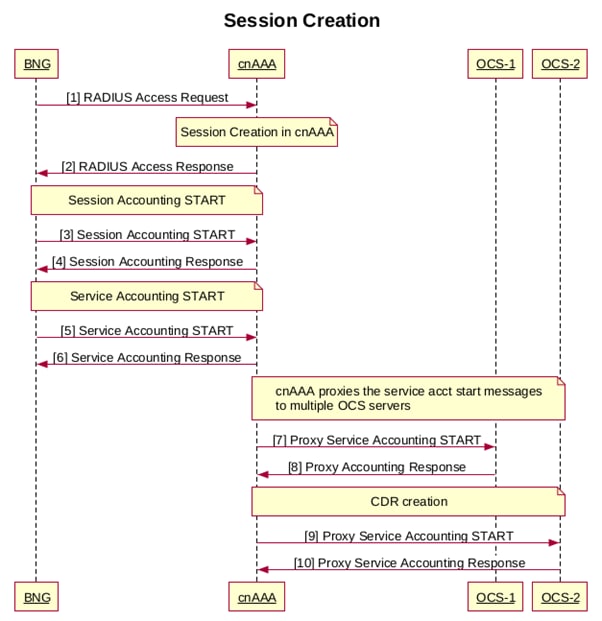
The RADIUS call flow in the CPC system outlines the steps involved in managing Authentication, Authorization, and Accounting (AAA) for network users. The process includes:

Session Creation

1 BNG sends RADIUS Access Request message to CPS
2 cnAAA sends Access-Response with the service name details
3 BNG Sends a session accounting START
4 cnAAA sends ACK to session accounting START
5 BNG sends a service accounting START to cnAAA
6 cnAAA sends ACK to service accounting START
7,8,9,10 cnAAA proxies the service accounting start to multiple OCS servers

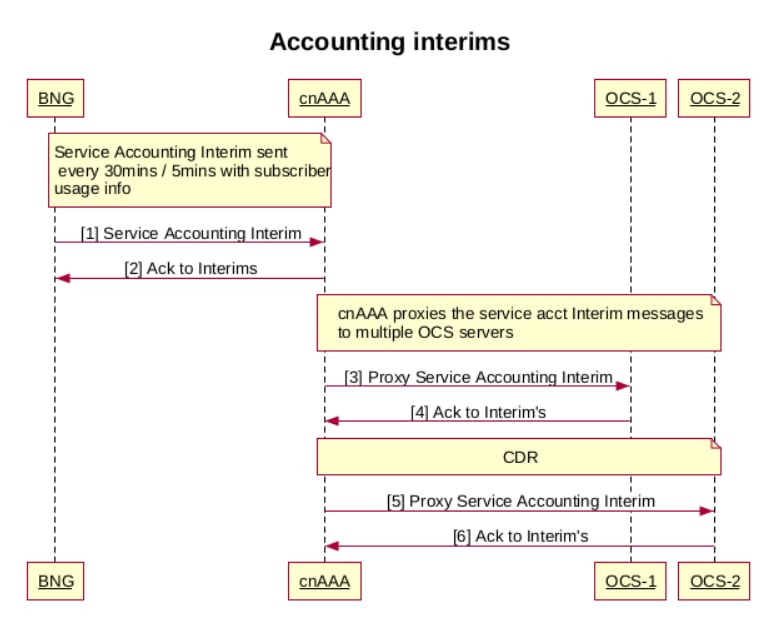
Accounting Interims Call Flow

1 BNG sends RADIUS Accounting Interim to cnAAA
2 cnAAA sends ACK to BNG
3,4,5,6 cnAAA proxies the service accounting start to multiple OCS servers

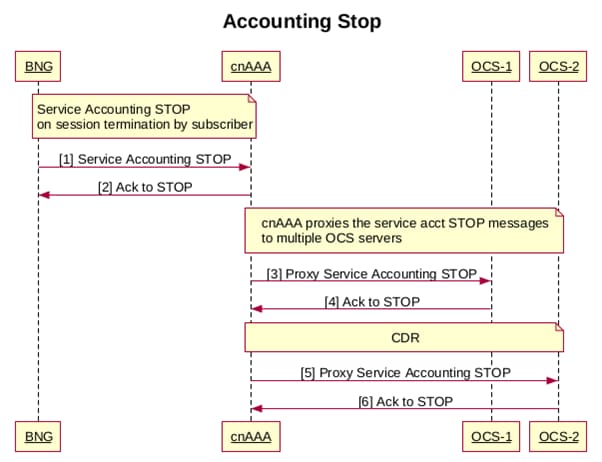
Accounting Stop Call Flow

The Accounting Stop Call Flow in cnAAA includes the following steps:

1 BNG sends RADIUS Accounting STOP to cnAAA on session termination by subscriber
2 cnAAA sends ACK to BNG
3,4,5,6 cnAAA proxies the service accounting STOP to multiple OCS servers

Change of Authorization (CoA) Call Flow

The Change of Authorization (CoA) Call Flow in cnAAA involves the following steps:

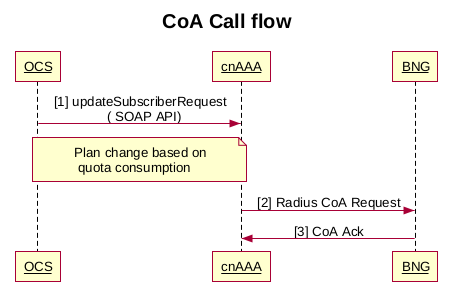
1 OCS sends SOAP API request to cnAAA for a service change based on the quota consumption of the subscriber
2 cnAAA updates the SPR and sends CoA to BNG to deactivate existing service and activate the new service name details
3 BNG sends Ack to CoA on successful service change for the subscriber

Handling CoA mismatch on BNG SRG switchover

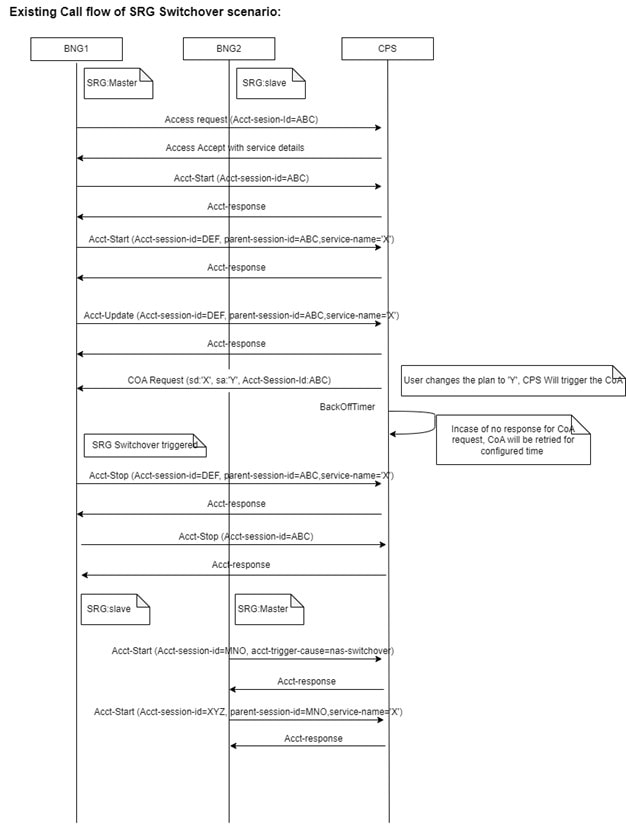
During a BNG Service Redundancy Group (SRG) switchover, BNG2 establishes new sessions using services previously assigned on BNG1. CPS sends a CoA to BNG2 for any session that did not receive updated services on BNG1.

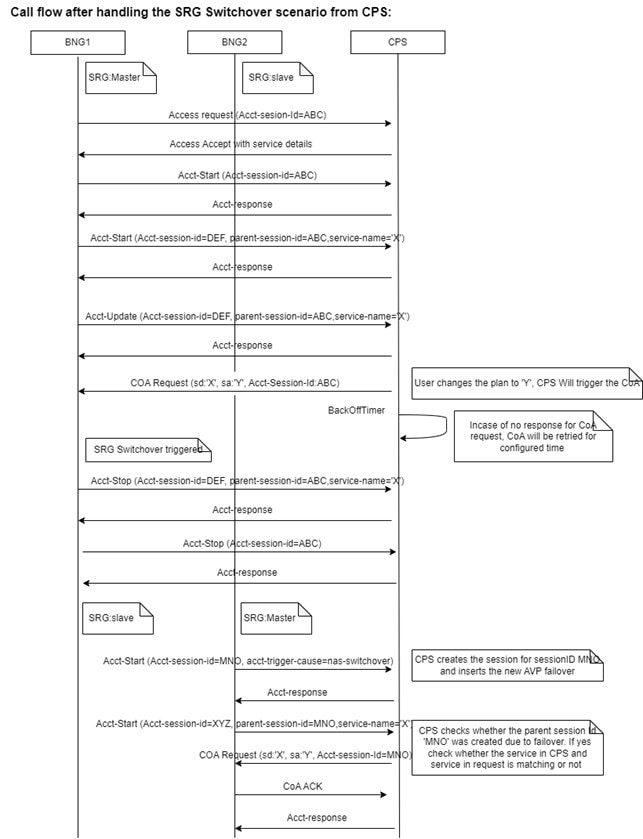
CPS is enhanced to resolve service mismatches resulting from the switchover. After the switchover, BNG2 sends two accounting start requests to create the new sessions:

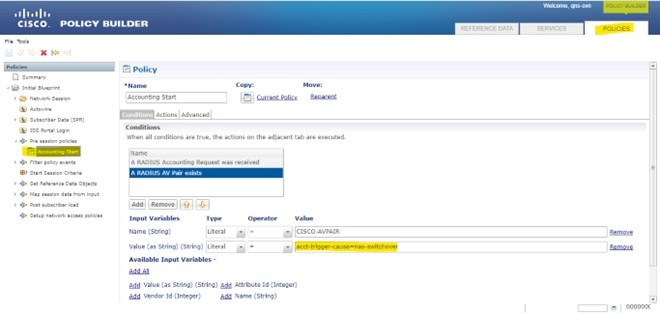
  • Session accounting request: This request contains the Attribute-Value Pair (AVP) cisco-avpair=acct-trigger-cause=nas-switchover and session ID XXXX.

  • Service accounting request: This request contains the service details in the AVP cisco-avpair=service-name=JIO_APPS. The request includes session ID YYYY and parent-session-id XXXX.

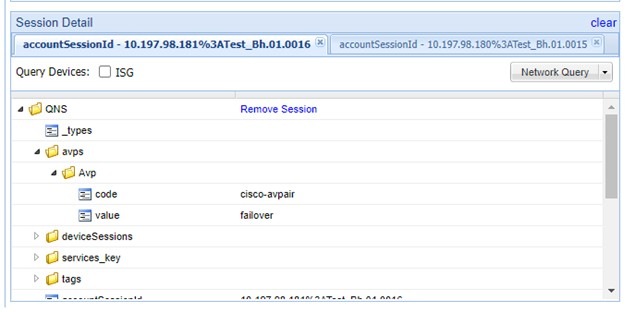
When CPS receives an accounting start request with acct-trigger-cause as nas-switchover, it creates a new session and marks it as a failover session.

When CPS receives a service accounting start request containing service details and a parent-session-id, it compares the user's service in CPS with the service in the request. If the services do not match, CPS triggers a CoA. If the services match, CPS sends an accounting response to the BNG.

The existing behavior of BNG SRG switchover:

CPS has provided a solution to handle the service mismatch in BNG SRG switchover scenario:

QNS Conf addition – Default Values if not given in qns.conf:

engine <engine group name> properties com.broadhop.SrgBngSwitchOverEnable value <true/false> exit

Note


Verify that the AVP name details are correct in the Policies section of Policy Builder.


IPv6 Support

Feature History

Feature Name

Release Information

Description

Dual Stack Support

2025.02.0

Dual Stack support on cnAAA enables the handling of both IPv4 and IPv6 sessions simultaneously with subsystem interfaces.

Overview

IPv6 support for cnAAA manages both IPv4 and IPv6 sessions, ensuring network connectivity.It operates in environments requiring either IPv4 or IPv6, supporting the transition to IPv6 while maintaining compatibility with existing IPv4 infrastructure without disrupting current operations.

To configure IPv6 support, configure the following components:

  • Radius Endpoint

  • Mongo Replica Sets

RADIUS Endpoint support in IPv6

RADIUS Endpoint support in IPv6 deploys cnAAA with IPv6/IPv4 dual stack connectivity to various network functions (NFs). In Ops-Center, the RADIUS endpoint configuration supports both IPv4 and IPv6 addresses for external IPs, device groups, and server group configurations. This setup ensures cnAAA operates effectively in different network environments, accommodating different IP address.

Properties to Enable IPv6

These properties enable the IPv6 support in cnAAA:

radius properties com.broadhop.pep.ipv6.enable.feature
value true
exit
engine cpc-green
policy-builder properties com.broadhop.pep.ipv6.enable.feature
value true
exit

Mongo Replica Sets configuration

Mongo replica set configurations support both IPv4 and IPv6 addresses for replica member hosts. This ensures that the initialization, replication, and initial sync functionalities of the Mongo replica set operate without any impact, regardless of whether IPv4 or IPv6 addresses are used. This dual support allows for flexible network configurations and aids in transitioning to IPv6 while maintaining compatibility with existing IPv4 infrastructure.

Each replica subscriber must be configured with either IPv4 or IPv6 addresses to ensure optimal functionality. It is not recommended to mix both IP versions within a single subscriber configuration.

Ops-Center configuration for enabling IPv6 in RADIUS Endpoint

To enable the IPv6 on the RADIUS Endpoint within CPC, complete the following configurations in Ops-Center.

General RADIUS settings


radius accounting-port 1813
radius authorization-port 1812
radius coa-port    1700
radius bind-ip 2001:ddff::1
radius settings request-timeout-ms 5000
radius settings max-tries  1
radius settings min-processing-time-millis 3000
radius settings backoff-time-millis 1000

BNG device group configurations

BNG Client Configuration
device bng01
  ip                 2002:20:50:53::100/127
  shared-secret      cisco
  coa-shared-secret  cisco
  loopback-addresses [ 12.0.0.1 ]
 exit

RADIUS server group configuration

radius server-group grp1
 servers DEL_OCS
  primary              2002:20:50:52::100
  secondary            2002:20:50:52::101
  accounting-port      1803
  authorization-port   1802
  auth-protocol        PAP
  radius-password      test123
  shared-secret        cisco
  timeout-seconds      5
  test-message         false
  test-userid          test
  test-password        test123
  thread-pool-size     400
  max-proxy-queue-size 40000
  server-type   online (or) offline
  retries              3
 exit
exit

Dual Stack Support

Dual Stack support for cnAAA manages of IPv4 and IPv6 sessions simultaneously, providing connectivity across networks. It also manages subsystem interfaces such as Policy Builder, Unified API, Control Center, and Central UI, and handles internal communications using IPv4 and IPv6.

Configure Dual Stack in cnAAA Ops Center

To configure Dual Stack in cnAAA Ops Center, follow these steps:

Procedure


Step 1

Log in to the Master Node.

Find Ops Center IP: Use kubectl get svc -n pcf | grep ops command to identify the IP for secure access.

Connect through SSH: Use ssh -p 2024 admin@<Ops Center IP> to log in to the Ops Center.

Step 2

Enter show running-config to verify the current setup.

Step 3

Enter the configuration mode using the config command.

Step 4

Set the IPv4 and IPv6 parameters and enter the commit to commit and save the configuration.

Step 5

Enter the show full-configuration radius command to verify that the RADIUS configuration has been correctly implemented and saved.

radius accounting-port 1812
radius authorization-port 1813
radius coa-port    2799
radius bind-ipv4   [ 192.0.2.1, 198.51.100.1 ]
radius bind-ipv6   [ 2001:DB8::1, 2001:DB8:1::1 ]
radius replicas    3
radius lbs-service true
radius settings request-timeout-ms 5000
radius settings max-tries  4
radius settings min-processing-time-millis 3000
radius settings backoff-time-millis 1000
radius advance-tuning port-range-limit 699
radius device-group ASR9K
 default-shared-secret     $8$qPdz5EmrhWJB0SNpzVz54be7YDK4mbRrLjx9rb+FDYc=
 default-coa-shared-secret $8$3fKlmnu0rPehxoRYKZVpDuLBrHopO5jNBptAQAmqjYE=
 device bng1
  ip                 192.0.2.1
  shared-secret      $8$7jPNi/1n9d5TPrvmooTvueNqensExCS3aqaPc919R/U=
  coa-shared-secret  $8$txf4uvoj0VPF/L0jd4yt/ta+j53wbzWJtpqEa8ht03c=
  loopback-addresses [ 12.3.1.2 ]
 exit
 device bng2
  ip                 2001:DB8::1
  shared-secret      $8$Lk7h3H3k9z+xPVTwo7eSCNRf9BQGwP7dV+V3CA3/9fw=
  coa-shared-secret  $8$3aqauvoj0VPF/L0jd4yt/ta+j53wbzWJtpqEa8ht03c=
  loopback-addresses [ 12.3.1.2 ]
 exit
exit
radius server-group grp1
 servers serv1
  primary              2001:DB8:1:1::1
  secondary            2001:DB8:1:2::1
  nas-ip               2001:DB8:1:3::1
  accounting-port      8312
  authorization-port   1312
  auth-protocol        PAP
  radius-password       $8$nbssKHR2U1zrXCZQSXUB0dfxANe4R5c5+AGFHC1ZAnk=
  shared-secret        $8$fUCcJ4PFvLIbMWmkeqvfAEpWeKYE419RqR+48hHRJ64=
  timeout-seconds      20
  test-message         false
  test-userid          test
  test-password        $8$hqZmdZSkCs2kLuygYVZMv9YSXLO4OFwVphTQEZQt8Lw=
  thread-pool-size     10
  max-proxy-queue-size 3
 exit
exit

Note

 
The application decrypts the password for internal use.

Ops Center configuration for enabling an external SNMP server

To enable an external SNMP server within CPC, following configurations in Ops Center are required:

Procedure


Step 1

Log in to the Ops Center.

Step 2

Enable and Configure External SNMP Server.

  • Enable snmp-trapper enable to true to activate SNMP trapping.
  • Configure the snmp-trapper v2c-target with the desired IPv4 or IPv6 address of the external SNMP server.
  • Set the port to 162 for SNMP communication.
  • Configure the community with the string Re4D0nLy5TrinG for SNMP access.
  • Enter the exit command to complete and exit the configuration mode.

Overview

Prerequisite:

Ensure that the deployment environment is configured for dual-stack operation (both IPv4 and IPv6 enabled). For detailed instructions on how to set up a dual-stack environment, please refer to the Configure Cluster Manager for Dual Stack Environment.

This feature introduces IPv6 support across cnAAA to address deployment limitations in dual-stack network environments. It extends existing IPv4 functionalities to IPv6 and enables dual-stack operations for critical components. This includes IPv6 for CPC subscriber provisioning, SNMP server integration, dual-stack for the Unified API and SNMP server, internal communication between CPC services, and Geo-Redundancy (GR) support for the CDL application.

Configure cnAAA Ops-Center for IPv6

Follow these steps to configure cnAAA for a dual stack environment.

Procedure


Step 1

Login to Ops Center and enter the configuration mode.

config

Step 2

Bind the RADIUS service to an IPv6 address.

radius bind-ipv4 [ 192.0.2.200 ]
radius bind-ipv6 [ 2001:DB8:20:50:51::200 ]
  • Configure RADIUS device groups with IPv6 addresses for network devices.

    Example:

    radius device-group ASR9K
    device v6bng01
    ip 2001:DB8:20:50:53::100/125
    shared-secret $8$...[HASHED_PASSWORD]
    coa-shared-secret $8$...[HASHED_PASSWORD]
    loopback-addresses [ 127.0.0.1 ]
    exit
    exit
  • Configure RADIUS server groups with IPv6 addresses for primary and secondary servers.

    Example:

    radius server-group grp1
     servers DEL_OCS
      primary              2001:DB8:20:50:59::100
      secondary            2001:DB8:20:50:59::101
      accounting-port      1803
      authorization-port   1802
      auth-protocol        PAP
      radius-password      $8$bYXTCjptJ6ILhivC4SjQHdf3+Wmpu9klu3qXcBnR2ck=
      shared-secret        $8$vVcdZ5CCnPAK2Wbl8FTjqGiqss5ls5LrVF9Sl1460PI=
      timeout-seconds      5
      test-message         false
      test-userid          test
      test-password        $8$M4odrqCNL+WjJcs11Yf5r+xTT637JDLm7zxDcJLrBe4=
      thread-pool-size     300
      max-proxy-queue-size 30000
      retries              3
     exit
     # ... (Include other relevant OCS servers as needed)
    exit
  • Enable the IPv6 feature for RADIUS Policy Enforcement Point (PEP).

    radius properties com.broadhop.pep.ipv6.enable.feature
    value true
    exit

Step 3

Configure SCDB replica sets on IPv6 for each member.

Example:

db scdb replica-name admin-db
 port      65008
 interface vlan2010
 resource cpu limit 2000
 resource memory limit 20000
 replica-set-label key smi.cisco.com/node-type
 replica-set-label value oam
 member-configuration member sdb-rs1-s1-m1
  host     2001:DB8:20:50:60::22
  arbiter  false
  priority 102
  site     local
 exit
 member-configuration member sdb-rs1-s1-m2
  host     2001:DB8:20:50:60::23
  arbiter  false
  priority 101
  site     local
 exit
 member-configuration member sdb-rs4-arbiter
  host    2001:DB8:20:50:60::24
  arbiter true
  site    local
 exit
exit
db scdb replica-name spr1
 port      65001
 interface vlan2010
 resource cpu limit 4000
 resource memory limit 60000
 replica-set-label key smi.cisco.com/node-type
 replica-set-label value oam
 member-configuration member sdb-rs1-arbiter
  host    2001:DB8:20:50:60::24
  arbiter true
  site    local
 exit
 member-configuration member sdb-rs1-s1-m1
  host     2001:DB8:20:50:60::22
  arbiter  false
  priority 102
  site     local
 exit
 member-configuration member sdb-rs1-s1-m2
  host     2001:DB8:20:50:60::23
  arbiter  false
  priority 101
  site     local
 exit
exit
db scdb replica-name spr2
 port      65002
 interface vlan2010
 resource cpu limit 4000
 resource memory limit 60000
 replica-set-label key smi.cisco.com/node-type
 replica-set-label value oam
 member-configuration member sdb-rs2-arbiter
  host    2001:DB8:20:50:60::24
  arbiter true
  site    local
 exit
 member-configuration member sdb-rs2-s1-m1
  host     2001:DB8:20:50:60::22
  arbiter  false
  priority 102
  site     local
 exit
 member-configuration member sdb-rs2-s1-m2
  host     2001:DB8:20:50:60::23
  arbiter  false
  priority 101
  site     local
 exit
exit
db scdb replica-name spr3
 port      65003
 interface vlan2010
 resource cpu limit 4000
 resource memory limit 60000
 replica-set-label key smi.cisco.com/node-type
 replica-set-label value oam
 member-configuration member sdb-rs3-arbiter
  host    2001:DB8:20:50:60::24
  arbiter true
  site    local
 exit
 member-configuration member sdb-rs3-s1-m1
  host     2001:DB8:20:50:60::22
  arbiter  false
  priority 102
  site     local
 exit
 member-configuration member sdb-rs3-s1-m2
  host     2001:DB8:20:50:60::23
  arbiter  false
  priority 101
  site     local
 exit
exit
db scdb replica-name spr4
 port      65004
 interface vlan2010
 resource cpu limit 4000
 resource memory limit 60000
 replica-set-label key smi.cisco.com/node-type
 replica-set-label value oam
 member-configuration member sdb-rs4-arbiter
  host    2001:DB8:20:50:60::24
  arbiter true
  site    local
 exit
 member-configuration member sdb-rs4-s1-m1
  host     2001:DB8:20:50:60::22
  arbiter  false
  priority 102
  site     local
 exit
 member-configuration member sdb-rs4-s1-m2
  host     2001:DB8:20:50:60::23
  arbiter  false
  priority 101
  site     local
 exit
exit

Step 4

Enable IPv6 features within the engine configuration.

Example:


api unified engine-group production-rjio
api unified externalIPs [ 192.0.2.87 2001:DB8:1::87 ]
engine production-rjio
properties com.broadhop.domain.ipv6.enable.feature
value true
exit
properties com.broadhop.pep.ipv6.enable.feature
value true
exit
policy-builder properties com.broadhop.pep.ipv6.enable.feature
value true
exit
crdapi admin-db primary 2002:20:50:60::22
crdapi admin-db secondary 2002:20:50:60::23
crdapi admin-db port 65008

Configure Geo-redundancy with CDL over IPv6

The CDL application supports GR over IPv6, enabling replication between sites using IPv6 communication. Follow these steps to configure GR with CDL over IPv6.

Procedure


Step 1

Login to CPC Ops-Center and enter the configuration mode.

config

Step 2

Enter the show command to display all available CPC migration configuration options and their descriptions.

show full-configuration cpc-migration

Step 3

Configure the remote site's database endpoint and Kafka servers with IPv6 addresses.

Example:

cdl remote-site 2
db-endpoint host 2001:DB8:50:58::201
db-endpoint port 8882
kafka-server 2001:DB8:50:58::26 10091
exit
kafka-server 2001:DB8:50:58::27 10092
exit
kafka-server 2001:DB8:50:58::28 10093
exit
exit

Step 4

Configure the local CDL datastore session endpoint and Kafka external IP addresses with IPv6 addresses.

Example:

cdl datastore session
 endpoint external-ipv6 2001:DB8:50:58::200
exit
cdl kafka external-ipv6 2001:DB8:50:58::22 10091
exit
cdl kafka external-ipv6 2001:DB8:50:58::23 10092
exit
cdl kafka external-ipv6 2001:DB8:50:58::24 10093
exit

Step 5

Verify Geo-synchronization status using the verify_geo_sync command on CDL endpoint pods.

Example:

cloud-user@gamma-master-2:~$ for CDLEP in `kubectl get pods -A | awk '{print $2}' 
| grep cdl-ep` ; do echo $CDLEP ; kubectl exec -it $CDLEP -n `kubectl get namespaces | grep pcf- |
 awk '{print $1}'` -- ./verify_geo_sync -ip [2001:DB8:50:58::200] -remoteIp [2001:DB8:50:58::201]; done

Step 6

Check session counts replication on each site.

Example:

[gamma/gamma-cncps] pcf# cdl show sessions count summary
Wed Sep  24 07:37:24.899 UTC+00:00
message params: {cmd:session-count-summary mode:cli dbName:session sessionIn:{mapId:0 limit:500 key: purgeOnEval:0 filters:[] inFilters:[] nextEvalTsStart:0 nextEvalTsEnd:0 createTsStart:0 createTsEnd:0 lastUpdateTsStart:0 lastUpdateTsEnd:0 allReplicas:false maxDataSize:4096 mapIDs:[] sliceNames:[] rebalancePublishTPS:0 createdBefore:0 concurrencyFactor:0 file:} sliceName:}
count 4202070
site-session-count {
    system-id 1
    count 2101032
}
site-session-count {
    system-id 2
    count 2101038
}
[gamma/gamma-cncps] pcf# 
[delta/delta-cncps] pcf# cdl show sessions count summary
Wed Sep  24 07:37:28.328 UTC+00:00
message params: {cmd:session-count-summary mode:cli dbName:session sessionIn:{mapId:0 limit:500 key: purgeOnEval:0 filters:[] inFilters:[] nextEvalTsStart:0 nextEvalTsEnd:0 createTsStart:0 createTsEnd:0 lastUpdateTsStart:0 lastUpdateTsEnd:0 allReplicas:false maxDataSize:4096 mapIDs:[] sliceNames:[] rebalancePublishTPS:0 createdBefore:0 concurrencyFactor:0 file:} sliceName:}
count 4202098
site-session-count {
    system-id 1
    count 2101045
}
site-session-count {
    system-id 2
    count 2101053
}

Configure Geo-redundancy with Mongo for SPR or Admin DB over IPv6

The Mongo supports GR over IPv6, enabling replication between sites using IPv6 communication. Follow these steps to configure GR with SPR or Admin DB over IPv6.

Procedure


Step 1

Login to CPC Ops-Center and enter the configuration mode.

config

Step 2

Enter the show command to display all available CPC migration configuration options and their descriptions.

show full-configuration cpc-migration

Step 3

Configure the Mongo replica set across GR cluster and third site arbiter with IPv6 addresses.

Example:


GR Site1: SPR

db scdb replica-name sdb-spr01
 port      65001
 interface vlan2400
 resource cpu limit 3000
 resource memory limit 20000
 replica-set-label key smi.cisco.com/node-type
 replica-set-label value spr
 member-configuration member sdb-rs1-s1-arbiter1
  host    2001:DB8:1::34
  arbiter true
  site    local
 exit
 member-configuration member sdb-rs1-s1-arbiter2
  host    2001:DB8:1::44
  arbiter true
  site    remote
 exit
 member-configuration member sdb-rs1-s1-m1
  host     2001:DB8:1::32
  arbiter  false
  priority 104
  site     local
 exit
 member-configuration member sdb-rs1-s1-m2
  host     2001:DB8:1::33
  arbiter  false
  priority 103
  site     local
 exit
 member-configuration member sdb-rs1-s2-m1
  host     2001:DB8:1::42
  arbiter  false
  priority 102
  site     remote
 exit
 member-configuration member sdb-rs1-s2-m2
  host     2001:DB8:1::43
  arbiter  false
  priority 101
  site     remote
 exit
 member-configuration member sdb-rs1-s3-arbiter3
  host    2001:DB8:1::22
  arbiter true
  site    remote
 exit
exit


GR Site2: SPR

db scdb replica-name sdb-spr01
 port      65001
 interface vlan2400
 resource cpu limit 3000
 resource memory limit 20000
 replica-set-label key smi.cisco.com/node-type
 replica-set-label value spr
 member-configuration member sdb-rs1-s1-arbiter1
  host    2001:DB8:1::34
  arbiter true
  site    remote
 exit
 member-configuration member sdb-rs1-s1-arbiter2
  host    2001:DB8:1::44
  arbiter true
  site    local
 exit
 member-configuration member sdb-rs1-s1-m1
  host     2001:DB8:1::32
  arbiter  false
  priority 104
  site     remote
 exit
 member-configuration member sdb-rs1-s1-m2
  host     2001:DB8:1::33
  arbiter  false
  priority 103
  site     remote
 exit
 member-configuration member sdb-rs1-s2-m1
  host     2001:DB8:1::42
  arbiter  false
  priority 102
  site     local
 exit
 member-configuration member sdb-rs1-s2-m2
  host     2001:DB8:1::43
  arbiter  false
  priority 101
  site     local
 exit
 member-configuration member sdb-rs1-s3-arbiter3
  host    2001:DB8:1::22
  arbiter true
  site    remote
 exit
exit


Third Site Arbiter:

db scdb replica-name sdb-spr01
 port      65001
 interface vlan2400
 resource cpu limit 3000
 resource memory limit 20000
 replica-set-label key smi.cisco.com/node-type
 replica-set-label value spr
 member-configuration member sdb-rs1-s1-arbiter1
  host    2001:DB8:1::34
  arbiter true
  site    remote
 exit
 member-configuration member sdb-rs1-s1-arbiter2
  host    2001:DB8:1::44
  arbiter true
  site    remote
 exit
 member-configuration member sdb-rs1-s1-m1
  host     2001:DB8:1::32
  arbiter  false
  priority 104
  site     remote
 exit
 member-configuration member sdb-rs1-s1-m2
  host     2001:DB8:1::33
  arbiter  false
  priority 103
  site     remote
 exit
 member-configuration member sdb-rs1-s2-m1
  host     2001:DB8:1::42
  arbiter  false
  priority 102
  site     remote
 exit
 member-configuration member sdb-rs1-s2-m2
  host     2001:DB8:1::43
  arbiter  false
  priority 101
  site     remote
 exit
 member-configuration member sdb-rs1-s3-arbiter3
  host    2001:DB8:1::22
  arbiter true
  site    local
 exit
exit

Step 4

Verify the replica set status from any of the cluster (site 1, site 2 or third site arbiter)

show db scdb replica-set-status

Sample output:

db scdb replica-set-status sdb-spr01

=======================================================================================================================================================================================================
HostName          Port      MemberName          NodeName                                                Priority                 State                  IsArbiter           Replication-lag   Site
  (IP)                                                                                             Running    Config   From-Primary   From-Member    Running   Config          (Seconds)     
=======================================================================================================================================================================================================
2001:DB8:1:2::32  65001     sdb-rs1-s1-m1       gamma-master-1                                     104        104      PRIMARY        PRIMARY        false     false        0.0               local
2001:DB8:1:2::22  65001     sdb-rs1-s3-arbiter3 beta-master-1                                      0                   ARBITER        ARBITER        true      true         N/A               remote
2001:DB8:1:2::44  65001     sdb-rs1-s1-arbiter2 delta-master-3                                     0                   ARBITER        ARBITER        true      true         N/A               remote
2001:DB8:1:2::43  65001     sdb-rs1-s2-m2       delta-master-2                                     101        101      SECONDARY      SECONDARY      false     false        0.0               remote
2001:DB8:1:2::33  65001     sdb-rs1-s1-m2       gamma-master-2                                     103        103      SECONDARY      SECONDARY      false     false        0.0               local
2001:DB8:1:2::34  65001     sdb-rs1-s1-arbiter1 gamma-master-3                                     0                   ARBITER        ARBITER        true      true         N/A               local
2001:DB8:1:2::42  65001     sdb-rs1-s2-m1       delta-master-1                                     102        102      SECONDARY      SECONDARY      false     false        0.0               remote
=============================================================================================================================================================================================

Note


Follow a similar configuration for the Admin DB.


Configure SNMP alerts through IPv6 address

Follow these steps to configure SNMP alerts through IPv6 address. This includes configurations for SNMP v2 and v3 trappers.

Procedure


Step 1

Enable the SNMP trapper and set the v2c target with an IPv6 address. Configure source IP routes using internal and external IPv6 Virtual IP addresses (VIPs)

Example:

snmp-trapper enable true
snmp-trapper v2c-target 2001:DB8:1::116
 port      162
 community Re4D0nLy5TrinG
exit
snmp-trapper source-ip-routes internal-vip 2001:DB8:2::21
snmp-trapper source-ip-routes default-external-vip 2001:DB8:1::87
snmp-trapper source-ip-routes source-external-vips cee-alpha
 external-vip 2001:DB8:1::87
exit

Step 2

Enable the SNMP trapper and set the v3 target with an IPv6 address. Configure source IP routes using internal and external IPv6 VIPs.

Example:

snmp-trapper enable true
snmp-trapper v3-engine-id 80004f2222
snmp-trapper v3-target 2001:DB8:1::116
port      162
user-name root
auth      none
exit
snmp-trapper source-ip-routes internal-vip 2001:DB8:2::21
snmp-trapper source-ip-routes default-external-vip 2001:DB8:1::87
snmp-trapper source-ip-routes source-external-vips cee-alpha
external-vip 2001:DB8:1::87
exit

Dual-Stack deployment principles

The cnAAA supports both IPv4 and IPv6 concurrently. This dual-stack capability is fundamental to the configurations detailed in the Unified API and SNMP sections. Both IPv4 and IPv6 addresses are specified for network interfaces, VIPs, and service endpoints.

Key dual-stack configuration principles include:

  • Cluster Mode: The cluster is configured for ipv6-mode dual-stack.

  • Network Interface Configuration: netplan configurations for VLANs and bonds include both IPv4 and IPv6 addresses and subnets.

  • Service Endpoints: Unified API external IP addresses, Ingress bind addresses, and RADIUS bind addresses are configured with both IPv4 and IPv6.

  • Virtual IP Addresses: Operations, Administration, and Maintenance (OAM) and Broadband Network Gateway (BNG) VIPs are defined with both IPv4 and IPv6 addresses.

IPv4 and IPv6 forwarding validation

Validation of both IPv4 and IPv6 forwarding is important for all relevant CPC services. This validation confirms that network traffic flows correctly over both protocols within the deployed environment..

How to validate

The successful execution of these key operations confirms correct network forwarding for both IPv4 and IPv6:

  • Cluster Deployment and Management: Core cluster components deploy with dual-stack configurations. This ensures node-to-node communication.

  • SNMP Alerts and Communication: SNMP alerts are received and processed through configured IPv6 trappers.

  • Geo-Redundancy GR with CDL: Data replicates and synchronizes between different sites using IPv6 for CDL communication.

  • Geo-Redundancy GR with Mongo: Data replicates and synchronizes between different sites using IPv6 for SPR or Admin DB communication.

Validate IPv6-enabled URLs

Verify access to Grafana, Policy Builder, Control Centre, and CPS Central through their respective IPv6-enabled URLs after the configurations are applied.

  • Grafana: https://grafana.2001-db8-1--87.sslip.io/

  • CPS Central: https://pb.<namespace>-pcf-engine-app-production-rjio.2001-db8-1--87.sslip.io/central/#!/central

  • Policy Builder (PB): https://pb.<namespace>-pcf-engine-app-production-rjio.2001-db8-1--87.sslip.io/pb

  • Control Center: https://pcf.controlcenter.2001-420-2c7f-f6ad--87.sslip.io

Cloud native CPS application on CNDP platform

Feature History

Feature Name

Release Information

Description

Cloud native CPS application on CNDP platform

2025.01.0

This feature introduces mechanisms to manage and protect the cnAAA Radius Engine from overload conditions by implementing message prioritization, message throttling, queue handling, and KPI monitoring, enhancing system stability and performance.

Overview

The cnAAA features a dedicated Radius Endpoint POD within its protocol layer, using a gRPC framework to handle Authentication, Accounting, and CoA requests. This setup ensures effective communication with the Policy Engine, enhancing message processing and session management. To maintain performance, cnAAA includes overload protection for handling message bursts. Kubernetes supports application deployment, offering zero downtime and automatic scaling to manage increased loads or recover from failures. Configuration involves software and code updates, with dynamic options for flexibility. This structure ensures robust and efficient network access management in cnAAA.

Configure the RADIUS Endpoint in cnAAA using Ops Center

To configure the RADIUS Endpoint in cnAAA using Ops Center, follow these steps:

Procedure


Step 1

Configure the RADIUS Device Group by defining shared secrets and loopback addresses for each BNG device.

radius device-group ASR9K
  default-shared-secret sh512
  default-coa-shared-secret aes256
  device dev1
    ip 10.1.2.12
    shared-secret aes128
    coa-shared-secret sh256
    loopback-addresses [12.3.1.2]
  exit
  device dev2
    ip 3.4.5.6
    shared-secret sh345
    coa-shared-secret aes111
    loopback-addresses [3.4.8.1]
  exit

Step 2

Configure the RADIUS Server Group by setting up primary and secondary server IPs, ports, server-type, and authentication protocols.

radius server-group grp1
  servers serv1
    primary 3.4.4.4
    secondary 5.5.5.3
    nas-ip 1.1.2.2
    accounting-port 8312
    authorization-port 1312
    auth-protocol PAP
    radius-password test123
    shared-secret sh233
    timeout-seconds 20
    test-message false
    test-userid test
    test-password test123
    thread-pool-size 10
    max-proxy-queue-size 3
    server-type   online (or) offline
  exit

Verification of Radius Endpoint configuration in cnAAA

Procedure


Verify the configuration by using the following command to ensure the running configuration matches the intended setup:

pcf# show running-config radius | nomore

The expected result is that the output should match the configured parameters for devices and server groups, confirming the setup is as intended.


Solution for Service Mismatch

Feature History

Feature Name

Release Information

Description

Solution for Service Mismatch

2025.02.0

This feature addresses issues caused by failures in CoA messages between cnAAA and BNG and vice-versa. It uses a backoff retry strategy to retry CoA messages at increasing intervals and handles error codes, targeting negative acknowledgment (NAK) for retries. The backoff Retry Strategy and Error Code Handling mechanisms prevent unauthorized access and ensure accurate management of subscriber services.

Overview

The Service Mismatch Handling feature in RADIUS Support for cnAAA ensures delivery of Change of Authorization (CoA) messages to the Broadband Network Gateway (BNG). CoA delivery failures can lead to unauthorized service access. This feature uses a retry mechanism with a backoff strategy, allowing the BNG time to recover and process CoA requests. The stack within the RADIUS Endpoint implements the backoff retry strategy.

CoA back-off retry in Ops-Center

To configure CoA backoff retry in Ops-Center, follow these steps:

Procedure


Step 1

Login to the Ops-Center.

Step 2

Enable and configure the CoA back off retry configurations with the following parameters:

  • backOffRetryCoA.maxRetransmission

    It indicates the maximum number of times the cnAAA will retry the CoA. To disable, set N=0 (Default is 300; update as required).

    radius properties backOffRetryCoA.maxRetransmission value <N>
  • backOffRetryCoA.CoANackErrorCause

    Retry attempts are made when the cnAAA receives a CoA NAK from the BNG with error codes configured in this parameter. Any CoA NAK received by cnAAA other than these error codes are not retried. (Default value is 506,405,1001; update as required).

    radius properties backOffRetryCoA.CoANackErrorCause value 506,405,1001
  • backOffRetryCoA.constantdelayInSeconds

    If the interval between the back off retries is greater than the configured value, then this retry interval is used for further retries.(Default is 60; update as required).

    radius properties backOffRetryCoA.constantdelayInSeconds value 60

Ops-Center configuration

To configure CoA parameters through the Ops-Center CLI, navigate to the RADIUS device-group configuration level. Define the timeout and retry values specifically for the ASR9K device group.

  1. Enter the config mode for the specific RADIUS device group.

  2. Define the CoA timeout, retries, and shared secret.

    Example:
    [gamma/gamma-cncps] pcf(config)# radius device-group ASR9K
    [gamma/gamma-cncps] pcf(config-device-group-ASR9K)# coa-timeout-seconds 5
    [gamma/gamma-cncps] pcf(config-device-group-ASR9K)# coa-retries 3
    [gamma/gamma-cncps] pcf(config-device-group-ASR9K)# coa-port 3799
    [gamma/gamma-cncps] pcf(config-device-group-ASR9K)# default-coa-shared-secret <your_secret_key>
    [gamma/gamma-cncps] pcf(config-device-group-ASR9K)# commit

Parameter descriptions:

  • coa-timeout-seconds: Specifies the duration, in seconds, that the CPC waits for a response from the ASR9K before timing out.

  • coa-retries: Specifies how many times the CPC attempts to resend a CoA request if no response is received.

  • coa-port: The port used for CoA messages.

  • default-coa-shared-secret: This is the shared key used for authenticating CoA messages between the CPC and the ASR9K.

Policy Builder configuration

Synchronize the CoA parameters within the Policy Builder UI to ensure the policy engine correctly handles RADIUS client interactions.


Note


Configure CoA timeout and CoA retry for each ASR9K device group in the system. This ensures consistency across the network.


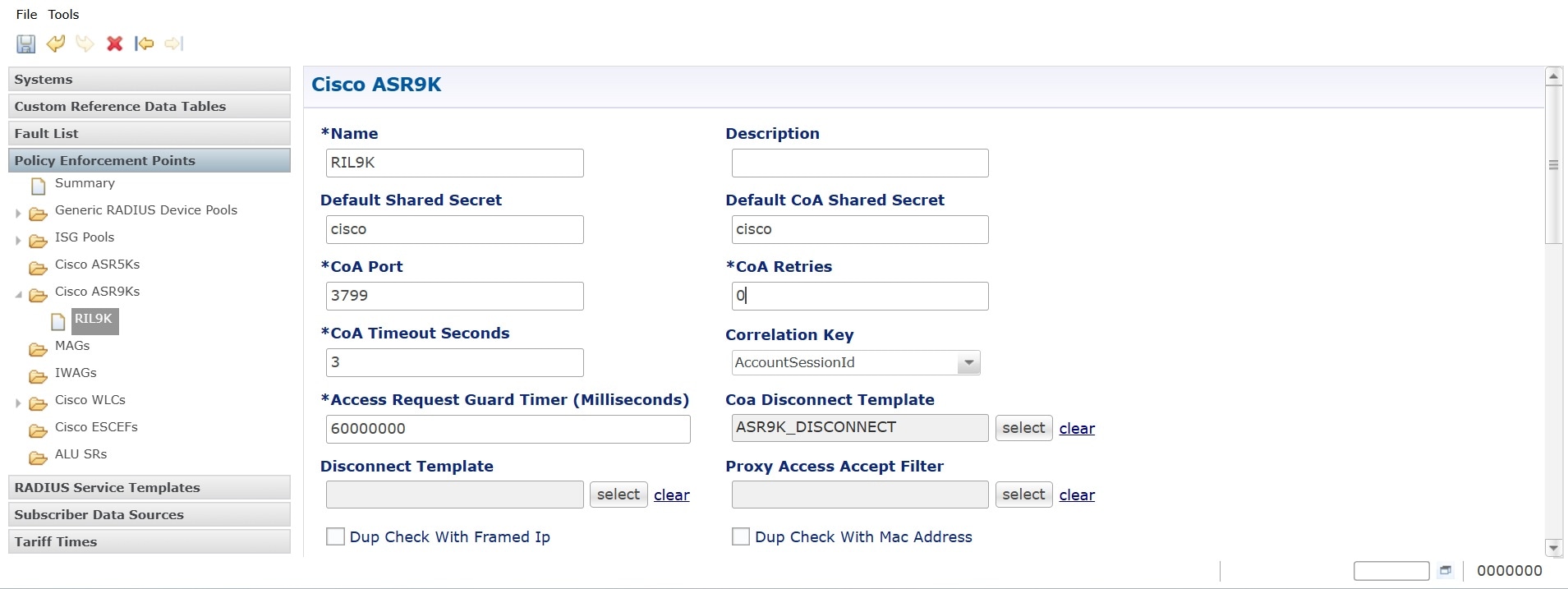
Figure 1. Policy Builder RADIUS CoA settings

Procedure


Step 1

Log in to the Policy Builder.

Step 2

Navigate to Reference Data > RADIUS > RADIUS Clients (If you are using a different version, select the Device Group tab).

Step 3

Select the ASR9K device group from the list.

Step 4

Locate the CoA Configuration section within the device group settings.

Step 5

Update these fields:

  • CoA Timeout: Enter the value in seconds.

  • CoA Retry: Enter the number of retry attempts.

Step 6

Save and Publish the changes to the cluster.


CoA Request Retry Mechanism

The Back Off Retry involves multiple attempts with increasing delay times. Following table outlines the retry schedule:

Back Off Retry Back Off Retry Delay in seconds
1st retry 1 + Timeout configured in Ops Center
2nd retry 3­­ + Timeout configured in Ops Center
3rd retry 7 + Timeout configured in Ops Center
4th retry 20 + Timeout configured in Ops Center
5th retry 55 + Timeout configured in Ops Center
6th retry 60 + Timeout configured in Ops Center

This process details the retry mechanism for sending Change of Authorization (CoA) requests from cnAAA to BNG when timeouts and NAK error codes occur. Assuming the CoA Retry Timeout is set to 3 seconds and the number of CoA Retries is configured to 3, the system will attempt retries based on these settings.

The following examples illustrate the timing of retries under different circumstances.

CoA Request Timed Out from BNG

This example shows the retry behavior when a CoA request times out due to no response from the BNG.

  • Initial CoA Request (Retry attempted in RADIUS stack):

    • T0: CoA#1

    • T0+3: CoA#2 (retry#1)

    • T0+6: CoA#3 (retry#2)

    • T0+9: CoA#4 (retry#3)

    • CoA#4 will timeout at T0+12

  • 1st Backoff Retry (retry attempted after 1 second):

    • T0+12+1: CoA#5

    • T0+12+1+3: CoA#6

    • T0+12+1+3+3: CoA#7

    • T0+12+1+3+3+3: CoA#8

    • T0+12+1+3+3+3+3: CoA#8 will timeout

  • 2nd Backoff Retry (retry attempted after 3 seconds):

    • T0+25+3: CoA#9

    • T0+25+3+3: CoA#10

    • T0+25+3+3+3: CoA#11

    • T0+25+3+3+3+3: CoA#12

    • T0+25+3+3+3+3+3 (T0+40): CoA#12 will timeout

CoA Nack Error Code Configuration

When a CoA request is negatively acknowledged (NAK) by the BNG, retries are triggered with a backoff mechanism. The behavior is shown in the following example:

Configure NACK error codes in OpsCenter using: backOffRetryCoA.CoANackErrorCause = <Comma Separated Nack Error Cause>

Example: backOffRetryCoA.CoANackErrorCause = "506,405,1001"

CoA NAK Error from BNG to cnAAA

  • Initial CoA Request

    • T0 – CoA#1

    • T0+2: CoA NAK (error code: 506) (response received after 2 seconds)

  • 1st Backoff Retry (retry attempted after 1 second)

    • T0+2+1: CoA#2

    • T0+2+1+2 (T0+5): NAK (error code: 506) (after 2 seconds)

  • 2nd Back off Retry (retry attempted after 3 seconds)

    • T0+5+3: CoA#3

    • T0+5+3+2: NAK (response received after 2 seconds)

CoA BackOff Failure Report

  • When the BackOff Retry exceeds the configured maxRetransmission limit, cnAAA updates the coaBackOffFailureReport.csv file located at /data/consolidated-aaa-logging/ in the consolidated-aaa-logging pod with the following information:

    • Session Id

    • BNG IP Address

    • Subscriber Id

    • Service Details

      2025-03-27 20:33:50,533  00012,11.11.90.72,0005.9A3C.7A00,
      [subscriber:sd=A0F0500M050M000030MQ, subscriber:sa=A0F0500M100M000030MQ] 

The flowchart explains the process of CoA retry mechanism, the interaction between the Engine, RADIUS Endpoint (EP), and BNG. The workflow includes handling retries, applying backoff logic, and determining success or failure based on responses.

Figure 2. CoA retry mechanism flowchart
  1. The Engine initiates the CoA request workflow and reads the configured Backoff Retry Threshold to determine the maximum number of retry attempts, then sends the initial CoA request to the RADIUS Endpoint (EP).

  2. The RADIUS EP forwards the CoA request to the BNG.

  3. The BNG processes the CoA request and responds with one of the following:

    • ACK (acknowledgment): Indicates success.

    • NAK (negative acknowledgment): Indicates failure.

    • No response: Indicates timeout.

  4. If the BNG responds with an ACK, the RADIUS EP forwards this to the Engine. The Engine considers the process successful, and the workflow ends.

  5. If the BNG responds with a NAK or does not respond (timeout), the RADIUS EP forwards this response to the engine.

  6. If a NAK or timeout is received, the engine updates the retry counter and, after a one second delay, either retries the CoA request (if within the retry threshold) or generates a failure report.

  7. The workflow ends either upon success (ACK) or failure (retries exhausted).

Configure gRPC timeout parameters

Follow these steps to configure the gRPC timeout properties:

Procedure


Step 1

Configure the CoA retry and timeout in CPC Ops-Center.

Figure 3. CoA retry and gRPC key

radius device-group ASR9K
 coa-port                  3799
 coa-retries               0
 coa-timeout-seconds       3

Step 2

Calculate the timeout milliseconds value using this formula:

(CoA timeout seconds * (CoA retries + 1)) + 1|2 Seconds.

Step 3

Set the gRPC key timeout values using this commands:

radius properties grpc.timeoutMs.processing value 15000

engine <engine-name> properties grpc.request.asyncCoA.timeoutMillies value 15000

engine <engine-name> properties grpc.request.bundledCoA.timeoutMillies value 15000

Handling service mismatch between cnAAA and BNG

The service mismatch handling feature ensures the delivery of CoA messages to the BNG. This feature prevents unauthorized service access caused by delivery failures. The RADIUS endpoint stack uses a retry mechanism with a backoff strategy to allow the BNG to recover and process pending CoA requests.

CoA back-off retry in Ops-Center

To configure CoA backoff retry in Ops-Center, follow these steps:

Procedure

Step 1

Login to the Ops-Center.

Step 2

Enable and configure the CoA back off retry configurations with the following parameters:

  • backOffRetryCoA.maxRetransmission

    It indicates the maximum number of times the cnAAA will retry the CoA. To disable, set N=0 (Default is 300; update as required).

    radius properties backOffRetryCoA.maxRetransmission value <N>
  • backOffRetryCoA.CoANackErrorCause

    Retry attempts are made when the cnAAA receives a CoA NAK from the BNG with error codes configured in this parameter. Any CoA NAK received by cnAAA other than these error codes are not retried. (Default value is 506,405,1001; update as required).

    radius properties backOffRetryCoA.CoANackErrorCause value 506,405,1001
  • backOffRetryCoA.constantdelayInSeconds

    If the interval between the back off retries is greater than the configured value, then this retry interval is used for further retries.(Default is 60; update as required).

    radius properties backOffRetryCoA.constantdelayInSeconds value 60

Ops-Center configuration

To configure CoA parameters through the Ops-Center CLI, navigate to the RADIUS device-group configuration level. Define the timeout and retry values specifically for the ASR9K device group.

  1. Enter the config mode for the specific RADIUS device group.

  2. Define the CoA timeout, retries, and shared secret.

    Example:
    [gamma/gamma-cncps] pcf(config)# radius device-group ASR9K
    [gamma/gamma-cncps] pcf(config-device-group-ASR9K)# coa-timeout-seconds 5
    [gamma/gamma-cncps] pcf(config-device-group-ASR9K)# coa-retries 3
    [gamma/gamma-cncps] pcf(config-device-group-ASR9K)# coa-port 3799
    [gamma/gamma-cncps] pcf(config-device-group-ASR9K)# default-coa-shared-secret <your_secret_key>
    [gamma/gamma-cncps] pcf(config-device-group-ASR9K)# commit

Parameter descriptions:

  • coa-timeout-seconds: Specifies the duration, in seconds, that the CPC waits for a response from the ASR9K before timing out.

  • coa-retries: Specifies how many times the CPC attempts to resend a CoA request if no response is received.

  • coa-port: The port used for CoA messages.

  • default-coa-shared-secret: This is the shared key used for authenticating CoA messages between the CPC and the ASR9K.

Policy Builder configuration

Synchronize the CoA parameters within the Policy Builder UI to ensure the policy engine correctly handles RADIUS client interactions.


Note


Configure CoA timeout and CoA retry for each ASR9K device group in the system. This ensures consistency across the network.


Figure 4. Policy Builder RADIUS CoA settings
Procedure

Step 1

Log in to the Policy Builder.

Step 2

Navigate to Reference Data > RADIUS > RADIUS Clients (If you are using a different version, select the Device Group tab).

Step 3

Select the ASR9K device group from the list.

Step 4

Locate the CoA Configuration section within the device group settings.

Step 5

Update these fields:

  • CoA Timeout: Enter the value in seconds.

  • CoA Retry: Enter the number of retry attempts.

Step 6

Save and Publish the changes to the cluster.


CoA Request Retry Mechanism

The Back Off Retry involves multiple attempts with increasing delay times. Following table outlines the retry schedule:

Back Off Retry Back Off Retry Delay in seconds
1st retry 1 + Timeout configured in Ops Center
2nd retry 3­­ + Timeout configured in Ops Center
3rd retry 7 + Timeout configured in Ops Center
4th retry 20 + Timeout configured in Ops Center
5th retry 55 + Timeout configured in Ops Center
6th retry 60 + Timeout configured in Ops Center

This process details the retry mechanism for sending Change of Authorization (CoA) requests from cnAAA to BNG when timeouts and NAK error codes occur. Assuming the CoA Retry Timeout is set to 3 seconds and the number of CoA Retries is configured to 3, the system will attempt retries based on these settings.

The following examples illustrate the timing of retries under different circumstances.

CoA Request Timed Out from BNG

This example shows the retry behavior when a CoA request times out due to no response from the BNG.

  • Initial CoA Request (Retry attempted in RADIUS stack):

    • T0: CoA#1

    • T0+3: CoA#2 (retry#1)

    • T0+6: CoA#3 (retry#2)

    • T0+9: CoA#4 (retry#3)

    • CoA#4 will timeout at T0+12

  • 1st Backoff Retry (retry attempted after 1 second):

    • T0+12+1: CoA#5

    • T0+12+1+3: CoA#6

    • T0+12+1+3+3: CoA#7

    • T0+12+1+3+3+3: CoA#8

    • T0+12+1+3+3+3+3: CoA#8 will timeout

  • 2nd Backoff Retry (retry attempted after 3 seconds):

    • T0+25+3: CoA#9

    • T0+25+3+3: CoA#10

    • T0+25+3+3+3: CoA#11

    • T0+25+3+3+3+3: CoA#12

    • T0+25+3+3+3+3+3 (T0+40): CoA#12 will timeout

CoA Nack Error Code Configuration

When a CoA request is negatively acknowledged (NAK) by the BNG, retries are triggered with a backoff mechanism. The behavior is shown in the following example:

Configure NACK error codes in OpsCenter using: backOffRetryCoA.CoANackErrorCause = <Comma Separated Nack Error Cause>

Example: backOffRetryCoA.CoANackErrorCause = "506,405,1001"

CoA NAK Error from BNG to cnAAA

  • Initial CoA Request

    • T0 – CoA#1

    • T0+2: CoA NAK (error code: 506) (response received after 2 seconds)

  • 1st Backoff Retry (retry attempted after 1 second)

    • T0+2+1: CoA#2

    • T0+2+1+2 (T0+5): NAK (error code: 506) (after 2 seconds)

  • 2nd Back off Retry (retry attempted after 3 seconds)

    • T0+5+3: CoA#3

    • T0+5+3+2: NAK (response received after 2 seconds)

CoA BackOff Failure Report

  • When the BackOff Retry exceeds the configured maxRetransmission limit, cnAAA updates the coaBackOffFailureReport.csv file located at /data/consolidated-aaa-logging/ in the consolidated-aaa-logging pod with the following information:

    • Session Id

    • BNG IP Address

    • Subscriber Id

    • Service Details

      2025-03-27 20:33:50,533  00012,11.11.90.72,0005.9A3C.7A00,
      [subscriber:sd=A0F0500M050M000030MQ, subscriber:sa=A0F0500M100M000030MQ] 

The flowchart explains the process of CoA retry mechanism, the interaction between the Engine, RADIUS Endpoint (EP), and BNG. The workflow includes handling retries, applying backoff logic, and determining success or failure based on responses.

Figure 5. CoA retry mechanism flowchart
  1. The Engine initiates the CoA request workflow and reads the configured Backoff Retry Threshold to determine the maximum number of retry attempts, then sends the initial CoA request to the RADIUS Endpoint (EP).

  2. The RADIUS EP forwards the CoA request to the BNG.

  3. The BNG processes the CoA request and responds with one of the following:

    • ACK (acknowledgment): Indicates success.

    • NAK (negative acknowledgment): Indicates failure.

    • No response: Indicates timeout.

  4. If the BNG responds with an ACK, the RADIUS EP forwards this to the Engine. The Engine considers the process successful, and the workflow ends.

  5. If the BNG responds with a NAK or does not respond (timeout), the RADIUS EP forwards this response to the engine.

  6. If a NAK or timeout is received, the engine updates the retry counter and, after a one second delay, either retries the CoA request (if within the retry threshold) or generates a failure report.

  7. The workflow ends either upon success (ACK) or failure (retries exhausted).

Configure gRPC timeout parameters

Follow these steps to configure the gRPC timeout properties:

Procedure

Step 1

Configure the CoA retry and timeout in CPC Ops-Center.

Figure 6. CoA retry and gRPC key

radius device-group ASR9K
 coa-port                  3799
 coa-retries               0
 coa-timeout-seconds       3

Step 2

Calculate the timeout milliseconds value using this formula:

(CoA timeout seconds * (CoA retries + 1)) + 1|2 Seconds.

Step 3

Set the gRPC key timeout values using this commands:

radius properties grpc.timeoutMs.processing value 15000

engine <engine-name> properties grpc.request.asyncCoA.timeoutMillies value 15000

engine <engine-name> properties grpc.request.bundledCoA.timeoutMillies value 15000

Consolidation of CoA processing in a RADIUS endpoint for a given BNG

Feature History

Feature Name

Release Information

Description

Consolidation of CoA Processing in a RADIUS EP for a Given BNG

2025.02.0

This feature enhances CoA request handling for BNGs by using a NAS IP-based hashing mechanism to direct requests to a consistent RADIUS endpoint, preventing overloads.

Overview

This feature optimizes CoA request handling for BNGs by directing requests from an engine pod to a consistent RADIUS endpoint using a hash derived from the NAS IP address of the BNG. The engine generates a hash number from the NAS IP Address, ensuring consistent endpoint selection for each BNG. This prevents overloads by avoiding inconsistent throttling that can occur with random distribution of CoA requests across endpoints.

BNG IPs is configured through Policy Builder and Ops Center.

BNG IP configuration in Policy Builder

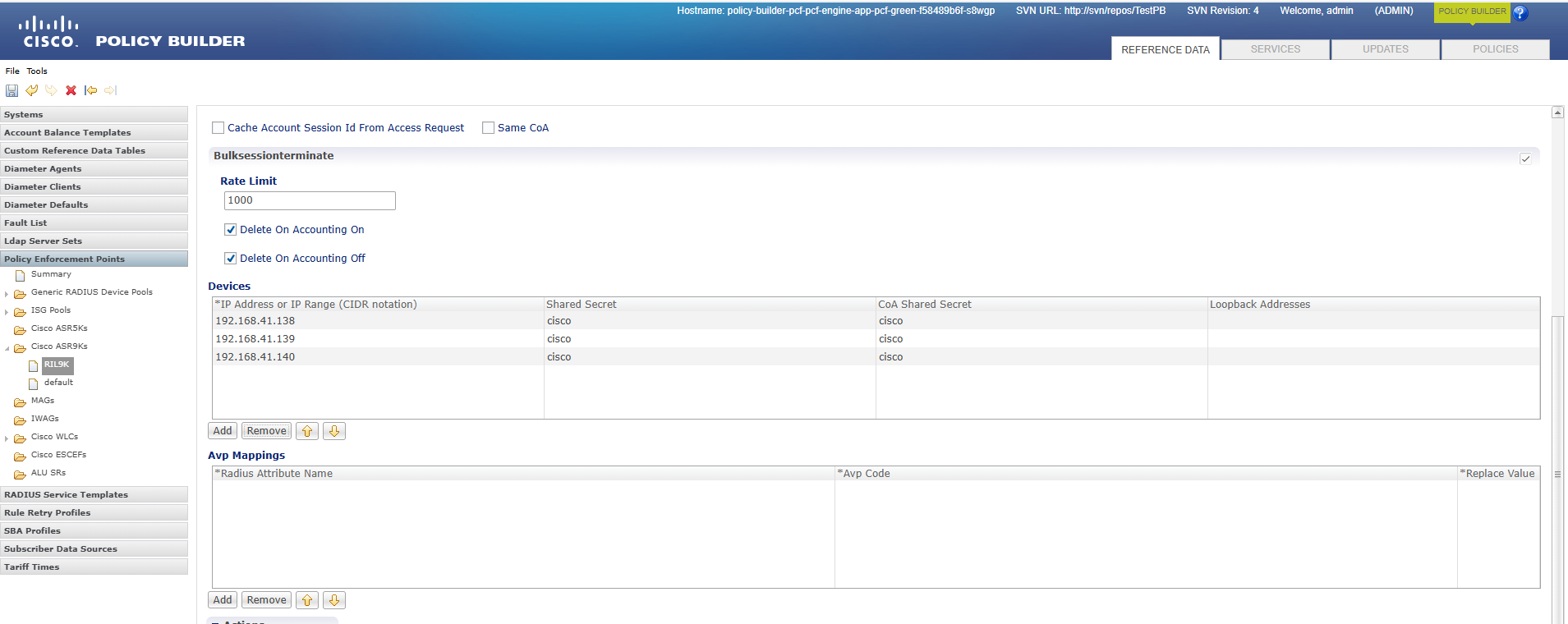
Set up BNG IP addresses in the Policy Enforcement Point (PEP) of Policy Builder to enable RADIUS packet generation, allowing the Engine to recognize the configured BNG IPs.

Follow these steps to configure BNG IP addresses:

Procedure


Step 1

Login to Policy Builder and navigate to the Policy Enforcement Point > RIL9K.

Step 2

In the Devices section, click Add to add the BNG IP address.

Step 3

Click File on the top left corner of the Policy Builder GUI and select Publish to Runtime Environment.


BNG IP Configuration in Ops Center

BNG Configuration

Configure the BNG-IP and device details using the following setup:

Device Group Setup:

radius device-group ASR9K
device dev1
ip  192.68.41.138
shared-secret cisco
coa-shared-secret cisco
loopback-addresses [ 12.3.1.2 ]
exit
device dev2
ip  192.68.41.139
shared-secret cisco
coa-shared-secret cisco
loopback-addresses [ 12.3.1.2 ]
exit
device dev3
ip 192.68.41.140
shared-secret cisco
coa-shared-secret cisco
loopback-addresses [ 12.3.1.2 ]
exit

Enable the CoA Processing Per BNG

Enable CoA processing per BNG in the Ops Center by setting the property value to true. The default configuration sets this property to false.

engine cpc-green
properties coaThrottlingPerBng
value true
exit

Configure CoA Throttling

Enable the following Ops Center configuration for the throttling feature.

radius advance-tuning throttling-limit 15

radius advance-tuning coa-throttlling-for-asr9k-pep true

Add/Remove the Radius Replicas

Use the following Ops Center configuration to modify the radius replicas.

radius replicas 2

CoA Request Scenarios in cnAAA

CoA Request Throttling

When the cnAAA engine receives a plan change request from the OCS, it initiates a process towards the RADIUS endpoint (radius-ep) to send a Change of Authorization (CoA) to the designated BNG. The engine generates a hash number from the NAS IP Address, ranging from 0 to N, representing the number of radius endpoints. This hash maps to the corresponding radius endpoint, allowing the engine to send a CoA Request for further processing to the configured BNG.

Example: If the cnAAA engine processes 20 CoA requests with a throttling value of 15, 15 requests will be successful while 5 are dropped due to throttling. The engine will retry the throttled requests and consistently route them to the radius-ep.

Endpoint Pod Changes

While adding or removing RADIUS endpoint pods, re-hashing is performed. As a result, CoA requests are always redirected to the correct RADIUS endpoint based on the hash value of the configured BNGs. The hashing mechanism minimizes key redistribution when the number of RADIUS Endpoint pods changes, focusing on maintaining consistent routing rather than equal distribution of keys.

Combined multi-CoA support

The Policy Builder GUI supports configuration of the entire cnAAA virtual machine cluster, services, and advanced policy rules. Combined CoA support enables validation of activating and deactivating up to five services with a single CoA.

Configure multiple CoA in a radius message

These steps describe the procedure to combine multiple CoA in a radius message:

Procedure

Step 1

Open the Policy Builder GUI using these steps:

  1. Execute this command: kubectl get ing -n <cpc namespace> | grep pb

    policy-builder-ingress-pcf-beta-cncps-pcf-engine-app-production-rjio nginx pb.<namespace>-pcf-engine-app-production-rjio.<ip>.nip.io <ip>
  2. Build the PB URL: https://pb.<namespace>-pcf-engine-app-production-rjio.<ip>.nip.io/pb

Step 2

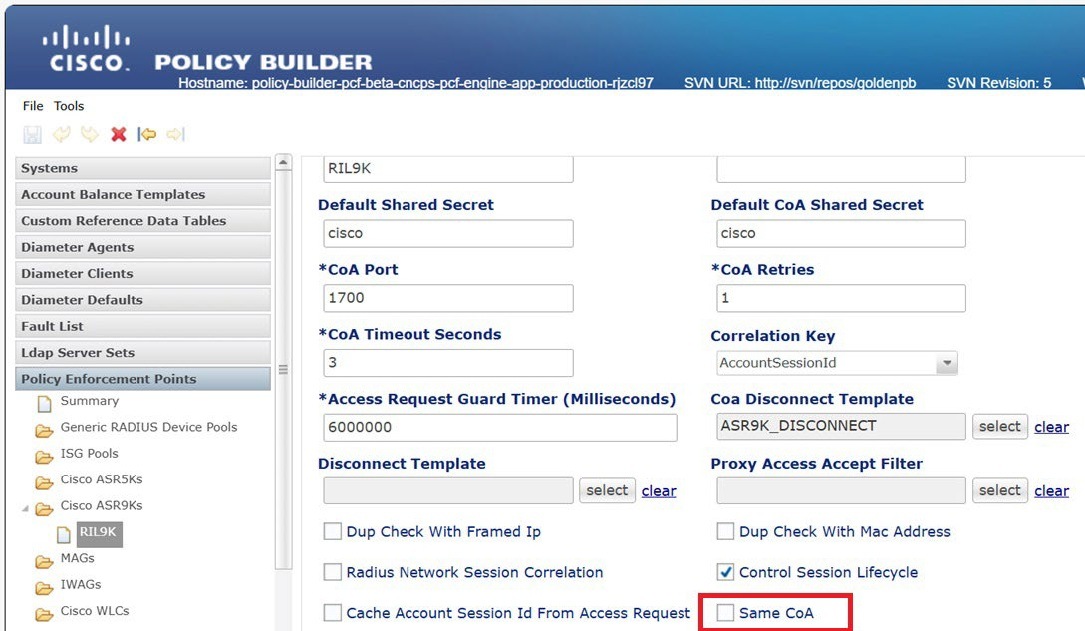
In the Policy builder, choose the Policy Enforcement Points > Cisco ASR9K.

Step 3

Select the same CoA checkbox to enable the Change of Authorization (CoA) so that multiple services are handled in a single CoA request.

Note


Multi-CoA will impact the overall TPS on the BNG. Turn on the feature only after you consult the BNG team.


CoA Request and Response Metrics

These metrics provide an overview into the processing and outcomes of CoA requests and responses:

Throttled CoA Requests:

Description: Indicates the total number of CoA requests that were throttled due to exceeding set limits.

radius_coa_requests_throttled_total{message_type="CoARequestThrottle",
nas_ip_address="192.168.41.138",endpoint_address="192.102.6.99",} 5.0 

Total CoA Requests:

Description: Represents the total CoA requests processed.

radius_coa_requests_total{message_type="CoARequest",
nas_ip_address="192.168.41.138",endpoint_address="192.102.6.99",retry_type="NA",
result="SUCCESS",} 20.0

CoA Acknowledgment Responses:

Description: Captures acknowledgment responses for CoA requests. The metric shows a successful CoA ACK response from NAS IP address to endpoint, with no NAK error cause specified.

radius_coa_responses_total{message_type="CoAACKResponse",
nas_ip_address="192.168.41.138",client_ip_address="192.168.101.70",
endpoint_address="192.102.6.99",nak_error_cause="",}