Advanced Tuning Parameters

Feature Summary and Revision History

Summary Data

Table 1. Summary Data
Applicable Product(s) or Functional Area cnAAA
Applicable Platform(s) SMI
Feature Default Setting Disabled – Configuration required to enable
Related Documentation Not Applicable

Feature History

Table 2. Feature History

Feature Details

Release

First introduced.

2025.01.0

Feature Description

The cnAAA Ops Center allows you to configure the advanced tuning parameters for cnAAA. The tuning parameters primarily consist of the async-threading and http2-threading parameters. These parameters provide the flexibility of the tuning threads responsible for cnAAA's incoming and outgoing requests over HTTP.


Note


Configure the advanced tuning parameter values only if you have a strong understanding of the cnAAA deployment.

cnAAA supports the message threshold per endpoint.


Note


Message threshold is applicable only for the configured message types in RADIUS-endpoint


Configuration support for the Advanced Tuning parameters

This section describes how to configure the advanced tuning parameters using the CLI. The configuration of the advanced tuning parameters involves:

On or Off configuration to enable or disable the features

CPC introduces On/Off control for features to optimize system performance, enhance management, and align with operational needs by activating or deactivating specific functionalities.

How features are controlled

Features within CPC are managed through three methods:

  1. User Interface (UI) toggles: For application-layer features accessible directly within the Policy Builder and Control Center interfaces, typically through check-boxes or dedicated settings.

  2. Ops-Center CLI: For core engine or RADIUS based functionalities, managed by setting specific properties through the Ops-Center CLI.

  3. CRD based control: For features activated or deactivated by executing specific automated scripts on demand.

Configure Ops-Center CLI

Procedure

Follow these steps to set properties through Ops-Center CLI:


Follow these steps to set properties through Ops-Center CLI:

Step 1

Obtain the Ops-Center CLI IP Address.

kubectl get svc -A | grep ops-center-<your-cluster-name>

Step 2

SSH into the Ops-Center CLI.

ssh -p 2024 admin@<Ops-Center-IP>

Step 3

Enter Configuration Mode.

[unknown] pcf# config

Step 4

Configure the property.

[unknown] pcf(config)# engine <engine-group-name> properties
 properties <property-key>
  value <true/false or string>
 exit

Step 5

Commit the Changes.


Example
cloud-user@m13-cnaaa-master-3:~$ kubectl get svc -A| grep ops-center-pcf-m13-ops-center
pcf-m13         netconf-ops-center-pcf-m13-ops-center                   ClusterIP      10.102.242.82         10.84.16.219                                                         2024/TCP                                23d
pcf-m13         ops-center-pcf-m13-ops-center                           ClusterIP      10.102.56.128         <none>                                                               8008/TCP,8080/TCP,2024/TCP,2022/TCP     23d
pcf-m13         ssh-ops-center-pcf-m13-ops-center                       ClusterIP      10.102.101.218        10.84.16.219                                                         22/TCP                                  23d
cloud-user@m13-cnaaa-master-3:~$
cloud-user@m13-cnaaa-master-3:~$ ssh admin@10.102.56.128 -p 2024
admin@10.102.56.128's password:

      Welcome to the pcf CLI on m13-cnaaa/m13
      Copyright © 2016-2023, Cisco Systems, Inc.
      All rights reserved.

User admin last logged in 2025-10-23T08:45:30.882804+00:00, to ops-center-pcf-m13-ops-center-95874d9b9-xwxpr, from 10.192.1.24 using cli-ssh
admin connected from 10.192.1.24 using ssh on ops-center-pcf-m13-ops-center-95874d9b9-xwxpr
[m13-cnaaa/m13] pcf#

List of features and controls

This section lists features that can be enabled or disabled, along with management instructions:

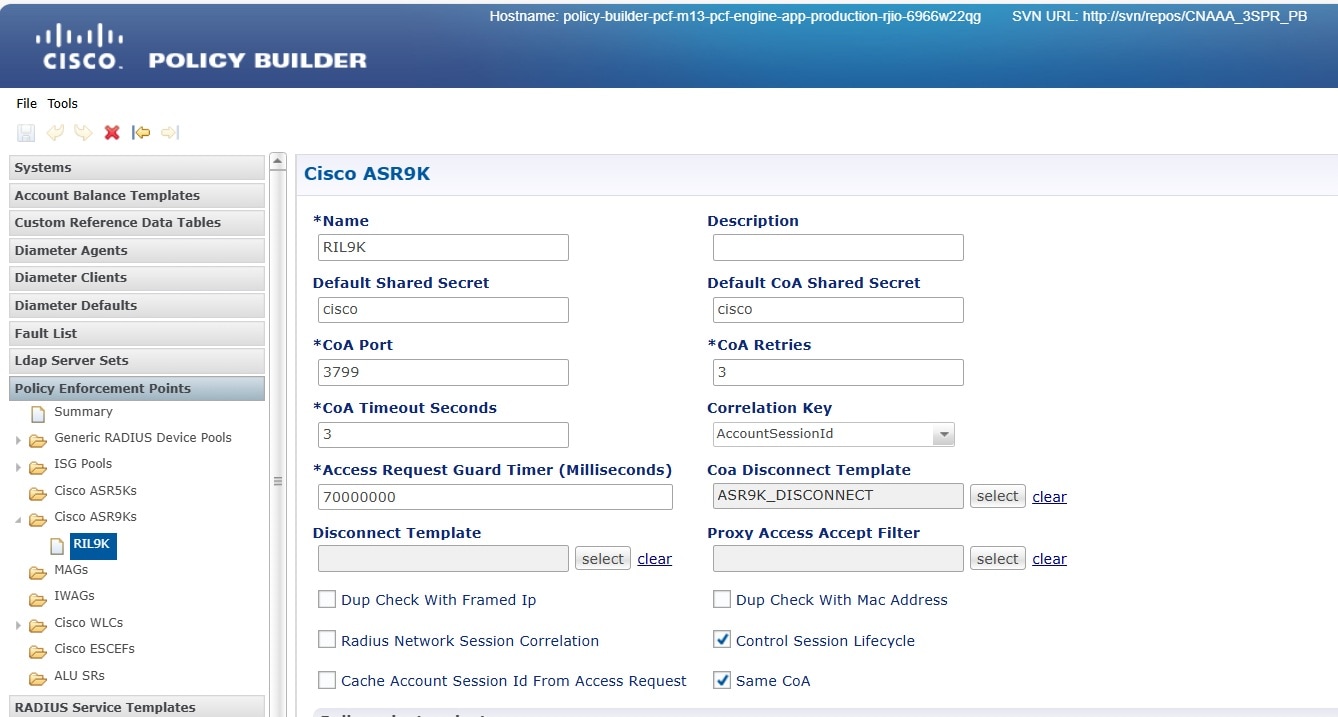
  • Combined multi CoA support: This feature enhances CoA capabilities, allowing complex or simultaneous CoA operations. Policy Builder's UI manages this feature. It can be enabled by checking the dedicated checkbox in the PEP section. The default state is disabled.

  • In Policy Builder's PEP section, check the same COA checkbox to activate the Combined Multi CoA feature.

    Figure 1. Activate Combined Multiple CoA
  • Policy Builder and Control Center activity logging: Logs various activities within PB and Control Center for auditing and monitoring. Control Center logs user login, logout, and subscriber-level CRUD operations to qns-audit.log. PB logs user login, logout, and policy publish events to qns-audit-pb.log. Setting properties through Ops-Center CLI:

    • Control Center logging:

      engine <engine group name> properties com.broadhop.cc.auditLog value true/false exit
    • Policy Builder Logging:

      engine <engine group name> policy-builder properties com.broadhop.pb.auditLog value true/false exit

    Note


    This feature is enabled by default if the property is not configured in Ops-Center. To disable the feature, set the property value to false.


  • Policy Builder and Control Center login user details: Records the most recent successful login event for each user in both Control Center and Policy Builder, including the username and exact timestamp. Control Center logs to lastlogin_user_cc.log, and Policy Builder logs to lastlogin_user_pb.log. OpsCenter Command Line Interface (CLI) manages this feature.

    • Center login details are managed by setting:

      engine <engine group name> properties com.broadhop.cc.login.details.feature value true/false exit
      
    • Policy Builder login details are managed by setting:

      engine <engine group name> policy-builder properties com.broadhop.pb.login.details.feature value true/false exit

    Note


    This feature is enabled by default if the property is not configured in Ops-Center. To disable the feature, set the property value to false.


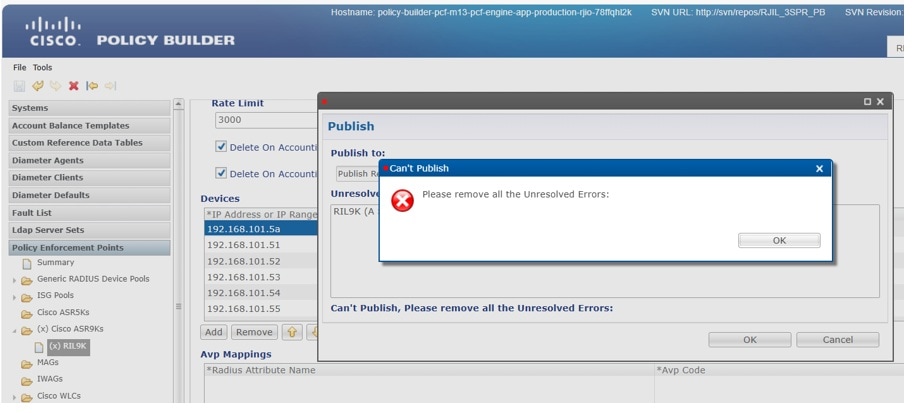
  • Unresolved errors display during publish: Controls whether a pop-up dialog displaying configuration-related errors appears during Policy Builder publish operations. Disabling it prevents the dialog from showing.

    Figure 2. Unresolved error
    engine <engine group name> policy-builder properties com.broadhop.unresolvedError.feature value true/false exit

    Note


    This feature is enabled by default if the property is not configured in Ops-Center. To disable the feature, set the property value to false.


  • Support all four IPv6 formats in PEP configuration: Enables the system to recognize and process all four common IPv6 address formats within Policy and Accounting Traffic Steering (PATS) and PEP configurations.

    engine <engine group name> properties com.broadhop.pep.ipv6.enable.feature value <true/false> exit
    engine <engine group name> policy-builder properties com.broadhop.pep.ipv6.enable.feature value <true/false> exit

    Note


    This feature is enabled by default if the property is not configured in Ops-Center. To disable the feature, set the property value to false.


  • Support IPv6 address in domains: Enhances domain selection during subscriber authentication by allowing matching of incoming Framed-IPv6-Address or NAS-IPv6-Address from RADIUS requests with IPv6 entries in a domain's locations section.

    engine <engine group name> properties com.broadhop.domain.ipv6.enable.feature value <true/false> exit

    Note


    This feature is enabled by default if the property is not configured in Ops-Center. To disable the feature, set the property value to false.


  • CoA backoff retry on CoA timeout and CoA NACK from BNG: Provides a configurable retry mechanism for CoA messages when a timeout occurs or a CoA-NACK is received from the BNG. The default state is enabled, with a default value of 300.

    radius properties backOffRetryCoA.maxRetransmission value <Set value: 0 to disable, >1 to enable> exit
  • Add throttling support for CoA: Implements a throttling mechanism within CPC to control the rate (messages per second) at which CoA messages are sent to ASR9K BNG devices, preventing overload. The default state for CoA throttling is enabled.

    • Configure throttling limit:

      radius advance-tuning throttling-limit <limit>
    • Enable CoA throttling for ASR9K PEP:

      radius advance-tuning coa-throttlling-for-asr9k-pep true exit
    • Disable CoA throttling for ASR9K PEP:

      radius advance-tuning coa-throttlling-for-asr9k-pep false exit
  • SRG switchover scenario: This feature pertains to the handling and behavior during SRG switchover events. The default state is enabled.

    engine <engine group name> properties com.broadhop.SrgBngSwitchOverEnable value <true/false> exit
  • PB publish framework modification for audit logging: Logs every change made during the policy publishing process, whether initiated from the Policy Builder UI or CPS Central UI. This provides a detailed audit trail of policy modifications. The logs are stored in qns-pb-publish-svn-diff.log within the /data/consolidated-aaa-logging/ directory of the consolidated-aaa-logging-0 pod.

    Ops-Center CLI manages this feature by setting com.broadhop.pb.publish.audit.feature to true or false for the engine group's policy builder. The default state is enabled.

    engine <engine group name> policy-builder properties com.broadhop.pb.publish.audit.feature value <true/false> exit
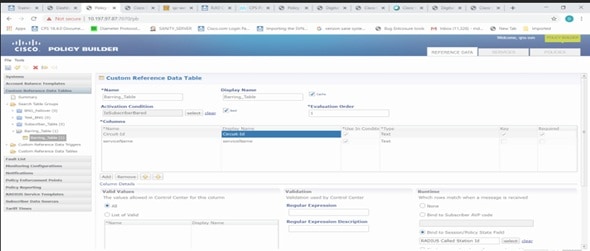
  • Call Barring solution: This feature allows for blocking internet or call access for subscribers connected to specific OTLs during emergency situations. Policy Builder and Control Center's UI manage this feature. It is typically a manual configuration performed on demand during emergency events rather than a persistent on/off toggle.

    Figure 3. Call Barrier
  • SOAP call validation: This feature includes two sub-features to enhance the security and control of SOAP API calls which can be configured in Ops-Center:

    • White-listed IPs: Allows to define a list of trusted IPv4 addresses permitted to invoke SOAP calls.

      Example:
      api unified externalIPs [ 192.0.2.119 192.0.2.120 ]
    • Rate Limiting: Enables to control the number of SOAP API requests made to the Unified API URL within a given time-frame.

      Example:
      api unified limit-max-requests-per-sec 100
  • HQoS turbo plan rollout for subscribers: Facilitates the rollout of HQoS turbo plans to subscribers using an automated Python script (HQoS_Migration_Script.py), typically located at /data/pcf-m13/data-pcf-utilities-0/support/script/. This script migrates active subscriber sessions in batches, triggers SwitchService and CoA, and logs actions.

    • Enable by executing the HQoS_Migration_Script.py script.

    • The feature is disabled if the script is not run.

  • Updating Provisioned-Called-Station-ID based on CSV file: This feature updates the Provisioned-Called-Station-Id for subscribers using the OLT_rehoming.py script, typically located at /data/pcf-m13/data-pcf-utilities-0/support/script/. The script processes a CSV file containing networkId and calledStationId pairs to update each subscriber accordingly. Enable it by executing the OLT_rehoming.py script. The feature is disabled if the script is not run.

  • CSV report for differences between Called-Station-ID: This feature generates a Comma Separated Values (CSV) report. It highlights discrepancies between the Called-Station-ID in subscriber provisioning data and the active session data (obtained using cdl show sessions summary). This helps identify and resolve mismatches. The feature uses the called_stn_id_report_gen.py script, typically located at /data/pcf-m13/data-pcf-utilities-0/support/script/. Execute the called_stn_id_report_gen.py script to enable. The feature is disabled if the script is not run.

Threading configuration for HTTP2 outgoing requests

Configure threading for HTTP2 outgoing requests from cnAAA.

advance-tuning async-threading

Parameters:

Default Processing Threads: default-processing-threads processing_threads

Specifies the number of processing threads (Integer, Default: 10).

Default Queue Size: default-queue-size queue_size

Sets the size of the queue (Integer, Default: 100).

Default Worker Threads: default-worker-threads workerThreads

Defines the number of worker threads (Integer, Default: 20).

Max Timeouts to Reconnect: max-timeouts-to-reconnect max_timeout_to_reconnect

Maximum request timeouts to reconnect HTTP2 connections (Integer, Default: 0).


Note


Do not change recommended values.


Sample Configuration:
> M7 Performace setup sample  configuration.
[m13-cnaaa/m13] pcf# show running-config advance-tuning async-threading
Wed Jul  16 05:18:44.212 UTC+00:00
advance-tuning async-threading default-worker-threads 25
advance-tuning async-threading default-queue-size 200
advance-tuning async-threading default-processing-threads 12
advance-tuning async-threading http2-connect-timeout-ms 100
advance-tuning async-threading http2-idle-connection-timeout-sec 60
advance-tuning async-threading max-timeouts-to-reconnect 0
[m13-cnaaa/m13] pcf#

Istio resource control configuration

Configure istio-resource-control settings for the engine.

advance-tuning istio-resource-control engine concurrency count

Parameter:

Concurrency Count: Specifies istio-resource-control engine concurrency (Integer, Default: 6).


Note


The recommended value is 6, which is the default. This value cannot be changed.


Sample configuration:

[m13-cnaaa/m13] pcf# show running-config advance-tuning istio-resource-control
Wed Jul  16 05:25:45.542 UTC+00:00
advance-tuning istio-resource-control engine concurrency 6
[m13-cnaaa/m13] pcf#

Redis password configuration

Configure the Redis password for secure access.

advance-tuning redis-password password

Parameter:

Password: Specifies the Redis password (String).

Usage: Configure the Redis password for secure access.

Sample Configuration:

[m13-cnaaa/m13] pcf# show running-config advance-tuning redis-password
Wed Jul  16 06:09:09.895 UTC+00:00
advance-tuning redis-password $8$SjiJVGF1XL25sH4dnOSfs9r9jPKc9paPDISqk3QQubc=
[m13-cnaaa/m13] pcf#

Network Slice access control

Enable or disable validation of sliceInfo for PDU sessions.

advance-tuning slice-access-control {enable/disable}

Parameter:

Enable/Disable: Validates sliceInfo in PDU sessions and rejects unsupported slices (Boolean, Default: false).

OAM Support

This section describes operations, administration, and maintenance information for this feature.

Bulk statistics support

This section provides the list of statistics and counters that are generated for the monitoring for message threshold enhancement. Bulk stat is enabled by default.


Note


The following values apply to all the statistics:

  • Unit - Int64

  • Type - Counter

  • Nodes - Service


The following metrics track the counter information:

  • inbound_request_threshold_exceeded_total - Captures the total count of the inbound threshold requests exceeded due to overload.

    The following labels are defined for this metric:

    • interface_name

    • service_name

    • operation_name

    • command

    • action