Cisco Common Data Layer

Feature History

Table 1. Feature History

Feature Details

Release

First Introduced

2025.01.0

Feature Description

The cnAAA extends support to the Geographic Redundancy (GR) version of the Cisco Common Data Layer (CDL). When the primary CDL endpoint fails, cnAAA attempts the same operation on the next highly rated secondary endpoint thus providing RADIUS message handling. If the next rated endpoint is unavailable, then cnAAA reattempts the operation on the subsequent endpoint that has the highest rating and so on.

For more information on the CDL concepts, see the Ultra Cloud Core Common Data Layer Configuration Guide.

Limitations

This GR support feature has the following limitations:

  • The cnAAA tries to reroute calls only when it encounters gRPC errors like "UNAVAILABLE." It ignores errors returned by the datastore and actual gRPC timeouts, such as the "DEADLINE_EXCEEDED" status code.

  • The cnAAA Engine does not handle datastore failures, including indexing and slot failures. The CDL layer is responsible for resolving these issues and, if needed, making an API call to the remote system.

How the CDL Works

This section describes how this feature works.

Configure and Manage Endpoint Failover in CDL with cnAAA

Upon configuring the Cisco Common Data Layer (CDL) in cnAAA through the cnAAA Ops Center, the system supports multiple CDL datastore endpoints. Configuration involves specifying IP addresses, port numbers, and assigning ratings to each endpoint. By default, cnAAA considers the local endpoint as the primary one, with the highest rating. CDL API operations are initially performed on this primary endpoint. If the primary is unavailable, cnAAA routes operations to the next highest-rated endpoint. The system continues to fail over to the next accessible secondary endpoints until all configured endpoints are exhausted. cnAAA does not reattempt a query on an endpoint if it is reachable but responds with an error or timeout.

If cnAAA is unable to access any of the endpoints in the cluster, then CDL operation fails with the "Datastore Unavailable" error.

  • cnAAA receives notification from CDL with session record from both the sites.

  • After receiving the notification from CDL based on the session creation state only one site must processes the notification to resolve the conflict and save the session.

Architecture

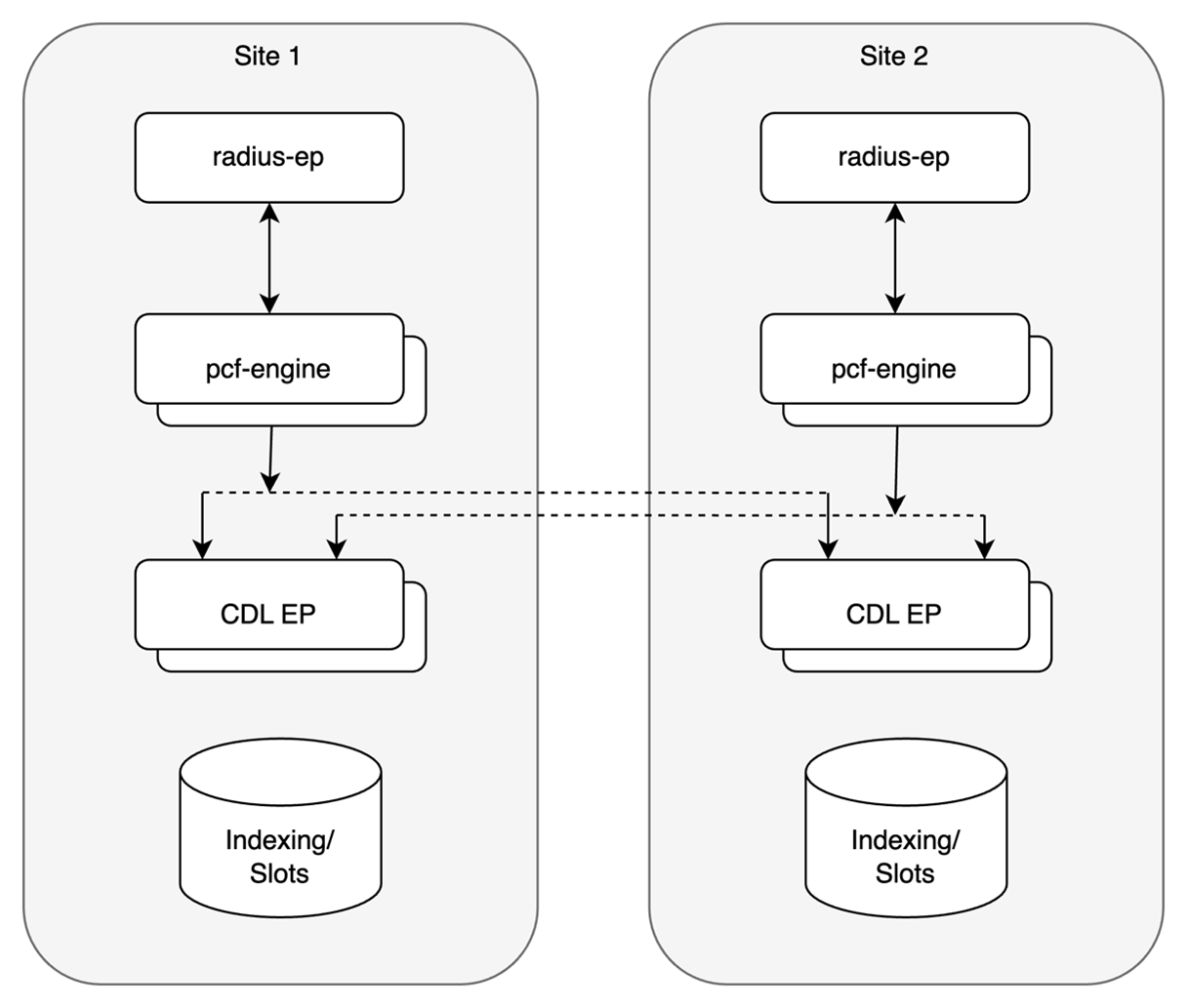
You can configure CDL through cnAAA Ops Center. CDL in the GR mode replicates the session data across the configured sites. When cnAAA connects to the CDL, it always treats the local CDL endpoints as the primary endpoint and the remote endpoints as secondaries (with the appropriate rating). cnAAA uses the secondary endpoints when the connection to the primary endpoint fails.

The following illustration depicts the failover that happens when the cnAAA Engine is unable to access the primary CDL datastore endpoint.

Figure 1. CDL Datastore Architecture

Call Flows

This section describes the key call flows for this feature.

CDL endpoint failure

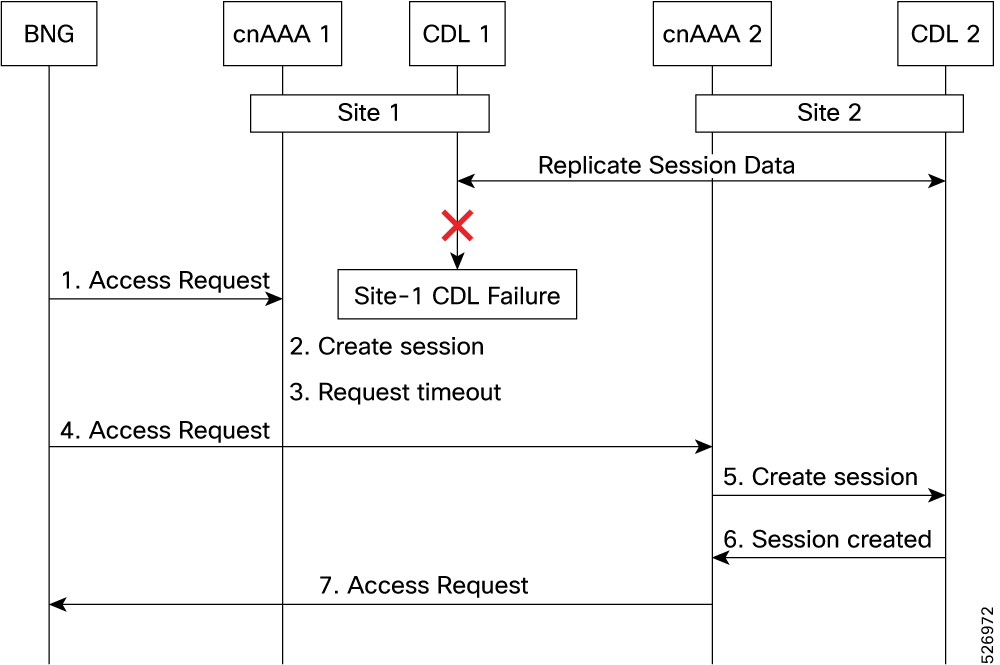
CDL Endpoint Failure

A CDL endpoint failure occurs when the primary site's data layer becomes unreachable. The cnAAA relies on the CDL to manage session state. If the endpoint becomes unresponsive, the primary site cannot complete AAA transactions.

Figure 2. CDL endpoint failure call flow

These stages describe the call flow and system behavior during a CDL endpoint failure:

Stage

Description

1

The BNG sends a RADIUS Access-Request to Site 1.

2

Site 1 sends a session creation request to CDL 1.

3

Site 1 does not send a response because the CDL endpoint is down. The Access-Request times out on the BNG.

4

The BNG identifies Site 1 as unavailable and redirects the request to Site 2.

5

Site 2 sends a session creation request to CDL 2.

6

CDL 2 responds with a success message.

7

Site 2 sends a RADIUS Access-Accept message to the BNG.

GR Call Flows

This section describes the possible CDL GR mode call flows scenarios that could start a failover to another site.

Indexing shard failure

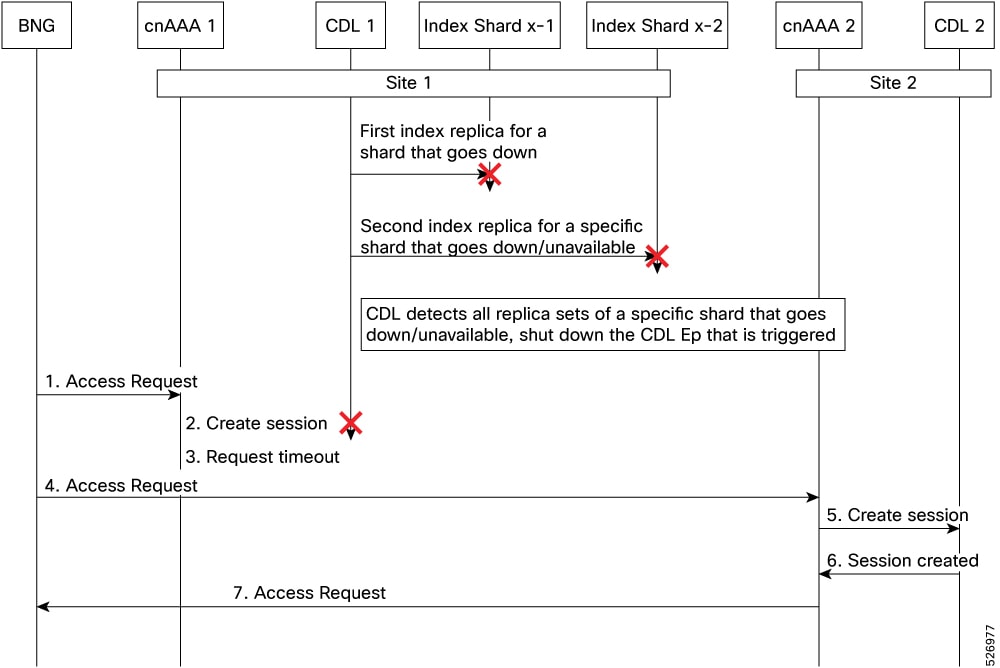
An indexing shard failure occurs when two index replicas that belong to the same shard are unavailable. This scenario represents two points of failure, which typically occurs when replicas reside on different virtual machines or hosts.

If the primary CDL site (Site 1) is unavailable, the cnAAA RADIUS endpoint and engine redirect traffic to the secondary site (Site 2) based on the highest available rating.

Figure 3. Indexing shard failure call flow

These stages describe the sequence of events during an indexing shard failure:

Table 2. Indexing shard failure call flow description
Stage Description
1 The Broadband Network Gateway (BNG) sends a RADIUS Access-Request to Site 1.
2 The RADIUS endpoint receives the request and forwards it to the Policy Engine.
3 The Policy Engine attempts to send a session creation request to the CDL, but the connection fails.
4 Site 1 does not respond to the BNG, and the request times out.
5 The BNG identifies Site 1 as unavailable and redirects the request to Site 2.
6 Site 2 sends a session creation request to CDL 2.
7 CDL 2 responds with a success message.
Slot replica set failure
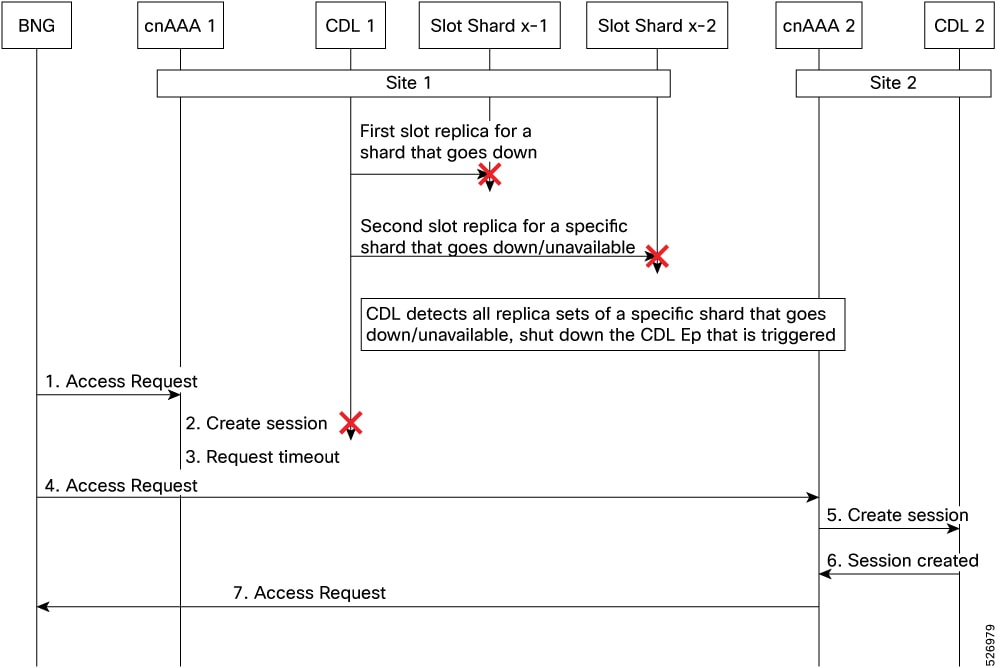
Slot replica set failure call flow

A slot replica set failure occurs when two slot replicas that belong to the same replica set are unavailable. This scenario represents two points of failure, which typically occurs when replicas reside on different virtual machines or hosts.

These stages describe the sequence of events during a slot replica set failure:

Table 3. Slot replica set failure call flow description
Stage Description
1 The BNG sends a RADIUS Access-Request to Site 1.
2 The RADIUS endpoint receives the request and forwards it to the Policy Engine.
3 The Policy Engine attempts to send a session creation request to the CDL, but the connection fails.
4 Site 1 does not respond to the BNG, and the request times out.
5 The BNG identifies Site 1 as unavailable and redirects the request to Site 2.
6 Site 2 sends a session creation request to CDL 2 and receives a success message.
7 Site 2 sends a RADIUS Access-Accept response to the BNG.

Configure CDL through Ops Center

This section describes how to configure the CDL endpoints.

Configure the CDL using cnAAA Ops Center involves the following steps:

Configure the CDL session database and defining the base configuration

This section describes how to configure the CDL session database and define the base configuration in cnAAA.

To configure the CDL session database and define the base configuration in CDL, use the following configuration in the Policy Ops Center console:

config 
  cdl 
    system-id system_id 
    node-type node_type 
    enable-geo-replication [ true | false ]  
    zookeeper replica zookeeper_replica_id 
    remote-site remote_system_id 
      db-endpoint host host_name 
      db-endpoint port port_number 
      kafka-server remote_kafka_host1 remote_port1 
      kafka-server remote_kafka_host2 remote_port2 
      kafka-server remote_kafka_host3 remote_port3 
      exit  
   cdl logging default-log-level debug_level 
      cdl datastore session  
      cluster-id cluster_id 
      geo-remote-site remote_site_value 
      endpoint replica replica_number 
      endpoint external-ip ip_address 
      endpoint external-port port_number 
         index map map_value 
         slot replica replica_slot 
         slot map map/shards 
         slot write-factor write_factor 
         slot notification host host_name 
         slot notification port port_number 
         slot notification limit tps 

         index replica index_replica 
         index map map/shards 
         index write-factor write_factor 
         end  

NOTES:

  • system-id system_id —(Optional) Specify the system or Kubernetes cluster identity. The default value is 1.

  • node-type node_type —(Optional) Specify the Kubernetes node label to configure the node affinity. The default value is “session.” node_type must be an alphabetic string of 0-64 characters.

  • enable-geo-replication [ true | false ] —(Optional) Specify the geo replication status as enable or disable. The default value is false.

  • zookeeper replica zookeeper_replica_id —Specify the Zooker replica server ID.

  • remote-site remote_system_id —Specify the endpoint IP address for the remote site endpoint. Configure this command only when you have set the cdl enable-geo-replication to true.

  • db-endpoint host host_name —Specify the endpoint IP address for the remote site. Configure this command only when you have set the cdl enable-geo-replication to true.

  • db-endpoint port port_number —Specify the endpoint port number for the remote site endpoint. The default port number is 8882. Configure this command only when you have set the cdl enable-geo-replication to true.

  • kafka-server remote_kafka_host1 remote_port1 —Specify the Kafka server’s external IP address and port number of the remote site that the remote-system-id identifies. You can configure multiple host address and port numbers per Kafka instance at the remote site. Configure this command only when you have set the cdl enable-geo-replication to true.

  • endpoint replica replica_number —(Optional) Specify the number of replicas to be created. The default value is 1. replica_number must be an integer in the range of 1 – 16.

  • endpoint external-ip ip_address —(Optional) Specify the external IP address to expose the database endpoint. Configure this command only when you have set the cdl enable-geo-replication to true.

  • endpoint external-port port_number —(Optional) Specify the external port number to expose the database endpoint. Configure this command only when you have set the cdl enable-geo-replication to true. The default value is 8882.

  • slot replica replica_slot —(Optional) Specify the number of replicas to be created. The default value is 1. replica_slot must be an integer in the range of 1 – 16.

  • slot map map/shards —(Optional) Specify the number of partitions in a slot. The default value is 1. map/shards must be an integer in the range of 1 – 1024.

  • slot write-factor write_factor —(Optional) Specify the number of copies to be written before successful response. The default value is 1. write_factor must be an integer in the range of 0 – 16. Make sure that the value is lower than or equal to the number of replicas.

  • slot notification host host_name —(Optional) Specify the notification server hostname or IP address. The default value is datastore-notification-ep.

  • slot notification port port_number —(Optional) Specify the notification server port number. The default value is 8890.

  • slot notification limit tps —(Optional) Specify the notification limit per second. The default value is 2000.

  • index replica index_replica —(Optional) Specify the number of replicas to be created. The default value is 2. index_replica must be an integer in the range of 1 – 16.

  • index map map/shards —(Optional) Specify the number of partitions in a slot. The default value is 1. map/shards must be an integer in the range of 1 – 1024. Avoid modifying this value after deploying the CDL.

  • index write-factor write_factor —(Optional) Specify the number of copies to be written before successful response. The default value is 1. write_factor must be an integer in the range of 0 – 16.

Configure Kafka in CDL

This section describes how to configure Kafka in CDL.

To configure the Kafka in CDL, use the following configuration:

  1. Open the Policy Ops Center console and navigate to the datastore CLI.

  2. To configure Kafka, use the following configuration:

    config 
       cdl kafka replica number_of_replicas 
          enable-JMX-metrics [ true | false ] 
          external-ip ip_address  port_number 
          enable-persistence [ true | false ]  
          storage storage_size 
          retention-time retention_period 
          retention-size retention_size 
          end 
    

    NOTES:

    All the following parameters are optional.

    • cdl kafka replica number_of_replicas —Specify the number of replicas to be created. The default value is 3. number_of_replicas must be an integer in the range of 1 – 16.

    • enable-JMX-metrics [ true | false ] —Specify the status of the JMX metrics. The default value is true.

    • external-ip ip_address port_number —Specify the external IPs to expose to the Kafka service. Configure this command when you have set the enable-geo-replication parameter to true. You are required to define an external IP address and port number for each instance of the Kafka replica. For example, if the cdl kafka replica parameter is set to 3, then specify three external IP addresses and port numbers.

    • enable-persistence [ true | false ] —Specify whether to enable or disable persistent storage for Kafka data. The default value is false.

    • storage storage_size —Specify the Kafka data storage size in gigabyte. The default value is 20 GB. storage_size must be an integer in the range of 1-64.

    • retention-time retention_period —Specify the duration (in hours) for which the data must be retained. The default value is 3. retention_period must be an integer in the range of 1 – 168.

    • retention-size retention_size —Specify the data retention size in megabyte. The default value is 5120 MB.

Configure Zookeeper in CDL

This section describes how to configure Zookeeper in CDL.

To configure Zookeeper in CDL, use the following configuration:

  1. Open the Policy Ops Center console and navigate to the datastore CLI.

  2. To configure the parameters, use the following configuration:

    
    config 
       cdl zookeeper data-storage-size data_storage 
          log-storage-size log_storage 
          replica number_of_replicas 
          enable-JMX-metrics [ true | false ] 
          enable-persistence [ true | false ]  
          end 
    

    NOTES:

    All the following parameters are optional.

    • cdl zookeeper data-storage-size data_storage —Specify the size of the Zookeeper data storage in gigabyte. The default value is 20 GB. data_storage must be an integer in the range of 1-64.

    • log-storage-size log_storage —Specify the size of the Zookeeper data log's storage in gigabyte. The default value is 20 GB. log_storage must be an integer in the range of 1-64.

    • replica number_replicas —Specify the number of replicas that must be created. The default value is 3. number_replicas must be an integer in the range of 1-16.

    • enable-JMX-metrics [ true | false ] —Specify the status of the JMX metrics. The default value is true.

    • enable-persistence [ true | false ] —Specify the status of the persistent storage for Zookeeper data. The default value is false.

Sample Configuration

The following is a sample configuration of CDL in the HA environment.

cdl system-id   system_i
cdl enable-geo-replication true
cdl zookeeper replica num_zk_replica
cdl datastore session
 endpoint replica ep_replica
index map index_shard_count
 slot replica slot_replica
 slot map slot_shard_count
exit
cdl kafka replica kafka_replica

Sample Configuration

The following is a sample configuration of CDL in the HA environment.

cdl system-id   system_i
cdl enable-geo-replication true
cdl zookeeper replica num_zk_replica
cdl datastore session
 endpoint replica ep_replica
index map index_shard_count
 slot replica slot_replica
 slot map slot_shard_count
exit
cdl kafka replica kafka_replica

Configure the CDL Endpoints

This section describes how to configure the CDL endpoints.

Configure the CDL endpoints involves the following steps:

  1. Configure the External Services

  2. Associating the Datastore with the CDL Endpoint Service

Configure the External Services

This section describes how to configure the external services in cnAAA.

CDL gets deployed in the GR environment as part of the SMI deployment procedure. By default, the CDL endpoints are available in the Datastore CLI node of the cnAAA Ops Center. However, you are required to configure these endpoints.

For each CDL site and instance, configure external service with the IP address and port number that corresponds to the site and instance.

  1. Open the Policy Ops Center console and navigate to the datastore CLI.

  2. To configure the parameters, use the following configuration:

    
    config 
        external-services site_name 
        ips ip_address 
        ports port_number 
        end 
    

    NOTES:

    • external-services site_name —Specify the CDL site or instance name.

    • ips ip_address —Specify the IP address on which the CDL endpoint is exposed.

    • ports port_number —Specify the port number on which the CDL endpoint is exposed.

Associate the datastore with the CDL endpoint service

This section describes how to configure the external service for each CDL endpoint service that you plan to use.

To configure the external service for each CDL endpoint service, use the following configuration:

  1. Open the Policy Ops Center console and navigate to the datastore CLI.

  2. To associate the datastore with CDL endpoint service, use the following configuration:

    config 
       datastore external-endpoints service_name 
       port port_number 
       rating rating_priority 
       end 
    NOTES:
    • datastore external-endpoints service_name —Specify the service name that belongs to the external services.

    • port port_number —Specify the port number where the external service resides.

    • rating rating_priority —Specify the rating or priority of the external service. cnAAA gives preference to the endpoints with the higher ratings.